Workflow Optimization for Co-Living: A Host's Playbook
July 3, 2026
If you're running a co-living house with a few rooms, manual work feels manageable. At one property, you can answer inquiries from your phone, log rent in a spreadsheet, text the cleaner after a move-out, and message a lock code to the next member.
At five properties, that same system starts breaking. Leads sit too long. Someone forgets to send a reminder. A cleaner arrives before a member has moved out. A maintenance issue gets buried in a text thread. You aren't just busy. You're running a business through scattered habits.
That's where workflow optimization stops sounding like corporate jargon and starts sounding like relief. For room-by-room rentals, it means building repeatable systems for pricing, leasing, communication, access, maintenance, and reporting so the operation can grow without becoming chaotic.
The End of Juggling Spreadsheets and Texts
Most co-living operators start with whatever works fastest.
A spreadsheet tracks rent. Google Calendar handles showings. Text messages handle applicant questions. Lease files sit in a folder somewhere. Lockbox codes get copied and pasted. The cleaner gets updates in a group chat. It works until it doesn't.
The breaking point usually isn't dramatic. It's cumulative. You answer the same questions every day. You retype the same move-in instructions. You chase late rent manually. You double-check whether a room is ready before sending a tour. The business grows, but every new property adds more friction.
What workflow optimization means in co-living
In this niche, workflow optimization means reducing the manual handoffs that slow you down or create mistakes. It also means improving the member experience, because residents in co-living expect digital, mobile-friendly communication, and operators need regular feedback systems to improve community life, as noted in Buildium's guide to managing co-living properties.
A useful way to think about it is simple. Every repeated task should answer three questions:
- Can this be standardized? If every move-in email should include the same core details, stop writing it from scratch.
- Can this be automated? If rent reminders go out on the same schedule, let software handle them.
- Can this be tracked in one place? If pricing, occupancy, maintenance, and collections live in separate tools, you can't manage cleanly.
Practical rule: If a task depends on you remembering it, it isn't a system yet.
This isn't only about convenience. The average company saves $46,000 annually through workflow automation, and for many employees, up to 30% of their time could be saved, freeing capacity for more strategic work, according to Anchor Group's workflow automation statistics roundup.
What changes when you stop patching things together
Once you move past ad hoc operations, the business starts feeling different.
Instead of hunting through messages, you check one workflow. Instead of reacting all day, you review exceptions. Instead of every property needing your direct attention, the same process runs across the portfolio. If you're still piecing together tools, it's worth understanding what a centralized system does in this guide to property management software.
For hosts scaling from one to ten properties, that's the shift. You stop managing each room like a one-off listing and start operating a repeatable machine.
Map Your Current Co-Living Operations
Before you automate anything, you need an honest picture of how the business runs today.
Not how you think it runs. Not how you want a virtual assistant to handle it. The way it runs when a prospect messages at night, a room turns over on a weekend, and a maintenance request shows up during a move-in week.
A high-impact workflow optimization method starts by mapping the current state, documenting every step, handoff, and decision point as it really operates, according to Bitecode's workflow optimization methodology.
Follow one member from first inquiry to move-out
Start with one real journey. Pick your most common path, not your cleanest one.
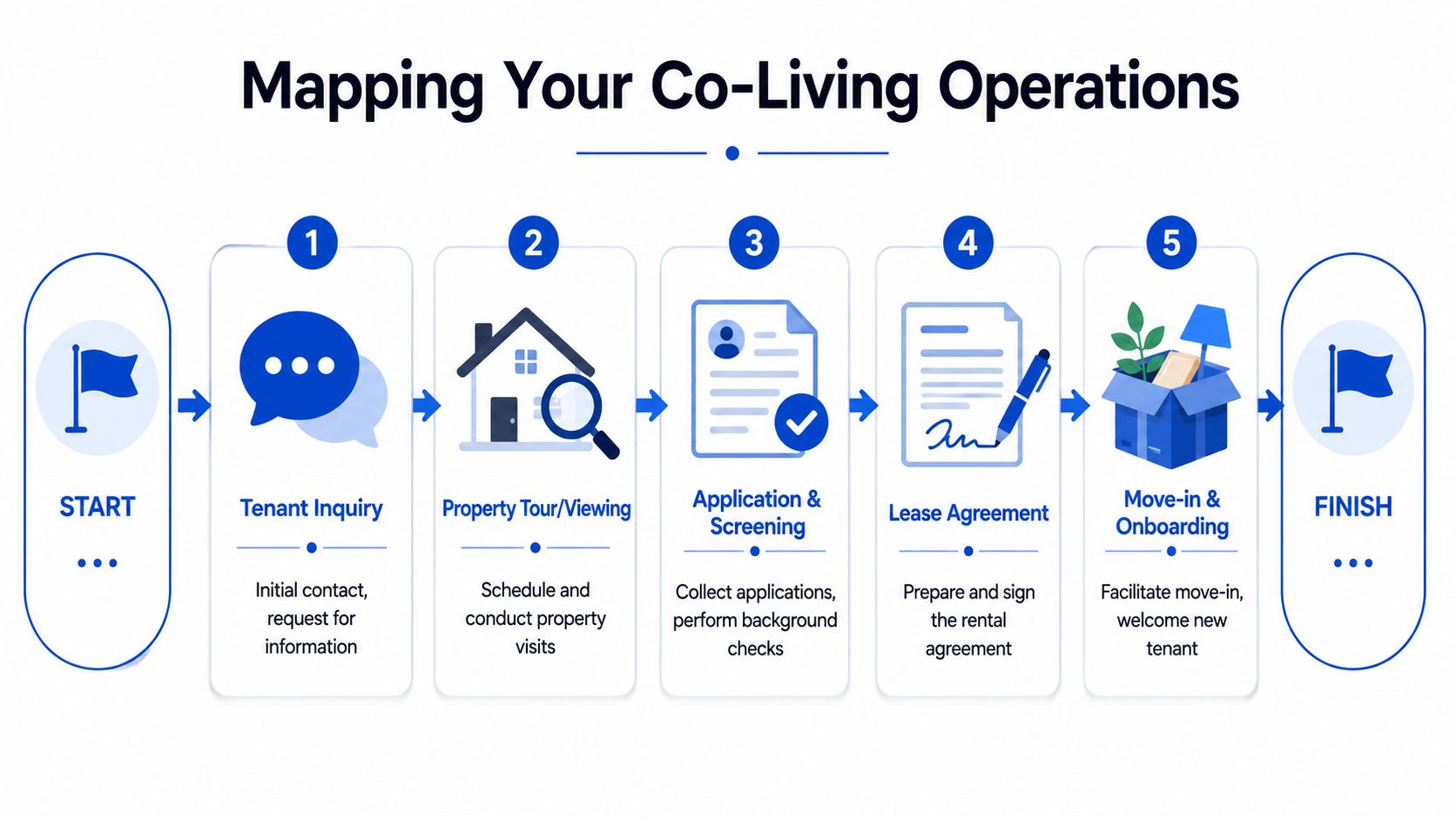
Trace the sequence in plain language:
- Inquiry arrives through Facebook Marketplace, Zillow, Apartments.com, text, or your website.
- Tour gets scheduled and someone confirms availability.
- Application gets submitted and screening starts.
- Lease gets prepared and signed with house rules and payment terms.
- Move-in happens with access instructions, room readiness, and onboarding.
- Ongoing operations continue through rent collection, maintenance, renewals, and eventual move-out.
Write down every tool involved. If a lead starts in Facebook Marketplace, moves into Google Sheets, then into a PDF lease, then into a payment app, that's not a small detail. That's exactly where delays and errors hide.
What to capture in your process map
Most operators make this too abstract. Keep it concrete.
For each step, note:
- Who owns it. Is it you, a leasing assistant, a cleaner, or a maintenance coordinator?
- What triggers it. A guest card submission, signed lease, payment confirmation, or move-out notice.
- Which system handles it. Gmail, Google Sheets, DocuSign, Stripe, a smart-lock app, or a property management platform.
- Where decisions happen. Approve application, hold room, reject applicant, reschedule tour, escalate maintenance.
- What can go wrong. Missing documents, double-booked tours, unpaid deposits, stale pricing, wrong access code.
The map should feel a little uncomfortable. If it looks too neat, you probably documented the ideal process instead of the real one.
Map the core workflows separately
Don't try to draw your entire company in one giant diagram. Split it into operating lanes.
A practical co-living map usually includes:
| Workflow | What to document |
|---|---|
| Lead management | Inquiry source, response time, follow-up steps, tour scheduling |
| Applications and screening | Form completion, verification, approval rules, communication templates |
| Leasing and onboarding | Lease signing, deposit collection, move-in checklist, house orientation |
| Rent and finance | Billing cadence, reminders, payment confirmation, arrears follow-up |
| Maintenance and communication | Intake channel, triage, vendor dispatch, resident updates, closure |
This exercise almost always exposes a few uncomfortable truths. Maybe tours depend on one person checking messages. Maybe room readiness lives only in the cleaner's head. Maybe pricing updates happen "when there's time," which usually means too late.
Good. That's the point. You can't optimize what you haven't made visible.
Find Your Most Costly Bottlenecks
Once your map is on paper, the biggest problems usually jump out. Some waste time. Some burn money. Some make residents question whether your operation is well run.
I sort bottlenecks into three buckets: time sinks, money pits, and frustration points. That framework is easier to use than a generic audit because it matches how co-living operators feel the pain.

Time sinks
These are the repetitive tasks that erode the day.
A common example is answering the same applicant questions over and over. Is the room furnished? What's the deposit? Are utilities included? Is there parking? If you're manually replying every time, your leasing flow isn't designed. It's reactive.
Another one is vacancy coordination. You confirm a move-out by text, message the cleaner separately, remind yourself to update the listing later, and then forget to change the smart-lock access until the next day. None of these steps are hard. Together, they create drag.
Money pits
These are the leaks that directly affect revenue or occupancy.
The biggest one in room-by-room rentals is usually slow turnover. Every day a room sits offline because the listing wasn't updated, photos weren't ready, or access wasn't coordinated is a lost opportunity. Static pricing can also hurt. If rates don't adjust when demand changes, some rooms sit longer than they should while others are underpriced.
A second money pit is fragmented reporting. If you can't see property-level income, concessions, unpaid balances, and vacancy status in one place, you make slower decisions. That's not just an admin problem. It affects pricing, marketing, and collections.
Frustration points
These don't always show up in a spreadsheet first, but they matter.
Members get annoyed when maintenance disappears into a text thread. Applicants lose interest when follow-up is slow. House managers get frustrated when they don't know who already sent what. In co-living, those rough edges shape retention because residents judge the operation by every small interaction.
The first workflow to fix usually isn't the most complex one. It's the one that repeats often, breaks visibly, and affects both staff time and resident experience.
A simple scoring method helps. Review each bottleneck and ask:
- How often does this happen?
- How much manual effort does it create?
- Does it affect revenue, occupancy, or retention?
- Can one system change solve it across all properties?
Start where all four answers hurt. That's usually where the fastest win lives.
Practical Automation Recipes for Co-Living Hosts
Once you've identified the choke points, automation becomes useful. Before that, it just turns messy habits into faster messy habits.
The best co-living automations share one trait. They remove repeated decisions without removing operator control. That's why I like "recipes" more than giant all-at-once overhauls. You can deploy one workflow, test it, and keep the rest of the business stable.
Workflow automation can reduce task execution time by 30 to 50 percent and cut human error rates by up to 40 percent, while standardization creates more consistent operations, according to Comidor's workflow optimization best practices.
Recipe one for dynamic room pricing
Static rent works in stable buildings with low variation. Co-living isn't that. Room size, private bath access, seasonality, neighborhood demand, and current occupancy all shift the right price.
A practical pricing workflow looks like this:
- Market input comes first. Pull comparable room rents, recent demand signals, and your current occupancy by property.
- Rules drive the adjustment. If a room has been vacant longer than your target window, pricing gets reviewed automatically. If demand is strong and occupancy is tight, rates can move upward.
- Human review stays in the loop. You set the floor, ceiling, and exceptions.
This kind of workflow is especially helpful when you manage different room types across multiple houses. Without it, you're relying on memory and gut feel.
If you're evaluating what that kind of setup can look like in practice, customized automation solutions for property operations are a good benchmark for how pricing rules, triggers, and reporting can work together.
Recipe two for AI-powered messaging
Most hosts don't need AI to write poetry. They need it to handle repetitive communication cleanly.
Use messaging automation for the parts of the funnel that repeat:
- Lead response: confirm room details, share next steps, offer tour windows
- Application follow-up: request missing documents, confirm status updates
- Pre-move reminders: send payment instructions, house rules, and arrival steps
- Ongoing resident updates: rent reminders, inspection notices, maintenance scheduling
The key is scope. Don't automate conflict resolution, sensitive disputes, or unusual screening decisions. Automate the predictable messages, then route exceptions to a human.
A strong messaging workflow should also preserve context. If a resident reports a plumbing issue, the system should attach property, room, urgency, and communication history so your team doesn't start from zero each time.
Automate the first response and the routine follow-up. Keep judgment calls with a person.
Recipe three for smart-lock workflows
Access control is where co-living operators often create unnecessary risk.
Manual key exchanges don't scale well across ten houses. Shared codes create confusion. Temporary staff access gets forgotten. Vendors show up and can't enter. New members arrive early and message you from the porch.
A better workflow ties access to events:
| Event | Automation action |
|---|---|
| Approved move-in | Create access schedule tied to lease start |
| Cleaner assigned | Issue temporary entry during turnover window |
| Vendor visit booked | Grant limited access for the repair period |
| Move-out complete | Remove resident access and trigger turnover tasks |
This does two things at once. It saves coordination time and tightens security. It also gives you an audit trail when someone asks who had access and when.
The trade-off is setup discipline. Smart-lock workflows only work if your lease dates, cleaning schedule, and maintenance calendar are accurate. If those inputs are sloppy, the automation will feel unreliable. That's why standardization has to come before scale.
Track Success with the Right Co-Living KPIs
A lot of operators make one mistake after optimizing a workflow. They judge success by whether the team feels less busy.
That matters, but it isn't enough. Co-living businesses need metrics that connect process changes to revenue, occupancy, and resident experience. Effective workflow optimization should be measured beyond speed and cost. For co-living operators, that includes member satisfaction scores, response latency to inquiries, and system reliability, because those metrics affect NOI through occupancy and retention, as explained in Quandary Consulting Group's workflow measurement discussion.
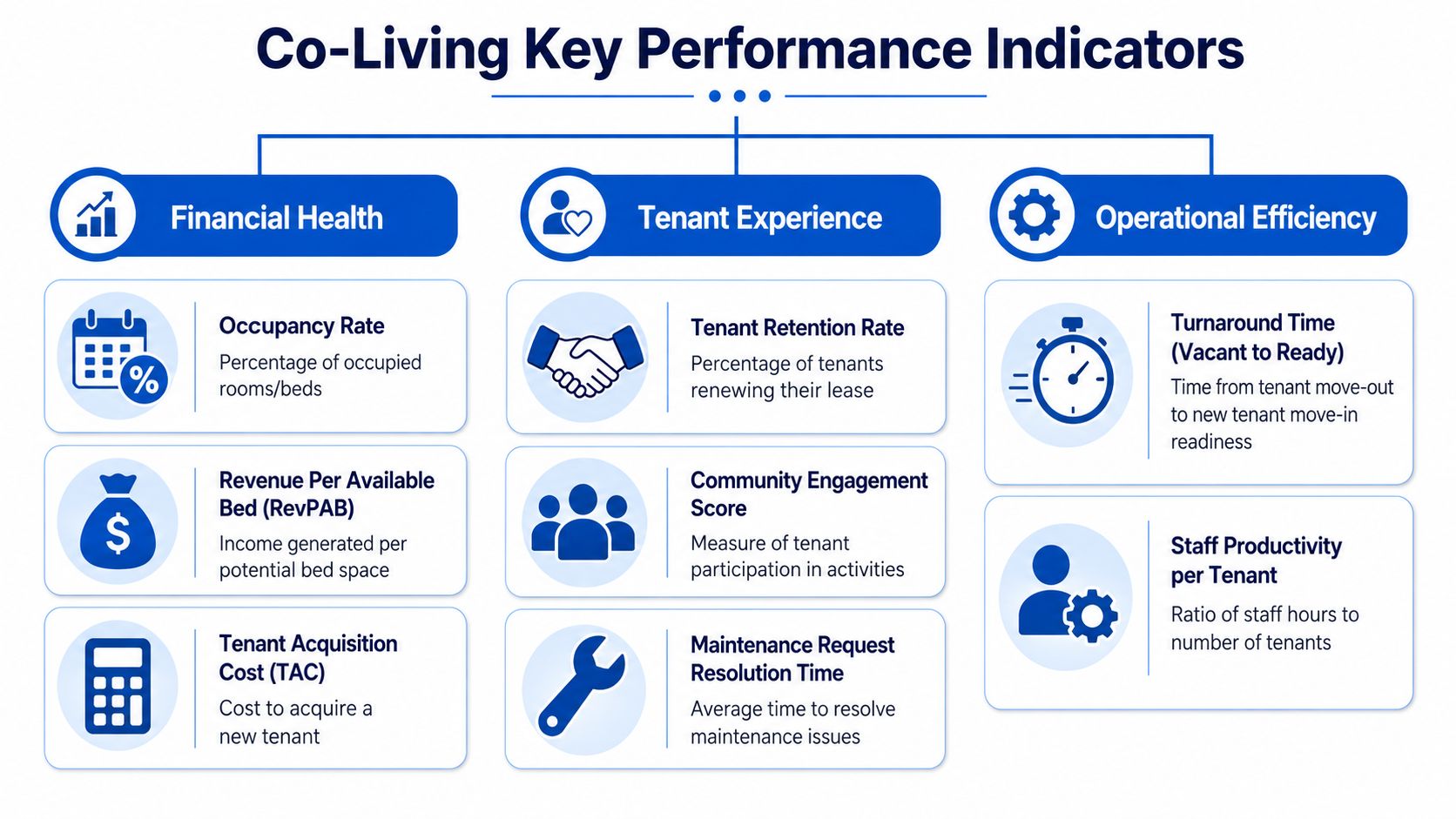
Financial health
Start with the numbers that tell you whether each property is performing.
NOI per property is the anchor metric because it forces you to look past gross rent. In co-living, two houses can show similar topline income while one is bleeding through vacancy lag, concessions, maintenance inefficiency, or poor collections.
I also like revenue per available room or bed because it reflects the room-by-room nature of the model better than whole-property rent alone. If a six-bedroom house has one premium room underpriced and one standard room sitting vacant too long, room-level reporting makes that visible fast.
Operational efficiency
At that juncture, workflow optimization becomes measurable on the ground.
Track a small set of operating KPIs consistently:
- Time-to-fill a vacancy from room-ready status to signed resident
- Inquiry-to-tour response time so you know whether lead handling is fast enough
- Inquiry-to-lease conversion rate by channel, property, or room type
- Maintenance resolution time from intake to closure
- Turnover readiness status so you know whether each room is marketable
A co-living property management system should bring business data into a simple dashboard and allow remote management across properties through one interface, helping automate tasks and reduce human error in invoicing and bookings, as described in Resharmonics' overview of co-living property management software.
If you want a model for viewing these numbers across houses instead of one property at a time, portfolio performance tracking for rentals is the right direction.
Member experience
This is the category many hosts skip, then later wonder why turnover stays high.
You don't need a complicated survey program. A short resident pulse after move-in, after a maintenance request, and before renewal can tell you a lot. Keep the questions practical: was communication clear, was the home ready, did the issue get resolved, would they renew?
Residents don't experience your operation as departments. They experience it as response time, clarity, and whether the house feels reliably managed.
The strongest KPI dashboards mix these three views together. A drop in renewal interest paired with slow maintenance closure tells a story. So does a property with solid inquiry volume but weak conversion. That's when workflow changes stop being abstract and start pointing to the exact process that needs attention.
Your Workflow Optimization Migration Checklist
The mistake I see most often is trying to overhaul everything at once. That approach usually creates new confusion before it creates stability.
A better path is a controlled migration. Pick one workflow, fix it properly, measure it, then expand. Organizations that meaningfully optimize workflows report an average 19 percent increase in employee productivity and can see revenue growth up to 2.4 percentage points higher than peers, according to Zebra's manufacturing workflow optimization report. The industries differ, but the operating lesson carries over well. Better workflows create capacity and stronger top-line performance.
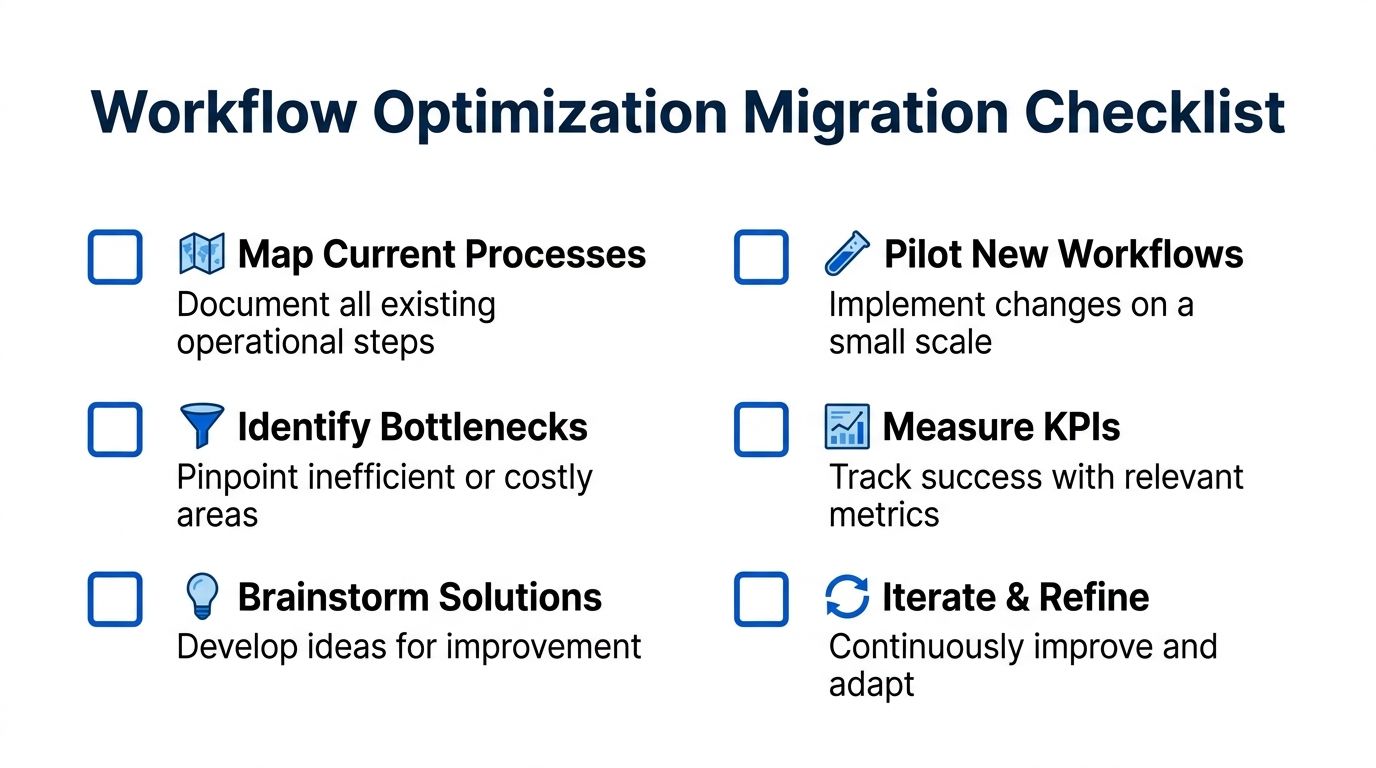
Start small and make it real
If I were helping a host move from one property to ten, I'd keep the rollout tight:
- Document one workflow end to end. Tenant onboarding is a good place to start because it touches leasing, payments, access, and communication.
- Mark the top three friction points. Don't overthink it. Look for the steps people forget, repeat, or constantly chase.
- Choose one tool or automation rule for the biggest issue. If slow follow-up kills conversions, messaging comes first. If access handoffs are messy, start with smart locks.
- Pilot it on one property or one room type. A contained rollout lets you catch edge cases before they spread.
- Define one primary KPI. If you're fixing lead response, track response latency. If you're fixing turnover, track room-ready-to-list-live time.
- Review and refine before expanding. Keep what works. Rewrite what creates new confusion.
What not to do
Some failures are predictable.
- Don't automate a broken process. If your move-in checklist changes every week, automation will just create inconsistent outputs faster.
- Don't hide process knowledge in one person. If only you know how to handle exceptions, the business isn't scalable yet.
- Don't add tools without ownership. Every workflow needs a clear owner, even if software handles the repetitive steps.
- Don't judge success too early. Let the workflow run long enough to reveal where the friction moved.
The hosts who scale cleanly aren't always the most technical. They're the ones who commit to repeatable operating rules and improve them one workflow at a time.
A simple system beats heroic effort. Every time.
PadPulse is being built for PadSplit hosts and co-living operators who are tired of stitching together pricing tools, inboxes, lock apps, and spreadsheets. If you want one place to manage room-by-room operations, monitor portfolio performance, automate messaging, and improve NOI as you scale, join the PadPulse interest list for early updates and limited beta access.