What Is Revenue Per Available Room Explained for Hosts
September 6, 2026
RevPAR is total room revenue divided by total available rooms, also equal to ADR multiplied by occupancy rate. It measures how efficiently your inventory is monetized, regardless of whether every room sold.
You can have a calendar that looks healthy and still wonder where the money went. A co-living host may have most rooms occupied, yet income feels thin after turnover, utilities, cleaning, and vacant nights between residents. Another house may charge higher rates but leave more rooms empty. Occupancy alone can't tell you which property is using its available inventory better.
That's why revenue per available room, or RevPAR, is useful for PadSplit-style and room-by-room operators. It puts price and occupancy into one room-level efficiency measure. The calculation is simple, but interpreting it well requires a little more care, especially when your real goal is net operating income, not a flattering headline metric.
Introduction to Revenue per Available Room for Hosts
Consider two shared houses with different layouts. One has six rentable rooms and another has twelve. Both hosts report similar occupancy, so the larger property appears stronger at first glance. But if the smaller house earns more room revenue per available room-night, it may be monetizing its inventory more efficiently.
That distinction matters because room-by-room housing creates many small revenue decisions. A room can sit vacant after a move-out, remain unavailable during repairs, or fill only after a discount. Each available room-night represents earning capacity, whether someone occupies it or not.
RevPAR captures that unused capacity in a way occupancy and ADR can't do separately. Occupancy tells you how much inventory was filled. ADR tells you the average price paid for occupied inventory. RevPAR combines both.
Why occupancy can mislead
Suppose a host fills nearly every room by accepting lower rates. The occupancy number looks excellent, but the resulting revenue may not cover the extra costs created by frequent turnover. A different host may keep a stronger rate, accept a little more vacancy, and produce better operating profit.
RevPAR won't replace a profit-and-loss statement. It gives you a clean first question: How much room revenue did each available room produce during the period?
For a beginner, that makes RevPAR a practical bridge between daily operations and financial analysis. You can use it to compare houses, weeks, room types, or pricing approaches without being distracted by the total number of rooms in each property.
A simple way to use it
Track four items in the same period:
- Available room-nights: Every room-night that could have been rented.
- Occupied room-nights: The room-nights sold or occupied.
- Room revenue: Revenue assigned to the rooms, separated from other fees.
- ADR and occupancy: The rate and fill level that explain the result.
A basic spreadsheet is enough. Add columns for the period, property, available room-nights, occupied room-nights, room revenue, ADR, occupancy, and RevPAR. Review it weekly, then compare the result with your own past performance and the property's operating costs.
The central idea is straightforward: RevPAR is the efficiency score for every available room-night, not only the room-nights you sold.
What Revenue per Available Room Means and Why It Matters
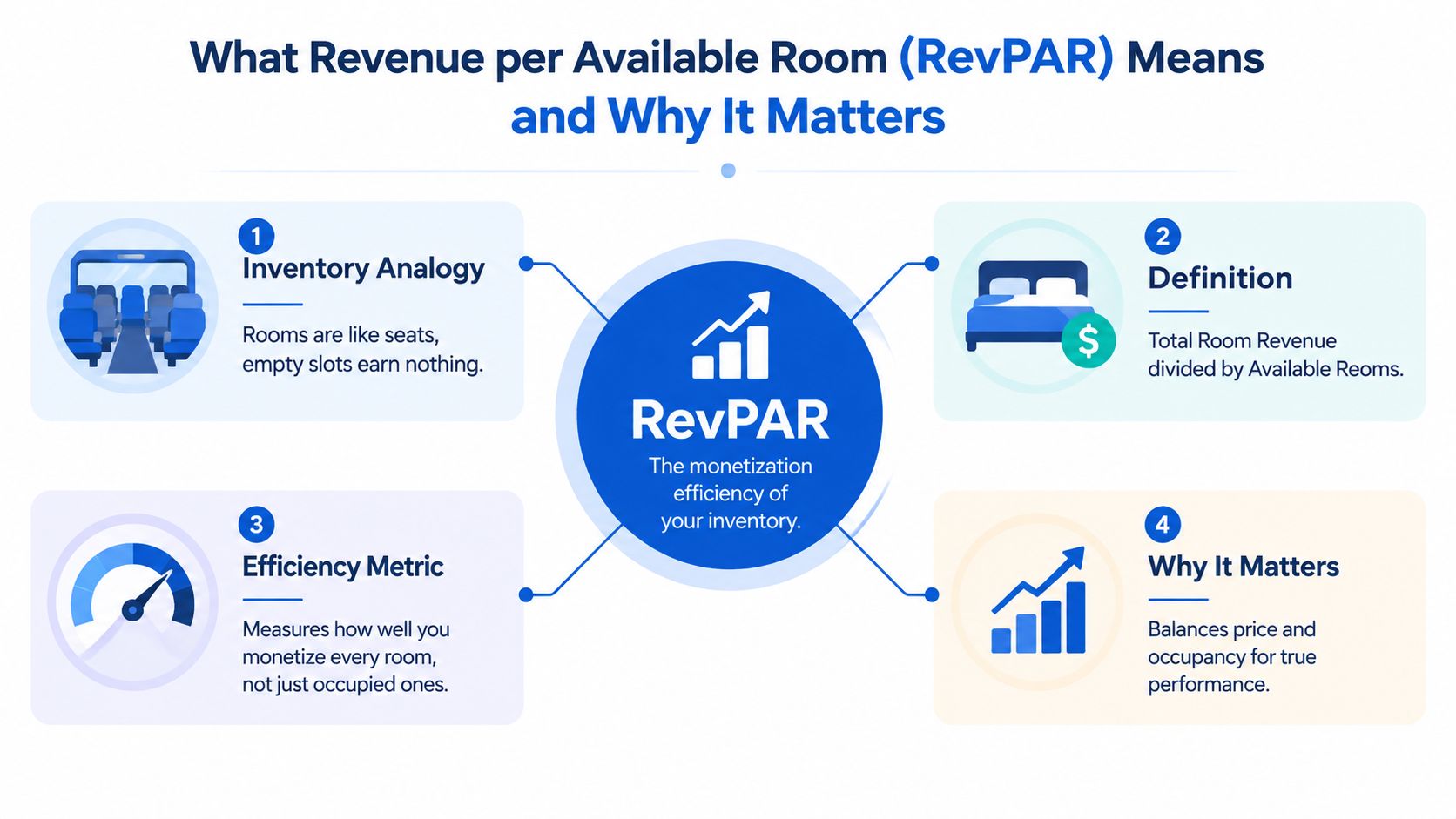
Think of your rooms as seats on a bus. The bus has a fixed number of seats on each trip. If only some passengers board, the empty seats still existed, but they produced no fare. A hotel or co-living house works similarly. Available rooms are the inventory slots, and RevPAR measures the revenue produced across all those slots.
The standard formula is:
RevPAR = Total Room Revenue ÷ Total Available Rooms
For a time-based room-by-room operation, “rooms” usually means available room-nights. A room available for rent across multiple nights contributes one available unit for each night in the reporting period.
The alternative formula is:
RevPAR = ADR × Occupancy Rate
ADR, or average daily rate, describes the average room revenue collected from occupied rooms. Occupancy describes the share of available room inventory that was occupied. Multiplying them gives the revenue produced per available room, including the rooms that remained empty. Investopedia's explanation of RevPAR describes this mathematical relationship and the reason RevPAR combines pricing and demand.
Why RevPAR is lower than the advertised rate
Because occupancy can't exceed 100%, RevPAR is always less than or equal to ADR. If every available room is occupied, RevPAR and ADR can match. If any room remains vacant, RevPAR falls below ADR.
That's where new hosts often get confused. A strong ADR doesn't automatically mean strong room revenue efficiency. Charging a high rate for a room that sits empty produces no room revenue for that night. Conversely, reducing the rate may raise occupancy, but only improves RevPAR if the added demand makes up for the lower price.
Practical rule: Never evaluate a rate change from ADR alone. Check whether the change improved revenue across all available room-nights.
Why co-living hosts should care
RevPAR normalizes inventory size. You can compare a six-room house with a twelve-room house because the measure looks at revenue per available unit, not total revenue. That makes it useful for portfolio reviews, property acquisition analysis, and room-level pricing decisions.
It also complements broader unit economics analysis. RevPAR answers the revenue-efficiency question. Unit economics helps you examine the costs and contribution attached to producing that revenue.
Industry benchmarking uses RevPAR across properties, markets, and time periods because it captures both occupancy and pricing effects in one figure. CoStar's STR overview of RevPAR identifies it as a standard hotel performance and benchmarking metric.
How to Calculate RevPAR With Simple Formulas and Examples
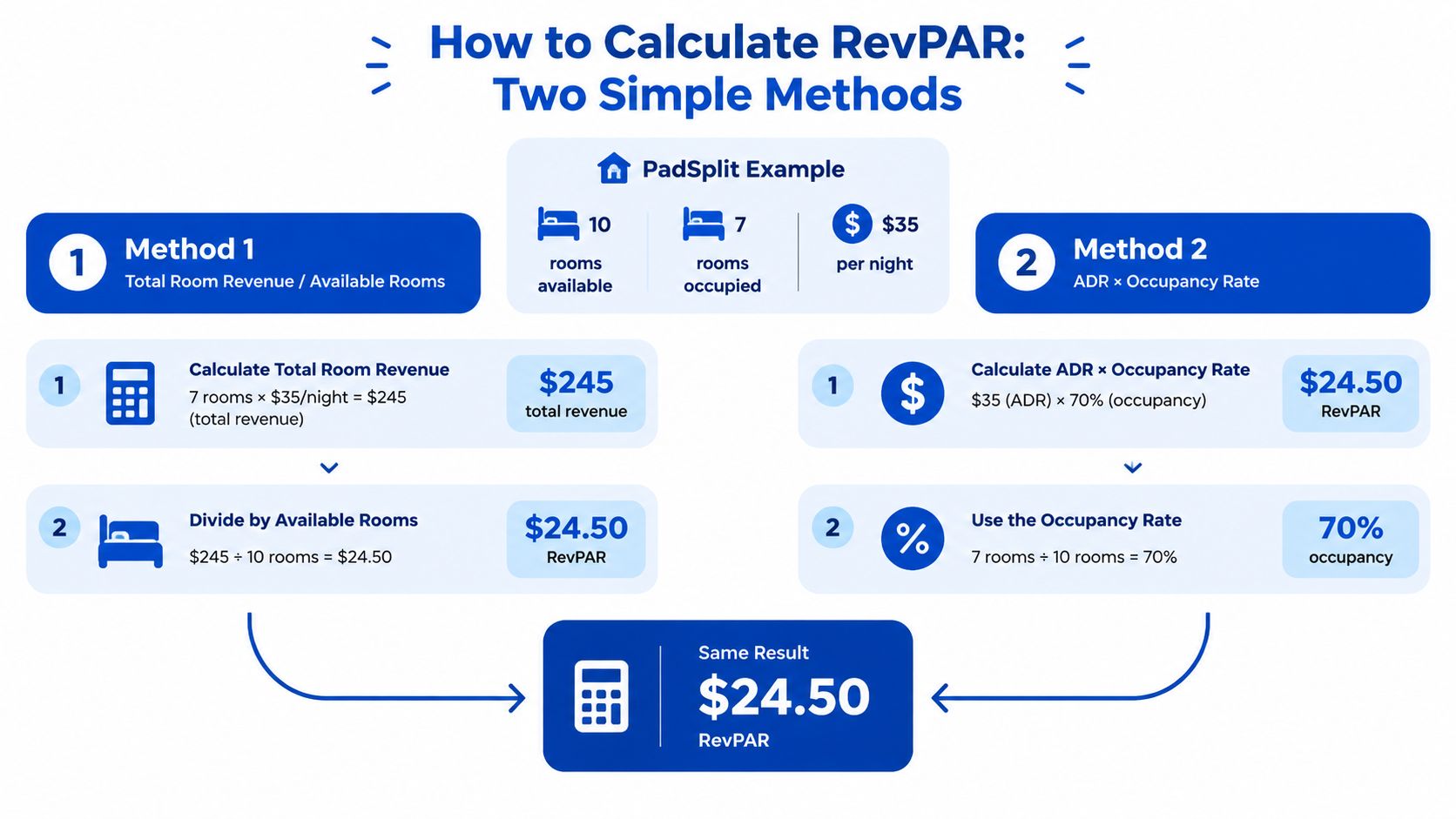
You can calculate RevPAR in two ways. Use the first method when you have total room revenue and available room-nights. Use the second when your system already reports ADR and occupancy. Both should produce the same result if the inputs cover the same property and period.
Method one uses revenue and available inventory
Use this formula:
RevPAR = Total Room Revenue ÷ Available Room-Nights
The documented example is a hotel with US$180,000 in monthly room revenue and 1,200 available room-nights. The calculation is:
US$180,000 ÷ 1,200 = US$150 RevPAR
That result means the property produced US$150 in room revenue for each available room-night, whether the room was occupied or vacant. PriceLabs' RevPAR calculation example shows the same math and confirms the alternative calculation below.
For a co-living host, the inputs might be:
- Add room revenue for the reporting period.
- Count every room-night available for rent.
- Divide the first figure by the second.
- Keep room revenue separate from deposits, utility charges, cleaning fees, and other non-room amounts.
Method two uses ADR and occupancy
Use this formula:
RevPAR = ADR × Occupancy Rate
With an ADR of US$200 and occupancy of 75%, the calculation is:
US$200 × 0.75 = US$150 RevPAR
The answer matches the revenue-divided-by-available-inventory method. The reason is simple. ADR describes the revenue from occupied rooms, while occupancy converts that occupied-room result into an average across the entire available inventory.
The supplied PadSplit-style visual also shows a smaller nightly example: 10 rooms available, 7 occupied at US$35 per night. Total room revenue is US$245, and dividing by 10 available rooms gives US$24.50 RevPAR. The second method reaches the same result, US$35 ADR × 70% occupancy = US$24.50 RevPAR.
A video walkthrough can reinforce the two paths visually:
Avoid the common spreadsheet mistakes
Use available room-nights, not occupied room-nights, in the denominator. If you divide room revenue by only the rooms that paid, you're calculating ADR-like revenue, not RevPAR.
Keep the period consistent. Monthly room revenue must be matched with monthly available room-nights, and the ADR and occupancy figures must come from that same period. Also decide how you'll treat rooms unavailable because of maintenance, then apply the same rule each time so your trend remains comparable.
RevPAR Benchmarks and How to Interpret Your Results
A RevPAR figure has meaning only in context. A result that looks attractive in one market may be ordinary in another because demand, room rates, property type, and operating conditions differ. Start with the number, then ask what produced it.
For U.S. hotel reporting, CoStar and STR recorded full-year 2025 RevPAR of US$100.02, down 0.3% from the prior year, with 62.3% occupancy and US$160.54 ADR. The figures are reported in Akia's RevPAR overview. They provide a broad hotel reference point, not a target for a room-by-room property.
Benchmark snapshot
| Market / Period | RevPAR | Occupancy | ADR |
|---|---|---|---|
| United States, full-year 2025 | US$100.02 | 62.3% | US$160.54 |
| New York City, 2025 | US$280.71 | Not provided | Not provided |
| Las Vegas, 2025 | US$149.13 | Not provided | Not provided |
The same reporting shows major market dispersion. New York City recorded the highest absolute RevPAR among the top U.S. markets at US$280.71 in 2025, while Las Vegas declined 10.9% to US$149.13. Those results shouldn't become direct co-living targets. They demonstrate why geography and demand conditions matter before you label a RevPAR “good” or “bad.”
Diagnose the two inputs
If your RevPAR is weak, separate the result into occupancy and ADR:
- Low occupancy with healthy ADR: Your pricing may be defensible, but inquiries, listing presentation, response speed, availability, or demand targeting may need attention.
- High occupancy with weak ADR: You're filling rooms, but perhaps discounting too aggressively or failing to adjust rates when demand improves.
- Weak occupancy and weak ADR: Review the property's positioning, room condition, pricing, screening process, and local competition together.
- Strong occupancy and strong ADR: Protect the result, then check whether added turnover or service costs are reducing NOI.
RevPAR's strength is comparability. A six-room house and a twelve-room house can be reviewed on the same per-available-room basis. Compare each property against its own history first, then against similar local inventory. Spain's national statistics office has published hotel RevPAR datasets extending back to at least 2008, illustrating how the metric supports long-running tourism comparisons across time. Spain's official RevPAR dataset provides that public measurement context.
Related Metrics That Put RevPAR in Context
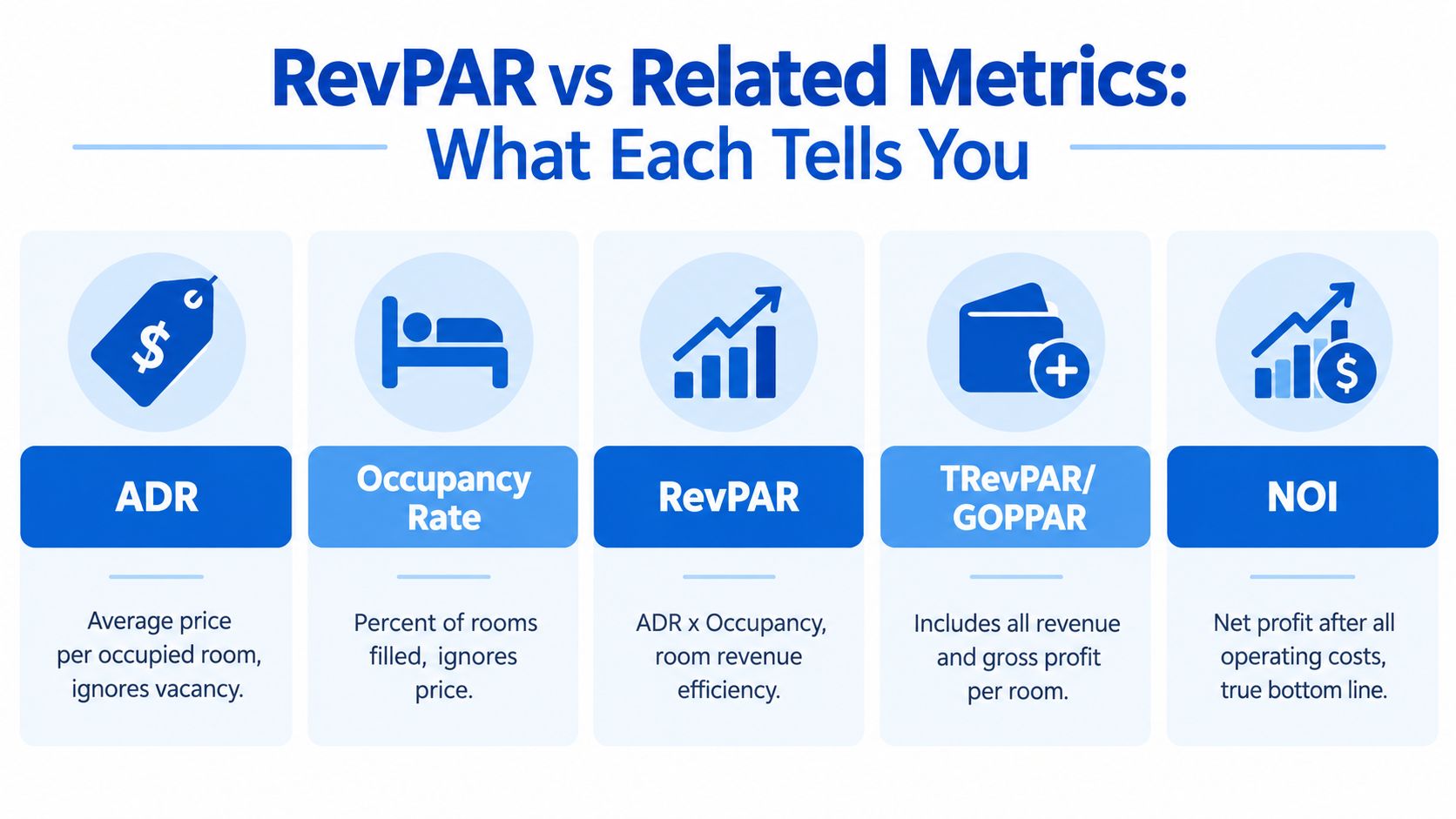
RevPAR is a room-revenue metric, not a complete business scorecard. Hosts often use it alongside ADR and occupancy, then add broader revenue and profit measures when they need to make operating decisions.
| Metric | What it measures | What it leaves out |
|---|---|---|
| ADR | Average room revenue per occupied room | Vacant inventory and operating costs |
| Occupancy rate | Share of available rooms that are occupied | Price and profitability |
| RevPAR | Room revenue per available room | Non-room revenue and operating costs |
| TRevPAR | Total revenue per available room, including broader revenue streams | The full cost structure |
| GOPPAR | Gross operating profit per available room | Some below-gross-operating-profit items |
| NOI | Net operating income after operating expenses | It isn't a pure room-efficiency measure |
Use the metric that matches the decision
Use ADR when you're evaluating pricing. If you raised rates, ADR shows whether occupied rooms produced a higher average room price. It won't tell you whether the change caused vacancies.
Use occupancy when you're evaluating demand and availability. It helps reveal whether rooms are filling, but it can't distinguish a full house at a low rate from a full house at a premium rate.
Use RevPAR when you want one number that combines those two drivers. It's especially helpful for comparing different properties or reviewing whether a pricing change monetized total inventory more effectively.
Why NOI matters for co-living
TRevPAR can include revenue beyond the room charge. GOPPAR moves closer to operating performance by considering gross operating profit. NOI is the more relevant decision metric when utilities, repairs, cleaning, turnover, software, and management costs materially affect the property's result.
Two houses can have the same RevPAR while producing different NOI. One may have stable residents and low turnover. The other may rely on frequent move-ins, heavy cleaning, utility usage, and concessions. RevPAR sees the same room revenue efficiency, but the owner experiences different cash results.
RevPAR tells you how efficiently the rooms earn. NOI tells you whether the operation is worth running that way.
Limitations of RevPAR and When to Optimize for NOI Instead
A higher RevPAR isn't automatically a better business outcome. The measure covers room revenue divided by available rooms, so it excludes non-room revenue, ancillary fees, and operating costs. For room-by-room housing, that omission matters because utilities, cleaning, repairs, turnover, and service intensity can change the economics of a seemingly successful pricing strategy.
Consider a host who lowers rates to fill a vacant room quickly. Occupancy may improve, and RevPAR may rise. But if the new resident stays briefly, creates additional turnover work, and increases cleaning or utility expense, NOI may not improve with it. The reverse can also happen. A host may protect rate and accept some vacancy because a longer-stay resident creates a better contribution after operating costs.
The guide to calculating net operating income helps place RevPAR inside a fuller property-level view.

When chasing RevPAR can backfire
Discounting makes sense when the added demand produces more useful revenue than the rate reduction costs. It becomes risky when a host measures success only by filled rooms and ignores resident quality, stay length, acquisition effort, and service burden.
Current reporting also shows why operators need a careful reading of the metric. U.S. RevPAR fell 0.3% in 2025, while a Cushman & Wakefield report forecast H2 2025 global RevPAR growth of -0.6%, full-year growth near 0.1%, and projected 2026 U.S. RevPAR growth of 2.9%. The national U.S. hospitality market report presents these as forecasts and reported market figures. In a softer cycle, operators shouldn't assume every occupancy gain deserves a discount.
For a broader introduction to rate decisions and pricing for short-term rental managers, review how revenue management connects pricing, demand, and property goals.
Use decision rules instead of one target
Prioritize RevPAR when you're comparing inventory efficiency, testing rate changes, or diagnosing the relationship between price and occupancy. Prioritize NOI when operating costs vary sharply between rooms or when a higher-turnover strategy creates more work.
Prioritize length of stay when frequent vacancies between residents are eroding revenue. Prioritize segmentation when different resident groups have different price sensitivity, booking patterns, or service needs. The best metric is the one that matches the decision in front of you.
Practical Ways to Improve RevPAR for Co Living Properties
Start with a weekly room-by-room tracker. Keep it simple:
| Property | Available room-nights | Occupied room-nights | Room revenue | ADR | Occupancy | RevPAR |
|---|---|---|---|---|---|---|
| House A | Enter data | Enter data | Enter data | Calculate | Calculate | Calculate |
Calculate ADR from room revenue divided by occupied room-nights. Calculate occupancy from occupied room-nights divided by available room-nights. Then calculate RevPAR from room revenue divided by available room-nights, and compare the result with your NOI review.
Improve the rate decision
Use dynamic pricing when demand changes, but don't let software chase occupancy without guardrails. Set minimum acceptable rates, review upcoming move-outs, and protect dates when inquiries increase. Length-of-stay controls can also reduce gaps between residents, though they should support your profit objective rather than maximize filled nights.
Property presentation supports pricing power. Practical Airbnb rental decorating tips can help you review furnishings, linens, lighting, and shared-space presentation without treating decoration as a substitute for sound pricing.
Reduce avoidable vacancy
Respond to inquiries quickly, keep room details accurate, and make move-in instructions easy to follow. A room that stays available because a prospect is waiting for basic information is an operational problem, not a market mystery.
Review turnover timing after every move-out. Coordinate cleaning, repairs, inspections, and access so the room returns to rentable condition promptly. Smart locks can simplify access, while efficient thermostat settings can help protect margins, but measure their effect through operating costs and NOI rather than RevPAR alone.
For a deeper framework on matching rates to demand and inventory, see this guide to yield optimization. Use the tracker to test one change at a time, then examine ADR, occupancy, RevPAR, stay length, turnover, and NOI together.
PadPulse is being built to bring dynamic pricing, inquiry workflows, smart-home controls, P&L tracking, portfolio analytics, and market intelligence into one platform for room-by-room operators. Visit PadPulse to join the early access list, follow the Winter 2026 launch updates, and prepare a clearer RevPAR-to-NOI workflow for your properties.