Vacancy Management System Explained for Co-Living Hosts
August 15, 2026
A room can be empty for reasons that have nothing to do with demand. An inquiry arrives while you're driving, the reply waits until evening, the cleaner hasn't confirmed readiness, and the price still reflects last week's market. By the time everything lines up, the prospect has chosen another room.
That pattern feels like bad luck when you manage one property. Across a growing co-living portfolio, it becomes an operating problem. Every vacant day delays rent collection, increases the work required to find the next resident, and makes your occupancy report look worse than it should.
A vacancy management system brings the moving parts into one workflow. It connects pricing, inquiry response, turnover readiness, access, and reporting so you can reduce avoidable delays instead of counting empty rooms.
Introduction to Smarter Vacancy Management
Suppose one room becomes available on Monday. The listing is still priced for a stronger demand period, the photos don't show the latest improvements, and the first inquiry lands after business hours. On Tuesday, someone asks whether they can view the room, but nobody has confirmed the smart-lock code or cleaning status. By Wednesday, the prospect has stopped responding.
The room didn't stay vacant because the host made one dramatic mistake. It stayed vacant because several small tasks were handled separately, with no shared view of what needed attention next.
That distinction matters for PadSplit hosts and other room-by-room operators. A whole-unit vacancy is painful, but a room vacancy can be easy to overlook because the rest of the property still produces income. The financial effect remains direct: every day without an occupied room is a day when that room cannot generate rent.
Vacancy management is therefore more than setting a rent amount. It means managing the full path from available room to qualified inquiry, scheduled access, move-in readiness, and occupied room.
A useful operating question is not, “How many rooms are empty?” Ask instead:
- Which rooms are vacant today?
- How long has each room been available?
- What action is blocking the next move?
- Which inquiries have not received a response?
- Which ready rooms need a pricing or listing adjustment?
The U.S. market also shows why small changes deserve attention. The Census Bureau reported a 7.3% national rental vacancy rate in Q2 2026, compared with a 1.2% homeowner vacancy rate; the same release reported that approximately 89.5% of U.S. housing units were occupied and 10.5% were vacant. These figures describe the broader housing market, not an individual co-living portfolio, but they demonstrate why supply conditions affect leasing decisions at scale. See the Census Bureau housing vacancy data for the release.
The practical promise is simple. Treat vacancy as a time-and-workflow problem, then give every room a clear next action. Pricing still matters, but faster communication, dependable access, and coordinated turnover often determine whether a price adjustment produces a move-in or just another inquiry.
What a Vacancy Management System Really Does
Think of a vacancy management system as air-traffic control for rooms. Air-traffic control doesn't operate the aircraft, clean the runway, or sell tickets. It gives each movement a shared status, prevents conflicting actions, and helps people decide what should happen next.
A room-management platform should do the same. It should show which rooms are occupied, becoming available, being cleaned, ready for viewing, awaiting an applicant, or blocked by maintenance. It should then connect those statuses to the actions your team already performs.
Start with time, not room counts
A vacancy count is a snapshot. It tells you that three rooms are empty, but it doesn't tell you whether those rooms became available yesterday or have been waiting for a resident through several leasing cycles.
HUD explains that vacancy duration can be derived from vacancy rate and turnover rate. In its formulation, annual average vacancy duration in days equals annual vacancy rate divided by annual turnover rate. That relationship is important because two portfolios can show the same vacancy rate while losing different amounts of cash if one portfolio takes longer to turn rooms.
A more operational view uses days vacant divided by days available for occupancy. HUD guidance also describes an adjusted vacancy rate that removes vacancy days caused by modernization or circumstances outside the housing provider's control before dividing by total available days. Review the HUD guidance on vacancy measurement when you need a consistent reporting method.
Coordinate the full room journey
A useful system connects five stages:
- Pricing: Set a starting price and adjust it when demand, seasonality, or competition changes.
- Lead response: Capture inquiries from relevant channels and send a prompt, accurate reply.
- Access: Provide viewing or move-in instructions without waiting for a physical key handoff.
- Readiness: Confirm cleaning, repairs, utilities, furnishings, and documentation.
- Reporting: Show the result by room, property, and portfolio.
This is why a co-living occupancy management platform should be judged by its workflow coverage, not by its dashboard appearance alone. A beautiful occupancy graph won't fill a room if the system can't tell your cleaner that a move-out is complete or your leasing team that an inquiry is waiting.
Practical rule: Measure the delay between “available” and “occupied,” then assign every delay to a specific owner and action.
The system's purpose is to shorten unproductive time. It doesn't replace judgment. You still decide whether a room needs a price change, a better listing, a repair, or a different leasing approach. The platform makes those decisions easier by keeping the evidence and next steps together.
Key Features That Fill Rooms Faster
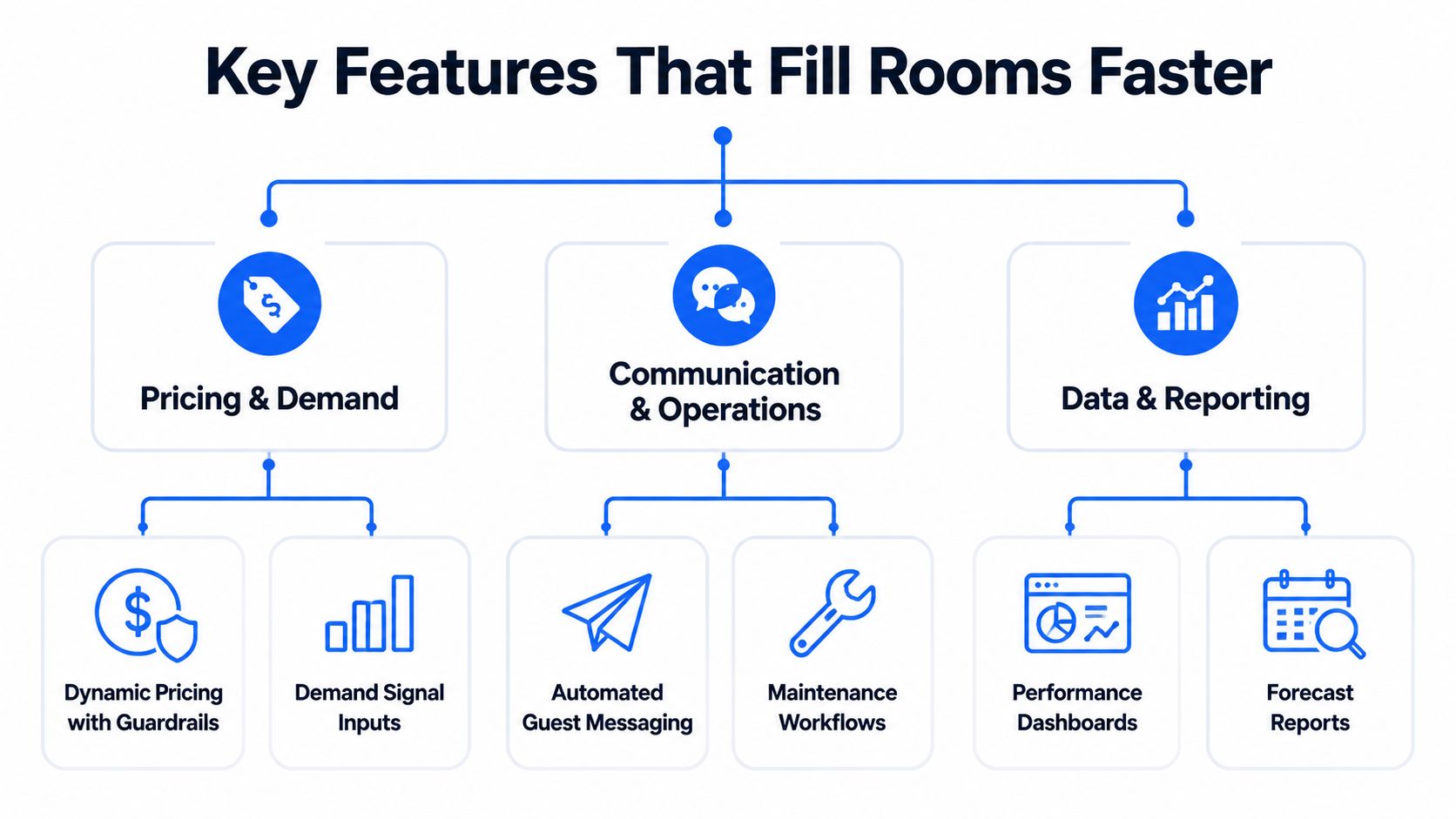
A strong vacancy management system doesn't need every possible property feature. It needs the capabilities that remove delays between availability and move-in.
Demand-sensitive pricing with limits
Static pricing forces you to guess how much demand a room can attract. A dynamic pricing engine can consider current listings, historical occupancy, leasing velocity, seasonal patterns, upcoming events, competitor rates, web traffic, and inquiry or application volume. Guardrails such as minimum and maximum rates keep the system from making an aggressive adjustment that doesn't fit your operating rules. This approach is described in data-driven rental pricing guidance.
Dynamic pricing is especially useful when a room has views but few qualified inquiries. The system can flag weak demand, suggest a lower rate within your limits, and help you compare the result with similar rooms. It can also identify strong demand, helping you avoid discounting when prospects are already responding.
A year-long study of a dynamic-pricing solution reported +25.1% RevPAR and a +28.6 percentage-point occupancy gain versus manual pricing, as reported in Hostaway's dynamic pricing analysis. That result comes from the referenced study and shouldn't be treated as a guaranteed outcome for every co-living operator. The operational lesson is more reliable: price changes work best when they respond to actual demand and remain within clear guardrails.
Fast, consistent communication
A prospect who asks whether a room is available often needs a simple answer first. An automated messaging workflow can confirm availability, explain house rules, share qualification requirements, offer viewing times, and send reminders. AI can help draft or route responses, but a human should control exceptions involving eligibility, disputes, safety, or unusual requests.
Response speed also needs a handoff process. If an inquiry asks about a repair, a parking arrangement, or an accessibility concern, the system should assign the question rather than leaving it buried in a shared inbox.
Access and turnover controls
Keyless smart locks can make viewing and move-in coordination easier because authorized people don't need to wait for a physical key exchange. Smart thermostats can support more deliberate HVAC control between residents, though hosts still need clear policies and local compliance checks.
The important point is coordination. A room shouldn't be marked “ready” merely because a resident has moved out. The system should connect move-out confirmation, cleaning, maintenance, inspection, access setup, and listing availability.
Reporting that supports action
Analytics should answer practical questions:
- Which room has the longest vacancy duration?
- Which property produces inquiries but few applications?
- Which turnover step creates the most waiting time?
- Which price changes lead to more qualified conversations?
- What does vacancy cost by room and property?
A demand forecasting system for property operators can help turn those questions into forward-looking decisions, especially when it combines market signals with your own leasing history.
A short walkthrough can make the workflow easier to visualize:
Traditional Processes Versus a Centralized System
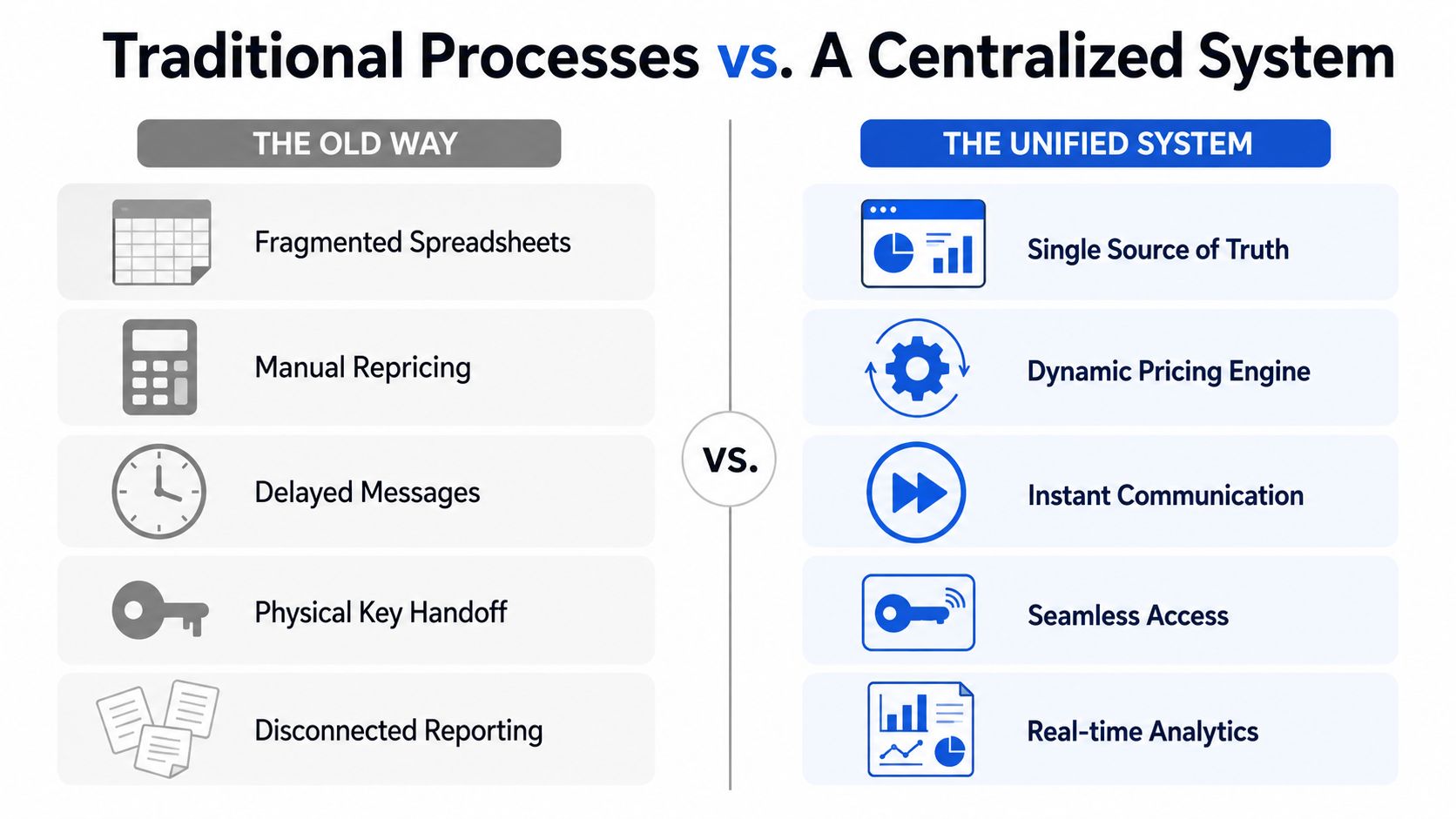
Manual processes can work when one person manages a small number of rooms and remembers every detail. The trouble starts when information spreads across spreadsheets, text messages, listing sites, lock apps, cleaning calendars, and accounting files.
Consider a room that becomes available. In a fragmented setup, one person updates the listing, another tracks the applicant, a cleaner reports readiness by text, and a property manager holds the access information. Nobody has a complete view. Each person may do their part correctly, yet the room remains unavailable because the steps don't meet in one place.
A centralized system changes the handoff. The move-out status can trigger a turnover task. Completion can update room readiness. Readiness can activate the listing. An inquiry can create a follow-up task and provide approved access instructions. The operator sees the sequence instead of reconstructing it from separate conversations.
The old way and the unified way
| Operating need | Fragmented process | Centralized process |
|---|---|---|
| Room status | Separate spreadsheet updates | Shared room-level status |
| Pricing | Manual checks and occasional repricing | Demand inputs with pricing limits |
| Inquiries | Shared inboxes or personal phones | Routed messages and follow-up tasks |
| Access | Physical key coordination | Controlled digital access |
| Turnover | Text-based updates | Assigned readiness workflow |
| Reporting | Periodic spreadsheet work | Room, property, and portfolio views |
The difference becomes more noticeable as the portfolio grows. With 10 rooms, one missed message can affect a meaningful portion of available inventory. With 100 or more rooms, a repeated delay can affect many rooms at once. The system doesn't eliminate operational work, but it makes the work visible and repeatable.
Evaluate the investment by time and outcome
A platform deserves a closer look when it can help you connect three outcomes:
- Lower vacancy days: Rooms return to productive use sooner.
- Higher operating efficiency: Staff spend less time reconciling records and chasing updates.
- Better NOI visibility: Revenue and property costs can be reviewed at the same room and portfolio levels.
Don't evaluate software by occupancy alone. The U.S. Census Bureau reported a 7.3% rental vacancy rate in Q2 2026, alongside a 1.2% homeowner vacancy rate, so broad market conditions matter when you interpret your own results. Those figures are available in the Census Bureau's current housing vacancy release, and they should be treated as context rather than a target for a specific property.
Implementation Checklist and KPIs to Track Success
A room can remain vacant because several small tasks are out of sync. Pricing may be current, but a delayed reply, missing smart-lock permission, or unfinished turnover still blocks the move-in. At 10 rooms, one missed handoff affects a noticeable share of inventory. At 100 or more rooms, the same delay can repeat across many rooms. A vacancy management system should connect these steps in one workflow.
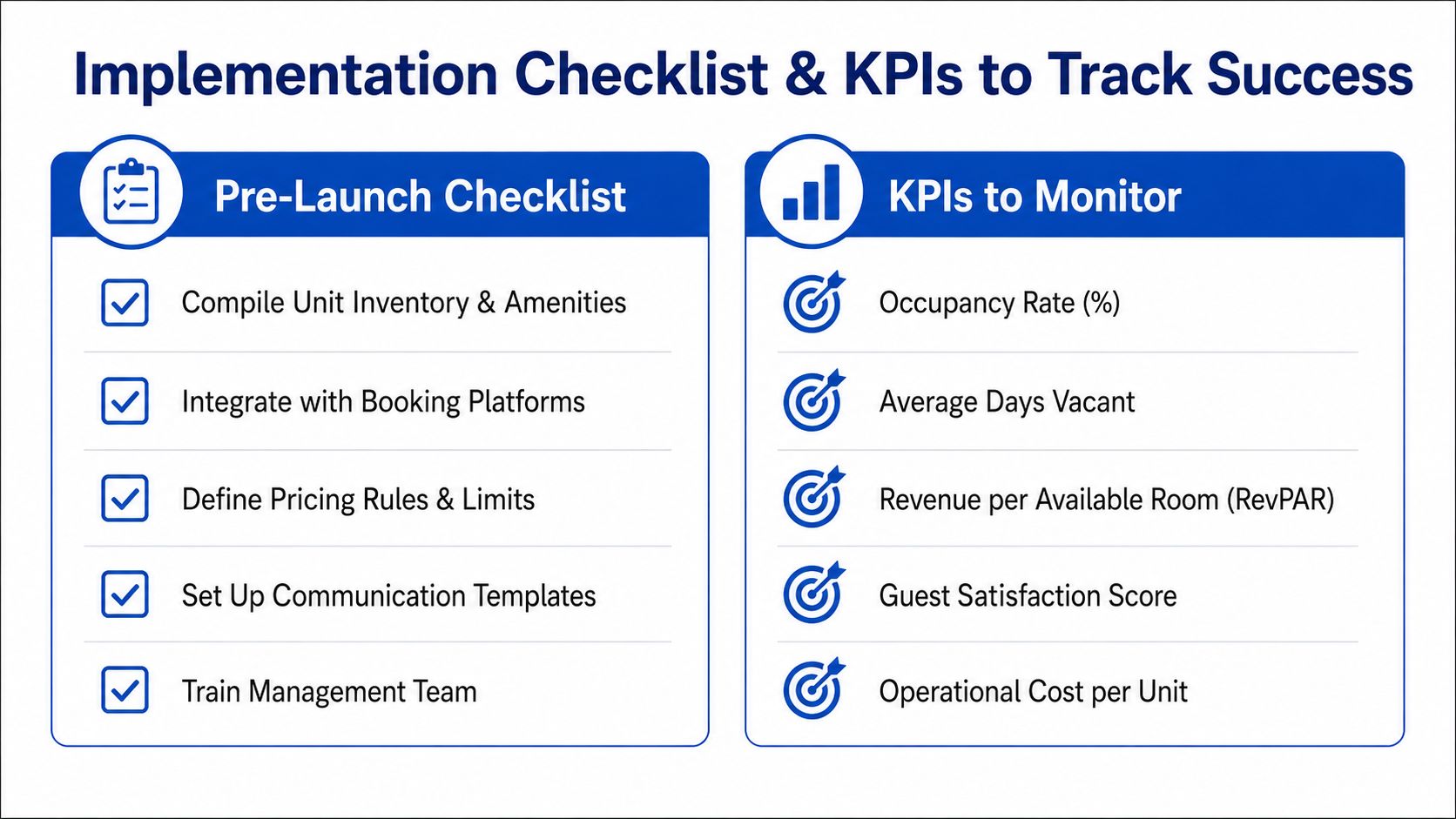
Prepare the operating foundation
Begin with a clean record for every room and property. Include amenities, furnishings, house rules, current status, expected availability, access method, and restrictions that affect leasing. Treat each record like a shared checklist. If one field is missing, the next person has to stop and ask.
Connect the tools where work already happens:
- Listing channels: Keep availability and pricing updates consistent.
- Inquiry sources: Capture messages in a shared queue instead of personal inboxes.
- Access tools: Link smart-lock permissions to approved viewing and move-in steps.
- Turnover partners: Assign cleaning and maintenance work with clear completion requirements.
- Financial records: Connect rent, operating costs, and room-level information where practical.
Add historical occupancy and pricing records if available. Imperfect data can still reveal patterns, such as rooms needing a different listing approach or properties where turnover repeatedly takes longer.
Roll out in a controlled sequence
Start with a small operating group rather than every property. Document the current process, then test the full path from move-out notice to the next move-in.
Watch the exceptions closely. A canceled viewing should close or reopen the correct access task. A maintenance hold should stop advertising. The system should distinguish a room under renovation from one still waiting for a resident.
Use a property management KPI framework to agree on definitions before reporting begins. Consistent definitions make comparisons useful.
Track the measures that reveal delay
Hold a weekly operating review covering:
- Vacancy rate: Compare vacant days with days available for occupancy. Apply an adjusted view for excluded modernization or uncontrollable circumstances, following HUD vacancy guidance.
- Average vacancy duration: Measure how long rooms remain unproductive.
- Time to fill: Track the period from listing availability to completed move-in.
- RevPAN: Where the rental model fits, divide total rental revenue by total nights available. This rental pricing overview explains RevPAN and frequent pricing adjustments.
- Inquiry-to-booking conversion: Locate failures in response, qualification, viewing, or application.
- Operational cost per unit: Record the labor and service effort required to keep rooms ready and occupied.
Read the measures together. A lower vacancy rate paired with higher turnover costs can hide a weaker operation. Review speed, service quality, and profitability as one system.
Common Pitfalls and How to Avoid Them With Real Examples
The most common mistake is treating price as the only vacancy lever. A lower rate can attract attention, but it won't fix a room that prospects can't view, a listing with unclear rules, or a move-in process that requires several manual confirmations.
Rigid pricing hides changing demand
A host may set a rate at the start of the month and leave it unchanged while nearby listings, local events, and inquiry volume shift. The room gets views but no serious applications, and the host concludes that demand is weak.
Use demand signals and pricing guardrails instead. Review inquiry quality, viewing activity, application volume, and competing availability together. Change one major variable at a time when possible, so you can learn whether the problem was price, presentation, qualification, or access.
Slow replies waste high-intent inquiries
A prospect sends a message during work hours. The host replies later, asks for information already included in the application, and offers no convenient viewing path. The prospect moves on before the host realizes the lead was serious.
Create approved response templates for availability, qualification, viewing, and move-in. Route unanswered conversations to a backup owner, and track response status rather than assuming someone handled it.
Turnover tasks remain disconnected
A resident leaves, but the cleaner doesn't receive the assignment until someone checks a spreadsheet. Maintenance finds a small issue during the cleaning visit, yet the room remains listed as ready. A viewing is scheduled before the repair is complete.
Use one room status workflow with explicit gates:
- Move-out confirmed
- Cleaning assigned
- Maintenance cleared
- Inspection completed
- Access approved
- Available for leasing
Occupancy gains can conceal weak pricing power
Filling rooms faster doesn't automatically mean you can raise rents. Apartment List reported that stabilized vacancy remained high at 7.2% in July 2026, while RealPage reported occupancy improvements in early 2026 with only mild rent gains. The Apartment List national rent data provides the cited market context.
Review occupancy alongside effective rent, concessions, inquiry quality, and operating cost. A full room at an unsustainable price may create a different problem later.
Portfolio visibility arrives too late
A manager may notice a problem only after several rooms have been vacant for an extended period. Set alerts for aging vacancies, stalled inquiries, incomplete turnovers, and repeated maintenance holds. Weekly portfolio review should focus on exceptions, not just averages.
Next Steps for Building a Low Vacancy Operation
A low-vacancy operation starts by changing the daily question. Instead of asking only whether a room is occupied, ask what is preventing the next move-in.
The answer usually falls into one of four areas:
- Pricing: The rate doesn't match current demand or the room's value.
- Communication: A prospect is waiting for an answer, qualification step, or viewing.
- Access and readiness: The room is not ready for a safe, convenient visit or move-in.
- Visibility: The operator can't see the delay until the vacancy has already aged.
A vacancy management system should make those categories visible at room level. It should help you connect demand-sensitive pricing with fast messaging, smart-lock access, turnover coordination, and financial reporting. The best platform for your operation is the one your team can use consistently, integrates with the tools you already depend on, and measures vacancy as time rather than a single count.
Start with a simple audit this week. List every vacant room, record its availability date, identify the current blocker, and assign one next action. Then compare that manual view with the workflow you want software to provide. That exercise will show whether your biggest opportunity is pricing, response speed, turnover execution, or portfolio reporting.
PadPulse is being developed as an all-in-one platform for PadSplit hosts and co-living operators, combining dynamic pricing, AI-assisted messaging, smart-home workflows, and portfolio-level financial visibility. Visit PadPulse to join the interest list for planned Winter 2026 beta access, with no billing required before launch.