Occupancy Management Software: A Room Rental Guide
July 7, 2026
If you're managing rooms one by one, your day probably starts with a simple question that turns messy fast. Which rooms are filled, which leads are still warm, who's moving in this week, and why did someone text about a lock code at 11:47 PM?
That chaos is common in co-living and rent-by-the-room operations. You're not just leasing units. You're juggling individual bedrooms, shared kitchens, staggered move-ins, partial vacancies, pricing decisions, and resident communication across multiple channels. A spreadsheet can hold the data, but it can't run the operation.
That's where occupancy management software starts to matter. Not as another dashboard to babysit, but as a way to see what's open, what's underperforming, and what needs action before a room sits empty longer than it should.
The Manual Management Headache
A room-by-room portfolio creates friction in places that traditional property management systems barely notice.
One room turns over early. Another applicant wants to move in next Tuesday. A current resident asks to switch bedrooms. A cleaner needs access after a move-out. Meanwhile, your listing is live in more than one place, and your notes about pricing are spread across text threads, email, and whatever tab you forgot to close.

Where manual systems break down
The pain usually shows up in a few predictable ways:
- Lead tracking slips: You answer inquiries quickly at first, then one promising prospect disappears because nobody followed up at the right moment.
- Room status gets fuzzy: A room is “available soon,” but nobody agrees on whether that means cleaning is done, keys are ready, or the listing price is current.
- Move-ins create bottlenecks: Access, paperwork, house rules, and payment all happen in separate tools.
- Shared spaces complicate everything: One vacant room doesn't behave like one vacant apartment. The house still has active residents, shared amenities, and community dynamics to protect.
I've seen operators spend more time reconciling who said what than improving occupancy. That's the hidden cost. It isn't just vacancy. It's decision fatigue.
Practical rule: If you need to open three or four systems to answer “what rooms are available right now and what should I do next,” your process is already too manual.
This shift isn't niche. The global occupancy tracking market was valued at USD 2.07 billion in 2024 and is projected to reach USD 20.74 billion by 2033, with a CAGR of 29.2%. That growth reflects a broader move toward real-time visibility that helps operators reduce vacancies and manage space more intelligently.
Why co-living operators feel this pain first
Traditional landlords can sometimes absorb slow reporting. Room-rental operators usually can't.
A single empty bedroom can distort the economics of the whole house. When you're running several homes, those small gaps stack up fast. That's why the right software feels less like a luxury and more like operational relief. It gives you one place to track occupancy, coordinate turnover, and stop relying on memory.
What Is Occupancy Management Software Really
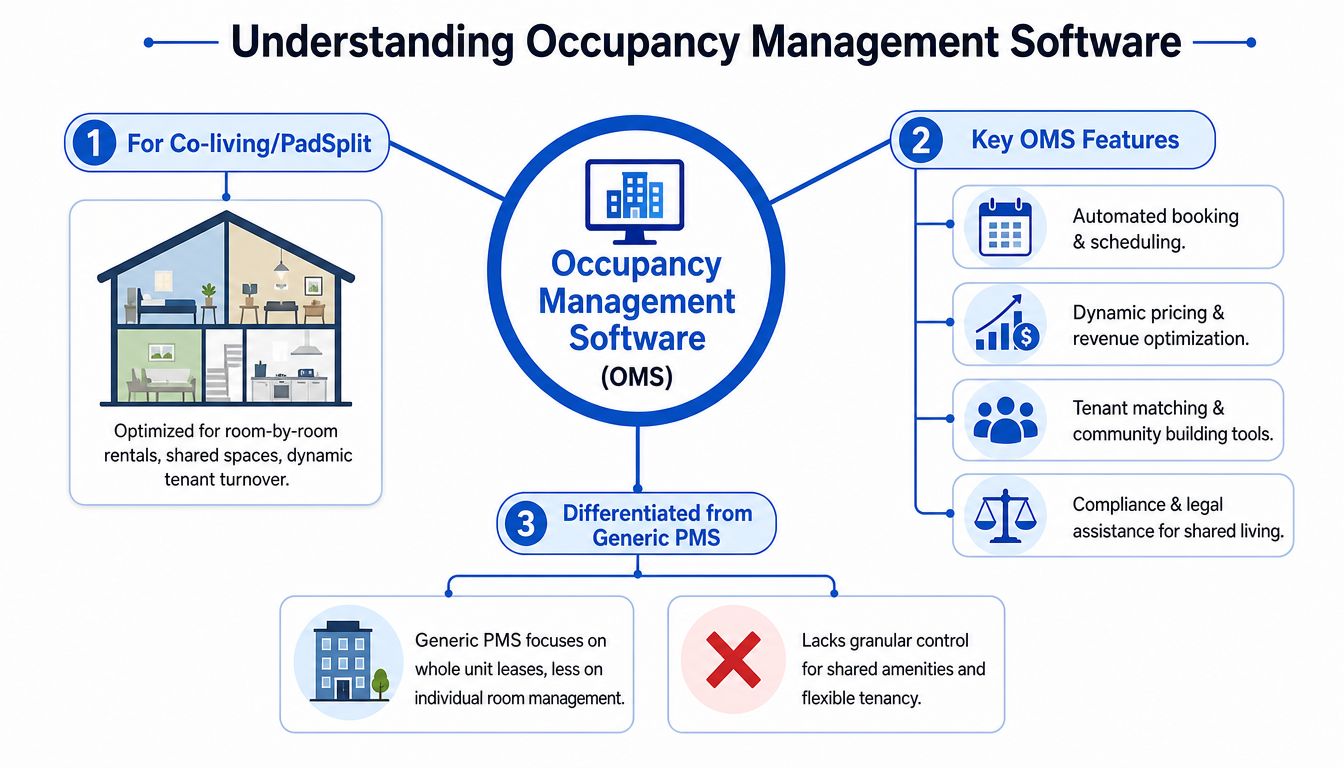
For a co-living operator, occupancy management software isn't just software that tells you whether a property is leased. It tells you how each room, shared area, and turnover window is performing so you can keep the house full without running yourself into the ground.
A generic PMS often assumes one lease, one unit, one resident group. That works for apartments. It breaks down when a single address contains multiple bedrooms, multiple payment schedules, multiple inquiries, and different turnover dates.
Occupancy is not the same as utilization
This distinction matters more than most operators realize.
Occupancy is who's present or which spaces are filled. Utilization is how intensively that space is being used. CBRE's 2024 guidance makes that distinction explicit and notes that blending signals like badge, Wi-Fi, and sensor data helps reveal no-shows and dwell times that matter for rightsizing and NOI decisions.
For co-living, translate that into room-rental language:
| Concept | What it means in practice |
|---|---|
| Occupancy | Is bedroom 3 occupied right now, or is it vacant? |
| Utilization | Is that room priced correctly, turning over efficiently, and contributing as much as it should to the house? |
A simple analogy helps. Owning a car is one thing. Having that car actively earning money through rideshare use is another. In the same way, a room can be occupied without being well managed, and a property can look “full enough” while still leaving money on the table through poor pricing, weak turnover timing, or mismatched resident flow.
What good software does for room-by-room operations
The right platform helps you answer practical questions fast:
- Which rooms are available now, and which will open soon
- How long a room tends to sit vacant between residents
- Whether your pricing strategy is hurting occupancy
- How shared spaces and room assignments affect the resident experience
- Which houses are healthy and which need intervention
A filled room is good. A filled room at the right price, with a smooth turnover and fewer operational headaches, is what actually improves the portfolio.
Why generic systems miss the mark
Most apartment-focused software treats the property as the unit of analysis. Co-living operators need the room to be the unit of analysis.
That changes everything:
- room-level pricing
- room-level availability
- staggered resident journeys
- shared-house access control
- communications tied to bedrooms, not just addresses
If you've ever tried to force a standard PMS into a co-living workflow, you already know the result. Lots of workarounds. Extra notes. Duplicate records. And a team that stops trusting the system because it doesn't reflect reality.
Core Features That Save You Time and Money
Not every feature matters equally. For room-rental operators, the best tools solve recurring operational problems first.
A strong market benchmark helps here. To qualify as a top solution, software needs to handle five core use cases: real-time occupancy tracking, reservations, historical usage reporting, floor plan visualization, and capacity limits. Those capabilities account for 25% of evaluation scoring in 2026 industry assessments.
Features that reduce vacancy friction
These are the tools that directly affect whether a room gets filled quickly and managed cleanly:
- Real-time occupancy tracking: You need a live view of what's occupied, what's pending, and what's ready to market.
- Reservations and scheduling: This matters anytime you're coordinating tours, hold requests, move-ins, cleaners, or maintenance.
- Historical usage reporting: Past patterns help you spot houses with recurring delays, weaker demand, or longer turnover gaps.
- Floor plan visualization: In co-living, seeing rooms in context helps. It's easier to understand vacancies, nearby shared spaces, and room mix when you're not reading from a spreadsheet.
- Capacity limit management: Shared kitchens, common areas, and house rules work better when occupancy caps are clear and enforced.
Features that lower admin load
The best occupancy management software also removes repetitive tasks that keep operators stuck in reaction mode.
A practical stack often includes:
- Automated messaging workflows: Initial lead replies, tour confirmations, move-in reminders, and resident updates shouldn't all depend on manual texting.
- Dynamic pricing controls: Room pricing changes constantly with seasonality, demand, room type, and current vacancy pressure.
- Smart lock integration: Access changes happen often in co-living. Remote credential control beats chasing physical keys.
- Smart thermostat integration: Shared housing creates utility waste when HVAC runs without regard to actual occupancy patterns.
- Portfolio dashboards: You need to know which homes are stable, which rooms are dragging performance, and where the next problem is likely to appear.
What works and what usually disappoints
Some features sound impressive in demos but don't help much day to day unless they're tied to clear workflows.
What usually works well:
- Simple room status workflows
- Fast visibility across multiple houses
- Automations tied to move-out and move-in events
- Reports that owners can understand without exporting data
What often disappoints:
- Apartment-first workflows forced onto room rentals
- Pretty dashboards without room-level actions
- Messaging tools that don't connect to occupancy or turnover
- Reporting that stops at “leased” instead of showing room performance
The practical test is simple. If a feature doesn't help you fill rooms faster, reduce manual follow-up, or improve house-level decision-making, it's probably not worth much in a co-living operation.
Evaluating Your Software Options
Shopping for occupancy management software gets confusing fast because many tools use the same language while solving different problems. A desk-booking platform, a workplace analytics tool, and a room-rental operations system can all claim to manage occupancy. That doesn't mean they fit your portfolio.
The filter I'd use is straightforward. Start with operational fit, not feature count.
The non-negotiables
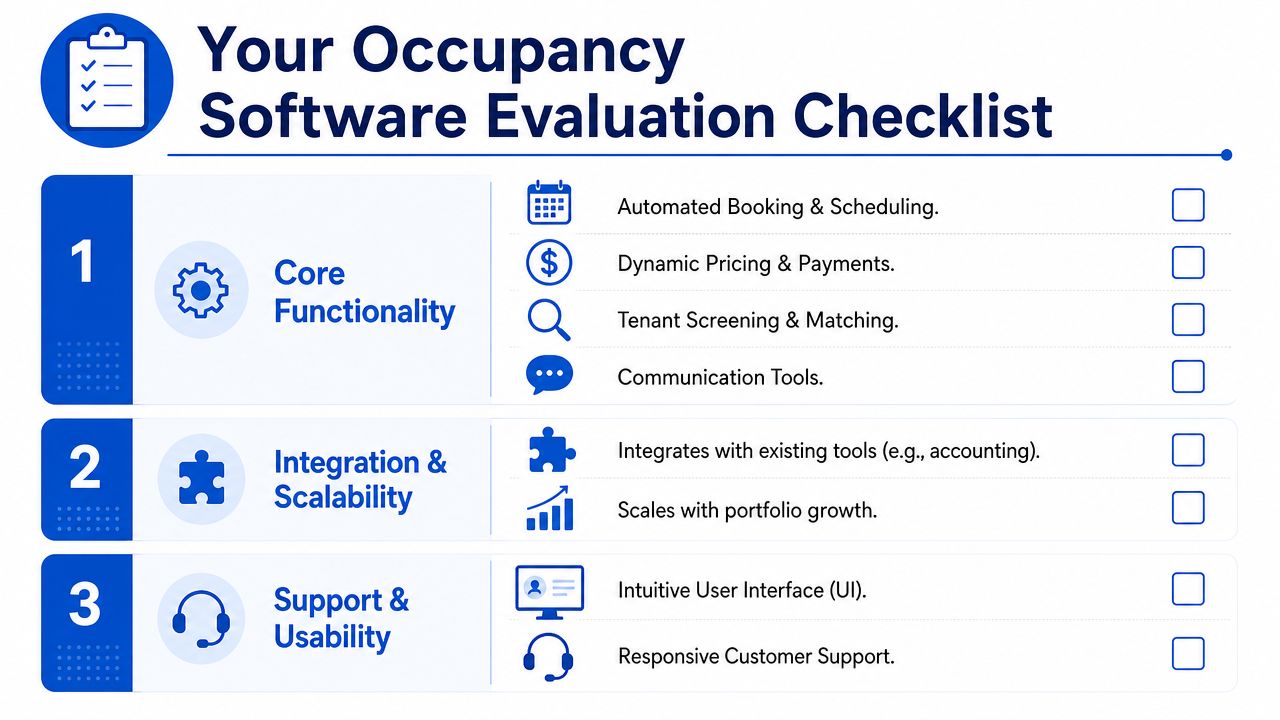
The GSA's occupancy data guidance points to several criteria that map well to co-living operations: user-friendliness, scalability, easy integration with existing tools, and comprehensive analytics that align with your own internal definitions.
That last point matters more than it sounds. If the software says a room is “occupied” but your team considers it “pending cleaning” or “not yet revenue active,” reporting gets messy fast.
Use this checklist during demos:
- Room-first design: Does the platform treat bedrooms as distinct inventory, or does it mostly think in whole-unit leases?
- Usability: Can an on-site manager, VA, or leasing coordinator learn it quickly without a long training cycle?
- Integration: Does it connect cleanly with accounting, calendars, messaging tools, and smart-home devices?
- Scalability: Will it still work when you add houses, staff, and more turnover volume?
- Analytics: Can you see occupancy and usage in a way that matches how you run the business?
For a broader look at adjacent tools, it helps to compare your shortlist against other systems in the wider property management software landscape.
Questions worth asking on the demo
Don't let a sales rep control the whole conversation. Ask questions that reveal whether the product understands your workflow.
- How does the system handle multiple rooms at one address with different availability dates?
- Can we automate communications based on room status changes?
- How are vacant, reserved, occupied, and make-ready rooms defined?
- What does reporting look like at the room, house, and portfolio level?
- How does pricing work if our inventory grows by rooms rather than units?
- What breaks if internet or device connectivity is interrupted?
A short explainer can help you spot the difference between a polished pitch and a useful operating system:
Trade-offs you should expect
You probably won't get every feature in one perfect package.
| If a tool is strong at... | Watch for... |
|---|---|
| Enterprise analytics | More setup overhead and slower onboarding |
| Simple usability | Less flexibility in reporting or automation |
| Smart-device integrations | Dependence on hardware compatibility |
| Broad PMS functionality | Weak support for room-by-room workflows |
Buy for the operation you run every day, not the demo you liked for twenty minutes.
Calculating the ROI for Your Portfolio
Most operators don't need a complex finance model to evaluate occupancy management software. They need a simple way to decide whether the tool saves more than it costs.
For room-rental portfolios, the answer usually comes from three buckets: vacancy reduction, admin time savings, and fewer operational mistakes.
Start with the rooms
Use a back-of-the-napkin approach:
- Vacancy savings: What is one room worth per week in your market?
- Admin savings: How many staff hours go to lead follow-up, scheduling, access coordination, and resident updates?
- Operational savings: How often do you pay for avoidable lock changes, unnecessary site visits, or missed handoffs?
Even without exact benchmarks, most operators can estimate these quickly from current operations.
Where timing creates value
Demand is not evenly distributed. Research on occupancy patterns consistently shows Wednesday and Thursday as peak days, with lighter activity on Monday and Friday, and a steady occupied window from 10 AM to 4 PM. For operators, that kind of pattern matters because it helps you plan when to respond fastest, when to schedule tours, and when to line up staffing and access.
That doesn't mean co-living behaves exactly like an office. It does mean timing matters more than many landlords assume.
Here's the practical takeaway:
- Respond faster during known high-activity windows
- Schedule tours and make-ready coordination when prospects are most reachable
- Review pricing before your busiest inquiry periods, not after
- Use automations to cover slow-response periods like nights and weekends
A manual system usually misses these moments because everything depends on whoever is available. Software doesn't get distracted by another resident text.
Worth remembering: ROI often comes from speed. The room that gets marketed, shown, and assigned faster is the room that earns sooner.
A simple decision test
You don't need exact percentages to make a solid call. Ask:
| Question | Why it matters |
|---|---|
| Will this help us fill rooms faster? | Vacancy is usually the largest upside |
| Will this reduce repetitive staff work? | Labor savings compound across houses |
| Will this improve pricing and turnover decisions? | Better timing improves portfolio health |
| Will this reduce avoidable errors? | Access mistakes and communication gaps are expensive |
If you want a structured way to pressure-test the numbers for your own portfolio, run your assumptions through a room-rental savings calculator.
A good software investment doesn't need heroic assumptions. It just needs to remove enough friction that your team can move faster and make cleaner decisions.
Common Pitfalls to Avoid During Implementation
A lot of software rollouts fail for a boring reason. The team keeps using old habits inside a new tool.
Occupancy management software won't rescue a messy workflow unless you clean up the workflow too. The system can automate actions, but it can't guess what your statuses mean, which messages should trigger when, or who owns each handoff.
What trips operators up
These mistakes show up often in room-by-room portfolios:
- Choosing apartment software for a co-living workflow: The setup may look close enough, but room-level operations usually end up buried in notes and workarounds.
- Importing dirty data: If room names, availability dates, or resident records are inconsistent at launch, reporting becomes unreliable from day one.
- Skipping training: Teams nod through setup, then go right back to texting, spreadsheets, and side conversations.
- Leaving automations turned off: Operators pay for the platform but still handle replies, reminders, and access changes manually.
The result is usually low adoption, not low software quality.
What successful adoption looks like
A useful benchmark comes from workplace software adoption. Successful rollouts target 60% to 80% active use among intended user cohorts, and strong policies can reduce booking no-show rates to below 10%. The lesson for co-living is simple. Engagement matters. If your team doesn't use the system, results stay theoretical.
A better implementation approach looks like this:
- Define statuses clearly: Everyone should know the difference between available, reserved, occupied, and make-ready.
- Train around real tasks: Use move-ins, room turns, and lead follow-up as training scenarios.
- Assign ownership: Someone needs to own pricing updates, someone else needs to own data hygiene, and nobody should assume “the system handles it.”
- Enforce the workflow: If updates happen outside the software, the software stops reflecting reality.
New software doesn't fail because teams dislike technology. It fails because the process around it stays optional.
Your Roadmap to Adopting a New Platform
The cleanest way to adopt occupancy management software is to treat it like an operational upgrade, not a tech project. Keep it grounded in daily pain points. Late replies. Unclear room status. Repeated turnover mistakes. Fragmented reporting.
That approach keeps you from buying features you won't use.
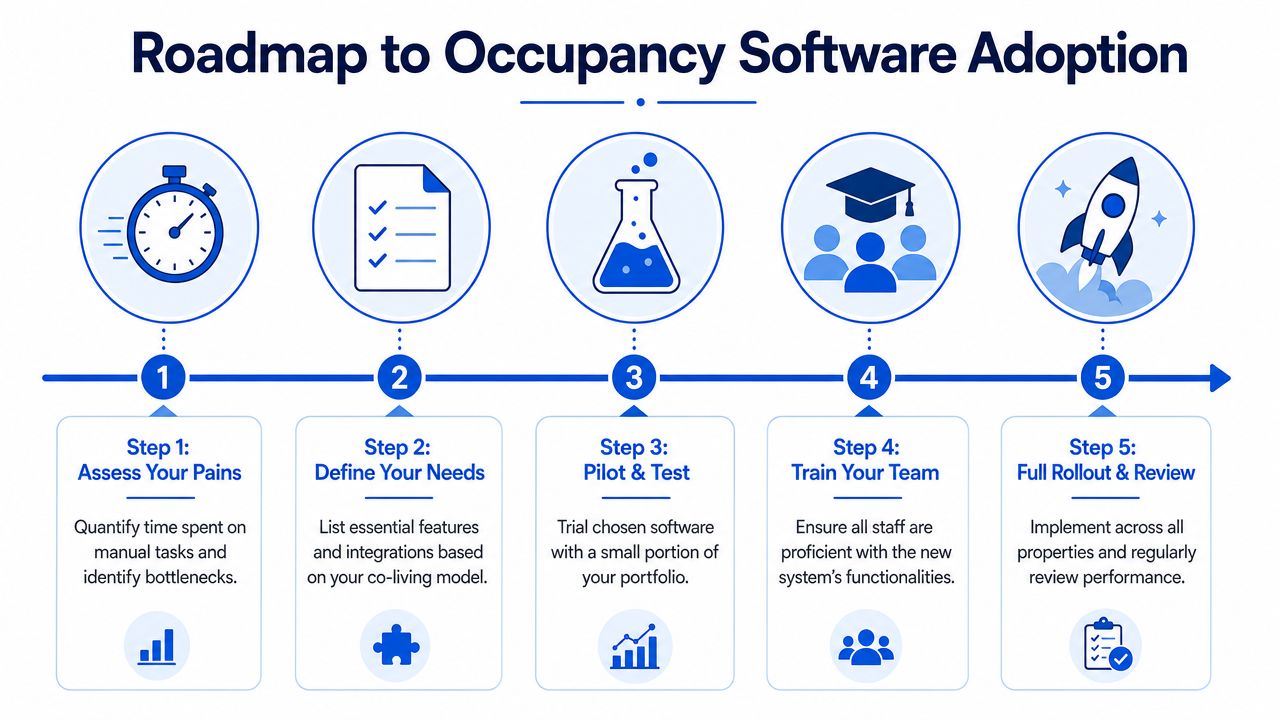
A practical rollout sequence
Assess your pains
Write down where your team loses time now. Look at inquiry handling, room turns, access coordination, pricing updates, and owner reporting.Define your must-haves
Not every operator needs the same setup. Some need stronger pricing controls. Others need better communications or cleaner reporting across many houses.Pilot before full rollout
Start with one property or a small set of rooms. That gives you room to fix naming conventions, workflows, and permissions before the wider launch.
Train for the work, not the software
Teams learn faster when training is tied to real operational moments.
Use examples like:
- a same-week move-in
- a room transfer
- a lock credential update
- a delayed cleaning handoff
- a pricing change on a room that just went vacant
That's also where process documentation matters. A short operating playbook beats a long manual almost every time.
If you're tightening operations more broadly, this kind of workflow optimization guide for property teams can help you map the software to actual daily tasks.
Review and improve after launch
A rollout isn't done when the software is live. It's done when the team trusts the system enough to stop maintaining shadow processes.
Review questions that matter:
| Review area | What to look for |
|---|---|
| Room status accuracy | Does the system match what's happening on site? |
| Response workflows | Are leads and residents getting timely communication? |
| Turnover execution | Are make-ready tasks moving cleanly from move-out to relist? |
| Reporting quality | Can you spot problem houses quickly without rebuilding reports? |
The operators who get the most value from occupancy management software don't chase perfection at launch. They start with the biggest pain point, build confidence, and expand from there.
Room-by-room operations are too dynamic for manual management forever. Once your portfolio reaches a certain level of complexity, software stops being optional and starts becoming the operating layer that keeps everything together.
PadPulse is building an all-in-one platform for PadSplit hosts and co-living operators who want to save time, fill rooms faster, and improve NOI without stitching together disconnected tools. If that sounds like the direction you're heading, join the PadPulse interest list to get product updates, limited beta access news, and early opportunities to help shape the platform before launch.