Utility Billing Software for Co-Living Operators
September 14, 2026
A utility bill arrives after a room turns over, and the numbers don't line up. One resident moved out halfway through the cycle, another moved in three days later, the internet charge belongs to the whole house, and the water bill still sits in your email inbox. You open a spreadsheet, count occupied rooms, make a few prorated calculations, and hope nobody asks why their share changed.
That workflow may be manageable for one house, but it becomes fragile when several rooms, utilities, move-ins, and disputes overlap. Utility billing software gives co-living operators a repeatable way to collect usage or utility charges, apply allocation rules, create resident statements, and preserve the records behind every amount.
The category is no longer limited to municipal billing departments. One recent utility billing software market report estimates the global market at USD 6.32 billion in 2025, with a projection of USD 11.52 billion by 2034. The same report identifies cloud deployments as 69.4% of the market in 2025, Software as a Service as 48.7% of the type segment, and North America as 36.8% of global share that year. For a PadSplit host, the important point isn't the market size by itself. It's that billing software has become a practical operations layer for recurring, room-by-room charges.
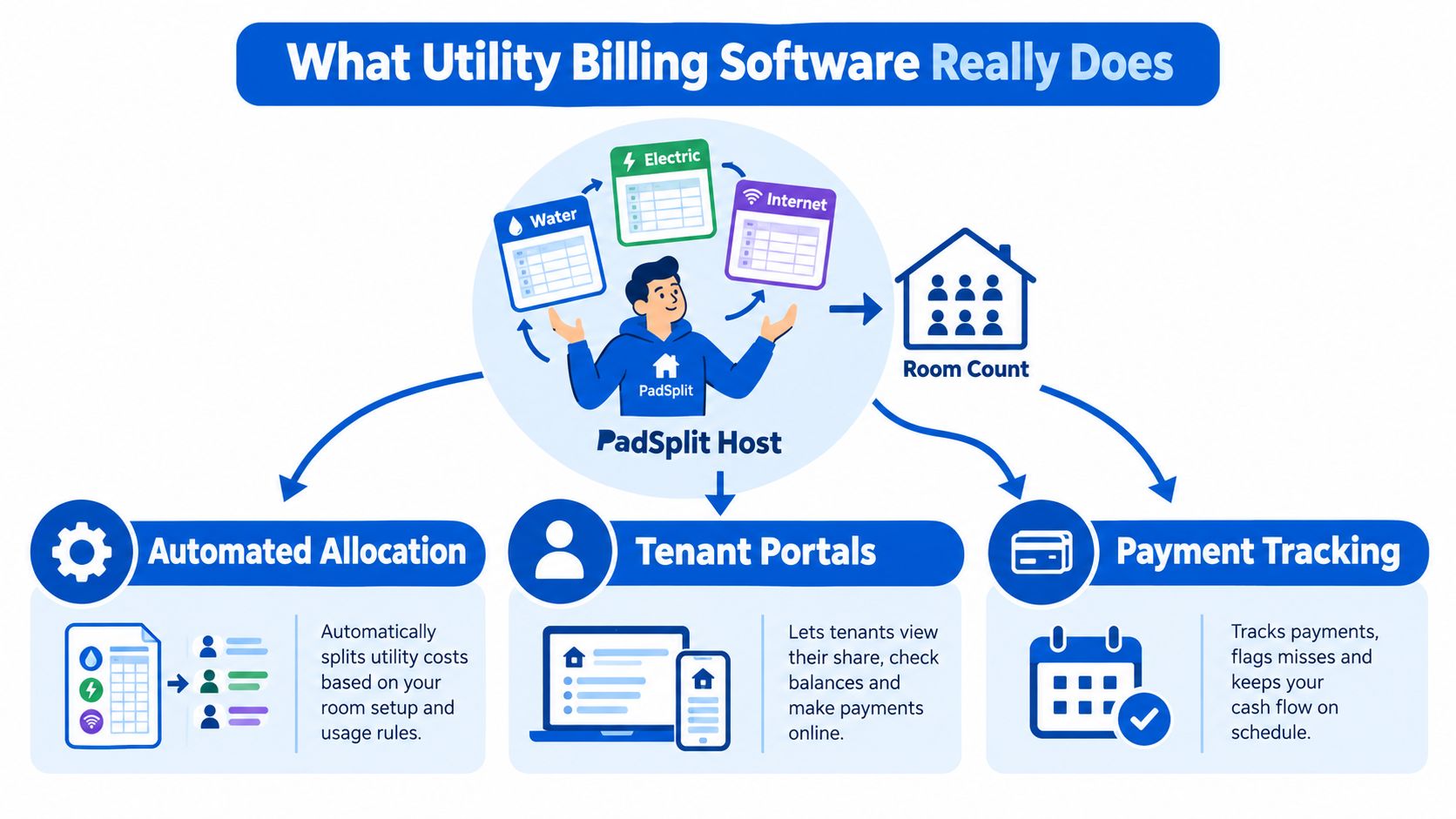
What Utility Billing Software Really Does
Suppose you operate a five-room house. The electric bill covers the whole property, the water bill arrives on a different date, internet is a fixed monthly charge, and a resident leaves on the fifteenth. Your spreadsheet has to remember who occupied which room, how many days each person was responsible for, which costs should be split evenly, and whether the next resident began paying immediately or after a gap.
A dedicated platform replaces that patchwork with a controlled workflow. It takes utility information from meter reads, submeters, smart devices, uploaded bills, or fixed allocations. Then it applies rules such as per room, per occupant, actual usage, or prorated days, creates an itemized statement, and sends the charge to the rent or payment ledger.
The billing execution layer
In a traditional utility environment, the customer may be a homeowner paying the city or electric provider directly. A customer information system, or CIS, stores the account, meter assignment, rate schedule, payment history, and audit trail. Billing software uses those records to calculate periodic charges and produce invoices. This relationship is described in an explanation of utility CIS and billing software.
A co-living operator uses the same basic logic in a different setting. You remain responsible for the master utility account, while residents reimburse their allocated share. The software becomes the layer between the property-level bill and each room's resident ledger.
Why the distinction matters
For room-by-room housing, the difficult part usually isn't printing a bill. It's handling exceptions:
- A resident moves in halfway through the month.
- A resident moves out while another room remains vacant.
- One utility is shared evenly, while another follows actual usage.
- A resident questions a charge and needs to see the underlying period and calculation.
- A bill arrives late, after the house has already changed occupancy.
The best system records the source charge, allocation rule, occupancy dates, adjustments, and payment status together. That gives you more than convenience. It gives you a defensible explanation when a resident asks, “Why is my amount different this month?”
Practical rule: Treat every utility charge as a small accounting record, not a number copied into a spreadsheet.
Core Features Every Co-Living Host Should Know
Think of a useful billing platform as a calculator, notebook, and envelope system combined. The calculator applies the math, the notebook records why the math was used, and the envelopes separate each resident's responsibility. A host shouldn't need three disconnected tools to answer one basic question about a bill.
Start with clean usage and occupancy data
The platform should accept meter reads and, where available, automated feeds from submeters, smart thermostats, or other connected devices. It should also know which room was occupied, by whom, and on which dates. Without that connection, automation moves inaccurate data through the process faster.
For a mid-month move-in, the system should calculate the resident's eligible days rather than assigning the full monthly charge. For a move-out, it should close that resident's responsibility on the correct date and preserve the calculation.
Look for these operating capabilities
- Automated allocation: Apply rules by room, occupant, square footage, fixed percentage, or actual measured usage.
- Proration: Handle partial occupancy without forcing you to calculate daily shares manually.
- Audit-ready ledgers: Show the bill period, source amount, allocation method, meter read, adjustment, and resident share.
- Multi-utility support: Keep electric, water, gas, internet, trash, and other recurring charges in one workflow.
- Plain-language statements: Give residents understandable line items instead of unexplained totals.
- Payment and fee handling: Record late charges, returned payments, credits, and adjustments according to your policy.
- Accounting exports: Send summarized or detailed records to tools such as QuickBooks or similar accounting systems.
Submetering and audit trails deserve special attention. Texas rules for submetered water service require bills to show measured usage and the cost per unit for each service, as set out in the Texas submetered water billing rule. Even when a co-living arrangement isn't governed by that exact rule, the principle is useful: residents should be able to understand what was measured and how the charge was formed.
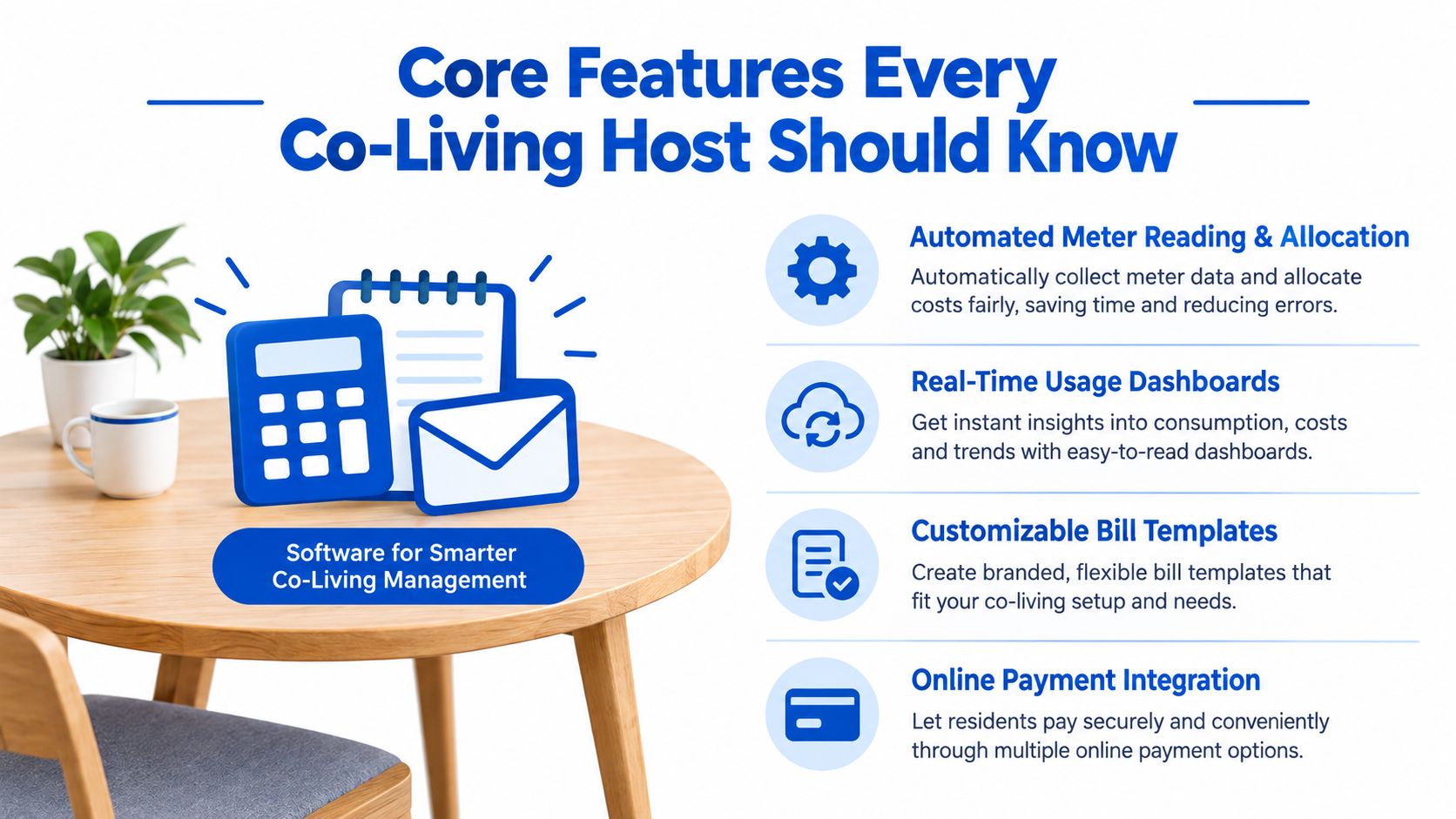
A resident portal can complete the loop by showing statements, payment history, usage details, and open questions. Your accounting record, resident communication, and payment ledger should describe the same transaction, not three slightly different versions.
Choosing the Right Billing Model for Your House
There isn't one correct utility model for every co-living property. Your choice depends on the number of rooms, the equipment already installed, how much usage varies, and how much transparency residents expect.
| Billing Model | How It Works | Best For |
|---|---|---|
| Flat allocation | The property bill is divided evenly, by room count, or according to a chosen fixed rule. | Smaller shared houses without room-level meters |
| Submetered billing | Each room is charged using individual meter reads or connected device data. | Larger houses where actual usage and dispute reduction justify equipment |
| Inclusive rent | Utility costs are built into the weekly or monthly room price. | Properties where simplicity matters and utility costs remain predictable |
Flat allocation
Flat allocation is easy to explain and inexpensive to operate. A five-room house might divide a shared internet bill by occupied rooms, while a water bill could follow the same rule. You still need a consistent vacancy and proration policy, because an empty room can change who carries the shared cost.
Hosts often choose this approach when the house has few rooms and no submetering infrastructure. The tradeoff is that a low-usage resident may pay the same share as a high-usage resident.
Submetered billing
Submetering connects each room to actual consumption. It takes more planning because the equipment must be installed, paired, checked, and maintained. In return, a resident can see a charge tied to their own usage rather than a general house average.
This model can be especially useful when rooms have different heating, cooling, or appliance patterns. It also makes a dispute easier to investigate, provided the software stores the meter read and calculation.
Inclusive rent
Inclusive rent removes a separate reimbursement line from the resident experience. You set the room price with expected utility costs in mind and accept the risk that unusual consumption will reduce your margin.
A PadSplit-style structure often favors transparent pass-through billing because each room rents independently. Residents want to know what they're paying for beyond base rent, and hosts need a repeatable way to handle partial occupancy. For more detail on dividing shared property costs, see these expense allocation methods.
Benefits and ROI for PadSplit Hosts
For a small operator, return on investment isn't only about saving administrative time. It comes from recovering costs that would otherwise stay with the host, reducing avoidable corrections, and turning a fixed property bill into clearly assigned room-level revenue.
Consider a five-room house. A resident moves out before the next person arrives, and your spreadsheet misses part of the departing resident's responsibility. Another resident disputes a water charge because the statement contains only a total. You spend the evening rebuilding the calculation instead of preparing the room for its next occupant.
Where the financial benefit comes from
- Vacancy recovery: The system closes the departing resident's allocation correctly and applies the next resident's responsibility from the proper start date.
- Fewer disputes: Itemized statements show the period, rule, and share, reducing questions caused by unexplained totals.
- Less reconciliation work: The platform connects the source bill, resident allocation, payment status, and accounting record.
- Better collection visibility: Outstanding utility charges remain visible beside the resident's other ledger activity.
- Cleaner month-end review: You can investigate exceptions rather than recalculate every room from scratch.
The provided operating example is a five-room house that recoups roughly $180 per month after software fees through recovered allocations, reduced leakage, and time savings. That amount is a scenario, not a universal result. Its value comes from showing how several small improvements can combine into one monthly operating gain.
| Lever | Monthly Impact | How Software Delivers |
|---|---|---|
| Vacancy recovery | Recovers eligible charges that might otherwise remain with the host. | Applies move-out and move-in dates to the allocation. |
| Dispute reduction | Limits avoidable credits and repeated explanations. | Displays itemized calculations and supporting records. |
| Time saved | Gives the host more time for room turns and resident service. | Automates imports, calculations, statements, and exports. |
| Collection visibility | Makes unpaid pass-through charges easier to follow. | Links billing records to resident payment ledgers. |
Across a year, a recurring monthly improvement compounds into a meaningful property-level result. Across multiple houses, the same logic can improve visibility without requiring a separate spreadsheet for every address. Hosts comparing utility costs can also use this guide to lower utility bills, while keeping allocation and collection records separate from conservation efforts.
Integrations That Make Billing Run Itself
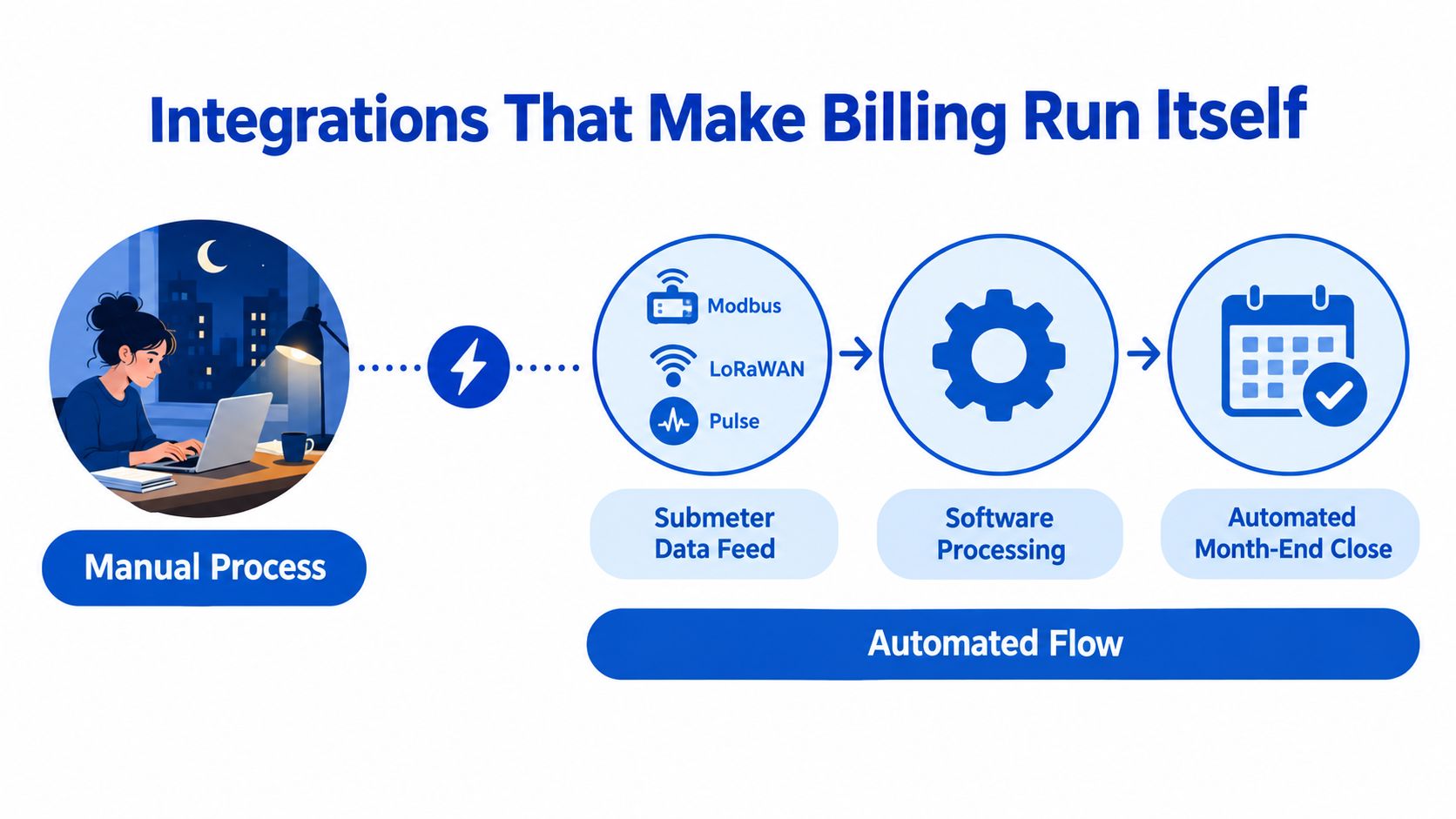
Integrations determine whether utility billing software reduces work or creates another place to type numbers. A host who enters meter reads, resident names, charges, and payment status by hand is still operating a manual system, even if the final invoice looks polished.
Ask how meter data enters the platform
Submeters may send data through Modbus, LoRaWAN, or pulse output. You don't need to become an engineer, but you should ask which protocols the platform supports, how often readings arrive, and what happens when a reading is missing or looks abnormal.
Smart thermostats add another layer. An API can connect HVAC activity to a specific room or device, helping you distinguish a room-level usage signal from a whole-property charge. If remote HVAC oversight matters, understand how monitoring connects with remote thermostat management.
Connect the property and accounting records
The property management or resident platform should receive the generated charge and keep it aligned with the room's ledger. For a PadSplit operation, that means asking how invoices or resident charges move into the payment workflow. On the accounting side, tools such as QuickBooks, Xero, and Stessa may need transaction exports, journal entries, or property-level summaries.
A clean handoff prevents duplicate entry. The bill should enter once, allocation should occur once, and the accounting record should reference the same source transaction.
Bring these questions to a vendor demonstration:
- Data feed: Which Modbus, LoRaWAN, and pulse-output devices are supported?
- Missing reads: Does the system flag gaps before creating a bill?
- Thermostat connection: Can smart thermostat data be associated with individual rooms?
- Property platform: Does the software connect with PadSplit or export in a usable format?
- Accounting: How does it work with QuickBooks, Xero, or Stessa?
- Corrections: Can you reverse and reissue a charge without losing the original audit trail?
- Ownership: Which system remains the source of truth for residents, payments, and accounting?
Implementation Checklist From Day One to First Bill
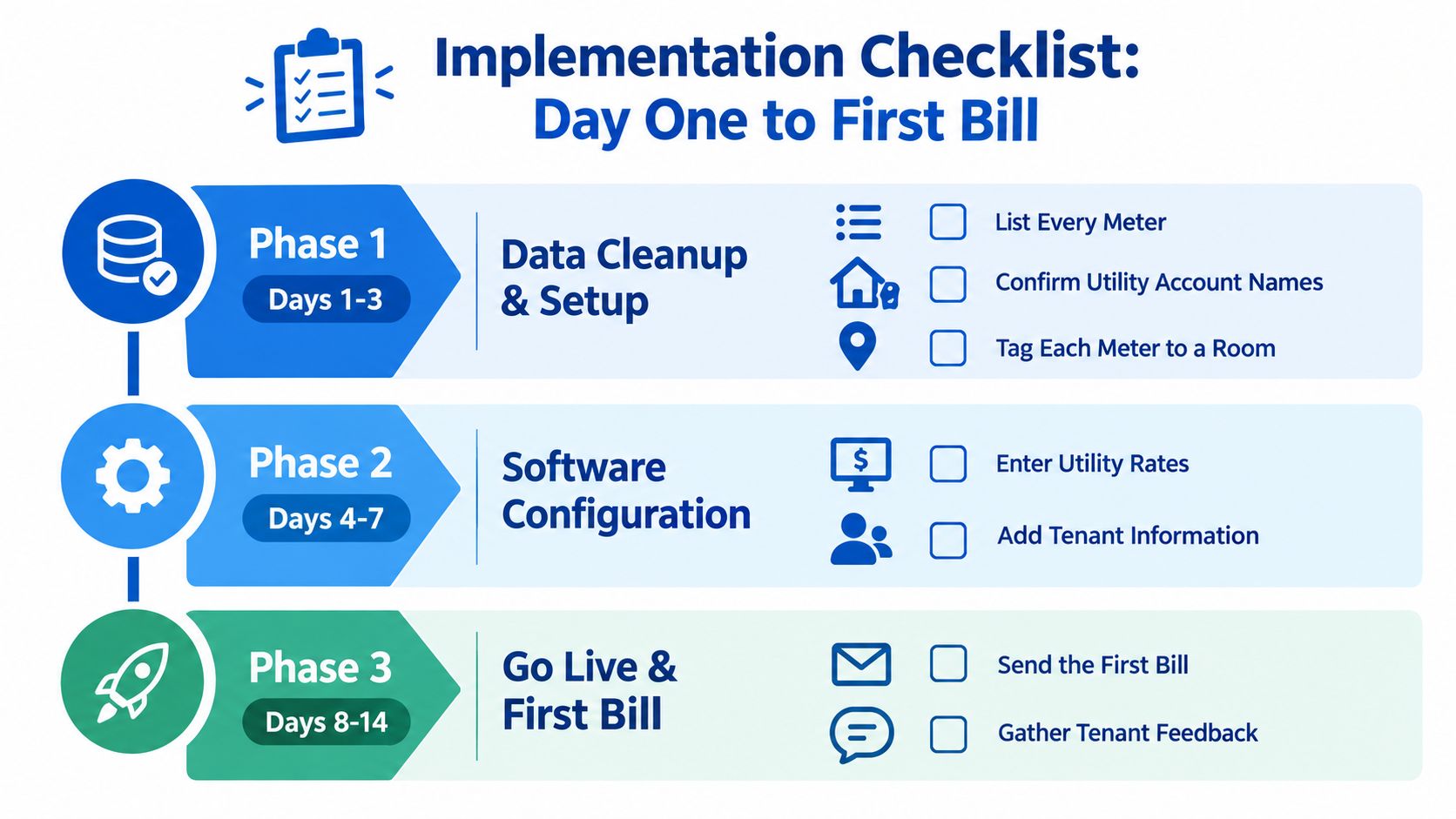
A solo host can approach implementation as a controlled rollout rather than a major technology project. The fastest path is to clean the property data first, connect or verify the meters second, configure the billing rules third, and run a parallel check before the first live statement.
Days 1 through 3, clean the records
Create a property inventory. List every utility account, meter, submeter, room, current resident, occupancy date, and billing responsibility. Confirm that the utility account names match your records and tag each meter to the correct room or shared area.
Don't skip the source-document step. Save recent utility bills, current rate information, existing spreadsheet formulas, and written allocation policies in one location. If the rule can't be explained from your records, it shouldn't be automated yet.
Days 4 through 7, configure the system
Pair each available meter or device and record a sanity-check reading before go-live. A reading that is obviously missing, duplicated, or assigned to the wrong room will create a clean-looking but incorrect invoice.
Then enter the billing rules:
- Utility mapping: Identify which account supplies which rooms or shared spaces.
- Allocation logic: Select actual usage, room share, occupant share, square footage, or a fixed charge.
- Proration: Define how move-ins and move-outs are treated.
- Adjustments: Record credits, corrections, and approved exceptions.
- Communication: Configure the statement language residents will see.
Days 8 through 14, test and cut over
Run one parallel billing cycle beside the old spreadsheet. Compare the total property bill, room allocations, occupancy dates, credits, and resident totals. Investigate every variance before deciding whether the software or spreadsheet is correct.
Use this cutover checklist:
- Test invoices: Generate statements for a full-occupancy month, a mid-month move-in, a move-out, and a vacant room.
- Resident notice: Tell residents what will appear, when statements are issued, and where disputes should be submitted.
- Deposit handling: Confirm how utility credits, balances, or approved adjustments are recorded.
- Payment handoff: Verify that the charge reaches the correct resident ledger.
- Final date: Choose one cutover date and stop editing the old spreadsheet afterward.
- Review owner: Assign one person to approve exceptions before bills are released.
Compliance and Tenant Communication Best Practices
A clear statement protects the relationship before it protects the host. Residents are less likely to challenge a charge when they can see the billing period, source utility, allocation method, occupancy dates, and any adjustment in plain language.
Rules vary by location and utility arrangement, so don't assume a familiar process is lawful everywhere. Arkansas utility billing rules, for example, distinguish between a 22-day cycle that allows late charges and a 14-day cycle that does not. Under the 22-day option, the late charge cannot exceed 10% of the first $30 and 2% of the remainder, according to the Arkansas Public Service Commission utility billing guidance. A separate municipal code example sets a bill's past-due date at the 22nd day after billing and adds a 10% past-due fee, as shown in Hot Springs municipal utility rules. These examples show why your policy needs local review.
Build four communication touchpoints
- Welcome packet: Explain who pays the master bill, which charges may be passed through, and how allocation works.
- Monthly statement: Show the service period, utility type, measured or allocated amount, and resident share.
- Dispute window: Tell residents how to question a charge and what supporting records you'll review.
- Policy updates: Notify residents before changing an allocation rule, fee treatment, or statement format.
For a high bill after a heat wave, use direct language: “Your electric allocation increased because the property recorded higher cooling usage during this billing period. Your statement shows the service dates, the house-level charge, and the allocation rule used for your room.”
For a roommate vacancy, say: “The departing resident's responsibility ended on the recorded move-out date. The remaining allocation follows the shared-house policy, and the next resident's share begins on the recorded move-in date.”
A complete audit trail should retain the source bill, meter reads, calculation, proration, adjustment approval, statement, and communication history. If a resident or regulator questions the charge, repeatable documentation is stronger than memory.
PadSplit Use Cases That Bring It All Together
A host with three PadSplit rooms can use utility billing software without changing the underlying house routine. During the week, the system receives water and energy data, checks the current occupancy list, and identifies a resident who moved in halfway through the billing period. The platform prorates that room's responsibility, generates the resident statement, and places the charge in the payment ledger.
The host's review becomes an exception check. They look for a missing read, an unusual usage value, a vacant-room treatment, or a resident adjustment. They don't need to rebuild every allocation unless something needs attention.
A duplex with flat allocation uses the same workflow more straightforwardly. The host uploads the property bill, assigns the approved share by room, confirms the occupancy dates, and releases the statements. No submeter is required, but the system still preserves the rule and the source amount.
A host managing several PadSplit properties can use one platform while keeping each house's utility accounts, allocation rules, residents, and accounting records separate. One property may use room-level submeters, another may use a fixed shared allocation, and a third may include some utilities in rent. The configuration changes, but the operating pattern remains consistent.
The best setup turns month-end utility work into a short review of exceptions, not a late-night reconstruction of every room.
Start by documenting one property's utilities, room assignments, occupancy dates, and allocation policy. Test the workflow against a move-in and a move-out before expanding it across your portfolio.
PadPulse is being built to help PadSplit hosts centralize co-living operations, including financial visibility, room-level workflows, smart-home connections, and portfolio reporting. Join the interest list by visiting PadPulse to follow the planned Winter 2026 launch and request access to future beta updates.