Remote Thermostat Monitoring a Guide for Landlords
June 14, 2026
A lot of landlords first look at remote thermostat monitoring after a bad utility month.
You open the bill for a shared house, and the number doesn't match the rent roll. One member works nights and drops the temperature during the day. Another is home all afternoon and pushes it back up. A third opens windows while the system is still running. Nobody thinks they're wasting money, but the property still pays for the result.
That problem gets worse in co-living and room-by-room rentals because HVAC isn't serving one household with one schedule. It's serving multiple people with different routines, comfort preferences, and habits. If you don't have visibility into what the system is doing, you're managing one of your biggest operating costs by complaint and guesswork.
The End of Thermostat Wars and Surprise Utility Bills
It usually starts with a message thread. One resident says their room is freezing. Another says the house is stuffy. Someone has already changed the thermostat twice, and the utility bill for the month is still headed in the wrong direction.
In a co-living home, that is not a resident preference issue alone. It is an operating problem tied directly to margin, maintenance load, and retention.
Single-family thermostat advice misses the point here. A shared home has rotating schedules, uneven room use, and residents who do not experience the property the same way. One person works nights, one is home all day, one leaves a window cracked, and the HVAC system keeps responding to all of it. Without visibility, operators end up managing comfort by text message and energy spend by hindsight.
Why operators started treating this like infrastructure
Remote thermostat monitoring became more common once cloud-connected controls were reliable enough to manage across multiple homes, not just one owner-occupied house. For co-living operators, the appeal is practical. Staff can check conditions without a site visit, set limits that fit the property's rules, and catch drift before a comfort issue turns into churn or a maintenance ticket.
That matters more in room-by-room rentals than in traditional leasing.
A standard lease usually spreads HVAC behavior across one household. In co-living, the operator often carries the utility risk while several unrelated residents influence the same system. That changes the math. A few degrees of unnecessary runtime across several occupied bedrooms, common areas, and vacancy gaps can erase margin faster than many operators expect. The benefit of monitoring is not novelty. It is tighter control over a cost category that is easy to lose track of.
Three capabilities tend to matter most:
- Portfolio visibility: Check temperatures, schedules, and overrides across properties without dispatching staff.
- Guardrails: Set operating ranges that protect comfort without letting one resident drive excess runtime for the whole house.
- Early warning: Catch abnormal patterns, such as constant overrides or unusual cycling, before they show up as complaints or repair calls.
I have seen this play out the same way more than once. The expensive part is rarely one dramatic HVAC failure. It is the repeated small waste. Extra runtime in lightly used rooms, avoidable service visits, and preventable resident frustration all stack up.
What changes once you can see the pattern
A key improvement is operational discipline. You can spot whether a home has a scheduling problem, an occupancy mismatch, or a system issue before the monthly bill forces the conversation.
That is why tools built for remote thermostat operations in rental workflows make more sense for shared housing than a basic smart-home app. The goal is not to give everyone another gadget. The goal is to reduce avoidable HVAC spend, keep rooms comfortable, and give the operator a defensible way to manage a shared system fairly.
Remote monitoring will not end every thermostat argument. It does give you records, rules, and response time. In co-living, that is usually what turns HVAC from a recurring source of friction into a controllable part of the business.
What Is Remote Thermostat Monitoring
Remote thermostat monitoring is the ability to see, manage, and automate heating and cooling from outside the property.
The simplest version is familiar. You open an app, check the current temperature, and adjust the thermostat. But that definition is too small for rental operations. In practice, the system becomes a virtual HVAC manager that watches conditions, compares them to your rules, and flags exceptions.
More than a phone app
A basic thermostat app gives you remote control. A monitoring setup gives you oversight.
That means you can:
- View current conditions without calling a resident
- Set schedules for common patterns
- Create threshold alerts for unusual temperatures
- Spot drift before the house becomes uncomfortable
- Reduce wasted runtime in low-use periods
For landlords managing shared homes, that's the difference between passive access and active operations. Tools built for thermostat operations in rental workflows are useful because they treat HVAC as part of day-to-day property management rather than as a gadget.
What the system is actually doing
At a practical level, remote thermostat monitoring collects temperature data, sends it to software, and compares it against rules you define.
That sounds technical, but the business impact is simple:
| What happens | What it means for the operator |
|---|---|
| Temperature is tracked remotely | You don't need to be onsite to know conditions |
| Rules are applied to readings | The system can flag exceptions before residents complain |
| Schedules control HVAC behavior | The house doesn't run the same way at all hours |
| Alerts reach your phone or dashboard | You can act before a comfort issue becomes a repair issue |
Practical rule: If your setup only lets you change the thermostat manually from your phone, you have remote access. If it also gives you alerts, history, and operating rules, you have remote thermostat monitoring.
Why co-living changes the definition
In a single-family home, comfort and cost are usually negotiated inside one household. In co-living, the operator sits in the middle.
You need a system that can support consistent house rules without constant intervention. You also need to account for bedrooms, common areas, and awkward spaces that can affect the whole property if they get too hot or too cold.
That's why landlords who run room-by-room rentals usually get the most value when monitoring is tied to clear policies, not just convenience controls.
How Remote Monitoring Systems Work
A co-living house can feel fine in the hallway and still produce three different comfort complaints by 9 p.m. One resident is under a vent, another is in a hot back bedroom, and the thermostat is sitting in the one spot that looks normal. Remote monitoring fixes that blind spot by showing what is happening across the property, not just at the wall control.
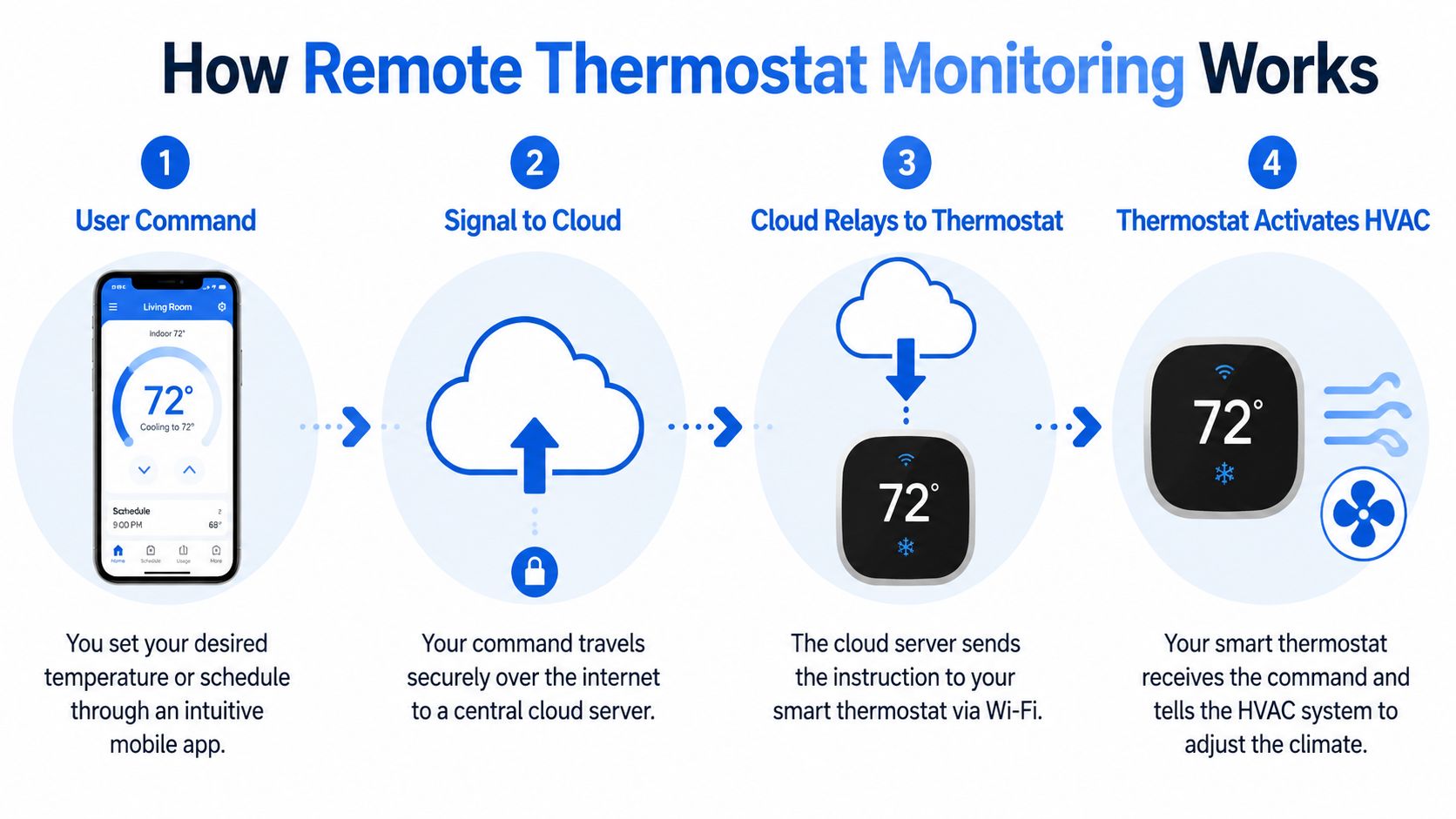
A practical system follows a simple chain: measure, transmit, evaluate, respond. Each step matters because room-by-room rentals create room-by-room problems.
Sensors gather the conditions
The first job is collecting readings from the places that affect member experience. In co-living, that usually means more than the central thermostat location. Back bedrooms, attic-adjacent rooms, basements, and large common areas often behave differently from the rest of the house.
That difference is where operators lose time and money.
If only the hallway thermostat is reporting, you may end up chasing complaints that sound subjective but are really airflow, insulation, or balancing issues in specific rooms. Extra sensors make those patterns visible. A broad overview of remote sensing hardware and placement options is outlined in this remote temperature monitoring guide.
Connectivity moves the data
After the sensor records a reading, the system sends it through Wi-Fi, cellular, or another wireless connection to the platform that manages alerts and history. The software then checks that reading against the rules you set.
In practice, the workflow looks like this:
- A room sensor captures the temperature
- The system sends that reading to the platform
- Software checks it against thresholds, schedules, or exception rules
- The operator gets an alert, or the system logs the event for review
For a co-living operator, that means fewer calls that start with "the room feels off" and no clear way to verify it.
The thermostat, sensors, and software each have separate jobs
These systems work better when you treat each part as a different tool.
The thermostat controls the HVAC equipment. Sensors report what is happening in rooms that the thermostat cannot see well. The software stores the history, applies the rules, and gives your team remote visibility through an app or dashboard.
That separation matters operationally. If a resident changes a setting, the thermostat handles the immediate control. If one bedroom keeps drifting outside your target range every afternoon, the software shows the pattern and helps you decide whether the fix is a schedule change, a lockout policy, a balancing adjustment, or an HVAC service call.
Good monitoring depends on thresholds, timing, and noise control
Operators often focus on app features and skip the part that determines whether the system is useful day to day. The real question is how the platform handles signal quality.
Two settings drive most of the value:
- How precise the reading is
- How quickly the system reflects a real temperature change
Both affect alert quality. A system that reacts to every tiny fluctuation can create constant noise, especially in shared houses where doors open often and occupancy shifts throughout the day. A system that reacts too slowly can miss the early signs of a failing unit, blocked vent, or room that overheats every afternoon.
In co-living, the goal is not lab-grade measurement. The goal is reliable action. Good setups catch patterns early enough to prevent resident friction, but they do not flood your phone with alerts that nobody trusts after the first week.
That is why experienced operators set rules around dwell time, alert thresholds, and exception windows instead of relying on a single temperature cutoff. A bedroom that stays warm for 20 minutes is a more useful signal than a brief spike when someone opens a window or comes in from outside.
Key Benefits for Co-Living and PadSplit Operators
A six-bedroom house with utilities included can lose margin fast when one resident drops the thermostat, another opens windows, and nobody notices the system running hard until the bill arrives. In co-living, HVAC control is not a convenience feature. It is an operating control.
The first win is tighter expense control
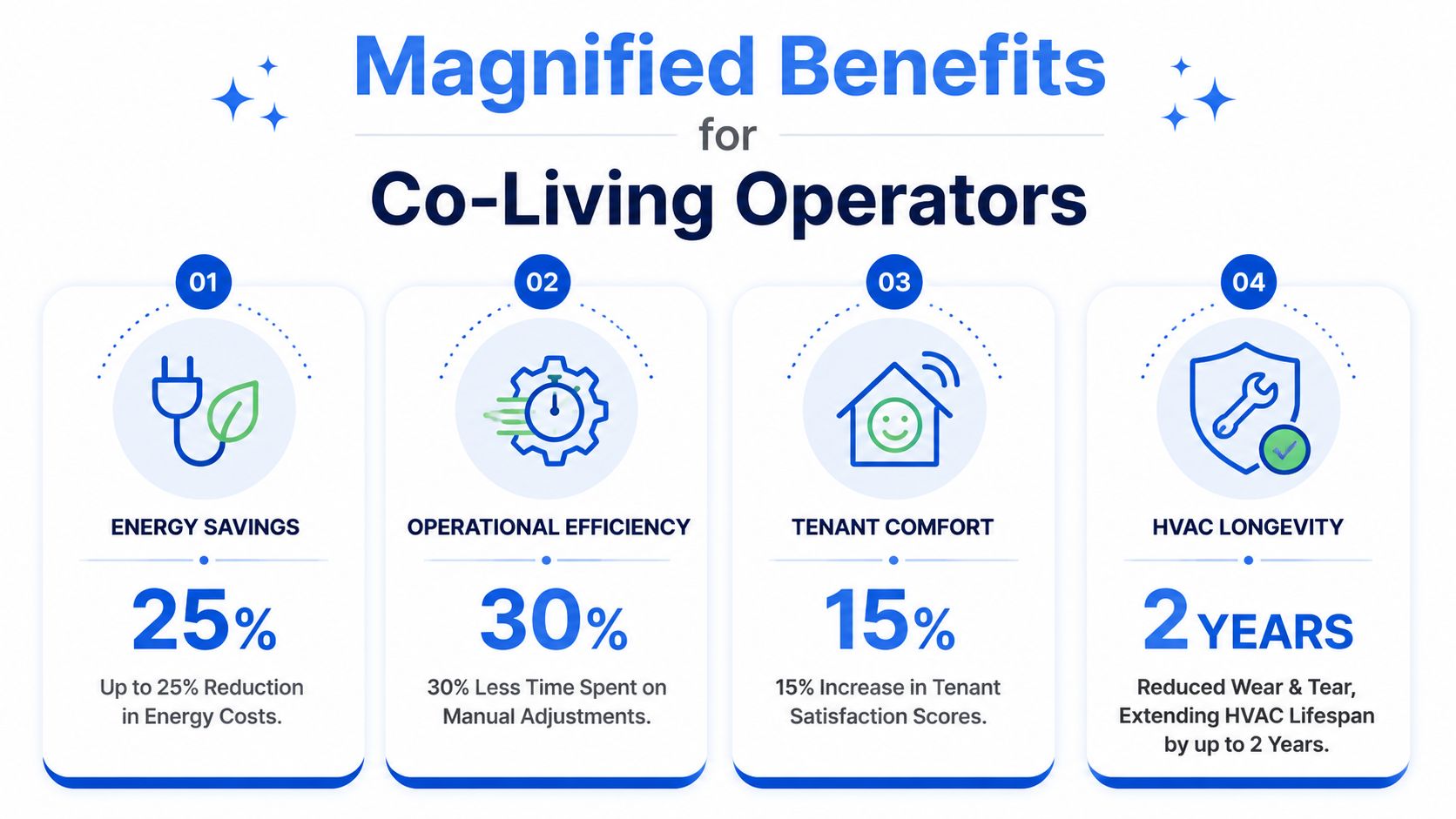
Remote thermostat monitoring helps reduce heating and cooling waste by keeping schedules, setpoints, and runtime closer to actual occupancy. For operators who cover utilities, even modest reductions matter because the savings land directly on NOI, not just on resident convenience.
The value usually comes from a few repeatable controls:
- Schedules that reflect real room usage
- Less conditioning in vacant bedrooms and low-traffic hours
- Faster correction after manual overrides
- Earlier identification of systems that are running longer than they should
The general savings case for programmable and smart thermostat strategies is well documented by the U.S. Department of Energy's thermostat guidance. For shared housing, the practical question is not whether waste exists. It is how much of it you can remove without creating resident complaints.
That trade-off matters. Aggressive setbacks may save more on paper, but if members wake up uncomfortable or common areas drift too far from expectations, you can lose those gains through complaints, refunds, and harder renewals.
The second win is fewer house-level conflicts
Single-family marketing usually focuses on convenience. Operators need control and consistency.
In a room-by-room rental, one thermostat affects multiple paying members with different schedules, comfort preferences, and ideas about who should control the house. Remote monitoring helps set a house standard. Residents get more predictable temperatures, and staff spend less time refereeing thermostat disputes.
A few operator benefits show up quickly:
- Fewer arguments over shared controls
- More consistent comfort across common areas and problem rooms
- Faster response when a resident reports a hot or cold room
- Less wasted HVAC runtime in vacant inventory
I have seen this make the biggest difference in houses with mixed room quality, especially where one upstairs bedroom always runs warmer than the rest. Without monitoring, every complaint sounds subjective. With monitoring, you can verify the pattern, fix the airflow issue, and stop treating the problem like a customer service mystery.
Better maintenance decisions
The labor savings are easy to miss if you only look at utility bills.
When a resident says the house is too hot or too cold, your team can check the trend first and decide whether the issue is a true HVAC problem, a temporary spike, or a room-specific airflow issue. That cuts down on unnecessary vendor visits and helps you send the right technician with the right context when service is needed.
A short walkthrough helps show the practical side:
The ROI is higher in co-living than in standard rentals
One thermostat problem in a traditional rental affects one household. In co-living, the same problem can affect six, eight, or ten members at once. That changes the math.
You are protecting utility spend, maintenance time, review risk, and member satisfaction in the same system. That is why remote monitoring often pencils out faster in shared housing than in a conventional single-tenant property. If you want to test the economics on one house before rolling it out portfolio-wide, run the numbers with this co-living utilities and HVAC savings calculator.
Calculating the Cost and ROI for Your Properties
A six-bedroom co-living house can lose money on HVAC in ways a standard rental does not.
One overheated upstairs room can trigger three complaint threads, an after-hours vendor call, and a thermostat override that leaves the whole house running harder for the next two days. That is why the ROI model needs to cover more than the monthly software fee. In shared housing, the return comes from fewer comfort disputes, fewer unnecessary service visits, and tighter control of utility waste across high-turnover bedrooms.
Start with a property-level model
Use one house first. Pull a representative set of utility bills, then compare that baseline against the cost of a small monitoring setup focused on the rooms and zones that create the most risk.
For co-living, the best pilot usually includes:
- One common area where thermostat decisions affect everyone
- One or two complaint-heavy bedrooms
- One utility-sensitive space if heat, humidity, or airflow creates maintenance risk
- Any room with repeated vacancy waste or override issues
That approach gives you enough visibility to test the business case without paying to monitor every square foot.
What the cost model should include
Keep the math simple at the start. Use two categories.
First, recurring system cost. That includes the platform, sensors, connectivity, and any install labor if you are not handling setup in-house.
Second, operational return. In co-living, that return usually shows up in four places:
| ROI Factor | What to measure | Why it matters in co-living |
|---|---|---|
| Energy savings | Utility spend before and after the pilot | Shared homes often have longer HVAC runtimes because schedules and comfort preferences vary by room |
| Fewer truck rolls | Service calls avoided or shortened | Remote data helps your team rule out false alarms before sending a vendor |
| Lower management time | Complaint handling time per house | One temperature issue can involve several members, not one tenant |
| Better retention and reviews | Complaint frequency and move-out feedback | Persistent comfort problems hurt renewals faster in room-by-room rentals |
A practical sample model
A standard single-family rental might justify monitoring only if the utility savings are clear. Co-living is different. The same system can pay back through operations even when direct energy savings are modest.
For example, say a six-room house has repeated complaints about two upstairs bedrooms and occasional waste from vacant rooms left conditioning all day. If a targeted setup reduces one avoidable service dispatch, trims some runtime during vacancies, and cuts the back-and-forth your team handles each month, the economics can work faster than they do in a one-household rental.
If you want a structured way to test those assumptions, use this co-living utilities and HVAC savings calculator.
How to calculate payback honestly
Operators often overstate returns by pricing a full-house rollout and then assuming every sensor produces equal value. That is not how shared housing performs in the field.
A better method:
- Choose one representative property, not your easiest house.
- Document current pain points with bills, complaint history, and service calls.
- Install a narrow pilot in the rooms and zones that drive real cost.
- Measure results for a full billing cycle or season, depending on your climate.
- Expand only where the pilot shows a clear operational return.
That keeps the pilot grounded in house-level economics instead of vendor promises.
Where the real return usually shows up
Utility savings get attention because they are easy to see on a bill. In co-living, I have found the labor side often matters just as much.
If a member says their room is too hot, the team can check the trend before scheduling a visit. If the room is in range, the issue may be airflow, sun exposure, or a closed vent. If the data shows a real spike, maintenance goes in with context instead of starting from zero. That saves time on both ends.
The strongest ROI cases usually come from a mix of lower energy use, fewer avoidable HVAC calls, and fewer hours spent managing room-by-room comfort conflicts. That is what turns remote monitoring from a gadget into operating infrastructure for shared housing.
Implementation and Security Considerations
Installing the hardware is the easy part. Running it well in shared housing is where most of the actual work starts.
A lot of generic smart-home advice assumes one family, one schedule, and one comfort standard. Co-living doesn't work like that. You have rotating occupancy patterns, different sleep schedules, stronger privacy expectations, and more chances for false alarms.

Placement matters more than most vendors admit
The wrong sensor placement can make a good system look unreliable.
In shared housing, don't assume the thermostat's wall location tells you everything you need to know. Watch the spaces that create risk: rooms with recurring complaints, top-floor heat pockets, draft-prone corners, and irregular spaces that influence the house.
Guidance on remote temperature monitoring without relying on a simple phone-only setup points out a key issue many articles skip: operators have to decide which spaces to monitor, what thresholds to use, and how to handle irregular spaces such as attics and crawlspaces.
A practical deployment plan usually includes:
- Resident-facing zones: Bedrooms or common areas where comfort complaints begin
- Risk zones: Attics, crawlspaces, or other spaces vulnerable to freezing or overheating
- Mechanical context: Areas that help explain whether the HVAC system is behaving normally
Avoid false alarms in multi-occupant homes
Shared housing creates noisy data because people live differently.
One resident may work from home and keep a door shut all day. Another may come and go constantly. A common area may swing in temperature during cooking, gatherings, or heavy daytime use. If your thresholds are too tight, the system will flood you with alerts that don't require action.
Good operators handle this by setting rules that fit the property, not by copying a generic smart-home template.
Set alerts around meaningful exceptions, not every minor fluctuation. A useful alert changes what you do next.
Security and privacy have to be explicit
Residents don't just care about comfort. They care about how the system affects their privacy and control.
That means you should be clear about:
- What the system monitors: Temperature and HVAC-related conditions
- What it doesn't monitor: Anything outside the defined equipment and sensors
- Who has access: The owner, manager, or authorized maintenance staff
- How changes are handled: House rules, escalation process, and service response
If the system sits on your property network, basic security hygiene matters too. Change default credentials, restrict account access, and keep your devices and apps updated. None of that is glamorous, but weak account security turns a useful tool into a liability.
For landlords comparing equipment, a guide to smart thermostats for rental property use can help frame product choices around operator needs rather than retail features.
Your Next Steps to Pilot Remote Monitoring
The best first move isn't a portfolio-wide rollout. It's one controlled pilot.
Pick a property where HVAC costs are noticeable, residents have varied schedules, or comfort complaints already show up often enough to be a pattern. That gives you a fair test case with enough complexity to show whether the system is useful.
A practical pilot checklist
Start with a short list:
- Choose one house: Preferably a co-living property with included utilities or recurring comfort issues.
- Map the problem areas: Bedrooms with repeated complaints, common areas with heavy use, and irregular spaces that affect building performance.
- Set clear rules: Define who can change settings, what temperature exceptions matter, and when alerts should trigger action.
- Track outcomes: Measure bill trends, maintenance friction, resident complaints, and how often the system helps you intervene early.
- Scale selectively: Add more sensors or more houses only after the first property proves its value.
Success usually looks boring. Fewer complaints. More predictable bills. Less time spent figuring out whether the house feels wrong because of a real HVAC problem or just a temporary preference clash.
That kind of boring is profitable.
PadPulse is building an all-in-one platform for PadSplit hosts and co-living operators who want tighter control over pricing, communication, access, and HVAC operations in one place. If you want updates on the Winter 2026 launch and early access opportunities, join the PadPulse interest list.