Smart Lock Setup for Rentals: A Landlord's Guide
May 22, 2026
Managing one rental with a physical key is annoying. Managing a house full of rooms with different move-in dates, cleaner access, maintenance visits, and the occasional midnight lockout turns keys into a daily operations problem.
Most landlords hit the same wall. A tenant moves out and forgets to return a key. A contractor copies one without asking. A room sits vacant for two days because nobody can coordinate handoff. Then someone gets locked out, and suddenly your evening is gone.
That's why smart lock setup matters so much in room-by-room rentals. It isn't just a hardware upgrade. It's the start of an access control system that affects turnover speed, security, and how much manual work your team does every week.
The End of Lost Keys and Late-Night Lockouts
In a standard single-family rental, a lock is a lock. In co-living, it's part of the operating model.
A front door may need permanent access for the manager, scheduled access for cleaners, temporary access for vendors, and individual access rules for tenants whose lease dates don't line up. Physical keys don't handle that well. They create uncertainty. You never quite know who still has one, who copied one, or whether the spare key is where the team thinks it is.
Smart locks solve a different problem than most product boxes suggest. Its true value isn't “open with your phone.” The value is controlled access that changes when your property changes.
That matters because adoption is no longer niche. The worldwide smart door lock market is projected to grow from USD 4.22 billion in 2026 to USD 17.75 billion by 2034 according to Grand View Research's smart lock market outlook. For landlords, that shift reflects something practical. Keyless access is becoming normal infrastructure for properties with frequent turnover.
The instruction manual teaches pairing. It rarely teaches operations.
In shared housing, the best smart lock setup is the one that makes turnover boring. New tenant arrives, access works. Old tenant leaves, access is gone. Cleaner comes Tuesday at noon, code activates on schedule and expires after the visit. That's the standard worth aiming for.
Landlords who treat smart locks like gadgets usually end up frustrated. Landlords who treat them like a system usually keep them.
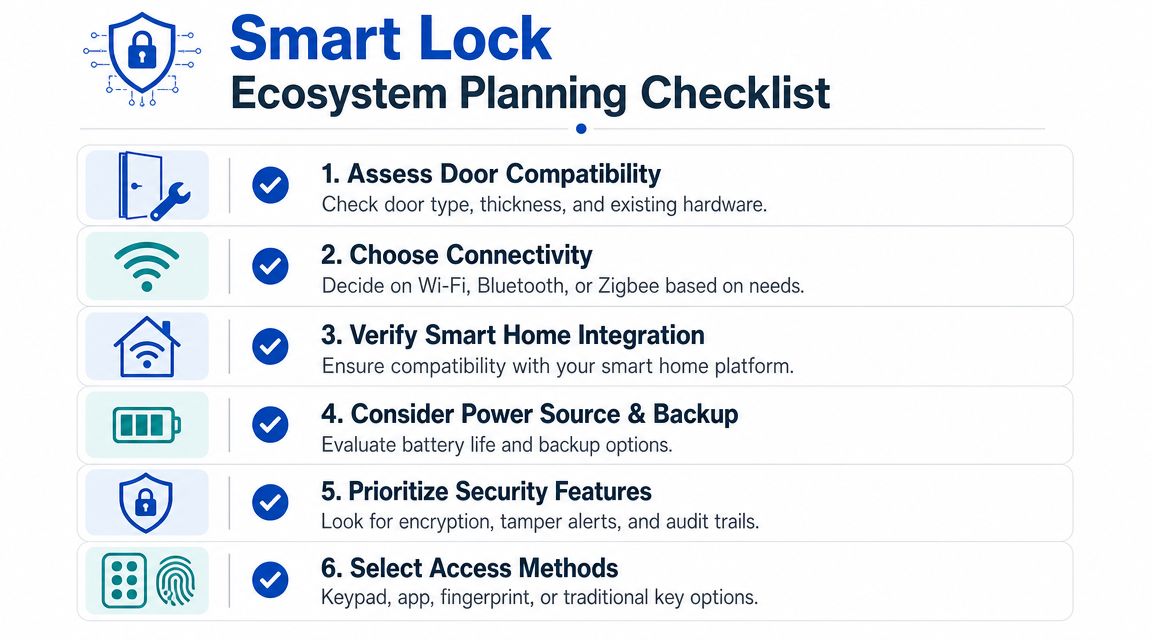
Planning Your Smart Lock Ecosystem Before You Buy
The biggest mistake happens before the box is opened. People buy one lock at a time, based on a coupon or a review, and only later realize they've created a messy mix of apps, batteries, access methods, and connectivity standards.
For rentals, start by choosing an ecosystem, not a device.
Pick access methods that fit real tenants
A keypad is still the most practical baseline for rentals. Tenants don't need to download an app before entering. Cleaners and maintenance staff can use scheduled codes. If a phone is dead, access still works.
Fingerprint access can be useful in some properties, especially where residents want fast entry without memorizing codes. Consumer Reports notes that modern smart locks increasingly include built-in fingerprint scanners and Apple Home Key compatibility, which allows facilitating entry with an iPhone or Apple Watch in supported setups, as outlined in Consumer Reports' overview of modern smart lock features.
Use a simple filter when comparing options:
- Keypad first: Best for rentals with frequent turnover and mixed tech comfort levels.
- App access second: Useful for managers and backup control, but don't make it the only method.
- Biometric access selectively: Good when tenants value convenience, but only if your workflow still supports backup credentials.
- Physical key override: Worth keeping for contingency planning, especially on exterior doors.
Choose connectivity based on property operations
Connectivity decisions affect maintenance more than marketing pages admit.
| Setup type | Where it works well | Common trade-off |
|---|---|---|
| Wi-Fi lock | Small properties where direct remote control matters | More app dependency and more variables during setup |
| Bluetooth lock | Single doors or nearby management access | Limited remote control without added hardware |
| Z-Wave or Zigbee lock | Properties that already run a hub-based smart home system | Better centralization, but more planning upfront |
For a house with multiple bedrooms, consistency matters more than novelty. If every door uses a different app or pairing process, your team will waste time on every turnover.
If you're already thinking about other smart-home systems, it helps to coordinate those choices early. This is the same reason landlords compare locks alongside things like rental-friendly smart thermostat options, rather than buying each category in isolation.
Check the door before you choose the lock
A lot of “bad lock” complaints are really “bad door” problems.
A common but under-diagnosed cause of failure is the door itself. Door sag, weatherstripping friction, and misaligned strike plates can create mechanical binding that people mistake for software or battery issues, as explained in this guide on door-related smart lock failures.
Pre-buy rule: If the current deadbolt already sticks, scrapes, or needs a shoulder push, fix the door first.
Use this quick pre-purchase checklist:
- Watch the deadbolt manually: It should slide with minimal resistance when the door is open and when it's closed.
- Inspect the strike plate: If the bolt barely catches, a smart lock motor will struggle too.
- Check for door sag: Look for uneven gaps around the frame or rubbing near the latch side.
- Test weatherstripping pressure: Tight seals are good until they force the lock to bind every cycle.
- Standardize where possible: In a multi-room house, using the same lock family across doors makes support much easier.
The best buying decision is usually the boring one. Same platform, same workflow, same batteries, same app, same training for the whole team.
From Box to Door A Practical Installation Guide
Most lock installs don't fail because the instructions are missing. They fail because the installer rushes the mechanical steps and assumes the app will fix what the door is doing wrong.
That never works.
Start with measurements, not pairing
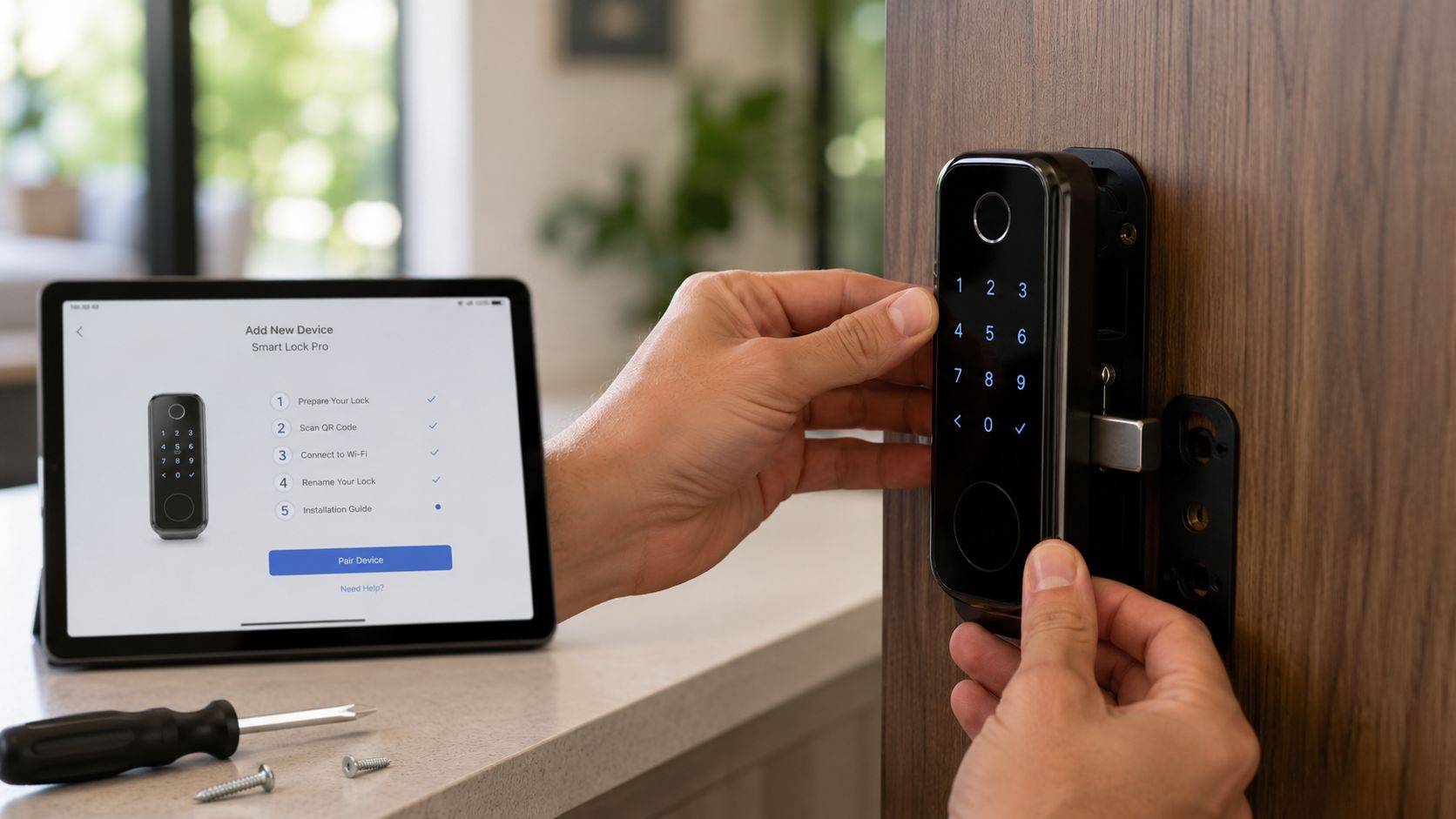
Before mounting anything, verify the door geometry. Field guidance for smart lock installation recommends checking the backset, typically 2.125 in. or 2.75 in., and door thickness, commonly 1.375 in. to 2.25 in., so the deadbolt and lock assemblies align properly, as outlined in this step-by-step smart lock installation guide.
If you skip that check, you can force the hardware together and still end up with a lock that drains batteries, jams, or throws false errors.
A practical installation sequence looks like this:
- Remove the old deadbolt and latch.
- Install the new deadbolt.
- Mount the exterior keypad or exterior panel.
- Connect the interior assembly and route cabling carefully.
- Insert batteries.
- Pair the device and configure the app.
That order matters because the physical fit should be correct before software setup begins.
The three mistakes that create the most callbacks
In day-to-day rental operations, three issues show up constantly.
- Misaligned strike plates: The lock may pair perfectly and still fail because the bolt doesn't enter the strike cleanly.
- Pinched or poorly routed cables: Interior assemblies don't sit flush, or the lock behaves inconsistently after installation.
- Incomplete setup after mounting: The lock works mechanically, but access methods, app permissions, or firmware updates were never finished.
Home Depot's installation guidance notes that the most common pitfalls include door and strike-plate misalignment plus incomplete firmware setup, and recommends confirming smooth deadbolt extension and retraction, then verifying app-based locking after tightening all fasteners, as described in Home Depot's smart door lock installation instructions.
If the deadbolt doesn't move smoothly by hand with the door closed, stop there. Don't troubleshoot the app yet.
What a finished install actually looks like
A mounted lock isn't a completed smart lock setup. A completed setup passes a full function check.
Use this test routine before you leave the property:
- Cycle the lock multiple times: Test its locking and opening with the door open, then closed.
- Watch bolt travel: It should extend fully without hesitation or grinding.
- Confirm strike engagement: If the latch or bolt catches weakly, adjust the plate before the tenant ever sees it.
- Tighten and retest: Fasteners can shift alignment slightly after final tightening.
- Finish the digital setup: Add users, enable desired access methods, and update firmware if available.
For readers who want to see the general process in motion, this walkthrough is useful:
For bulk installs, standardize your workflow. Use the same naming convention for every door, the same installer checklist, and the same handoff process after pairing. That's what keeps one successful install from turning into ten slightly different versions of the same problem.
Mastering Access Management for Tenant Turnover
Most smart lock advice stops at “create a code.” That's fine for one home. It's not enough for room-by-room rentals.
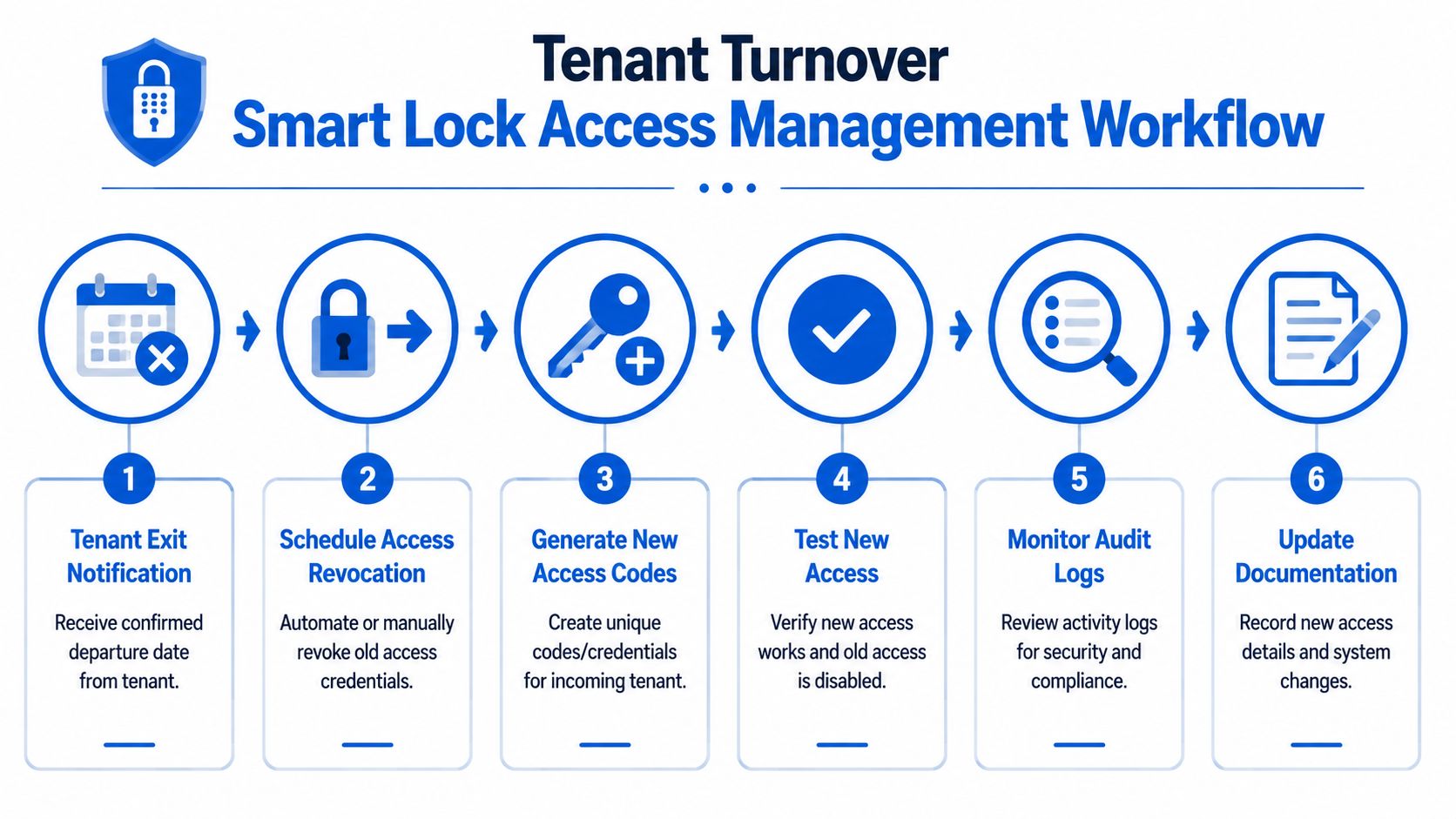
In shared housing, every credential has a lifecycle. It gets created, assigned, monitored, changed, and revoked. If you skip any of those steps, access risk stays behind after the tenant leaves.
A major security gap in many smart lock guides is the lack of credential lifecycle management. For landlords, setup isn't complete without a formal offboarding process that includes revoking codes and app permissions so old access doesn't linger after move-out, as discussed in this guidance on secure smart lock setup and offboarding.
Build roles before you assign codes
Don't start with people. Start with roles.
A co-living house usually needs at least these categories:
- Tenant access: Ongoing access tied to lease dates and room assignment.
- Cleaner access: Limited to scheduled windows.
- Maintenance access: Temporary, job-based, and revocable.
- Manager access: Reserved for approved staff only.
- Emergency backup access: Stored and documented, but rarely used.
This approach prevents the common mistake of handing out permanent codes for temporary work. It also makes turnover easier, because you're editing a role-based system instead of improvising one code at a time.
Use unique credentials, not shared house codes
A shared code for everyone feels simpler. It creates mess.
When multiple tenants use the same front-door code, you lose accountability. If a former tenant still gets in, you don't know whose code remained active because everyone used the same one. If a cleaner shares it with a vendor, the trail ends there.
Use unique credentials whenever the lock allows it.
A practical turnover workflow looks like this:
- Confirm move-out date in writing.
- Schedule credential revocation for that date and time.
- Generate a new code for the incoming tenant.
- Test that old access is disabled and new access works.
- Review recent activity if the lock provides audit logs.
- Update your records immediately.
If your team already uses operations checklists, add this process to your property management checklist system so turnover tasks don't live in someone's memory.
Security habit: Disable broad “everyone knows it” codes as soon as you move beyond your first property.
Set rules for temporary access
Cleaners, handymen, inspectors, and showing agents all need entry. None of them should get the same level of access as a tenant.
Use time windows whenever the platform supports them. If it doesn't, create a manual process with a same-day issuance and same-day removal rule.
Here's a simple framework that works in practice:
| User type | Best access method | What to avoid |
|---|---|---|
| Tenant | Unique recurring credential | Shared house code |
| Cleaner | Scheduled code limited to service window | Open-ended permanent code |
| Maintenance vendor | Temporary code for work order | Reusing an old vendor code |
| Leasing or manager staff | Named account or documented manager credential | Informal code sharing by text |
Offboarding needs a checklist, not a reminder
Landlords often remember to collect keys. They forget app permissions, guest access, old code slots, and backup users.
A clean offboarding checklist should include:
- Revoke tenant code: Remove or expire the primary credential.
- Remove app access: If the tenant had app control, confirm it's gone.
- Delete guest credentials: Check for partner, family, or visitor codes.
- Review staff access created during tenancy: Temporary maintenance permissions shouldn't stay forever.
- Test the door after changes: Make sure the lock still responds as expected.
- Document completion: Someone on the team should own the final signoff.
Old access usually survives because nobody owns the final five minutes of the turnover.
The operators who run secure smart lock setups aren't more technical. They're just stricter about process.
Automating and Integrating Your Smart Locks at Scale
A single lock can be managed manually. A portfolio can't.
Once you manage multiple houses or a growing room count, the problem shifts from installation to coordination. Who creates codes? Who removes them? Where is that documented? What happens if the person who handled move-in forgets to tell the person handling move-out?
That's where integration starts paying off.
Manual access control breaks in predictable ways
Manual systems usually fail in the same places:
- A tenant signs a lease, but nobody creates the code until they arrive.
- A move-out happens on Friday, and code revocation gets pushed to Monday.
- Staff members text temporary codes back and forth with no record.
- One property uses app-based access, another uses keypad codes, and a third has no standard at all.
Those aren't technology failures. They're workflow failures.
The strongest setup is the one that ties access control to existing operations. Lease signed. Credential generated. Tenant departs. Credential revoked. Maintenance job approved. Temporary access issued with an end time. If those events don't connect, your team spends its day chasing exceptions.
What future-ready lock systems should support
Modern smart locks are moving beyond basic remote entry. Consumer Reports notes that current models increasingly function as integrated security systems with multiple access methods, including fingerprint scanners and Apple Home Key compatibility, which gives property platforms more ways to support secure and convenient entry in the future. That makes integration more valuable over time, not less.
For landlords thinking ahead, a scalable stack should support:
- Centralized user management: One place to see who has access across doors.
- Credential templates: Different rules for tenants, cleaners, and vendors.
- Turnover triggers: Access changes tied to occupancy events.
- Portfolio visibility: Managers should know which doors are online, updated, and active.
- Clear audit records: Not because every property needs forensic detail every day, but because you'll need it eventually.
A lot of operators are already moving in this direction with broader short-term rental automation workflows, even when they run room-by-room housing rather than nightly stays. The reason is simple. Automation cuts repeat admin work and reduces the chance that somebody forgets a critical step.
A scalable smart lock setup doesn't remove human judgment. It removes repetitive manual tasks that humans are bad at doing consistently.
If you're choosing locks today, think about tomorrow's management layer. Even if you're only running one house now, standardizing on hardware and workflows that can connect to a larger system later will save you from replacing your process twice.
Long-Term Care and Security for Your Smart Lock System
The install is the beginning. Reliability comes from what happens after month one.
Most smart locks that “suddenly stop working” gave warning signs first. Batteries got weak. Firmware lagged behind. A strike plate shifted slightly. A user list filled up with old codes that nobody reviewed. None of that is dramatic, but it creates avoidable lockouts and support calls.
Use a simple recurring maintenance routine
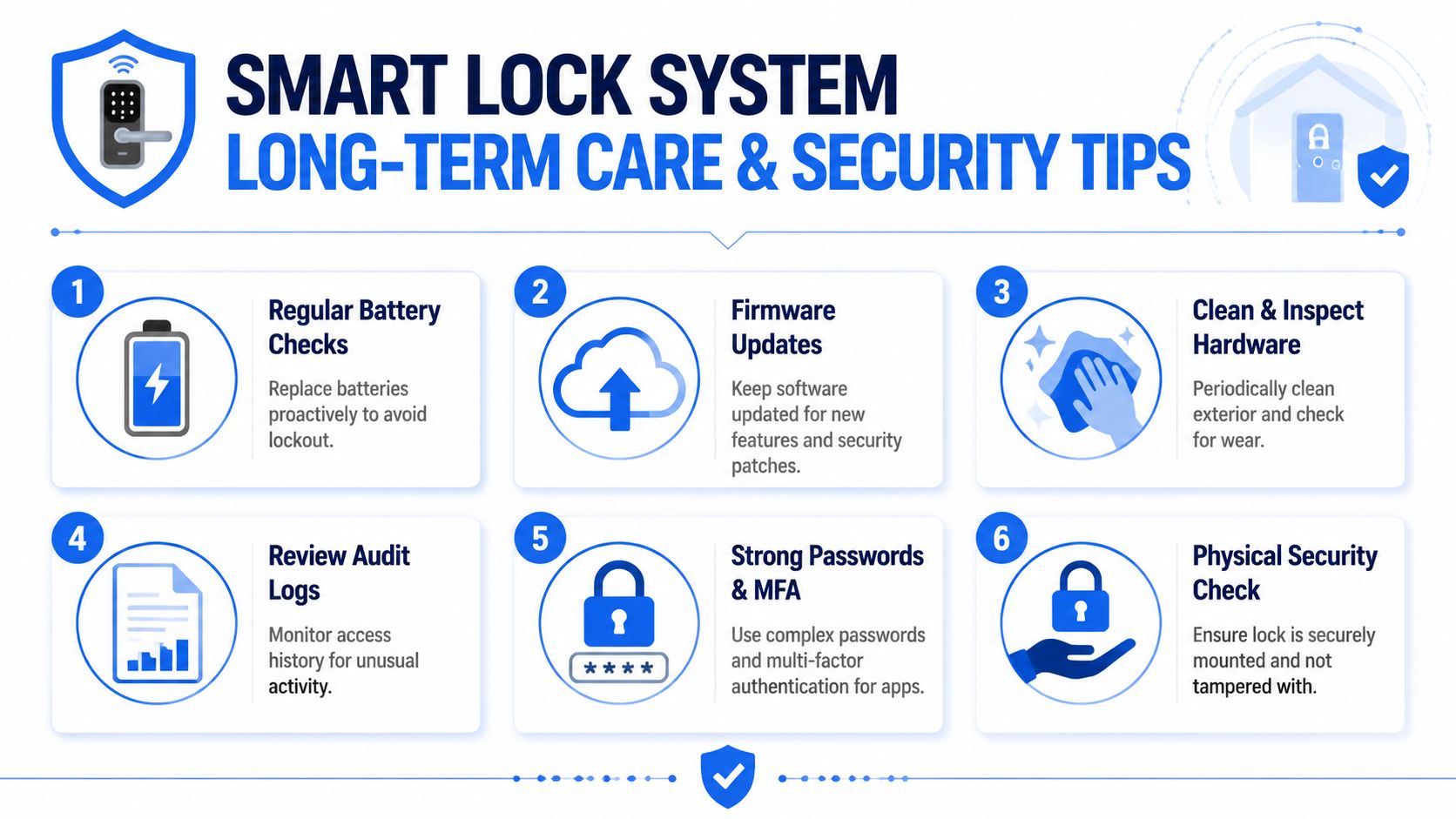
Don't wait for battery warnings to create a process. Put recurring checks on the calendar and treat them like any other property maintenance task.
A practical maintenance rhythm includes:
- Battery checks: Replace proactively on your own schedule, not only when tenants report issues.
- Firmware review: Update locks and related apps during business hours when someone can test them afterward.
- Hardware inspection: Look for loose interior mounts, keypad wear, and signs of tampering.
- Door movement check: Open and close the door, then confirm the deadbolt still moves cleanly.
- Access review: Remove users who no longer need entry.
Troubleshoot in the right order
When a tenant says the lock isn't working, don't jump straight to factory reset.
Start with the basics:
- Confirm whether the issue is mechanical or electronic.
- Test the deadbolt with the door open.
- Check battery condition and seating.
- Verify the lock is still mounted tightly.
- Confirm the user's credential is active and entered correctly.
- Review app status and pending firmware only after the physical checks pass.
This sequence saves time because many failures start with the door, not the software.
Treat every “smart” lock issue as a door test first and a software test second.
Run a quarterly security audit
A good smart lock setup ages well when someone owns the review process.
Use a quarterly audit to answer a few direct questions:
| Audit item | What to confirm |
|---|---|
| Active users | Every listed user still needs access |
| Temporary codes | Old vendor and guest codes are removed |
| Manager access | Only current staff have elevated control |
| App security | Strong passwords and multi-factor authentication are enabled where available |
| Physical condition | The lock and strike area remain secure and aligned |
This doesn't need to be complicated. It needs to happen.
In rental operations, security failures often come from leftovers. Old credentials. Old assumptions. Old maintenance shortcuts. The fix is consistency. If you maintain the door, review the users, and keep software current, smart locks usually become one of the quieter systems in the property.
PadPulse is building an all-in-one platform for PadSplit hosts and co-living operators who want tighter control over pricing, communications, reporting, and future smart-home workflows like keyless access. If you want updates on the platform and early access opportunities, join the interest list at PadPulse.