Find a Smart Lock Near Me: A Host's Guide for 2026
May 27, 2026
You're probably searching for a smart lock near me because the old system is breaking down in familiar ways. A new tenant is arriving after work. A cleaner needs access midday. A maintenance tech is waiting outside because the spare key is in someone else's pocket. Meanwhile, one lost key can turn into a rekey job, awkward tenant messaging, and a security problem you didn't plan for.
That's why co-living operators should think about smart locks differently than homeowners do. For a homeowner, a smart lock is convenience. For a room-by-room rental operator, it's part access control, part turnover system, and part risk management. The right lock reduces key handoffs, tightens move-in and move-out procedures, and gives you a cleaner record of who entered and when. The wrong lock creates battery problems, lockouts, and support tickets at the worst possible time.
Why Smart Locks Are a Game-Changer for Co-Living Hosts
A co-living house can have five tenants, a cleaner, a handyman, and a leasing agent needing different access in the same week. That operating reality is why smart locks matter in room-by-room rentals. They reduce key handoffs, cut rekeying jobs, and give operators tighter control over who can enter and when.
For a co-living host, the value is operational before it is technical. The app matters less than the policy behind it. A good setup lets you issue tenant-specific codes, set time limits for vendors, remove access the day someone moves out, and keep an entry record when there is a dispute. That is a meaningful upgrade from copied keys and lockboxes, especially once you manage more than one property.
They fix recurring problems in shared housing
The main benefit is cleaner turnover management.
With a well-selected lock, you can stop treating every move-in and move-out like a handoff event that depends on your schedule. That saves time, but it also reduces risk. Former tenants do not keep working keys. Contractors do not need permanent access. Staff can get the access they need for a defined window instead of joining the long list of people who might still have a copy.
There is also a tenant experience benefit, and it is more practical than flashy. In shared housing, residents want reliable entry on day one, not a vague plan to meet someone outside after work. A keypad code that works as promised signals that the property is run with discipline.
Practical rule: If a lock does not reduce turnover friction or access mistakes, it is just extra hardware to maintain.
Adoption is rising because the use case is real
Analysts at IMARC Group project strong growth in the smart lock market, driven by demand for keyless entry and remote access. For co-living operators, the useful takeaway is straightforward. These locks are no longer niche electronics for owner-occupied homes. They are becoming part of standard rental operations, especially for portfolios with frequent access changes.
That is also why many operators connect locks with broader process tools such as messaging, check-in workflows, and short-term rental automation systems, even when the property runs on longer stays rather than nightly bookings.
What improves, and what still needs management
A good smart lock setup usually improves three parts of the business:
- Turnovers become easier: access changes happen in software instead of through key collection and rekey appointments.
- Security becomes more consistent: access can be removed immediately without replacing hardware every time a resident leaves.
- Staff coordination becomes simpler: cleaners, contractors, and showing agents can use scheduled codes instead of permanent keys.
But smart locks are not maintenance-free. Batteries need a replacement routine. Tenants still forget codes. Some older doors have alignment issues that make even a good lock perform badly. Operators who get the best results treat the lock as one part of an access system, with backup entry, code rules, and clear staff procedures already in place.
How to Search for the Right Smart Lock Locally
A search for smart lock near me usually starts online, but the best buying decisions often happen after you narrow the field and inspect options locally. For co-living houses, that matters because you're not just buying for looks. You're checking fit, build quality, keypad feel, and whether the lock seems durable enough for repeated tenant use.
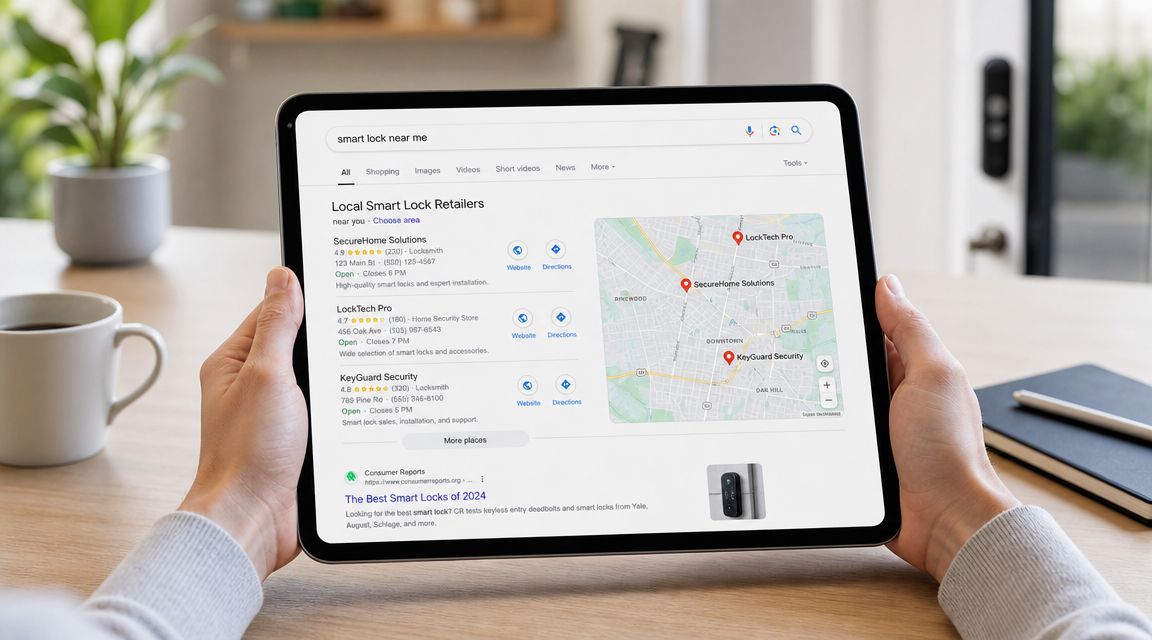
Start online, then verify in person
Before you drive anywhere, shortlist a few lock types. Don't begin with brand loyalty. Begin with your use case.
If you operate room-by-room rentals, your first filter should be questions like these:
- Do you need remote code changes? If yes, eliminate locks that only work well when you're physically nearby.
- Will multiple people need temporary access? If yes, focus on locks built around code management, not just owner access.
- Do you manage older doors? If yes, pay attention to retrofit fit, latch alignment, and whether the deadbolt binds.
Then visit a local retailer or dealer to handle the hardware. A keypad that feels fine in a product listing can feel flimsy in person. Fingerprint readers, rotating knobs, battery compartments, and interior housings vary a lot.
Use three local channels
Most operators get the best results by checking more than one source:
Big-box home improvement stores
These are useful for comparing mainstream models side by side. You can inspect keypads, finishes, and door compatibility before buying.Local locksmiths
Good locksmiths are worth calling when your house has older doors, odd hardware, or heavier-use entry points. They may also carry more advanced options than what's on a retail shelf.Authorized local dealers found online
Some brands and access-control products are easier to buy through installer networks than through general retail.
Ask the seller one simple question: “If Wi-Fi goes down, what still works at the door?” The answer tells you a lot about whether they understand real-world use.
What to check during the local visit
Don't leave the store or end the call until you've verified the basics.
- Door fit: Confirm your door thickness, backset, and deadbolt prep before purchasing.
- Credential options: Check whether the lock supports keypad, app, fingerprint, or physical key backup.
- Admin workflow: Ask how codes are added, changed, and removed.
- Backup path: Confirm what happens during battery failure or internet loss.
- Support path: Find out who handles problems after installation. Retail return desk, manufacturer, or locksmith.
If you want a quick overview before comparing units in person, this walkthrough can help frame what to look for:
Don't buy based on showroom appeal alone
Some locks are designed to impress a homeowner buying one front-door upgrade. Co-living operators need something else. Repeated code changes, frequent entries, occasional user mistakes, and remote troubleshooting put more stress on the system.
That's why the local search should end with a practical decision, not an aesthetic one. A lock that looks sleek but creates tenant confusion or requires constant battery babysitting isn't a good fit for shared housing.
Evaluating Locks for Security and Tenant Management
A co-living lock gets judged on the worst day, not the best one. One tenant forgot their code, a cleaner arrived early, a contractor needs one-time access, and you are nowhere near the property. The right lock keeps that day routine instead of turning it into a chain of calls and door resets.
For room-by-room rentals, the shortlist should be based on three things: how access is assigned, how quickly it can be changed, and what still works when the app, internet, or batteries create trouble. Consumer guidance in Lowe's smart lock buying guide is directionally useful here. For shared housing, the practical standard is simple. Remote management matters, but an offline backup path matters just as much.
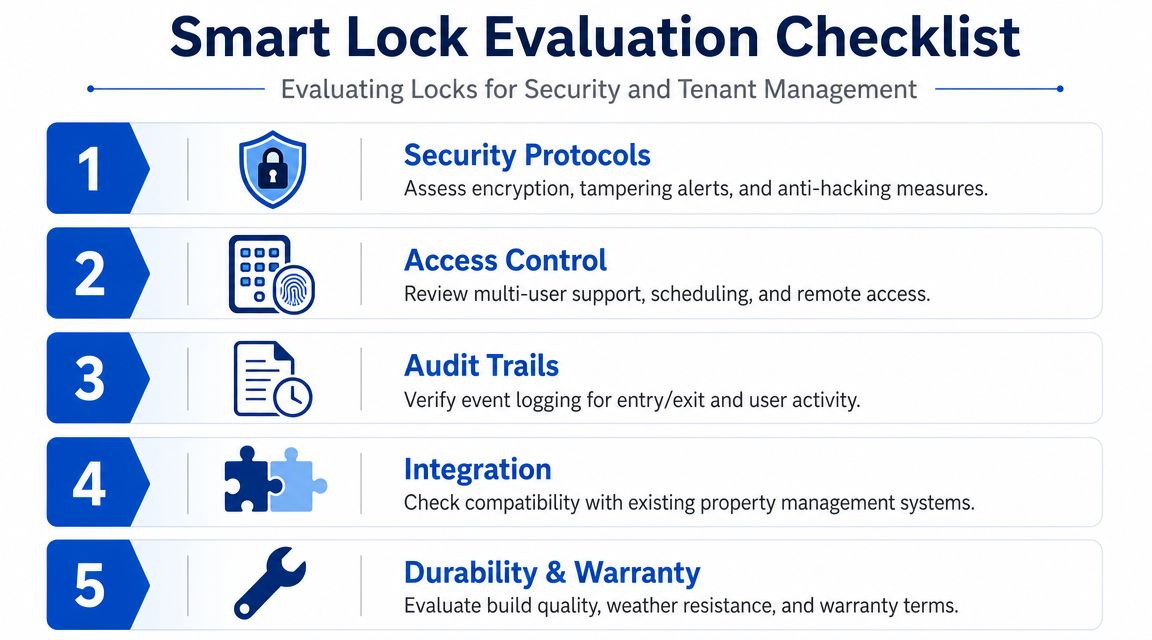
Access control matters more than flashy features
In co-living, the credential system does most of the critical work. A polished app or a nice finish will not save you if staff are sharing one code across the whole house or if move-out access stays active for two extra days.
Look closely at these points:
- Unique user access: Give each tenant, cleaner, and vendor their own credential.
- Expiring credentials: Temporary access should end on its own whenever possible.
- Fast revocation: Move-out access should be removed immediately, not during the next admin batch.
- Activity history: Entry logs help settle disputes and verify whether a service visit happened.
Setup discipline matters as much as the hardware. I have seen decent locks create constant friction because nobody agreed on naming rules, code ownership, or who removes stale users. A clear smart lock setup process for rentals usually prevents more problems than switching brands after a bad month.
Wi-Fi versus Bluetooth affects day-to-day operations
This choice changes how much labor stays on your plate.
Bluetooth-only locks can be a reasonable fit for a single property with on-site oversight. They are often simpler, and local access can still work even if the internet drops. The trade-off is remote administration. If a tenant loses access and you need to be within range to fix it, you still own the interruption.
For operators managing several houses or rooms from a distance, remote credential changes usually justify a Wi-Fi or hub-based setup. The test is practical. Can you add, revoke, and verify access without visiting the property? If not, the lock may be fine for an owner-occupied home but weak for a rental operation.
Buy for the failure mode. Demo-day convenience matters less than recovery when something goes wrong.
Security is broader than the deadbolt
Physical strength still matters, but connected entry adds another layer of risk. PSA Certified's analysis of smart lock security explains common issues such as exposed credentials, impersonation, and insecure device communication.
For co-living operators, that means the review should cover both forced entry and admin misuse. A lock can have a solid deadbolt and still create risk if former tenants keep access longer than they should, staff share one owner login, or the product gives you little visibility into who changed what.
A practical evaluation checklist
- Credential hygiene: Old users should be removable in seconds.
- Communication security: The manufacturer should explain how devices and credentials are protected.
- Tamper awareness: Alerts or logs should help you investigate disputed access.
- Fallback entry: A physical key or other offline method reduces lockout risk.
- Admin separation: Staff should not need to share one master account.
Battery life and maintenance can make or break the rollout
A lot of lock trouble in shared housing comes from basic upkeep, not advanced attacks. Main entrances get used hard. Add a camera, frequent recordings, and repeated code entries, and battery drain becomes an operating issue, not a small spec-sheet detail.
For example, the myQ Secure View product page says its integrated lock, camera, and doorbell system can reach up to 6 months of battery life under a defined usage profile. In co-living, actual traffic may be heavier, especially at front doors serving several unrelated tenants.
That is why every property needs a battery policy.
| What to monitor | Why it matters in co-living |
|---|---|
| Battery status | Shared entrances often drain faster because more people use them every day |
| Code changes | Higher turnover increases the chance of admin mistakes and stale access |
| Entry logs | Useful for confirming service visits, move-ins, and disputed entry |
| Backup access | Reduces emergency callouts when batteries or connectivity fail |
The best lock for a room-by-room rental is rarely the one with the longest feature list. It is the one that lets you control access cleanly, recover quickly, and avoid sending staff back to the property for preventable problems.
Calculating the Cost and ROI of Your Smart Lock Upgrade
Hosts often ask the wrong first question. They ask, “What does the lock cost?” The better question is, “What does the whole access process cost me today?”
If you're still handling key pickups, lockouts, copied keys, and move-out uncertainty manually, you already have an access-control expense. It just doesn't show up neatly on one invoice.
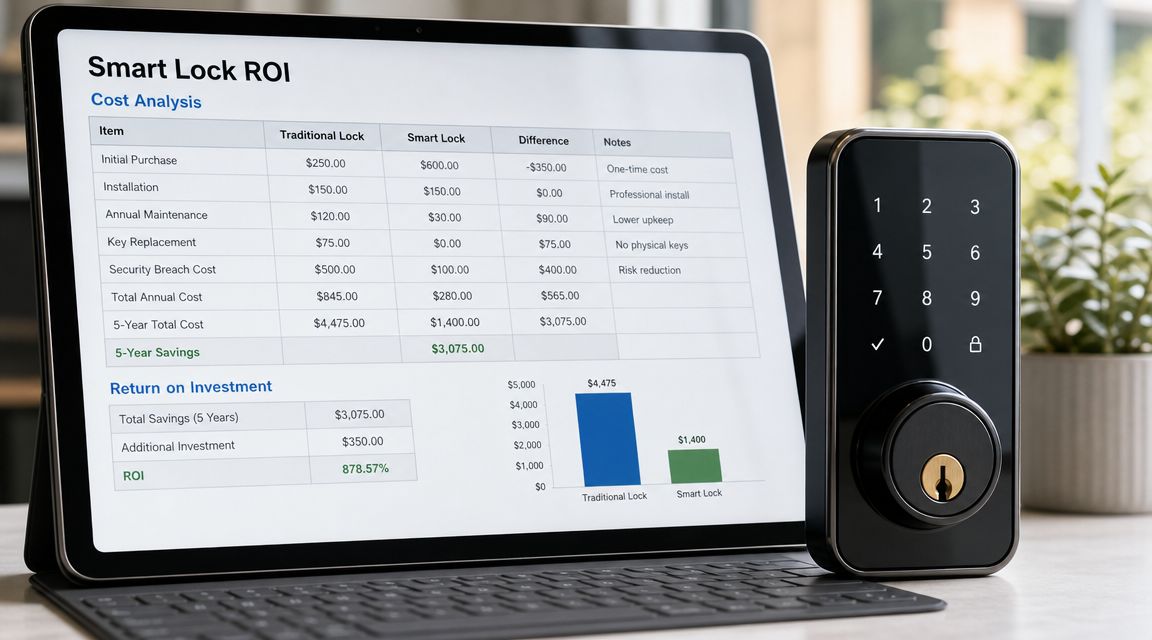
Count the full ownership cost
For rental operators, total cost usually includes more than hardware. Think through the full stack:
- The lock itself: The device, finish, keypad, and any gateway or hub needed for remote features
- Installation work: Your own labor or a contractor's
- Ongoing power management: Batteries, charging routines, and replacement visits
- Software or cloud features: Some remote tools or logs may sit behind subscriptions
- Support time: Tenant questions, resets, and troubleshooting
The biggest budgeting mistake is buying based on sticker price and ignoring admin friction. A cheaper lock that fails often, drains fast, or makes code management clumsy can cost more in staff time than a better lock ever would.
Where the return usually comes from
The return is operational before it's financial. You save time, reduce chaos, and make access more predictable.
Common ROI drivers include:
- Fewer key handoffs
- Less need to rekey after turnover
- Cleaner vendor access management
- Better tenant experience at move-in
- More consistent control across multiple houses
A useful way to evaluate ROI is to look at the friction points you already deal with every month. How often does someone wait outside? How often does your team coordinate manual access? How often do you delay revoking access because someone still needs to return a key?
The best ROI calculation starts with the headaches you can stop paying for in time, attention, and avoidable mistakes.
Use a simple business test
You don't need a complicated spreadsheet to make a good decision. Use this basic test:
| Question | Why it matters |
|---|---|
| Does this lock reduce manual key exchanges? | That's one of the fastest ways to recover time |
| Can staff assign and revoke access without confusion? | Admin clarity lowers support burden |
| Is there a backup plan when tech fails? | Emergency visits erase a lot of savings |
| Will this still fit your process if you add more rooms? | Scalability matters more than novelty |
For one house, a smart lock can feel like a convenience upgrade. Across several shared homes, it becomes a systems upgrade. That's where ROI gets clearer. You're not just replacing a deadbolt. You're reducing small recurring inefficiencies that keep showing up in leasing, maintenance, and tenant support.
DIY vs Pro Install What's Best for Your Properties
A lot of smart locks are marketed as easy DIY projects. Sometimes that's true. Sometimes the install is simple and serious trouble starts later, when the latch sticks, the strike plate doesn't line up, or the door frame shifts enough to cause intermittent problems.
For co-living operators, the decision isn't just about whether you can install one lock. It's about whether you can install several consistently and support them afterward.
When DIY makes sense
DIY works best when the doors are in decent shape, the lock is a straightforward retrofit, and you're comfortable checking alignment instead of just swapping parts.
It's also a good option if you want to standardize one lock model across a small portfolio and learn the system yourself. That knowledge can help later when tenants report issues.
DIY tends to work well when:
- Your doors already close cleanly: Smart locks hate misalignment.
- You're replacing standard residential deadbolts: Odd hardware complicates the job.
- You're testing one property first: A pilot install lets you refine your process before rolling out widely.
- You're prepared to own support: If tenants call, you'll be the first line of troubleshooting.
When a professional install is the better move
Professional installation usually makes more sense when you have older housing stock, multiple properties, or front doors that already have alignment issues. A locksmith or experienced installer can correct underlying hardware problems that a box-store install guide won't cover.
That's especially helpful for shared housing because the lock has to perform under repeated use. Small install errors become real operating issues once several people use the same entrance every day.
Ask a pro these questions before hiring:
- Have you installed this exact lock model before?
- Will you check door alignment and strike fit, not just mount the hardware?
- Who handles call-backs if the lock binds or drains batteries unusually fast?
- Can you document the final admin setup and backup entry method?
Side-by-side comparison
| Factor | DIY Installation | Professional Installation |
|---|---|---|
| Cost | Lower cash outlay, but uses your time | Higher upfront cost, less owner labor |
| Speed | Fast if the door is standard and aligned | Often smoother for tricky or older doors |
| Risk of fit issues | Higher if you miss alignment problems | Lower if the installer checks door condition |
| Scalability | Harder across multiple houses unless you standardize | Easier for rolling out across several properties |
| Troubleshooting knowledge | You learn the system firsthand | Installer may handle setup details and corrections |
| Warranty and support | You may own more of the post-install burden | Often clearer service path if issues show up |
My rule for shared housing
If the property is older, the front door gets constant use, or the lock is mission-critical for remote turnovers, I lean toward professional installation. If it's a clean retrofit on a standard door and you're piloting one unit, DIY can be perfectly reasonable.
What doesn't work is false economy. Saving money on installation doesn't help if the deadbolt drags, tenants get locked out, and your team spends evenings walking people through resets. In co-living, reliability matters more than the satisfaction of installing it yourself.
Connecting Your Smart Lock to a Management Ecosystem
A smart lock by itself is useful. A smart lock connected to the rest of your operation is where things get much better.
Most operators start with the door. Then they realize true value shows up when access is tied to leasing, move-ins, maintenance, and reporting. That's the point where a lock stops being a hardware purchase and starts acting like part of your operating system.
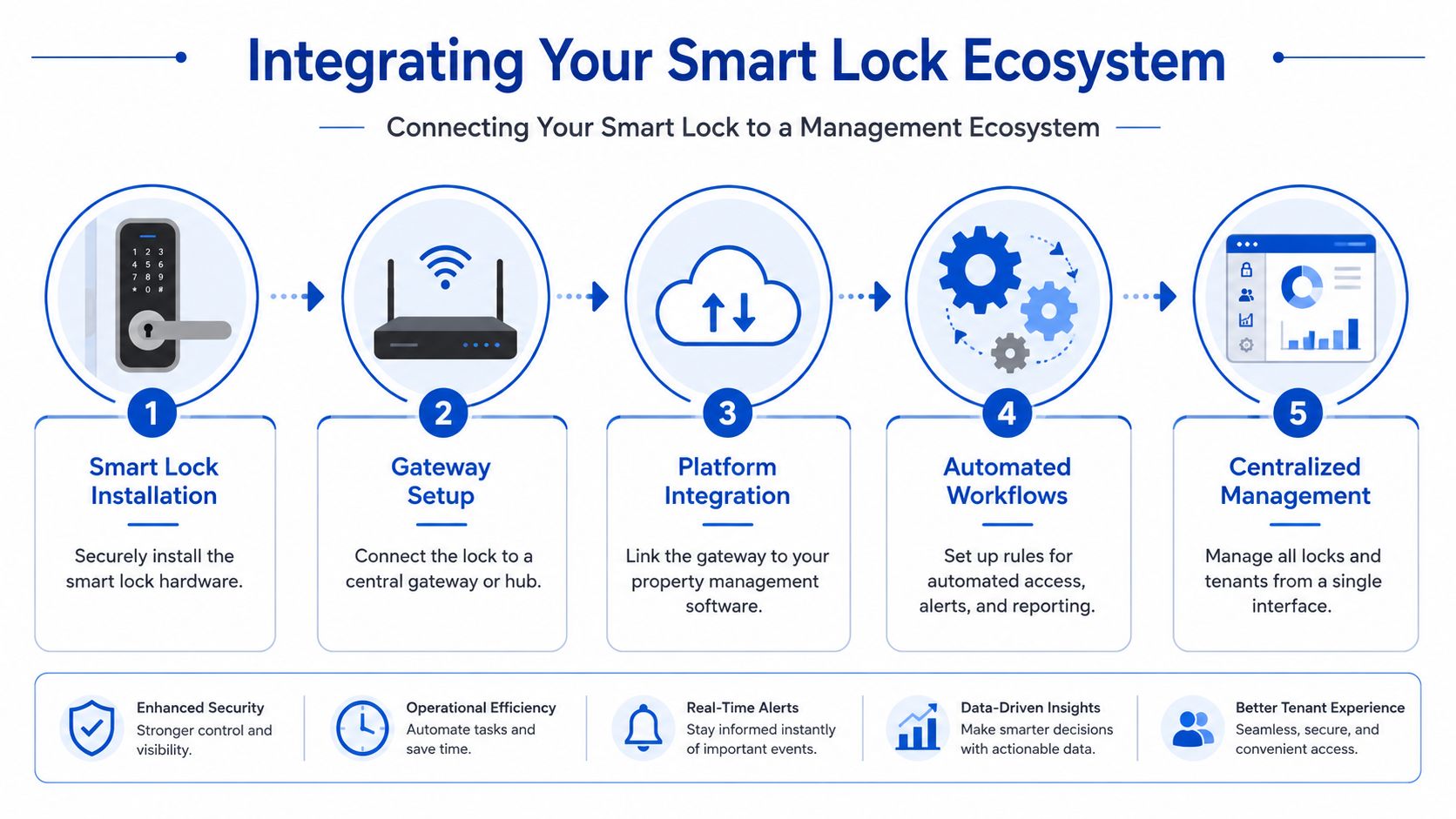
Basic integrations are helpful
At the simplest level, many hosts connect locks to a smart home hub or mobile app environment. That can be useful for alerts, remote status checks, and routine control.
For a single property, that may be enough. But room-by-room operations usually need more than app convenience. They need process automation.
The bigger gain is workflow automation
When your lock connects to a broader management stack, several manual tasks can become more consistent:
- Move-ins: Access can be assigned as part of onboarding instead of handled separately
- Move-outs: Revocation can be tied to offboarding so it doesn't get missed
- Maintenance visits: Temporary access can be issued without sharing resident credentials
- Central oversight: You can review multiple properties from one place instead of checking separate apps
That's why many operators eventually look beyond standalone consumer apps and into tools that connect access with resident management. If you're exploring that path, it helps to understand what property management software does before choosing lock hardware, because integration limitations often shape the final decision.
A smart lock creates convenience. An integrated system creates repeatable operations.
Choose an ecosystem, not just a lock
Before you standardize across properties, ask these questions:
Will this lock work with the software you already use?
Hardware that lives in a silo can create extra admin work.Can your team manage multiple houses without app sprawl?
Too many dashboards create mistakes.Does the system support your turnover process?
If onboarding and offboarding still happen manually, you're leaving value on the table.Can you keep a clean audit trail?
Shared housing runs better when access records are easy to review.
One example in this category is PadPulse, an in-development platform built for PadSplit hosts and co-living operators that is expected to include smart-home integrations such as keyless smart locks alongside communications, pricing, and reporting workflows. For operators, the relevance is straightforward. The more closely access control connects to occupancy and resident management, the less time gets wasted in disconnected tools.
The practical takeaway is simple. If you're investing in smart locks for co-living, buy with the next step in mind. Don't just ask whether the lock opens the door. Ask whether it fits the system you want to run a year from now.
If you manage room-by-room rentals and want a cleaner way to connect pricing, messaging, reporting, and future smart lock workflows, PadPulse is building an all-in-one platform for co-living operators. You can join the interest list to follow the Winter 2026 launch plans, see upcoming features, and get updates on early access.