Smart Lock Features for Room-by-Room Rentals
September 16, 2026
Tuesday morning at a 12-bedroom co-living house rarely follows the clean schedule on your calendar. Two guests are checking out, one resident has extended a stay, and a maintenance vendor needs a 45-minute access window. If the front door depends on physical keys, someone has to coordinate handoffs, chase the departing guests, and possibly drive to the property. The wrong smart lock features can turn a simple turnover into a half-day vacancy.
The right setup handles those access changes remotely. Scheduled codes expire at checkout, the extended resident keeps access, the vendor receives a limited window, and the operator can verify entry from the activity log. For room-by-room rentals, a smart lock isn't a homeowner convenience. It's an operating tool that affects vacancy days, labor hours, lockout calls, accountability, and per-room NOI.
Why Smart Lock Features Matter in Room-by-Room Rentals
A room-by-room property creates more access events than a conventional single-family rental. Guests arrive and leave on different dates. Residents extend stays. Cleaners, maintenance technicians, inspectors, and emergency contacts need entry without receiving permanent keys. A lock must manage those changes without forcing the operator to become a full-time key dispatcher.
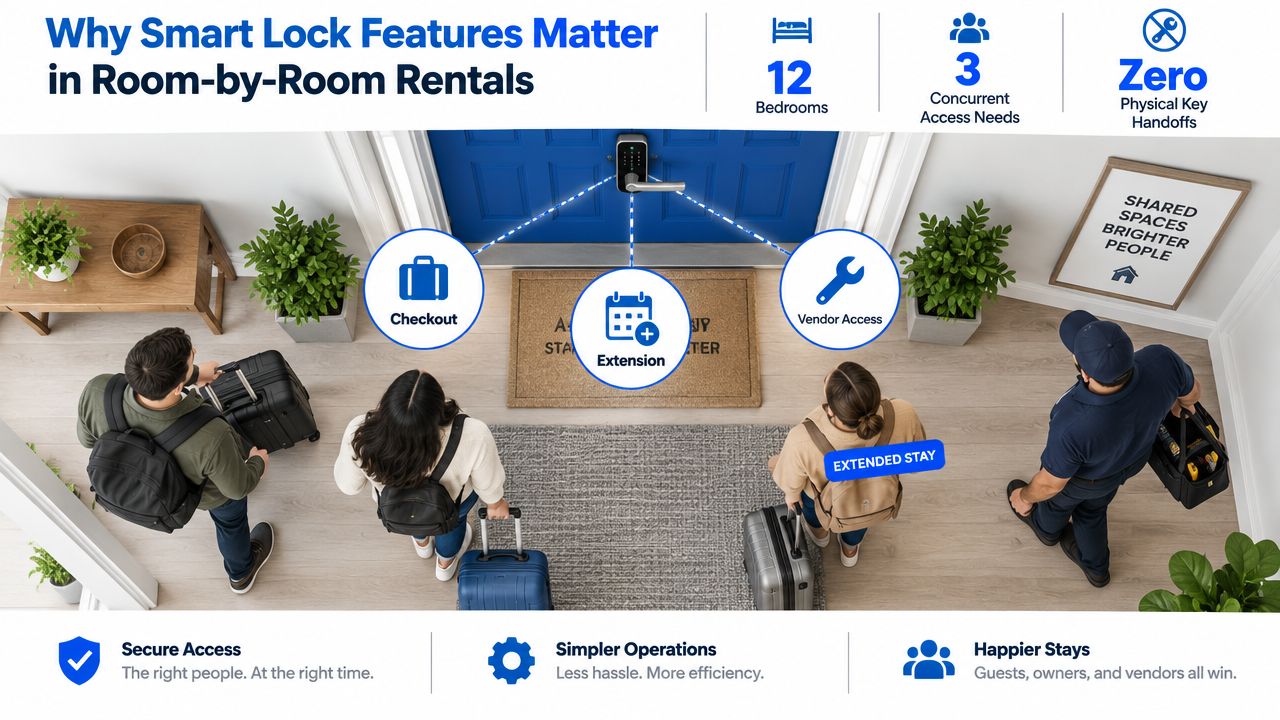
Consider that Tuesday turnover. A basic keypad may let you create a code, but it won't necessarily schedule activation, revoke access automatically, identify which credential opened the door, or notify you when someone enters. Each missing function creates manual work. A vendor waits for a key handoff, a cleaner loses time, or a departing guest keeps access longer than intended. Those delays can push a ready room into another vacancy day.
The market has moved well beyond experimental key replacement. Parks Associates reported that in Q4 2021, 11% of U.S. internet households, more than 12 million homes, owned a smart door lock, nearly double the adoption rate five years earlier, according to the smart lock market overview. The same data set found ownership among 25% of households with a security system, compared with 3% of households without one, which connects smart locks to broader security investment rather than isolated gadget purchases.
Track the operating payoff
I judge a lock by the work it removes from the weekly operating schedule:
- Turnover speed: Can a new guest receive access without a physical visit?
- Labor control: Can a cleaner or technician enter for a defined period?
- Accountability: Can you see which credential opened which door?
- Revenue protection: Can access end exactly when the booking or lease ends?
- Continuity: Can someone enter if Wi-Fi fails or batteries run low?
A remote access feature can replace an unnecessary drive-out. An expiring checkout code can prevent a former guest from returning. An access record can clarify whether a resident, vendor, or operator caused an entry dispute. Those aren't abstract benefits. They show up in your vacancy tracker, maintenance workflow, and NOI spreadsheet.
Operator rule: Buy the lock that reduces exceptions, not the lock with the longest feature list.
How a Smart Lock System Works Under the Hood
Most connected smart-lock systems have three practical layers: the electronic lock on the door, a local controller such as a phone or hub, and a remote cloud platform. A Berkeley technical report describes a comparable architecture involving an electronically augmented deadbolt, a mobile device, and a remote web server supporting connected functions. You can review that architecture in the Berkeley smart-lock technical report.
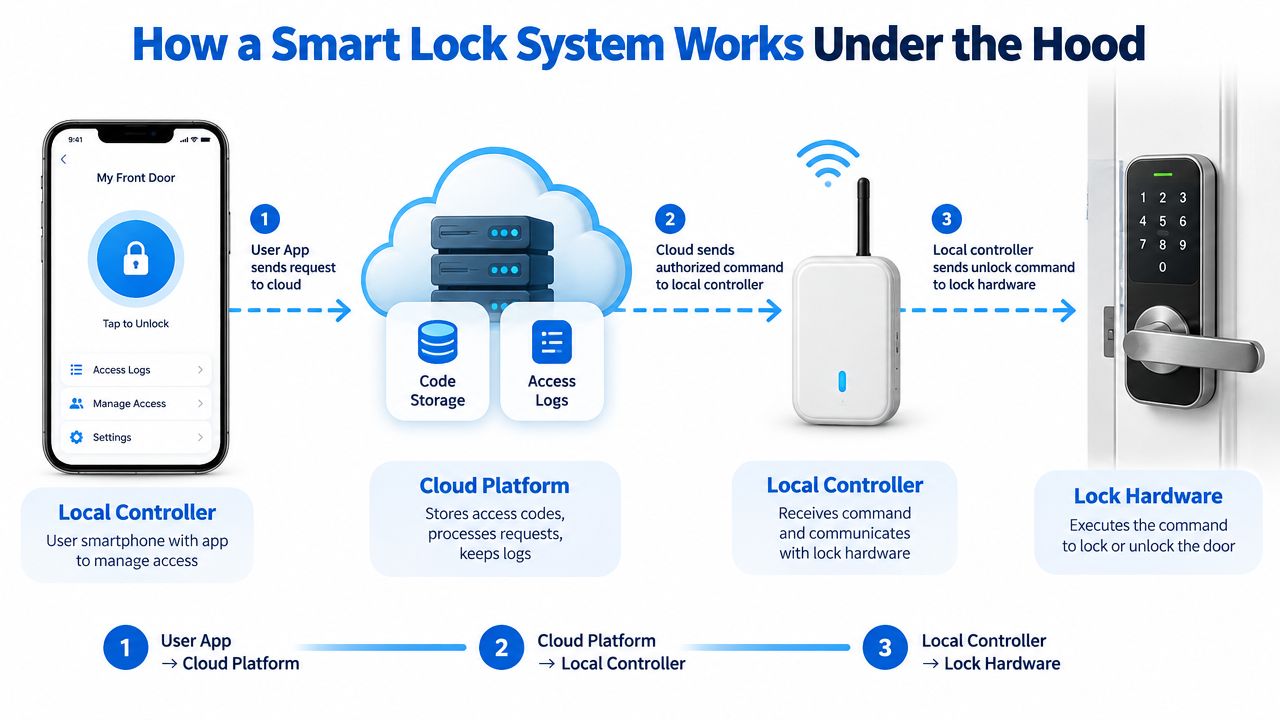
Think of the arrangement like a hotel. The cloud platform acts like the central reservation system. It stores reservations, permissions, schedules, and event history. The local controller resembles the front desk or room phone, passing approved instructions to the door. The lock hardware is the actual room door, where the credential is accepted or rejected.
The access request
A host creates a guest PIN or mobile credential in the management platform. The system associates that permission with a particular door and access window. Depending on the design, the credential may travel through the cloud to a hub or phone, then reach the lock through a local wireless connection.
Some systems also support a key fob or personal PIN, along with temporary or time-sensitive access for other users, as described in this technical overview of smart-lock access methods. The important operational question isn't just whether a lock accepts multiple methods. It's whether each method can be scoped to the right unit, user, and time period.
What happens during an outage
The lock may make the final access decision locally. That distinction matters when Wi-Fi drops. A credential already stored on the lock or local controller might continue working, while a newly created permission may wait until the connection returns. Your team needs a clear answer before deployment.
Event logs follow the reverse path. The lock records an action, the local layer transmits it, and the cloud platform displays it for the operator. If the lock is offline, the event may appear later or fail to sync, depending on the product.
Every important feature depends on this division of responsibility. Code creation, automatic expiry, remote access, and audit trails are only as reliable as the layer performing each task. Ask vendors where credentials live, where decisions happen, and how the system reports a disconnected door.
Access Methods Compared for Co-Living Operators
No single access method fits every door in a shared rental. A short-stay guest needs fast, disposable access. A long-term resident may prefer a phone or fob. A maintenance team needs repeatable entry without receiving a resident's permanent credential.
| Access Method | Best Use Case | Turnover Speed | Audit Quality | Weakness for Operators |
|---|---|---|---|---|
| PIN code | Short-stay guests and temporary vendors | Fast when issued remotely | Clear if each user receives a unique code | Guests may share codes or forget them |
| Smartphone Bluetooth or NFC credential | Long-stay residents and managers | Fast after enrollment | Strong when tied to individual accounts | A lost or dead phone can create a lockout |
| RFID fob or card | Shared-house staff and recurring vendors | Fast once issued | Good if every fob is assigned | Lost fobs require prompt deactivation |
| Biometric reader | Private rooms with a stable resident population | Fast for enrolled users | Potentially clear, but enrollment and exceptions add work | Poor fit for frequent guest turnover and shared accountability |
| Physical key override | Emergency access and recovery | Immediate if the key is available | Weak unless key custody is tightly controlled | Copies, handoffs, and missing keys create exposure |
PIN codes are the default workhorse for most room-by-room operators. Give each guest a unique code, restrict it to the booking or lease window, and remove it automatically at checkout. Independent guidance on guest codes highlights the central governance problem: operators often fail to delete temporary codes after a stay ends, and logs show code use without proving who physically entered. The guest-code security explainer makes that distinction especially useful for dispute handling.
Smartphone credentials work better for long-stay residents and managers who need recurring access. They become less attractive when a guest loses a phone, changes devices, disables Bluetooth, or arrives with a dead battery. RFID fobs offer a practical middle ground for cleaners and vendors, provided the operator maintains an assignment register and revokes missing fobs quickly.
Biometrics sound advanced, but they often complicate a multi-operator property. Fingerprints and facial profiles need enrollment, privacy handling, replacement procedures, and an exception path for visitors. A biometric reader can make sense for a controlled private entrance, but it shouldn't replace flexible codes and emergency access across a changing guest population.
Use this smart lock setup guide to document the access stack before installation. My typical recommendation is unique scheduled PINs for guests, individual phone or fob credentials for staff, and a physical override stored under a controlled emergency protocol.
Operational Features That Drive Real NOI
The best smart lock features perform one of three jobs: they protect the property, accelerate turnover, or create accountability. Evaluate each feature by the manual task it removes and the operational evidence it produces.
Features that protect access
Auto-generated guest codes eliminate repetitive setup and reduce the chance that an operator reuses an old PIN. The measurable payoff is the number of check-ins completed without a manual code-creation task.
Scheduled access windows should activate and revoke permissions around the actual booking or lease. A checkout-day code that expires at 11 a.m. can end access without asking a manager to remember a calendar task. Track the number of expired permissions that require no human intervention.
Tamper alerts push a warning when someone repeatedly handles, forces, or interferes with the lock. The value isn't the notification itself. It's the earlier opportunity to send a manager, contact the resident, or investigate before a small issue becomes a security incident.
Features that accelerate turnover
Remote lock and control is useful when a cleaner arrives early, a vendor misses the scheduled window, or a guest can't operate the keypad. A Tuesday-morning remote action can replace a drive-out, but record that avoided trip in your operations log so the feature has a visible labor value.
Access permissions should be managed by unit and door, not only by property. A cleaner may need the common entrance but not every resident room. A maintenance worker may need one vacant room for a defined appointment. Per-door scoping keeps a convenience feature from becoming an unnecessary master key.
Features that establish responsibility
Real-time audit trails should identify the door, credential, and event time. Smart locks can provide unique user codes, automatic locking, access logs, failed-attempt lockout, remote revocation, and alerts, all of which go beyond a traditional keyed deadbolt, as summarized in this smart-lock security analysis.
| Feature | Operational Job | Measurable Payoff |
|---|---|---|
| Unique scheduled codes | Control guest access | Fewer manual setup and revocation tasks |
| Remote unlock | Resolve arrival and vendor exceptions | Fewer unnecessary site visits |
| Door-specific permissions | Limit staff and vendor scope | Cleaner responsibility when access is disputed |
| Access logs | Establish an event record | Faster resolution of guest, vendor, and operator disputes |
| Failed-attempt lockout | Slow repeated unauthorized attempts | Earlier security escalation |
| Tamper alerts | Surface physical interference | Faster response to a damaged or compromised door |
A log won't prove who physically entered if guests share credentials. It will show which credential the system accepted. That distinction makes code assignment and user education as important as the lock itself.
The Underserved Risks Hosts Overlook
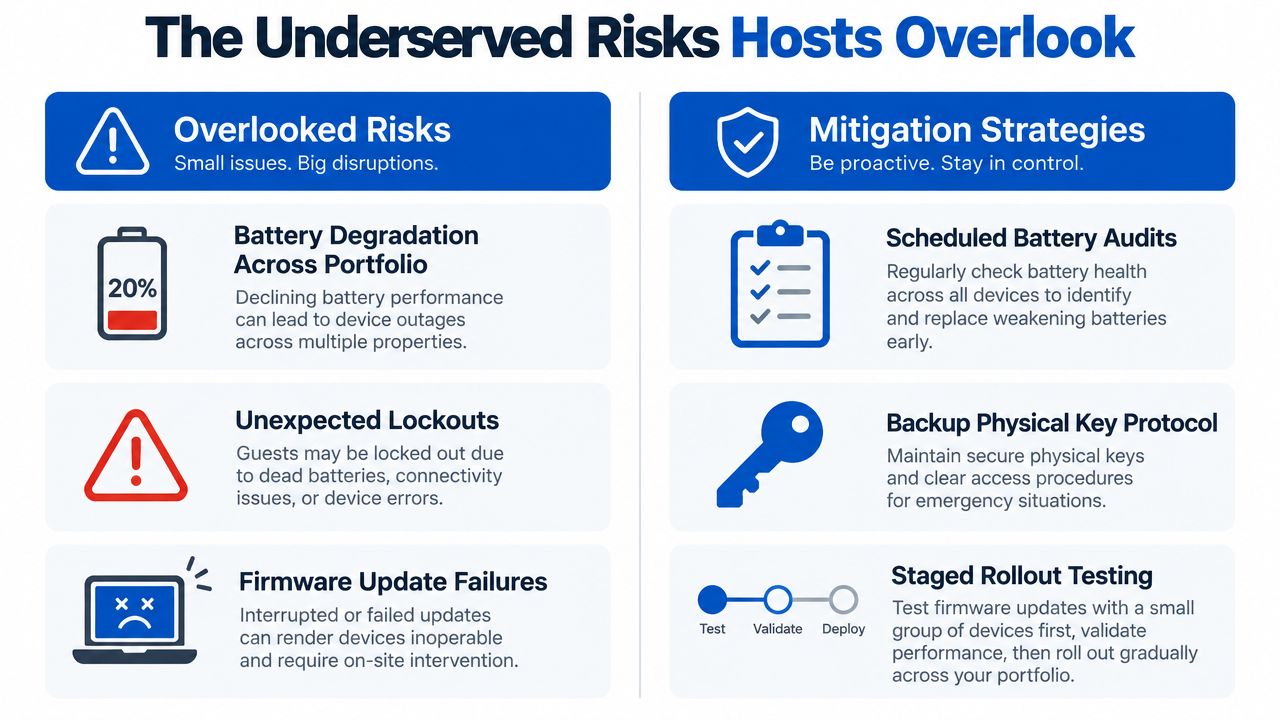
Marketing pages emphasize remote access, voice control, and polished dashboards. Portfolio operators learn to worry about the less attractive failures: weak batteries, disconnected locks, stale codes, and unclear ownership of access.
Battery levels are an operations issue
A lock showing 18% battery isn't equivalent to one showing 80%. Low power can affect how confidently a lock communicates, how often it reports status, and how much time the team has to respond. One missed battery check across several rooms can create a checkout-day lockout, a delayed cleaning visit, or an after-hours emergency.
Protocol and power design matter. A Texas Instruments smart-lock reference design estimates 5.29 years of operation on four AA batteries, illustrating how low-power radio duty cycling and event-driven wakeups can support multi-year maintenance. Treat that as a design reference, not a promise for every product.
Set a portfolio battery routine:
- Review low-battery alerts: Assign an owner and response deadline.
- Inspect high-turnover doors: Entry doors deserve more attention than rarely used storage doors.
- Carry approved replacement batteries: Don't let a routine service call become a second trip.
- Record replacements by door: Patterns can expose a failing lock or unusually heavy use.
Offline behavior needs a written answer
Ask what happens when Wi-Fi disappears. Do existing PINs continue to work? Can a manager create a new credential? Does the lock retain events and upload them later? How does the dashboard show a door that's been offline for several days?
Mainstream support documentation still addresses dead batteries, physical-key operation, and temporary external power, as shown in this smart-lock power and access FAQ. Those recovery methods belong in the property's move-in instructions and emergency playbook.
Old codes create avoidable disputes
Code lifecycle is where many operators lose control. A guest checks out, the code remains active, and someone later uses it. The access log may show the code but not the person. That creates a dispute over responsibility and can weaken the operator's position with a resident or owner.
The key governance question is not “Can I create a code?” It's “Who owns, reviews, and revokes that code after the guest leaves?”
Shared-front-door properties add another blind spot. One entrance may serve many rooms, so an entry event doesn't identify which resident visited a particular room. Use room-level permissions where possible, and don't mistake a front-door log for complete resident accountability.
Operators evaluating remote access control systems should test failure recovery before approving a rollout. A lock that works perfectly during normal operation but creates confusion during a dead battery or disconnected network can leak more NOI than it saves.
Integrations, APIs, and Platform Fit
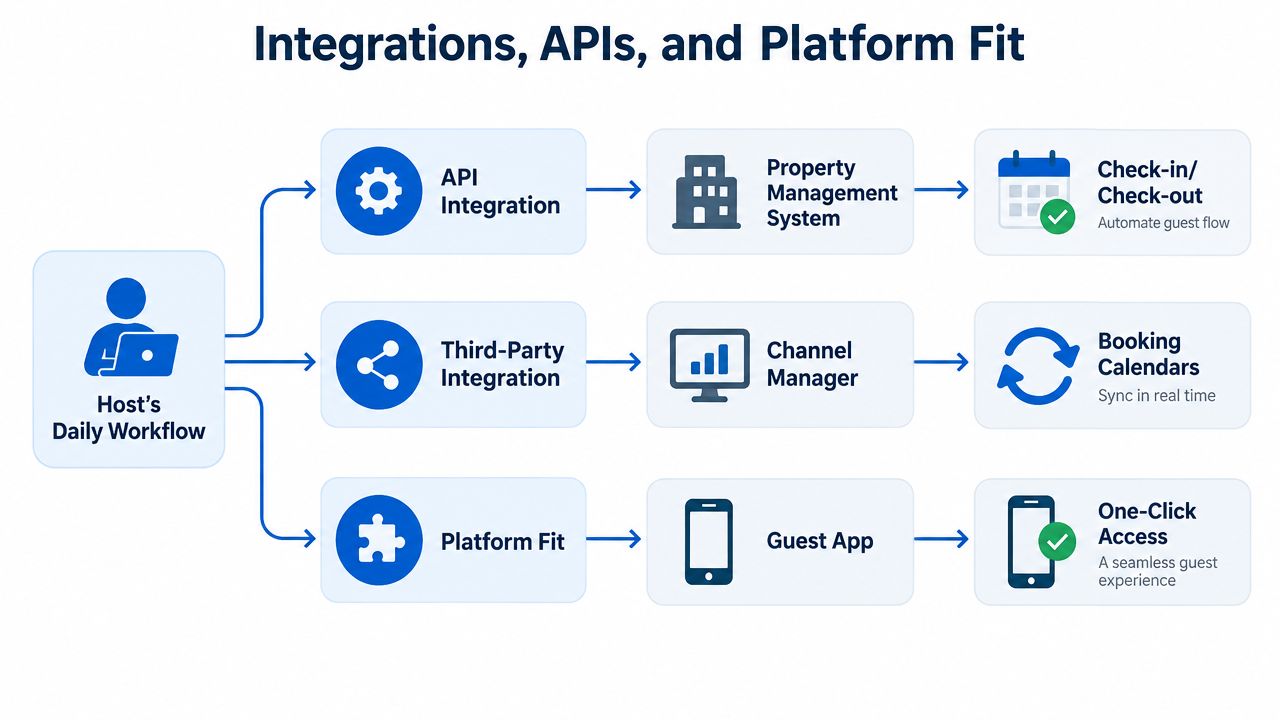
A lock app that operates alone can still be useful. It becomes operationally powerful when it shares the same guest, booking, and unit data as the property management system.
A simple connected workflow looks like this: a booking confirmation in the PMS creates a door permission, the permission activates for the planned arrival window, and the checkout timestamp triggers revocation. The operator shouldn't have to copy a guest name from one system, create a code in another, and remember to delete it later.
Understand the connection types
An API integration lets two systems exchange structured information. A third-party connection may link the lock to a channel manager or guest application. A broader platform integration places access beside rent, messaging, maintenance, and reporting.
Webhooks push an event as it happens, such as a booking created or a checkout completed. Polling asks repeatedly whether something changed. For an operator, the distinction matters because polling can introduce delay, while a failed webhook can prevent a code from being created or revoked.
One-way integration sends information in one direction. For example, the PMS may send a booking to the lock platform, but the PMS may never receive confirmation that the code reached the guest. Two-way integration gives both systems a chance to confirm status, report failures, and reconcile differences.
Test the silent failure: Create a test reservation, verify the code appears in the lock platform, confirm the guest receives it, and check that revocation returns to the PMS.
The most expensive integration bug isn't always a visible error. It's a code that issued in one system but never reached the guest's phone, or a checkout that closed in the PMS while the lock retained access. Your team needs an exception queue, not just a green “connected” badge.
This access-control integration guide is useful when mapping those handoffs. A platform such as PadPulse is designed to place access control alongside billing, ticketing, and messaging, so one guest record can carry payment status, maintenance tickets, and door permissions together. The practical litmus test is simple: if the lock app and PMS disagree about who has access right now, the integration isn't complete.
Your Smart Lock Decision Checklist
Run this checklist against the product, the software, and the operating team. Don't score a lock based only on the hardware demo. Ask each question, record the signal it produces, and set a pass or fail threshold before you compare vendors.
Access coverage
Question: Can the lock support a unique PIN, a manager credential, a staff fob or phone, and a physical emergency method?
Operational signal: You can serve short-stay guests, long-term residents, vendors, and emergency responders without sharing one permanent code.
Pass threshold: Pass only if every required user type has a defined credential and revocation process. Fail if the vendor expects staff to share guest access.
Question: Can permissions be scoped to an individual door or room?
Operational signal: A cleaner or technician receives only the access needed for the task.
Pass threshold: Pass if the system supports per-door permissions. Fail if every credential opens the entire property.
Lifecycle and accountability
Question: Can access windows activate and expire automatically?
Operational signal: Checkout revocation happens from the booking or lease schedule instead of memory.
Pass threshold: Pass if you can test activation and revocation in a real workflow. Fail if a manager must delete every code manually.
Question: Do logs identify the credential, door, event, and time, and can you export them?
Operational signal: Your team can investigate a dispute without reconstructing events from texts and camera footage.
Pass threshold: Pass if the export supports your PMS or incident process. Fail if the log only shows that “someone” opened the door.
Resilience and recovery
Question: What happens during low battery, dead battery, Wi-Fi loss, and local controller failure?
Operational signal: The team knows whether existing access continues, whether new access can be issued, and how events synchronize later.
Pass threshold: Pass only after a live failure test. Fail if the vendor answers with general assurances instead of a documented recovery path.
Question: Can the operator monitor offline status and receive actionable alerts?
Operational signal: A disconnected lock becomes a service task before a guest discovers it at the door.
Pass threshold: Pass if alerts identify the affected door and stay visible until resolved.
Integration depth
Question: Can the PMS create, update, and revoke access, and can the lock platform return confirmation?
Operational signal: Booking, payment, messaging, and door permissions stay aligned.
Pass threshold: Pass if you can trace one reservation through the entire workflow. Fail if the integration only exports a calendar or requires manual copying.
A lock that passes 80% of these checks is usually a better operational choice than a cheaper product with attractive consumer features but weak governance. Score the missing items by consequence. A failed voice-control feature is inconvenient. A failed revocation workflow can create a vacancy, dispute, or security problem.
PadPulse is being built for room-by-room operators who need pricing, messaging, access control, and financial visibility in one workflow. Visit PadPulse to join the early-adopter interest list for limited beta access, product updates, and referral opportunities, with no billing required before launch.