Remote Access Control System Guide for Co-Living Operators
August 20, 2026
Tuesday night, you're coordinating three move-ins, a contractor needs the side gate, and a member is locked out after a late shift. If you operate room-by-room housing, that isn't an unusual problem. It's the job.
A remote access control system can turn those interruptions into scheduled, traceable workflows. The right setup lets you manage doors, guest permissions, contractor entry, and lockout response without driving across town. The wrong setup replaces a metal key problem with an internet, battery, software, and vendor problem.
Access control has grown from standalone locks and card systems into a mainstream operational layer for commercial buildings, multifamily housing, and distributed portfolios. One 2026 access control market estimate places the global market at USD 9.89 billion in 2026, rising from USD 9.38 billion in 2025, with a projection of USD 14.88 billion by 2032. For co-living operators, the question isn't whether the technology exists. It's whether the system protects occupancy, staff time, and resident safety when normal conditions fail.
Why Co-Living Operators Care About Remote Access Control
A PadSplit host in Atlanta might be handling three arrivals, a contractor at the side gate, and a late-shift member who can't open a bedroom door. With physical keys, each task creates a separate handoff. Someone has to meet the member, hide a spare, coordinate the contractor, or arrange a rekey after a key disappears.
Room-by-room housing makes that friction expensive. Members rotate, rooms change hands, and shared entrances serve people with different schedules. A traditional key gives you poor control over who still has access, and a copied key can remain in circulation long after the original resident leaves. Rekeying, lost-key disputes, and emergency visits turn a simple door into recurring overhead.
Operator rule: Treat access as part of the turnover workflow, not as a smart-home accessory.
A remote access control system can issue a PIN or mobile credential for a defined stay, limit a contractor to a specific door, and remove a departing member without collecting a physical key. That matters for revenue because a room that sits vacant while someone waits for a key handoff delays the next move-in. It also matters for liability. If an incident occurs, a reliable access history is more useful than a drawer full of unlabelled copies.
The market's scale reflects this broader shift. Another industry market report describes access control's historical expansion through card-based systems, regulatory compliance, commercial infrastructure, and surveillance integration. Remote management now sits inside that larger ecosystem, alongside connected locks, software administration, and property operations.
Choose infrastructure with three tests in mind:
- Can you issue and revoke access without visiting the property?
- Can the door still behave safely when the network or cloud platform is unavailable?
- Can you export a complete, understandable log for your property management system and incident reviews?
Those questions are more important than a sleek app or a long feature list.
How a Remote Access Control System Actually Works
Think of the system as a nightclub bouncer with a clipboard, a phone, and a backup flashlight. The person arriving at the door carries a credential. The lock or reader checks that credential. A controller applies the rules and records what happened.
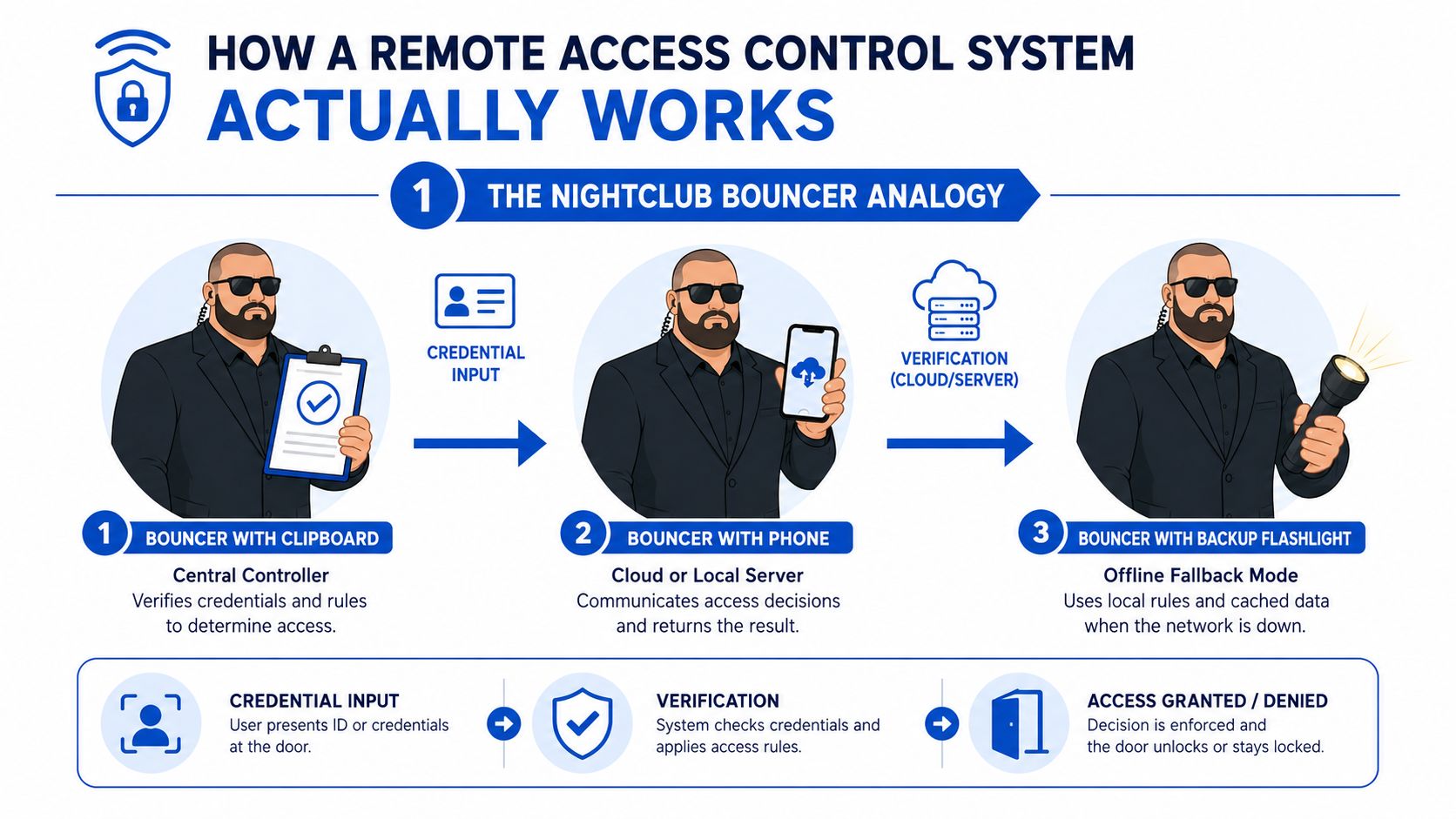
The three working parts
The credential might be a physical key, PIN, phone-based token, RFID device, or biometric identifier. It answers, “Who is trying to enter?”
The lock or reader sits at the door and receives the credential. It may connect through Wi-Fi, Bluetooth, a wired network, or another communications path.
The controller holds the permission rules. It decides whether a member can enter a bedroom, whether a cleaner can use a common entrance, and whether a former resident's access has been removed. In a cloud-managed design, the controller also distributes changes and stores event records.
A member taps a phone or enters a code. The lock checks the credential against its current rules, either through the network or through locally stored permissions. It then grants or refuses access and sends the event to the management platform when connectivity allows. The operator should be able to see the user, door, time, result, and any relevant reason attached to the event.
That event log is the operational core. It can show repeated denied attempts, confirm a contractor's arrival, support a dispute review, and reveal whether a credential remained active after a move-out. A multi-tenant access control workflow should also support permissions tied to roles, rooms, and stay dates rather than one shared code for the whole house.
Offline behavior decides whether the system is useful
Co-living houses lose internet more often than office buildings with dedicated infrastructure. A remote access control system that stops recognizing every credential during an outage has moved the failure point.
Ask exactly what happens when the connection disappears:
- Do already-issued PINs continue working?
- Can a resident enter the bedroom but not shared utility areas?
- Does the lock store events locally and upload them later?
- Can an operator use a local override?
- How does the system alert you to low batteries or communication loss?
NIST's electronic physical access control guidance treats access as a policy-driven process that must apply approved authorization consistently across physical and logical paths. That supports a simple operating principle: credentials should be server-backed where possible, permissions should be explicit, and revocation must reach the lock, app, and logs.
Credential Types and Lock Technologies at a Glance
No credential wins every co-living use case. The best choice depends on turnover, resident comfort, outage behavior, and how much evidence you need after an incident.
| Credential Type | Per-Door Cost | Onboarding Speed | Revocation Control | Offline Behavior | Best Fit |
|---|---|---|---|---|---|
| Physical keys and fobs | Usually simple hardware, with ongoing replacement and rekeying exposure | Immediate if the handoff is available | Weak unless the physical item is recovered or the lock is changed | Strong during network outages | Low-turnover doors and basic backup access |
| PIN keypads | Straightforward door hardware and easy code sharing controls | Fast, especially for short stays | Strong when codes are individual and time-bound | Often good, depending on local code storage | Most room-by-room operators |
| Mobile credentials over Bluetooth or NFC | More dependent on compatible locks, phones, and software | Fast after app setup | Strong, with central revocation and event history | Varies by lock and local credential design | Operators prioritizing audit trails |
| Biometrics, such as fingerprint or face | Higher hardware, privacy, and administration burden | Can be slower because enrollment is required | Potentially strong, but identity data needs careful handling | Varies by device | Controlled environments with clear privacy acceptance |
Keypads are my default recommendation for many shared houses. They're easy for a member to understand, don't require a charged phone, and can support individual, expiring codes. They still need disciplined administration. A shared house code destroys the audit trail and makes revocation messy.
Mobile credentials are stronger when you need detailed event records and near-instant changes. They're also more exposed to phone loss, app failures, Bluetooth issues, and resident onboarding friction. Academic evaluations of smart locks have identified risks including plaintext keys in application storage, vulnerable Wi-Fi control paths, and wireless denial-of-service exposure. A technical smart-lock evaluation supports using encrypted device-to-cloud links, hardware-backed secrets, and a safe local fallback.
Biometrics deserve a higher bar. Fingerprint and face systems raise privacy questions, enrollment concerns, and tenant acceptance issues. For room-by-room housing, the convenience rarely justifies making biometric data part of the default access workflow.
The lock form factor matters too. Retrofit deadbolts install quickly and suit a pilot. Hardwired commercial-grade locks cost more to install, but they're the better long-term choice for doors that see heavy daily use. Platforms serving PadSplit-style housing increasingly expect PIN or mobile credentials that can be issued and revoked through property management integrations, which makes fobs less attractive for portfolios built around frequent turnover.
Benefits and Real Risks for Room-by-Room Operators
The strongest benefit is operational speed. A member can receive access before arriving, a contractor can enter only the area required, and a departing resident's permission can expire without an in-person handoff. That reduces the number of tasks that depend on the host being physically nearby.
A good remote access control system also produces evidence. A mobile record may include user ID, timestamps, geolocation, and reasons for lock events, with logs exportable for security or compliance review under the remote access security standard. For a deposit dispute or a missing-item investigation, a precise event trail is far more useful than a resident saying they “never went into that room.”
Automation can help protect vacancy fill as well. If access is connected to stay dates, the credential can activate for the arrival window and expire at departure. That reduces manual cleanup and limits the risk of former residents retaining access.
The same system creates new failure modes.
| Benefit | Operator Outcome | Corresponding Risk | Likely Impact |
|---|---|---|---|
| Faster move-ins | Fewer physical key handoffs | PMS synchronization may fail or issue the wrong credential | Delayed arrival or access to the wrong room |
| Fewer lockout visits | Less after-hours driving and staff interruption | Internet, battery, app, or Bluetooth failure | Resident frustration and emergency labor |
| Time-bound permissions | Cleaner turnover and less stale access | Revocation may not reach an offline lock | Former access remains active |
| Detailed audit trails | Stronger incident review | Logs may be incomplete, inaccessible, or hard to export | Weak evidence during a dispute |
| Centralized management | One dashboard for multiple houses | Cloud outage, supplier discontinuation, or vendor lock-in | Portfolio-wide disruption |
Researchers studying commodity smart locks found that attackers could bypass revocation and logging mechanisms in most devices, allowing unauthorized long-term entry after credentials were supposedly removed. That's why a “remove user” button isn't enough. You need to know how quickly the change reaches each door, what the lock does while offline, and whether the event appears in the central record.
The resilience question is particularly neglected. A neutral paper on industrial remote access highlights downtime from cloud outages, cyberattacks, and supplier discontinuation, along with the difficulty of keeping policies consistent across owners, sites, and vendors. Don't build a portfolio where one unreachable portal can strand every resident.
Choosing the Right System With an Operator Checklist
Start with the door, not the dashboard. Inventory bedroom doors, exterior entries, gates, garages, and emergency access points. Record the lock type, power source, network coverage, traffic level, and who needs access. A retrofit lock that works perfectly on a quiet bedroom may fail quickly on a busy front door.
Ask the vendor these questions
- Credential flexibility: Can the system support individual PINs, mobile access, RFID, and a physical emergency method without forcing one credential on every resident?
- Offline fallback: What continues working during a Wi-Fi or cloud outage? Ask for a live demonstration, not a sales statement.
- Revocation behavior: How does the system remove access from the lock, app, and controller? What happens if the lock is offline at the time?
- Audit retention: Can you search, filter, export, and preserve records by property, room, user, and event type?
- Role-based administration: Can a cleaner, maintenance worker, leasing agent, and portfolio owner receive different permissions?
- Multi-site control: Can you manage several houses without merging every door into one overpowered administrator account?
- Firmware ownership: Who applies updates, how are failures handled, and can you keep operating during an update?
- Data portability: Can you export residents, permissions, event logs, and configuration data in a usable format?
The integration test matters more than the word “compatible.” Ask whether the PMS connection is native or API-based, whether webhooks retry after failure, whether stay dates sync in both directions, and whether a correction in the PMS removes an old credential. A system that only pushes new keys but never reconciles changes will create duplicate or stale permissions.
Use a simple scoring sheet. Give each finalist a rating for security, outage behavior, integration, resident usability, hardware durability, support, and exit flexibility. Weight security and resilience more heavily than cosmetic app features. If a vendor refuses to explain its fallback mode or data export, remove it from the shortlist.
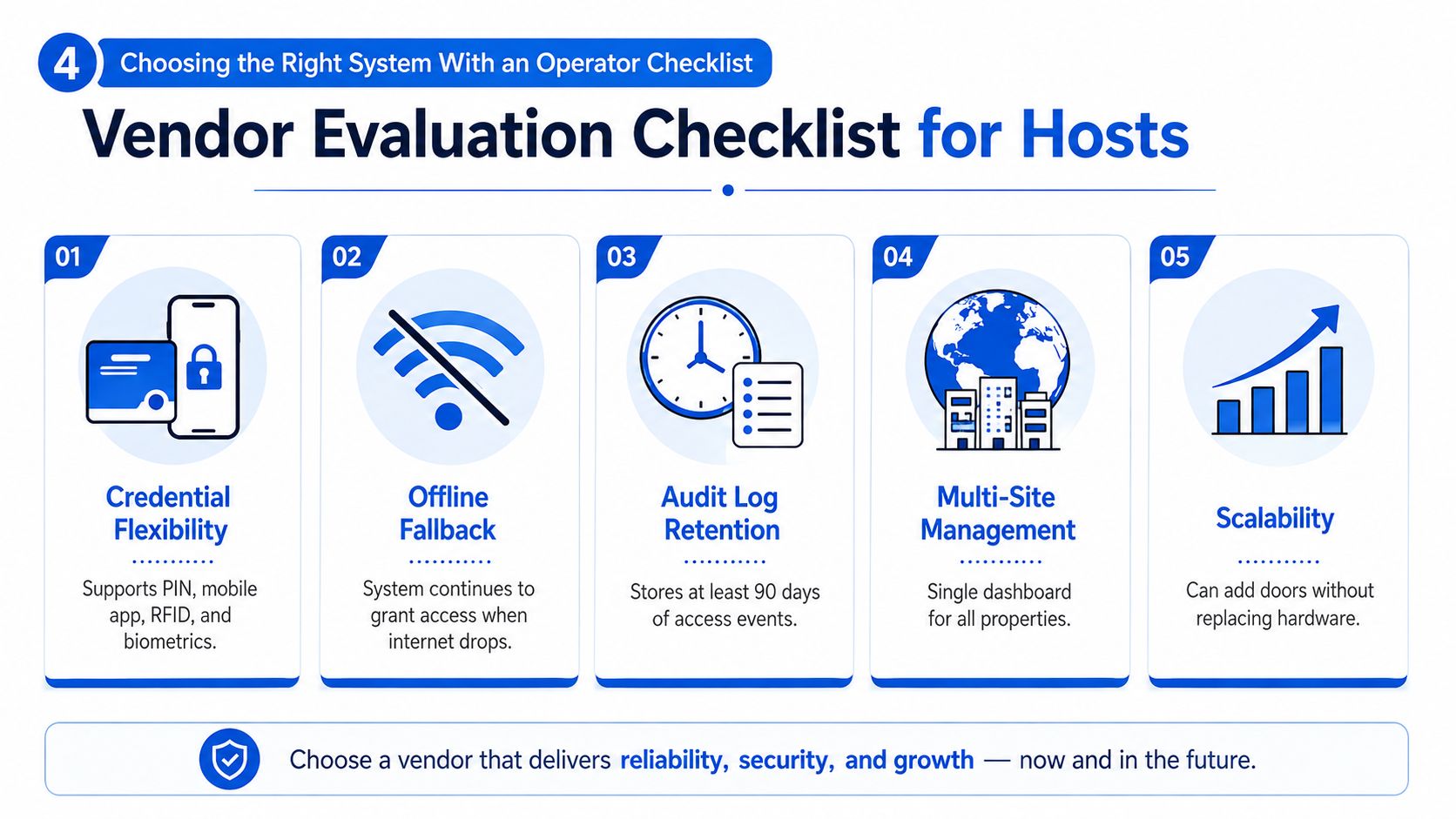
A cloud-based access control approach can simplify multi-property administration, but centralization increases the importance of account security, recovery procedures, and vendor continuity. Convenience is valuable only when you can retain control if the provider changes terms or disappears.
Implementing Remote Access Across a Co-Living Portfolio
Roll out one pilot house first. Don't install a new remote access control system across every property before you've tested the ugly cases, including an expired credential, a dead battery, a failed PMS sync, a lost phone, and a network outage.
Prepare the pilot
Inventory every door and photograph the existing hardware. Confirm Wi-Fi coverage at each entry, identify doors that need a cellular or local fallback, and document your current lockout volume and response process. You need a baseline so the pilot can prove whether it reduces work rather than shifting it into software administration.
Install the locks, create separate admin roles, and issue credentials for real residents and staff. Run a real booking through the PMS, check the assigned room, confirm the start and end dates, and verify that a cancellation removes the planned access. Then simulate an outage and record exactly what residents and staff can still do.
Train staff on the override procedure before launch. Every person who may answer a lockout call should know where the backup key or mechanical override lives, how to verify identity, and how to document an emergency opening. Residents need a short message explaining their credential, backup process, battery warnings, and who to contact after hours.
Use the pilot to find operational weak spots, not to collect compliments. Ask residents whether onboarding was clear, but also inspect denied events, duplicate permissions, battery alerts, and unresolved synchronization errors. Standardize hardware SKUs after the pilot so staff aren't carrying a different procedure for every property.
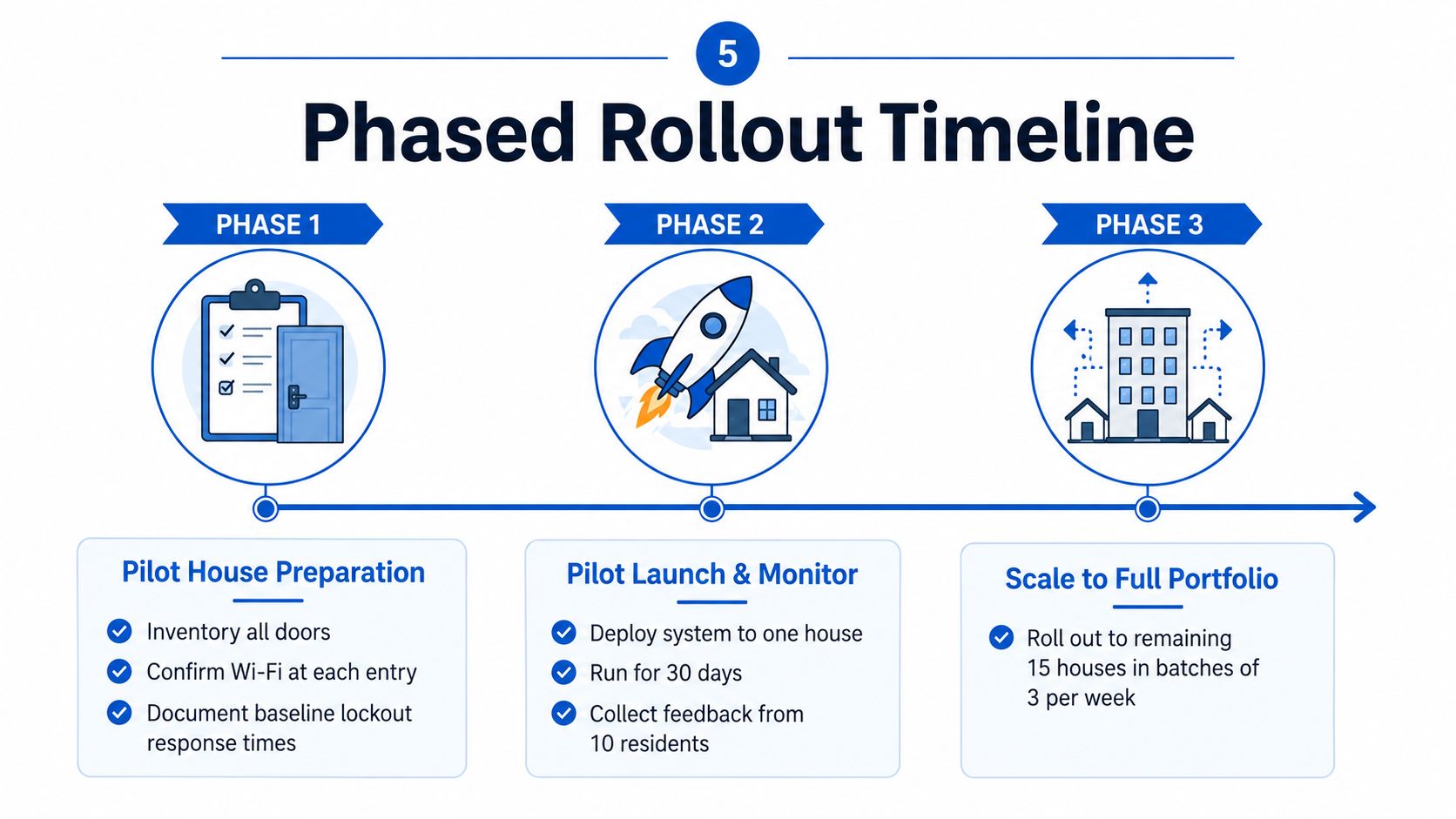
A useful rollout sequence looks like this:
- Pilot preparation: Document doors, connectivity, access roles, and the current lockout process.
- Pilot monitoring: Operate the system in one house, review events daily, and fix workflow gaps.
- Portfolio expansion: Add properties in controlled batches after the outage and revocation tests pass.
Centralize administrative ownership, but don't give every employee unrestricted control. Schedule preventive battery checks, keep replacement hardware available, and review emergency overrides regularly. For a practical overview of keyless entry for rental property, focus on procedures as much as equipment.
ROI, Integrations, and Your Next Step
Ownership reviews don't need a complicated model. Track the operational numbers you can defend:
- Average vacant days per turnover: How long does a room remain unavailable because access, cleaning, inspection, or handoff is incomplete?
- Lockout-related labor hours: How much staff time goes to late-night openings and emergency travel?
- Key replacement spend: Include spare keys, rekeying, and administrative handling.
- Incident-resolution time: How quickly can you produce a trustworthy access record after a complaint or security event?
The value of a remote access control system appears when those measures improve without creating a larger support burden. PMS-level integration is the difference between a lock that opens and an operations system that understands a check-in. A successful entry can confirm arrival, while a denied attempt can trigger a review, provided the event is tied to the right resident, room, and stay record.
| Scenario | Primary KPI | Typical Integration | Operator Outcome |
|---|---|---|---|
| Smart lock plus PMS | Vacant days per turnover | Stay dates, room assignment, credential issuance | Faster move-ins with fewer manual handoffs |
| Smart lock, PMS, and utility metering | Operating cost per occupied room | Access events, occupancy records, thermostat or meter data | Better visibility into room-level operations |
| Full stack with surveillance and intercom | Incident-resolution time | Locks, cameras, intercom, resident records, audit logs | Faster investigation with connected evidence |
The integration should also preserve separation of duties. A maintenance worker may need temporary access to a room, but that permission shouldn't grant portfolio-wide entry. A leasing agent may issue a credential, while only an owner or security administrator can change master policies.
Your next decision should be concrete. Pick one pilot house this week, record the four KPIs above, and run a 90-day comparison against a control house using physical keys. The result won't be a theoretical smart-lock score. It'll show whether the system protects NOI, reduces interruptions, and leaves you with better evidence when something goes wrong.
PadPulse is being built to bring pricing, communications, smart-home access, and portfolio reporting into one toolkit for room-by-room operators. Join the early-access interest list by visiting PadPulse, and use the pilot to shape the workflows you'll rely on across your houses.