Multi-Tenant Access Control: Securing Co-Living Homes 2026
July 19, 2026
You're probably dealing with access the hard way right now. A resident moves in late, a cleaner needs entry for two hours, a guest arrives before the host replies, and someone can't find the physical key that was “definitely left in the kitchen drawer.” In a room-by-room rental, those small moments pile up fast.
What trips up new co-living operators is that access control isn't just about the front door. It's about deciding who can enter which room, shared area, storage closet, mailbox room, or utility space, and for how long. A resident should reach the front door and their bedroom. A maintenance tech may need the basement and one vacant room. A short-stay guest might need the main entry and one room until checkout, then nowhere else.
That's where multi-tenant access control becomes useful. It treats each room, resident group, or property as a separate access boundary inside one shared system. Instead of passing keys around and hoping everyone remembers the latest code, you set rules once and let the system enforce them consistently.
Introduction to Multi-Tenant Access Control for Co-Living
A shared house can look simple from the sidewalk, but inside it behaves more like a small hotel. People arrive at different times. Some stay for months. Some stay for days. Staff come and go. Vendors need temporary entry. Access changes constantly, even when the building itself doesn't.
Physical keys struggle in that environment. They get copied, misplaced, handed off, or never returned. Even keypad locks become messy when one code is reused for too many people or left active after someone leaves. The problem isn't just inconvenience. It's a lack of clean boundaries.
Multi-tenant access control solves that by organizing access around separate user groups and scopes. In co-living, a “tenant” doesn't only mean the legal leaseholder. It can also mean a resident account, a room assignment, a property, or a management group inside the software. The system uses those boundaries to decide what each person can open and when.
That matters in daily operations for three reasons:
- Security: People only get access to the spaces tied to their role.
- Speed: New access can be issued without driving to the property.
- Control: You can revoke access the moment a stay ends or a situation changes.
Cloud-based multi-tenant access control systems have been associated with a 42% reduction in unauthorized entry incidents compared with traditional key-based systems, along with an 18% uplift in NOI and 30% lower security operating expenses in the cited implementations, according to Action 1st's review of multi-tenant building access control.
Practical rule: If you can't answer “who can open this door right now?” in under a minute, your access setup is already costing you time and creating risk.
Early operator feedback from PadPulse beta conversations points to the same hidden cost pattern, qualitatively. It's rarely one major failure. It's dozens of small access tasks, lockouts, manual code changes, and after-hours messages that eat into margins and distract from leasing, maintenance, and resident experience.
Understanding Key Concepts of Multi-Tenant Access Control
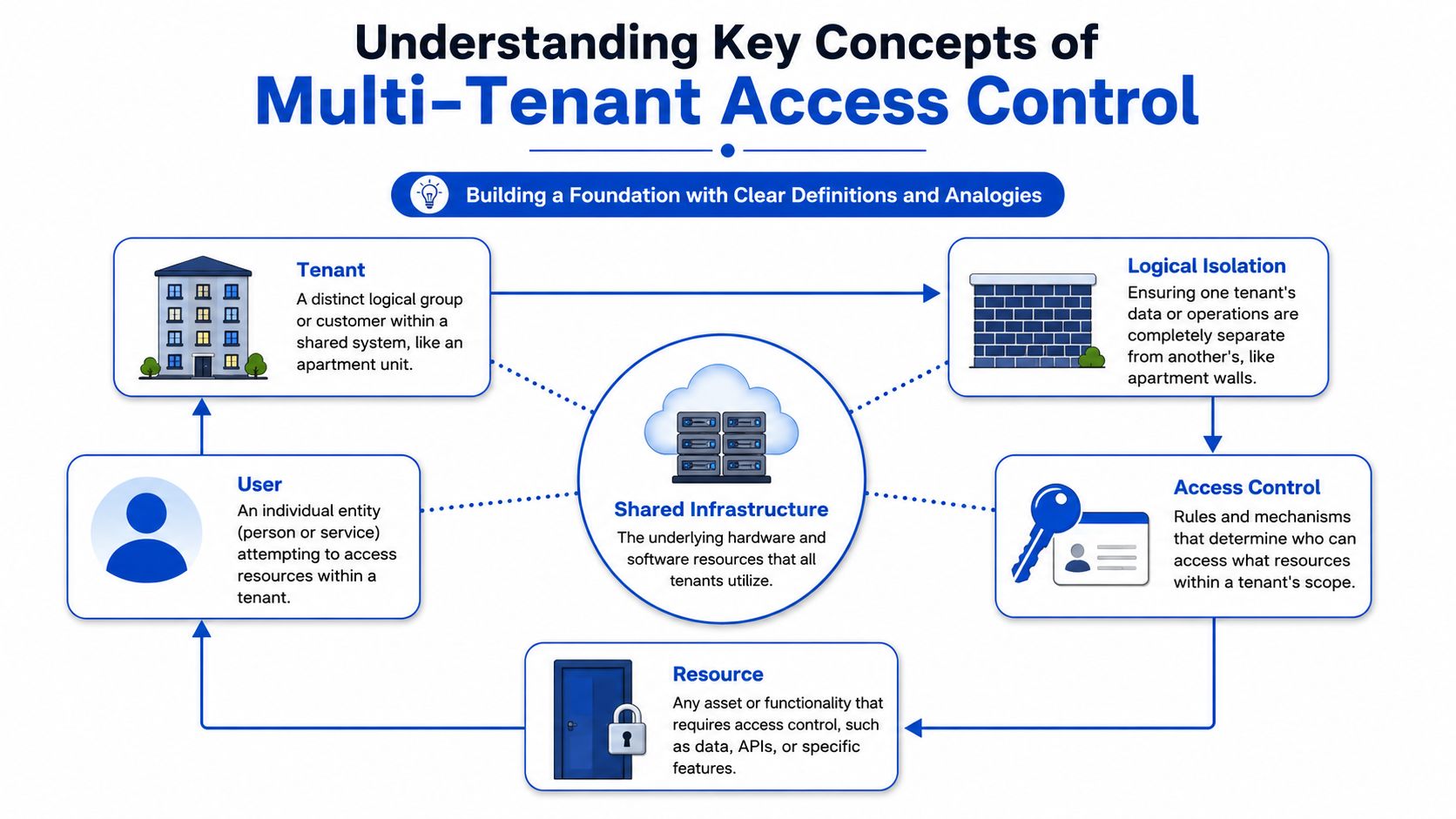
The easiest way to understand multi-tenant access control is to think of one house as several mini-environments sharing the same shell. The kitchen may be shared by everyone. Bedroom 3 belongs to one resident. The supply closet belongs to staff. The software has to reflect those boundaries clearly.
What a tenant means in practice
In software, a tenant is a distinct logical group inside a shared platform. For a co-living operator, that could mean:
- A property tenant: One house inside a larger portfolio
- A room tenant: One resident's room assignment and permissions
- An operator tenant: A management entity separated from another owner on the same platform
The confusion usually starts because “tenant” in real estate and “tenant” in software overlap but aren't identical. In access control, the safer question is, “What boundary am I trying to protect?”
Logical isolation without separate systems
You don't need a fully separate app for every property to keep data and permissions apart. You need logical isolation. This is comparable to apartment walls. Everyone lives in the same building, but one resident shouldn't walk through the wall into someone else's room just because the plumbing is shared.
A strong multi-tenant design enforces those walls in the software. One cited guidance states that strict tenant isolation requires enforcing the tenant_id boundary at three layers: schema, runtime, and test validation, so every lookup and action checks tenant context and cross-tenant access attempts fail deterministically, as explained in WorkOS guidance on designing multi-tenant RBAC for SaaS.
That sounds technical, but the plain-English version is simple:
- Store the boundary clearly in the data model.
- Check the boundary every time a user tries to do something.
- Test for failure, not just success.
A system isn't isolated because the menu looks different for each user. It's isolated because the backend refuses the wrong request every time.
Access scopes and shared infrastructure
An access scope is the set of places and actions a user is allowed to have. A resident may have 24/7 access to the front door, hallway, laundry room, and their own room. A cleaner may have Tuesday access from noon to 4 PM to common areas only.
Behind the scenes, many operators run these permissions on shared cloud infrastructure. That's normal. Shared infrastructure doesn't mean shared permissions. It means one platform can manage many properties while still separating users, rooms, events, and credentials.
If you're comparing options for keyless entry systems for shared rentals, this is the concept to keep in mind. The lock hardware matters, but the primary operational difference lies in how well the system models boundaries, roles, and timing.
Comparing Centralized Versus Per-Unit Architectures
A host with twelve bedrooms across three houses usually reaches this decision the hard way. One Monday morning, a cleaner cannot get into the upstairs bathroom, a new resident's room code did not sync, and the front door at another property is still using last week's guest schedule. The question is no longer which lock looks better in a demo, but rather where control should live, and what your team has to do when something goes wrong.
Some operators put control in one shared layer. Others distribute it to each unit or to small groups of doors. Both can work. The better choice depends on your property layout, connectivity, retrofit constraints, and how your staff handles turnovers, vendor visits, and resident changes.
Centralized architecture in a co-living house
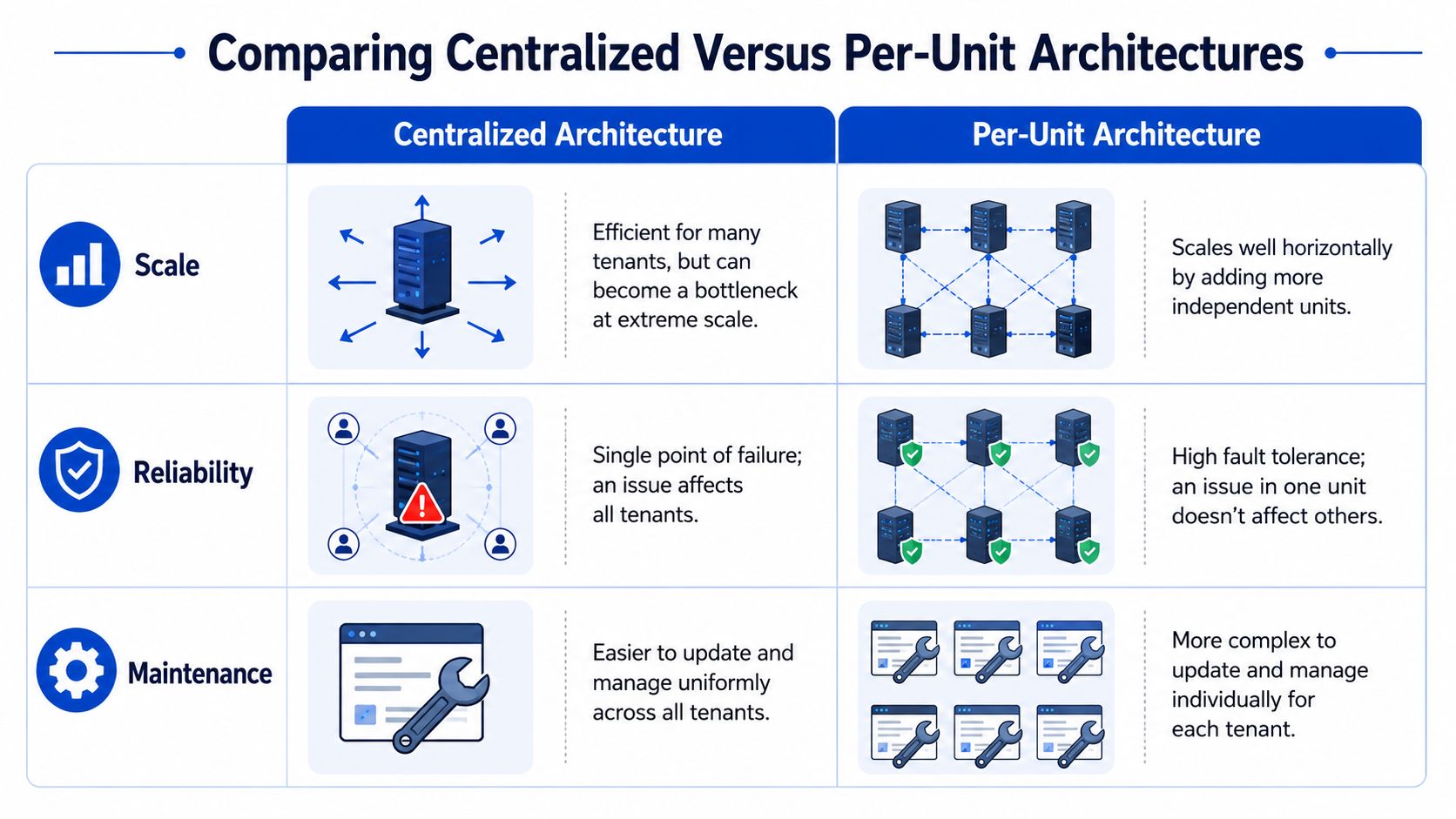
A centralized setup works like a front desk for the whole building. One hub, controller, or cloud management layer coordinates rules across many doors.
That model is attractive when your operating pattern is repeatable across homes. If your staff often needs to adjust shared-space hours, issue temporary access for cleaners, or apply the same rule set to several properties, one control plane reduces duplicate work.
Centralized systems usually make these jobs easier:
- Policy changes across multiple doors: update once, apply broadly
- Staff onboarding and training: one process to teach, one dashboard to learn
- Portfolio standardization: the same operational playbook across houses
- Audit review: access events are easier to review in one place
The weakness is concentration of failure. If the central layer has an outage, sync problem, or misconfiguration, the issue can affect more than one door at a time. In a room-by-room rental business, that can turn a single bad rule into a full day of support tickets.
Per-unit architecture in room-by-room rentals
Per-unit architecture places more control at the door, unit, or local controller level. In practice, this is common in older homes, mixed hardware environments, and portfolios that grew one retrofit at a time.
It helps when each room needs to keep working even if the network is unreliable. It also fits operators who inherited different lock brands across properties and need a practical way to keep moving without replacing everything at once.
Per-unit setups are often a better fit when:
- Internet reliability varies by property
- Bedroom access needs to stay insulated from common-area issues
- Retrofits happened in phases
- Different vendors or lock types already exist in the portfolio
The cost shows up in administration. One lock failing is usually contained. Ten locks configured ten slightly different ways create a different kind of problem. Your team spends more time checking device settings, confirming schedules, and fixing one-off exceptions.
Architecture Comparison for Co-Living Access
| Criteria | Centralized Controller | Per-Unit Controller |
|---|---|---|
| Policy management | Easier to update from one place | More manual coordination across devices |
| Failure impact | Broader impact if the main control layer fails | Problems are often contained to one lock or unit |
| Scaling across houses | Strong for standardized portfolios | Works well, but operational overhead can rise |
| Offline behavior | Depends heavily on controller design and fallback rules | Often stronger at the individual door level |
| Staff training | Simpler for one repeatable process | Harder when each property differs |
| Retrofit flexibility | Best when planned as a system | Useful when upgrading piecemeal |
The hidden cost is operational drag
New hosts often compare hardware prices first. PadPulse's early beta conversations pointed somewhere less obvious. The expensive part was often the staff time created by the architecture behind the lock.
A low-cost device can become costly if your team has to reissue codes manually, verify access after every booking change, or keep a property-by-property spreadsheet because the system does not reflect how rooms are rented in real life. In room-by-room operations, small frictions repeat constantly. One extra minute during every check-in, cleaner visit, lock reset, and move-out becomes real labor.
A simple analogy helps here. Centralized architecture works like one building manager with a master schedule. Per-unit architecture works like giving each room its own clipboard. The clipboard model can be reliable at the room level, but only if someone keeps every clipboard current.
That is why the right choice is rarely about hardware alone. A standardized portfolio with frequent access changes often benefits from centralized control because the team repeats the same process every day. A retrofit-heavy portfolio may accept more admin work in exchange for local resilience and faster deployment.
Choose the architecture that still makes sense during late check-ins, internet hiccups, and staff handoffs. That is the version your team will live with.
Designing Security Models Role Based and Time Based Policies
A good lock system becomes a great operating system when your rules are clear. Most access mistakes don't happen because the lock failed. They happen because the policy was vague, overbroad, or never cleaned up after move-out.
Start with roles, not people
The cleanest approach is to define roles first, then assign people into them. In co-living, a simple starting set might include:
- Resident: Main entry, assigned bedroom, shared spaces
- Host or manager: All common areas, vacancies, emergency override paths
- Cleaner: Shared spaces during scheduled windows
- Maintenance vendor: Assigned work area for a limited period
- Guest: Main entry and one room for a short stay
People change, but roles repeat. If you create a custom permission set for every individual, the setup gets messy fast.
Add time-based rules for real life
Room-by-room rentals are full of temporary access needs. A role alone isn't enough. You also need time-based policies.
Examples help:
- A weekend guest checks in Friday evening and loses access after checkout.
- A cleaner can enter the front door and kitchen every Monday morning.
- A pest control vendor can enter one unit during a narrow appointment window.
- A former resident's digital key stops working the moment occupancy ends.
That combination of role plus timing is what keeps access useful without becoming sloppy.
Avoid role explosion
As operations grow, many teams create too many roles. “Cleaner Tuesday,” “Cleaner Weekend,” “Resident Premium,” “Resident Temporary,” “Maintenance Light,” and so on. Soon nobody remembers what each one means.
A better model uses tenant-aware RBAC with ABAC, where role-based access control handles the broad job and attribute-based access control adds context like tenant ID, ownership, status, or schedule. Cerbos describes this approach as a way to solve role explosion and notes it can reduce permission set complexity by up to 40% in enterprise SaaS environments, according to Cerbos guidance on scalable multitenant authorization.
In plain language, that means:
- Keep the role broad, such as “resident”
- Add attributes, such as “room = 4B” or “valid until checkout”
- Let the backend check both before every action
A practical policy model for hosts
Use a short policy checklist:
- Define the base role. Resident, guest, cleaner, manager.
- Attach a scope. Which property, which room, which door group.
- Attach time rules. Daily schedule, stay dates, one-time windows.
- Set exceptions sparingly. Avoid one-off permissions unless there's a real reason.
- Review after turnover. Every move-out should trigger access cleanup.
The key point is that the backend must remain the source of truth. The app screen can hide buttons, but the actual authorization decision has to happen behind the scenes every time a door action or management action is attempted.
Building Provisioning Workflows and Smart-Lock Integration Patterns
A Friday room swap is where weak provisioning shows up fast. One resident extends for two nights, another moves from 3A to 5C, a cleaner needs entry between turnovers, and the lock app still shows yesterday's assignments. If your team has to update three systems by hand, the cost is not just inconvenience. It is late-night lockouts, staff calls, refund requests, and manual cleanup the next morning.
PadPulse beta teams ran into this early. The hard part was rarely creating a credential for a new move-in. The hard part was keeping every change in sync after the first assignment: extensions, early checkouts, room transfers, guest passes, maintenance windows, and vendor access. Room-by-room rental platforms create more small access changes than traditional apartment leasing, so the workflow matters as much as the lock brand.
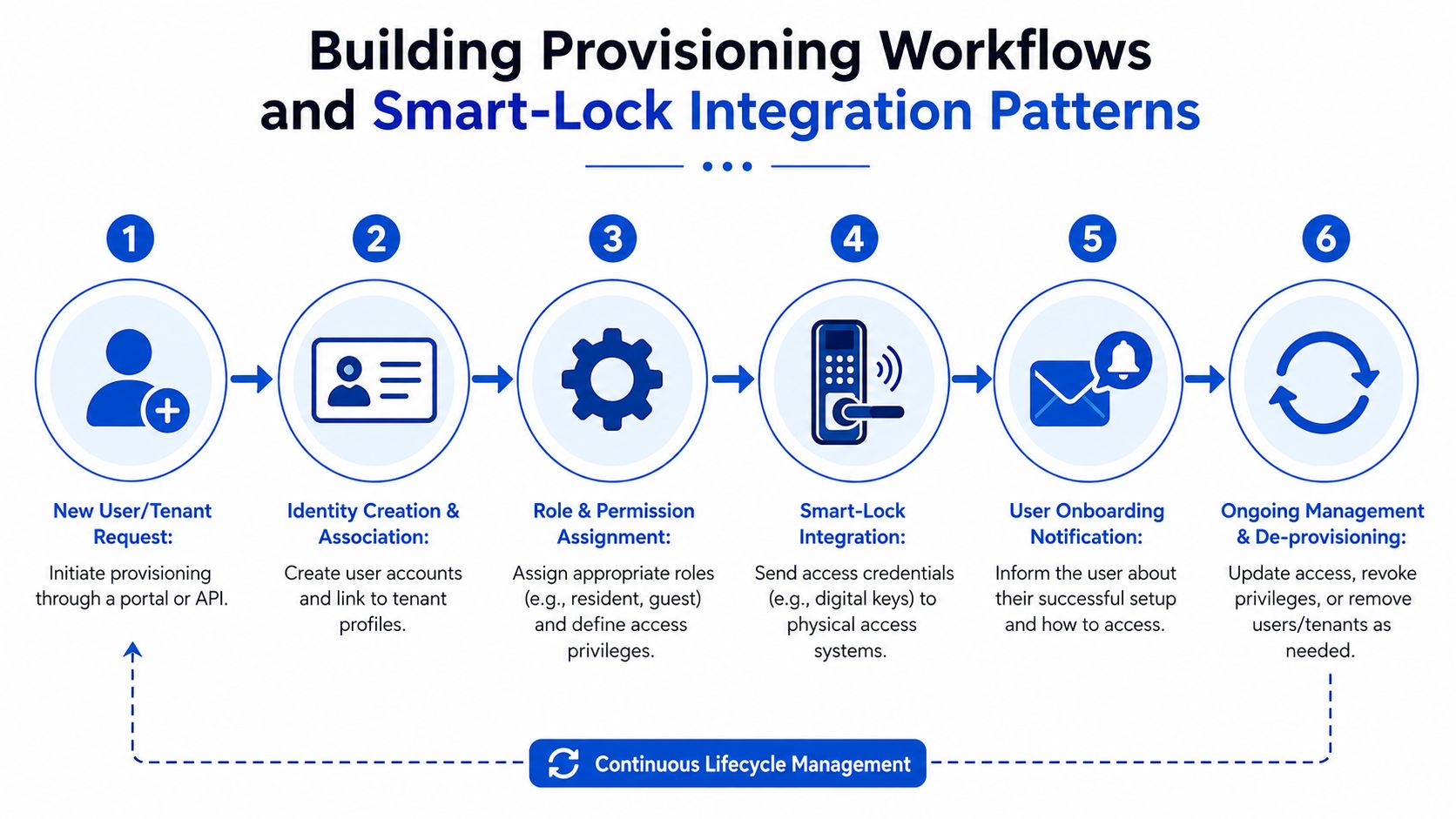
The six-step provisioning flow
A good workflow follows the same path every time, much like a front desk checklist that no one is allowed to skip.
A trigger starts the job
This can be a booking approval, a signed lease, a room reassignment, or a staff request.Identity is matched to the right record
Create or update the user profile, then tie it to the correct property, unit, and room. In shared housing, room-level accuracy matters more than broad property access.Policy is attached
Add the right role, dates, and door scope. A resident for Room 4B should not inherit building-wide access because someone reused a template.The lock system receives the credential request
The platform sends the PIN, mobile key, or temporary code to the lock vendor.The user receives entry instructions
Send the code, app invite, backup instructions, and start time in one message. Confusion at the door often starts with unclear onboarding, not with the lock itself.Changes and removals happen automatically
Extensions, cancellations, checkouts, and room moves should update access without a staff member remembering to revisit the record.
Integration patterns that work in the field
Operators usually settle into one of three patterns, and each has a place.
Portal-driven provisioning
Staff assign rooms, dates, and permissions in a dashboard. This works for smaller portfolios or for properties where managers want to review every access grant before it goes live. The tradeoff is labor. Every exception becomes a manual task, and co-living has many exceptions.
API-driven provisioning
Your PMS, booking flow, or resident system sends data directly to the lock platform. This removes repetitive data entry and cuts down on the common failure where a resident is approved in one system but never reaches the door system. For teams comparing tooling, this overview of cloud-based access control for rental operations helps explain why software events need to map cleanly to physical entry rules.
Event-driven provisioning
This pattern fits high-turnover properties best. A check-in, checkout, room change, or cancellation creates an event, and each connected system updates from that event. It works like a relay race. If the handoff is clean, the next system runs its part without staff stepping in. Early PadPulse beta feedback pointed to this pattern as the easiest one to operate at scale because it reduces the number of places a team must remember to update.
Shared versus dedicated lock management
There are two common ways to organize lock integrations across a portfolio.
One approach gives each property its own lock management path, with separate configuration, staff permissions, and vendor credentials. Operators often choose this for a flagship building or for properties with unusual hardware. Isolation is easier to understand, but rollout, maintenance, and staff training take more time.
The other approach uses a shared management layer across many properties, with rules that keep each property and room group separate. This is usually more efficient for room-by-room rental platforms because the same workflows can be reused across dozens or hundreds of doors. The catch is policy discipline. A bad mapping rule in a shared setup can assign access to the wrong room much faster than a manual process can.
In co-living terms, dedicated management works like giving each house its own binder, keys, and operating playbook. Shared management works like running one strong operations desk with labeled drawers for every property. Both can work. The better choice depends on whether your bigger risk is cross-property complexity or repeated manual setup.
This walkthrough shows the workflow concept in action:
Don't skip fallback planning
Real properties need backup rules because lock APIs fail, batteries die, phones get lost, and Wi-Fi drops.
Good provisioning includes:
- Offline entry plans: A local code, backup credential, or staff override process
- Failed sync handling: A retry queue and clear alerting if the lock vendor does not confirm the change
- De-provisioning rules: End access from checkout events and schedule changes, not from staff memory
- Exception handling: A defined process for roommate changes, guest upgrades, and last-minute vendor visits
- Audit linkage: Record who created, changed, retried, and removed each credential
A useful rule for hosts is simple. If a move-out, room swap, or extension requires a person to remember multiple systems, the workflow is incomplete.
That is where hidden operating cost shows up. It appears in every check-in delay, every after-hours support message, every mistaken cleaner code, and every room transfer that needs manual repair. In room-by-room rental platforms, those small failures add up faster than many new operators expect.
Implementing Auditing Incident Response and Compliance
When access goes wrong, memory isn't enough. You need logs. Not just because of worst-case incidents, but because small disputes happen all the time. A resident says they couldn't get in. A vendor says the code didn't work. A cleaner entered outside the expected window. Without an audit trail, your team spends time guessing.
What to log every time
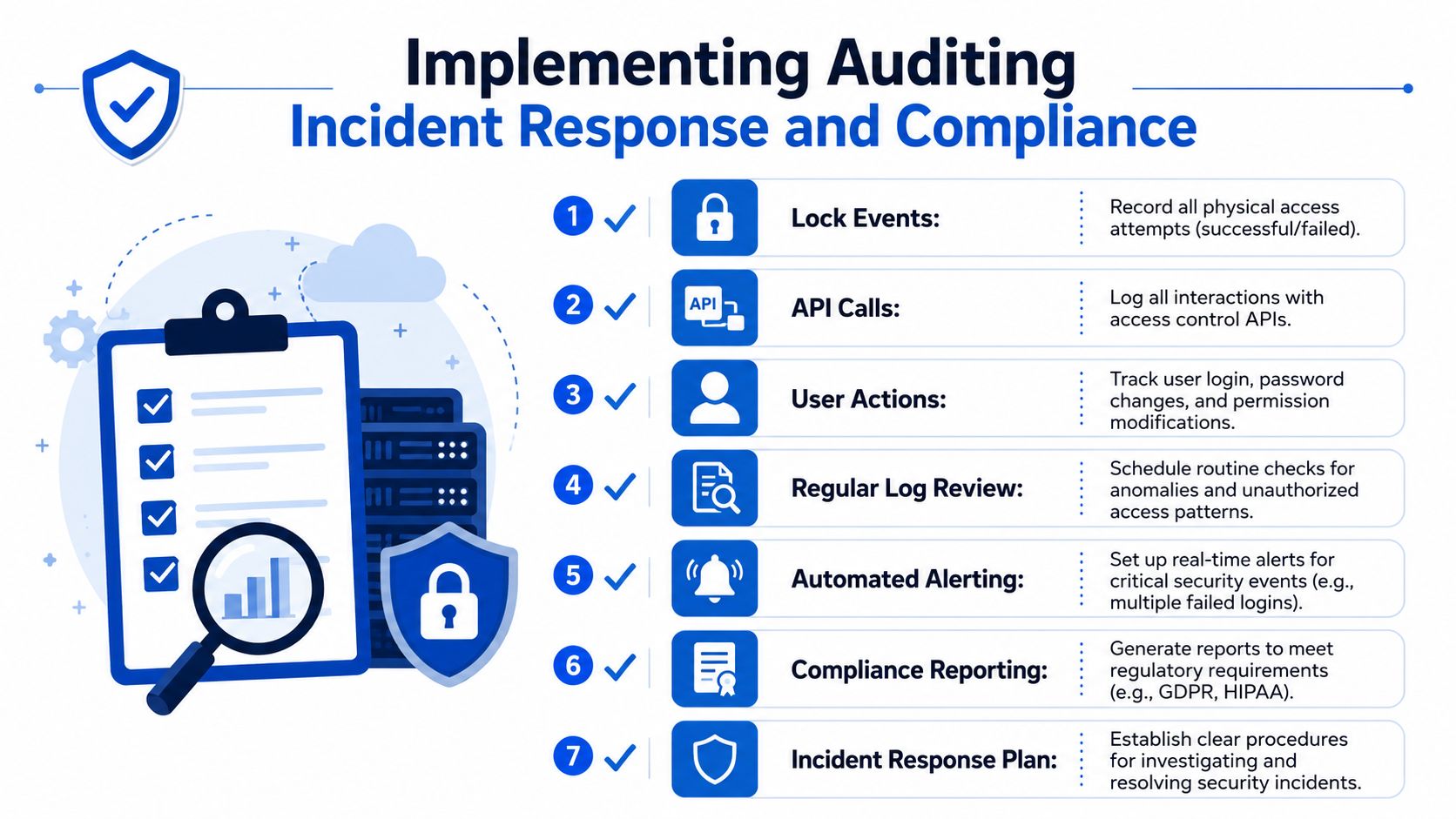
Your audit record should combine physical and digital events. At minimum, track:
- Lock events: Successful access, failed attempts, manual overrides
- API activity: Credential creation, revocation, sync attempts, system errors
- User changes: Login events, password resets, role changes, room reassignments
- Administrative actions: Who granted or removed access, and when
That gives you a timeline instead of a pile of disconnected facts.
A practical incident playbook
When a problem happens, use the same sequence every time.
Access complaint
Start by checking whether the user had valid permissions at that time. Then review lock event history, app activity, and any recent schedule changes. Many “lock failures” turn out to be expired access, wrong door assignment, or a room transfer that wasn't fully completed.
Suspected unauthorized entry
Freeze the relevant credentials first. Then verify recent access logs, check whether any shared code or stale digital key is still active, and preserve the event history before staff start making ad hoc changes.
System outage or integration failure
Switch to the fallback plan. Local entry procedure, emergency contact path, and a checklist for re-syncing permissions once service is restored. The important part is consistency. Staff shouldn't invent the process mid-incident.
Keep one rule for emergencies. Temporary workarounds should still leave an audit trail.
Compliance without turning the house into a surveillance project
Most co-living operators want enough data to resolve issues and prove proper handling, but not so much that residents feel watched. That balance matters.
A practical compliance checklist looks like this:
- Collect only necessary visitor and access data
- Set retention rules so logs don't live forever without purpose
- Limit log visibility to managers who need it
- Document consent and notices where local privacy rules require it
- Review who can export logs because that's often overlooked
If you're building process around resident records and audit readiness, compliance tracking software for housing operations can help centralize documentation, but the discipline still has to come from the team.
Session and state isolation still matter
Auditing isn't only about doors. It also applies to sessions in your management software. One secure-session practice is to prefix each session key with the tenant identifier and store the tenant ID inside the session payload so each read verifies the correct tenant context atomically, with a recommended 30-second clock-skew tolerance, according to this guide on session isolation and state management in multi-tenant SaaS.
For operators, that means the staff dashboard itself needs isolation discipline. Otherwise, a clean physical access policy can still be undermined by weak admin-session handling.
Scaling Migration and Operational KPIs for Multi-Property Management
The jump from one house to several properties changes everything. The doors multiply, but so do user types, staff workflows, exceptions, and failure points. What worked with sticky notes and one lock app stops working when your portfolio spans neighborhoods, owners, and move-in calendars.
The migration question to answer first
Before changing systems, decide what boundary you're scaling around. Some operators migrate property by property. Others migrate by hardware type or by management region. The safest path is the one that keeps access boundaries clear while staff are learning a new process.
One security principle is worth holding onto during migration. The safest multi-tenancy architecture combines tenant-scoped roles, centralized authorization, and database-level enforcement such as row-level security, which helps prevent data leaks while balancing operational costs, as described in LoginRadius guidance on multi-tenant authorization.
In practical terms, your migration plan should preserve three things:
- Each user remains tied to the right property and room context
- Authorization rules stay centralized enough to manage consistently
- Data access remains constrained even if application logic misfires
A migration checklist for co-living operators
Export the right records
Don't just export user names and lock IDs. You also need room assignments, role mappings, expiration dates, door groups, exception rules, and any standing vendor access.
Clean before import
Migration is the best time to remove stale users and old permissions. If a cleaner no longer services House B, don't carry that access into the new platform.
Stage by risk level
Many teams start with shared spaces and vacant rooms, then move occupied bedrooms after the process is stable. That reduces disruption and gives staff room to test edge cases.
Protect session boundaries
If your team uses a central dashboard during cutover, make sure logins, tokens, and active sessions stay tied to the correct tenant or property context. Session confusion during migration can create the exact cross-property mistakes you're trying to eliminate.
Which KPIs actually matter
Operators often track too much and use too little. For multi-property access control, focus on metrics that change decisions.
Lock uptime
This tells you whether the hardware and integration are dependable enough for self-serve operations. Track it by property and by lock type, not just as one portfolio average.
Provisioning time
Measure how long it takes from approval to active access. If it's slow, the issue may be staffing, integration quality, or unclear workflow ownership.
Incident rate
Watch for repeated lockouts, unauthorized attempts, stale credentials, and manual overrides. These patterns tell you whether your policy model is clean or leaking exceptions.
Cost per door
Conceptually, early PadPulse beta insights proved highly valuable. Operators often budget for hardware and ignore the labor around setup, support, and turnover. Cost per door should include admin time, not just subscription and device cost.
Standardize where residents never notice
The best scaling move is usually invisible to the resident. A host shouldn't have one move-in process for House A, another for House B, and a third for furnished short stays. Standardize the internal workflow even if the front-end resident experience differs slightly by property.
A scalable operating rhythm often includes:
- One naming convention for doors, rooms, and access groups
- One approval path for guest and vendor access
- One revocation trigger for move-out and booking end
- One exception process for emergency access
- One review cycle for dormant accounts and old permissions
Multi-property growth gets messy when every house has its own folklore. Write the rule once, then make each property fit the rule unless there's a strong reason not to.
That's the shift from being a host who manages access manually to an operator who runs access as infrastructure.
Conclusion and Key Takeaways
A lot of hosts start with a front-door fix. They install a smart lock, create a few codes, and hope that solves the problem. Then the business grows. One house becomes several. A resident changes rooms. A vendor needs temporary entry. A guest arrives early. The lock still works, but the process starts to crack.
The operators who handle that growth well usually make the same shift. They stop thinking in terms of keys and start thinking in terms of boundaries, roles, schedules, and workflows. That's what multi-tenant access control really is. It's a way to run shared housing with cleaner rules.
The strongest setups tend to share a few traits:
- Clear isolation: Each property, room, and user context stays separate
- Simple architecture choices: Centralized where consistency helps, distributed where resilience matters
- Practical policies: Roles do the heavy lifting, time rules handle real-world exceptions
- Reliable provisioning: Access is created and removed through repeatable workflows
- Strong audit habits: Every important action leaves a trail
- Operational discipline: Migration, reporting, and KPI review happen on schedule
A host who gets this right usually notices the change in ordinary moments. Fewer late-night lockouts. Fewer stale codes. Fewer “who gave access to this person?” messages. Staff spend less time fixing access and more time running the property well.
That's the payoff. Better security, less friction, and a portfolio that can grow without turning every move-in into a manual scramble.
PadPulse is building toward that kind of workflow for room-by-room operators. If you want one place to track pricing, communications, reporting, and future smart-home operations for co-living, join the PadPulse interest list to follow the Winter 2026 launch plans, beta updates, and early access opportunities.