Keyless Entry Systems: A Landlord's Guide for 2026
June 15, 2026
A resident loses a key at the worst possible time. Another moves out and never returns the copy they promised was “somewhere in the kitchen drawer.” A cleaner shows up early and can't get in. Then someone gets locked out after midnight and your phone lights up.
That cycle is why many landlords start looking at keyless entry systems. Not because they want a flashy gadget, but because they're tired of running access like a small emergency service.
In room-by-room rentals, the pain is sharper. Doors change hands often. Common areas need one set of rules, bedrooms need another, and temporary access comes up constantly. The old method works until turnover picks up. Then every extra key, lockout, and rekey becomes a recurring operating problem.
This isn't a fringe category anymore. The global keyless entry system market was valued at US$5.5 billion in 2025 and is projected to reach US$11.3 billion by 2032, according to Persistence Market Research's keyless entry system market analysis. Landlords aren't adopting this because it's trendy. They're adopting it because access control has become part of normal property operations.
The End of Late-Night Lockout Calls
The first real benefit of keyless entry isn't “smart home convenience.” It's fewer interruptions.
In a co-living house, physical keys create friction at every stage of the tenant lifecycle. Move-in means key handoff. Move-out means key return. If the key isn't returned, you decide whether to trust that it won't resurface. If a resident copies a key without telling you, you may never know. If someone loses one, the problem isn't just inconvenience. It's uncertainty.
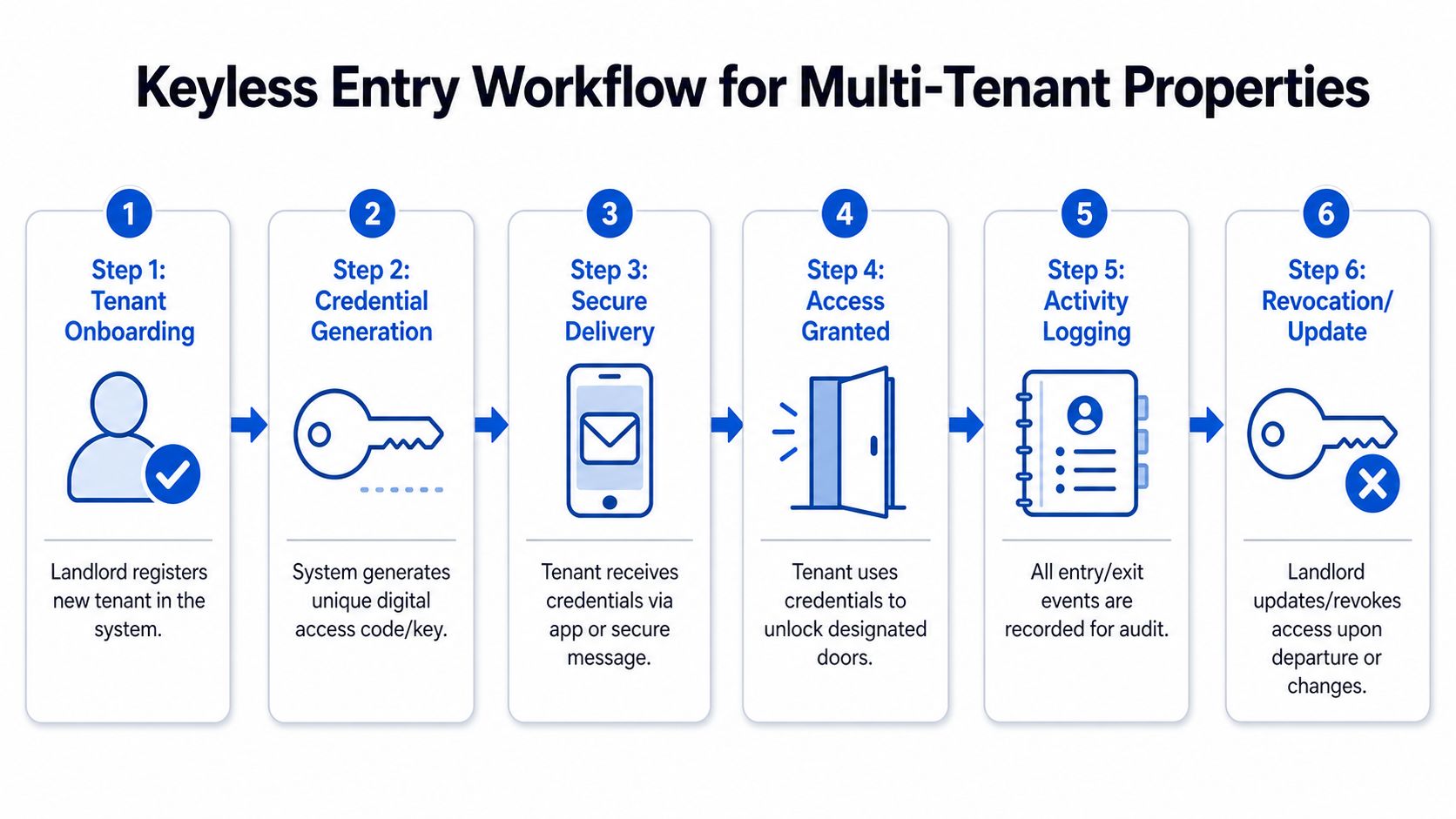
With a decent keyless setup, that whole pattern changes. You issue access remotely. You remove it remotely. You can set access by person, by door, and by schedule. A new resident can move in without you driving across town. A former resident can lose access the moment their stay ends.
What changes in day-to-day operations
For landlords, the key win is operational calm.
A few common headaches start to disappear:
- Lost key chaos goes down: You stop treating every missing key like a possible rekey.
- Turnovers get simpler: You update credentials instead of replacing hardware every time someone leaves.
- Shared houses get easier to manage: Residents can access the front door and their assigned room without getting unrestricted access to everything else.
- Vendors become easier to schedule: Cleaners, inspectors, and maintenance staff can get limited access for a specific window.
Practical rule: If your property has frequent move-ins, move-outs, or temporary vendors, access control is no longer a hardware issue. It's an operations issue.
That said, keyless doesn't eliminate management. It changes the kind of management you do. You trade physical keys for digital credentials, permissions, and support. That's usually a good trade in high-turnover housing, but only if you treat it like a system, not a gadget.
Why co-living operators care more than owner-occupants
A homeowner can live with a quirky lock app. A landlord with multiple rooms can't.
If one resident has trouble accessing a door, that becomes a support ticket. If onboarding is confusing, you'll hear about it repeatedly. If the system doesn't let you revoke access cleanly, the problem compounds every turnover. In co-living, the best keyless setup isn't the one with the most features. It's the one that reduces repeat work.
What Are Keyless Entry Systems
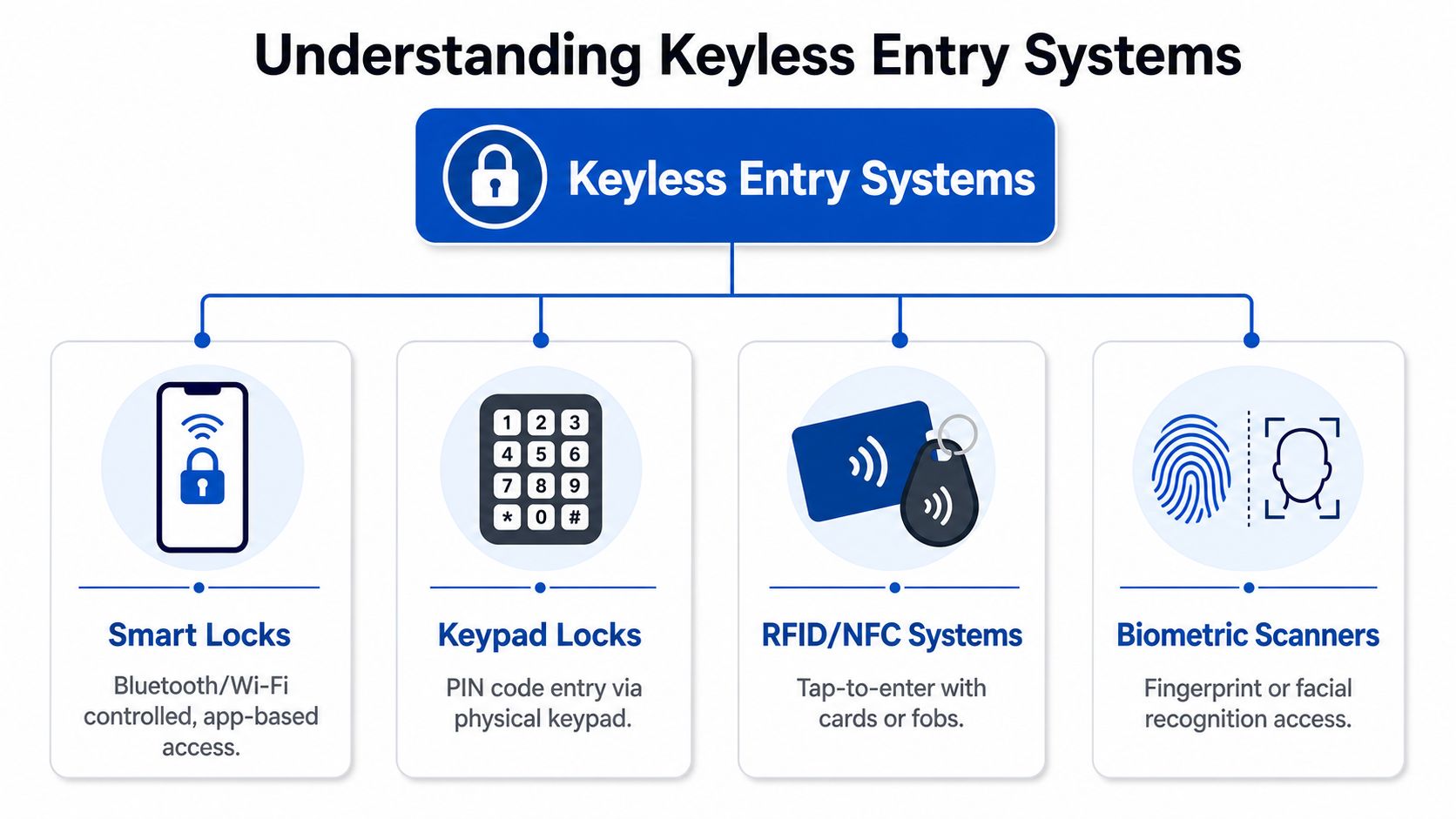
At the simplest level, keyless entry systems allow entry through a door without a traditional metal key. The “key” becomes something else: a PIN code, a card, a fob, a phone, or a biometric identifier like a fingerprint.
The idea isn't new. One history overview of keyless control traces the concept back to the 1870s, with James Sargent credited for a combination lock in 1873 and a time-delay lock in 1880. From there, access control moved through RFID systems in the 1990s and smartphone-based access in the 2010s.
For landlords, that history matters less than the current choices. Most systems you'll evaluate fall into four practical buckets.
The main credential types
Keypad locks use a PIN code entered on the door.
They're easy for residents to understand and easy to deploy. They also create one obvious risk: people share codes. In a single-family home, that may be acceptable. In shared housing, you need a plan for changing codes, assigning them individually, and avoiding “everyone uses the same front-door code forever.”
RFID or NFC cards and fobs work like a tap-to-enter badge.
These are familiar and usually simple for residents. They can also be tracked and deactivated without changing the lock. But they still behave like physical objects. People lose them, forget them, lend them out, or leave them in the laundry room.
Smart locks with mobile access let residents use an app or phone-based credential.
This can be the smoothest experience when residents are comfortable using smartphones. It also makes remote issuance and revocation easier. The downside is support burden. Phones die. Apps get ignored. Notifications get buried. Some residents don't want app-based access at all.
Biometric systems rely on fingerprints or facial recognition.
They can be appealing where convenience and strong identity verification matter. But landlords should think carefully before using biometrics in ordinary rentals. Enrollment takes work, privacy concerns are real, and not every property needs that level of complexity.
What works best in rentals
The “best” option depends on who lives in the property and how often access changes.
- For simple deployments: Keypads are often the easiest starting point.
- For stronger tracking: Individual fobs or cards can be cleaner than shared codes.
- For remote operations: Mobile credentials are often the most flexible.
- For specialized environments: Biometrics may fit, but they're rarely the first system I'd choose for room-by-room housing.
The right question isn't “Which technology is most modern?” It's “Which one creates the least friction for your residents and staff?”
Most operators eventually learn that access method matters as much as lock quality. A great lock paired with a bad credential model still creates daily headaches.
How These Systems Work for Landlords
Consumer smart lock marketing often makes access control sound magical. In practice, commercial-grade systems are pretty straightforward. Think of them as a digital doorman with three jobs: check what someone presents, decide whether they're allowed in, and enable door access if they are.
That structure matters in multi-tenant housing because you don't just need doors to open. You need doors to open for the right person, at the right time, with a record of what happened.
The three parts that do the work
A commercial keyless entry system guide from BTI Group describes the setup as a three-part chain:
- Reader: This is the part the resident interacts with. It reads a PIN, card, fob, phone, or other credential.
- Controller: This is the decision-maker. It checks whether that credential has permission for that door and time.
- Electrified lock: This is the hardware that releases the door if access is approved.
That separation is why better systems are more useful for landlords than a basic standalone lock. The reader doesn't make all the decisions itself. The controller applies rules, and those rules can be specific.
Why it matters in shared housing
In a co-living house, not everyone should have the same access.
A resident may need the front door and their bedroom, but not the owner's closet. A cleaner may need common areas during a scheduled window. A contractor may need one exterior door for a short period. Once you manage more than a couple of doors, these distinctions stop being nice-to-have.
This walkthrough shows what that operational flow looks like in practice:
The other major advantage is the audit trail. Good systems can log who tried to enter, when they tried, which door was involved, and whether access was granted or denied. For landlords, that's useful when there's a dispute, a security concern, or a simple “I couldn't get in” support request.
When a resident says the lock failed, an access log often tells you whether the issue was the lock, the credential, or the timing.
That's a major shift from physical keys. With a metal key, you usually know only one thing: someone got in, or they didn't. With digital access, you can usually reconstruct what happened.
Pros and Cons in a Co-Living Setting
The sales pitch for keyless entry systems is easy. No more lost keys. Remote access. Better control. All true.
The harder question is whether the system reduces work in a high-turnover, room-by-room rental. Sometimes it does immediately. Sometimes it just swaps one category of headaches for another. That isn't a reason to avoid it. It's a reason to choose carefully.
Where keyless entry helps
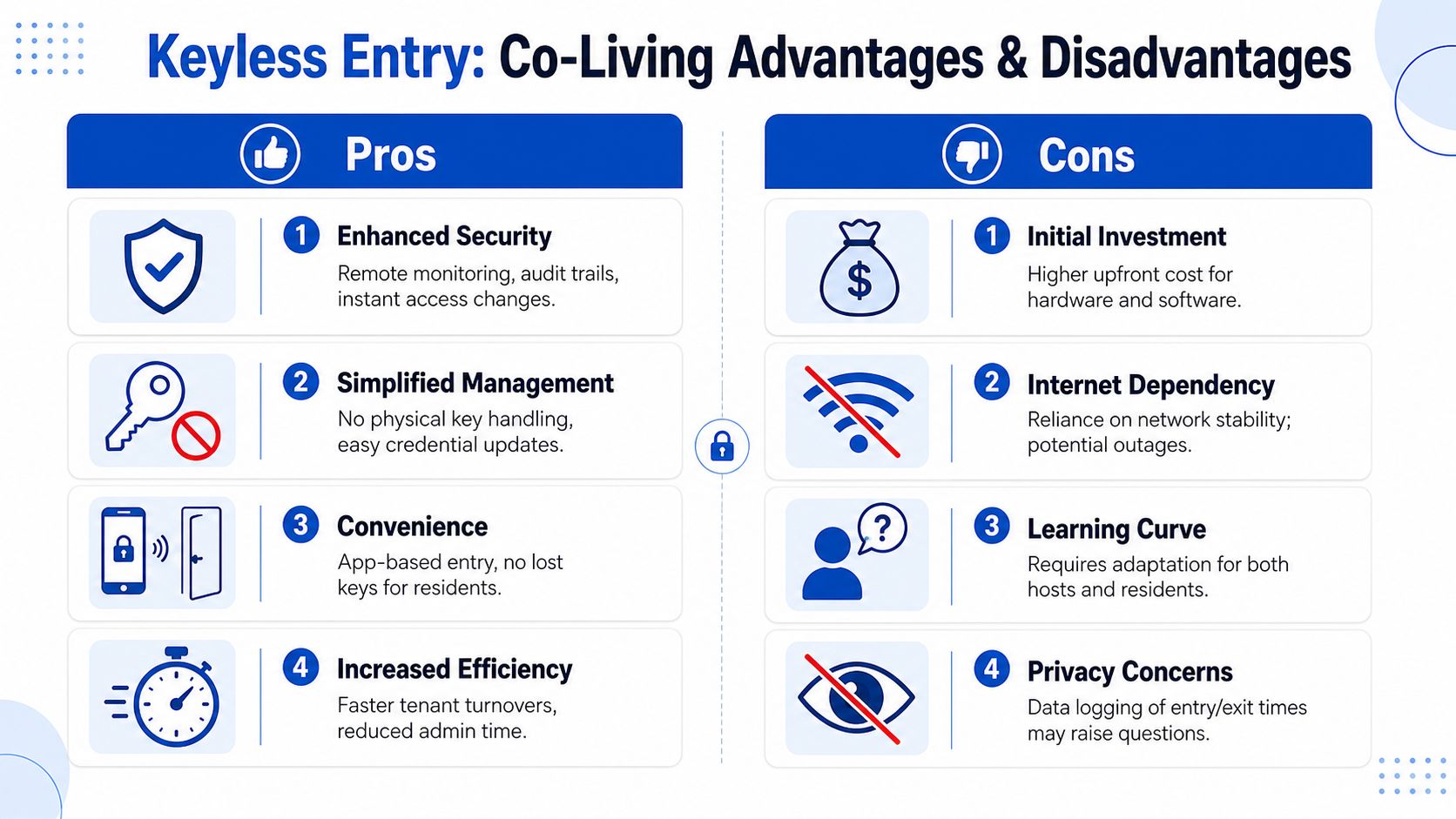
The biggest operational benefit is control.
You can issue access without meeting someone in person. You can remove access without chasing down hardware. In a house with frequent turnover, that's not just convenient. It closes the gap between lease status and actual building access.
Keyless systems also help with coordination:
- Move-ins get smoother: Residents can receive access when their stay begins.
- Temporary users are easier to manage: Vendors can get access tied to a task or schedule.
- Shared properties become more legible: You can separate common-area access from private-room access.
- Disputes get easier to untangle: Logs give staff something concrete to review.
Where operators get surprised
The hidden cost isn't always hardware. It's support.
RemoteLock's overview of keyless entry for multifamily notes the operating burden around mobile and biometric credentials, including guests without smartphones, privacy concerns, and the training needed to reduce support tickets in high-turnover housing. That's exactly where many landlords stumble. They buy for convenience and underestimate process.
A few examples show up repeatedly:
- Shared codes spread fast: One resident gives the code to another, then to a guest, and soon nobody knows who should still have it.
- Phone-based access excludes some users: Not every resident wants to download an app, keep Bluetooth on, or troubleshoot permissions.
- Biometrics raise governance questions: If you're collecting fingerprint or facial data, you need clear policies and resident trust.
- Staff training gets overlooked: If your team can't reset access quickly, every issue becomes an escalation.
Credential Type Comparison for Landlords
| Credential Type | Upfront Cost | Tenant Friction | Turnover Management | Best For |
|---|---|---|---|---|
| Keypad PINs | Lower relative complexity | Low at first, higher if codes are frequently changed | Good if codes are unique and managed carefully | Smaller properties and simple room turnover |
| RFID cards or fobs | Moderate | Usually easy to understand | Strong, because lost credentials can be deactivated | Houses that want trackable physical credentials |
| Mobile app access | Varies by ecosystem | Low for tech-comfortable residents, higher for others | Very strong for remote onboarding and revocation | Operators managing multiple properties remotely |
| Biometrics | Higher operational complexity | Mixed, depends on resident comfort and enrollment | Can be strong, but requires careful setup | Specialized use cases, not most standard co-living homes |
The practical answer for most landlords isn't “go fully mobile” or “use the most advanced lock.” It's to pick the credential model your residents will use correctly.
Security Best Practices and Failure Planning
The weak point in most discussions about keyless entry systems isn't security theory. It's failure planning.
People ask whether keyless is safer than traditional locks. That's not quite the right comparison. The more useful question is: what happens when something goes wrong, and how quickly can you recover?
Avigilon's discussion of keyless entry systems highlights a key challenge. Keyless systems reduce some physical-key risks, but they shift dependence toward software, network availability, and credential management. That means landlords need an operational continuity plan, not just a lock installation.
Plan for the most common failure modes
If you run shared housing, assume one of these will happen at some point:
- Power problems: Batteries die. Backup power matters.
- Connectivity issues: Internet service drops or cloud syncing gets interrupted.
- Credential mistakes: A resident is assigned the wrong door, wrong dates, or no access at all.
- Human error: Staff forget to revoke old users or accidentally issue broad permissions.
A solid setup doesn't avoid every failure. It limits the blast radius.
A practical continuity checklist
Use this checklist before you trust a system across multiple rooms:
- Confirm offline behavior: Ask what the lock does if internet service is down. Some systems continue to function locally. Some become awkward fast.
- Create emergency access procedures: Keep a secure fallback method for authorized staff use only.
- Audit permissions regularly: Old cleaners, former residents, and one-time vendors shouldn't linger in the system.
- Document support steps: Staff should know how to verify battery status, check logs, resend credentials, and revoke access.
- Limit shared credentials: Individual access is easier to trace and easier to shut off.
- Set resident expectations: Explain what to do if a phone dies, a code is forgotten, or a credential stops working.
A keyed lock fails in one familiar way. A keyless lock can fail in several different ways, but those failures are usually easier to manage if you prepare for them.
If you're comparing front-door access methods, this guide to apartment gate codes and access trade-offs is also worth reviewing. The same lesson applies indoors: convenience without policy creates support issues.
The operators who struggle most with keyless entry aren't the ones using bad technology. They're the ones treating access control as “set it and forget it.”
Choosing a System and Planning for Integration
A lock on a door is one purchase. An access system across a portfolio is an operating decision.
When landlords outgrow a single house or start managing frequent turnovers, standalone smart locks begin to show their limits. You can still use them, but the admin work piles up. The critical improvement comes when access control connects cleanly to the rest of your workflow.
What to look for before you buy
Start with the basics that matter in shared housing:
- Door-level control: You need to separate front entry, common areas, bedrooms, and restricted spaces.
- Simple user management: Staff should be able to add, remove, and edit access without digging through a confusing dashboard.
- Reliable logs: If the system records events, those logs should be easy to review when a resident reports an issue.
- Scalability: What works for one property should still work when you add more rooms and more staff.
- Support for temporary access: Cleaners, handymen, inspectors, and showing agents need controlled access windows.
Then ask the question many landlords skip: can this system integrate with the software you already use?
Why integration matters
Manual entry is where mistakes creep in.
If someone has to create a resident profile in one tool, then recreate access in another, errors become inevitable. Move-in dates get mismatched. Revocations get missed. Staff lose time updating systems twice.
That's why integration matters. If your access control platform can connect with your management stack, you reduce repetitive admin and tighten the handoff between leasing and actual access. If you're evaluating compatible ecosystems, review examples of TTLock and Sifely integration workflows to understand what a connected setup should look like in practice.
Buy the system your team can operate consistently, not the one with the longest feature list.
A future-proof setup isn't necessarily the fanciest. It's the one that keeps access aligned with occupancy, staff processes, and day-to-day reality.
Implementation Checklist and Calculating Your ROI
The rollout is where good intentions either become a stable system or a long series of resident complaints. Most problems come from rushing hardware choices, skipping door audits, or giving tenants almost no guidance.
A clean implementation is less about tech enthusiasm and more about sequence.
A rollout plan that works
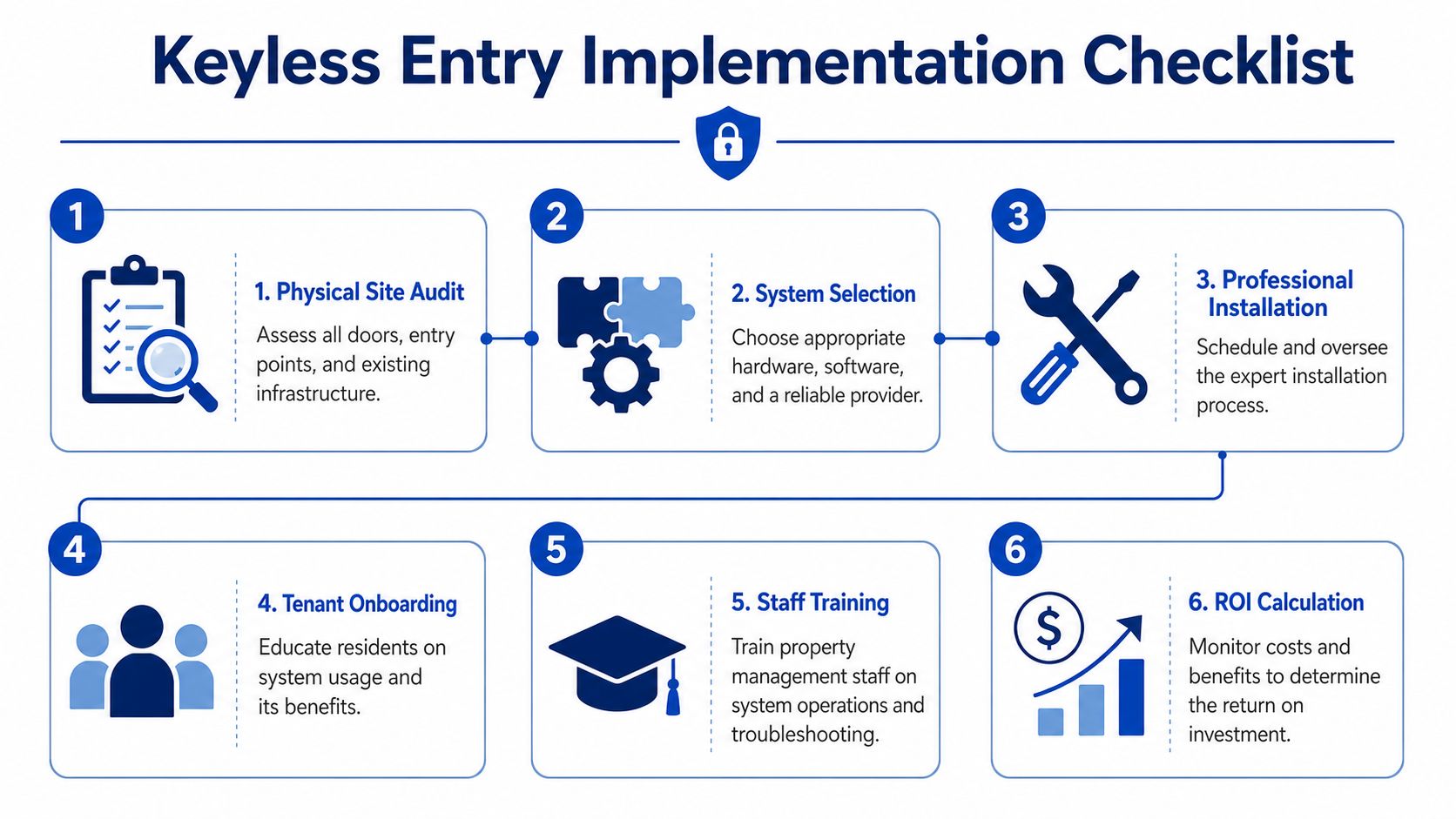
Use a checklist like this before you install anything:
Audit every door first
Identify exterior doors, bedroom doors, common areas, storage rooms, and any spaces staff need but residents shouldn't access.Match hardware to use case
A front door in a busy shared house may need a different solution than an interior bedroom. Don't force one lock style onto every opening.Decide your credential model early
Choose whether residents will use PINs, fobs, mobile access, or a mix. Most confusion starts when operators change this midway.Pilot before full deployment
Test one property or one set of doors first. You'll catch onboarding problems before they spread.Write a resident guide
Keep it short. How to enter. What to do if access fails. Who to contact. What not to share.Train staff on exceptions
Normal access is easy. Edge cases are what create support burden.
For a practical setup walkthrough, this guide to smart lock setup for rental operations is a useful companion.
How to think about ROI without fake precision
You don't need a complicated spreadsheet to evaluate return. You do need honesty.
Start with the direct costs you can see: hardware, installation, subscriptions, and staff time during rollout. Then look at the recurring work the system may reduce.
Consider questions like these:
- How often do lockouts interrupt staff or owners?
- How often do you rekey, replace, or chase missing keys?
- How much admin time goes into move-ins and move-outs?
- How often do vendors need temporary access coordination?
- How much time does your team spend resolving access disputes without logs?
Some savings are hard costs. Others are operational drag. Both matter. In co-living, the return often comes from reduced friction rather than one dramatic line item.
What landlords often miss
The strongest ROI usually comes from consistency.
If access rights update cleanly at move-in and move-out, staff make fewer mistakes. If residents know exactly how to use the system, support requests fall. If your team trusts the logs, disputes get resolved faster. None of that is flashy. All of it improves operations.
Good keyless entry doesn't just open doors. It removes small, repeated tasks that used to eat up your week.
For room-by-room rentals, that's where its value lies. Not the novelty of opening a door with a phone, but the ability to run a tighter operation with fewer recurring access problems.
PadPulse is building an all-in-one platform for PadSplit hosts and co-living operators who want tighter control over pricing, communications, reporting, and smart access in one place. If you're planning a better workflow for room-by-room rentals, you can join the early interest list at PadPulse to follow the Winter 2026 launch and get updates on beta access.