Keyless Entry for Rental Property: A Practical Setup Guide
August 12, 2026
If you manage a house where every room turns over on a different schedule, you already know the pain. A tenant gets locked out at night, a cleaner needs access before sunrise, a vendor forgot the fob, and someone at the curb is still waiting for keys that should've been sorted hours ago. Keyless entry for rental property stops being a fancy amenity the moment it starts saving those handoffs, those calls, and those wasted trips.
The shift is real. A 2024 National Multifamily Housing Council and Grace Hill survey found 75% of renters want controlled community and amenity access, and a separate renter survey cited by PointCentral found 61% said keyless entry would make them more likely to rent a property (SmartRent's summary of renter demand and adoption). On the other side, adoption still lags. A 2025 survey summarized by KeyTrak found 76% of multifamily professionals still use traditional keys exclusively, while only 7% use smart locks exclusively (same source). That gap is why early adopters can stand out on convenience without pretending the market is already fully modern.
Why Keyless Entry Has Become an Operating Standard
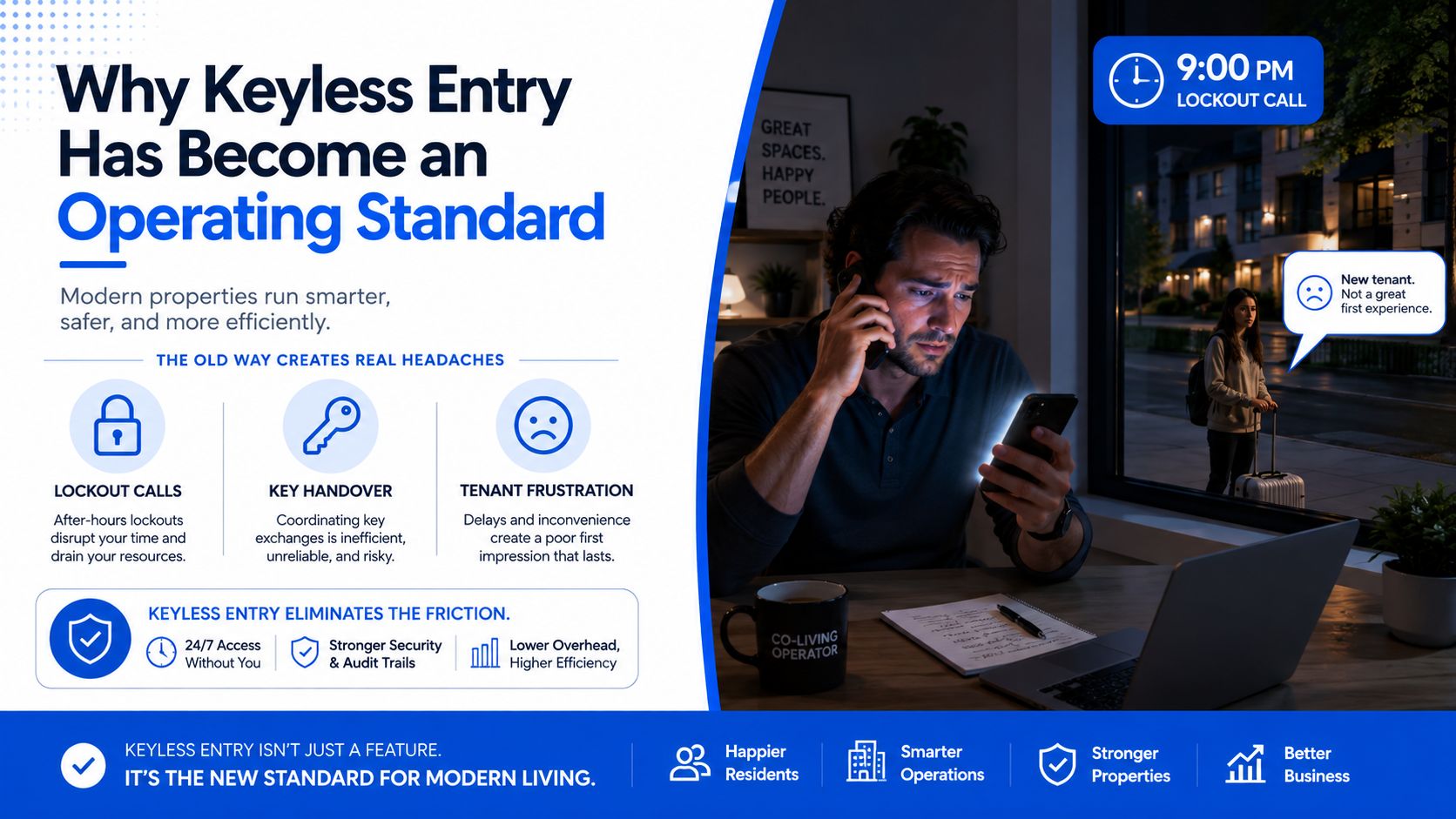
At 9 p.m., the phone rings again. A new resident is outside with luggage, the old key handoff fell through, and someone else says they “just need to borrow a fob for one night.” That's the moment most co-living operators stop treating keys as a convenience issue and start seeing them as a daily operations risk.
Keyless entry fits rental housing because it removes a lot of the manual handling that eats staff time. In a building with room-by-room turnover, the primary win is not the hardware itself. It is the way access stops depending on one person being available with one physical object, one spare copy, or one last-minute trip back to the property. That change matters even more in shared housing, where the same front door, side gate, laundry room, storage closet, and bedroom suite may all need different rules.
The market side is already familiar. Renters want controlled access, and many say keyless entry would influence their decision to rent (SmartRent's renter-access summary). Traditional keys still dominate property operations, so the operators who modernize can stand out by running a tighter, more predictable access workflow.
What renters notice first
Renters do not care whether your access stack sounds impressive in a brochure. They care whether they can arrive, enter, and settle in without a messy exchange at the curb. That is why controlled access now sits alongside parking, package handling, and laundry as part of the basic experience in properties that want to feel current.
The first thing they notice is whether access works the same way every time. If a resident can get in, a cleaner can get in on schedule, and a vendor can get out without waiting on staff, the property feels organized. If access depends on a quick text, a printed code taped to a wall, or a person physically handing over a fob, the system feels improvised.
If access depends on one person being available with one physical object, the whole building runs on a fragile system.
That fragility shows up fast in shared housing. One late code update can block a cleaner from a room turnover. One missing fob can delay a move-in and push the handoff into the evening. One staff mistake on a bedroom door can ripple across several residents, because room-by-room access has no patience for loose process. Keyless entry makes those handoffs visible, repeatable, and easier to audit, which is where the operational value starts to show up in NOI.
Mapping Your Property and Planning Requirements
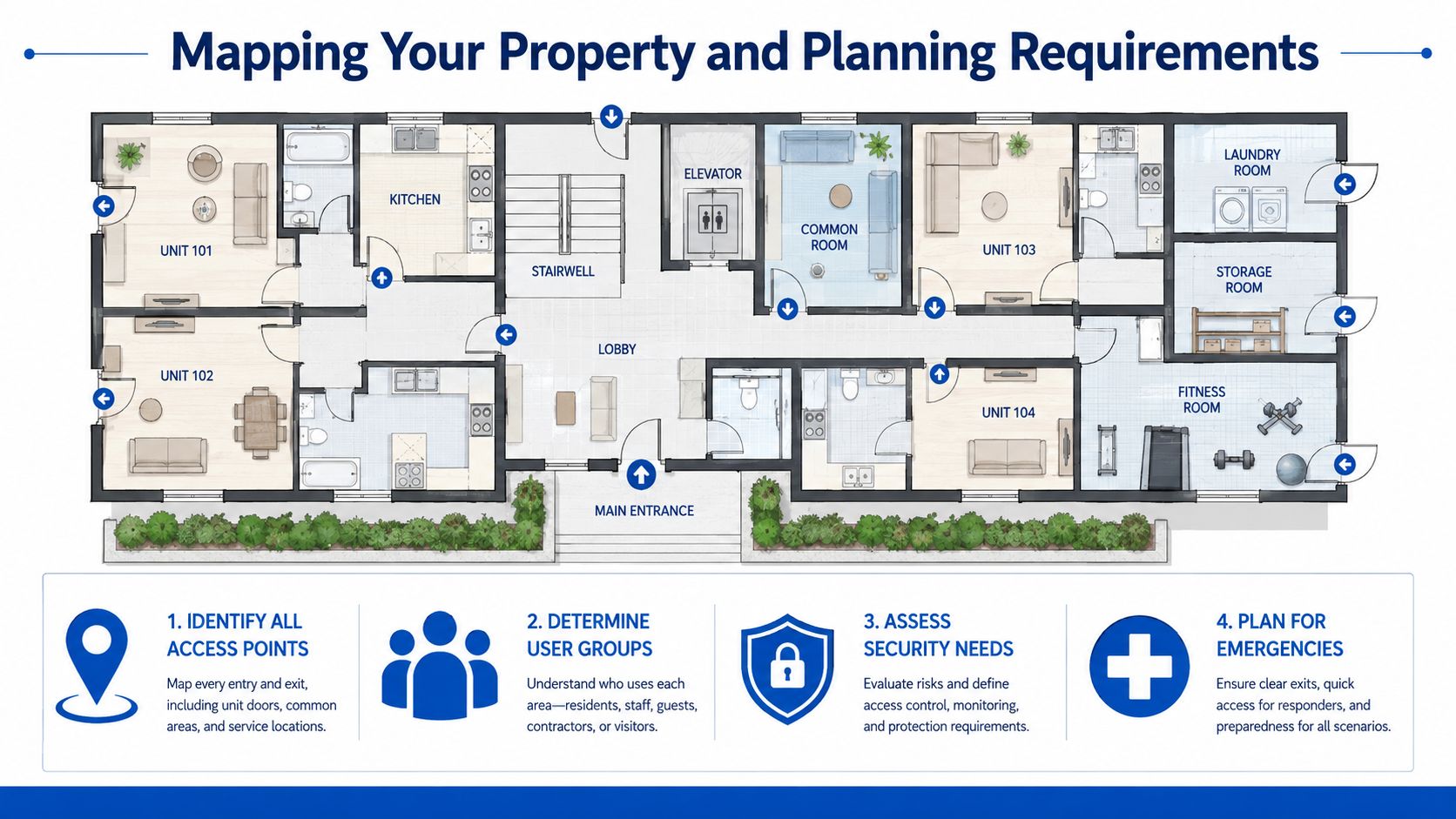
The first mistake is buying a lock before the property map is clear. A co-living house usually has more than one door to manage, and every one of them deserves a decision. Front entry, side entry, gates, garage access, laundry, storage, office space, amenity rooms, and bedroom doors all need different answers.
Start with access, not hardware
Write one page that answers three questions. Which doors exist, who should open each one, and what happens when access needs to change quickly? That sheet saves you from buying the wrong product for the wrong entry point, and it also forces the team to see the building the way residents, cleaners, and vendors will use it.
Use this checklist before you talk to any vendor:
- Identify all access points. Map every exterior door, gate, garage, amenity room, and storage area.
- Determine user groups. Separate residents, staff, vendors, cleaners, maintenance, and emergency access.
- Assess security needs. Decide where restricted access matters most, especially in shared houses with room-by-room turnover.
- Plan for emergencies. Write down the backup process for battery failures, power issues, app failures, and staff-only entry.
A co-living operator also has to think in terms of handoffs. A bedroom door may need one level of control, while a pantry, linen closet, or office door needs another. That difference matters because the wrong setup creates extra support calls, slow turnovers, and avoidable keys or codes floating around the house.
Set policy before the first lock arrives
Access policy should come first, because stale or conflicting codes create problems fast during turnover. Define code rules, staff roles, time windows, and exception approvals before provisioning anything. If a cleaner, a vendor, and a new resident can all end up with overlapping permissions, confusion is built into the system before the first move-in.
Use the workflow discipline described in RentalReady's workflow guidance to keep provisioning, revocation, and staff handoffs in one process. That matters more in a multi-door property than in a single-unit setup, because one missed update can affect a room, a shared hall, or a service area all at once.
The best access system is the one you can explain in one minute to a new team member.
That rule matters most in shared housing. Room transfers happen fast, and access needs to follow the people, not the paperwork. If the backup plan is only “we'll figure it out later,” the first failure will find you unprepared.
Choosing the Right Hardware for Each Door
A keyless system has four parts: a credential, an authentication device, a control unit, and an electronic lock mechanism (Swiftlane's technical overview). In plain English, a resident presents a code, phone, biometric, or fob, the reader checks it, the controller decides yes or no, and the lock opens if the credential matches. Many systems complete that check in under one second, which is why the experience feels smooth when the hardware is chosen and installed correctly.
The question is not whether keyless entry works. It is which door needs which level of control, backup access, and admin overhead. A front entry, a bedroom door, a pantry, and an office do not deserve the same hardware just because they all open into the same building.
Match the lock to the door
| Door Type | Recommended Lock Category | Key Trade-Off |
|---|---|---|
| Main exterior entry | Smart keypad or connected smart lock | More convenience, more admin if you want remote changes |
| Bedroom door in co-living | Keypad-only or reassignable electronic lock | Simpler support, fewer advanced features |
| Gate or shared exterior access | Fob-based or controlled entry system | Strong access control, more dependency on credential management |
| Amenity room or office | Code-based lock with audit trail | Easier staff oversight, needs policy discipline |
For many operators, the simplest answer is better. A landlord-oriented source on pros and cons argues that a basic keypad can create fewer support headaches than a feature-heavy smart lock in some rentals (Gordon James Realty's discussion of reliability trade-offs). That is especially true when the door just needs reliable code management, not a full app ecosystem.
A bedroom door in a co-living house usually needs fast turnover and easy reassignment. A shared gate or staff office needs clearer accountability. Those are different jobs, and the hardware should reflect that.
Use the least complex option that still solves the problem
If a bedroom door only needs quick code changes between residents, do not buy more system than that door can use. If a building entrance needs auditability and staff coordination across several hands, do not underspec it. The right choice is the one that matches your access map, not the one with the longest feature list.
A practical smart-lock selection guide helps compare categories, but the operating rule stays the same. Buy for the door, not for the marketing copy.
Installing and Provisioning Your Locks
Unboxing the lock is the easy part. The actual work starts when the door, the battery, the app, and the admin account all have to behave like one system. On a multi-door property, the fastest way to create a support nightmare is to rush installation and skip the first round of testing.
Get the physical setup right
Check the battery before mounting anything. Align the door and latch so the lock isn't fighting the frame, because that's where a lot of “smart lock problems” begin. If the bolt drags or the door doesn't close cleanly, the software can't fix it.
Then test signal and placement at the actual door, not in the office. Wi-Fi and Bluetooth behavior can look fine from a desk and fail at the threshold where the lock lives. That's why provisioning should happen in the field, with the hardware mounted and the door closed.
Provision like staff turnover will happen
Create admin accounts with naming conventions that still make sense when someone leaves. Use role-based labels, not personal shortcuts. A code labeled for a function survives staff changes better than one tied to a person's nickname.
Before you go live, run the full path:
- Pair the lock. Confirm the device appears in the management system.
- Create the first credential. Make sure the format is easy to recognize later.
- Test entry and exit. Don't just grant access once, secure it again and try the full cycle.
- Test failure and recovery. Simulate a lockout and verify your backup process works.
If you never test the recovery path, your first real lockout becomes the test.
That matters for co-living because lockouts rarely happen at a convenient time. A clean provisioning sequence turns the lock into an operational tool instead of a piece of expensive wall hardware.
This setup checklist for smart locks is a good companion while you're provisioning the first door. For multi-door properties, the goal is to prove one repeatable setup before cloning it across the house.
Designing the Daily Code Lifecycle
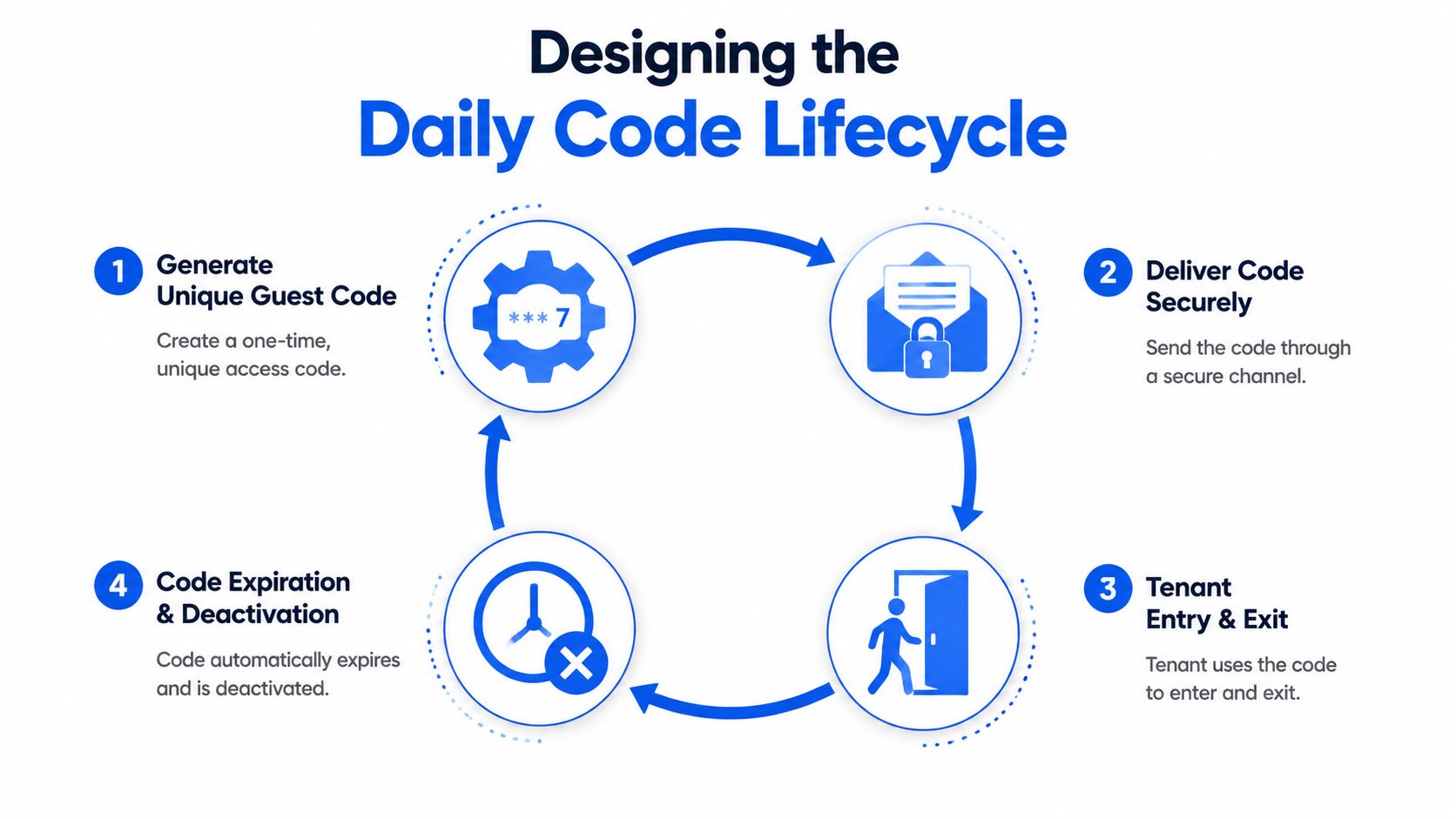
A working keyless system lives or dies on code discipline. In co-living, the pressure comes from many room doors, cleaners, maintenance staff, and guests all moving through the same building on different schedules. The best workflow is simple enough to repeat and strict enough to keep stale access out of the system. It should follow the same four steps every time, from the first reservation to final checkout.
Keep the sequence consistent
The lifecycle should look like this:
- Generate a unique guest credential. Each stay gets its own access credential.
- Deliver it in a timed message. Send the code when it's needed, not days early.
- Adjust for exceptions. Early arrival, late departure, and extensions should change the code automatically or through a documented override.
- Revoke access at stay end. Remove guest access while keeping staff-only permissions and audit logs intact.
That framework matches the kind of access control workflow that property teams rely on when they want fewer manual steps and fewer mistakes. The difference is practical, not cosmetic. A code that starts, changes, and expires on schedule is easier to manage across a house with multiple doors than one that depends on someone remembering each handoff. Once the lifecycle is set, every stay follows the same path.
Automate the handoffs that cause mistakes
Manual code updates are where teams slip. Someone forgets to refresh a late checkout, a cleaner gets the wrong schedule, or a temporary extension leaves old access alive too long. In a building with room-by-room access, those misses create real operational drag, because one bad handoff can affect several doors and multiple staff members.
Automation reduces that drift when reservation records, messaging, and access tools talk to each other. It keeps the code tied to the stay instead of tied to someone's memory. That matters more than fancy features on the lock itself.
The goal isn't more code. The goal is fewer surprises.
For operators running many room-level entries, the useful rule is simple. The fewer places a code lives, the fewer places it can go stale. PadPulse is being built as an in-development management platform for PadSplit hosts and co-living operators, with planned smart-home integrations for keyless smart locks and smart thermostats to link secure access and HVAC control.
Security, Legal, and Reliability Trade-offs
A smart lock isn't automatically a safer lock. It's a different risk profile, and operators need to understand the trade-offs before they standardize on it. The biggest mistakes usually come from treating access as a gadget decision instead of a privacy, reliability, and compliance decision.
Know the legal rules where you operate
New York City's Tenant Data Privacy Law applies when owners of multiple dwellings use smart access systems. It explicitly covers key fobs, electronic or computerized entry, RFID cards, mobile apps, and biometric identifiers, and affected owners must provide tenants with a data retention and privacy policy (NYC HPD's tenant data privacy page). British Columbia's Residential Tenancy Policy Guidelines also set entry rules, including specific conditions for entry and notice timing, with written notice between 24 hours and 30 days in advance and a permitted entry window between 8:00 a.m. and 9:00 p.m. (BC policy guidelines). Texas requires multiple security devices on exterior openings and says landlords must re-key or change outside locks between tenancies by the seventh day after move-in (Texas tenant guidance). In Victoria, Australia, consumer guidance says each external door must have a working deadlatch with at least one cylinder (Consumer Victoria).
Plan for the failure mode before it happens
Batteries die. Apps fail. Internet drops. Those aren't edge cases, they're planning assumptions. The question is whether you can still get the right person through the right door without improvising at midnight.
A lot of operators also overcomplicate the lock itself. In shared housing, a simpler keypad can be the better choice because it reduces support overhead while still giving you remote code control. The smarter product is the one that solves the access problem with the fewest moving parts.
This guide to multi-tenant access control is a useful reference when you're deciding how much complexity your property can support. If your team struggles with code changes now, adding more app layers won't magically fix that.
Costs, ROI, and When the Numbers Make Sense
The economics of keyless entry for rental property go beyond the sticker price on the lock. The global keyless entry system market is projected to be worth US$5.5 billion in 2025 and US$11.3 billion by 2032, with a 10.8% CAGR over 2025 to 2032, according to Persistence Market Research (market estimate). That growth points to a wider shift away from mechanical keys and toward digital credentials, including smart locks, fobs, mobile apps, and PIN entry.
For operators, the useful question is not whether the category is growing. It is whether the workflow saves enough labor to justify the hardware, setup, and ongoing support. Industry sources report that smart-lock automation can cut manual entry tasks by 40%, reduce emergency lockout calls by 30%, and save property managers about 24 hours per month. Another source estimates a typical 200-unit property can face more than US$40,000 per year in access-control costs when conventional systems keep generating fob replacements, programming, maintenance, and admin work.
For a co-living house, the math gets clearer when access is tied to room-by-room turnover. One door may not justify much on its own. Ten bedroom doors, plus common-area doors, start to create real labor if your team is still tracking keys, reissuing fobs, and handling late-night lockouts by hand. That is where keyless entry starts to affect NOI in a measurable way, because the savings show up in staff time, fewer rekeys, and fewer interruptions during turnover.
Use a simple ROI worksheet
A basic worksheet for a co-living house should include:
- Hardware cost. The lock itself and any accessories.
- Installation time. Labor or contractor work to mount and provision the lock.
- Subscription fees. Any recurring software or service charge.
- Support savings. Fewer lockout calls, fewer handoffs, and fewer rekey events.
- Turnover savings. Faster resets when room assignments change.
- Staff time saved. Hours not spent managing physical keys or fobs.
That is usually enough to tell whether a simple keypad pays back quickly or whether a connected smart lock makes sense. If your biggest pain is room turnover and staff coordination, automation has a clearer payoff. If your biggest pain is only that the door should open reliably, a simpler option may be the better business decision.
The best ROI often comes from removing repetitive work, not from buying the fanciest hardware.
For many small and mid-sized operators, that means starting with the least complex setup that still supports remote code management and a clean audit trail. Once that works, add more integration only where it saves time. In practice, the winning setup is the one your team can keep consistent across every room, every turnover, and every tenant change without creating a new pile of exceptions.