Access Control Integration Guide for Co-Living Operators
September 10, 2026
A new member arrives at a shared house late at night. The operator is away from the property, the resident is standing at the door with a phone full of messages, and the lock should be the simplest part of the move-in. Instead, someone has to search for a code, confirm the room, check whether the booking started, and hope the credential still works.
That situation reveals the true purpose of access control integration. The goal isn't merely to install a smart lock. The goal is to connect a person's identity, membership, reservation, and access rights so the correct door responds at the correct time, while the operator can see what happened afterward.
For co-living hosts, this connection can tie together room bookings, pricing, resident communications, maintenance access, occupancy awareness, and reporting. It replaces scattered manual tasks with a consistent operating workflow.
Core idea: A door should respond to the current business relationship, not to an old code copied into a text message.
The access-control market reflects this broader shift. One 2024 industry report estimated the global market at USD 10.76 billion in 2024, with a projection of USD 17.30 billion by 2030, implying an 8.4% CAGR from 2025 to 2030. The same source describes an industry moving toward connected platforms that combine identity, mobile credentials, visitor management, video, and building systems. The 2024 access-control market reference helps explain why integration now matters to property operations, not just security departments.
This guide starts with the basic architecture, then looks at common data flows, security and resilience, vendor decisions, implementation, and a practical roadmap for shared housing portfolios.
Introduction to Access Control Integration for Co-Living
Access control integration connects your property-management rules to the physical doors in your homes. When a member becomes active, the system can issue the right credential. When a booking ends or a membership changes, the system can remove or adjust access. When someone opens a door, the event can return to the operating platform for logging or occupancy workflows.
Without integration, operators often manage several separate lists:
- Current residents and their rooms
- Active bookings and move-in dates
- Door codes and mobile credentials
- Maintenance or cleaning permissions
- Messages explaining how and when to enter
Each list can be accurate on its own and still produce mistakes when the lists disagree. A resident may have a valid booking but no working credential. A former member may retain a code. A cleaner may receive broad access when they only need a limited window.
What integration changes
Think of a co-living house as a small hotel with longer stays and more shared spaces. The booking or membership record acts like the front desk register. The access platform acts like the key desk. Integration keeps both records synchronized.
A room-by-room operator might use rules such as:
- Active members: Give access to the main entrance and the member's assigned room.
- Membership levels: Grant shared-space access based on the resident's plan.
- Booked rooms: Allow entry only during the reservation or move-in period.
- Temporary workers: Issue short-lived permissions for maintenance or inspections.
The value comes from reducing manual decisions. Your team doesn't need to remember every code change if the system can apply the rule automatically.
Why this matters for distributed housing
Shared housing creates frequent access changes. Residents move in, transfer rooms, leave, pause memberships, or need temporary access while a repair takes place. A connected workflow makes those changes easier to manage across multiple properties.
Modern access control has also become an operational-data layer. Historical accounts trace the development of access systems from Berlin's first callbox in 1881, through PIN-based keypads in the 1960s, touchscreen kiosks in the 1970s, and broader digital adoption in the early 2000s. This history of physical access control technology describes the transition from physical entry mechanisms toward mobile and cloud-connected systems.
For a non-technical host, the practical test is simple: can your access process answer who should enter, which door they should use, when permission starts, when it ends, and where the event is recorded?
How Access Control Integration Works Behind the Scenes
The easiest way to understand the architecture is to compare it with a hotel front desk.
The property-management system holds the guest or member record. The access platform turns that record into a credential. The lock, reader, or controller checks the credential at the door. The event log records whether entry was granted or denied.
The main layers
1. Identity and membership data
The host platform stores information such as a member's name, status, assigned room, and booking dates. The access system shouldn't need to understand your entire business. It needs the access-relevant facts.
2. The integration connection
An API is a controlled way for two software systems to exchange information. One system sends a request, such as “create access for this active member,” and the other returns a result. Many modern integrations use structured data formats such as JSON because they make records predictable for software to read.
3. The access platform
This layer creates, updates, and revokes credentials. Depending on the product, a credential might be a mobile key, PIN, card, fob, or biometric profile. The platform applies rules before sending permissions to a controller or lock.
4. The door hardware
A reader identifies the presented credential. A controller or smart lock checks whether the credential is allowed. Some systems make that decision through a connected controller, while others keep enough permission data locally to continue operating during a connectivity interruption.
How one access event travels
Suppose an active member books a room. The property system sends the member and booking details to the access platform. The access platform creates a credential with the appropriate door permissions. When the member presents that credential, the door verifies it and records the result.
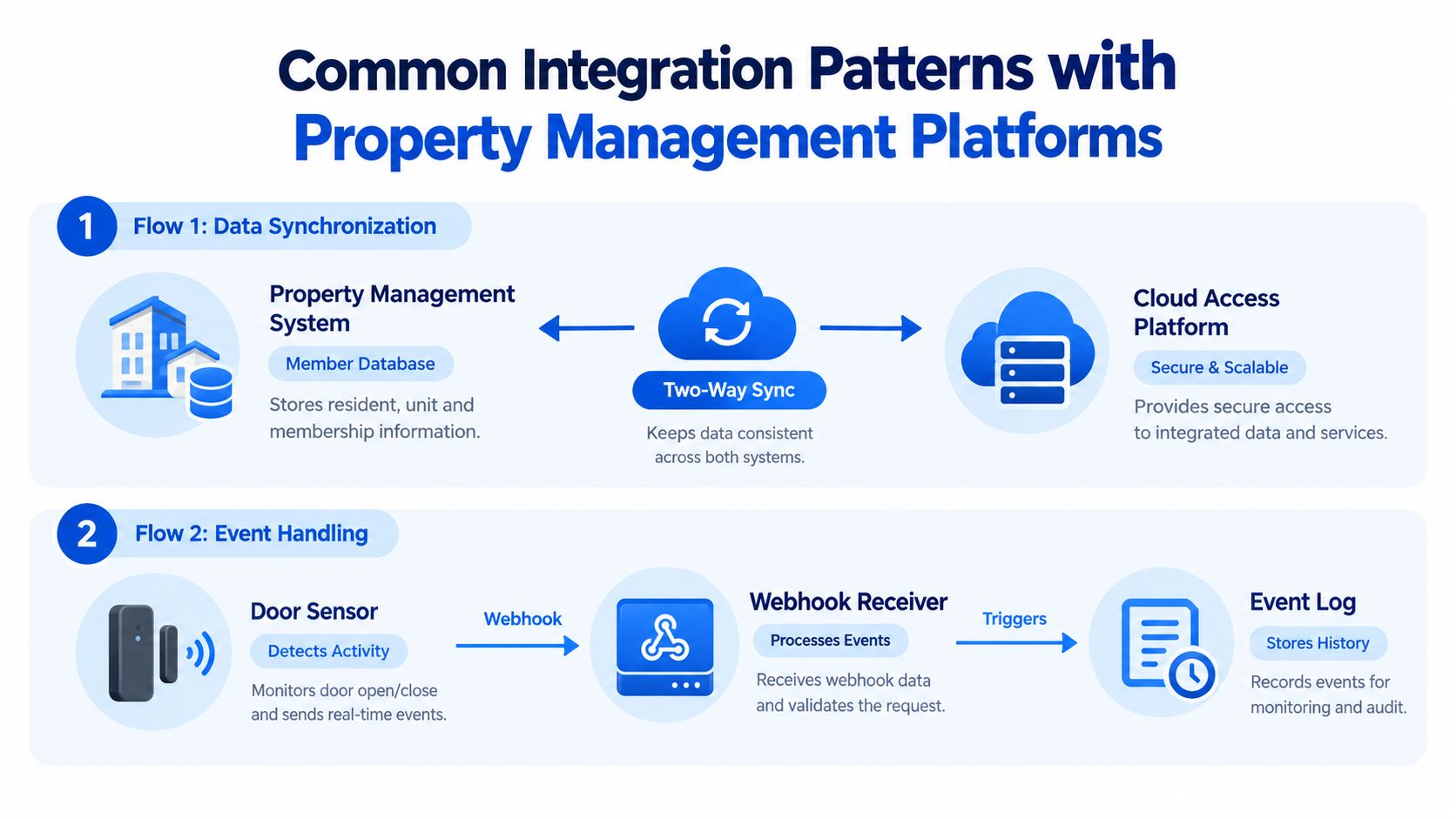
A door-open event can then travel back through a webhook. A webhook is an automatic notification sent from one system to another when something happens. Instead of repeatedly asking, “Did anyone open this door?”, the receiving platform gets a message when the event occurs.
The remote access control system guide provides related context for operators evaluating remote management. The important distinction is between remote control and integrated control. Remote control lets a person operate a lock from a distance. Integrated control lets business rules govern that operation and sends the resulting event back into the workflow.
Cloud and local decisions
Cloud access makes centralized management convenient across multiple houses. Local decision-making adds resilience when a device temporarily can't reach the cloud. A sound design identifies which functions must continue locally, such as existing credentials, and which functions can wait, such as a non-urgent reporting update.
The architecture doesn't need to be mysterious. Ask the vendor to draw four boxes, member record, integration layer, access platform, and door hardware. Then ask what information moves in each direction and what happens when one connection fails.
Common Integration Patterns with Property Management Platforms
Most co-living integrations fit a small number of recognizable patterns. The differences matter because each pattern controls access at a different level of precision.
Two-way member synchronization
In the most useful pattern, data moves in both directions.
The property platform pushes member records to the lock system. The access system sends door events back. The example documented by Cobot's access-control integration documentation describes this model with a user-registration endpoint and a webhook for lock-open events.
A typical sequence looks like this:
- A member becomes active in the host platform.
- The integration sends the member record to the access platform.
- The access platform issues or updates a credential.
- The member opens an approved door.
- The access platform sends the event back for logging or occupancy logic.
- A membership change triggers an access update or revocation.
This pattern is strong because it links identity state to physical access state. It also creates a clear audit trail when the systems handle updates consistently.
Access for all active members
This approach gives every active member a standard set of permissions, such as the main entrance and shared kitchen. It's easy to administer and works well when residents have similar rights.
The tradeoff is breadth. If one member needs room-specific access or a temporary restriction, a universal rule may grant more access than necessary. Operators should document exceptions rather than managing them through separate messages.
Membership-level permissions
Membership-level rules divide access by plan or role. A resident might receive access to a particular shared area, while a cleaner or contractor receives a different permission set.
This approach offers more control without requiring a unique rule for every person. It does require consistent membership data. If the access platform receives an outdated level, the door will follow the outdated instruction.
Booking-based, time-boxed access
Reservation-based access ties entry to a room booking or appointment window. This model suits move-ins, inspections, maintenance visits, and short-term room use.
Its main strength is limited duration. Its main risk is timing accuracy. The operator needs clear rules for early arrivals, extensions, cancellations, and changes made after a credential has already been issued.
Practical comparison: Broad access is simpler to operate. Role-based access is more selective. Booking-based access is more temporary. Choose the narrowest rule that still keeps daily operations manageable.
A useful test is to describe a real person without using a name: active member, assigned room, shared-space permission, move-in date, and end date. If the integration can't express that scenario clearly, the pattern may be too limited for your portfolio. The multi-tenant access control overview offers additional context for separating permissions among residents and users.
Security Privacy and Resilience Considerations You Cannot Ignore
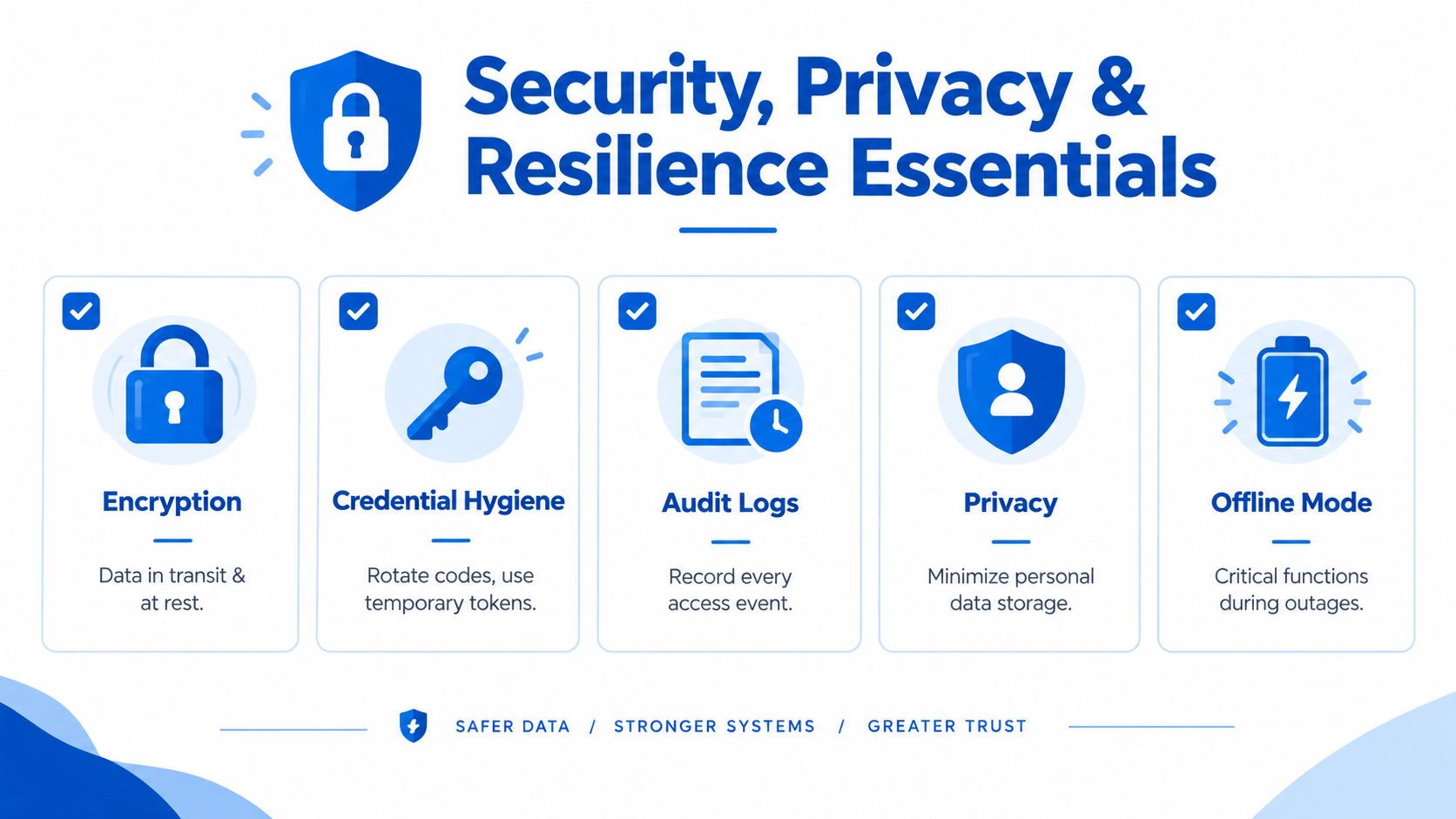
A connected door system creates convenience, but it also creates operating dependencies. A credential may be misused, a resident record may be outdated, or a network outage may interrupt an automated access change. Treat security, privacy, and continuity as part of the workflow from the start. Booking and membership status should determine physical access, while local safeguards keep doors usable when the connection fails.
Protect credentials and data
Use encrypted communication wherever the platform and hardware support it. Protect information while it moves between systems and while it is stored. A credential should be handled like a physical key, with controlled issue, review, and removal.
Good credential hygiene includes:
- Short-lived permissions: Use temporary access for contractors, inspections, and booked rooms.
- Fast revocation: Remove access when a member leaves or a worker finishes.
- Limited administration: Give staff only the permissions required for their role.
- Separate emergency access: Maintain a documented process for urgent entry.
- No shared master codes: Individual credentials support accountability.
Audit logs should record the credential, door, result, and event time so authorized staff can review them. A useful log helps an operator distinguish a normal resident entry from an unexpected attempt and connect that event with the relevant booking or membership record.
Design for privacy
Shared housing operators handle personal information about residents, staff, and visitors. Store only the information the access workflow needs. Limit access to event histories, and set a retention policy that fits operational and legal requirements.
An access event can reveal when someone enters or leaves. It remains sensitive even without a detailed resident profile. Tell residents what the system records, why it records it, and who may review it. Clear notice also gives staff a practical standard for handling access data.
Plan for outages
Ask what happens when the internet, power, or device connection fails. Honeywell's access-control overview reports that 44% of organizations are adopting edge computing, 52% use cloud-enabled controllers, and 37% prioritize IoT integration with lighting, HVAC, and other automation. These trends show why a distributed co-living operation should plan for local continuity rather than depend on a live connection for every door decision. Honeywell's access-control overview
A hybrid design keeps selected functions on site. Ask whether the system supports offline credentials, local failover, delayed event synchronization, and defined recovery behavior. Test what happens when a booking is cancelled during an outage, then confirm how the door receives the change after service returns.
Power backup and mechanical emergency procedures matter too. Software cannot compensate for a depleted lock battery or unavailable electrical supply.
Reduce repeated failed attempts
Authentication affects safety and daily experience. One IoT smart-lock study reported fingerprint recognition at around 1.0 second, door release time around 5 seconds, a 1.32% False Acceptance Rate, and a 26.32% False Rejection Rate attributed to user placement error. The findings show why a secure sensor can still frustrate residents when normal hand placement is unclear. The smart-lock study
The study also used a rule that locked the system after 3 failed attempts for 15 seconds and sent an instant alert. Operators can apply the same general principle with vendor-specific settings, combining tamper resistance with a clear support response. A resident who cannot enter needs a visible help path, not only a stricter authentication rule.
How to Choose the Right Access Control Vendor and Protocol
Vendor selection should start with your operating model, not with a feature list. A small portfolio still needs reliable access changes, while a larger one needs consistent administration across properties and the freedom to connect future tools.
Compare the communication foundations
OSDP supports encrypted, bidirectional communication and mutual authentication between a reader and controller. Wiegand is a legacy protocol that transmits credentials without encryption or mutual authentication, as explained in this access-control integration comparison.
That distinction matters because a reader should be able to communicate securely with the controller, and the controller should be able to confirm that it is communicating with a trusted device. Ask which doors use which protocol, whether the vendor supports migration, and whether replacing one component requires replacing the entire system.
The standard EN 60839-11-31:2017 defines a web-services-based interoperability protocol intended to support multi-vendor, plug-and-play communication between network clients and devices. The EN 60839-11-31:2017 standard reference is useful when a vendor claims interoperability, because it gives buyers a concrete standard to discuss.
The Security Industry Association standards guide lists frameworks such as SIA TVAC-01-2001.04 for CCTV-to-access-control message sets and ANSI/SIA OSIPS standards for open systems integration. These standards matter when you want access events, video, and other security systems to exchange information without relying on a closed custom connection.
Use a buyer's comparison table
| Criteria | Legacy Approach | Modern Integrated Approach |
|---|---|---|
| Credential management | Manual codes, cards, or keys | Centralized mobile, card, fob, or temporary credentials |
| Communication | Limited or one-way device connection | Encrypted, bidirectional communication |
| Property systems | Separate records | API and webhook-based synchronization |
| Expansion | Often tied to one vendor | Open architecture and documented integrations |
| Outage planning | Manual fallback | Local failover and offline credential support |
| Reporting | Door events reviewed separately | Events connected to resident and operational records |
Mobile adoption is also changing the buying conversation. An Assa Abloy wireless access control report found that 17% of organizations had fully mobile access solutions in 2025, up from 5% in 2023. The same report found that 72% rated open architecture as very important in 2025, compared with 90% in 2023. Treat those findings as market context, not as a substitute for checking a specific vendor's architecture.
Ask every vendor to demonstrate a member activation, a booking cancellation, an immediate revocation, an offline event, and a recovery after reconnection. A polished dashboard isn't enough if the underlying workflow can't handle ordinary co-living changes.
Implementation Best Practices and Troubleshooting Tips
A reliable rollout starts small. Choose one house with representative doors, residents, shared areas, and connectivity conditions. A pilot gives your team a safe place to test rules before the same mistake reaches every property.

A practical rollout sequence
- Map the doors: List entrances, resident rooms, shared spaces, utility areas, and emergency routes. Record which people need access and under what conditions.
- Define the source of truth: Decide whether membership, booking, or another record controls access. Don't let staff maintain conflicting manual lists.
- Test the lifecycle: Activate a member, change a room, extend a booking, cancel a booking, and revoke access. Check both the door and the event log.
- Test failure modes: Disconnect the network where safe, check battery alerts, and confirm what works locally. Verify how delayed events appear after reconnection.
- Train the response team: Staff should know how to identify a failed credential, issue temporary access, escalate a hardware problem, and document an exception.
- Scale deliberately: Move to another property only after the pilot produces repeatable results and clear operating instructions.
The smart-lock setup guide can help operators think through the physical installation and setup side of the project.
Troubleshoot by symptom
A failed access attempt can result from an expired permission, incorrect room assignment, weak battery, poor credential presentation, or a connectivity issue. Verify the member record first, then the access-platform status, then the hardware.
A sync delay often means the source record changed but the outbound process didn't complete. Look for a failed API request, a queued update, or a mismatch between the member identifier in both systems. Avoid creating a second credential before finding the original error, because duplicate records make later revocation harder.
False rejections deserve special attention with biometric systems. User placement, lighting, moisture, and sensor condition can affect the experience. Provide a fallback credential and simple instructions instead of forcing residents to repeat the same failed action.
Success checklist: Every pilot property should have a documented access map, tested member lifecycle, outage procedure, revocation process, staff escalation path, and event-review routine.
Your Roadmap to Smart Lock Integration with PadPulse
A practical roadmap starts with an access audit. List each property, door, credential type, resident workflow, and system that stores access information. Mark manual steps that cause delays, especially move-ins, cancellations, maintenance visits, and after-hours support.
Define the smallest useful workflow next. An active member should receive the right entrance and room permissions. A booking change should update those permissions, a departure should revoke them, and door events should remain available for staff review. This connects identity and booking status to physical access.
Run a controlled pilot with real operating scenarios: a late arrival, room change, expired booking, temporary worker, and connectivity interruption. Record every manual action. Separate useful alerts from noise, and check whether offline access still follows the last approved permission state during an outage.
Keep the pilot focused on one property or access zone. Staff should know who approves exceptions, how they confirm a resident's identity, and what happens when the system cannot reach a door. That operating plan matters as much as the lock installation.
After testing, create a reusable property template before expanding. Include door names, permission groups, credential rules, outage procedures, revocation steps, staff responsibilities, and event-review instructions. Consistent templates improve reporting and shorten training.
The market's direction supports treating access as part of property operations rather than as isolated hardware. For co-living operators, adoption is most useful when booking, membership, access, maintenance, and reporting states stay aligned. The industry market reference
For PadPulse operators, the longer-term workflow can connect pricing, messaging, access control, HVAC connections, and reporting. Start by cleaning member records, documenting door permissions, and selecting properties suited to an early pilot.
PadPulse is building an all-in-one platform for co-living operators, with planned tools for dynamic pricing, AI-powered messaging, smart-lock and thermostat integrations, P&L tracking, and portfolio analytics. Join the early interest list through PadPulse for limited beta access, launch updates, and a more connected way to manage room-by-room operations.