Smart Home Integration: A Co-Living Operator's Guide
September 7, 2026
It's the first day of the month, and your six-bedroom co-living house is already generating work. One member is leaving Room 3, another is arriving for Room 5, a physical key needs to be collected, the lock may need rekeying, and someone has to coordinate access while you're at your day job. At the same time, the empty room's air conditioner is still running because the previous resident never changed the setting.
Those problems look small in isolation. Across several rooms and properties, they consume administrative time, create security gaps, and reduce net operating income. Smart home integration can address the operational issues that matter most in room-by-room rentals, especially access control, HVAC management, maintenance alerts, and member communication. The useful question isn't whether a device looks impressive in a product demo. It's whether the device works reliably, connects to the rest of your operating system, and lowers the cost of running the house.
Why Smart Tech Is Essential for Modern Co-Living
A physical key creates a task every time occupancy changes. You need to issue it, recover it, track it, and sometimes replace it. A smart lock can turn that process into a permission change. The departing member's access ends, the incoming member receives a new credential, and you can manage the transition without arranging an in-person handoff.
That matters even more in shared housing because access isn't limited to bedroom doors. Operators may manage a front entrance, side entrance, utility areas, storage rooms, and individual bedrooms. A resident may need access to some spaces but not others. A room-by-room rental business needs an access policy, not just a better key cabinet.
The same principle applies to climate control. A vacant bedroom shouldn't operate exactly like an occupied one, and a common area shouldn't depend entirely on whether someone remembers to adjust the thermostat. Automation can create schedules, identify unusual conditions, and give an operator visibility before a small issue becomes a large utility or maintenance problem.
The operational value sits in the workflow
The strongest use cases connect a device event to a business action:
- Move-out access: End bedroom and shared-area permissions when the agreement ends.
- Move-in access: Issue credentials only after the member's approval and onboarding steps are complete.
- Vacancy climate control: Apply an approved temperature schedule between occupants.
- Maintenance response: Alert the operator when a leak sensor, smoke detector, or environmental sensor reports a problem.
- Member experience: Give residents one clear way to open doors and report access trouble.
Smart home adoption is no longer limited to technology enthusiasts. The 2025 ASHB Smart Home Survey reported 59% adoption, up from 49% in 2024, based on 611 respondents. The same source summarizes another industry estimate that roughly 77 million U.S. homes, or about 51% of households, were actively using smart-home devices in 2026, with approximately 13 million new internet-connected households entering the market since 2020 and reaching 54 million homes with smart devices. Those figures indicate that residents increasingly understand connected access and climate tools, but operators still need to make the experience simple.
Operator's test: If a device creates another app, another password, or another manual check, it needs to save meaningful work somewhere else.
The practical starting point is not a house full of gadgets. It's a controlled system for access, energy, and incident response. Broader guidance on implementing smart facility technology can help operators think beyond individual devices and plan the property as one managed facility.
Building Your Foundation Choosing Compatible Devices
The best device for a co-living property isn't necessarily the one with the most features. It's the one that survives frequent occupancy changes, supports clear administrative ownership, and keeps working when a resident leaves with their phone, deletes an app, or changes a password.
Start with the physical environment. A bedroom lock may be used repeatedly every day, while a leak sensor may sit untouched until the moment it becomes important. Both need dependable hardware, but their service requirements differ. Check battery access, replacement procedures, warranty support, weather or tamper resistance where relevant, and whether an administrator can manage the device without taking possession of a resident's personal account.
Compare the core device categories
| Device Type | Key Feature for Co-Living | Top Consideration | Avoid This |
|---|---|---|---|
| Smart locks | Time-limited, room-specific access | Credential management and offline behavior | Locks that require residents to share personal accounts |
| Smart thermostats | Schedules, remote adjustment, and usage visibility | Compatibility with the installed HVAC system | Standardizing without checking fuel type and equipment |
| Leak sensors | Early warning for kitchens, bathrooms, and laundry areas | Alert delivery and battery replacement | Sensors that only notify one employee's phone |
| Door sensors | Confirmation that a door is open or closed | Straightforward installation and inspection | Devices that depend on complicated setup |
| Noise or environmental sensors | Help identify unusual conditions in shared spaces | Privacy boundaries and data retention | Continuous monitoring without a clear policy |
| Smoke and security devices | Safety alerts and centralized oversight | Local reliability and code compliance | Treating consumer notifications as a substitute for required systems |
Interoperability deserves special attention. Forty percent of smart-home device returns were attributed to products not working with other owned devices, according to Parks Associates' coverage of smart-home compatibility trends. A failed pairing in a private home is annoying. In co-living, it can affect a lock, an HVAC control, a member message, and a move-in appointment at the same time.
Matter was created to reduce that kind of ecosystem friction. The effort began in December 2019, when Amazon, Apple, Google, Samsung SmartThings, and the Zigbee Alliance announced Project Connected Home over IP, later renamed Matter. Matter 1.0 launched in October 2022, supporting lights, switches, plugs, thermostats, blinds, home-security sensors, and smart TVs. Matter 1.2 followed in October 2023, adding devices such as robot vacuums, refrigerators, washing machines, smoke detectors, and security systems. Matter 1.3 arrived in May 2024, adding EV chargers and energy-management support, as documented in this Matter timeline from EE Times.
Enterprise control beats gadget accumulation
A unified platform doesn't mean every device must come from one manufacturer. It means the operator should have one dependable management layer, clear ownership of credentials, and a documented response when an integration fails. Matter compatibility can support that direction, but you still need to verify the exact lock, thermostat, bridge, and software combination before purchasing.
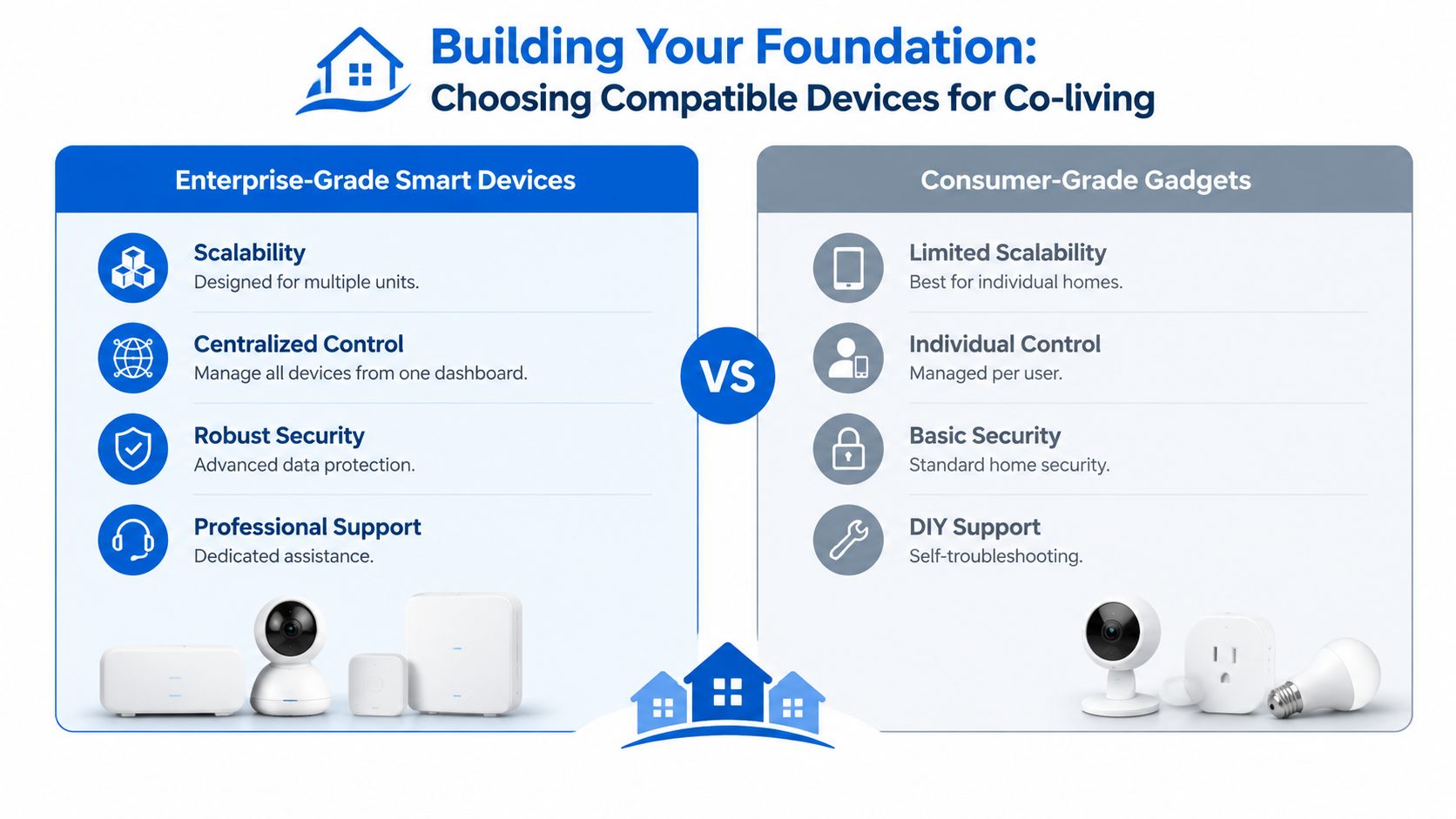
Buy in a small test group first. Install one bedroom lock, one thermostat, and one sensor. Run a move-in, a move-out, a battery replacement, an internet interruption, and an account handoff before scaling to every room. A device that works perfectly on a workbench can still fail when a door alignment changes or a member's phone has a different operating system.
Designing a Scalable Network Architecture
Your smart devices depend on the property's network in the same way residents depend on reliable plumbing and electricity. A lock that works in a lab but drops offline near a concrete stairwell is an operational liability. A network that mixes resident streaming traffic with management devices can also make troubleshooting and security harder.
Think of the network as the nervous system of the house. The router is the central junction, access points extend the signal, and each device type should have a defined place rather than competing for one undifferentiated connection.
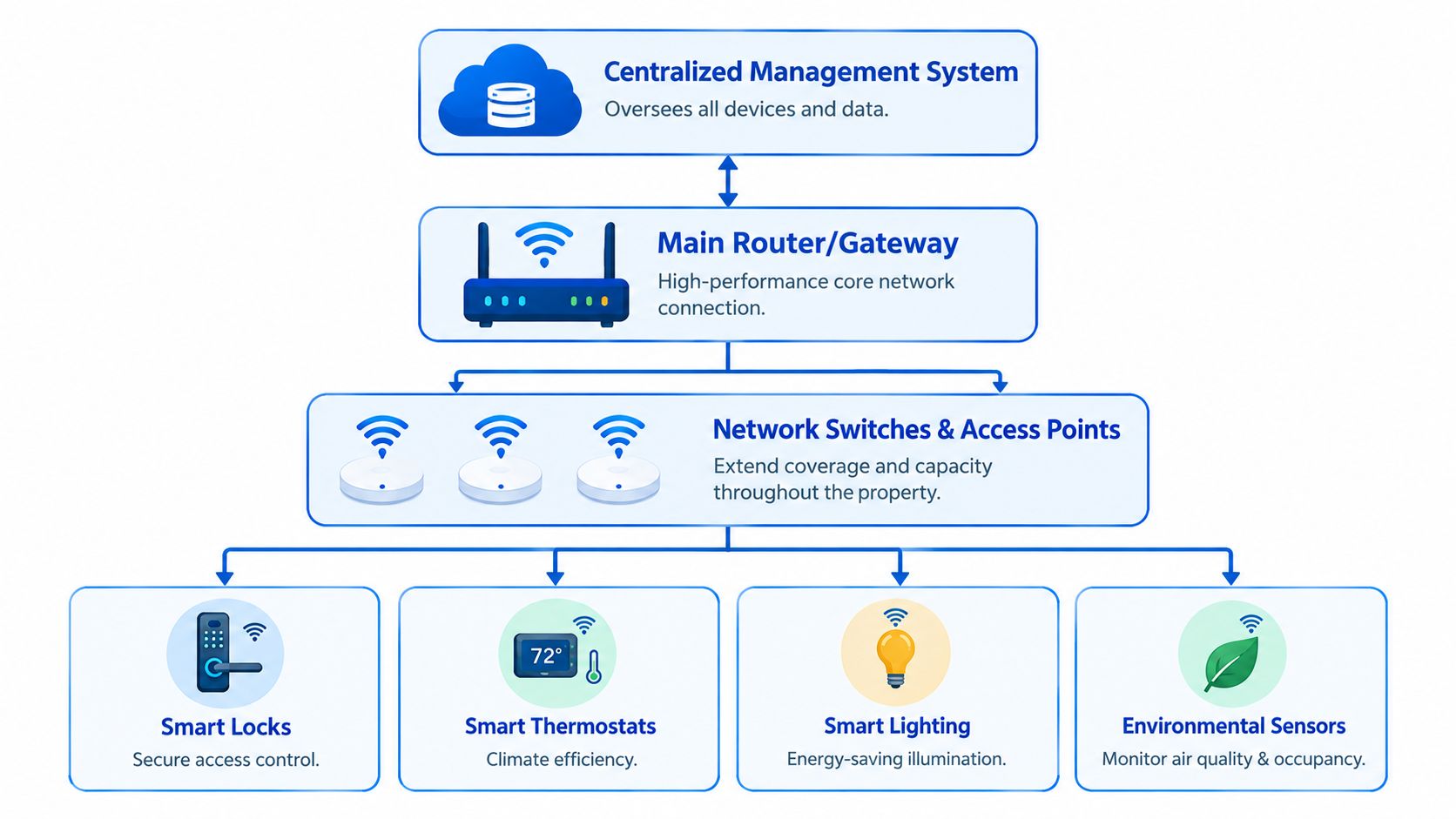
Choose the protocol for the job
Wi-Fi is familiar and useful for devices that need more bandwidth, but a crowded wireless environment can create congestion and battery pressure. Zigbee and Z-Wave are lower-power mesh options commonly used for sensors and switches. Thread is another low-power mesh protocol designed for connected-home devices, and it works as part of the Matter ecosystem.
The distinction is practical:
- Wi-Fi: Useful for high-bandwidth devices and equipment already supported by the property network.
- Zigbee or Z-Wave: Suitable when you want a dedicated mesh for many low-power sensors and switches.
- Thread: A strong option for Matter-compatible low-power devices, provided your controller and border-router setup support it.
- Bluetooth: Often useful during initial commissioning, but it shouldn't become the operator's only management path.
A hub may be necessary when your devices use protocols that your management platform can't speak directly. Don't treat a hub as automatically bad. Treat an undocumented hub, with unclear ownership and no replacement plan, as a risk.
Build for separation and recovery
Use separate network zones for resident traffic, smart devices, security equipment, and administration. Residents need dependable internet access, but they shouldn't have a path into your management dashboard, lock controller, camera system, or property records. Smart devices should have only the outbound access they need, and devices that don't require cloud services shouldn't receive unrestricted internet access by default.
Place the primary router where it can serve as the stable core of the system, then use wired backhaul for access points wherever possible. Test the actual bedroom doors, hallways, basement, and exterior entrances. Don't infer coverage from a signal map alone. A lock's location, construction materials, and battery state can change its behavior.
For a deeper treatment of permissions and shared-entry rules, see this guide to multi-tenant access control. Document the network in plain language so a contractor or future operator can understand which devices belong on which segment and what should happen if the central controller is offline.
Resilience rule: Every critical access point needs a fallback. That might be a physical emergency key, local PIN capability, battery warning, or a documented manual process. Convenience without recovery planning isn't resilience.
Practical Installation and Member Onboarding
Installation quality determines whether smart home integration feels invisible or intrusive. A lock needs correct alignment, a thermostat needs accurate equipment configuration, and a sensor needs a location where it can detect the condition it was purchased to monitor. The operator also needs a repeatable inspection process after every installation.
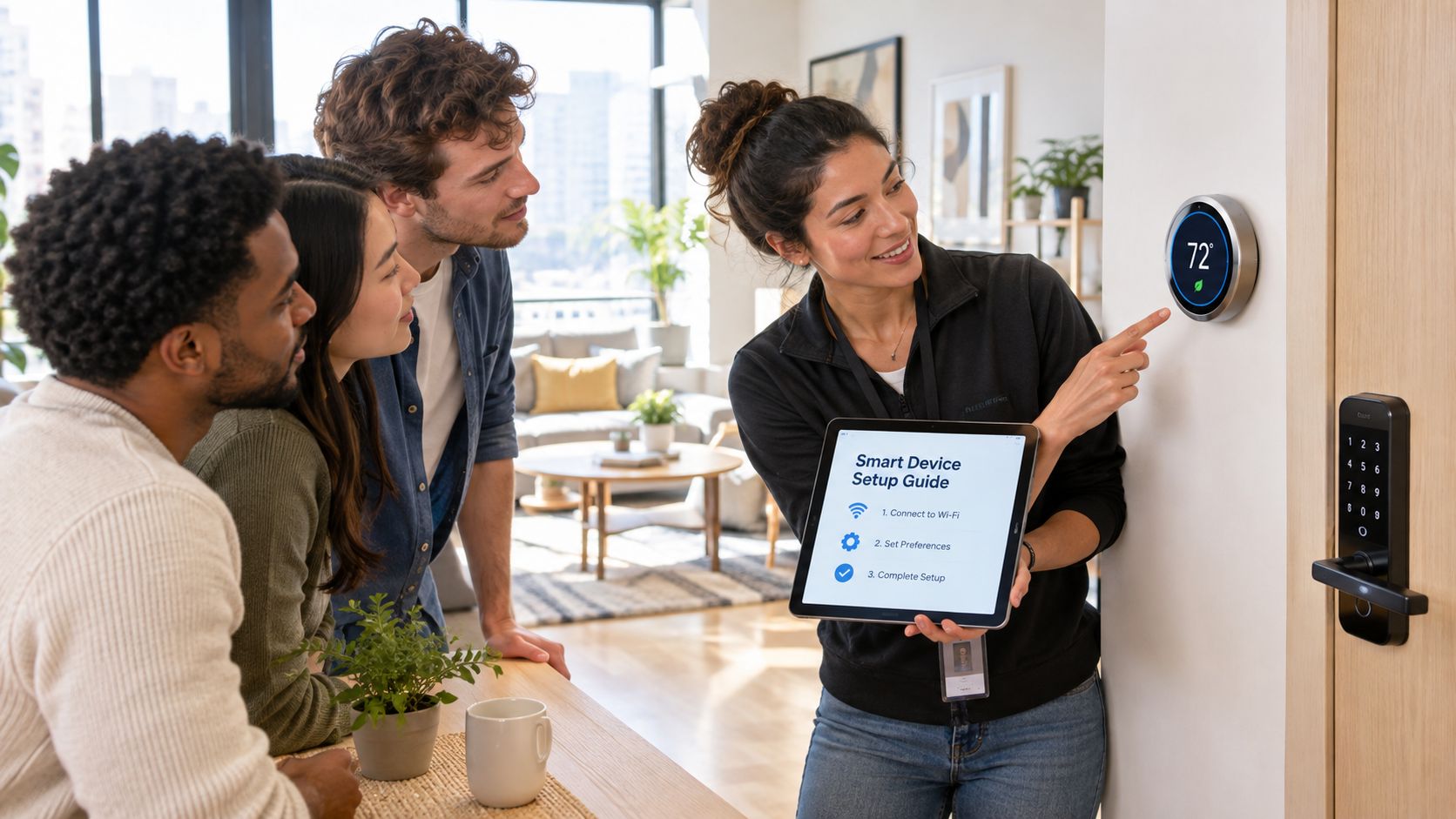
Install in a controlled sequence
Begin with a door survey. Confirm the lock type, backset, swing direction, frame condition, and clearance. A smart lock can't compensate for a door that already sticks, drags, or fails to latch. After installation, test the lock from the inside, outside, through the management interface, and with the backup method.
For thermostats, photograph the existing wiring before removal and confirm that the replacement supports the actual HVAC system. Label the property, room, and equipment clearly in the management platform. Then test heating, cooling, fan control, schedule changes, and manual overrides before the room is occupied.
Install secondary sensors where they produce an actionable signal. A leak sensor under a sink should be reachable for battery changes and positioned where water will arrive first. A door sensor should be mounted securely and checked after the door is opened, closed, and used repeatedly.
A usability study of self-installed smart-home kits found that motion sensors had high installation success, while door sensors and server setup were less successful. The study treats an installation failure rate above 35% as a sign of a complicated process, reinforcing the value of simple step-by-step installation and onboarding.
Give every member the same instructions
A resident shouldn't have to understand protocols, hubs, or network credentials. They need to know how to open the door, what to do when the battery warning appears, how to contact the operator, and what information you collect.
A useful welcome email can be short:
Your room access: Use the app or PIN provided for your room. Don't share your personal credential. Contact us immediately if the lock doesn't respond. The physical backup procedure is listed on the door guide.
The door guide should fit on one page and include:
- Normal entry: The exact steps for gaining access to the bedroom and common entrance.
- Battery warning: What the warning looks like and how to report it.
- Offline access: The approved fallback method, without exposing sensitive master credentials.
- Privacy: Which devices monitor building conditions and which areas are not monitored.
- Support: One contact method and the information to include in a fault report.
Send the email before move-in, place the printed guide inside the room, and demonstrate the lock during handover. Ask the member to complete one successful operation of the lock while you're present. That small confirmation is more useful than assuming a link was opened.
This overview of a remote access control system is also useful when defining what residents can manage themselves and what remains under operator control.
The following walkthrough can help staff explain thermostat behavior and basic member controls:
Finish every installation with a post-install inspection. Check device names, room assignments, alert recipients, battery status, permissions, and the emergency procedure. If a new member calls late at night, the support person should be able to identify the room and diagnose the likely failure without asking the resident to rebuild the system.
Automating Operations and Pricing Workflows
A connected device becomes commercially useful when it responds to a business event. The operator shouldn't have to copy a name from a lease into a lock app, then copy a move-out date into a thermostat schedule, then send a separate message explaining the process. Those handoffs create opportunities for delay and error.
The basic pattern is simple: an event starts a controlled action. A completed approval can create a resident profile. A confirmed move-in can activate access. A lease end can schedule credential expiration. A reported vacancy can apply an approved HVAC setting and start a room-readiness checklist.
Connect the operating events
A room-rental workflow might look like this:
- Reservation or approval: Store the member and room assignment in the management system.
- Access creation: Generate the appropriate credential after the required conditions are met.
- Onboarding message: Send entry instructions, privacy information, and support contacts.
- Move-in confirmation: Activate the credential and mark the room occupied.
- Occupancy change: Adjust the thermostat schedule according to the property's policy.
- Move-out: Disable access, notify the operator, and create a turnover task.
- Exception handling: Escalate failed locks, low batteries, sensor alerts, or disconnected devices.
Property-management software already demonstrates the model of combining resident services and access. For example, Entrata's Access Connect describes a single app that allows residents to pay rent and control access to doors. The value for a room-by-room operator comes from extending that concept into the rest of the workflow, not from adding another standalone lock application.
Automate carefully
Automation should be narrow, visible, and reversible. Don't let a single occupancy signal lock a resident out or change a shared thermostat without guardrails. Use approval steps for sensitive actions, keep a log of credential changes, and provide an operator override.
Pricing and smart-home controls can work together without being tightly coupled. A pricing decision may determine which room is marketed, what services are included, or whether a premium room feature is available. It shouldn't automatically change a resident's access rights. Keep commercial rules, safety rules, and device rules separate even when they share data.
The most reliable dashboards show the operator what needs attention: vacant rooms with active HVAC, locks with low batteries, devices that haven't checked in, and access credentials approaching expiration. A dashboard that only displays device status is less useful than one that connects status to a task and an accountable person.
Calculating ROI and Managing Long-Term Risk
Smart home ROI should be calculated at the property level, not borrowed from a consumer product page. Start with the costs you can identify: hardware, installation, software subscriptions, replacement batteries, support time, network upgrades, and the cost of correcting a failed installation. Then compare those costs with avoided rekeying, reduced manual coordination, utility changes, fewer emergency visits, and improved response to maintenance issues.
Energy savings require particular caution. A large analysis of 13,762 self-installed natural-gas homes found average annual savings of 22 therms per home, with a 56% realization rate. The same analysis found no consistent or statistically significant electricity savings in electric-heated homes, as detailed in the Energy Trust smart thermostat billing analysis. That result matters for operators with mixed HVAC fleets. A thermostat program that works in one building may not produce the same outcome in another.
Use a property-specific payback model
Create a simple worksheet for each house:
- Access savings: Record current rekeying, key replacement, travel, and handoff costs.
- Labor savings: Estimate the time spent issuing credentials, answering access questions, checking vacant rooms, and coordinating contractors.
- Utility impact: Compare pre-installation billing with post-installation billing by fuel type and HVAC configuration.
- Operating costs: Include subscriptions, device replacement, installation labor, network equipment, and support.
- Revenue effects: Consider whether better access and clearer room operations reduce friction during turnover or support stronger occupancy, but don't assign a financial benefit until you can measure it.
ENERGY STAR-certified smart thermostats are verified to save an average of 8% on heating and cooling costs, according to Consumer Reports' smart thermostat review. That figure applies to heating and cooling costs, not automatically to the entire utility bill. One portfolio-focused estimate places median HVAC savings at 8% to 14%, translating to roughly 3% to 5% of the whole-home bill where HVAC represents 30% to 40% of total energy use, as discussed in this smart thermostat ROI analysis.
Treat privacy as an operating requirement
Members deserve a clear explanation of what the system collects, why it collects it, who can access it, and how long records remain available. Access logs may be necessary for security, but that doesn't justify collecting more personal data than the operation needs. Avoid cameras or monitoring tools in private resident areas unless there's a compelling legal and operational basis, and communicate the policy before move-in.
Privacy concerns are substantial. Survey coverage reported concerns about data privacy among 26.2% of consumers overall and 43.5% for AI applications. Another survey reported that 57% of Americans worry about how smart-home information is collected and used, while 46% fear hacking, according to LightNOW's 2025 smart-home technology survey coverage.
Use strong administrator credentials, separate resident and management access, apply updates, and keep a written incident process. Decide in advance who responds when a lock fails, when a cloud service is unavailable, or when a member reports an incorrect access event. For a broader way to evaluate support and automation costs, Halo AI's AI support ROI insights provide useful context, but your own support logs should determine whether a subscription improves NOI.
For the energy side of the decision, this guide to smart thermostat benefits can help frame the conversation, but don't standardize hardware until your billing data, HVAC inventory, and member-use patterns support the case.
Long-term rule: A smart device earns its place when the operator can explain its cost, its fallback, its data policy, and the task it removes.
PadPulse is being built to connect room-by-room pricing, member messaging, keyless smart locks, smart thermostats, and financial reporting in one operating workflow. Visit PadPulse to join the interest list for launch updates and limited beta access, with no billing required before launch.