Smart Thermostat Benefits for Co-Living Operators
August 18, 2026
At 10 p.m., a tenant texts that one bedroom is freezing. You manage three shared houses, the thermostat is in a locked hallway, and the fastest solution appears to be getting back in the car. By the time you arrive, adjust the dial, and return home, you've spent more time solving a comfort complaint than the original HVAC issue deserved.
That routine is the wrong operating model for PadSplit hosts and co-living operators. Smart thermostat benefits aren't limited to a lower utility bill. The larger opportunity is centralized control across rooms and properties, better HVAC visibility, fewer avoidable trips, more consistent tenant comfort, and useful operating data. Energy savings matter, but they're only one part of the return.
This guide is for small landlords, room-by-room rental operators, and growing co-living portfolios. You'll get a practical view of what smart thermostats do, where the savings are credible, why results vary by fuel type, and how to roll out a system without creating a new management headache.
The Late-Night Thermostat Run Every Host Knows
The tenant's message usually sounds simple: “The room is too cold.” You ask whether the heat is running, whether the vents are open, and whether anyone else in the house is comfortable. The answers are incomplete because you're troubleshooting by text, and the thermostat itself may be behind another tenant's locked bedroom door or buried in a common area nobody monitors.
A host with three properties can lose an evening to this kind of issue. One trip becomes two when the thermostat setting wasn't the actual problem. A second trip may be needed when the system keeps running but never reaches the target temperature. That's not just inconvenient. It pulls an operator away from leasing, maintenance coordination, inspections, and resident communication.
A centrally managed smart thermostat changes the first response. You can check the current temperature, review the setpoint, make an adjustment, and see whether the HVAC system responds without crossing town. If the temperature doesn't move as expected, the abnormal pattern gives you a reason to send a technician instead of guessing.
Operator's rule: If the same HVAC question requires a vehicle trip, the property lacks basic remote visibility.
The seven benefits that matter most are practical:
- Energy savings: Useful, but dependent on fuel type, climate, and installation.
- Peak-demand flexibility: Automated adjustments can create value during utility events.
- Remote control: Hosts can respond to comfort problems from a phone.
- HVAC monitoring: Runtime patterns can expose trouble before a complaint escalates.
- Portfolio data: Temperature and usage patterns can improve operating decisions.
- Tenant experience: Consistent comfort supports trust and retention.
- Standardized operations: One account structure and one process reduce property-by-property improvisation.
The key shift is simple. Homeowners ask whether a thermostat will lower their bill. Operators should ask whether it will make HVAC measurable and manageable across the portfolio.
What a Smart Thermostat Actually Does
A smart thermostat is a Wi-Fi-connected controller for heating and cooling. It can accept commands through a mobile app, follow schedules, record runtime, use sensors, and connect with demand-response programs. A programmable thermostat can also follow a schedule, but someone must create that schedule manually and update it when real life changes.
A useful analogy is a printed calendar on the refrigerator versus a calendar app on your phone. The printed calendar shows the plan you created. The app can be edited remotely, shared with other people, and connected to reminders. A smart thermostat brings that second model to temperature control.
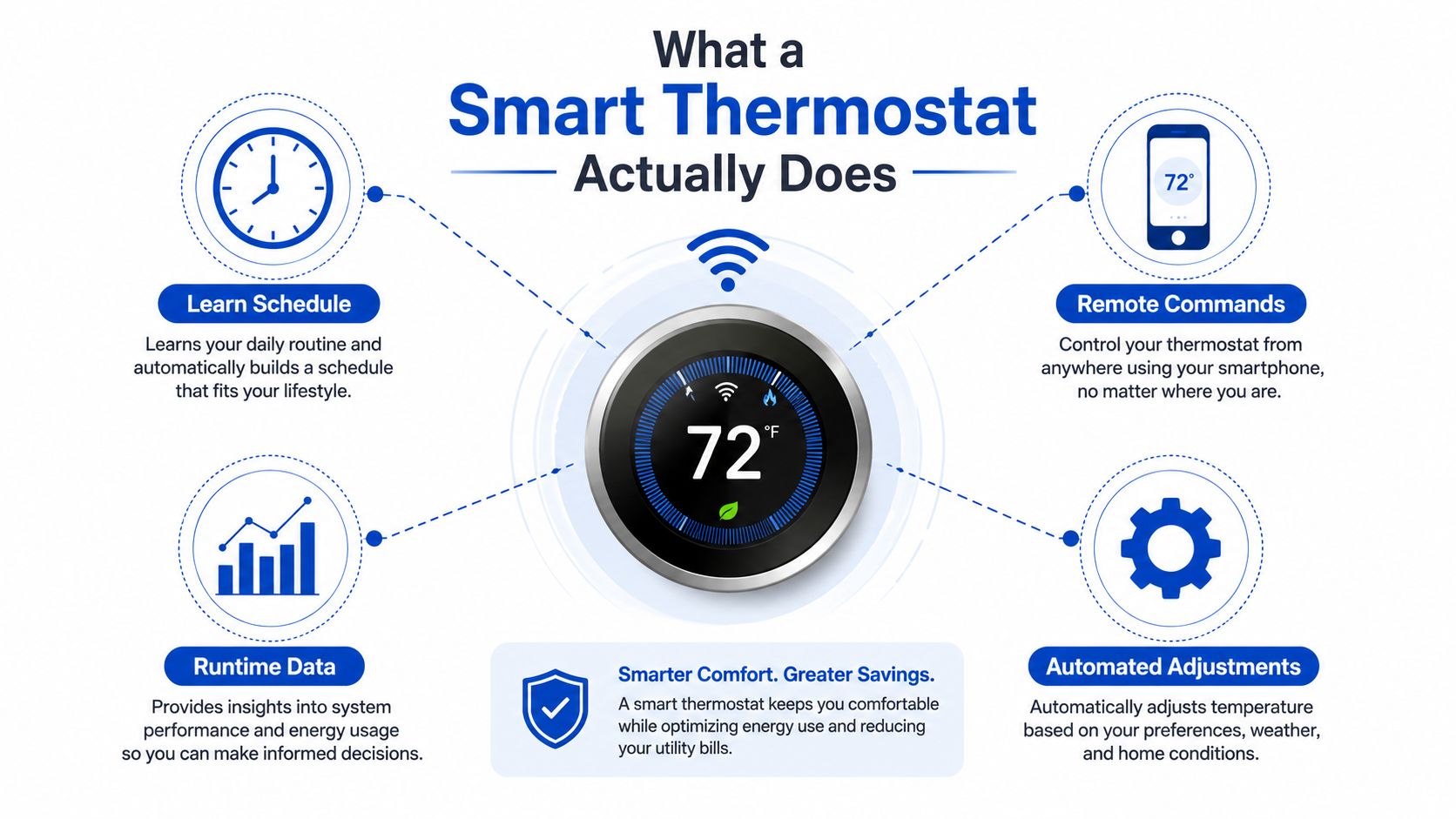
The main building blocks
- Scheduling: Set different temperature targets for occupied, vacant, daytime, and overnight periods.
- Remote commands: Adjust a property from a phone instead of visiting the house.
- Runtime reporting: See how long the heating or cooling equipment operates.
- Sensors: Compare the thermostat's reading with temperatures in other rooms when the system supports remote sensors.
- Geofencing: Use a resident's or operator's phone location to trigger away settings. In shared housing, operator-controlled schedules are usually safer than relying on individual phones.
- Automated adjustments: Allow the device to make planned changes during vacancy or utility events.
Operators should separate comfort control from tenant surveillance. A thermostat may provide temperature and equipment data, but the account should be configured around property operations, clear access rules, and transparent resident communication.
Compatibility comes first. Confirm the HVAC type, wiring, power requirements, zoning arrangement, and internet dependence before buying a fleet. For a practical comparison of features and rental-property considerations, review this guide to the best smart thermostat for rental property.
Energy and Cost Savings Without the Hype
A smart thermostat can lower utility use, but hosts should not underwrite every installation around a headline percentage. In a study of 89 California households, smart thermostats reduced whole-home electricity bills by 6% in summer months, or $15.60 per month on average. Estimated savings reached 17% in August, when cooling demand was highest, according to the California smart thermostat and energy use analysis.
That finding matters for PadSplit hosts operating in warm markets. Cooling costs can create seasonal pressure across several houses at once, but results vary by property. A lightly cooled home, inefficient HVAC equipment, or a thermostat placed where it reads an unrepresentative temperature can weaken the return.
Fuel type changes the answer
The equipment and fuel source determine whether savings justify a portfolio rollout. ACEEE-reviewed utility evaluations reported average gas-heating cuts of 13.3% and cooling-electricity cuts of 14.5% across the programs examined in the ACEEE evaluation paper. Those results point to stronger value in homes with substantial heating or cooling loads.
Oregon program data offers a useful portfolio reference. A billing analysis covering 13,762 homes found that self-installed smart thermostats in natural-gas-heated homes saved an average of 22 therms annually, with a 56% realization rate, as documented in the Energy Trust billing analysis. A separate Oregon pilot linked one thermostat model to about 6% heating-load savings, or roughly 34 therms per year, in gas-heated homes, according to the smart thermostat pilot evaluation.
Electric-heated homes need a separate underwriting case. The Oregon billing analysis did not find consistent or statistically significant electricity savings in those homes. Climate, equipment type, installation quality, resident behavior, and the balance between heating and cooling all affect the outcome.
Budgeting advice: Underwrite smart thermostats as a control and monitoring investment first. Treat utility savings as upside that property data must validate.
Before installation, PadSplit hosts should answer four questions:
- What fuel powers each house?
- Which properties have the highest heating or cooling bills?
- Does each thermostat measure a representative temperature?
- Can the HVAC equipment support the selected device, with every account owned and managed by the operator?
Do not apply one portfolio average to every house. Start with high-usage properties and homes where remote control already addresses a recurring management problem. That approach ties the purchase to NOI, not wishful utility forecasting.
Peak Demand and Demand Response as a Hidden Benefit
Annual energy savings and peak-demand reduction are different products. Lower annual usage reduces total consumption over time. Demand response temporarily changes HVAC operation when a utility or grid program calls for lower load.
That distinction creates an overlooked benefit for operators. A smart thermostat can shift a setpoint or pre-cool a property during a planned event, then reduce air-conditioner operation during the most constrained period. The operator may receive a program incentive, while the utility gains a controllable load resource.
A cooperative pilot recorded average per-home demand reductions of 0.94 kW during summer events and 1.9 kW during winter events, according to the cooperative smart thermostat pilot report. The result won't apply uniformly to every property, but it demonstrates that the device can do more than report a monthly bill.
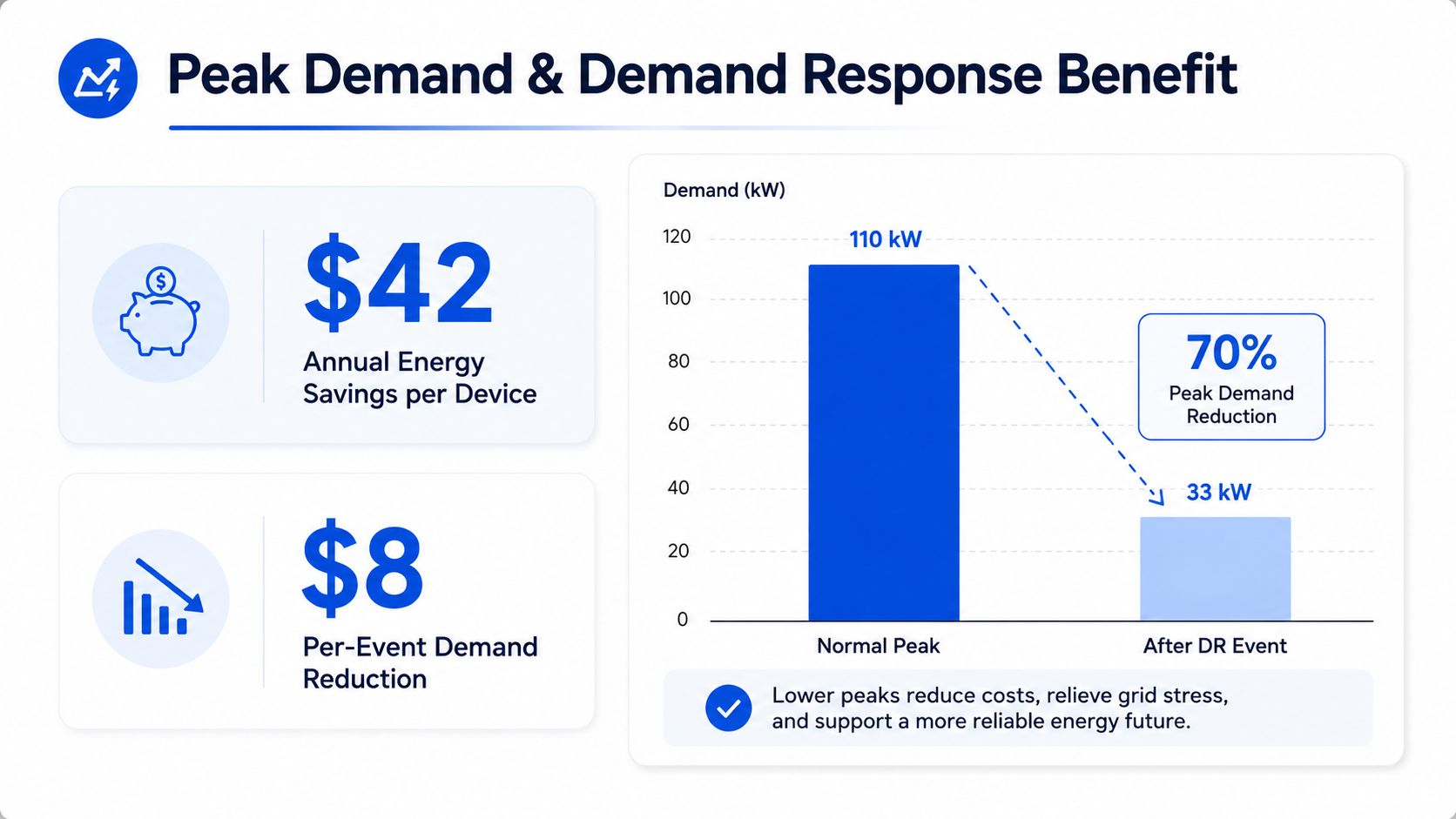
Georgia Tech researchers studied automated pre-cooling and found that it cut peak-period air-conditioner use by roughly 60%, reduced peak demand by about 0.56 MW across 2,133 participants, and delivered about C$7–9 in average summer-month savings per home, as described in the Georgia Tech smart thermostat automation study.
Here's the operational implication: a thermostat fleet can become an asset during utility events, especially in cooling-intensive markets. A demand-response program may require enrollment, customer permissions, event rules, and clear expectations about temporary comfort adjustments. Don't enroll blindly. Confirm the program's compensation, override rules, data requirements, and resident communication process.
Demand response also works best when operators control the accounts. A fragmented fleet owned by individual tenants is difficult to coordinate. A centrally managed fleet can be configured consistently, monitored during events, and evaluated against actual property performance.
Why Landlord Installation Is the Real Lever
Renters are the weakest link in consumer-led smart thermostat adoption. The 2025 Northwest Smart Thermostat Research Study found that renters are much less likely to adopt smart thermostats than homeowners, which makes landlord installation and management the practical entry point in shared housing. Read the Northwest Smart Thermostat Research Study for that renter-versus-homeowner context.
A tenant may want better comfort, but they often won't buy equipment for a property they don't own. They may also lack permission to modify wiring, worry about losing the device at move-out, or avoid learning a system they expect to use temporarily. In a co-living house, several tenants may have different temperature preferences, which makes individual consumer ownership even less workable.
The operator should own the hardware, the account, and the operating policy. Install during turnover or planned maintenance, then give residents a simple explanation of what the thermostat controls and how comfort requests are handled.
Three decisions that create portfolio leverage
- Install during natural vacancy. Use the period between occupants to verify wiring, test the HVAC response, and document the device.
- Keep account ownership centralized. The operator should control credentials, permissions, billing notifications, and turnover access.
- Standardize the fleet. A consistent model reduces training time, simplifies troubleshooting, and makes portfolio reporting easier.
The point isn't to remove resident input. It's to prevent resident turnover from breaking the operating system. Hosts can still provide reasonable comfort settings and a clear escalation process, while keeping the control layer stable from one occupant to the next.
For operators building that central workflow, the thermostat operations feature is a useful reference for how HVAC control can fit into broader property management.
Operational Efficiency and HVAC Monitoring
The fastest return often appears in the maintenance inbox, not the utility statement. A smart thermostat lets a host adjust temperature remotely, schedule setbacks during vacancy, and check whether the system responds after a tenant reports discomfort.
That matters in shared houses because a single thermostat may serve several rooms with different comfort expectations. You can set a common operating schedule, use room sensors where supported, and investigate temperature differences before they become a resident dispute.
Use runtime as an early warning
A thermostat that records runtime can reveal patterns a wall dial can't. If equipment runs for unusually long periods without reaching the target temperature, the system may need inspection. Possible causes include a dirty filter, restricted airflow, a failing compressor, a stuck relay, or an issue with the ductwork. The thermostat won't diagnose the fault, but it can tell you when the normal pattern has changed.
An ACEEE demand-response study found scheduled setpoint shifts of about 0.5°F in summer and 0.7°F in winter, along with average HVAC runtime reductions of 3%–7%, showing how small automated changes can affect equipment operation. Those figures are documented in the ACEEE demand-response participation study.
Use the data as a triage tool:
- Long runtime with little temperature movement: Schedule an HVAC inspection.
- Frequent short cycles: Ask a technician to investigate equipment and control behavior.
- One room consistently outside the target: Check sensor placement, airflow, insulation, and occupant practices.
- A sudden loss of reporting: Verify power, connectivity, and device health before assuming the HVAC system failed.
Make vacancy settings operational
A vacant bedroom doesn't need the same schedule as an occupied room, but aggressive settings can create moisture, comfort, or equipment concerns depending on the property and climate. Use conservative schedules that protect the building and equipment, then restore the occupied profile before move-in.
Remote thermostat monitoring won't replace preventive maintenance. It gives you earlier evidence and better dispatch decisions. Operators managing many rooms should treat that visibility as an HVAC monitoring workflow, not as a novelty feature.
Data and Analytics for Pricing and Occupancy
A thermostat becomes strategically useful when its records join the rest of the property's operating picture. Setpoints, actual temperatures, runtime patterns, and occupancy signals help PadSplit hosts compare how rooms and houses perform throughout the year. For a portfolio, that visibility matters more than chasing a universal utility-bill percentage.
Use the information to improve leasing and retention decisions, not to set rent automatically. A room with weak demand, limited HVAC activity, and repeated vacancies may need a different leasing plan from a room with strong demand but recurring comfort complaints. The first case points toward pricing or marketing. The second may point toward a building, room, or HVAC problem that is hurting occupancy.
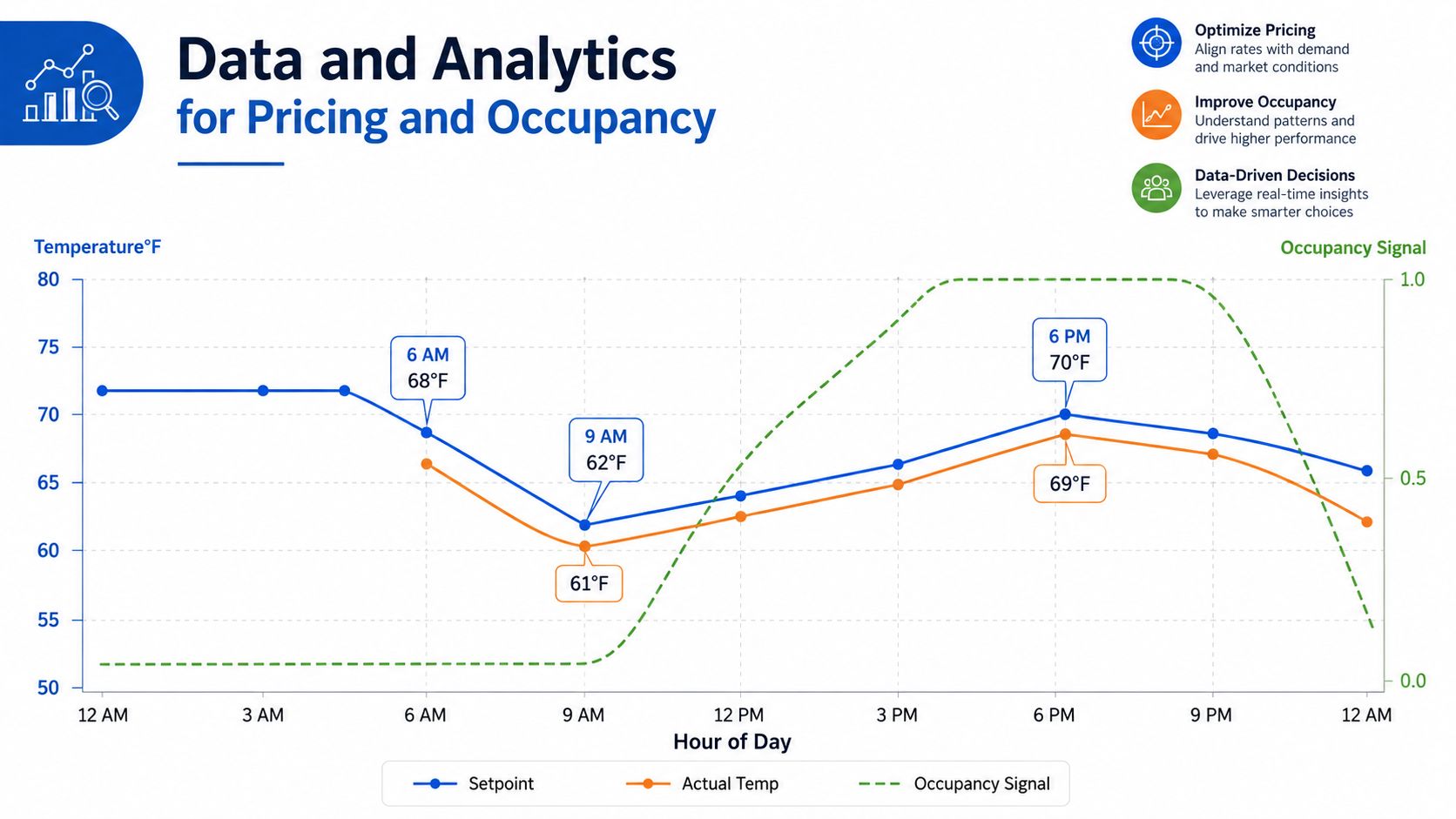
Turn temperature data into operating decisions
Start with room-level patterns. Do not build a complicated forecast before the basic records are consistent.
- Compare occupied and vacant periods. If a room stays vacant while its HVAC schedule continues as though someone lives there, review leasing activity, pricing, and automation together.
- Review seasonal load curves. Winter heating and summer cooling patterns show how expenses shift across the year and help operators compare houses with similar occupancy.
- Connect comfort with retention. Repeated temperature complaints can identify a room, building, or HVAC zone that deserves inspection or capital work before more residents leave.
- Use signals as context. Occupancy hints can support pricing analysis, but they do not replace lease records, access information, or direct resident communication.
Utility-program evaluations have reported meaningful reductions in gas heating and cooling electricity, along with lower demand during selected events. Those findings show that thermostat records can support efficiency reviews and demand-response planning, as noted earlier. Do not copy those results into a pro forma without checking the property's fuel type, equipment, climate, and resident behavior. A gas-heated house and an all-electric property will not produce the same savings profile.
The practical question is whether the data changes a decision. If it does not affect a price review, a maintenance request, a vacancy schedule, or a resident conversation, the record has little operating value.
Don't ignore privacy and ownership
Temperature data can reveal household routines. Even without a person's name, repeated schedules may suggest when a room is occupied or vacant. Give residents a clear explanation of what the device collects, why the operator uses it, who can access it, and how long the information remains available.
Account ownership creates another turnover risk. If a tenant creates the account, the operator may lose access after move-out. If the operator owns it, residents need clear rules for control, overrides, and maintenance access.
Ask every vendor:
- Where is the data stored?
- Who owns the account and historical data after a tenant moves out?
- Can the operator export useful records in a standard format?
- What happens if the manufacturer discontinues the product or exits the market?
- Will the thermostat continue following its schedule during an internet outage?
- How are software updates, passwords, and administrator permissions managed?
- Can the system separate operator access from resident access?
Vendor lock-in creates an operating cost. A cheap device that forces a portfolio-wide replacement later can cost more than a supported system selected for HVAC compatibility and usable data access.
Privacy also affects retention. Residents trust operators more when controls are explained before installation, rather than discovering that temperatures changed and occupancy patterns were collected without context. Clear communication reduces conflict and protects the resident relationship that keeps rooms occupied.
A 90-Day Rollout Plan for a Co-Living Portfolio
Don't install smart thermostats everywhere on the first day. A controlled rollout gives you time to test compatibility, account ownership, resident communication, and reporting before a small issue becomes a portfolio-wide problem.
Weeks 1 and 2
Choose one model family that fits the majority of your HVAC systems. Document exceptions, especially heat pumps, multi-zone systems, unusual wiring, and properties that need professional installation.
Create the account structure before the first device goes on the wall. Use operator-controlled credentials, consistent property and room names, administrator permissions, and a turnover checklist. Record the original thermostat settings, HVAC type, installation date, and baseline utility information available for each property.
Weeks 3 through 6
Install first in the rooms and houses with the clearest operational need. Prioritize high-utility properties, frequent comfort complaints, hard-to-access thermostats, and rooms that routinely sit vacant between occupants.
Test every installation under heating and cooling modes where the system supports both. Confirm that the device reaches the target temperature, reports runtime, reconnects after a network interruption, and gives the right people the right level of access.
Weeks 7 through 10
Configure occupied and vacancy schedules conservatively. Add remote sensors only where they solve a documented temperature problem. If a utility demand-response program is available, review its terms before enrolling and explain temporary adjustments to residents.
Keep the process simple for tenants. Give them a short written guide covering comfort requests, emergency HVAC issues, and what the operator can control remotely.
Weeks 11 and 12
Review runtime, complaints, service calls, and utility performance. Compare properties with similar equipment rather than treating every house as interchangeable. Adjust schedules when the data supports a change, and send a technician when the data points to equipment trouble.
Track these KPIs:
- Monthly HVAC runtime per room: Identify unusual operating patterns.
- Tenant comfort complaints: Separate thermostat settings from underlying HVAC faults.
- Emergency HVAC service calls: Measure whether earlier visibility improves dispatch.
- Utility bill per square foot: Compare cost intensity across properties.
- Demand-response rebates earned: Record whether grid participation creates a separate return.
- Turnover completion time: Confirm that device setup doesn't slow room readiness.
- Account and device exceptions: Find properties that need a different hardware or network plan.
The seven smart thermostat benefits worth managing are fuel-dependent energy savings, peak-demand flexibility, remote control and scheduling, HVAC monitoring, data for pricing and occupancy, tenant comfort and retention, and standardized portfolio operations. The first two are measurable financial opportunities, but the last five often determine whether the system becomes useful or gets ignored.
The next step is specific. Pick a compatible model, claim every account in the operator's name, and install the first device in the next vacant room. Then measure what changes before expanding the rollout.
Smart thermostats for co-living aren't mainly about promising a universal reduction in the utility bill. They turn HVAC into a visible operating layer, one that can support better maintenance, more consistent comfort, and stronger NOI decisions when the operator manages it deliberately.
PadPulse brings pricing, communications, access control, financial visibility, and planned smart-home integrations into one operating platform for co-living hosts. Visit PadPulse to join the interest list for beta updates and explore how centralized thermostat data can fit into your portfolio workflow.