Short Term Rental Pricing Tools: A Complete 2026 Guide
April 27, 2026
You open your calendar, notice a gap next Tuesday, see a holiday weekend two weeks out, and realize you still haven’t updated rates for the local festival downtown. So you tweak a few prices by hand, second-guess them an hour later, and wonder if you just priced yourself too high, or too low.
That cycle is where a lot of hosts get stuck.
Manual pricing feels responsible because you’re involved. In practice, it often turns into reactive pricing. You lower rates when bookings feel slow, raise them when things get busy, and hope you’re catching the market at the right moment. Sometimes you are. Often, you’re leaving money on the table or filling nights at rates you later regret.
Short term rental pricing tools exist to solve that exact problem. They help hosts respond to demand changes faster, more consistently, and with less guesswork. Think of them less like a robot taking over your business and more like a revenue assistant that watches your market every day.
Stop Guessing Your Rental Rates
A new host usually starts with simple rules. Charge more on weekends. Add a bump for holidays. Drop prices if a date is still open close to check-in. That’s reasonable at first.
Then real life shows up.
A concert gets announced. Three nearby listings slash rates. Weather changes travel demand. A long weekend books earlier than usual. Suddenly your “simple” pricing system starts feeling like a spreadsheet with mood swings.

Why manual pricing breaks down fast
The hard part isn’t setting one good price. The hard part is setting the right price for hundreds of booking decisions across the year.
A Tuesday in slow season shouldn’t be priced like a Saturday during a citywide event. But that’s exactly what happens when you don’t have time to check your market constantly. Most hosts are also juggling guest communication, cleaning coordination, reviews, maintenance, and turnover. Pricing gets pushed down the list.
That’s why dynamic pricing has moved from “nice to have” to normal operating equipment for many hosts. In Summer 2025, 40% of short-term rental hosts who adopted dynamic pricing tools achieved simultaneous increases in both occupancy rates and ADR, with adoption rising to 62% industry-wide, according to Hostaway’s 2025 short-term rental performance report.
That result matters because occupancy and rate often feel like a tradeoff. New hosts assume they must choose one or the other. Smart pricing aims for both.
Practical rule: Your best price is rarely the highest possible number. It’s the rate that fits real demand for that date.
What dynamic pricing really does
Dynamic pricing tools change rates automatically based on market conditions. If demand rises, rates can move up. If demand softens, the tool can recommend a more competitive price before the date goes stale.
That’s the same basic logic airlines use. Seats for a high-demand flight cost more than seats for a quiet route at an off-peak time. Rentals work the same way. Your nights are inventory, and once a night passes unsold, you can’t get it back.
For a beginner host, the biggest benefit is mental relief. You don’t have to wake up and wonder if tonight’s open night should be cheaper, or if next month’s holiday should already be higher. The tool watches those signals for you.
A good setup won’t eliminate your judgment. It enhances your judgment.
Understanding the Brains Behind Dynamic Pricing
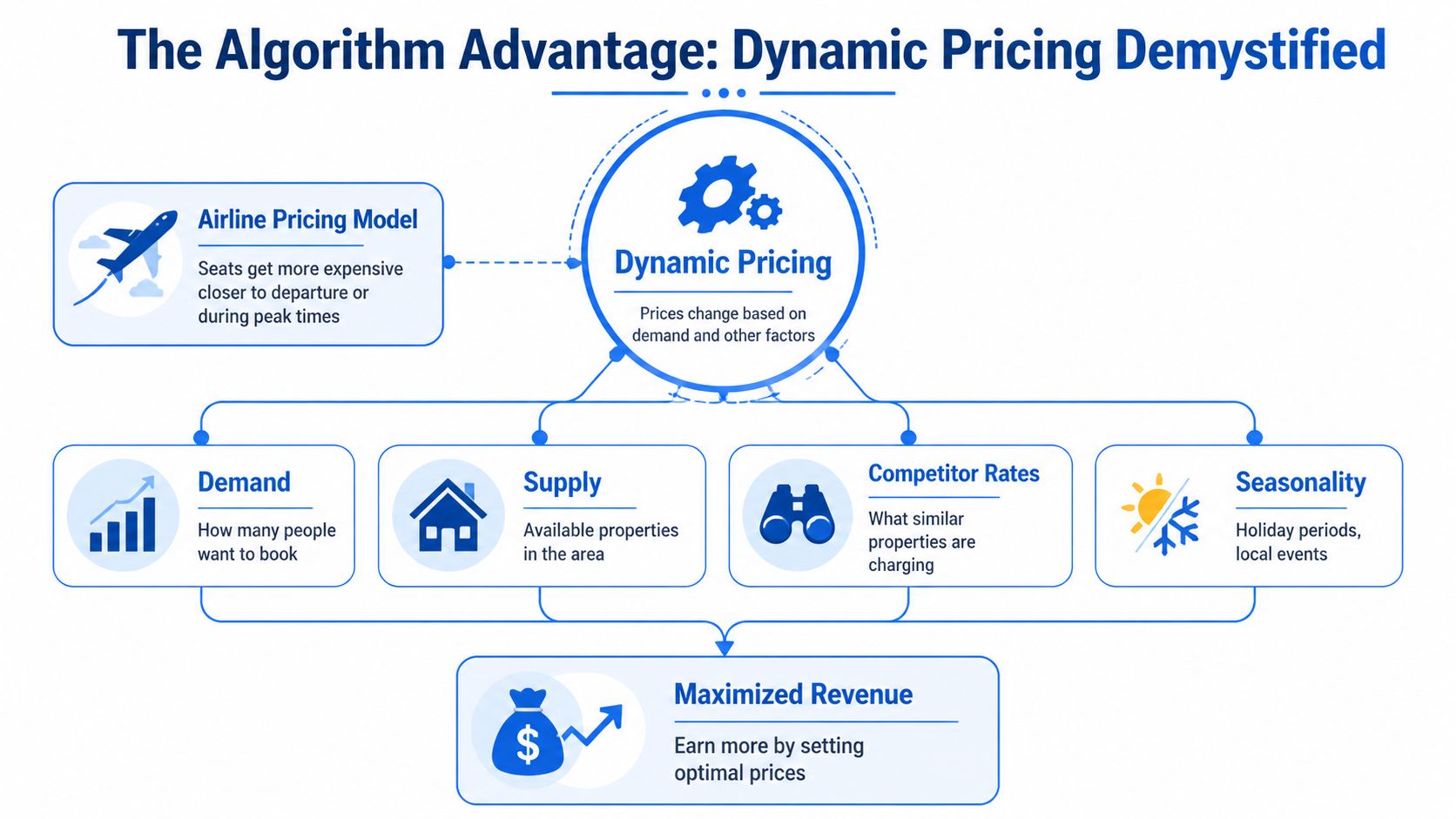
Most hosts hear “algorithm” and picture something mysterious. It’s not mysterious. It’s a math-driven way to answer one simple question: what should this night cost right now?
The easiest analogy is airline pricing. Airlines don’t post one flat fare and leave it alone for six months. They adjust based on timing, demand, route popularity, and remaining inventory. Dynamic pricing in short term rentals works with the same basic idea.
It starts with your base price
Most tools don’t invent your pricing strategy from scratch. You usually begin with a base rate, which acts like a starting point.
If you know a strong summer night is worth more than a quiet winter weekday, you can use that knowledge to anchor the system. From there, the software adjusts up or down depending on what it sees in the market.
That’s important for beginners because it means you still keep strategic control. The tool handles the daily recalculation. You set the direction.
The main signals the tool watches
A solid pricing engine usually looks at a handful of inputs together instead of relying on one factor alone.
Some of the most common inputs are:
- Seasonality: High season, shoulder season, and slow periods don’t behave the same.
- Day-of-week patterns: Fridays and Saturdays often book differently from Tuesdays.
- Local events: Conferences, sports weekends, festivals, and graduations can shift demand fast.
- Nearby rates: Similar listings help the tool understand local price positioning.
- Booking pace: If dates are booking faster than normal, the current rate may be too low.
- Availability pressure: Open calendar gaps create a different pricing situation than broad availability far in advance.
None of that is magic. It’s pattern recognition.
What tools like PriceLabs are actually doing
A good example is PriceLabs. According to this overview of short-term rental pricing tools, leading tools like PriceLabs use a host-defined base rate, then analyze market data, seasonality, and events across over 150 integrated systems to generate daily rate recommendations. The same source says hosts report 20% to 40% increases in RevPAR with that approach.
That doesn’t mean every property gets the same outcome. It does show why hosts take these tools seriously. The value comes from daily decisions made with better data than a person can usually process by hand.
A pricing tool is strongest when it combines your local knowledge with machine-speed monitoring.
Where machine learning fits in
Machine learning sounds intimidating, but the practical meaning is simple. The tool learns from patterns in booking behavior and market movement over time.
It may notice that your area books earlier for summer weekends than you expected. It may catch that event weekends spike sooner than your manual system would. It may also see that your listing can hold rate longer than nearby properties because of stronger reviews or better amenities.
You don’t need to build those models yourself. You just need to understand what they’re for. They help the tool avoid using one fixed rule for every date.
Why beginners get tripped up
New hosts often assume dynamic pricing means “always charge more.” That’s not the point.
The point is to charge more when the market supports it, and stay competitive when demand doesn’t. Sometimes the smartest move is holding firm. Sometimes it’s nudging up. Sometimes it’s dropping just enough to capture a booking before a night becomes dead inventory.
Here's a basic explanation:
| Situation | Static pricing response | Dynamic pricing response |
|---|---|---|
| Big event announced | You may not notice right away | Rates can rise to reflect stronger demand |
| Last-minute gap opens | You manually discount if you remember | Rates can adjust to improve booking chances |
| Competitors undercut you | You spot it late | The tool can react much faster |
That’s why these systems matter. They don’t replace hosting judgment. They help you make fewer slow, emotional pricing decisions.
Evaluating Key Features in Modern Pricing Tools
Once you understand the concept, the next question is practical. Which features matter when comparing short term rental pricing tools?
A lot of sales pages make every tool sound the same. They’re not the same. Some are basic. Some are flexible. Some are built for a single listing host. Others fit operators managing dozens of units across channels.
Start with market awareness
A pricing tool is only as useful as the market picture it sees.
The strongest tools monitor comparable listings, demand shifts, and booking behavior in your area. That matters because pricing is relative. A number that looks good in isolation may be weak for your neighborhood on a specific weekend.
Advanced tools like Wheelhouse and Beyond can boost nightly rates by 18% to 35% using AI-driven competitor monitoring, tracking real-time shifts in nearby listings’ rates and search demand to adjust prices automatically, according to Rentals United’s guide to dynamic pricing tools.
If a tool can’t clearly show how it thinks about nearby competition, be cautious. Blind automation is just faster guessing.
Rule controls matter more than people expect
Beginners often focus on the headline promise: “automatic pricing.” Experienced operators usually focus on guardrails.
You want automation, but you also want limits. A good rule engine lets you shape how the tool behaves so it stays aligned with your business goals.
Look for controls such as:
- Price floors and ceilings: These stop the tool from dropping too low or rising to unrealistic levels.
- Minimum stay settings: Useful for holidays, weekends, and peak periods.
- Gap-night handling: Helps with awkward single-night or short orphan gaps.
- Lead-time adjustments: Lets you behave differently far out versus close to arrival.
- Length-of-stay logic: Longer bookings may justify a different pricing approach.
If a tool offers “automatic” pricing but gives you almost no control, you may end up managing around the software instead of with it.
Integrations reduce manual mess
A pricing recommendation only helps if it reaches your live calendar.
That’s where integrations matter. If you list across Airbnb, Vrbo, Booking.com, or use a property management system, the tool should push updates reliably and quickly. Otherwise, you’re stuck copying rates manually, which defeats much of the point.
This gets more important as your operation grows. One listing host can tolerate some friction. A multi-property operator usually can’t.
The best comparison question
Don’t ask, “Which tool is smartest?”
Ask, “Which tool fits the way I operate?”
A host with one cabin in a seasonal market may want simplicity. A city operator with several units and short booking windows may need deeper controls. A manager with listings on several channels may care most about sync quality and portfolio visibility.
Here’s a practical scorecard you can use.
Feature checklist for pricing tools
| Feature | Why It Matters | What to Look For |
|---|---|---|
| Competitor tracking | Helps you price relative to similar listings | Clear comp-set visibility and local market context |
| Demand monitoring | Catches shifts before you do manually | Signals tied to pace, search activity, and booking trends |
| Custom rules | Keeps automation aligned with your strategy | Floors, ceilings, minimum stays, lead-time logic |
| Multi-channel sync | Prevents pricing drift across platforms | Reliable PMS and OTA integrations |
| Portfolio controls | Useful if you manage multiple listings | Filters, grouping, and bulk rule edits |
| Calendar usability | Makes review easier and faster | Clear daily recommendations and override options |
| Reporting | Helps you judge whether the tool is working | Easy views of pricing changes, occupancy, and revenue patterns |
Don’t choose the tool with the most features. Choose the one whose features you’ll actually use every week.
One more thing beginners miss
A built-in platform tool can be fine as a starting point, especially if you want less setup. But standalone tools usually offer deeper controls and broader market visibility.
That difference becomes obvious when you need more than simple occupancy chasing. If your goal is stronger revenue management, not just filling nights, you’ll care more about competitor sets, stay controls, and segmentation.
That’s where evaluating features carefully saves money. Not because the software is cheap or expensive, but because a weak pricing setup undermines every open date on your calendar.
Why Co-Living and Room-by-Room Rentals Need a Different Approach
Most dynamic pricing tools were built with one core assumption. One listing equals one rentable unit.
That assumption breaks once you operate co-living or rent-by-the-room housing.
A shared house doesn’t behave like a one-bedroom apartment on Airbnb. You’re not pricing one product. You’re pricing multiple rooms with different sizes, layouts, privacy levels, and demand patterns inside the same property.

A room is not just a smaller whole-home rental
Traditional short term rental pricing tools are usually designed for entire properties. According to Uplisting’s review of short-term rental pricing tools, existing tools don’t address the unique pricing dynamics of room-by-room or pad-style rentals, including pricing different rooms within a single house or handling staggered lease cycles.
That gap matters more than it sounds.
If one house has a larger front bedroom, a smaller interior room, and one room with a private bath, those aren’t interchangeable products. Yet general STR tools often treat them like parallel copies of the same inventory logic.
Shared housing creates different pricing questions
With co-living, your pricing decisions are tied to the whole property, not just one room.
For example:
- One vacancy changes the house differently than three vacancies: An almost-full home sends a different pricing signal than a half-empty one.
- Room type changes value: A master bedroom can’t be priced like a compact room near a shared bath.
- Lease timing gets messy: Move-ins and move-outs are staggered, not neatly lined up like hotel-style nightly blocks.
- Shared amenities complicate value: Kitchen access, laundry, parking, storage, and workspace can influence pricing in uneven ways.
These aren’t edge cases. They’re daily operating realities in rent-by-the-room housing.
A whole-home pricing tool can tell you what a house might earn. A co-living operator needs to know what each room should earn without hurting the house-level result.
Why this trips up good operators
A smart host can still struggle here because the market comparison itself is harder.
If you run a room-by-room property, what’s the actual comp? Another room in the same zip code? A studio apartment? A competing co-living bedroom with utilities included? A furnished room near transit? Often the answer is “some mix of all of them,” which is exactly why room pricing gets inconsistent fast.
Operators dealing with this model usually need a broader operating view, not just nightly-rate logic. That includes occupancy by room type, vacancy pacing, and property-level performance. If you’re managing shared housing, the operational side matters as much as the pricing side, which is why many hosts benefit from stronger co-living property management guidance alongside revenue tools.
The one-size-fits-all problem
General pricing software isn’t “bad” for co-living. It’s just not purpose-built for it.
And when software isn’t designed for your model, you end up creating workarounds. You override recommendations. You maintain side spreadsheets. You set manual exceptions that pile up over time. Soon the automation is there, but you’re still doing a lot of the thinking by hand.
That’s usually the sign that your business model needs different logic, not more effort.
Introducing a Smarter Pricing Solution for Co-Living Hosts
For co-living operators, the challenge isn’t just finding software that changes prices. It’s finding software that understands what’s being priced.
That’s where the next wave of tools needs to improve. A useful room-by-room pricing system should recognize different room types, changing vacancy patterns inside the same home, and the fact that operators care about property-level income, not isolated nightly wins.
What a tailored system should do
A better co-living pricing setup should help operators answer questions like:
- Should the largest room hold rate while smaller rooms move faster?
- If one room sits vacant, should pricing shift only there, or across the house?
- When staggered lease cycles create rolling openings, how should the system respond?
- How do you protect occupancy without undercutting your strongest room types?
Those are not side features. They’re the core workflow in rent-by-the-room operations.
A modern co-living platform should also connect pricing to the rest of the business. That means communication, access, turnover coordination, and portfolio reporting should work together instead of living in separate tools. When pricing changes happen in isolation, operators lose context. When they happen inside a fuller operating system, they become easier to trust and easier to act on.
Why all-in-one matters more in shared housing
In a whole-home STR business, pricing can sometimes sit in its own lane. In co-living, it’s tightly connected to operations.
If a room goes vacant, your next steps often include marketing, inquiry handling, calendar coordination, access setup, and move-in prep. The more disconnected those systems are, the slower your response becomes.
That’s why many operators are now paying closer attention to all-in-one platforms built around room-by-room housing. The strongest options won’t just suggest a better price. They’ll help operators move from vacancy to filled room with fewer handoffs and less manual cleanup.
Good pricing software for co-living shouldn’t force you to translate whole-home logic into room logic every day.
What to look for next
If you’re evaluating future-fit tools for this category, keep your eye on a few basics:
- Room-level pricing logic: Different rooms need different assumptions.
- House-level performance visibility: One property’s economics should stay visible as rooms fill and turn.
- Operational integrations: Messaging, access, and reporting should support the revenue workflow.
- Scalability: The system should still make sense when you grow from one house to many.
If you’re comparing platforms in this space, it helps to review co-living software pricing options from PadPulse to understand how purpose-built room-by-room platforms are starting to frame the problem differently.
The big idea is simple. Co-living hosts don’t need a slightly modified whole-home tool. They need software built around the economics of shared housing from the start.
Steps for Implementing Your Dynamic Pricing Strategy
Choosing a tool is only half the job. True gains come from setup.
A lot of hosts turn on dynamic pricing, glance at the calendar, and assume the software will handle everything from there. It won’t. The tool needs guardrails, context, and a little supervision, especially in the first few weeks.

Connect your calendars first
Start by connecting the pricing tool to the platforms where your rates live. That might be your PMS, Airbnb, Vrbo, Booking.com, or a channel manager.
If your calendars aren’t syncing cleanly, pricing automation becomes risky fast. Rate changes need to reach every active channel reliably. If you’re still cleaning up calendar mismatches, it’s worth reviewing how Airbnb calendar sync works across platforms before trusting automated repricing.
Set a thoughtful base rate
Your base rate is the anchor. Don’t overthink it, but don’t guess wildly either.
Use your own knowledge of the property and market. Ask yourself what a normal, non-peak, non-discounted night should be worth. If your base is too low, the tool may spend too much time climbing uphill. If it’s too high, you may price yourself out on ordinary dates.
A good starting point is the price you’d feel comfortable charging on an average date with average demand.
Add guardrails before you go live
Hosts protect themselves from bad automation.
Set rules such as:
- A minimum price floor so the tool never drops below what makes sense for your costs and standards.
- A maximum ceiling so rates don’t jump to numbers your market won’t support.
- Minimum stay rules for weekends, holidays, and high-demand periods.
- Gap-night logic for awkward openings that are hard to fill manually.
These settings matter because every market has weird dates. Guardrails keep one odd signal from creating a pricing mistake.
Review the first recommendations manually
Don’t flip the switch and walk away. Spend time looking at the first batch of recommendations.
Check a few types of dates:
- Far-out peak dates: Are they high enough?
- Standard weekdays: Do they feel realistic?
- Last-minute openings: Are they competitive without looking desperate?
- Special event periods: Do they reflect stronger demand?
This review doesn’t need to be complicated. You’re mainly checking whether the tool’s logic matches your common sense.
Later in your setup process, this walkthrough can help:
Monitor patterns, not single days
One of the fastest ways to lose confidence in dynamic pricing is obsessing over one date.
A better habit is to watch patterns over time. Are weekends consistently stronger? Are gaps filling better? Are last-minute dates behaving more sensibly than before? Is the tool regularly suggesting changes that make market sense?
Field note: Treat your first month with a new pricing tool like training, not autopilot.
Keep making small adjustments
Dynamic pricing works best when you manage it lightly but consistently.
You might tighten minimum stays during a busy period. You might raise your floor if your property is outperforming local competition. You might create different rules for one listing type versus another.
That’s normal. The best setup is rarely perfect on day one.
The goal isn’t to remove yourself from pricing forever. The goal is to stop doing repetitive pricing work manually and spend your energy on better decisions.
Moving Beyond Manual Pricing for Good
Manual pricing usually starts as a practical habit. Over time, it becomes a growth limit.
Once you’re managing changing demand, local events, competitor movement, and multiple booking windows, hand-editing rates doesn’t scale well. It takes too much attention, and it’s too easy to miss the moments that matter most.
That’s why short term rental pricing tools have become part of the standard toolkit for modern hosts. They help you respond faster, price with more consistency, and make calmer decisions because the data is doing more of the heavy lifting.
The biggest shift is mental. You stop asking, “What should I charge tonight?” and start asking, “What rules and strategy should guide my pricing system?” That’s a better use of your time.
The real benefit isn’t just revenue
Yes, better pricing can improve financial performance. But hosts often feel the time savings and stress reduction first.
A good setup helps you:
- Spend less time editing calendars
- Reduce emotional discounting when bookings feel slow
- Spot demand changes earlier
- Maintain more consistent pricing across your portfolio
For co-living and room-by-room operators, the stakes are even higher because standard whole-home logic often doesn’t fit the business model cleanly. When your inventory is made up of different rooms with staggered vacancies, pricing needs to reflect the nature of shared housing.
Keep it simple and keep it active
You don’t need to become a revenue manager overnight. You need a system you understand well enough to guide.
That means choosing software with useful controls, setting sensible boundaries, reviewing how it behaves, and refining as you learn. The operators who do that usually make better decisions than the ones who either price everything manually or trust automation blindly.
Better pricing isn’t about predicting the future perfectly. It’s about reacting to the present more intelligently.
If you’ve been adjusting rates from instinct, spreadsheets, or late-night calendar checks, this is your sign to move on from that workflow. The tools are better now. The expectations are higher. And the hosts who adapt sooner usually operate with less stress and more confidence.
PadSplit hosts and co-living operators who want a platform built around room-by-room revenue, operations, and NOI can join the early interest list at PadPulse.