Security Camera Integration for Co-Living Operators
July 27, 2026
You can buy a decent camera in an afternoon and still end up with footage you can't use. That usually shows up at the worst time, a noise complaint, a door event with no matching clip, or a hallway argument where the recording exists but doesn't line up with the lock log, the member record, or the moment staff need to verify.
That's the key difference between a camera purchase and security camera integration. In co-living, the camera is only useful when it fits the way the property runs, with access control, property-management workflows, and room-by-room coverage all tied together. When that connective layer is missing, operators get more hardware but less clarity.
The Night the Footage Was Useless
The call came in after midnight, which is usually how these problems announce themselves. A resident said someone had tailgated into the building, the smart lock showed a valid entry, and the nearest camera had recorded something, but not the moment anyone needed to verify. The clip was there, yet it lived in a different app, under a different timestamp, with no quick way to match it to the door event.
That's the kind of failure that costs time twice. First, staff spend the night digging through systems. Then, the next day, they still can't answer the basic questions, who entered, which door they used, and whether the footage proves anything.
A camera is not the system
A standalone camera records. An integrated system helps you act. That difference sounds small until you're managing multiple houses, where a missed answer can turn into a longer dispute, a strained relationship with a member, or a liability conversation you didn't want to have.
Security camera integration means the camera is part of the workflow, not a separate island. It should be able to share events with locks, software, and staff alerts so the footage isn't just archived, it's attached to an operational record.
Practical rule: if your team still has to open three different tools to confirm one incident, the system is not integrated enough for daily operations.
That's why operators should think in terms of connected evidence. A useful system links the video, the access event, the resident or member record, and the action staff took after review. Without that chain, the camera becomes a passive witness instead of an operational tool.
What Security Camera Integration Actually Means
At the simplest level, integration means devices and software speak a common language. A camera sends video, a recorder stores it, access control generates door events, analytics flags patterns, and the property-management platform pulls it together so staff don't have to stitch the story by hand.
The parts that have to talk to each other
Think of the setup in layers. The camera captures video. The network moves it. The recorder or VMS organizes it. The software platform turns it into something staff can use during incidents, access reviews, or maintenance follow-up.
Two common protocols show up here often. RTSP carries live video streams, while ONVIF helps with device discovery and standardized commands so different brands can work together more reliably. In plain terms, ONVIF acts like a translator when you mix vendors across houses or phases of a rollout, and that matters when you don't want every new building locked into one proprietary app.
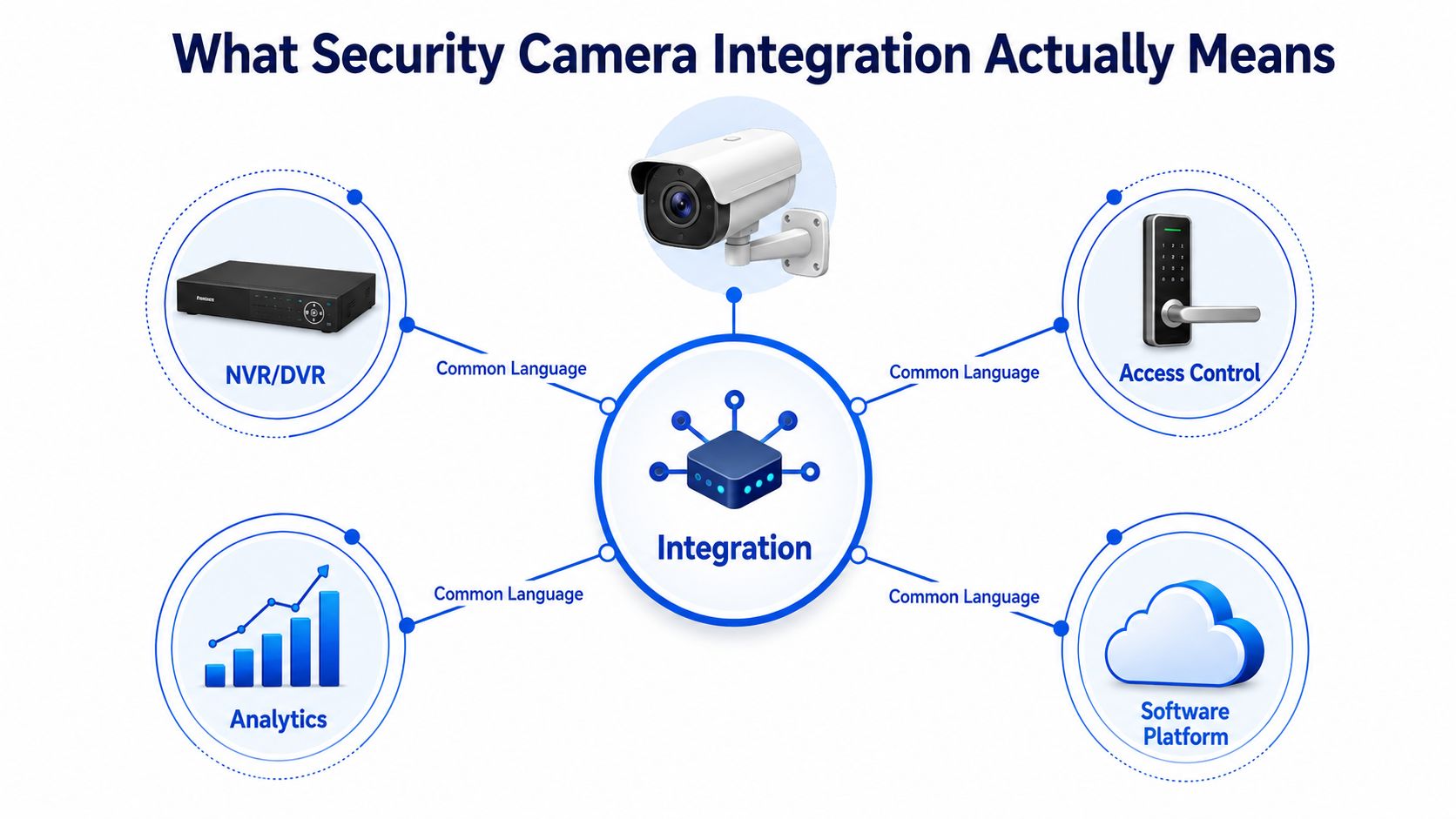
A practical integrated system usually does four things at once:
- Captures video from IP cameras in a usable format.
- Organizes events from doors, motion, or analytics.
- Stores footage where staff can find it quickly.
- Connects records to a software layer that tells you who did what and when.
The reason open standards matter is simple. Co-living operators rarely get a clean, all-at-once deployment. You inherit one house with legacy gear, another with newer cameras, and a third where the access control changed after move-in. Open standards make that mix survivable.
A good integration makes the camera feel boring in the best way. It should just appear where staff need it, when they need it, without a support ticket every time a door event happens.
The Technical Requirements Most Operators Underestimate
The hidden work in security camera integration is rarely the camera itself. It's the network, the power, the storage plan, and the event plumbing that keep the system dependable once real people start using it every day.
Network, power, and storage need to match the property
A camera network should usually live on a dedicated VLAN or at least a clearly segmented network. That keeps camera traffic from competing with resident Wi-Fi, and it gives you a cleaner place to troubleshoot when something goes wrong. If you've ever seen a property where streaming video and move-in day internet usage happen on the same overloaded network, you already know why separation matters.
Power-over-Ethernet, or PoE, is the other essential requirement for most operators. It keeps installation cleaner, reduces the number of wall warts and awkward outlets, and makes maintenance easier when you're supporting multiple houses. Market research also shows IP cameras held 47.80% of global revenue in 2025 because of their simple IT integration and PoE deployment, which reflects how central that wiring model has become in real systems rather than one-off installs (Mordor Intelligence CCTV market report).
Storage is where a lot of teams get vague. Footage policy, retention windows, and retrieval speed should all be decided before the first camera goes up. Otherwise, you end up with a system that technically records but can't support the kind of incident review your staff needs.
The interfaces your integrator should confirm
For operator use, there are three interfaces that matter most:
- RTSP URLs for live view and stream access.
- ONVIF support for discovery and device control.
- Webhooks or cloud APIs for pushing events into a property-management workflow.
Those are the links between cameras and the rest of the stack. If a vendor hides behind only a mobile app, you'll feel fine during installation and frustrated later when you need reliable event handling across multiple properties.
A disciplined deployment should include a device inventory with model numbers, firmware versions, and a compatibility matrix before rollout, because mismatched firmware and undocumented differences are a common reason integrations fail (compatibility guidance).
Designing Coverage for Shared Houses Without Blind Spots
Most camera advice assumes one house, one front door, and one obvious hallway. Co-living properties are messier. You're dealing with shared kitchens, stairwells, side entries, driveways, rear gates, and corridors where a single angle can leave the most important moment just out of frame.
Overview and identification are different jobs
The first mistake is asking one camera to do everything. An overview camera tells you what happened in a space. An identification camera helps you see who did it. In shared residences, those are separate goals, and trying to force one lens to cover both usually creates soft, wide footage that looks fine in a demo and fails during a real dispute.
The smarter pattern is layered coverage. One camera covers the approach or larger area, while another focuses on the entry point or the face-level moment you might need for identification. That layered approach also helps with the blind spots that appear around door frames, railings, and stair turns.
For entry-heavy layouts, adjacent cameras should cross-cover each other's blind cones. If one camera sees the front walk and another sees the porch, each should be able to catch the edge of the other's weak area. That's more useful than pointing both at the same general direction and hoping overlap solves the problem.
Translate overlap into rooms, not theory
A lot of consumer guidance talks about overlap, and the practical idea is sound. The challenge is making it usable in a building with multiple entrances and shared paths. The planning question shouldn't be “How many cameras can I mount?” It should be “Which camera sees the approach, which camera sees the face, and which one backs up the first two?”
The article on visibility angles for shared properties makes the same point, effective designs need deliberate cross-coverage and layered views, not just generic placement rules (installation angles guidance).
A good room-by-room plan usually starts with these decisions:
- Front and side entries: separate approach and identification views.
- Hallways: avoid dead-center placements that miss door edges and turns.
- Stairwells: prioritize the landing and the transition point, not the wall behind it.
- Driveways and parking pads: cover vehicle approach and pedestrian paths separately when possible.
- Shared kitchens and common rooms: focus on entry thresholds, not private-use zones.
If a camera can't answer who came in, where they came from, and what happened right after, it's probably in the wrong place.
Workflows That Pay Back the Integration Investment
The value shows up in the day-to-day. When cameras are tied into the rest of the operation, staff stop hunting for evidence and start resolving issues with less friction. That saves time, but it also reduces the mess that builds up when complaints stay open too long.
Incident response gets much faster
A resident reports a noise issue in a hallway. Staff pull the corridor clip, match it to the door access timestamp, and see exactly who entered, when they entered, and whether the noise lines up with the event. What used to take a long evening of guesswork becomes a short review and a clean follow-up.
That kind of incident handling gets even easier when you pair video review with structured documentation. If your team wants a cleaner record of what happened, this guide to photo documentation software is worth keeping nearby, because camera clips and photo evidence often solve the same operational headache from different angles.
The same workflow matters when a unit turns over and the last night's activity needs a quick check. The camera isn't replacing judgment, it's shortening the path to the right judgment.
Smart-lock access can be tied to footage
The other valuable workflow is access correlation. When a member uses a mobile key, the system can bookmark the nearest camera event and tag it to the member record. That creates a cleaner audit trail without making staff manually line up the time, the door, and the video.
The practical payoff is not glamorous, but it's real. Faster verification means fewer back-and-forth messages, less time spent on disputes, and less chance that a small concern grows into a bigger member-relations issue across the portfolio. In operations terms, that's an NOI problem, not just a security one.
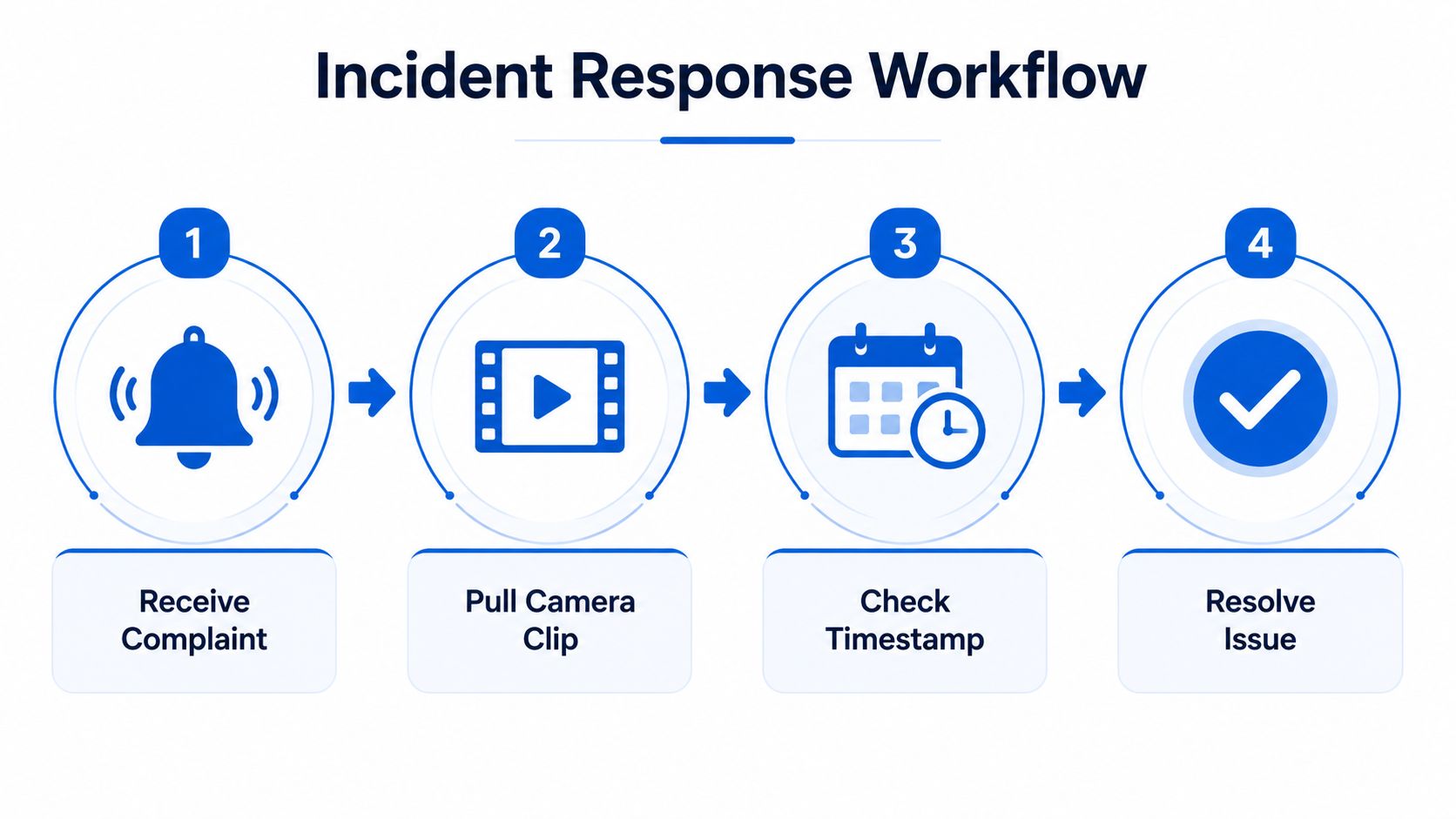
If your system can't move from complaint to clip to timestamp to resolution without manual detective work, the integration layer still needs work.
Privacy, Consent, and Compliance for Shared Residences
Cameras in shared homes need guardrails. The goal is to protect the property and its residents without creating a feeling that every common area is under suspicion. That balance starts with where the cameras point and who can see the footage.
The basics operators should treat as non-negotiable
Do not place cameras where people reasonably expect privacy, especially bathrooms and sleeping areas. In shared residences, that boundary is the line between legitimate monitoring and a trust problem you'll never fully repair. Even in common areas, keep the field of view targeted to entry points, circulation paths, and shared assets rather than private routines.
A visible camera policy helps a lot. Members should know where cameras are located, what they're for, who can access footage, and how long recordings are kept. If staff access is too broad, the risk isn't theoretical, it becomes a personnel issue.
Retention should be defined in policy before deployment, not negotiated after a dispute. The right length depends on your operational needs and legal environment, which vary by state and locality, so the policy should be written with counsel or a compliance lead who knows the market you operate in.
Access control protects trust as much as security
The other half of compliance is internal access. Footage shouldn't be open to everyone on the team, and it definitely shouldn't live in a system where no one knows who viewed or exported it. Role-based access, audit logs, and a documented export process reduce misuse and make your system easier to defend if a resident asks hard questions.
There's also a legal reason to be disciplined about this. A U.S. Urban Institute study found intersections with surveillance cameras had 15% more crimes overall, 40% more violent crimes and 62% more group B offenses than matched intersections without cameras, while some PTZ-camera intersections had stronger clearance outcomes (Urban Institute study). That doesn't mean cameras are useless, but it does mean operators should never treat them as a substitute for policy, access control, or good site design.
The best privacy policy is the one your staff can actually follow on a busy Friday night.
Choosing a Vendor and the Hardware That Actually Fits
Once the coverage plan and compliance rules are clear, vendor selection gets easier. The right choice is less about brand prestige and more about whether the system can survive real operations across multiple houses, different staff members, and uneven property conditions.
What to compare before you buy
Start with ONVIF profile conformance. An independent integration guide describes ONVIF profile conformance as the only guaranteed method for compatibility between access control and CCTV systems, which is exactly the kind of constraint an operator should care about when mixing brands or expanding later (integration considerations).
Then check whether the cameras support RTSP, whether the vendor publishes usable API documentation, and whether the storage model matches how you run the business. Some operators are best served by a local NVR, some by cloud-managed platforms, and some by a hybrid setup that keeps recordings local while still exposing events to software.
Here's a practical comparison.
| Approach | Open Standards | Storage Model | PMS Fit | Best Fit |
|---|---|---|---|---|
| Prosumer system with local NVR | Usually solid, but varies by vendor | On-premises | Moderate if APIs are clean | Smaller portfolios that want local control |
| Vendor-managed cloud platform | Often mixed, sometimes limited | Cloud | Good if the event layer is mature | Operators who want less infrastructure to manage |
| DIY kit with ONVIF cameras and third-party VMS | Strong if components are chosen carefully | Hybrid or on-premises | Strong when the VMS exposes event hooks | Multi-property operators who need flexibility |
If you want a deeper framework for coordinating vendors across houses, the planning checklist in vendor coordination pairs well with camera selection because the same logic applies to locks, networking, and software handoffs.
Buy for the next three years, not the next weekend
Warranty, firmware support, and roadmap matter more than fancy packaging. A system that's easy to install but hard to maintain usually becomes the thing staff avoid. For co-living operators managing 10 to 500 doors, the best fit is the vendor that lets you standardize without boxing yourself into one fragile workflow.
Connecting Cameras to Your Property Management Platform
The last step is making the video system useful inside daily operations. Before go-live, confirm ONVIF and RTSP support, map access events to member records, define who can view and export footage, and run a peak-hour test before the first real incident forces the issue.
If you're migrating from legacy DVRs, keep the cutover staged. Inventory firmware, run parallel recording if needed, and keep a rollback plan documented so the old system can be restored if the new one exposes an unexpected gap. A simple maintenance rhythm helps too, quarterly lens checks, annual storage audits, and a review of access permissions after staffing changes.
The final compliance piece shouldn't get skipped either. If your camera records are tied to member identity or incident history, read the practical guidance in background check integration so your documentation and access policies stay aligned with the rest of the resident record.
PadPulse is being built for operators who want room-by-room control, cleaner workflows, and less time spent chasing disconnected tools. If you're organizing cameras, access events, and property records across multiple houses, visit PadPulse to see how an integrated operations platform can support that stack and help you run tighter, faster, and with fewer blind spots.