Background Check Integration a Guide for PMs & Product Teams
June 22, 2026
You're probably dealing with one of two situations right now. Either your team still runs checks in a separate portal and pastes status updates back into your leasing or hiring workflow, or you're evaluating a vendor that promises a fast API connection and not much else.
That's where most background check integration projects go sideways. The technical connection usually isn't the hardest part. The primary work is deciding what should happen, for whom, under which rules, and how your team will act on the result without creating compliance risk or a messy applicant experience.
In property operations, that matters more than most software demos admit. A co-living applicant, an on-site manager, and a maintenance technician may all need screening, but they shouldn't always go through the same package, the same decision rules, or the same review path. If you standardize the plumbing without standardizing the policy, you just automate confusion.
Laying the Groundwork for Your Integration
Most failed integrations start too late. The team books demos first, sees a slick dashboard, and only then realizes nobody has agreed on who gets screened, what gets checked, who reviews exceptions, or what data should flow back into the source system.
A solid background check integration starts with an internal requirements document. Keep it plain English. If legal, operations, HR, leasing, and product can't all read it and agree with it, it's not ready.
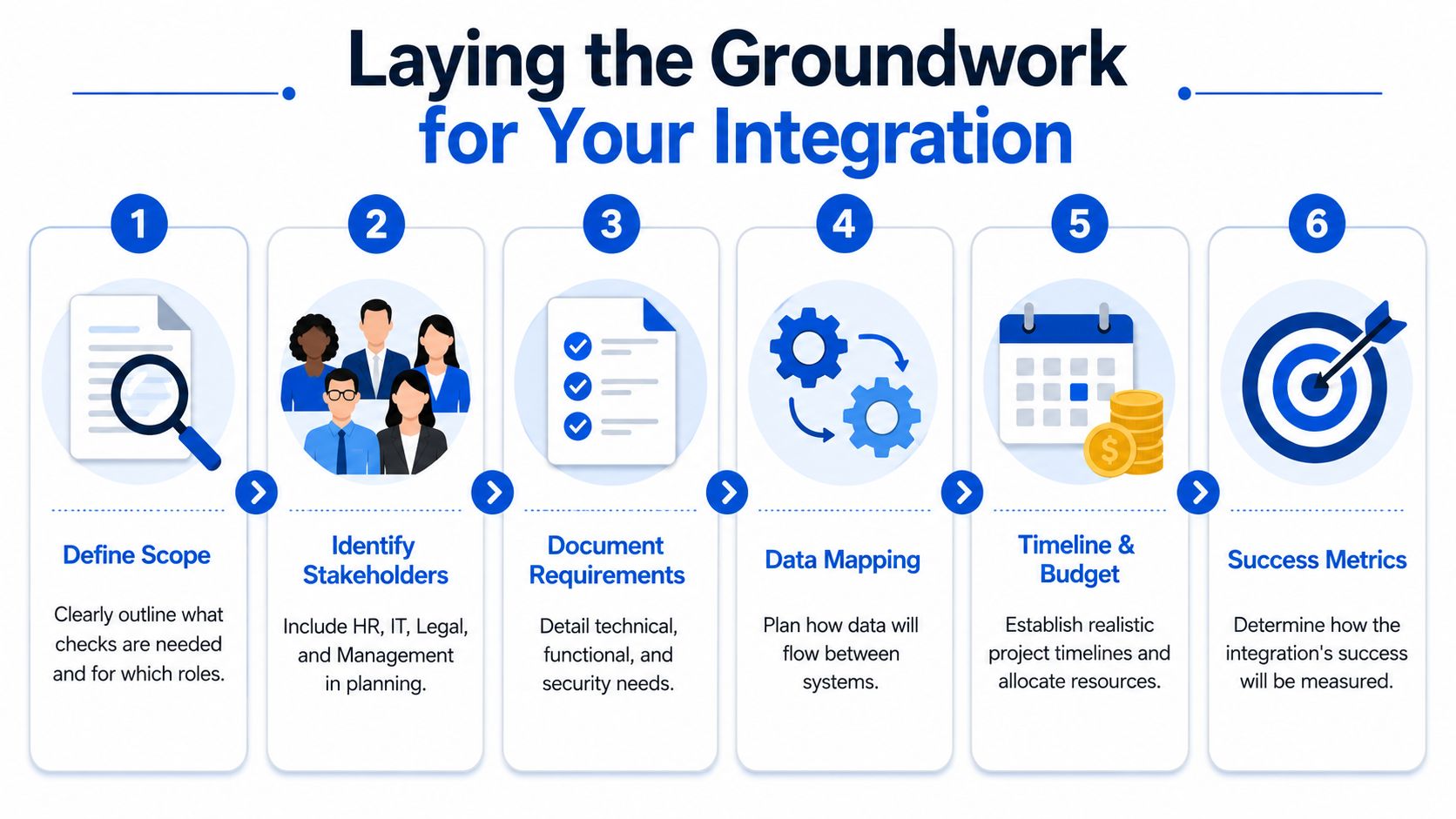
Define scope before you define software
Start with the screening use case, not the vendor catalog.
For example, a room-by-room housing operator may have at least three distinct flows:
- Resident screening for occupancy decisions
- Staff screening for operational roles
- Vendor or contractor screening for people entering occupied properties
Those flows often need different packages, disclosures, review steps, and retention practices. If your team treats them as one workflow, your integration gets simpler on paper and worse in practice.
Ask questions like these internally:
- Which roles or applicant types need screening: Residents, employees, contractors, or all three?
- What triggers the check: Application submitted, conditional approval, offer stage, or lease draft?
- Who owns review: Leasing, HR, a centralized compliance lead, or site managers?
- What counts as a final status: Clear, review required, incomplete, withdrawn, expired, or cancelled?
- What data should write back: Status only, PDF report link, package used, completion timestamp, or reviewer notes?
Map the workflow people actually use
The happy path is easy. Applicant applies. Check runs. Result returns. Team acts.
The actual workflow is where the integration succeeds or fails.
Practical rule: If your team can't draw the exception paths on a whiteboard, the API spec won't save you.
Map the moments where things usually break:
- Applicant enters the wrong legal name
- Invitation email lands but isn't completed
- Status stalls with no visible reason
- Report returns with a discrepancy
- Team member marks someone denied before required review steps happen
- Site staff call support because they can't tell whether the report is pending or complete
Once you list those moments, define the system behavior for each one. That work is boring. It's also what keeps support queues manageable after launch.
Separate must-haves from nice-to-haves
Teams waste time when every preference becomes a launch blocker. I've had better outcomes using three buckets.
| Priority | What belongs here | Why it matters |
|---|---|---|
| Must have | Consent capture, status sync, review permissions, auditability | These are hard to bolt on later |
| Should have | Package routing by role, reminder logic, mobile-friendly candidate flow | These improve completion and internal efficiency |
| Nice to have | Custom branding, dashboard polish, extra automation layers | Useful, but not launch-critical |
A modern setup should move screening into the system your team already uses, rather than forcing staff to re-enter candidate data in another portal. Industry guidance points to centralized status tracking as a core benefit, and notes that some well-built integrations can go live in a day or two when requirements are clear and the workflow is straightforward, as described in Yardstik's overview of background check integrations.
Pull the right people into the room early
Don't let this become an IT-only or ops-only project.
Get input from:
- Legal or compliance: Consent language, adverse action workflow, fair-chance constraints
- Operations: What managers need to see, and when
- Support or success teams: Common applicant questions
- Finance: Pricing model, per-check controls, cancellation handling
- Product or engineering: Data mapping, error handling, permissions, webhook design
A background check integration is one of those systems where a one-hour planning meeting can save months of cleanup.
Choosing the Right Background Check Partner
The market is crowded, and that's exactly why buyers need a scoring model. One market report projects the global background check services market at USD 8.16 billion in 2025 and USD 24.24 billion by 2035 with 11.2% CAGR, while also estimating the U.S. market at $5.1 billion in 2026 and 1,018 businesses operating in the sector in 2025, according to Business Research Insights on the background check services market. With that many options, “looks enterprise” isn't a selection method.
The vendors that win demos aren't always the vendors that survive implementation. I'd rather work with a provider that has a clear API, realistic support, and strong workflow controls than one with a polished sales deck and vague answers about exceptions.
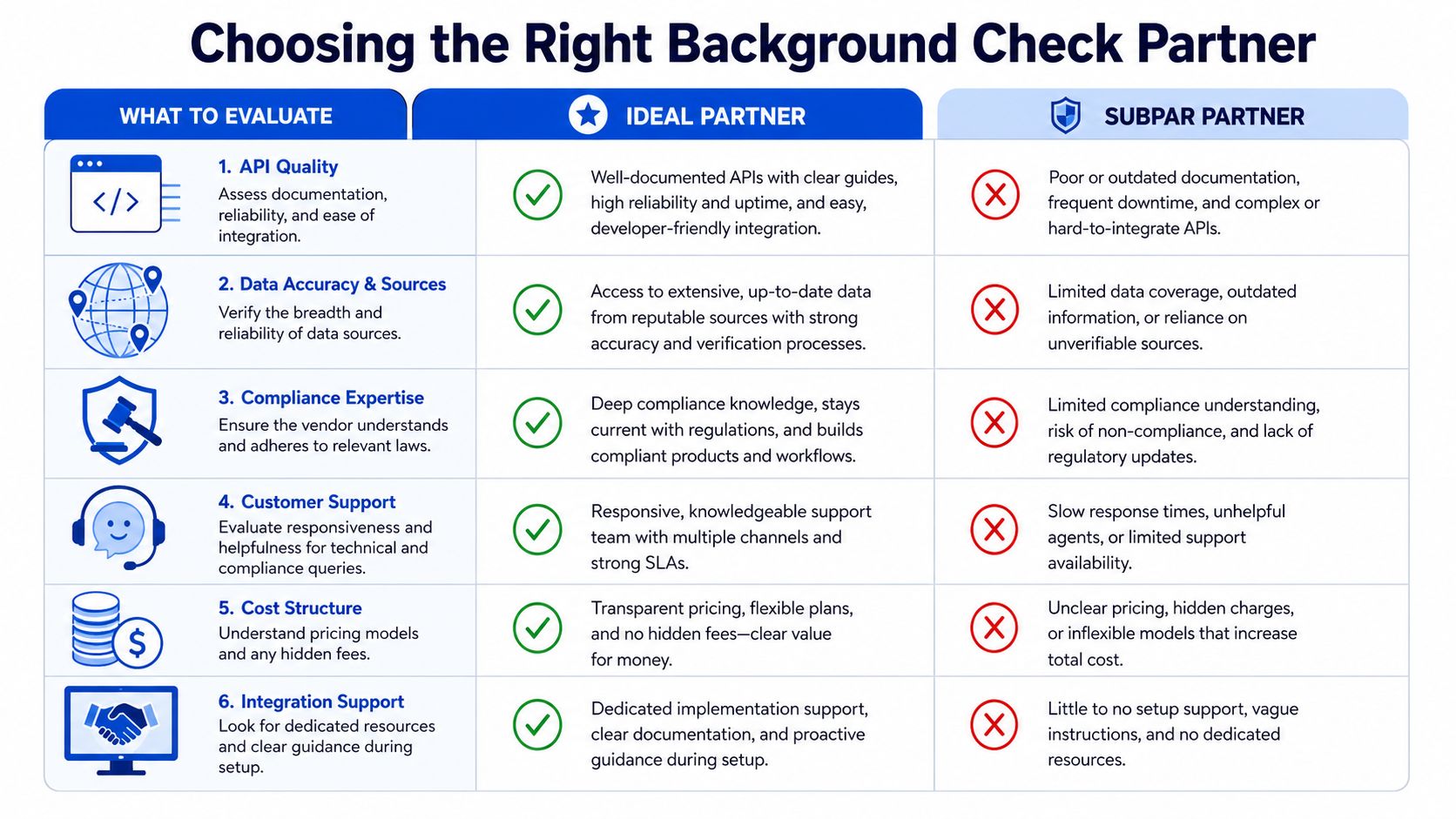
What to compare side by side
Use a shortlist and score every vendor against the same criteria.
| Evaluation area | Strong partner | Weak partner |
|---|---|---|
| API quality | Clear docs, predictable status model, sandbox access | Thin docs, unclear payloads, hard-to-test flow |
| Compliance support | Configurable notices, review steps, role-based logic | “You handle that outside the system” |
| Candidate UX | Mobile-friendly, clear invitations, simple identity steps | Confusing handoffs, too many clicks, unclear status |
| Support model | Named implementation help, responsive technical answers | Sales-led handoff, generic ticket queue |
| Packaging flexibility | Different workflows by applicant type or jurisdiction | One standard package for everyone |
| Pricing clarity | Clear billing for checks, retries, cancellations | Hidden costs and unclear service terms |
A vendor should also understand your operating model. Property workflows aren't identical to enterprise recruiting workflows. If the provider can only talk about “candidates” in a generic ATS context, ask how they handle lease applicants, conditional approvals, household variations, or operator-specific review queues.
Questions that expose real fit
You don't need a hundred questions. You need the few that reveal whether the platform will hold up under actual use.
Ask these in live evaluation:
- What can be triggered automatically, and at what stage
- Which statuses sync back to our platform
- How do you handle cancellations, expired invites, and re-runs
- Can different properties or roles use different packages
- What does the reviewer interface look like for flagged results
- Who helps with implementation when the edge cases show up
The right partner doesn't just expose an API. They make the operational state of each screening request easy for your team to understand.
If you're also comparing resident screening alongside credit workflows, it helps to see how screening decisions fit into a broader rental process. This breakdown of TransUnion credit checks for landlords is useful context when you're deciding whether one provider should own multiple screening steps or just the background check layer.
A short product demo can tell you whether a feature exists. It usually won't tell you whether your leasing coordinator can resolve an exception quickly on a Monday morning.
To get a feel for what vendors emphasize in setup and workflow conversations, this overview is a helpful watch:
What usually works and what doesn't
What works:
- Simple trigger logic: One clear event starts the process
- Visible statuses: Team members can see whether the check is pending, complete, or needs review
- Limited package sprawl: Enough flexibility for different use cases, but not endless custom variants
- Shared ownership: Product, ops, and compliance all stay involved through launch
What doesn't:
- Vendor selection by logo count alone
- Assuming “ATS integration” means good resident workflow
- Pushing policy questions until after contract signature
- Treating support as a secondary feature
Designing the Integration and UX Flow
At 8:15 on a Monday, a leasing agent opens an applicant record and sees three conflicting signals. The application says "screening sent," the vendor portal says "awaiting applicant info," and the prospect is on the phone insisting they already completed everything on Saturday. That is the moment the quality of your integration shows up.
A workable background check flow is less about the API diagram and more about whether staff can act with confidence while the applicant understands what is happening. In housing, that matters for speed, but it also matters for consistency. Confusing states lead to ad hoc follow-up, duplicate invites, and uneven treatment across properties.
Keep one operational source of truth
The screening provider should produce the report. Your platform should own the workflow state your team uses day to day.
If staff have to compare your application record against a vendor dashboard to answer a basic question, the integration is incomplete. The applicant profile should show the current stage in plain language and make the next action obvious.
That usually means exposing a small set of statuses that map cleanly to operations:
- Not started
- Applicant action required
- Submitted to vendor
- In vendor review
- Complete
- Review required
- Cancelled or expired
This sounds straightforward until you support multiple properties, local policy differences, and more than one screening package. I have seen teams create fifteen vendor-specific substatuses because the API offered them. That gives engineering fidelity, but it makes frontline work slower and increases the chance that someone advances a file based on a status they do not understand.
Use APIs to initiate work and webhooks to keep state current
The clean pattern is simple. Your system creates the order. The vendor posts status changes back to you. Your application updates the record, triggers notifications, and routes exceptions.
Polling can fill gaps, but it should not be the primary experience. If coordinators are refreshing screens, checking email, and logging into a second portal just to learn whether an applicant completed identity steps, you have shifted operational effort rather than reducing it.
A flow that holds up in production usually looks like this:
- Staff moves the applicant into the screening stage.
- The system selects the right package based on property, role, and jurisdiction rules.
- The applicant receives an invitation from a recognizable sender with clear instructions.
- Vendor updates return through webhooks and update the applicant record automatically.
- Staff see a readable status and only the actions they are allowed to take.
- Files that need human review go to a queue with ownership, notes, and timestamps.
The third step is where many teams cut corners. Package selection is not only a product configuration issue. It can become a compliance issue if staff can override screening logic freely and apply different packages to similar applicants without a documented reason.
Design for the applicant's actual behavior
Applicants complete these flows on phones, between errands, with low patience for ambiguous requests. A technically correct integration can still fail if the invite looks suspicious, asks for repeated information, or leaves the person guessing whether they are done.
The basics still matter:
- Clear invitation copy: what this is, why they received it, and what they need to do next
- Recognizable branding and sender name: enough context that the message does not look like phishing
- Mobile-friendly completion: especially for identity inputs and consent-related steps
- Plain-language statuses: words an applicant and site team will interpret the same way
- Visible help paths: support contact, FAQ, or property contact when the flow stalls
There is also a less obvious issue. Cross-jurisdiction applicants often have edge cases that create friction, such as prior addresses in multiple states, name variations, or identity mismatches that trigger manual review. If your UX treats every delay as a generic "processing" state, staff will start making side-channel decisions in email or chat. That breaks the audit trail and creates inconsistent handling.
Teams that already automate document workflows across leasing operations usually handle this better because they build around handoffs, exception paths, and traceable state changes instead of a one-time API handoff.
Show results in a way staff can use safely
Do not dump the raw report into the record and assume the job is finished. Leasing teams need a summary they can interpret quickly, while sensitive details stay restricted to the right roles.
A practical review view usually includes:
- Current disposition: complete, review required, cancelled, expired
- Package ordered: visible enough to support ops and audits
- Submitted and completed timestamps: useful for follow-up and queue management
- Assigned reviewer or queue owner: no ambiguity about who acts next
- Controlled access to the full report: available only to users who need it
Product decisions affect legal exposure. If every site-level user can see raw report details, access control is too loose. If nobody can tell why a file is stuck or who owns it, staff will work around the system. Good integration design sits in the middle. It gives operations enough context to move work forward and limits access to sensitive content that should not circulate casually.
The best background check UX feels predictable to both sides. Staff know what stage a file is in and what they can do next. Applicants know who is asking, what is required, and whether they are waiting on themselves or on the vendor. That predictability reduces support load and, in regulated housing workflows, lowers the odds of inconsistent treatment across properties.
Navigating Compliance and Gaining Consent
The fastest way to turn a useful integration into a liability is to treat compliance as a document problem instead of a product problem. It isn't enough to have a disclosure template in a shared drive. The workflow itself has to enforce the right sequence, capture consent cleanly, and preserve an audit trail your team can retrieve.
This is especially important in housing and co-living operations, where staff roles differ, local rules vary, and decision-making can easily become inconsistent across properties.
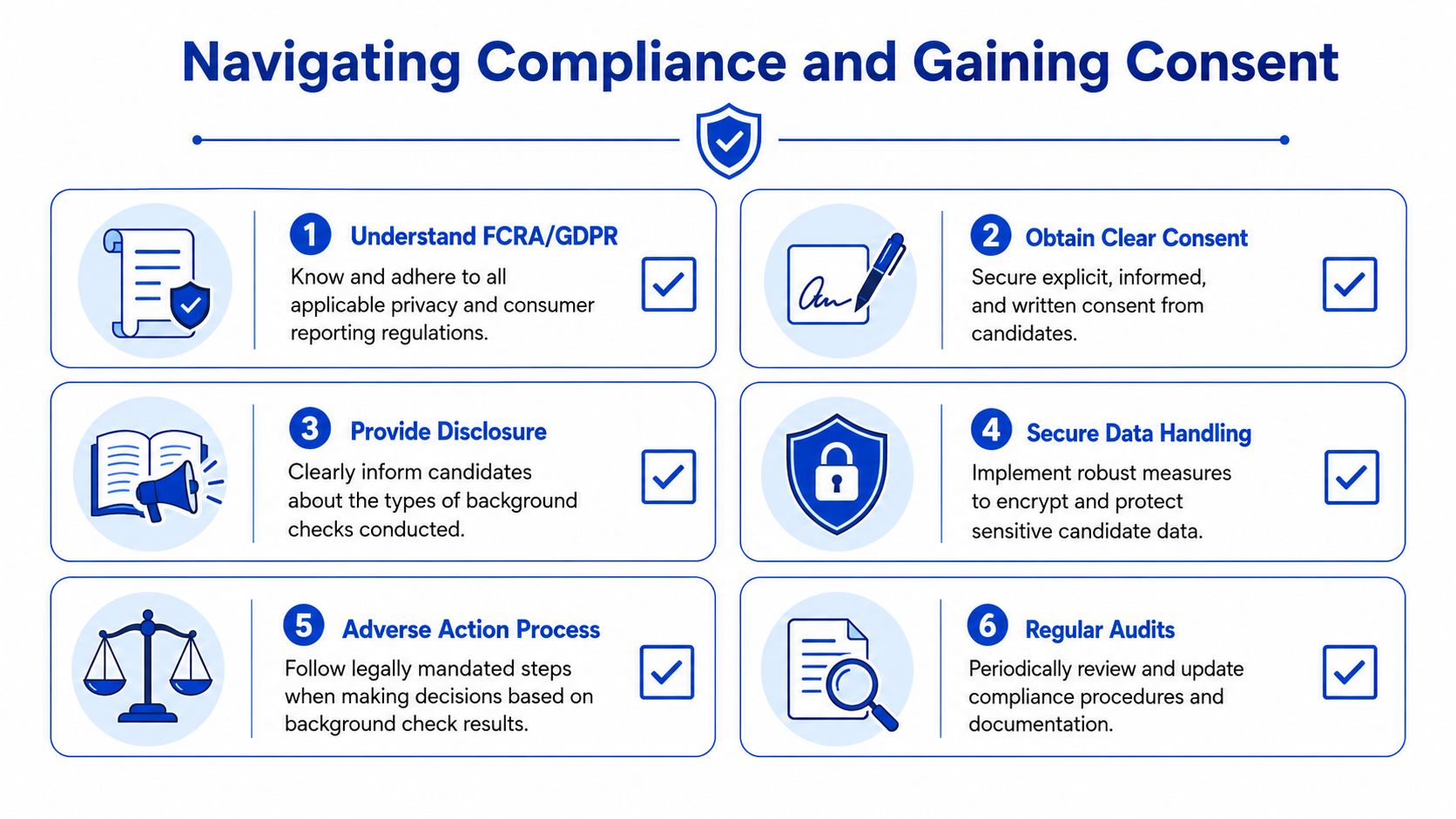
Consent has to be built into the flow
A compliant process should make it hard for staff to skip required steps.
That usually means the system should:
- Present disclosure before the check is initiated
- Capture consent in a traceable way
- Store the time, version, and applicant identity tied to consent
- Block screening initiation if consent isn't complete
If those steps happen outside the main workflow, people improvise. They send a PDF manually. They rely on email confirmation. They assume a site manager handled it. That creates gaps you only notice when there's a dispute.
Operational reality: If consent evidence lives in someone's inbox, you don't have a reliable process.
Fair-chance logic belongs in the product design
This is the issue most technical guides gloss over. Many teams focus on connecting the API, but the more important question is how the integration handles screening decisions fairly and lawfully.
Guidance on background check integration increasingly stresses that employers should connect screening to job relevance, avoid blanket exclusions, and think carefully about how automated rules are configured. That matters because the EEOC has continued enforcing Title VII claims tied to criminal-history screening, as discussed in MokaHR's article on background check integration and fair-chance hiring.
For property and co-living operators, the practical implication is simple. Don't create a single “fail” rule and apply it to every person and every context.
Instead, build review paths such as:
- Different logic by role: A maintenance worker with unsupervised property access may not be reviewed the same way as an office-based coordinator
- Different logic by jurisdiction: Some locations limit when or how certain records can be considered
- Manual review checkpoints: Flagged reports should go to trained reviewers, not auto-deny logic
- Notice workflows: If an adverse decision process is required, the platform should support it in order and with records
Auditability matters as much as policy
A policy that isn't reflected in system behavior won't hold up well under pressure.
Your team should be able to answer:
| Compliance question | What the system should show |
|---|---|
| Did the applicant consent? | Timestamp, version, user record |
| Which package ran? | Package ID or name tied to the request |
| Who reviewed the result? | Named user and review action |
| Was a decision automated? | Rule path or manual decision log |
| Were notices sent in sequence? | Event history with dates and status |
If you manage applicant or resident data across digital workflows, your privacy standards need to match your automation standards. A clear privacy approach for resident data is part of making screening defensible, not just efficient.
Compliance-first teams usually move slower in the first few weeks. They move much faster later because they're not rebuilding the workflow after launch.
Testing and Monitoring Your Live System
Launch day isn't the finish line. It's when your assumptions meet real applicants, real staff behavior, and real vendor response patterns.
The strongest teams test two things separately. First, whether the integration functions technically. Second, whether the workflow behaves well under stress. Those are not the same test.
Test failure paths before you go live
Most implementation teams validate the happy path once and call it good. That leaves obvious gaps.
Run scenarios like these before launch:
- Incorrect applicant data: Misspelled name, wrong birthdate format, incomplete address history
- Vendor outage or timeout: Does the request retry, fail visibly, or disappear?
- Duplicate order risk: What happens if staff clicks initiate twice?
- Abandoned applicant flow: Does the team see action needed, or does the file sit idle?
- Flagged result: Is the case routed correctly, or does it look the same as a completed clear result?
- Permission issue: Can the wrong staff user see too much report detail?
You want your support team to see these problems in staging, not from a property manager juggling move-ins.
Track the KPIs that reveal bottlenecks
Once live, focus on a few operational metrics your team can act on. A vendor guide recommends tracking average time from submission to report completion and the percentage of checks completed within a target such as 48 hours, and notes that criminal and education checks should ideally come back within two days, as outlined in Accurate's guidance on measuring background screening ROI.
Those metrics matter because they separate three different issues:
- Slow vendor turnaround
- Applicant delay in completing required steps
- Internal delay in reviewing completed reports
A simple dashboard can go a long way if it shows:
| Metric | Why it matters |
|---|---|
| Average completion time | Shows whether the workflow is getting faster or slower |
| Share completed within SLA | Reveals operational reliability |
| Manual review volume | Helps you size reviewer workload |
| Pending applicant actions | Highlights drop-off or invitation confusion |
| Error and retry volume | Surfaces technical instability |
Don't measure success by “integration launched.” Measure whether staff spend less time chasing status and whether applicants move through the workflow predictably.
Review the queue, not just the dashboard
A lot of monitoring advice stops at KPIs. In practice, the reviewer queue tells you just as much.
Look at it weekly:
- Are too many files sitting in review required?
- Are certain properties or teams using the wrong package?
- Are applicants repeatedly asking the same support question?
- Are stalled cases caused by the vendor, the applicant, or your own workflow copy?
That review loop is where the integration becomes operationally mature instead of just technically live.
Common Pitfalls and Advanced Topics
Many organizations assume that once they've connected the systems, the hard part is over. It usually isn't. The next set of problems comes from edge cases, scaling pressure, and the legal complexity of operating across multiple markets.

A common mistake is treating every non-clear result as a vendor issue. Sometimes the problem is your own process. Screening metrics guidance recommends tracking the percentage of all results with discrepancies, along with rates by screening component, and also watching expired or cancelled rates because those often point to poor applicant instructions or weak alerts rather than vendor performance, as explained in GoodHire's screening metrics guide.
That matters because discrepancy handling is usually where support load spikes. If your team doesn't have a clear path for “review required,” they improvise. One manager chases documents by email. Another asks the vendor to re-run the check. A third leaves the file untouched.
A few pitfalls show up again and again:
- Status language that hides the actual blocker: “Pending” is too vague for staff or applicants.
- No owner for flagged reports: If everyone can review, nobody does.
- Vendor timing ignored in the UX: Applicants assume something is broken when the process is still in progress.
- Support teams left out of rollout: They need scripts, escalation paths, and visibility.
The advanced issue is jurisdictional complexity. For scaling operators, a basic integration often isn't enough. The more durable design is one that can route checks by jurisdiction, suppress disallowed data fields, preserve an audit trail, and handle varying consent rules without manual workarounds, as noted in Lever's documentation on universal background screening and jurisdictional workflow needs.
If you operate in multiple states, or across the U.S. and abroad, you'll eventually need a rules engine mindset. Not every property should run the same package. Not every result should surface the same way. Not every reviewer should see the same fields.
That's the difference between an integration that works for one site and one that scales.
PadPulse is building an all-in-one platform for PadSplit hosts and co-living operators who need cleaner operations across leasing, communication, and property workflows. If you want updates on the Winter 2026 launch, early access opportunities, and product progress, join the PadPulse interest list.