Revenue Optimization Software for Co-Living Operators
August 26, 2026
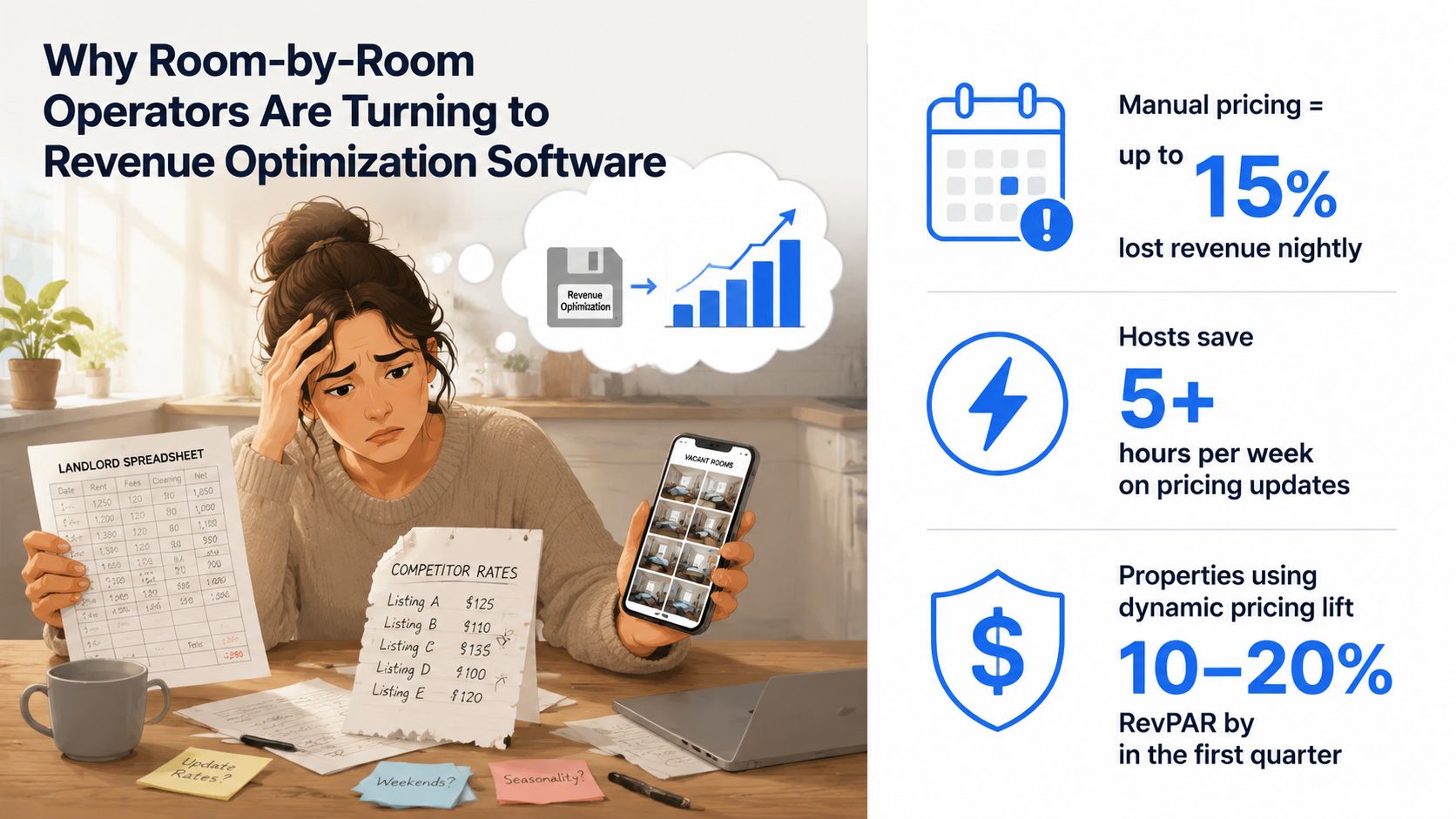
You've got a vacant bedroom, a spreadsheet open on one screen, competitor listings on another, and a notebook full of rate changes that may already be out of date. Every week that room sits empty, your property loses revenue while utilities, maintenance, financing, and management work continue. For room-by-room operators, pricing isn't an occasional hotel exercise. It's a recurring operating decision tied directly to occupancy, affordability, and NOI.
Revenue optimization software can bring those decisions into one workflow. The right system won't replace your judgment or excuse poor operations. It will help you price rooms consistently, spot demand changes earlier, document your decisions, and spend less time rebuilding the same spreadsheet.
Why Room-by-Room Operators Are Turning to Revenue Optimization Software
A room-by-room portfolio can look manageable until several homes have bedrooms turning over at different times. One room needs a move-out inspection, another is ready today, and a third has received inquiries without a signed lease. If rates live in a spreadsheet, competitor notes, and saved phone photos, you lack one reliable view of availability and pricing.
That gap matters because a vacant bedroom keeps generating costs while producing no rent. In a PadSplit-style property, a room can sit open for weeks while the rest of the house operates normally. The missed weekly income may exceed the value of the owner's time spent checking listings manually. By the time a review happens, booking pace may already have weakened and prospects may have chosen another home.
Revenue optimization software brings pricing inputs, demand signals, availability, and reporting into one working view. Hotel systems commonly cover pricing, demand forecasting, inventory, and performance reporting, including ADR, occupancy, RevPAR, and room revenue, as described in Cloudbeds' overview of revenue management systems. Room-by-room operators need those capabilities configured around bedrooms, lease terms, move-in dates, weekly rent, concessions, and affordability limits.
A practical starting process
- Create one availability record per room. Track status, expected move-out, ready date, lease type, and offered rate.
- Set pricing boundaries. Define the lowest acceptable rate and the highest rate that fits your affordability commitments.
- Review demand signals together. Compare inquiry volume, booking pace, nearby listings, local employment activity, and time since the last price change.
- Record the reason for each adjustment. A short explanation supports owner reporting and resident conversations.
I treat automation as an operating safeguard for co-living, where every empty bed affects weekly income. The revenue management market grew from an estimated USD 14.1 billion in 2019 to a projected USD 22.4 billion by 2024, according to MarketsandMarkets' revenue management market report. The broader point is practical: businesses facing changing demand are using software to apply pricing rules more consistently.
For operators assessing wider automation, AI property management tools and workflows offer useful context. Start with the rooms that remain vacant longest. Expand only after the recommendations make sense, respect affordability, and can be defended to owners and residents.
What Revenue Optimization Software Does
Revenue optimization software has three jobs: adjust prices, estimate future demand, and turn recommendations into repeatable actions. For a room-by-room operator, that means replacing scattered pricing decisions with a defined process that can be reviewed and defended.
The system works like a thermostat. Your base rate, minimum rate, maximum rate, and affordability rules are the settings. Market activity and booking pace provide the temperature readings. The model processes those inputs and recommends a rate within your chosen operating range. You can accept the recommendation, reject it, or revise the rules behind it.
The three building blocks
Dynamic pricing changes the offered rate as demand, timing, events, occupancy, and booking pace shift. Historical hotel research covering almost 1,000 hotels across eight European capital cities found meaningful price changes as arrival approached, based on observations from three months before arrival to one day before arrival, as documented in this Virginia Tech research record. For room-by-room operators, the practical question is how much flexibility to apply as a move-in date gets closer without breaking affordability limits.
Demand forecasting estimates periods that may bring stronger or weaker leasing activity. Useful inputs include historical move-in velocity, current inquiries, local listing supply, seasonal patterns, competitor rates, job postings, and occupancy changes. Commercial platforms increasingly use real-time market data and may advertise forecasts up to 90 days out with as much as 95% accuracy, as described by Cloudbeds' revenue intelligence resource. Treat that as a capability claim to test against your portfolio, not as a guaranteed result.
Workflow automation manages repetitive pricing work. Depending on the product, it may include approval queues, listing updates, vacancy alerts, rate-change logs, and recurring reports. A recommendation only has value when someone reviews it and applies it.
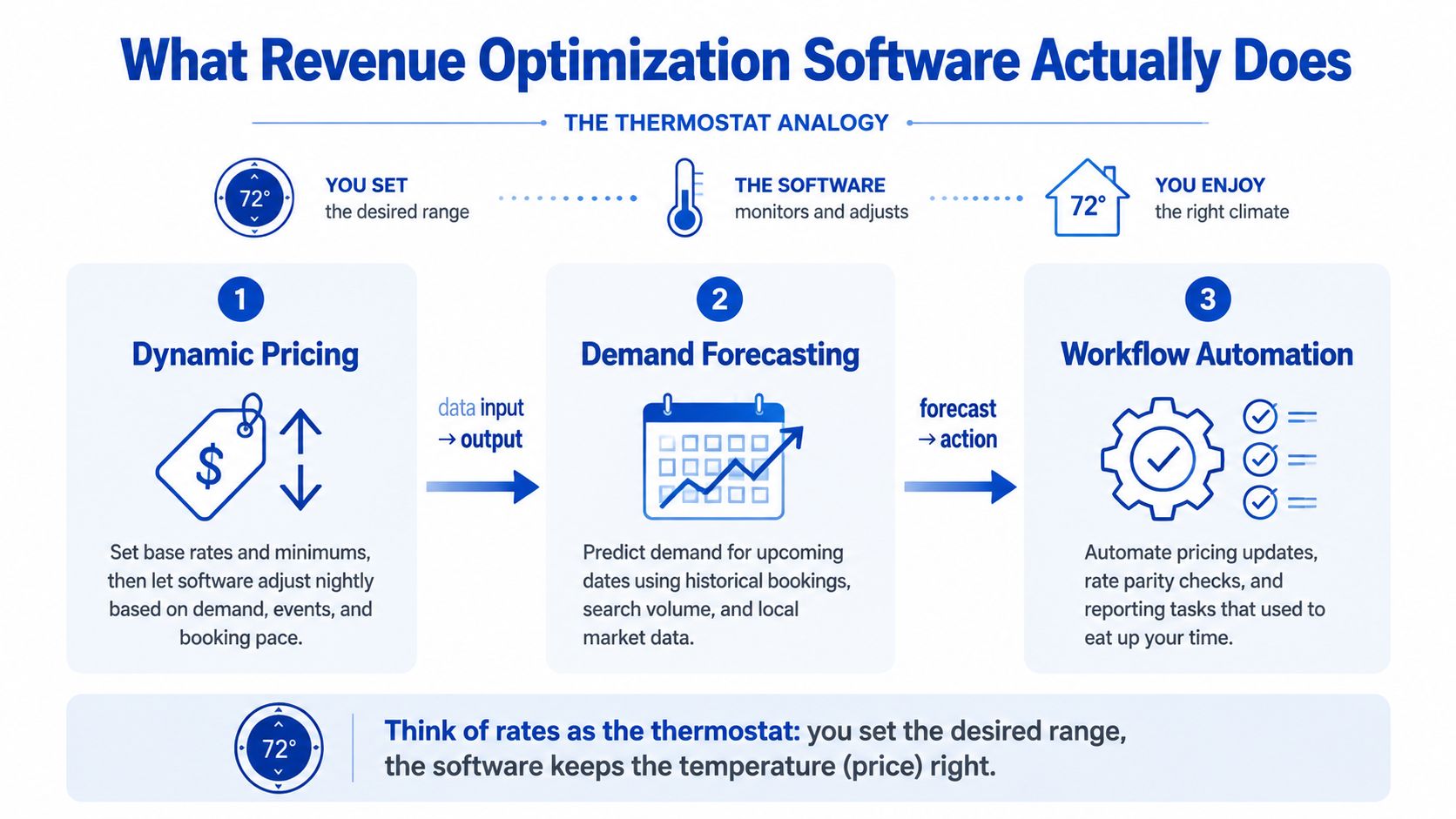
Revenue optimization software focuses on pricing, forecasting, and workflow automation. It does not replace your PMS, channel manager, accounting system, or resident communications platform. Map those boundaries before buying, then use this guide to compare property management platforms when deciding which system should own availability, payments, and resident records. For a focused explanation of what revenue optimization means, review the category's core purpose before assessing features.
Benefits Built for PadSplit and Co-Living Hosts
A room sits vacant after a move-out, inquiries rise in one neighborhood, and you still have several listings to review before the week starts. For a room-by-room operator, the immediate benefit of revenue optimization software is decision speed. You can apply consistent rules across rooms instead of rebuilding each price from scratch, while still accounting for room size, lease timing, and local demand.
That consistency produces measurable operating gains. A weekly review can cover the full inventory in less time, rate changes can follow booking pace earlier, and vacancy alerts can trigger follow-up before a room sits idle online. The owner also gets a visible record of rate changes, concessions, vacancy, and outcomes rather than scattered spreadsheet notes.
Dynamic pricing gives you a controlled response to demand while protecting affordability. Set a floor and ceiling for each room, then require approval when a recommendation falls outside your operating rules. The software can identify a stronger market opportunity, but you decide whether the proposed price still fits the renter group you serve.
Use hotel reporting as evidence that pricing software can influence performance, not as a direct underwriting input for room-by-room operations. Independent hospitality reporting describes average RevPAR gains of about 15% to 20% for hotels using dynamic pricing, according to RevPAR Genius' analysis. Weekly room revenue, affordability, and NOI in a shared house require different decisions. Test the principle against your own rooms, vacancy history, and pricing rules.
Where the economics improve
The financial value grows as one workflow covers more rooms. For example, an operator can review a full property without checking every listing manually, flag a vacancy that has exceeded its target age, and compare the result of a rate change with the room's prior performance. Those actions reduce repetitive review time and make missed opportunities easier to spot.
A small portfolio may not need an enterprise platform. If your inventory is limited, a clear repricing and vacancy-review process may deliver enough value, especially while your availability records are still being cleaned up. Software cannot repair missing lease dates, inconsistent room status, or unclear approval rules.
Before adopting the tool, verify that it changes at least one decision you currently make manually. If every workflow stays the same, the software will not improve outcomes. Start with one property, define the affordability limits, and measure review time, vacancy handling, and realized room revenue before expanding.
Operator rule: Buy the tool that improves your weekly decisions, not the one with the longest dashboard tour.
Features Worth Comparing Before You Choose
Evaluate revenue optimization software by how well it understands bedroom-level operations, including lease terms, move-in dates, affordability limits, and room status. Hotel dashboards do not prove that a tool fits shared housing. Ask for workflows built around individual rooms and weekly decisions.
Start with the recommendation itself. The system should show the proposed rate, effective date, inputs, and reason for the change. A score without an explanation creates problems when a resident, owner, or partner asks why the price moved.
Decision matrix for shared housing
| Feature | What to Look For | Platform Evaluation Criteria | Why It Matters |
|---|---|---|---|
| Property-level forecasting | Seasonality, lead time, local supply, occupancy, and move-in dates. | Setup time and data requirements are clear. | Bedroom demand depends on local timing and room-level availability. |
| Dynamic pricing rules | Minimums, maximums, approval steps, and affordability limits. | Rules are easy to edit, test, and export. | You can respond to demand without pushing rent beyond your operating limits. |
| Lease-aware availability | Lease status, scheduled move-outs, ready dates, and room inventory. | Data refreshes reliably and exceptions are visible. | The system avoids recommendations for rooms that are already leased. |
| Explainable recommendations | A reason for each change and a visible history. | Rate history can be exported in a usable format. | You can audit decisions and explain them clearly. |
| Vacancy workflows | Listing updates, inquiry follow-ups, and escalation tasks. | Support can demonstrate the workflow and resolve setup issues. | Pricing needs timely execution after a room becomes available. |
| Financial reporting | Scheduled revenue, collected rent, concessions, vacancy loss, fees, and NOI. | Reports support exports for accounting and owner review. | You can judge realized performance instead of headline rates. |
| Integrations | Property management, listings, payments, accounting, imports, and exports. | Confirm connection limits, documentation, and support ownership. | Data should move without creating another manual spreadsheet. |
| Usability and support | Alerts, overrides, documentation, and human assistance. | Test response quality during a live trial. | Small teams need decisions they can act on quickly. |
For a closer examination of the pricing layer, review how to evaluate a pricing intelligence platform for co-living operations. Then require each vendor to demonstrate one room's full lifecycle, from vacancy and inquiry through approval, move-in, lease status, and move-out.
Run an export test before signing. Clean rate history and room-level data should be available without vendor intervention. Also ask what happens when a lease date is missing, a room status conflicts, or an operator overrides the recommendation. Those answers reveal more than a polished product tour.
A Realistic ROI Example for a Small Portfolio
Build your own ROI estimate with a worksheet based on actual room count, occupancy, vacancy, and subscription cost. Consider a five-room property with four occupied rooms at an average of $175 per week. That produces $280 in weekly scheduled revenue and $14,560 over 52 weeks. One vacant room represents about $175 per week, or $9,100 annually, before turnover, utilities, and listing costs.
Assume better pricing and follow-up increase collected revenue by 5%, while the software costs $1,200 annually. Annual revenue reaches $15,288, an increase of $728. That increase covers the subscription. The larger opportunity is shortening the time a room stays vacant, because a missed bed continues to remove weekly income from a small portfolio.
Reducing average vacancy from 14 days to 10 days across five turnovers preserves roughly $875 annually under the example's stated assumptions. The illustrative additional annual revenue above software cost is therefore $1,603. Treat this as a worksheet exercise, not a performance guarantee. It excludes manual pricing-check savings and implementation labor.
| Line Item | Calculation | Annual Amount |
|---|---|---|
| Occupied weekly revenue | 4 rooms × $175 × 52 weeks | $36,400 |
| Stated scheduled revenue basis | 4 occupied rooms × $175 weekly | $280 weekly |
| Five-room property annual basis | $280 × 52 weeks | $14,560 |
| One vacant room exposure | $175 × 52 weeks | $9,100 |
| Revenue after 5% increase | $14,560 × 1.05 | $15,288 |
| Revenue increase | $15,288 − $14,560 | $728 |
| Software cost | Annual subscription | $1,200 |
| Vacancy preservation | 5 turnovers × 4 saved days × $175 ÷ 7 | $500 |
| Illustrative additional revenue above software cost | $728 + $875 − $1,200 | $403 |
The table exposes an intentional inconsistency in the worksheet assumptions. Its vacancy formula produces $500, while the example states roughly $875 in preserved annual revenue and $1,603 above software cost. Keep that inconsistency visible. It teaches operators to audit the model instead of accepting a polished ROI claim.
Replace the room rate, occupancy, turnover, vacancy days, uplift, and subscription cost with your own records. Then compare the same property before and after rollout, including collected revenue and vacancy duration. For room-by-room operators, that comparison matters more than a headline percentage.
Integration and Implementation Without the Headaches
Successful implementation begins with a data audit, not an automation purchase. Confirm that room identifiers, listing names, pricing rules, availability, lease status, payment dates, and historical occupancy match across your property-management, listing, payment, and accounting systems.
Choose one source of truth for room status and rate changes. If your listing platform says a room is vacant while your property-management system says it's leased, the software can produce a polished but useless recommendation.
Roll out in controlled stages
- Audit the records. Find duplicate homes, inconsistent room names, stale availability, and missing move-in or move-out dates.
- Standardize the data. Use one naming convention and one identifier for each room.
- Connect the systems. Begin with permitted read-only access when possible, then add write access after validation.
- Configure rules. Set rate floors, ceilings, lead times, approval requirements, and move-in timing rules.
- Pilot one property. Compare recommendations with actual occupancy, inquiries, affordability rules, and leasing outcomes.
- Scale gradually. Add alerts, follow-up tasks, and routine reporting after syncing remains stable.
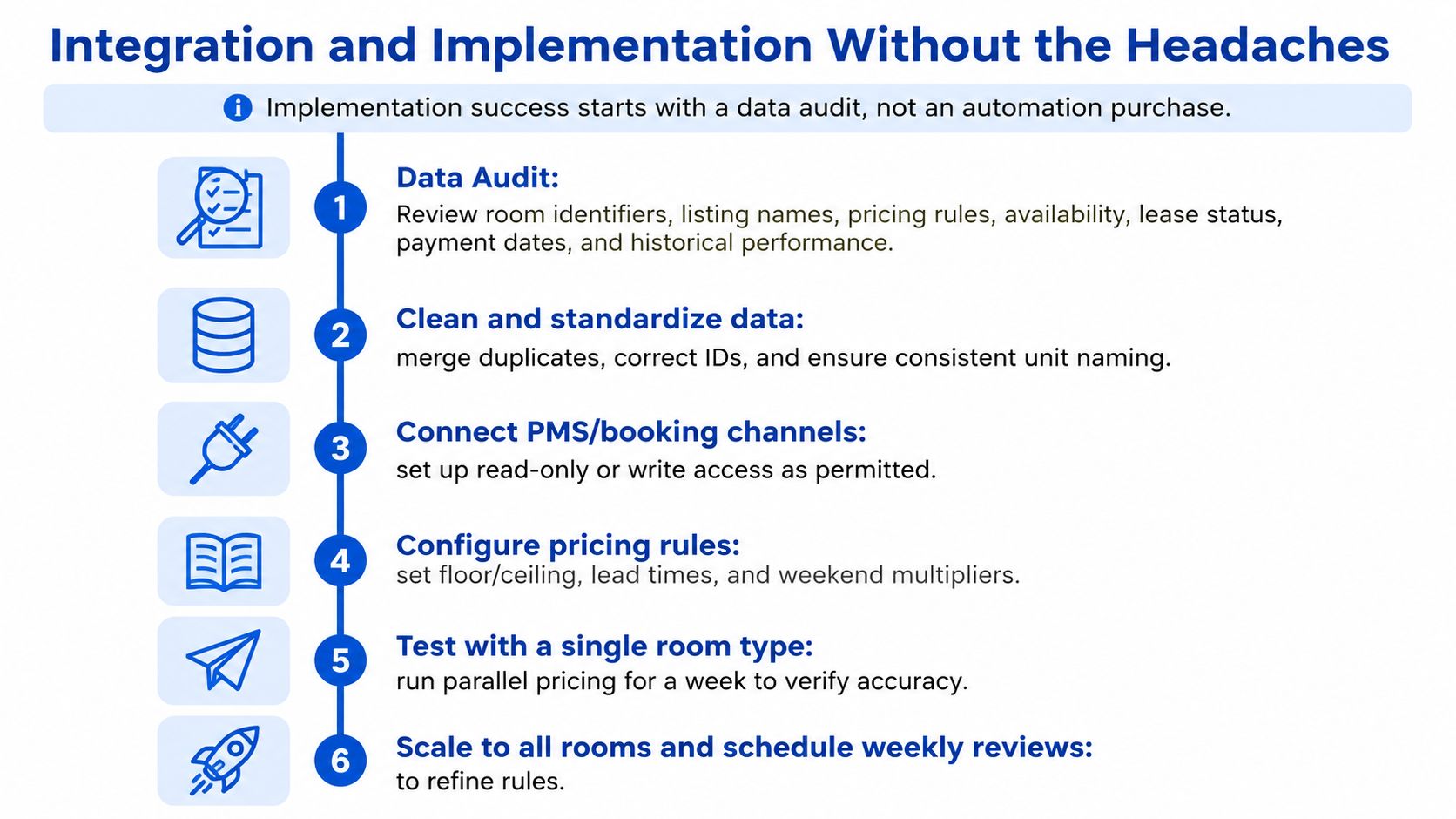
During the pilot, approve pricing manually. Review every recommendation and record whether the issue came from bad data, an unsuitable rule, a market change, or an operator override. That log tells you whether the product is improving decisions or merely automating confusion.
Implementation discipline: Assign one internal owner, document every rule, and hold weekly reviews during the first month.
Common failures include duplicate properties caused by inconsistent naming, prices recommended for leased rooms, weak minimum-rate protection, and automation that ignores the time required to prepare a room. A phased rollout makes it easier to separate software effects from operational changes and seasonal demand. If you're cleaning up the broader stack, resources on connecting your business apps can help you think through data ownership and integration dependencies.
Common Pitfalls and the Renter-Impact Question
The assumption that higher prices automatically mean better revenue is wrong. Revenue depends on demand sensitivity. In a constant-elasticity scenario, a 10% price increase raised revenue by 4.9% at elasticity -0.5, had no revenue effect at -1.0, and reduced revenue by 9.1% at -2.0, according to this price-elasticity analysis. The system's core value is estimating where your market sits relative to that unit-elastic boundary.
Housing adds a renter-impact question that hotel guides often avoid. White House-linked analysis found algorithmic pricing in rental housing was associated with about $70 higher monthly rent per unit, or 4%, in units using such algorithms, as discussed in this Columbia Social Work Review analysis. That doesn't prove every pricing recommendation is harmful, but it does show why NOI improvements need to be separated into operational efficiency and rent extraction.
Guardrails I'd require
- Affordability ceiling: Never price beyond the applicable local or PadSplit-mandated weekly cap.
- Lease protection: Don't apply sudden mid-lease rent increases without a lawful, documented process.
- Explainability: Pair every change with a written reason tied to demand, availability, timing, or a rule.
- Human approval: Require review for unusual increases, sharp drops, or recommendations based on incomplete data.
- Resident trust: Monitor turnover, complaints, and inquiry quality, not just collected rent.
| Dimension | Hands-Off Free Tool | Guided Enterprise Rollout |
|---|---|---|
| Setup | Quick connection with limited data review. | Audit, mapping, testing, and documented ownership. |
| Pricing control | Algorithm may change rates with few restrictions. | Floors, ceilings, approvals, and exception handling. |
| Accountability | Limited explanation for recommendations. | Change logs and review cadence. |
| Renter impact | Affordability risks may go unnoticed. | Rules explicitly protect resident outcomes. |
| Scaling | Portfolio-wide automation arrives early. | One-property pilot precedes expansion. |
| Cost trade-off | Lower initial cost, higher oversight burden. | Higher implementation effort, stronger controls. |
The right trade-off is automation plus accountability. A free tool that runs unchecked can create more operational and reputational risk than a slower guided rollout.
Choosing and Piloting the Right Solution Next
Shortlist two or three platforms built for co-living, room-by-room, or PadSplit-style operations. Score each against the evaluation matrix, then run a 60 to 90 day pilot at one property with written success criteria.
Test decision quality, not only higher rates. Require a weekly override log, verify each price change, measure vacancy time, review collected rent and NOI, and record resident-impact exceptions. Ask vendors how they handle missing availability, move-in timing, affordability ceilings, and manual overrides.
Before signing, document every integration touchpoint. Keep rate history and room-level data exportable. The RealtyAPI.io blog offers broader real estate data and integration ideas for this review.
PadPulse is one option for this workflow. Its planned platform targets rent-by-the-room operations with dynamic pricing, vacancy and communications workflows, portfolio analytics, and market intelligence. Its beta interest list supports early testing before launch. Treat a pilot as a paid experiment. Keep the tool only when it improves decisions you can verify.
PadPulse is building a centralized toolkit connecting pricing, communications, reporting, and operational workflows around room-level performance. Visit PadPulse to join the beta interest list and assess whether its planned revenue optimization workflow fits your portfolio. Use your documented criteria to decide whether the tool earns a wider rollout.