Process Standardization for Co-Living Operators
September 1, 2026
You've got three unanswered WhatsApp messages, a new member waiting for a door code, rent that posted late, and a maintenance vendor asking for a decision nobody owns. At one room, you can keep those details in your head. Across a five-house portfolio, that approach turns every Monday into emergency coordination.
Process standardization gives each recurring task a visible trigger, a clear owner, a defined handoff, and a way to check whether the work succeeded. It doesn't mean forcing every property or member into the same mold. It means creating a dependable operating baseline, then documenting the exceptions that need a different path.
Why Co-Living Operators Need Process Standardization
The four problems above usually share the same cause. Someone knows what should happen, but the sequence exists only in memory. The person handling inquiries assumes somebody else will schedule the viewing, the host sends access details manually, the rent issue sits in a personal inbox, and the vendor waits because no approval rule exists.
That informal coordination can work for a single room. It becomes fragile once an operator manages several rooms and starts switching between leads, move-ins, maintenance, payments, and member concerns. Context gets lost, tasks depend on personal relationships, and a new team member needs a long verbal briefing before handling ordinary work.
The cost of keeping processes in people's heads
The first cost is lost revenue from slow onboarding. A qualified prospect who waits for a reply may choose another room. A signed member who doesn't receive clear move-in instructions creates avoidable support work before they've even settled in.
The second is member churn caused by inconsistent experiences. One house may receive fast maintenance updates while another gets silence. One member may get a clear payment reminder while another discovers a problem only after a late posting.
The third is operator burnout. Reactive work forces you to revisit the same decisions repeatedly, often while handling a genuine emergency. A documented process lets a host complete routine work without reconstructing the entire situation from scattered messages.
Practical rule: If a capable new hire can't complete a recurring task without a personal briefing, the process isn't standardized yet.
A useful starting point is the MakeAutomation automation framework, which offers context for turning repeatable work into structured workflows. For co-living, the same principle applies whether the process lives in an automation platform, a shared document, or a checklist.
Start with the six operating pillars
Build your baseline around:
- Onboarding, from approved application to ready-to-move-in member.
- Pricing, including room availability, market context, and approved adjustments.
- Maintenance, from issue report through resolution and confirmation.
- Communications, covering response ownership, escalation, and message standards.
- Access control, including code creation, changes, recovery, and move-out removal.
- Financial reporting, from rent posting and reconciliation to portfolio review.
Keep the first version practical. A process map that reflects real work is more valuable than a polished manual nobody opens. Guidance on workflow optimization can help you identify where repeated handoffs are creating delays.
The Six Pillars of a Standardized Co-Living Operation
These six pillars work best as one member lifecycle, not as six unrelated binders. Pricing affects what you promise during onboarding. Onboarding creates the move-in record that access control depends on. Communications keep the member informed while maintenance protects the living experience. Financial reporting closes the loop and shows whether the earlier steps produced the expected result.
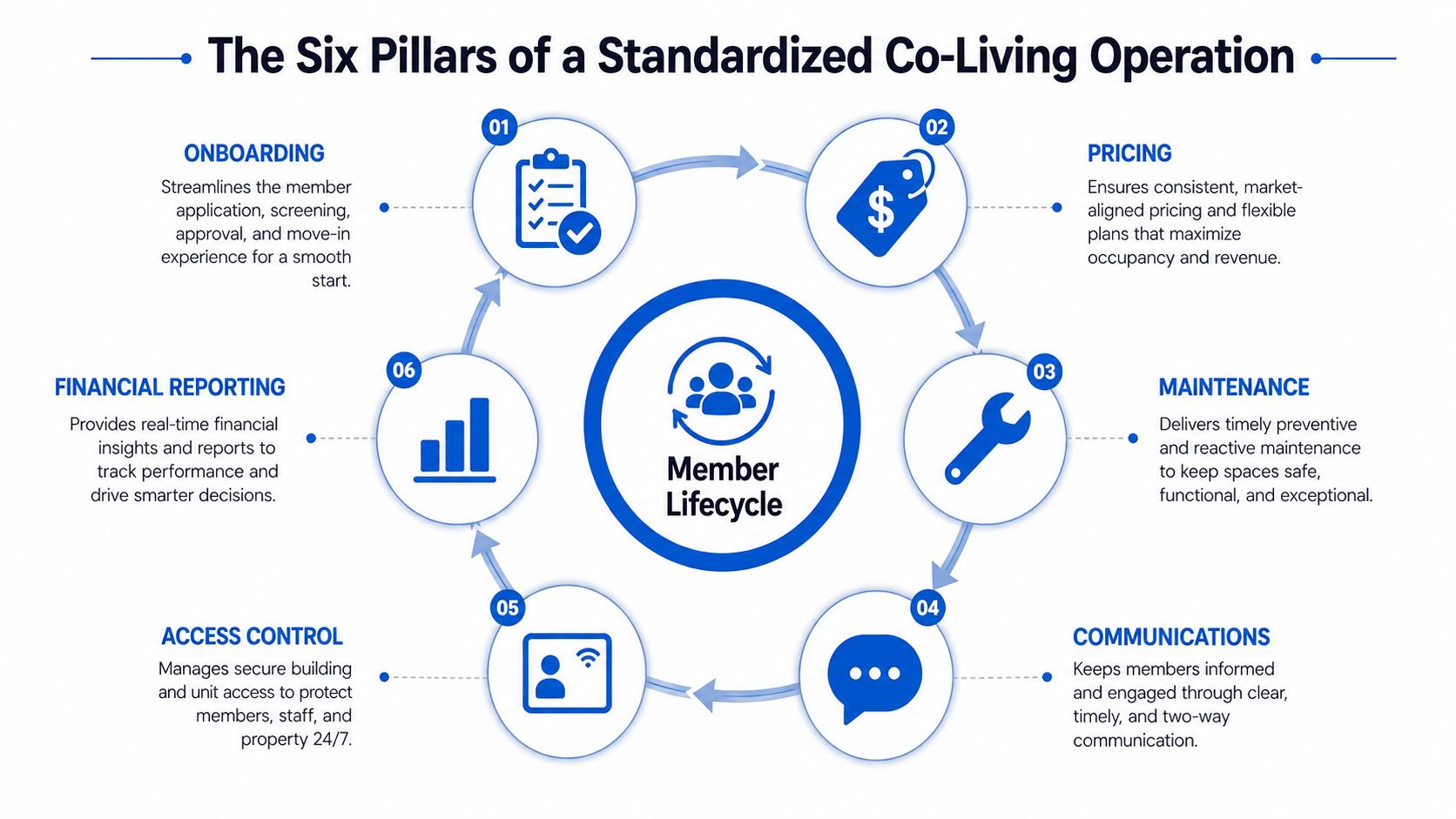
The ordering also follows the commercial flow of a room-by-room operation:
- Pricing establishes the offer and its commercial boundaries.
- Onboarding turns an approved prospect into a confirmed member.
- Access control makes the arrival secure and usable.
- Communications keeps expectations clear throughout the stay.
- Maintenance protects the property and member experience.
- Financial reporting measures the outcome and feeds future decisions.
That doesn't mean every task happens in this exact sequence. A maintenance issue can arise before the first payment, and a communication may trigger a pricing review. The important point is that each pillar produces a clean output that another person or process can use.
Define every handoff
For each pillar, write down five items:
- Trigger, the event that starts the work.
- Steps, the actions completed in order.
- Owner, the single accountable role.
- Output, the record or decision handed to the next process.
- KPI, the signal that shows whether the process worked.
For example, the onboarding output might be a complete member record with a confirmed move-in date, payment status, house assignment, and access request. The access-control owner shouldn't have to search through chat messages to determine whether the member is approved.
A process framework is useful only when it reflects how work moves through your operation. This framework for scaling ops provides additional perspective on connecting repeatable processes to growth instead of treating each SOP as an isolated document.
The same structure can also support official statistics. The Generic Statistical Business Process Model is designed around repeatable phases and sub-processes that can bridge different methods and tools. A co-living operator can apply the underlying idea at a smaller scale, using a shared vocabulary for handoffs even when different properties use different systems.
Building a Template You Can Reuse Across Every Pillar
A good SOP doesn't try to describe every possible situation. It defines the normal path clearly and points unusual cases to an exception rule. A five-field template keeps the document short enough to use while still making accountability visible.
Use five fields for every process
Trigger identifies the exact event that starts the work. “New member” is too vague. “Signed lease uploaded and payment status verified” gives the operator a real starting point.
Steps should contain concrete actions in sequence. Begin each step with a verb, such as verify, assign, send, create, confirm, or record. End each step with a handoff or a clear completion condition.
Owner names one accountable role. “The team” is not an owner. Add a backup person or role so the process doesn't stop when the primary owner is unavailable.
Output defines what the process leaves behind. That may be a completed member record, a vendor approval, a resolved ticket, a sent message, or a reconciled report.
KPI gives you one measurable signal. Choose a measure that reflects the purpose of the process, not the amount of paperwork produced.
For onboarding, the sequence might be:
- Verify the signed lease and payment status.
- Confirm the room and move-in date.
- Send the welcome message and house rules.
- Create the access-control request.
- Confirm the member received arrival instructions.
- Mark the record ready for move-in.
The owner could be the member coordinator, with the house lead as backup. The output is a move-in-ready member record. The KPI is time from completed approval to confirmed move-in readiness.
Transfer the structure to field work
A maintenance SOP may start when a member submits a ticket with a location and description. The owner triages the issue, assigns the appropriate vendor, sets the communication expectation, records the decision, confirms completion with the member, and closes the ticket. The output is a ticket with a resolution note, vendor record, and follow-up status.
A communications SOP can begin when an inquiry or member message enters the shared inbox. The owner categorizes it, checks the approved response guide, replies through the member's preferred channel, escalates any exception, and records the next action. The output is either a resolved conversation or an assigned follow-up.
The same logic works for pricing, access control, and financial reporting. Keep each pillar's main SOP to roughly one working page, then maintain a shorter checklist for field execution. Put the date and author in the header, and archive older versions instead of overwriting them.
| Pillar | Trigger | Steps, abbreviated | Owner | Output | Primary KPI |
|---|---|---|---|---|---|
| Onboarding | Approval and signed lease recorded | Verify, assign, notify, request access, confirm | Member coordinator | Move-in-ready record | Time to move-in readiness |
| Pricing | Vacancy or scheduled review | Check inputs, apply rule, approve, publish, record | Revenue owner | Current room offer | Pricing review completion |
| Maintenance | Ticket submitted | Triage, assign, update, verify, close | Maintenance coordinator | Resolved ticket | Resolution time |
| Communications | Message or inquiry received | Categorize, respond, escalate, record | Communications owner | Answered or assigned conversation | Response time |
| Access control | Approved move-in, change, or move-out | Create, test, communicate, remove, record | Access owner | Active or revoked permission | Access request completion |
| Financial reporting | Reporting period closes | Reconcile, investigate, approve, report, archive | Finance owner | Reviewed financial report | Close completion |
For teams using AI or automation, the same discipline matters. A resource on secure agent-driven knowledge workflows is useful context, but no tool should replace human ownership, source verification, or approval of exceptions.
KPIs That Tell You If Your Standards Are Actually Working
A process is not successful because the document looks complete. It's successful when members receive a more reliable service and operators can identify where work is slowing down.
Use one primary KPI for each pillar, then review the trend against the size and complexity of the portfolio. The following operating targets are practical benchmarks for planning, not universal guarantees.
| KPI | Pillar | 10 Rooms | 50 Rooms | 100+ Rooms |
|---|---|---|---|---|
| Lead-to-member conversion | Pricing and onboarding | 18% to 25% | 22% to 30% | 28% to 35% |
| Average onboarding time | Onboarding | Under 48 hours | Under 48 hours | Under 48 hours |
| Rent collection rate | Financial reporting | Above 96% | Above 96% | Above 96% |
| Routine maintenance resolution | Maintenance | Under 24 hours | Under 24 hours | Under 24 hours |
| Emergency maintenance resolution | Maintenance | Under 4 hours | Under 4 hours | Under 4 hours |
| Communication response | Communications | Within 2 business hours | Within 2 business hours | Within 2 business hours |
| Financial close | Financial reporting | Within 5 business days | Within 5 business days | Within 5 business days |
The conversion ranges and operating benchmarks in this table come from the process standardization business impact summary. Treat them as reference points, not promises. A market with different demand, regulation, or member eligibility requirements may need a different baseline.
Read the KPI as a diagnostic
If conversion falls while response time remains steady, review pricing, availability, and qualification steps rather than rewriting the communications SOP. If rent collection weakens, check the payment reminder trigger, reconciliation process, and escalation owner.
If maintenance resolution improves but member satisfaction declines, the process may be closing tickets without confirming whether the repair solved the problem. A reporting automation guide can help organize recurring reviews, but automation only makes the chosen measurement easier to see. It doesn't make a poor KPI meaningful.
ISO's process approach supports this kind of thinking. Its guidance describes risk-based thinking as a way to determine process controls, improve outputs, and prevent undesirable results, as explained in ISO's process approach guidance. Review the KPI with the process owner, ask what changed, and adjust the underlying step instead of blaming the person who reported the result.
Knowing When Not to Standardize
Uniform execution sounds efficient until it collides with a local rule, a member need, or an incompatible property system. The right objective isn't identical activity everywhere. It's a reliable outcome with controlled variation in the route used to reach it.
Local regulation is the clearest example. A municipality may impose permit conditions that affect how a room can be marketed, priced, occupied, or documented. A standard pricing template can't override a local requirement. Lease language may also differ by jurisdiction, especially where mandated notices or disclosures must appear in a particular agreement.
Member needs require judgment as well. An accessibility or reasonable accommodation request may require a different room assignment, communication method, inspection approach, or move-in arrangement. A member may prefer another language or channel for important updates. Standardize the commitment to clear, timely communication, but don't treat one channel or script as universally appropriate.
Technology creates another boundary. Older properties may use different smart locks, intercoms, thermostats, or key systems. If the underlying tools can't support the same action, copying one access-control SOP across every house creates false confidence. Define the shared security outcome, then give each system its own approved procedure.
Govern variation with an Exceptions Register
For every approved exception, record:
- Trigger condition, such as a specific municipality, accommodation request, or property system.
- Approver, the person authorized to depart from the baseline.
- Alternative path, including the steps that replace the standard procedure.
- Expiration date, if the exception is temporary.
- Review cadence, so permanent changes don't remain hidden in a one-off note.
ISO 9001:2015 uses the broader concept of documented information and asks organizations to determine what documentation is necessary for an effective quality management system, rather than prescribing one universal set of procedures. This distinction is explained in guidance on documenting procedures under ISO 9001:2015. ISO guidance also says there's no specific required format for documenting risk and opportunity determinations, while objective evidence of risk-based thinking still matters, as described in ISO auditing guidance on risk-based thinking.
Standardize the outcome. Vary the path when the law, the member, or the system requires it.
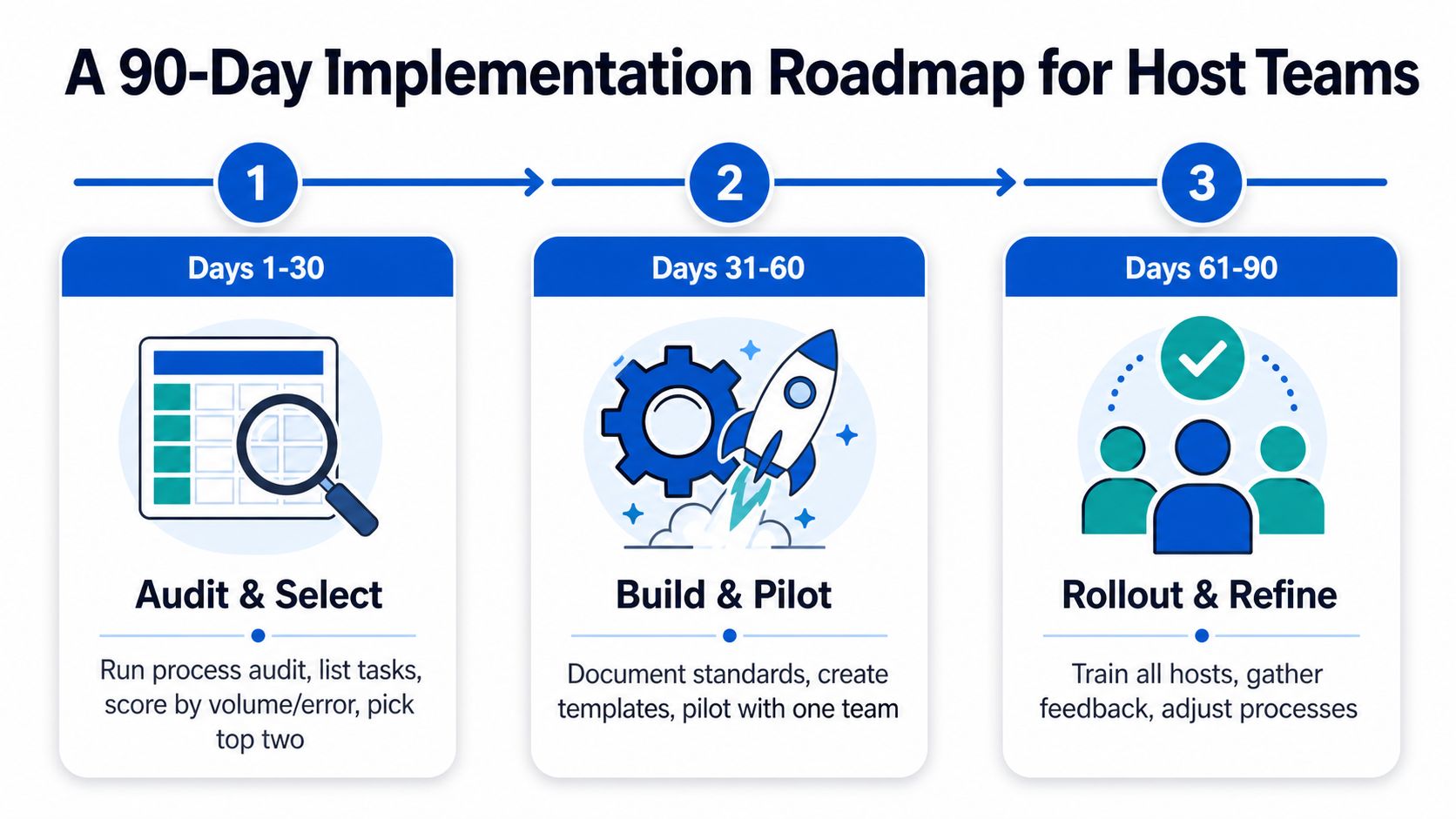
A 90-Day Implementation Roadmap for Host Teams
A workable rollout starts with a narrow problem, not a giant operations manual. For a portfolio of several houses, the first goal is to remove repeated friction without disrupting the routines that currently keep members safe and informed.
Weeks 1 to 2 audit the real work
Start with a spreadsheet and list every recurring task. Include the work that happens in WhatsApp, email, property software, vendor calls, and personal notes. Score each task by volume and error rate, then select the two pillars creating the most operational pain.
For many operators, those will be onboarding and maintenance. Others may find that rent reconciliation or access changes create the most risk. Don't choose based on which SOP would look best in a shared drive. Choose the work that repeatedly costs time, delays revenue, or creates member complaints.
A solo operator can complete this audit and draft two lightweight SOPs in the first month. A two-person team can also build a basic KPI sheet and an exceptions log, but shouldn't attempt to redesign every house at once.
Weeks 3 to 6 pilot one house
Select a house with enough recurring activity to expose weaknesses, but not so many unique conditions that the pilot becomes impossible to interpret. Assign one owner to each selected pillar and ask them to use the SOP during real work.
Capture friction in a shared document. Note missing information, unclear approvals, duplicate data entry, vendor delays, and steps that people skip because they don't fit the actual property. A process that fails in the pilot needs editing, not blame.
The vendor coordination workflow can help operators think through the handoffs between ticket intake, approval, scheduling, completion, and payment. Keep the pilot version short enough that a host can use it while moving between rooms.
Weeks 7 to 10 expand carefully
Roll the revised SOPs to the rest of the portfolio. Introduce the Exceptions Register at the same time, because expansion will reveal local rules, different member needs, and system differences that the pilot house didn't expose.
Brief house leads on the KPI for each pillar. They don't need a lecture on process theory. They need to know what starts the process, what they own, what they hand off, and when to escalate.
Weeks 11 to 13 review and lock in
Compare the new KPI trends with the baseline collected during the audit. Retire SOPs that added documentation without improving the intended outcome. Keep the standards that reduced uncertainty, then add them to new-team-member onboarding.
A two-person team can usually handle the full 90-day sequence if it limits the first rollout to the highest-pain pillars. A solo operator should ship a smaller package, such as onboarding, access control, and maintenance, before attempting portfolio-wide financial redesign.
Pitfalls to Avoid and How PadPulse Supports Each Step
Standardization fails when operators confuse documentation with control. A shared folder full of polished files won't help if nobody owns the next action, reviews the result, or asks members whether the process worked in practice.
The biggest traps are easy to recognize:
| Pitfall | What It Looks Like in Practice | PadPulse Feature That Prevents It |
|---|---|---|
| Over-documentation with no owner | A long SOP exists, but nobody is accountable for completing it | Onboarding workflow engine assigns ownership and handoffs |
| Ignored SOPs in a shared drive | Hosts keep using personal notes and old message threads | Maintenance ticketing dashboard puts work in an active queue |
| No KPI reviews | Problems are discussed informally without a regular measure | Automated KPI scorecards surface pillar performance |
| No member feedback loop | Operators close tasks without learning how the experience felt | Post-stay member surveys collect structured feedback |
| Copy-pasting one house's process | A procedure built for one market fails in another | Market-level configuration settings preserve local variation |
Match the fix to the failure
Over-documentation needs fewer, sharper instructions and a named owner. A one-page SOP with an active assignment is more useful than a detailed manual that never reaches the person doing the work.
Ignored procedures need to live where work happens. If maintenance instructions sit in a document while tickets move through another system, the operator must remember to consult both. That separation invites skipped steps.
Missing KPI reviews create delayed learning. A scorecard should connect the measure to the responsible pillar, so a weak result points toward a process review rather than a vague feeling that “operations are busy.”
No feedback loop leaves member experience invisible. Post-stay surveys can reveal whether quick closure meant a satisfactory resolution, whether move-in instructions were understandable, and whether communication preferences were respected.
Copy-paste standardization creates unsafe uniformity. Market-level settings should preserve differences in permits, lease requirements, pricing logic, and property technology while keeping the desired outcome consistent.
ISO's risk guidance treats preventive action as part of planning, operation, evaluation, and improvement, rather than as a separate exercise added after failure. That same mindset works for co-living: review the exception, the KPI, and the member feedback together before changing the standard.
For practical implementation, use the PadPulse Help Center playbooks to clone each pillar SOP directly into your account, then adapt the owners, outputs, and exceptions to match your portfolio.
PadPulse is being built as an all-in-one toolkit for co-living operators, bringing pricing, communications, access control, maintenance workflows, and financial visibility into one operating system. Visit PadPulse to join the interest list for limited beta access, product updates, and referral opportunities, with no billing required before launch.