Opening Balance Account: A Guide for Rental Operators
July 9, 2026
You're probably here because the books for your room-by-room rental business have reached the point where spreadsheets, bank feeds, and scattered notes aren't cutting it anymore. Rent came in on different dates, security deposits were tracked in a separate tab, one tenant prepaid part of a future month, and utilities landed on a credit card you haven't fully reconciled. Then you open a new accounting platform and hit a setup field called opening balance account.
That's usually the moment operators pause.
The term sounds technical, but the job is simple. You're telling the new system where your business stands on day one so every report after that has a clean starting point. If you manage shared housing, co-living homes, or PadSplit-style rentals, that starting point matters more than most generic guides admit because your cash, deposits, receivables, and room-level prepayments rarely fit a standard single-unit landlord setup.
Your Starting Line for Accurate Financial Tracking
A host with one house can get away with messy records for a while. A host with several rooms, staggered move-ins, and multiple payment methods usually can't. At some point, the numbers stop answering basic questions. How much cash is available? Which deposits belong to current members? Are unpaid utility bills already reflected anywhere? Why doesn't the profit and loss report line up with what's in the bank?
That's where the opening balance comes in.
An opening balance is the amount in an account at the start of a new accounting period, carried forward from the previous period's closing balance, with any verified adjustments applied before the new period begins, as explained in Sleek's overview of opening balances. In plain English, it's your financial starting line.
For rental operators, this usually shows up at one of three moments: when the business is brand new, when you're moving from spreadsheets into proper accounting software, or when you're resetting books at the start of a new financial year. In every case, the same rule applies. If the starting balances are wrong, every report built on top of them will be shaky.
If you want cleaner reporting long term, it helps to understand how this connects to the rest of your bookkeeping workflow. A solid primer on property management accounting for rental operators can help frame the bigger picture.
The opening balance isn't busywork. It's the first honest snapshot of the business inside the new system.
What Is an Opening Balance Account
Think of the opening balance account as the temporary scoreboard used to start a new financial game correctly. Before you record fresh rent, utility bills, owner draws, or repair costs, the software needs to know the current score. That means what the business owns, what it owes, and what belongs in equity on the first day of the new period or new platform.
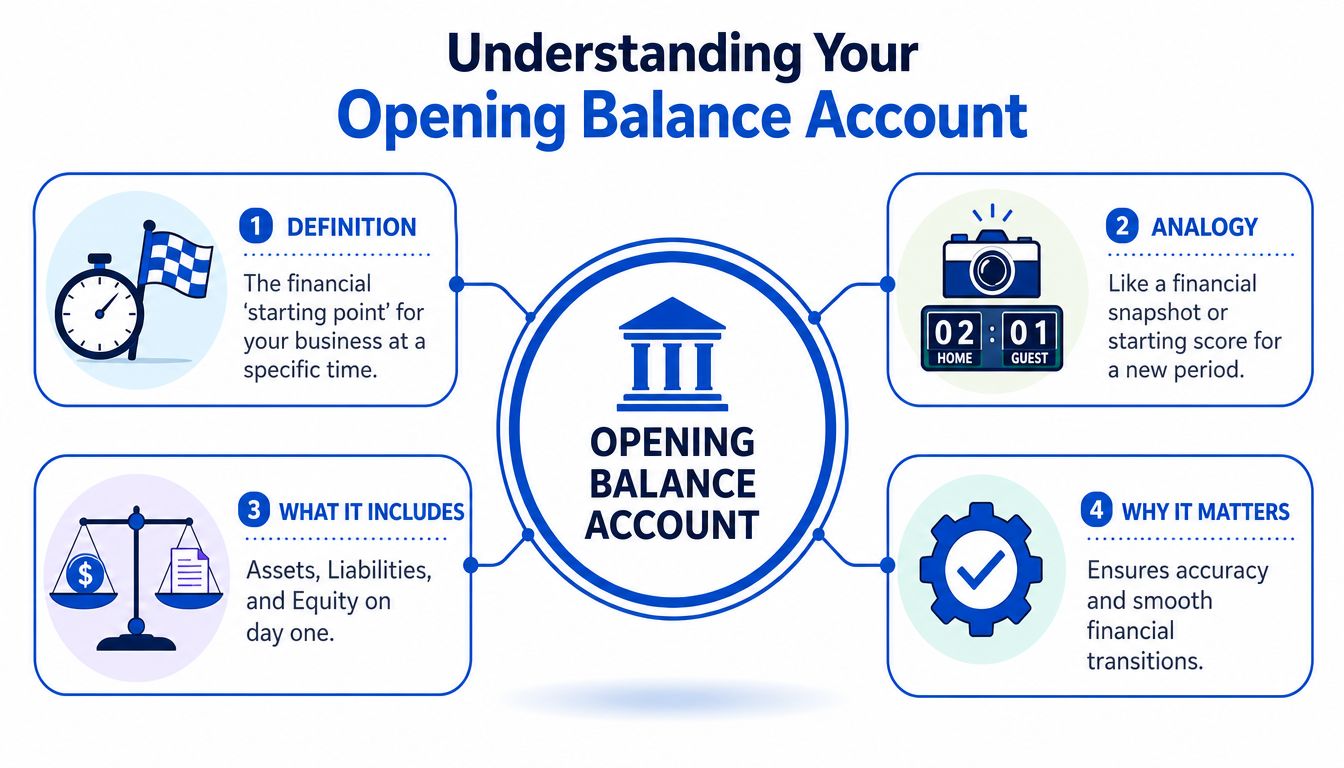
The practical definition
An accurate opening balance is the funds in a company's account at the exact start of a new financial period, representing the financial position of the business on the day before a new accounting system or period begins. Without that precise figure, financial reports can't provide a true picture of the company's status. It must match the bank statement or other financial sources exactly, and it works as a carryover because the closing balance of one period becomes the opening balance of the next, as described in Bookkeep's explanation of accurate opening balances.
That's why this matters so much for co-living and room-by-room rentals. You're not only carrying over one checking account balance. You may also be carrying member receivables, security deposit liabilities, prepaid rent, loan balances, taxes owed, and credit card balances.
What sits behind the number
A lot of beginners think the opening balance account is just a bank setup field. It isn't. It's the mechanism that helps the system offset the starting balances you enter across your chart of accounts.
For a rental operator, the opening setup often includes:
- Cash accounts such as the main operating bank account and any reserve account
- Amounts owed to you such as unpaid rent or fees from current members
- Amounts you owe such as utilities, vendor bills, taxes, loans, and security deposits held
- Equity balances such as owner capital, retained earnings, or prior accumulated profit
Practical rule: If your opening numbers don't reflect both assets and liabilities, the reports may look cleaner at first but they'll be less true.
Why the opening balance account exists
Most accounting systems need a temporary holding place while you build the starting financial position. You enter the balances account by account. The software uses the opening balance account to offset those entries until the whole opening set is complete and balanced.
That temporary role is why the account often causes confusion. Operators see it in the chart of accounts and assume it's a permanent bucket. It isn't meant to stay there as a catch-all. Its job is to help you import or enter the starting balances accurately so the regular accounts can take over.
When You Need to Record Opening Balances
The right time to record opening balances depends on what's changing in the business, not on whether the phrase sounds formal. In practice, room-by-room operators usually hit this task in three situations. Ignore it in any of them, and the cleanup work gets harder later.
Starting a new rental operation
If you just launched a co-living or PadSplit-style property, the books still need a real opening position. That might include the initial cash you put into the business, lease deposits you paid, a credit card used for setup costs, or a loan tied to the property or furnishings.
A new operator often thinks, “I'll just start with the first rent payment.” That doesn't work well because the business already had a financial position before the first month's reporting cycle settled.
Moving from spreadsheets or old software
This is the most common trigger. You've been operating for a while, maybe using Excel, maybe using basic bookkeeping software, maybe relying too heavily on bank feeds. Then you switch systems and need the new platform to pick up where the old records left off.
For businesses that have already been trading, the opening balances you enter can include trade debtors, trade creditors, bank balances, taxes owed, opening share capital, retained profit reserves, and outstanding loan balances, as outlined in Reviso's guide to opening balances.
For a room-by-room rental model, translate those items into your day-to-day reality:
- Trade debtors might be current residents who still owe rent, fees, or utility reimbursements.
- Trade creditors might be cleaners, maintenance vendors, internet providers, or furnishing suppliers you haven't paid yet.
- Taxes owed might include sales-tax-like obligations where applicable, payroll-related items if you have staff, or other filing liabilities.
- Loans can include mortgages, private notes, or equipment financing.
Starting a new fiscal year
Some operators reset or reorganize their books at year-end, especially after a messy year. That's a sensible time to establish clean carried-forward balances so the next year's reporting starts with fewer inherited mistakes.
What matters most is choosing a cut-off date and being consistent. If you move balances as of month-end, use month-end statements and reports. If you move them as of year-end, don't mix in later transactions.
What to gather before you begin
Before entering anything, pull together the figures that define the business at that date:
- Bank balances from the exact cut-off date
- Resident receivables for unpaid rent or fees
- Security deposits held by room or member
- Outstanding bills such as utilities, repairs, and subscriptions
- Loan balances and owner equity balances
- Tax liabilities still unpaid
The more room-specific your operation is, the less useful a generic landlord shortcut becomes. A single total for “rent” won't tell you which part belongs to receivables, prepaid amounts, or deposit liabilities.
Opening Journal Entries for Co-Living Operators
Generic bookkeeping tutorials usually show one bank account, one mortgage, and maybe one tenant. That's not how shared housing works. If you run rent-by-the-room properties, your opening journal entries should reflect the actual obligations tied to individual occupants and rooms.
What these entries are trying to do
You're not recording today's activity. You're establishing what was already true on the cut-off date. That means every opening entry answers one question: what balance should this account show before any new transactions are entered?
Here's a practical example for a co-living property being moved into a new accounting system. The exact amounts will differ in your books, so treat this as structure, not a template to copy blindly.
Sample opening balances by account type
| Account | Debit | Credit |
|---|---|---|
| Operating Bank Account | ||
| Accounts Receivable, Room 2 Member | ||
| Prepaid Rent Liability, Room 4 Member | ||
| Security Deposits Held | ||
| Utilities Payable | ||
| Mortgage Payable | ||
| Furniture and Fixtures | ||
| Owner Capital or Retained Earnings | ||
| Opening Balance Equity |
Because precise sample amounts weren't provided, focus on how the accounts behave:
- Operating bank account is usually a debit because it's an asset.
- Accounts receivable for a room member is a debit if that member owes you money as of the cut-off date.
- Prepaid rent for a future period is often a credit to a liability account if you received cash for rent you haven't earned yet.
- Security deposits held are typically a credit because that money is usually owed back unless applied under the lease terms.
- Utilities payable is a credit because it's an outstanding bill.
- Mortgage payable is a credit for the unpaid loan balance.
- Furniture and fixtures may be a debit if you're carrying them as assets.
- Owner capital or retained earnings is generally a credit, depending on your structure and prior results.
- Opening balance equity acts as the temporary offset while you build the full entry set.
For room-by-room operations, security deposits and prepaid rent are where many first-time setups go wrong. Both involve cash, but neither should automatically be treated as current income.
Room-level examples that matter
A few examples make this easier.
If a member in Room 3 gave you a security deposit before the cut-off date, that amount usually belongs in a security deposits held liability account, not in rent income. You have the cash, but you also have an obligation.
If a member in Room 5 prepaid part of next month's rent, that amount usually shouldn't sit in current-period income either. It belongs in a liability account until that rental period is earned.
If a current member still owes a portion of rent for the prior period, that amount belongs in accounts receivable. Don't leave it out just because the money hasn't arrived yet.
What works and what doesn't
What works:
- Breaking balances out by account type before importing them
- Tracking resident-related liabilities separately from income
- Keeping a list of room-specific exceptions such as prepaid rent or partial move-in collections
What doesn't:
- Dumping all prior cash activity into income
- Leaving security deposits buried in one general cash line
- Posting owner contributions and old balances into random equity buckets just to make the books “balance”
If you can explain each opening line in one sentence, you're usually in good shape. If you can't, stop and reconcile before moving on.
Your Checklist for Migrating to New Accounting Software
A migration goes smoothly when you treat it like a controlled handoff, not a bulk upload. The cleanest process is boring by design. Pick a cut-off date, gather the support, reconcile everything, then import only what you can explain.
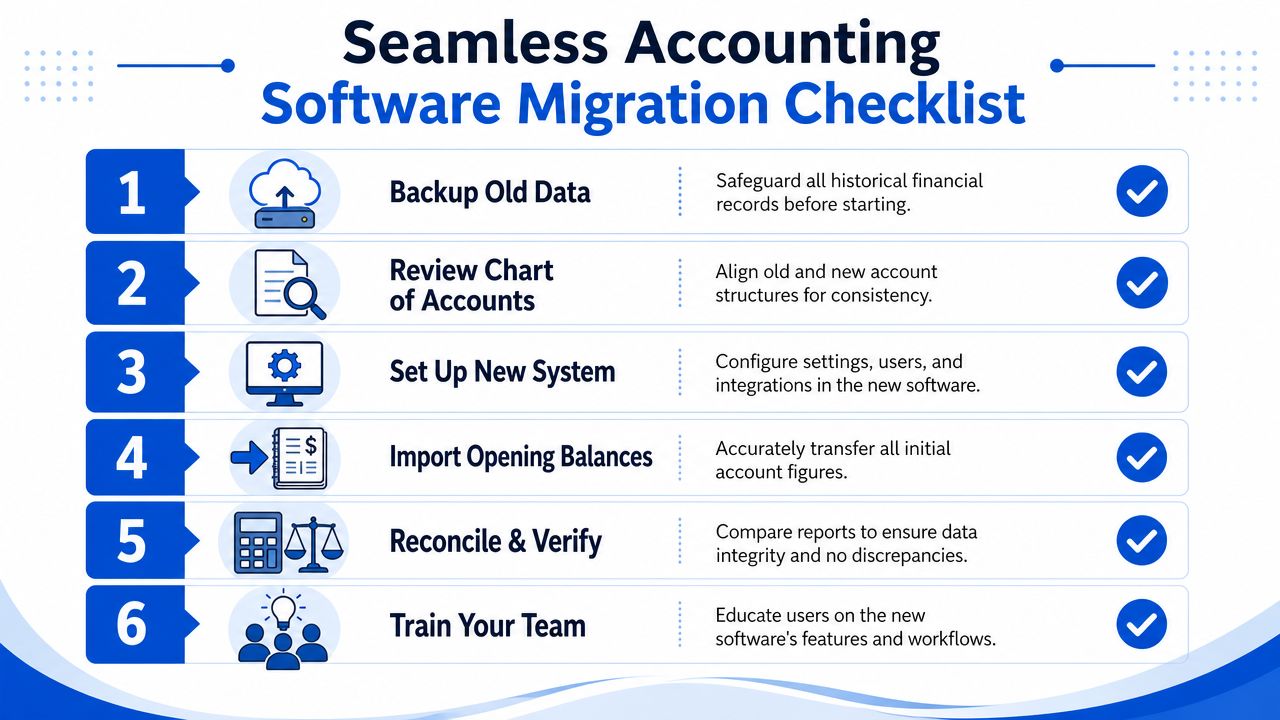
The migration checklist
Choose one cut-off date
Don't mix transactions from before and after the handoff. Month-end is often easiest because your bank statement, rent ledger, and unpaid bill list can all line up to one date.Pull every supporting document
Gather bank statements, credit card statements, loan statements, lease deposit records, vendor balances, tax balances, and any room-level receivable detail.Reconcile before importing
Best practices call for thorough reconciliation of prior records, including bank statements, accounts payable and receivable, and fixed assets, before consolidating financial data. Modern accounting software can automate calculations and help ensure opening balance equity is cleared correctly to retained earnings at fiscal year-end, according to SAP community guidance on opening balance preparation.Export or assemble a trial balance
If your old software can produce a trial balance, use it. If you were in spreadsheets, build one manually from the final balances of each account.Map your chart of accounts carefully
A room-by-room operator usually needs more detail than a standard rental setup. Separate security deposits, prepaid rent, owner equity, utilities payable, cleaning expense, and member receivables clearly.Enter and verify opening balances in the new system
Don't start posting new rent until the starting balances make sense and tie back to your supporting records.
If you're still evaluating platforms, this roundup of accounting software for rental properties can help you compare options with migration in mind.
Why offset accounts matter
In larger accounting systems, an opening balance offset account temporarily holds entries during the import process so subledger openings and trial balance entries can net to zero once everything is loaded correctly. That workflow is common in enterprise systems and helps prevent duplicate ledger impact when customer, supplier, and inventory-type balances are imported alongside the general ledger.
For a rental operator, the idea is useful even if the software hides the mechanics. The system needs a temporary balancing drawer while you move opening amounts into the right permanent accounts. If that temporary drawer never clears, something in the import is incomplete or misclassified.
A practical migration mindset
Use this rule when moving into a new platform:
- If a balance has backup, import it
- If a balance is estimated, pause and verify it
- If a line exists only because “that's what made the old spreadsheet work,” don't carry it forward blindly
That discipline matters more than speed. Fast migrations create slow cleanups.
Common Opening Balance Mistakes to Avoid
Most opening balance problems don't start with bad intentions. They start with shortcuts. A host is in a hurry, the software asks for a starting number, and the goal shifts from “make the books right” to “make the screen stop showing an error.”
Leaving the opening balance account unbalanced
The first mistake is treating the opening balance account like a permanent parking lot. It isn't. The opening balance account serves as a temporary zeroing mechanism. When balances are entered, the system posts the opposite side to the opening balances account, and that account should mathematically end at zero after all trial balance entries are complete. If it doesn't, that indicates a data entry error that needs reconciliation, as explained in Sage's guidance on extra opening balances.
That usually means one of three things:
- A balance was omitted such as a credit card payable or a security deposit liability
- A sign was reversed and a debit was entered as a credit, or the opposite
- A subledger detail didn't match the total such as room-level receivables not tying to the control account
If the opening balance account isn't zero after setup, don't post new month activity and hope it fixes itself. It usually won't.
Misclassifying owner contributions
This one shows up a lot when operators connect bank accounts and the software auto-generates starting entries. The money may be real, but the account classification can still be wrong. A transfer from your personal funds into the business isn't rental income. It's usually an owner contribution or capital injection, depending on the entity structure.
If you leave those amounts sitting in opening balance equity forever, the equity section becomes harder to understand and tax prep gets messier.
A practical walkthrough can help if you want to see how bookkeepers think through cleanup decisions in plain language.
Forgetting liabilities that are easy to overlook
Operators often enter assets first because they're visible. Cash is easy to see. Furniture is easy to remember. Liabilities are where omissions happen.
Common missed items in room-by-room rentals include:
- Security deposits held for current members
- Prepaid rent for future occupancy periods
- Unpaid utilities and vendor bills
- Loan balances
- Taxes owed
Leaving out liabilities makes the books look healthier than they are. Then the first few months on the new platform feel confusing because cash seems fine while net income and equity don't line up with reality.
How to Verify Your Balances Are Correct
Verification is the last step before you trust the new system. Don't skip it. Room-by-room rentals generate enough moving parts that a small opening mistake can flow through reports for months.
Run three checks before posting new activity
First, run a trial balance in the new software. Total debits should equal total credits, and the temporary opening balance equity should not carry unexplained leftovers after setup is complete.
Second, compare the bank balance in the software to the actual statement balance on your cut-off date. That match needs to be exact. If it isn't, go back before entering new rent or bills.
Third, review your equity section with extra care. Recent data from 2025-2026 shows that 42% of small business tax errors involve misclassified opening balance equity entries, with the highest impact on room-by-room rental operators who lack dedicated accounting staff, according to this YouTube discussion on opening balance equity errors.
A simple confidence test
Use one report and one reality check:
- Report check means the trial balance balances cleanly
- Reality check means the bank statement and your resident-related liabilities tie to real support
If you need a clearer way to test whether the books are producing usable operating insight, a basic profit and loss statement template for rental reporting can help you spot whether the setup is producing sensible results.
Clean opening balances don't guarantee perfect books, but messy opening balances almost guarantee messy books.
Get the starting point right, and your software becomes useful. Get it wrong, and every future report asks you to debug the past.
If you run PadSplit-style or co-living rentals and want a simpler way to manage pricing, operations, and financial visibility in one place, join the early interest list for PadPulse. It's being built for room-by-room operators who need clearer reporting, better NOI visibility, and less spreadsheet cleanup.