Best Accounting Software for Rental Properties
April 25, 2026
If you’re managing a rental house by the room, your bookkeeping probably got messy faster than you expected. One property can mean multiple tenants, different move-in dates, split utilities, partial payments, deposits, vendor bills, and constant turnover. A simple spreadsheet or a generic accounting app can hold the data, but that doesn’t mean it gives you useful financial visibility.
That’s the gap most roundups miss when they talk about the best accounting software for rental properties. They compare landlord tools as if every rental works like one lease, one unit, one monthly payment. Co-living doesn’t work that way. Room-by-room operators need cleaner transaction tracking, faster reconciliation, and a way to understand profitability inside a single property, not just at the building level.
The good news is that a few tools do a solid job for different stages of growth. The less comfortable truth is that none of today’s mainstream options fully solve co-living accounting out of the box. You can still build a strong stack. You just need to choose with the right lens.
Why Your Spreadsheet Fails for Co-living Accounting
Monday morning, two tenants have paid, one sent a partial payment with a note about a utility credit, one moved out over the weekend, and the cleaner invoice hit the bank before the deposit refund cleared. On paper, that is one house. In the books, it is a pile of transactions that do not belong in the same bucket.
A spreadsheet can store all of that. It usually cannot keep it usable once the house is full, turnover picks up, and you need answers in the middle of the month instead of at tax time.

One property does not equal one profit center
This is the first place generic rental bookkeeping breaks.
A co-living house may have six bedrooms, three pricing tiers, different lease start dates, and a shared cost base. If Room 1 stays occupied for ten months and Room 4 turns three times in a quarter, the property-level P&L hides the operational truth. You can see total rent. You cannot see which room is carrying margin, which room is absorbing turnover cost, or whether your premium room earns a premium after extra cleaning, furnishing, and vacancy loss.
That matters because co-living decisions happen below the property level. Pricing, concessions, upgrades, and marketing all happen at the room level. If the accounting view stops at the building, operators end up making room-level decisions with incomplete numbers.
I have seen this happen repeatedly. The spreadsheet starts as a simple ledger, then turns into a workaround for the parts the system cannot represent cleanly: room tags, vacancy notes, deposit tracking, utility splits, and side calculations for true room profitability. Once that happens, the file stops being a record and becomes a manual operating layer.
Practical rule: If you need a separate “notes” column to explain what happened on half your transactions, your accounting setup isn’t doing its job.
Shared costs are where the mess starts
Shared housing creates a cost allocation problem that standard rentals barely have.
Internet, water, electricity, cleaner visits, common-area supplies, trash service, smart locks, and turnover labor all support multiple residents at once. Some costs should be spread evenly. Some should follow occupancy. Some should stay at the house level because forcing a room split creates fake precision.
A spreadsheet can divide a bill by six rooms. It cannot decide whether six-way allocation makes sense during a month when one room sat vacant for two weeks and another included a bundled utility cap. That judgment still sits with the operator, and if the accounting system cannot support that logic consistently, reporting gets distorted fast.
Many operators often confuse bookkeeping with strategy. The file balances, but the underlying allocation method is weak, so the pricing decisions built on top of it are weak too.
High turnover creates bookkeeping friction
Turnover is not just an operations headache. It changes the accounting workload.
Every move-out can create a deposit adjustment, a cleaner charge, a lock reset, touch-up supplies, a vacancy gap, and a leasing cost tied to the next resident. In a standard apartment lease, those costs show up less often. In room-by-room rentals, they show up constantly. If you track them loosely, they disappear into broad maintenance or miscellaneous categories and you lose visibility into what churn is costing you.
That is one reason operators who also list flexible inventory or short-stay rooms often end up connecting leasing operations more tightly to the books. A room calendar problem quickly becomes a revenue recognition and reconciliation problem. Teams already dealing with mixed booking sources usually learn this the hard way while fixing occupancy mismatches, especially if they have not sorted out their calendar sync process across Airbnb and other booking channels.
A normal spreadsheet workflow usually relies on habits like these:
| Common spreadsheet workaround | Why it breaks |
|---|---|
| Color-coding paid vs unpaid rent | Easy to miss when residents pay on different dates |
| Separate sheet for deposits | Hard to reconcile against actual bank activity |
| Manual utility split formulas | Fragile when occupancy changes mid-month |
| Notes for move-outs and credits | Not searchable or reportable |
| End-of-month copy/paste reporting | Too slow for mid-month decisions |
The time cost is obvious. The accuracy cost is worse.
Once the file gets dense enough, every important number needs to be checked by hand. At that point, the spreadsheet is no longer helping you run the house. It is only helping you survive month-end.
Generic accounting software still leaves gaps for co-living
Moving from Excel into QuickBooks, Xero, or another general ledger usually improves bank reconciliation and formal reporting. I would still call that a step up for many small operators. But it does not solve the core co-living problem by itself.
General accounting tools are built around accounts, classes, vendors, customers, and properties. Co-living operators also need room-level revenue segmentation, turnover cost tracking by room, occupancy-sensitive utility logic, deposit workflows that reflect frequent resident changes, and a way to separate house performance from bedroom performance. You can force some of that into classes, locations, tags, or custom reports. You will still do a lot of manual translation.
That trade-off is a key reason spreadsheets survive long after operators adopt accounting software. The software handles the official books. The spreadsheet handles the business model.
The best setup for co-living reduces that split as much as possible. If your accounting stack still depends on a parallel spreadsheet to explain room economics, vacancy drag, and turnover cost, the spreadsheet did not fail because it was simple. It failed because your rental model is more granular than the system behind it.
Defining Your Must-Have Accounting Features
A resident moves in on Tuesday, pays a prorated first week by card, sends the deposit by bank transfer on Wednesday, and asks to switch rooms before the month ends. Another resident is late, one room sits vacant for six days, and the cleaner invoices you separately for turnover supplies and labor. If your accounting system treats all of that as one property, one tenant ledger, and one monthly rent cycle, you will spend month-end rebuilding the story by hand.
That is the standard for co-living software selection. The tool has to fit room-by-room operations, not just produce a clean property P&L.
Income tracking that reflects flexible leases
For a traditional annual lease, rent accounting is fairly predictable. For co-living, income arrives in fragments. Prorated rent, membership fees, deposits, utility true-ups, transfer fees, late fees, and credits can all hit the ledger in the same week.
That is why I do not start with dashboard quality. I start with payment structure.
A useful system should answer four practical questions fast:
- Can it record multiple payment types clearly so rent, deposit, fees, and credits do not get mixed together?
- Can it handle frequent resident turnover without creating a reconciliation mess?
- Can it show balances at the resident level and the room level when several people share one address?
- Can it support collections workflows such as reminders, partial payments, and follow-up notes, instead of only logging transactions after the fact?
Generic accounting comparisons rarely examine that level of workflow detail for room-by-room rentals. FreshBooks has a rental property accounting overview, but it stays at a broad landlord level rather than addressing same-week resident churn, mid-month transfers, or room-based revenue tracking in co-living: FreshBooks rental property accounting software overview.
Operators running hybrid inventory face another issue. Occupancy changes hit the books quickly, especially if some rooms also feed short-stay channels. That is one reason teams pay attention to operational dependencies like calendar sync for Airbnb and rental operations. A booking conflict can become a revenue variance within days.
Reporting that helps you price rooms, not just properties
Property-level reporting is the minimum. Co-living needs a second layer.
Key management questions are narrower and more useful. Which room type carries the house? Which rooms have the highest turnover cost? Are utility-heavy rooms still worth the premium? Is one floor underperforming because of vacancy, discounting, or repeated maintenance calls?
Those answers require some form of sub-unit tracking. Very few mainstream accounting tools handle true room-level P&L out of the box. Some can get close with classes, tags, locations, or units. That workaround is acceptable if the setup stays readable and your team will use it.
Operator test: If you cannot isolate one room’s revenue, concessions, vacancy days, and turnover costs without exporting to Excel, the software is still forcing a parallel system.
Expense controls and bank automation
Co-living books get messy faster than many operators expect. A single house can generate recurring utility bills, cleaning charges, repair visits, furnishing purchases, app subscriptions, deposit refunds, and resident reimbursements. The issue is not only volume. It is coding consistency.
The software should make routine accounting boring:
- Automatic bank feeds
- Rules for repeat vendors and expense categories
- Receipt and bill attachments tied to the transaction
- Clear treatment for owner contributions, reimbursements, and deposit activity
- Reports you can hand to a CPA without reclassifying half the ledger
I have seen operators blame software for bad reporting when the actual issue was delayed cleanup. If the system does not help you categorize quickly and consistently, the monthly close slips, and room economics become guesswork.
Tenant and property structure that maps to co-living reality
Most demos look clean because they show one unit, one tenant, one rent payment. Co-living rarely behaves that way.
Your chart of accounts matters, but your tracking structure matters just as much. At minimum, the system should let you represent these layers in a way that survives growth:
| Needed tracking layer | Why it matters in co-living |
|---|---|
| Property | House-level performance, debt service review, tax reporting |
| Room or sub-unit | Pricing, occupancy, and turnover differences within the same address |
| Resident | Payments, credits, balances, deposit status |
| Vendor | Cleaning, repairs, furnishings, and make-ready cost tracking |
| Tag, class, or location | Utility allocation, room type analysis, marketing source review |
Flatten those layers into one property total, and you lose the numbers that drive decisions. That is how underpriced rooms, expensive turnovers, and deposit mistakes stay hidden for months.
Integration potential matters because accounting follows operations
Accounting for co-living is downstream from operations. Leasing, renewals, room transfers, maintenance, access control, and occupancy all create financial entries, even if your accounting system never sees the original event.
That is why feature checklists can be misleading. A tool may have strong bookkeeping and still be a poor fit if every resident change has to be re-entered manually. The better question is whether the software reduces duplicate entry and preserves enough detail to explain house performance later.
The must-have feature set is narrower than many operators think:
- Bank-connected accounting that stays clean with frequent transaction volume
- A structure for property and room-level tracking
- Resident payment workflows that handle proration, deposits, fees, and credits
- Expense coding that makes turnover and shared-house costs visible
- A setup you can keep using after the next few houses, not one you will rebuild after every growth step
If a platform handles those five jobs well, it has a real shot in co-living. If it only does general landlord accounting well, expect workarounds.
Comparing the Top Rental Accounting Software for 2026
A co-living operator closes the month and sees one property showing a healthy margin. Then a few room turns, deposit deductions, utility true-ups, and mid-month move-ins hit the ledger. The property still looks fine at the top level, but the weakest rooms, the costly resident churn, and the houses carrying shared-service overhead stay buried. That is why software comparisons built for standard rentals miss the true decision.
For co-living, the better question is simple. Which system keeps the books accurate without forcing your team to rebuild room-level logic outside the platform every month?
Here’s the short version.
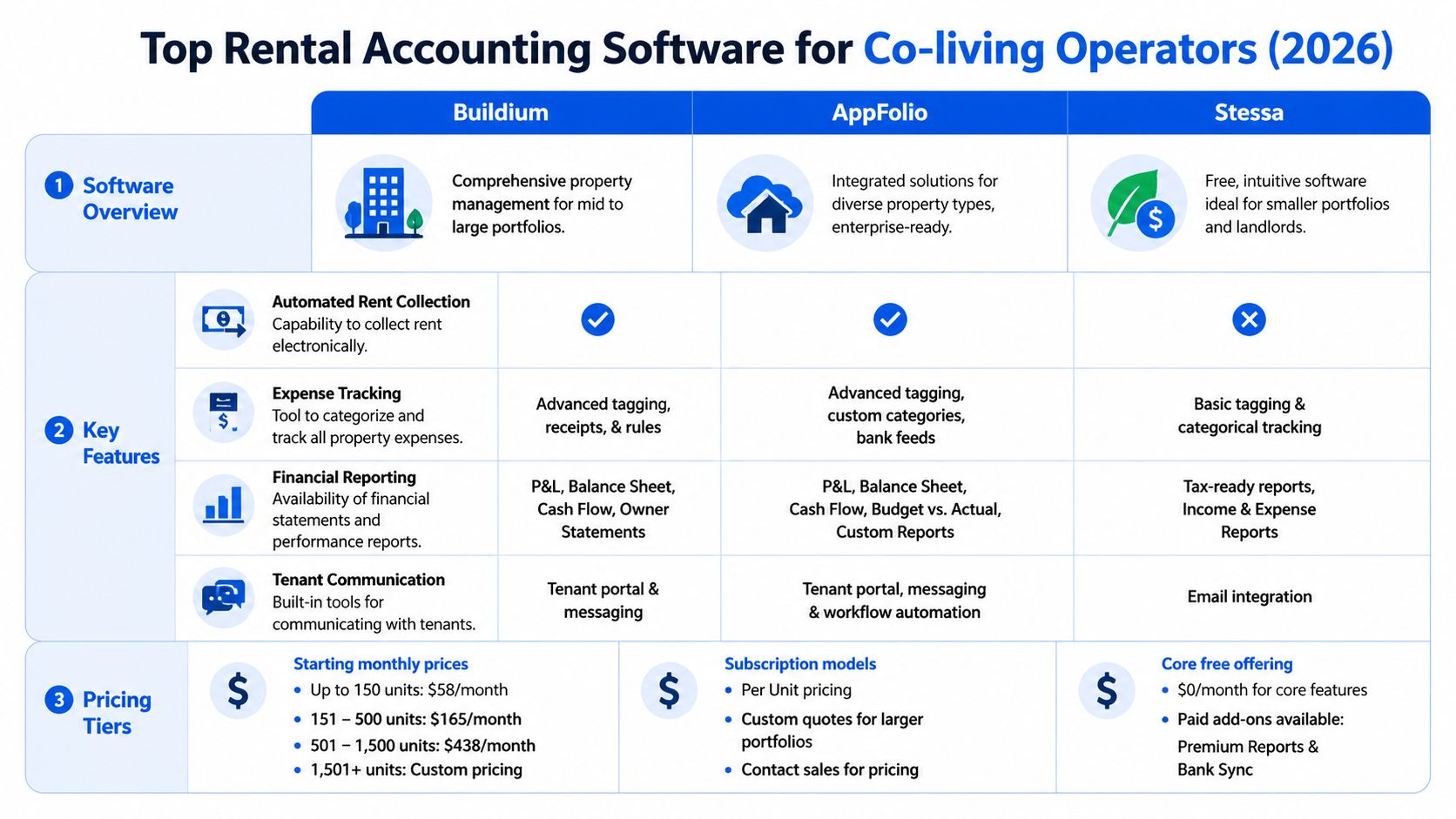
| Feature | QuickBooks Online | Stessa | Buildium | AppFolio |
|---|---|---|---|---|
| Best fit | General accounting with rental customization | Small landlords who want rental-specific bookkeeping | Operators who want accounting and property workflows in one system | Larger portfolios with heavier process and team coordination |
| Rental-specific reporting | Limited without custom setup | Good for standard rental reporting | Good built-in rental accounting reports | Good reporting across larger portfolios |
| Bank automation | Yes | Yes | Yes | Yes |
| Rent collection workflow | Basic | Limited operational depth | Integrated with property management workflows | Integrated with larger operational workflows |
| Room-by-room fit for co-living | Manual setup required | Better at property visibility than room economics | Better operational fit than general accounting, still property-centric | Better for scale than room-level profit tracking |
| Pricing context | Lower entry cost, but setup time is real | Free core plan | Mid-market pricing | Custom pricing |
QuickBooks Online fits operators who can manage the accounting architecture themselves
QuickBooks Online is still the default choice for many small operators because accountants know it, bookkeepers can work in it quickly, and it handles core bookkeeping well. Intuit’s own QuickBooks Online pricing page shows the product starts at a relatively low monthly cost compared with property management platforms.
That low entry cost hides the trade-off. In co-living, you have to design the structure yourself. Classes, locations, products, customer records, deposit liabilities, and cleanup rules all need thought upfront. If that setup is sloppy, the books drift fast.
QuickBooks works best when the operator has one of these advantages:
- A strong bookkeeper who can build and maintain the file
- Simple operations with limited resident movement
- A separate operating stack that already handles leasing and payments
- A clear reporting model for rooms, houses, and shared costs
Where it breaks down is familiar to anyone running room-by-room rentals. Room-level margin often lives in spreadsheets. Utility splits usually sit outside the system. Transfers between rooms create accounting mess unless someone is disciplined. QuickBooks can support a co-living business, but it does not understand one.
Stessa is a good cleanup tool for smaller portfolios
Stessa earns attention because it gets smaller landlords out of spreadsheet mode without much setup pain. Wise’s review of rental property accounting software notes that Stessa offers free rental-focused accounting with bank syncing, reporting, and landlord-friendly dashboards.
That makes it useful for operators who mainly need cleaner books, easier tax organization, and basic property visibility.
I would choose Stessa over QuickBooks in one specific case. The operator wants rental-focused reporting fast, does not want to build an accounting structure from scratch, and can live without deeper operational control inside the same platform.
Its limitations matter in co-living:
- Room-level performance still needs outside tracking
- Frequent resident changes create process gaps
- Collections, credits, and move-in exceptions are not the core strength
- House operations still require other tools
Stessa is a better fit for standard rentals than active shared housing. It gives you cleaner books. It does not solve the room economics problem.
Buildium is the better middle ground if accounting and operations need to live together
Buildium usually fits operators who have moved past basic bookkeeping pain and now need one system to handle rent collection, accounting, payables, and day-to-day property workflows. Buildium’s software comparison page positions it as an all-in-one rental property accounting option and highlights features such as bank syncing and tax reporting support.
That matters because co-living friction often comes from handoffs. A resident pays late, changes rooms, gets a prorated charge, and leaves a deposit issue behind. If accounting sits far from the operational workflow, someone has to patch those events together manually.
Buildium reduces more of that work than QuickBooks or Stessa. It is easier to train on, and the accounting is closer to the leasing and rent collection process. For many growing operators, that is enough to justify the higher cost.
Where Buildium helps most:
- Teams managing multiple houses
- Operators who want fewer disconnected systems
- Staff who need rental workflows, not just bookkeeping tools
- Portfolios where month-end cleanup is becoming a recurring problem
The trade-off is structural. Buildium is still organized around conventional rental units and properties. If your team cares about room contribution margin, shared kitchen supply costs by house, or vacancy patterns by room type, you will still build some reporting outside the platform.
A short demo helps if you want to see how a mainstream rental accounting platform is positioned for larger workflows.
AppFolio makes sense once volume is the main pain point
AppFolio is usually the strongest option in this group for larger teams that need tighter process control, better workflow automation, and cleaner oversight across a bigger portfolio. AppFolio’s property management accounting software comparison presents it as a leading option for operators who need accounting tied closely to broader management functions.
That strength shows up when transaction volume climbs. More residents mean more charges, more exceptions, more reconciliations, and more chances for accounting mistakes if the workflow is fragmented.
AppFolio is a strong choice for:
- Larger portfolios with staff across leasing, operations, and accounting
- Teams that need stronger controls and approvals
- Operators who value automation more than low software cost
- Businesses that have outgrown entry-level tools
The limitation is the same one I see across almost every mainstream platform. AppFolio handles scale better than it handles the native financial model of co-living. You get better process discipline and better automation. You still do not get a built-in room-by-room P&L model for a shared house.
That is the consistent pattern across all four tools. QuickBooks gives accounting flexibility. Stessa gives smaller owners an easier start. Buildium gives a practical operations-accounting mix. AppFolio gives larger operators stronger process control. None of them were built around the financial reality of room-by-room rentals.
If you are comparing software beyond accounting alone, it helps to review co-living platform pricing and software stack options alongside the accounting decision.
Situational Recommendations for Co-living Operators
A co-living operator with one shared house can survive on a basic setup for a while. Then the edge cases start piling up. One resident pays weekly, another prepays half a month, utilities need to be split across rooms, and a vacant room drags down house performance even though the property-level P&L still looks acceptable.
That is why software choice should follow the operating model, not the logo on the homepage. Room-by-room rentals create accounting questions that standard landlord software often treats as side cases.

The starting host
This operator usually has one or two houses and needs cleaner books without turning software setup into a second job. The common problem is not lack of effort. It is that rent, deposits, utility reimbursements, and house expenses are being tracked in too many places.
Best starting option: Stessa
Stessa makes sense if the immediate goal is to stop running the business from bank feeds and spreadsheet tabs. It is easier to get running than QuickBooks, and it feels closer to rental operations out of the box.
Why it tends to work at this stage:
- Lower setup burden for a small operator
- Basic rental reporting without building everything from scratch
- A simpler starting point for owners who are not ready for a full property management system
The trade-off is important. Stessa can organize property finances, but it still does not really think in rooms, beds, or house-level shared-cost allocation. For co-living, that gap shows up quickly.
Second option: QuickBooks Online
QuickBooks is still a reasonable first choice if your accountant wants it, or if you already run another business there. I have seen it work well for operators who are disciplined about classes, locations, and a custom chart of accounts. I have also seen small hosts overbuild the setup and create more bookkeeping work than they had before.
The growing operator
Growth changes the problem. The issue is no longer whether income and expenses are recorded. The issue is whether the system can keep up with operational reality.
A growing co-living business often needs to answer questions that generic software comparisons skip over:
- Which house is underperforming because of room vacancy, not total property vacancy
- Whether shared utilities and cleaning are being allocated consistently
- How to separate security deposits, one-time fees, and recurring rent cleanly
- Which exceptions still require manual correction every month
Best fit: Buildium
Buildium is often the practical middle ground once more people are touching the workflow. Leasing, rent collection, resident records, and accounting start affecting each other, so keeping them in separate tools gets expensive in staff time.
Buildium is a good fit for operators who want:
- One system to support both accounting and daily property workflows
- Better consistency across multiple houses
- Less manual re-entry between ops and bookkeeping
- More structure without stepping up to an enterprise platform
The limitation is familiar. Buildium tracks properties better than it tracks the internal economics of a shared house. If you need true room-by-room financial visibility, you will still end up adding process outside the accounting system.
If you are rethinking the full operating stack, not just the books, this guide to co-living property management systems for shared housing operators is a useful next reference.
The professional manager
At this stage, the business usually has enough volume that weak process discipline turns into reporting errors, missed follow-ups, and painful month-end cleanup. Owners want cleaner reporting. Staff need permissions and approvals. Finance needs fewer exceptions.
Best fit: AppFolio
AppFolio is the choice I would make when scale, controls, and cross-team coordination matter more than keeping software costs low. It handles heavier transaction volume and larger teams better than lighter tools.
It is a strong fit when you need:
- More formal controls across leasing, operations, and accounting
- Better workflow management for staff
- Faster handling of higher transaction volume
- Cleaner owner and internal reporting
The trade-off is the same one co-living operators keep running into. AppFolio improves process control, but it still does not give you a native room-level profit model for a shared house. You gain structure. You still have to solve co-living economics with workarounds.
Secondary option: Buildium
Buildium is the more realistic step if AppFolio feels too heavy, too expensive, or too early for the current team.
What I would actually prioritize
I would choose based on the next bottleneck, not the broadest feature list.
If the bottleneck is basic bookkeeping discipline, start with Stessa or QuickBooks. If the bottleneck is operational handoff between leasing, rent collection, and accounting, Buildium usually earns its place. If the bottleneck is scale, controls, and team accountability, AppFolio is the stronger answer.
For co-living operators, one test matters more than any marketing checklist. Can the system show how each house is performing in the way you run it, including room turnover, shared costs, and mixed payment patterns? If the answer is no, the software may still be usable, but you should go in expecting extra reporting work outside the platform.
How to Migrate and Set Up Your New System
Most operators delay software migration because they assume it will be a painful reset. It doesn’t have to be. The cleanest move is usually a controlled handoff, not a perfect historical rebuild.
Start with clean exports, not perfect history
Export your current data first. That usually means bank transactions, rent records, vendor lists, deposits, and any spreadsheet tabs you rely on for property or room tracking.
Don’t try to fix every old bookkeeping mistake before you migrate. Instead, separate the work into two buckets:
- What needs to be accurate going forward
- What needs to stay accessible for reference
For many small operators, a clean start date with archived history is more practical than recreating every prior detail inside the new system.
Build a chart of accounts around how you operate
Generic setups present challenges. A co-living business needs categories that reflect actual revenue and costs, not just generic small-business bookkeeping.
A practical chart usually includes items like:
- Rent income by property
- Late fees or other resident charges
- Security deposits as liabilities
- Utilities
- Cleaning and turnover costs
- Repairs and maintenance
- Supplies for common areas
- Smart-home or access system subscriptions
- Marketing or leasing expenses
- Management and admin costs
Keep it simple enough that your team will use it consistently. A bloated chart of accounts creates confusion faster than it creates insight.
The best chart of accounts is not the most detailed one. It’s the one your team can categorize correctly every week.
Set up properties and rooms deliberately
This is the step most room-rental operators rush, and it’s the one that determines whether reporting helps later.
At minimum, decide how you’ll represent:
| Setup decision | Why it matters |
|---|---|
| Property names | Keeps portfolio reporting clean |
| Room identifiers | Helps track performance within one address |
| Tenant naming conventions | Reduces confusion when roommates change |
| Tags or classes | Helps allocate shared expenses and analyze trends |
If your software doesn’t support true room-level structure, create a consistent workaround from the beginning. Don’t improvise it later.
Connect bank feeds and create rules early
Once the structure is in place, connect your banking and payment accounts. Then build categorization rules for recurring activity like utilities, software subscriptions, internet, maintenance vendors, and mortgage-related transactions.
Automation starts paying off. A good rule set cuts routine coding work and keeps reports current without a monthly cleanup marathon.
Run one parallel close
Before you fully switch, run one month where you compare your old process with the new one. Check totals, balances, and major categories. You’re not looking for perfection on day one. You’re making sure the system reflects reality closely enough to trust.
After that, commit. Half-migrated bookkeeping is worse than either old or new software alone.
The Future of Co-living Financial Management
A six-bed house can look fine on a standard monthly P&L while one room turns over twice, another tenant pays late, and utility overruns wipe out the margin on the whole property. That is the gap generic rental accounting still misses. Co-living finance is not only about tracking income and expenses by address. It is about seeing what is happening inside the address, fast enough to act on it.
Most accounting tools still treat a property as one unit with a rent roll attached. That works for a single-family rental. It breaks down when revenue changes room by room, turn costs hit unevenly, and operational events affect cash flow within days instead of months. In co-living, pricing, occupancy, collections, access, and maintenance all feed the same financial outcome.
The next step is tighter operational and financial coordination. A vacant room should hit projected revenue right away. A delayed payment should show up in collections workflows and cash planning, not wait until month-end cleanup. A move-in, lock change, or shortened stay should update the same system you use to judge property performance. Operators do not need prettier dashboards. They need shorter distance between what happened in the house and what shows up in the numbers.
Some rental platforms have already moved part of the way there, as noted earlier in the article. The broader lesson is straightforward. Software designed around rental operations usually performs better than forcing a general ledger tool to carry room-level leasing and turnover logic it was never built to handle. Still, even the better options are incomplete for room-by-room portfolios. Many can track properties well enough. Fewer can show whether Bedroom 3 in House A is repeatedly dragging down occupancy, collections, or turn cost.
What the best future system should do
The strongest co-living financial setup should bring together:
- Room-level revenue tracking
- Occupancy changes tied directly to cash flow forecasts
- Automated collections and payment follow-up
- Shared expense allocation without spreadsheet workarounds
- Inputs from leasing, access, maintenance, and resident communication tools
- Reporting that supports pricing and turnover decisions, not only bookkeeping and tax filing
That is the primary win. It is not prettier reporting. It is seeing financial impact while there is still time to fix the problem.
What to do now
Do not wait for a perfect platform. Choose a system that reduces manual entry, gives you reports you can trust, and leaves room for a more connected setup later.
For co-living operators, that usually means three practical decisions:
- Stop using spreadsheets as the main bookkeeping system
- Choose software based on room-by-room operations, not generic landlord marketing
- Set up properties, rooms, tags, and workflows cleanly now so future integrations are possible
The best accounting software for rental properties is not the one with the loudest brand or the longest feature list. It is the one that helps you spot underperforming rooms, understand turnover cost by house, and make better decisions in a business where one vacant bedroom can change the month.
If you’re building toward a more integrated co-living operation, PadPulse is worth watching. It’s being developed specifically for PadSplit hosts and room-by-room operators who need pricing, communications, access control, and financial visibility to work together. Join the interest list to follow the Winter 2026 launch plans, beta updates, and early access opportunities.