The Best Free Accounting Software for Landlords in 2026
May 26, 2026
If you're managing rentals with a spreadsheet, a bank app, and a folder full of receipt photos, you're not alone. Most landlords start there because it's cheap, familiar, and good enough for a while.
Then the cracks show. A payment comes in without a note. A utility bill covers multiple tenants and one vacant room. A deposit refund doesn't match what you thought you were holding. At tax time, you aren't doing accounting. You're reconstructing history.
That gets worse with room-by-room rentals. One house can behave like several mini businesses under one roof. Different move-in dates, partial-month rent, shared utilities, turnover costs, furnished rooms, and frequent small transactions all create bookkeeping work that a simple rental spreadsheet doesn't handle well.
A lot of advice about free accounting software for landlords skips that reality. It treats a co-living house like a standard single-tenant rental. But as this overview of property management software helps clarify, the question isn't just whether software collects rent or logs expenses. It's whether it matches the operating model you're running.
Why Your Spreadsheet Is Costing You Money
The problem with spreadsheets isn't that they're useless. The problem is that they hide operational mistakes until those mistakes are expensive.
I've seen landlords track one property in one tab, receipts in a cloud folder, deposits in a notes app, and rent status in text messages. It works right up until someone asks a basic question. Which room is underperforming? How much did turnover really cost last month? Are you collecting enough to cover shared utilities and recurring repairs?
For a standard rental, the damage is usually time. For co-living, it's time plus blurred visibility. When several tenants share one address, you need a cleaner way to separate room income, common-area costs, and resident-specific charges. Most online guides still don't answer the practical question of when free stops being enough for room-by-room portfolios, and they often blur the line between basic landlord software and true accounting tools, which leaves co-living operators without a clear decision framework, as noted by GoCardless in its landlord accounting guide.
What the spreadsheet usually misses
- Room-level performance: A house might look profitable overall while one room is a hidden drag on returns because of vacancy, concessions, or repeated repairs.
- Shared cost allocation: Internet, water, power, and cleaning often benefit everyone, but spreadsheets rarely make allocation easy or consistent.
- Deposit accountability: In co-living, you're often holding and refunding deposits for multiple residents at the same property.
- Turnover patterns: Frequent move-ins and move-outs create more entries, more chances for coding errors, and more manual cleanup.
Free software can save money. Manual bookkeeping rarely saves time.
The true cost isn't the spreadsheet file itself. It's the weekend you spend fixing categories, the missed reimbursement, and the fact that you can't spot trends early enough to act on them.
What Co-Living Landlords Must Track
Room-by-room rentals need more than basic income and expense logging. You need accounting that reflects how the house operates.
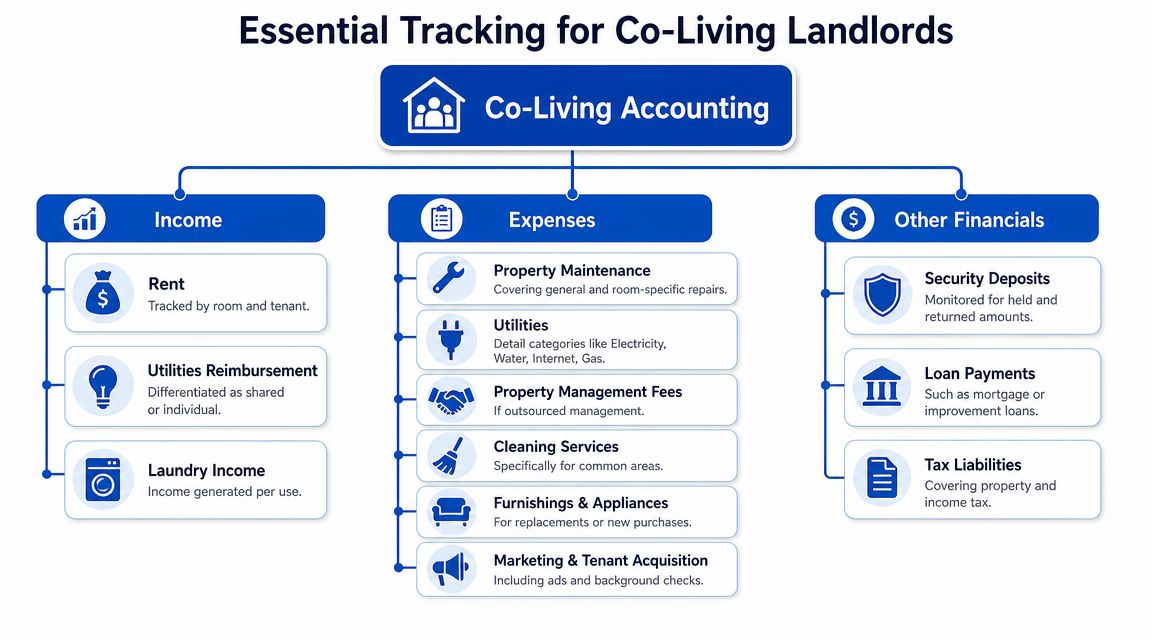
Recent rental software roundups show how landlord tools evolved from general bookkeeping toward rental-specific systems. Platforms such as Avail and Stessa focus on property-level tracking and Schedule E-style reporting for real estate investors, which reflects a broader shift toward software built around rental workflows rather than generic bookkeeping alone, according to REI Hub's review of rental property accounting software. That's useful, but co-living still adds another layer.
Income isn't just rent
A co-living operator usually needs to separate several types of incoming money.
- Room rent: Track each room and each tenant separately, even inside the same house.
- Utility reimbursements: Keep these distinct from base rent if tenants pay part of shared bills.
- Fees and charges: Late fees, lockout charges, cleaning charges, and replacement costs shouldn't disappear into one generic income line.
- Other house income: Laundry, parking, storage, or furnished-room add-ons may matter if you offer them.
If all income lands in one bucket, you lose clarity fast.
Expenses need more detail than a normal rental
A single-family landlord can get away with broad categories for longer. Co-living landlords usually can't.
- Shared utilities: Internet, electricity, water, and gas often rise and fall with occupancy.
- Room-specific repairs: A broken bedroom lock is different from a plumbing issue affecting the whole house.
- Common-area cleaning: This is often a recurring operating cost, not a one-off.
- Furnishings and replacements: Mattresses, desks, lamps, mini fridges, and small appliances add up.
- Marketing and tenant acquisition: Listings, screening, and turnover prep happen more often in room-by-room models.
Other balances that matter
You also need clean records for non-income items that still affect cash flow and compliance.
- Security deposits: Hold them by resident, not just by property.
- Loan and mortgage payments: Keep principal and interest treatment consistent inside your accounting system.
- Tax-related categories: Separate categories make reporting cleaner later.
- Cash reserves: Co-living houses often have more frequent small repairs, so visibility into available cash matters.
Practical rule: If a transaction would make you stop and explain it to a bookkeeper, it deserves its own category.
A useful test is simple. Can you run a profit and loss by property, then quickly understand what happened by room, by tenant, and by shared house operations? If not, your setup is too shallow for co-living.
Reviewing the Top Free Landlord Accounting Tools
Free landlord software has improved a lot. Reviews now show that Avail offers its rental property accounting tool free for all landlords regardless of portfolio size, and Stessa offers a free core plan that supports an unlimited number of properties. That matters because traditional landlord platforms often charge monthly fees ranging from about $50 to $460, while some enterprise-focused systems can run roughly $280 to $1,500 per month, according to Avail's roundup of landlord accounting platforms. For a new landlord, that gap makes free tools attractive.
The catch is that "free" tools don't all solve the same problem. Some are stronger at rent collection. Some are better at bookkeeping. Some are really just spreadsheet upgrades with a nicer interface.
Quick comparison through a co-living lens
| Feature | Stessa | Avail (Free Tier) | Spreadsheet Template |
|---|---|---|---|
| Best fit | DIY rental investors focused on property-level finances | Independent landlords who want rent collection and leasing tools | Very small portfolios with simple needs |
| Income tracking | Good for property income and expense organization | Good for rent collection basics | Fully manual |
| Expense categorization | Stronger than most basic landlord tools | Basic and usable | Fully manual |
| Room-level visibility | Limited for room-by-room operations | Limited for room-by-room operations | Possible, but manual and fragile |
| Shared utility allocation | Manual workaround | Manual workaround | Manual workaround |
| Tenant workflow support | Limited compared with property management tools | Better for leasing and tenant tasks | None |
| Reporting depth | Better for investors than for co-living operators | Basic reporting | Depends on your skill |
| Scalability for mixed portfolios | Moderate until workflows get complex | Moderate for small portfolios | Weak |
Stessa
Stessa makes sense for landlords who care most about organizing rental finances at the property level. It's one of the cleaner free options if your main pain point is income, expense, and tax-oriented reporting.
What it doesn't do especially well for co-living is room-level operations. If several tenants live in one property, you may still need manual notes, naming conventions, or off-platform tracking to understand which room is generating what. That's manageable early on, but it gets messy when turnover increases.
Avail free tier
Avail is more operational. It helps with rent collection, leasing, and landlord workflows, which makes it appealing if you're self-managing tenants directly.
For room-by-room landlords, the issue isn't whether Avail is useful. It is. The issue is that free landlord software usually organizes around the property and lease, not around house-level shared economics. If you want to know whether Room 3 consistently underperforms after cleaning, furnishing, and vacancy costs, you'll likely build a manual process around the software.
Spreadsheet template
Spreadsheets still have one big advantage. You can structure them however you want.
That flexibility is also the trap. Most landlords don't maintain disciplined formulas, naming conventions, and reconciliation habits for long. One accidental overwrite or one missed bank entry can throw off the whole file. Spreadsheets are fine for testing a setup. They're weak as an operating system.
What works and what doesn't
What usually works in free accounting software for landlords:
- Basic rent logging: You can track incoming rent and common expenses without much trouble.
- Simple categorization: Most tools support standard expense buckets well enough for a small portfolio.
- Entry-level reporting: Landlords can usually get a basic income and expense snapshot.
What usually doesn't work for co-living:
- Per-room profit visibility: Most free tools stop at the property level.
- Shared-cost logic: Utilities and common-area costs still need manual handling.
- Mixed portfolio reporting: One-by-one review becomes tedious when you manage different property types.
- Operational context: Accounting is separated from house workflows, so you still jump between systems.
If you're choosing among free tools, choose based on your bottleneck. If bookkeeping is the pain, Stessa is often the cleaner starting point. If tenant operations are the pain, Avail may fit better. If your portfolio is mostly room-by-room, neither fully solves the accounting model on its own.
Setting Up Your Co-Living Chart of Accounts
A solid chart of accounts fixes a lot of confusion before software ever does. If your categories are vague, your reports will be vague too.
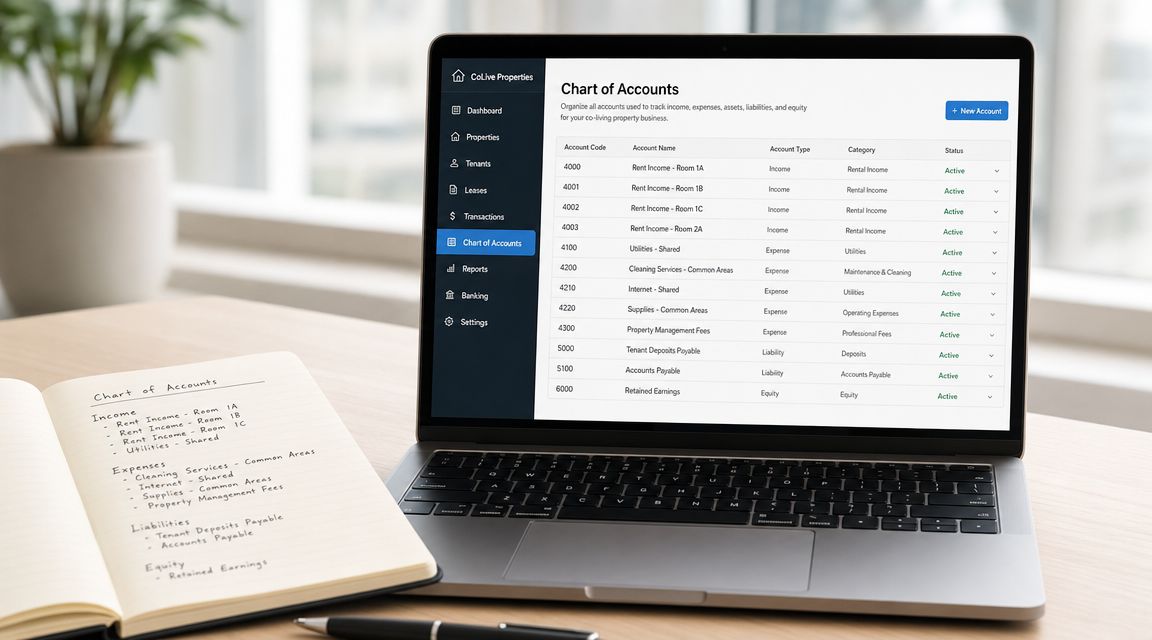
The goal isn't to create dozens of categories for the sake of it. The goal is to separate transactions in a way that helps you answer real operating questions. If you're new to bookkeeping, it also helps to understand how a rent ledger works in practice, because the ledger and chart of accounts need to support each other.
A simple co-living chart of accounts
| Account type | Example account |
|---|---|
| Income | Rent Income, Room A |
| Income | Rent Income, Room B |
| Income | Utility Reimbursement |
| Income | Late Fees |
| Income | Application or Admin Fees |
| Expense | Utilities, Electricity |
| Expense | Utilities, Water |
| Expense | Utilities, Gas |
| Expense | Utilities, Shared Internet |
| Expense | Cleaning, Common Areas |
| Expense | Repairs, Common Area |
| Expense | Repairs, Room Turnover |
| Expense | Furnishings and Appliances |
| Expense | Marketing and Leasing |
| Expense | Tenant Screening |
| Expense | Supplies |
| Liability | Security Deposits Held |
| Liability | Utility Credits Owed |
| Loan | Mortgage Payable or Improvement Loan |
| Equity | Owner Contribution |
| Equity | Owner Draw |
How to structure it without overbuilding
Start with categories you know you'll use every month. Shared internet deserves its own line if every house has it. Laundry income doesn't need a separate account if you never charge for it.
Use subaccounts when they answer a repeated question. "Repairs" is too broad for co-living. Breaking it into common-area repairs and room-turnover repairs gives you better insight without making bookkeeping painful.
A short walkthrough can help if you're setting this up for the first time:
Naming rules that save headaches
- Keep room names consistent: If you use "Room A" in leases, use "Room A" in your accounting.
- Separate reimbursements from rent: That helps you see whether base pricing is working.
- Don't bury deposits in income: Deposits are usually a liability until applied or refunded.
- Create turnover-specific expense lines: This makes vacancy and make-ready costs easier to measure.
A clean chart of accounts won't make free software more powerful, but it will make your reports more honest.
Most landlords don't need accountant-level complexity. They need categories that reflect the actual business model. For co-living, that means separating room income, shared operating costs, and resident-held funds from day one.
Your First Steps with Free Accounting Software
The move from spreadsheet chaos to organized software feels bigger than it is. The easiest way to do it is to migrate only what you need to run the business well going forward.
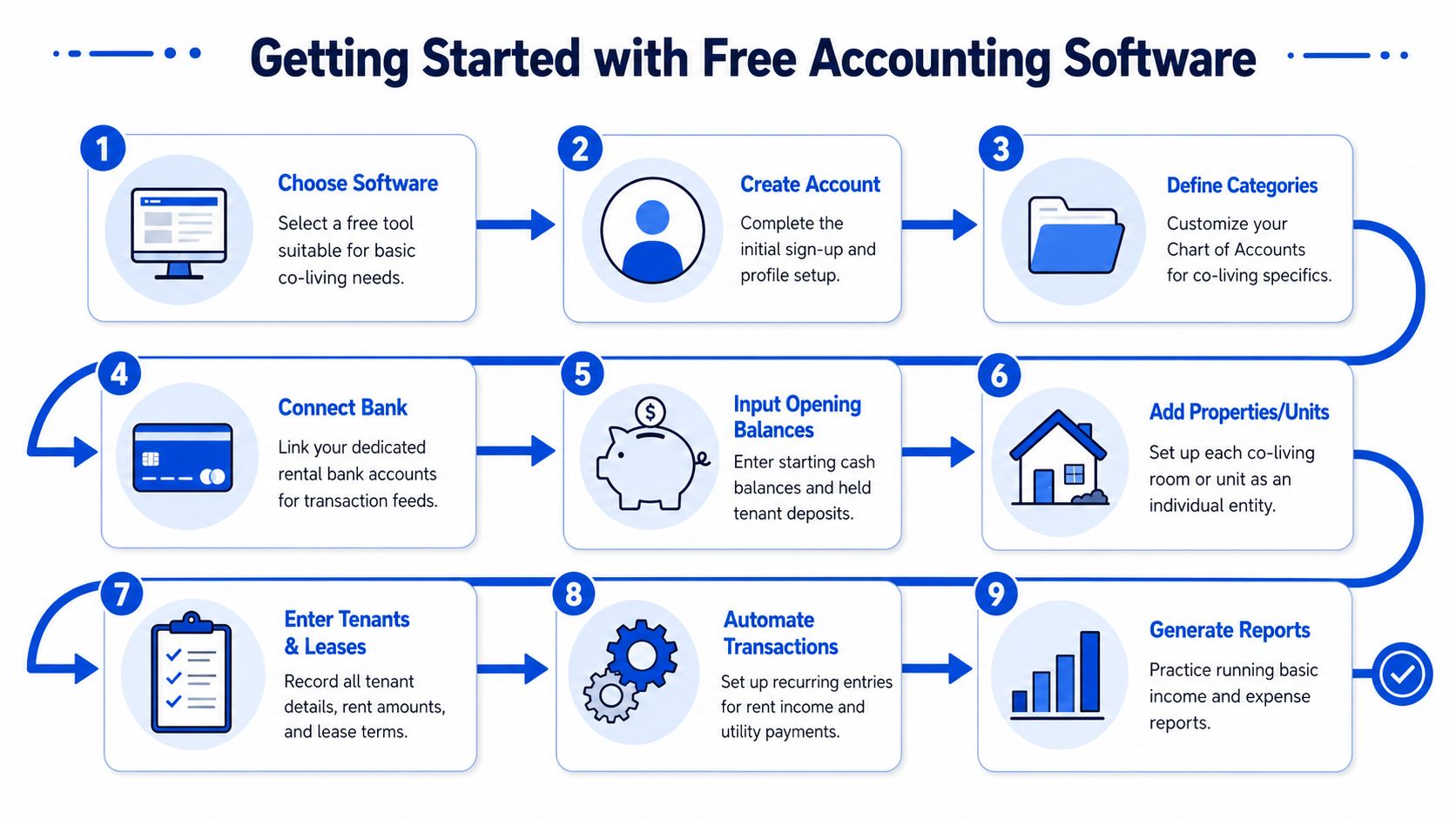
Start with the current year, not your entire history
Most landlords stall because they think they need to rebuild every transaction they've ever made. You usually don't.
Start with your current balances, current tenants, and current-year income and expenses. If older data matters for taxes or a refinance, keep it archived and import only what you'll actively use.
A practical setup sequence
Choose one tool and commit for a trial period
Pick Stessa, Avail, or another free option based on your main pain point. Don't test five tools at once.Create the property structure
Add each house first. Then decide how you'll identify each room, even if the software doesn't support room-level entities cleanly.Load your chart of accounts
Use the co-living structure above. Keep it simple enough to maintain.Enter opening balances
Add bank balances, unpaid bills if you're tracking them, and security deposits you're holding.Input your active rent roll
Record each current tenant, lease amount, due date, and any recurring charges such as utilities or fees.Backfill key transactions
Enter income and expenses for the current tax year. Focus on clean categories, not perfection.Set recurring items
Rent, internet, cleaners, lawn care, and software fees should not require manual entry every month.
What to check in the first month
The first month isn't about advanced reporting. It's about trust.
- Match rent received to expected rent
- Confirm every deposit is tracked separately
- Review utility coding for consistency
- Run one basic income and expense report
- Check whether you can understand results without opening your spreadsheet
If you still need the spreadsheet every time you want an answer, the software isn't set up well enough yet.
A simple rule helps here. Make the system useful before you make it elegant. Landlords get better results from a plain, disciplined setup than from a complicated chart they abandon after two weeks.
Signs You Have Outgrown Free Accounting Software
Free tools are good starting points. They stop being good deals when they create daily friction.
One of the clearest patterns in landlord software is that the limit isn't basic bookkeeping. It's workflow completeness. Independent reviews note that free plans often cover rent collection, expense tracking, and simple reporting, but they tend to fall short when landlords need bank-linked imports, maintenance workflows, tenant screening, forecasting, or portfolio-scale reporting. At that point, many landlords end up stitching together spreadsheets or upgrading, as described in DoorLoop's review of free versus paid property management software.
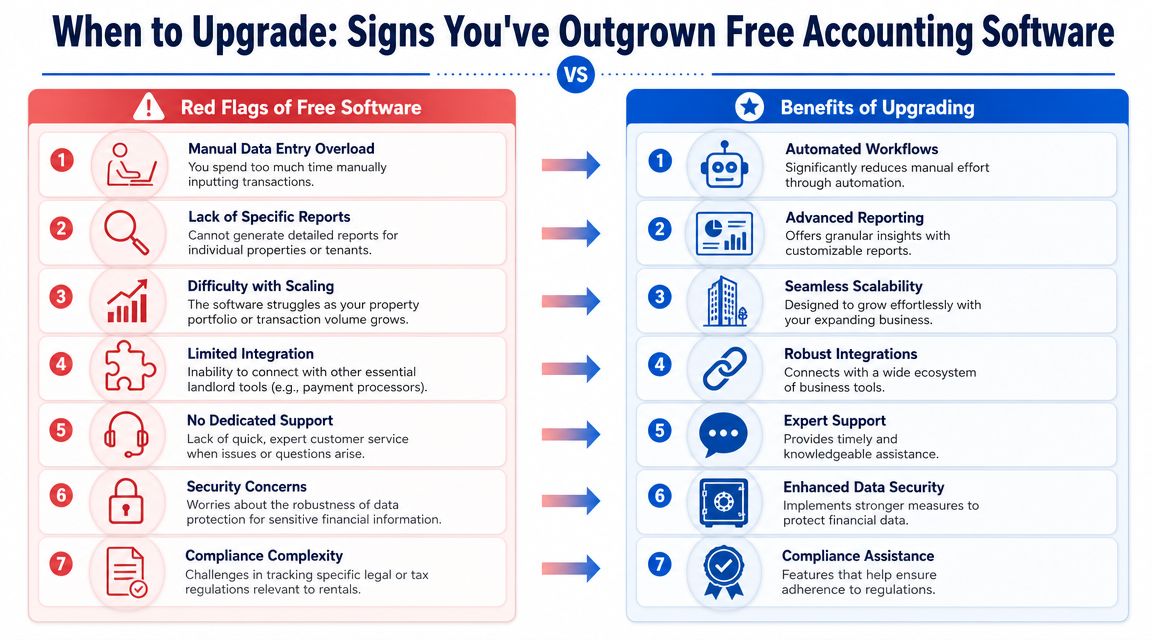
Red flags that show up first in co-living
The pressure shows up earlier in room-by-room portfolios because there are more moving parts per property.
- You still reconcile by hand every week: If rent, reimbursements, and deposits need constant manual cleanup, the software isn't reducing workload.
- Your reports stop at the property level: Co-living operators often need more detail than "House A made money."
- Shared costs are always guessed: If utility allocation depends on memory or side notes, your books aren't reliable.
- Turnover bookkeeping spills into operations: Cleaning, lock changes, furnishing, and move-in charges often live in separate tools with no clean accounting trail.
Hidden costs of "free"
Free plans often save subscription cost while pushing complexity somewhere else. Buildium's review of free property management accounting software notes that common restrictions include about $1 to $3 per ACH transfer or around 2.9% for credit cards, while advanced reporting, bank reconciliation, owner portals, and compliant trust accounting are often reserved for paid tiers or missing entirely in free products, as summarized in Buildium's guide to free property management accounting software trade-offs.
That doesn't mean free software is bad. It means the price tag is only part of the cost.
When automation becomes the real need
Many landlords think they need "better accounting software" when what they need is less manual admin. Recent market coverage points to a broader shift toward AI-assisted and automation-heavy workflows such as receipt scanning, real-time dashboards, online rent collection, and AI lease audits in landlord finance, which changes the standard landlords should use when evaluating software, as discussed in TurboTenant's overview of landlord accounting software for small landlords.
If your accounting system requires a second system just to explain the first one, you've outgrown it.
For room-by-room operators, that usually means one of two things. Either you upgrade to a more complete professional stack, or you move toward a system designed for co-living operations where messaging, pricing, access control, and reporting live closer together. If you're comparing options, this roundup of the best accounting software for rental properties is a useful next read.
From Bookkeeping to Business Optimization
Most landlords start by trying to get organized. That's the right first move. Free accounting software for landlords can absolutely help you replace scattered spreadsheets, clean up expense tracking, and get basic reporting under control.
But bookkeeping alone doesn't tell you how to run a stronger co-living business. It doesn't tell you which rooms underperform, whether your pricing is keeping pace with demand, or where admin work is eating your margin. Those questions matter more as soon as you manage multiple shared houses or mixed portfolios.
That's where the shift happens. You stop looking for software that merely records transactions and start looking for systems that reduce operational drag. For co-living operators, that often means tighter connections between pricing, communication, access, occupancy, and financial reporting.
One example is PadPulse, an in-development platform built for PadSplit hosts and co-living operators. Based on the company's published description, it is designed to combine room-by-room financial visibility with features such as automated dynamic pricing, AI-powered messaging workflows, smart-lock integrations, and portfolio-level analytics. That kind of setup is different from a basic free accounting tool because it treats accounting as part of daily operations, not a separate back-office task.
The practical takeaway is simple. Use free tools to get your books under control. Then pay attention to the moment when "free" starts costing you clarity, speed, and consistency. For co-living landlords, that moment usually arrives sooner than expected.
If you're running room-by-room rentals and want a system built around that model, join the PadPulse interest list. You'll get updates on the Winter 2026 beta, early access details, and a look at how the platform is being shaped for co-living operators before launch.