Boost Revenue With a Dynamic Pricing Tool in 2026
May 15, 2026
You've probably been there. A room opens up on Tuesday, three leads ask about it, and you have to decide whether to raise the price, keep it steady, or drop it to fill fast. Then a local event hits, a nearby operator changes rates, and suddenly the number you picked on Sunday already feels stale.
That's where a dynamic pricing tool starts to make sense for co-living and room-by-room rentals. Not as some mysterious AI box, but as a faster way to react to what's happening around your property without spending your day buried in spreadsheets.
For pad-style rentals, pricing is trickier than it looks. You're not just pricing one whole home. You're pricing individual rooms, often with different sizes, layouts, amenities, lease flexibility, and vacancy pressure. A tool that works well for a weekend Airbnb host doesn't always fit a shared housing operator trying to protect occupancy and NOI across multiple rooms.
Understanding Dynamic Pricing Tools
Most new hosts start with manual pricing. They look at a few nearby listings, pick a number that feels reasonable, and maybe adjust it once in a while if the room sits too long. That works at the beginning. It doesn't work well once you're managing multiple rooms, different neighborhoods, and changing demand.
A dynamic pricing tool is software that adjusts rates based on market conditions instead of leaving prices fixed. Think of how airline seats or ride-share prices change when demand changes. Room rentals can work the same way. If demand rises, the tool may recommend a higher rate. If a room is staying vacant too long, it may recommend a lower one.
Dynamic pricing is simply a way to match your rate to current market conditions instead of relying on last month's guess.
This category has grown well beyond airlines and hotels. The global dynamic pricing and yield management market was valued at USD 5.2 billion in 2024 and is projected to reach USD 10.8 billion by 2034, according to GM Insights market research on dynamic pricing and yield management. That matters because it shows these tools have become mainstream software, not a niche experiment.
What a dynamic pricing tool really does
Beginners often assume the tool is just a calculator. It's closer to an assistant that keeps checking the market for you.
A modern tool typically does four things:
- Watches the market by tracking things like comparable rates, seasonality, booking pace, and local demand signals.
- Analyzes the signals using pricing logic or algorithms to estimate what rate makes sense now.
- Applies your guardrails so it stays within the limits you set, such as a base price, minimum, and maximum.
- Pushes updates automatically to connected channels so you don't have to edit every listing by hand.
For co-living, the big idea isn't “charge the highest possible rent.” It's to find the rate that balances fill speed and revenue.
Why co-living operators should care
If you rent whole units, one pricing decision affects one lease. In room-by-room housing, every empty room creates its own problem. One room might have strong lead volume. Another might need a price nudge because it's smaller, has fewer windows, or came available during a slower week.
That's why dynamic pricing feels different in this niche. You need room-level decisions, not just property-level averages.
Coffee-shop rule: If you're checking nearby listings manually and updating prices only when a vacancy drags on, you're already doing dynamic pricing. You're just doing it slowly.
A good dynamic pricing tool doesn't replace your judgment. It gives your judgment a much faster feedback loop.
How Automated Pricing Optimizes Room Rentals
When people hear “algorithm,” they often picture something opaque. In practice, the logic is pretty simple. The software gathers signals, weighs them, and suggests a price based on what's happening now.
Here's the visual version of that process:
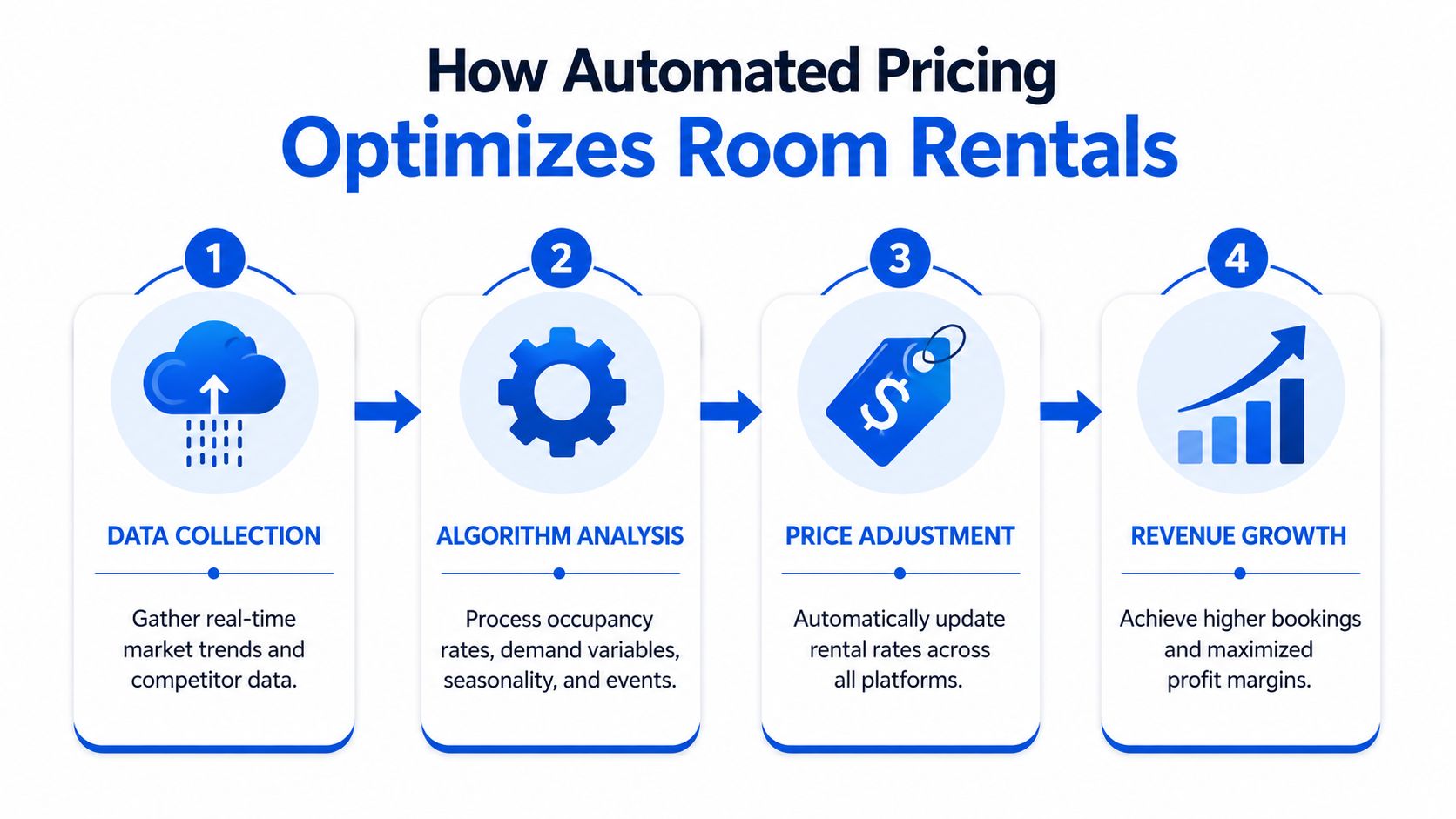
The basic pricing loop
For room rentals, a dynamic pricing tool usually pulls in a mix of outside and inside signals.
Outside signals often include:
- Comparable listing rates in the same area
- Seasonality such as slower winter demand or stronger summer moves
- Local events and holidays that can change demand quickly
Inside signals usually include:
- Booking pace or how fast rooms are getting filled
- Current occupancy
- Lead time or how far out the vacancy is
- Historical performance for that room or property
The tool then runs an analyze, recommend, and push cycle. It calculates a nightly, weekly, or monthly-equivalent rate within your guardrails and updates connected channels. In some setups, that loop can repeat daily or more often, which is why software reacts faster than a manual weekly review.
A simple room-by-room example
Say you have two rooms in the same house.
Room A is larger, has a private bath, and starts getting inquiries within a day of becoming available. Room B is smaller and gets less attention. A static pricing approach might leave both rooms unchanged for weeks. A dynamic pricing tool treats them differently.
If Room A is attracting quick interest, the software may hold the price firm or raise it within your limits. If Room B is getting fewer inquiries and the vacancy risk is rising, the software may lower the rate to improve fill odds before the room sits too long.
That value is essential. The tool isn't “smart” because it uses fancy terms. It's useful because it reacts to cause and effect faster than most operators can.
Later in the section, this walkthrough helps put the workflow in motion:
According to AirROI's glossary entry on dynamic pricing tools, operators moving from static manual pricing to automated dynamic pricing can see annual revenue increase by 10% to 40%. The important lesson for a new host isn't the exact outcome you should expect. It's the link between more frequent pricing updates and better income capture.
It's not about charging more every time
That's where many hosts get confused. A dynamic pricing tool doesn't always raise rates. Sometimes the best move is to protect occupancy.
If demand is soft and you hold out for a number the market won't support, you don't just lose rate. You lose time. In room-by-room rentals, time is expensive because one vacant bed can drag on property performance quickly.
Evaluating Key Features in a Pricing Tool
Once you understand the basic idea, the next question is practical. What should you look for when comparing tools?
For co-living, the answer goes beyond “does it change prices automatically?” The better question is whether the software helps you manage the tradeoff between occupancy and revenue across many small units with different demand patterns.
The features that matter most
For co-living, a key advantage is the tool's ability to combine external signals like market trends and holidays with internal signals like booking pace and inventory to optimize occupancy and revenue together, as noted by PriceLabs on dynamic pricing for short-term rentals. That combination is especially useful when one empty room can change the economics of the whole house.
Here's a practical checklist.
| Feature | What it Does | Why it Matters for Co-Living |
|---|---|---|
| Market intelligence dashboard | Shows local comparable rates, trends, and demand context | Helps you avoid pricing a room in isolation |
| Room-level pricing controls | Lets you set different logic by room type or unit | Shared houses rarely have truly identical rooms |
| Minimum and maximum guardrails | Keeps pricing within your comfort zone | Protects downside while still allowing movement |
| Occupancy-aware logic | Adjusts pricing based on current vacancy pressure | Useful when filling rooms fast matters more than squeezing rate |
| Event and seasonality adjustments | Accounts for local demand shifts over time | Prevents stale pricing during holidays or move-in peaks |
| Channel or PMS integration | Pushes rate updates automatically | Reduces manual errors and saves time |
| Override tools | Lets you step in for special situations | Important for renovations, room damage, or unusual comps |
| Reporting and performance tracking | Shows whether pricing changes are helping | Makes it easier to judge strategy instead of guessing |
Questions to ask before you choose
A polished dashboard can hide weak functionality. Ask how the tool behaves in the situations that hurt room-by-room operators.
- How does it handle weak comparable data? Some neighborhoods or room types don't have many clean comps.
- Can I price rooms differently within the same property? That matters when layouts and amenities vary.
- Can I favor occupancy over rate for selected rooms? A stale vacancy often needs a different approach than a premium room.
- How much manual control do I keep? You want automation, not loss of control.
If you're comparing broader options, this guide to short-term rental pricing tools is a useful starting point for understanding how vendors differ.
A good tool should help you make better decisions faster. It shouldn't force every room into the same formula.
Features that sound nice but aren't enough
Some hosts get distracted by surface-level features. Fancy charts are fine. Brand polish is fine. What matters more is whether the tool works in a fragmented market where every room has its own leasing story.
For this niche, I'd put controls, integrations, and room-level flexibility ahead of glossy reporting every time.
Implementing a Successful Dynamic Pricing Strategy
Buying software is easy. Setting it up well is where operators either gain confidence or end up turning the whole thing off after two weeks.
The biggest mistake beginners make is treating a dynamic pricing tool like autopilot. It isn't. The tool needs good inputs from you, especially at the start.
Start with sensible guardrails
Every pricing system needs boundaries. In room-by-room rentals, those usually begin with three numbers:
Base price
This is your normal starting point for a room under average conditions.Minimum price
This protects you from dropping too low when demand weakens.Maximum price
This stops the tool from overshooting into rates that hurt conversion.
Those numbers shouldn't come from wishful thinking. They should come from your unit quality, nearby alternatives, lease flexibility, included amenities, and your actual vacancy tolerance.
Use a short observation period
Once the tool goes live, watch what it does. Don't obsess over every tiny movement, but do pay attention to patterns.
Look for questions like these:
- Is the tool keeping one room near the floor too often?
- Is a premium room consistently getting underpriced?
- Are price changes lining up with inquiry volume?
- Is the software reacting appropriately when multiple rooms open at once?
This early monitoring period tells you whether the guardrails are realistic or whether your setup is boxing the tool in.
Operator habit: Review recommendations regularly at first. The goal is to learn how the system “thinks” in your market before you trust it with more autonomy.
Match pricing with operations
Pricing works best when it's connected to the rest of the leasing workflow. If your response time is slow, your listing copy is weak, or your move-in process is clunky, a better rate alone won't fix the vacancy problem.
That's why many operators eventually pair pricing with broader automation. If you're thinking about the bigger workflow, this article on short-term rental automation is a good companion read.
One practical setup I like for new hosts is simple: start with moderate guardrails, review often for the first stretch, and use manual overrides only when you have a clear reason. That keeps you involved without turning the tool back into a spreadsheet.
Common Pitfalls and How to Measure ROI
The hard part isn't turning a dynamic pricing tool on. The hard part is knowing whether it's helping.

Some operators expect instant results, then get frustrated when a room still sits vacant. Others ignore the tool's recommendations so often that the software never gets a fair shot. Both mistakes are common.
The pitfalls that show up first
One of the biggest complaints in this category is that a tool can default to the minimum price when comparable data is weak, especially in niche markets like co-living. That issue is discussed in this analysis of the minimum-price problem in dynamic pricing tools. For room-by-room operators, that matters because limited comps can make “dynamic” pricing act more like static discounting.
A few other pitfalls show up regularly:
- Tight guardrails that leave almost no room for the tool to move
- Bad comp selection that compares your room to the wrong inventory
- Too much manual override without a clear strategy
- No differentiation by room type even when rooms vary a lot
If a tool keeps hugging the floor price, don't assume the concept failed. Often the setup needs work.
How to judge whether it's paying off
You don't need a complex finance stack to measure results, but you do need a few consistent metrics.
Occupancy rate
Are more rooms staying filled over time?Average daily rate or average achieved rate
Are you earning stronger rates on booked rooms without hurting fill speed?RevPAR or revenue per available room
This combines occupancy and rate, which makes it useful for room-by-room operations.Days vacant
Are open rooms getting filled faster?Gross effective income This helps you evaluate what you collect after vacancy and concessions. If you want a clearer operating lens, read this breakdown of gross effective income for rental operators.
If occupancy improves but rate collapses, the strategy needs work. If rate rises but rooms sit too long, the strategy also needs work. The win is in the balance.
A practical way to review ROI
Use the same review window each time and compare against your earlier manual process. Focus on whether rooms are filling with less lag, whether premium rooms are holding stronger pricing, and whether weak rooms are getting help sooner.
That tells you more than staring at one flashy dashboard number.
Frequently Asked Questions About Dynamic Pricing
What should I do if the tool keeps recommending my minimum price
Start by checking the data quality around that room. In co-living, the room might not have many clean comps nearby, or the available comps may not really match your setup. Then review your minimum price itself. If the floor is too low, the tool may sit there too comfortably. If the floor is realistic but the room still won't move, the issue may be listing quality, lead handling, or marketability rather than price alone.
When should I lower price to fill a room faster
Lower price sooner when vacancy risk is more expensive than the extra rent you're hoping to hold out for. In a room-by-room model, a small price concession can be smarter than letting a room sit while utilities, payroll, and fixed costs keep running. This is especially true in slower periods or when you've got multiple openings at once. A dynamic pricing tool helps, but you still have to decide whether your current goal is margin protection or occupancy creation.
Can a dynamic pricing tool work for longer stays, not just short bookings
Yes, but you have to adapt the logic. In co-living, longer stays often change what “best price” means. You may prefer a slightly lower rate for a stable resident who stays longer, renews, and reduces turnover work. Some operators use dynamic pricing as a market signal layer, then apply room-level judgment for lease length, move-in timing, and resident fit.
Will dynamic pricing make my rents feel unstable to prospects
It can if you let prices move without clear boundaries. That's why guardrails matter. Stable floor and ceiling ranges make pricing changes feel more deliberate. Also, in room rentals, prospects often care about the full value package, not just the raw number. Included furnishings, utilities, flexibility, and location all shape how a price feels.
Is pricing enough to solve vacancy problems
No. Pricing affects demand capture. It doesn't create demand by itself. If your targeting is weak, your photos are poor, your listing is confusing, or you respond slowly, a lower rate won't fully solve that. Strong operators treat pricing as one part of a broader occupancy system that includes marketing, response speed, screening, and move-in execution.
How often should I review the tool's recommendations
For a new setup, review often enough to understand patterns and catch obvious issues. Once the settings are working, you can step back and focus more on exceptions than daily tinkering. The key is to avoid two extremes: micromanaging every recommendation or ignoring the system entirely.
The Future of Pricing for Co-Living Operators
Dynamic pricing is becoming a normal operating tool, not a novelty. That shift matters even more for co-living because the room-by-room model creates more pricing decisions, more vacancy risk, and more chances for small mistakes to add up.

The next step isn't just “better algorithms.” It's tighter connection between pricing, leasing, communication, and operations. For a co-living operator, that means software should help you react to demand, fill rooms faster, keep residents informed, and understand property performance in one workflow.
Why generic tools often fall short
Many pricing tools were built with hotels or vacation rentals in mind. Those products can still be useful, but shared housing has its own reality.
A co-living operator deals with:
- Non-identical inventory where each room has different value
- Longer stay patterns than typical nightly rentals
- Occupancy pressure that can outweigh pure rate maximization
- Operational dependencies like messaging, access control, and turn coordination
That's why the future likely belongs to systems built around the economics of room-by-room rentals, not just adapted from another category.
What smart operators should do now
If you're still pricing manually, start by building a repeatable process. Define room types, set realistic guardrails, and track outcomes consistently. If you already use a dynamic pricing tool, tighten the setup so it reflects how your properties lease.
The biggest opportunity isn't finding a magic number. It's building a pricing process that responds quickly without losing your business judgment.
PadPulse is building toward that future for room-by-room operators. If you want updates on its in-development platform for dynamic pricing, automation, analytics, messaging, and co-living operations, join the early interest list at PadPulse.