Door Entry Systems for Apartments: 2026 Guide
August 1, 2026
You're standing at the front desk, or maybe in your kitchen office, while a resident says they lost their key again, a contractor is waiting outside, and a vendor just sent you a glossy pitch about “frictionless smart access.” That's the story behind door entry systems for apartments, most days aren't about technology for its own sake, they're about whether people can get in, whether strangers can't, and whether you can still run the building when something goes wrong.
The smartest way to think about apartment access isn't smart versus keys. It's a reliability problem with three jobs: secure the building, give residents easy access, and keep a clean record of who got in and when. The right setup might be a simple intercom, a keypad at the front gate, a fob system for common areas, or a mobile credential layer on top of older hardware. In many buildings, it's some combination of those.
That mixed reality isn't theoretical. A 2024 survey of multifamily professionals found 76% of properties still use traditional keys, up from 61% in 2022, while exclusive smart-lock use edged down from 8% to 7% and hybrid use fell from 30% to 16% (KeyTrak survey on multifamily access control). Among properties using both smart locks and traditional keys, 56% still rely on metal keys as the primary apartment-access method (same survey). That's the world most operators live in.
By the end, you should be able to sort through the main system types, compare their trade-offs, ask the right questions about outages and backups, read the hardware specs that matter, and decide whether an intercom-only setup, a hybrid system, or a smart-lock layer makes sense for your building and your turnover process.
What Every Apartment Operator Should Know About Door Entry
If you've ever replaced a resident's key at 9 p.m., let a cleaner in from the curb, and then spent the next morning trying to figure out who had access, you already know the job. Apartment access sounds simple until the building is busy, people change rooms, and visitors show up at the worst possible time.
The operator's job is really three jobs at once. First, you need building security, which means only the right people can get through the door. Second, you need frictionless resident access, because if the system is annoying, people will work around it. Third, you need records and control, because access decisions, lockouts, guest entries, and contractor visits all become support issues if you can't trace them.
A lot of confusion comes from vendors describing features instead of use cases. Residents care about whether they can get in with a phone, a code, or a card. Operators care about whether the system still works during an outage, whether you can reset access fast during turnover, and whether the front door becomes a support burden.
Practical rule: if a system saves time on move-in but creates headaches during outages, it's not automatically an upgrade.
The everyday reality behind door entry systems for apartments is a mixed one, and that matters more than the smart-versus-keys debate. A 2024 survey of multifamily professionals found 76% of properties still use traditional keys, up from 61% in 2022, while exclusive smart-lock use edged down from 8% to 7% and hybrid use fell from 30% to 16% (KeyTrak survey on multifamily access control). Among properties using both smart locks and traditional keys, 56% still rely on metal keys as the primary apartment-access method (same survey). That mix tells you what many operators already know from experience, access often has to survive old hardware, turnover pressure, and imperfect internet all at once.
The rest of this guide breaks the market into four families of door entry systems for apartments. Those are intercoms, keypads, fobs and cards, and smart-lock or mobile-credential setups. After that, you'll have a clearer answer to questions like whether a buzzer-style system is enough, when a keypad belongs at a side gate, how much retrofit wiring matters, and where a smarter access layer earns its keep.
The Four Main Types of Door Entry Systems for Apartments
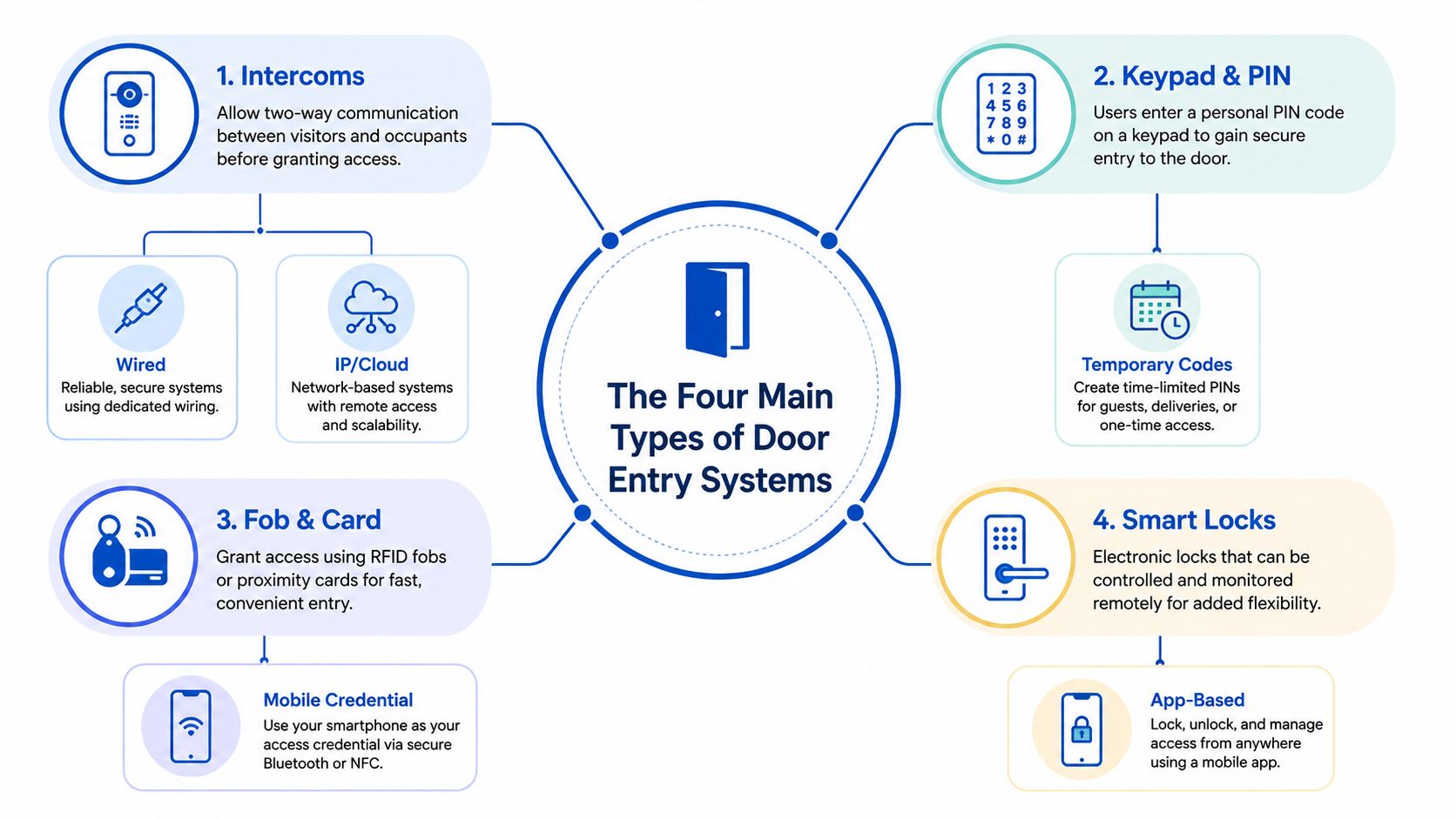
A useful way to sort apartment access is to ask what kind of conversation happens at the door. Some systems let people talk first, some let them enter a code, some let them tap a credential, and some let a phone or cloud account open the door. Each one solves a different part of the access problem.
Intercoms
Think of an intercom as a digital doorman. A visitor presses a name or unit, the resident answers, and access can be granted from inside the building or from a phone, depending on the setup. In a co-living house, this works well when you have frequent guests, package carriers, or turnovers that make direct resident contact important.
For one resident, an intercom is easy to understand. For many residents, it depends on how the directory is managed. For a contractor, it's useful because you can confirm who's there before you open anything.
Keypads and PIN access
A keypad is a shared secret. You type a PIN, the system checks it, and the door opens if the code is valid. That makes it especially handy at back gates, service entrances, or amenity doors where a simple entry method is enough.
A keypad handles one resident well if that person doesn't want to carry anything. It handles many residents poorly if codes get shared too widely. For contractors, it's convenient if you can issue a temporary code and revoke it later.
Fobs and cards
A fob or card is like a wallet credential. The resident taps a reader, and the system checks whether that token is allowed. This is common for front entries, gyms, laundry rooms, and mail areas where access needs to be quick and repeatable.
For one resident, it's simple. For many residents, it stays manageable as long as you control issuance tightly. For a contractor, it's a poor fit unless you're willing to hand out and recover credentials constantly.
Smart locks and mobile credentials
A smart lock acts as a remote doorman. The resident uses an app, a cloud dashboard, or a credential on a phone, and the system operates the door without a physical key exchange. In room-by-room housing, that can be useful during turnover because you can change access without chasing down a lock cylinder or reissuing a bunch of plastic cards.
It's strongest when your team needs remote control, audit logs, and quick turnarounds. It's weakest when the phone dies, the network drops, or the building has to keep working with limited connectivity. That trade-off matters more than the marketing usually admits.
Comparing Intercoms, Keypads, Fobs, and Smart Locks
The easiest way to compare these systems is to ignore the feature brochures and ask what breaks first. A good access setup isn't the one with the longest list of functions. It's the one that fits the building, the staff, and the people who live there.
| Door entry system types at a glance | Security | Accessibility | Retrofit ease | Typical per-door cost |
|---|---|---|---|---|
| Intercoms | Strong when residents verify visitors before opening | Good for residents who prefer voice or video prompts | Moderate, especially in older buildings with existing wiring | Mid to high, depending on video and cloud features |
| Keypads | Good for controlled, temporary, or shared access points | Simple for most users, but PIN sharing can become messy | Usually easier than full intercom retrofits | Low to moderate |
| Fobs and cards | Strong for controlled resident-only access | Very easy for residents who want a tap-and-go workflow | Moderate, because readers and credential management still need setup | Low to moderate |
| Smart locks | Strong when managed well and tied to permissions | Great for app-based users, less friendly for non-phone users | Can be easy in some retrofits, harder where hardware compatibility is limited | Moderate to high |
An intercom is usually the best fit for the front door when you care about visitor screening. A keypad is often better at a side entrance or back gate where the goal is fast entry, not a rich conversation. Fobs and cards work well when you want a simple resident credential that's easy to revoke. Smart locks shine when turnover is frequent and remote administration matters more than carrying a physical key.
The recurring mistake is mixing systems that don't talk to each other. A building ends up with one vendor for the intercom, another for the side door, and a separate app for unit locks. That can look flexible on paper, but staff end up managing three permission lists, three support paths, and three ways for something to go out of sync.
Residents don't care which vendor failed. They care that the door didn't open.
A mixed setup can still be the right answer. Just make sure the mix is intentional. If the front entrance needs visitor screening, the back gate needs speed, and unit doors need rapid turnover control, one system may not be enough, but three disconnected ones usually create more work than they save.
Reliability, Outages, and the Questions Most Guides Skip
Most access guides talk about mobile access, video calling, and remote management. Fewer say what happens when the internet drops, the power goes out, or a resident's phone dies at the door. Those are the moments when a system's real design shows up.
A cloud-managed smart lock can be convenient, but the team still has to know what happens when WAN connectivity is lost. Can residents use a local credential? Does the lock keep a cached permission list? Can staff still override access on-site? If the answer is unclear, you're not buying convenience, you're buying uncertainty.
An intercom panel faces a different problem. If a storm knocks out power, the building needs a backup path for residents, contractors, and emergency access. Some operators assume the hardware will “just work” because it looks permanent on the wall. It won't, unless the power and fallback design were planned from the start.
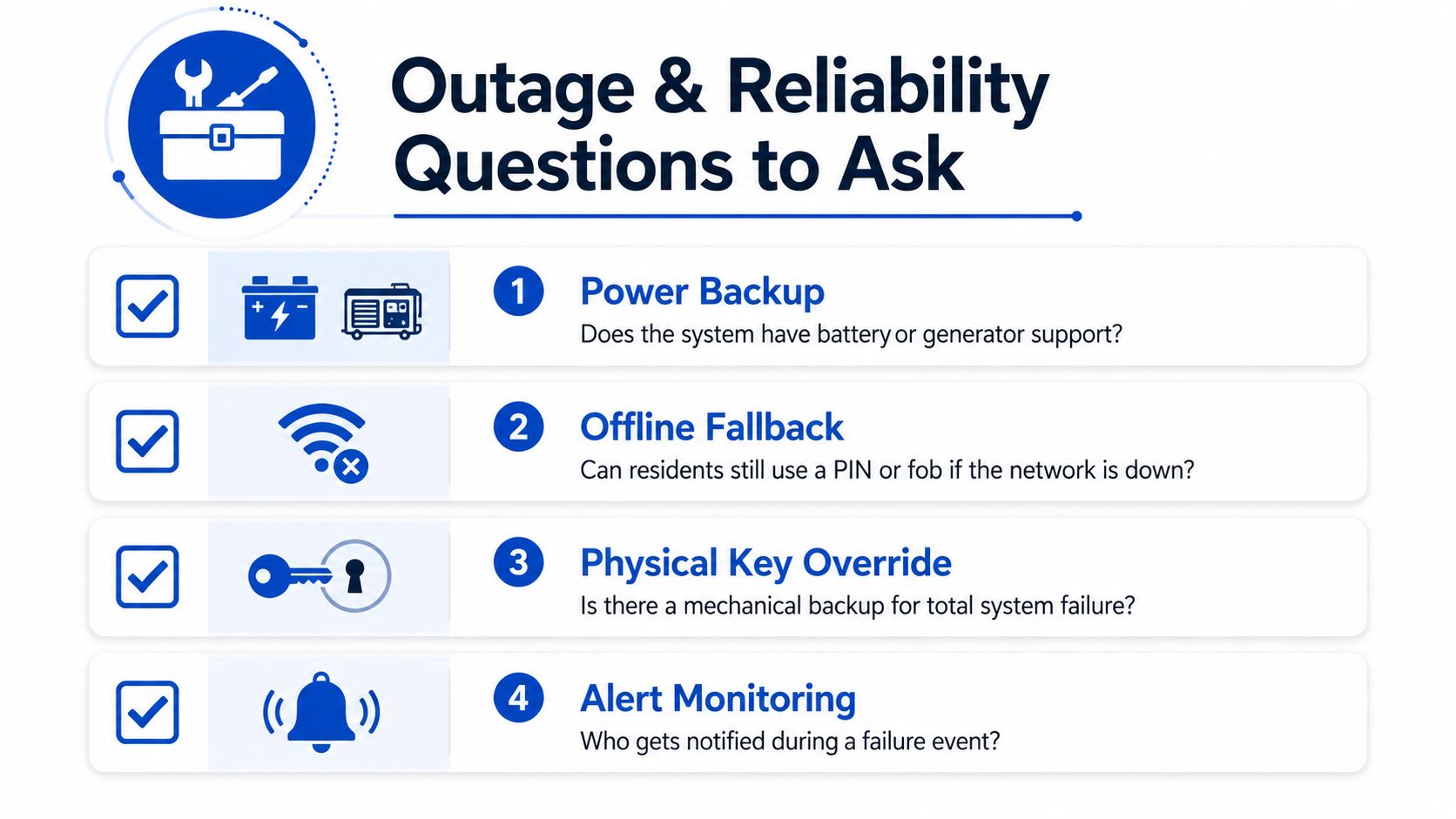
A resident with a dead phone at 11 p.m. is the simplest stress test. If your whole access plan depends on a charged battery and a functioning app, you need a backup that doesn't rely on the same device. That can mean a PIN, a fob, a mechanical override, or a staffed process for after-hours support.
Practical rule: if you can't explain your outage path in one minute, the system isn't ready.
This is also where cloud-based convenience and continuity collide. A useful overview of cloud-managed access is this guide to cloud-based access control, especially if you're trying to separate “nice to have” from “must have” in a building that can't afford to be locked out of itself. The important questions are straightforward ones, but they matter more than app screenshots.
Ask who gets alerted during a failure, whether there's battery backup or generator support, and what staff do when the system can't verify a user. If the support workflow gets slower every time the network gets shaky, resident trust erodes and after-hours calls pile up.
Hardware Specs That Matter in the Field
A spec sheet can feel dense, but the field test is simpler than it looks. Can the device handle weather, can it handle abuse, and can it drive the lock you plan to use? If those three answers line up, the install usually goes more smoothly.
Weather and vandal resistance
For exposed entrances, IP and IK ratings are the first numbers to check. ABB specifies IP54 dust and water protection and IK07 impact resistance for outdoor stations, with some modules rated to operate from -40 °C to +55 °C (ABB 2-wire Door Entry Systems specification). Independent apartment-entry specs also point to harder-wearing hardware in some installations, including IP67 keypads with a minimum 4 million key operations and 316 marine-grade stainless-steel panels (same ABB specification).
The practical rule is straightforward. If the entrance faces rain, dust, or repeated rough handling, stronger ingress and impact protection usually means fewer maintenance calls and a longer service life. Coastal properties and busy entries are the places where that extra hardening tends to pay off first, because salt, moisture, and constant use reveal weak hardware quickly.
Lock drive ratings and wiring
The reader matters, but the lock does too. One ABB specification states the outdoor station can drive locks with 18 V DC, 4 A impulse and 250 mA holding current (ABB 3-part Specification PDF). That is why underpowered strikes are a common install problem. The reader looks fine, the panel looks fine, and the door still does not release consistently because the hardware was not matched correctly.
Many modern apartment systems use single-pair non-polarized wiring, which helps reduce retrofit complexity in dense buildings. That matters most when you are working around legacy infrastructure, because fewer conductors usually mean less wall opening, less labor, and fewer surprises during install. If your building still has older 4-wire cabling, compatibility needs a closer look before anyone starts cutting.
For operators comparing new access hardware with broader building workflows, a keyless entry systems overview can help frame where wiring, reader choice, and lock control fit into the full setup.
What to ask before you buy
- Outdoor durability: Can the panel handle rain, impact, and repeated use without turning into a maintenance item?
- Lock compatibility: Does the system provide enough power for the strike or relay you plan to use?
- Retrofit fit: Can it work with existing wiring, or is this a full rewire project in disguise?
- Service life: Are the buttons, panels, and readers rated for the kind of traffic your building really sees?
Realistic Costs and ROI for Small Houses to 100+ Room Portfolios
The cost picture changes with scale, but the logic stays the same. You're paying for hardware, installation, and ongoing management, then trying to recover that spend through less manual work and fewer access headaches. The question is not just what the system costs, it's what it replaces.
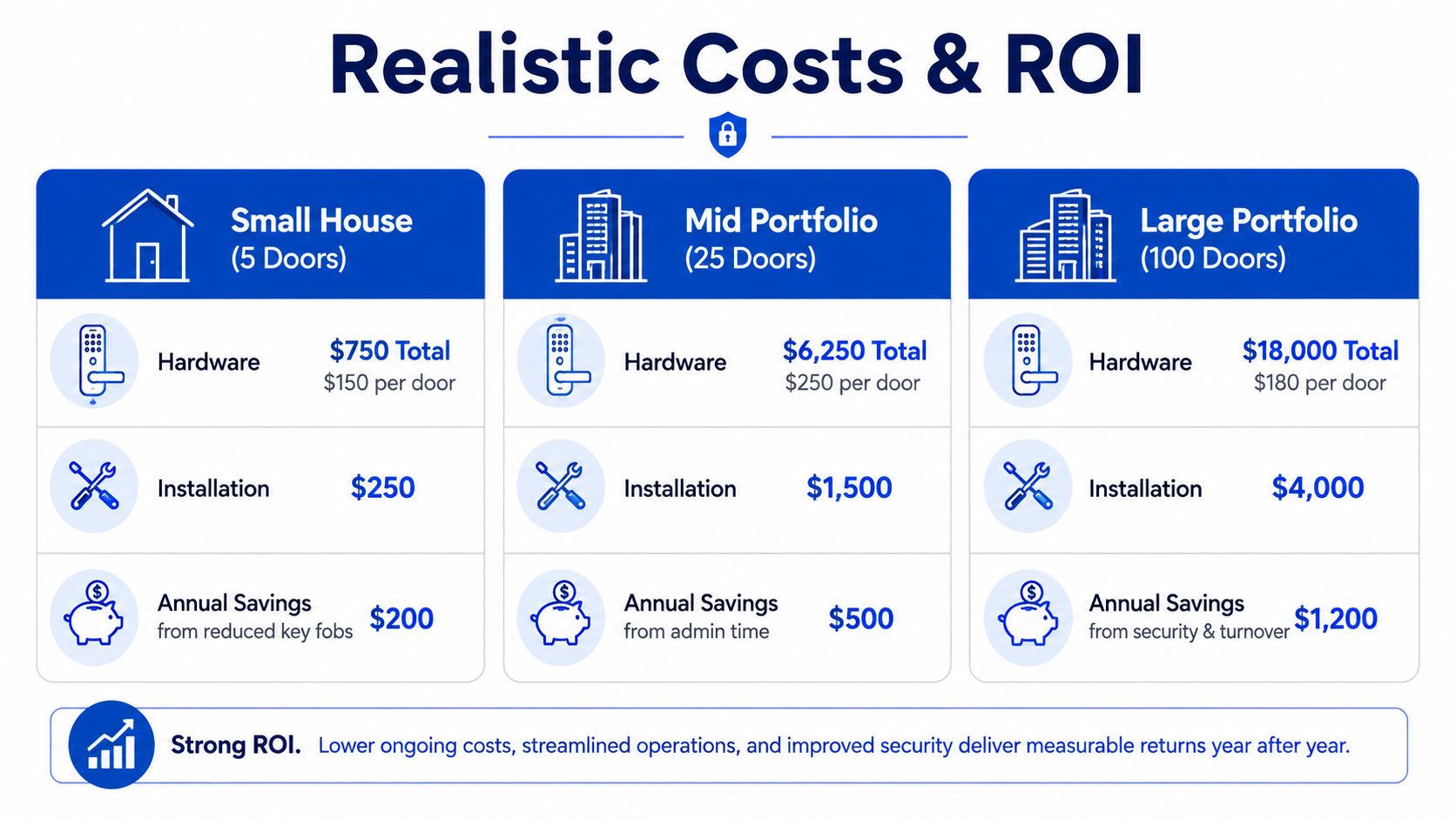
For a small co-living house, the spend is often about basic hardware plus a straightforward install. The return usually comes from fewer key handoffs, fewer lost-credential issues, and less time spent managing physical access during turnover. That's the kind of site where simple control often beats feature-heavy complexity.
For a mid-sized building, the math starts to include network gear, panel placement, and more structured admin workflows. The upside is that centralized management becomes more meaningful, because staff can update permissions, monitor access, and handle resident changes without running to the property every time someone moves out.
For a 100+ room portfolio, bulk procurement and centralized management can shift the economics further. Access control starts to interact with staffing, reporting, and turnover workflow, because a system that saves a few minutes at each changeover compounds across many units.
The strongest ROI drivers are pretty consistent:
- Avoided rekeying: less labor when residents leave
- Fewer after-hours lockout calls: less staff interruption
- Faster vacant-room turnarounds: quicker readiness for the next resident
- Lower admin overhead: fewer one-off access updates
A few operators won't get enough value to justify a bigger system. If a property has low turnover, simple resident behavior, and little need for visitor screening, a complex upgrade can become expensive tech that staff barely touch. That's a bad fit, not a bad product.
If you're comparing credential-based access against broader keyless workflows, this overview of keyless entry systems can help you think through where the labor savings really come from. The key is to compare your current process, not an idealized one.
Compliance, Privacy, and Accessibility Without the Headache
Access control touches legal and ethical issues whether the vendor mentions them or not. If you skip the basics, you can end up with a system that works technically but creates trouble for residents, staff, or inspectors. The safe approach is to treat compliance as part of the buying decision, not a clean-up task.
Local codes and fire egress
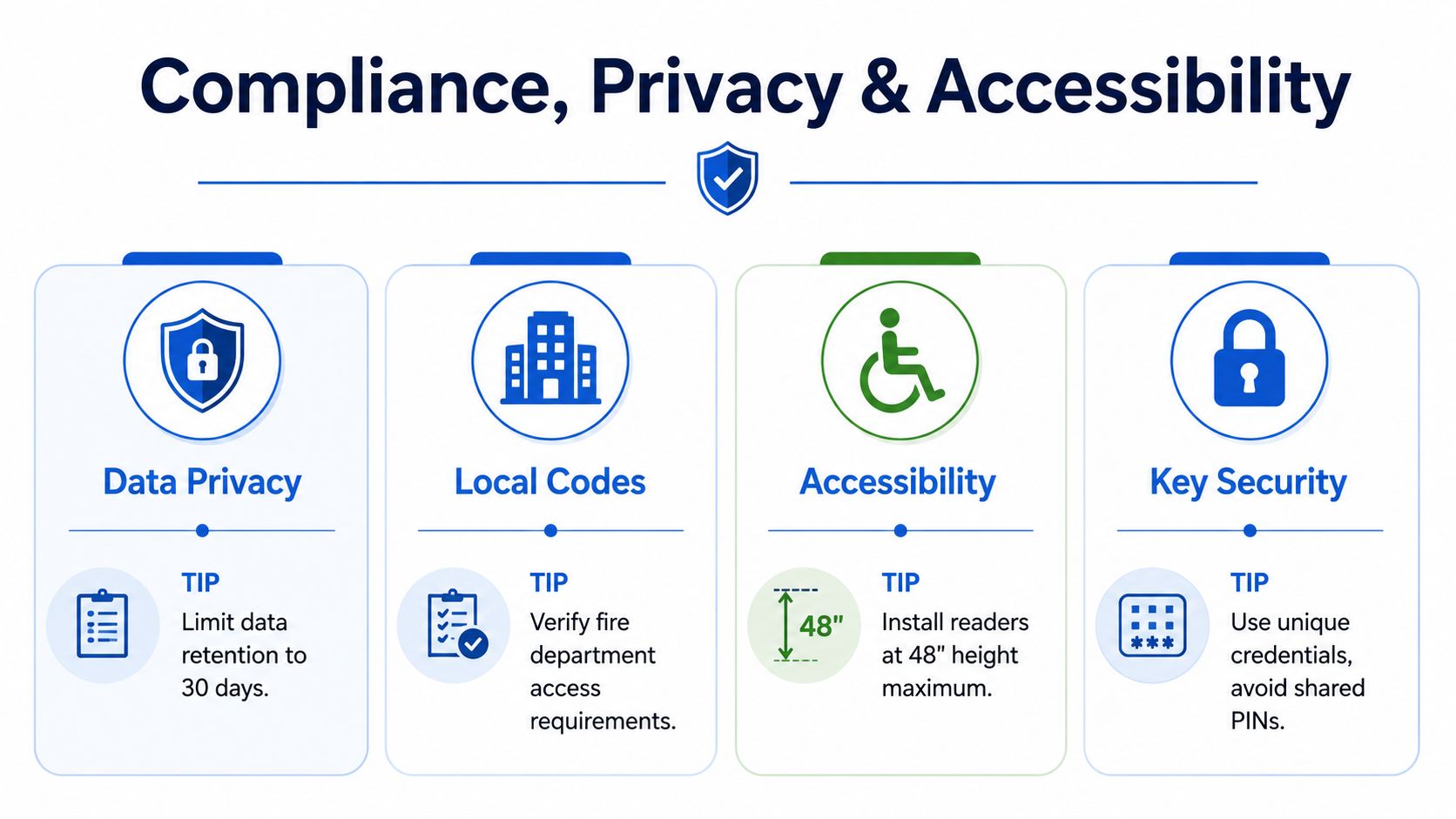
Some locks should fail safe, others should fail secure, and that choice has to match local fire and egress requirements. The operator should know which doors need free exit, which doors need special handling for emergency responders, and who verifies that the final setup matches local rules. A common mistake is assuming a “secure” lock is automatically acceptable everywhere.
Privacy and data handling
Access logs and video footage can be useful, but they also create data-handling responsibilities. Write down who can view logs, how long records are retained, and what happens when a resident moves out. Shared PINs and casual credential sharing create messes here, because they blur accountability fast.
Accessibility and resident usability
Readers, buttons, and signage need to be usable by people with different mobility and vision needs. That means checking placement, contrast, and whether the entry flow still works for someone who doesn't want to fumble with a tiny screen at night. A system that is technically advanced but hard to use in practice will generate support calls and resident frustration.
Keep the physical workflow obvious. People should know where to stand, what to press, and what happens next.
The practical self-audit is simple. Ask whether the door can be opened in an emergency, whether staff can explain the privacy rules in plain language, and whether the access method is accessible to the people who live there. If the answers are fuzzy, fix the policy before you fix the hardware.
Planning Smart Lock Integration With Your Property Stack
The best access systems don't live in isolation. They need to fit into onboarding, messaging, turnover, reporting, and the rest of the property stack, or staff end up retyping the same information in too many places. That's where integration becomes more than a technical feature.
A smart-lock integration should do a few plain things well. It should let you create or remove credentials during move-in and move-out without manual cleanup, tie audit logs to the right unit or resident, and support remote access for verified emergencies. If it can't do those basics, it's not really integrated, it's just connected.
The red flags are just as clear. Some vendors keep credentials trapped inside a walled app, which makes exporting data or changing systems harder than it should be. Others make the resident app the only control surface, which becomes a problem when you need staff workflows, fallback access, or cross-platform reporting.
PadPulse's planned smart-home integrations point in that direction, with keyless smart locks and HVAC control meant to sit alongside pricing, messaging, and P&L visibility on the same platform. For operators who want fewer tools to juggle, that kind of stack matters because access stops being a separate problem and becomes part of the operating system. You can read more about the broader approach in PadPulse's multi-tenant access control overview.
Before you commit to any smart-lock plan, check four things:
- API access: Can your team move data in and out cleanly?
- Vendor lock-in: Can you leave without rebuilding your process from scratch?
- Data export: Can logs, resident records, and access history be downloaded in a usable format?
- Rollback to mechanical keys: If the platform fails or the building changes, can you still run the property?
The right integration gives you options. The wrong one makes every future change more expensive.
If you're comparing access options for a co-living house, a multifamily portfolio, or a mixed building, PadPulse is building tools that bring pricing, messaging, access control, and reporting into one operating workflow. Visit PadPulse to see how that approach could fit your property stack, and join the interest list if you want updates as the platform moves toward launch.