Best Practices for Access Control in Shared Housing
September 17, 2026
A new resident arrives with luggage while another person is moving out. The cleaner needs access to the hallway, a maintenance contractor needs to reach a utility room, and a former resident still knows the old entry code. In a shared house, access changes constantly, often while you're handling rent questions, inspections, and a late-night lockout.
That's why the best practices for access control aren't limited to choosing a strong lock. They create a daily operating system for who can enter which room, at what time, for how long, and under what conditions. A well-run system protects privacy and safety while helping residents move in smoothly and helping you turn rooms without chasing physical keys.
Why Access Control Matters in Shared Housing
Shared housing has a moving target for access. A resident may have permission to enter a private bedroom and shared kitchen, but not another bedroom, a locked supply closet, or an owner's office. A cleaner may need common areas during a scheduled visit, while a maintenance worker may need temporary access to a mechanical room. The right permissions can change before the next person has finished carrying in their boxes.

Traditional keys make these changes awkward. You may need to collect a key from a departing resident, copy a replacement, coordinate a handoff, or change a lock after a key goes missing. A forgotten code creates the same problem in digital form. Someone leaves, but their access remains active because nobody completed the final removal step.
Weak access control creates more than a security concern. It causes lockouts, unauthorized entry, delayed room turnover, uncomfortable resident interactions, and avoidable support calls. It can also reduce your net operating income when staff spend time solving problems that a repeatable process could prevent.
Good access control feels almost invisible to residents. Their credentials work when they should, stop working when their agreement ends, and open only the spaces they're entitled to use. Hosts get a clear record of access, a reliable way to handle exceptions, and less dependence on one person remembering every code and key.
A practical system should answer four questions:
- Who is requesting entry?
- Which door or room are they trying to access?
- Is access appropriate right now?
- How can you prove what happened afterward?
For a deeper look at permissions across multiple residents and spaces, review this guide to multi-tenant access control. The rest of this article applies those ideas to room-by-room rentals, from basic principles through written policies, connected locks, audits, resident experience, and emergency response.
Understanding Core Access Control Principles Without the Jargon
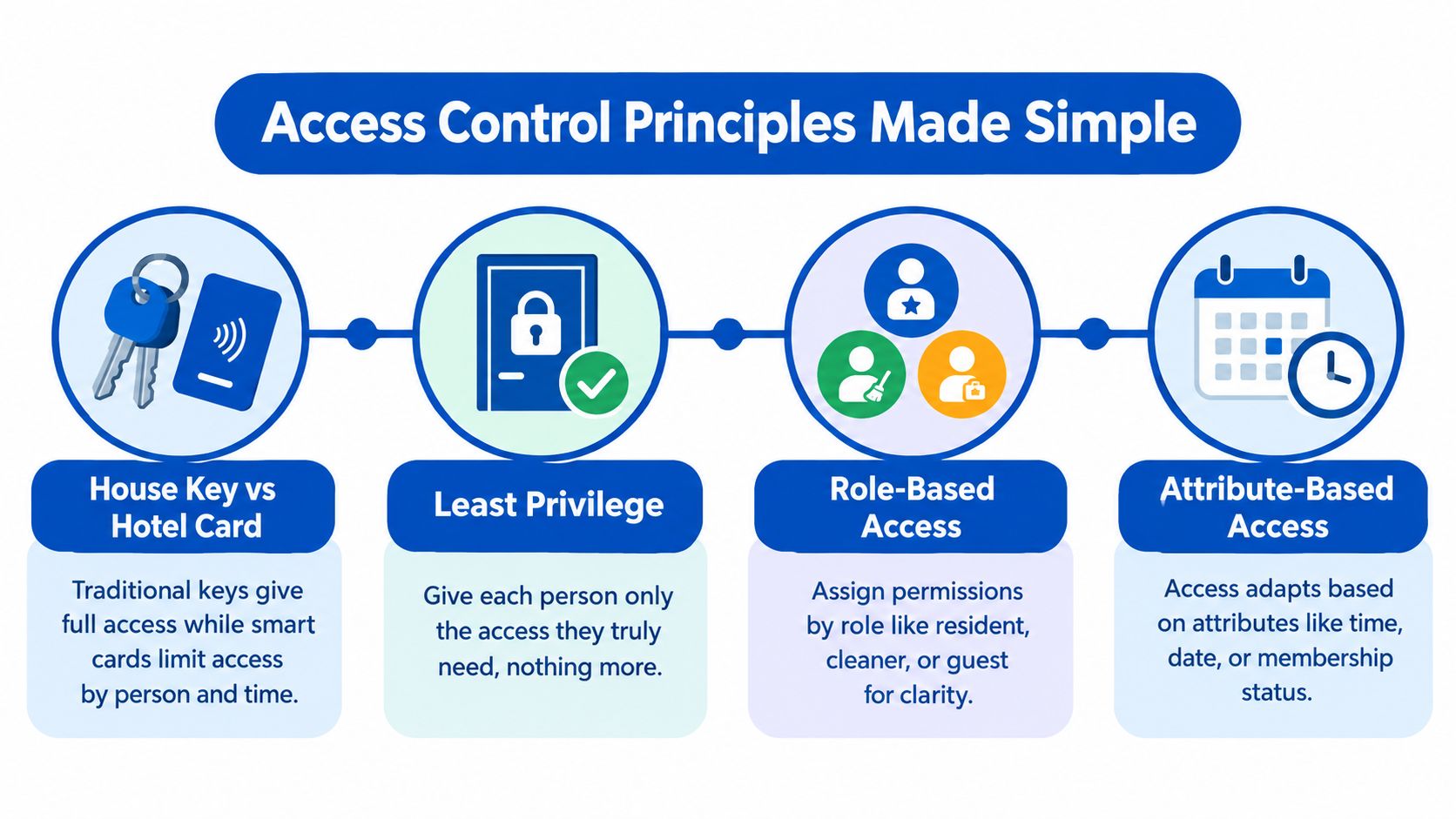
Start with a simple comparison. A traditional house key often gives access because the person possesses it. A hotel key card can be limited by person, door, and time. If a guest can enter a room only during an approved stay, the operator doesn't need to trust that the guest will return the card or remember not to enter other rooms.
Shared housing works better when you think like the hotel operator.
Give people only the access they need
Least privilege means granting the smallest useful set of permissions. A resident might need their bedroom, the front door, and agreed common areas. They don't automatically need every bedroom, the office, the lock-management dashboard, or a storage room containing maintenance supplies.
NIST describes this principle in SP 800-53 Revision 5, requiring only the access necessary for assigned organizational tasks. The same guidance connects least privilege with role-based enforcement, separation of duties, and non-privileged accounts for ordinary work.
Practical rule: If a person can complete the task without a permission, don't grant that permission by default.
Use roles to keep decisions consistent
Role-based access control, or RBAC, assigns permissions to roles instead of building every rule separately for every person. NIST's RBAC project describes a model in which users receive roles and roles receive privileges.
For a shared house, roles might include:
- Resident: Assigned bedroom, approved common areas, and the main entry.
- Cleaner: Common areas during an approved service window.
- Maintenance worker: Relevant utility or repair spaces for a defined task.
- Host or manager: Wider operational access, with administrative actions separated where possible.
- Guest: Limited access based on the resident's house rules.
Roles make onboarding easier, but they shouldn't become an excuse for broad permissions. A “resident” role should not open every bedroom because all residents live in the same property.
Add context when roles aren't enough
Attribute-based access control, or ABAC, adds conditions such as room assignment, membership status, device trust, location, time, or resource sensitivity. NIST's ABAC practice guidance emphasizes policies, models, mechanisms, and careful management of attributes throughout their lifecycle.
For example, a contractor may have a maintenance role, but access should also depend on the assigned property, scheduled visit, approved room, and current credential status. A resident's access might depend on whether their agreement is active and whether the credential is being used within the allowed time.
A 2025 survey of 1,000 IT, security, and engineering professionals found that only 29% of organizations used identity-based access as their primary model, while 56% granted access by role or need, 46% used groups or teams, 33% had just-in-time access, and only 26% followed least privilege with manual approvals. The same zero-trust survey found legacy VPNs still represented 41% of company usage, compared with 34% for cloud-delivered ZTNA platforms. The broader lesson applies to housing: many operators are modernizing gradually, so start with clear identities and narrow permissions before adding more advanced rules.
Designing Clear Access Policies and Managing the Full Lifecycle
A lock can enforce a rule, but it can't create one. Before you configure a keypad or mobile credential, write down what each person should be able to access. Keep the policy short enough that a new host, cleaner, or resident can understand it without a technical background.
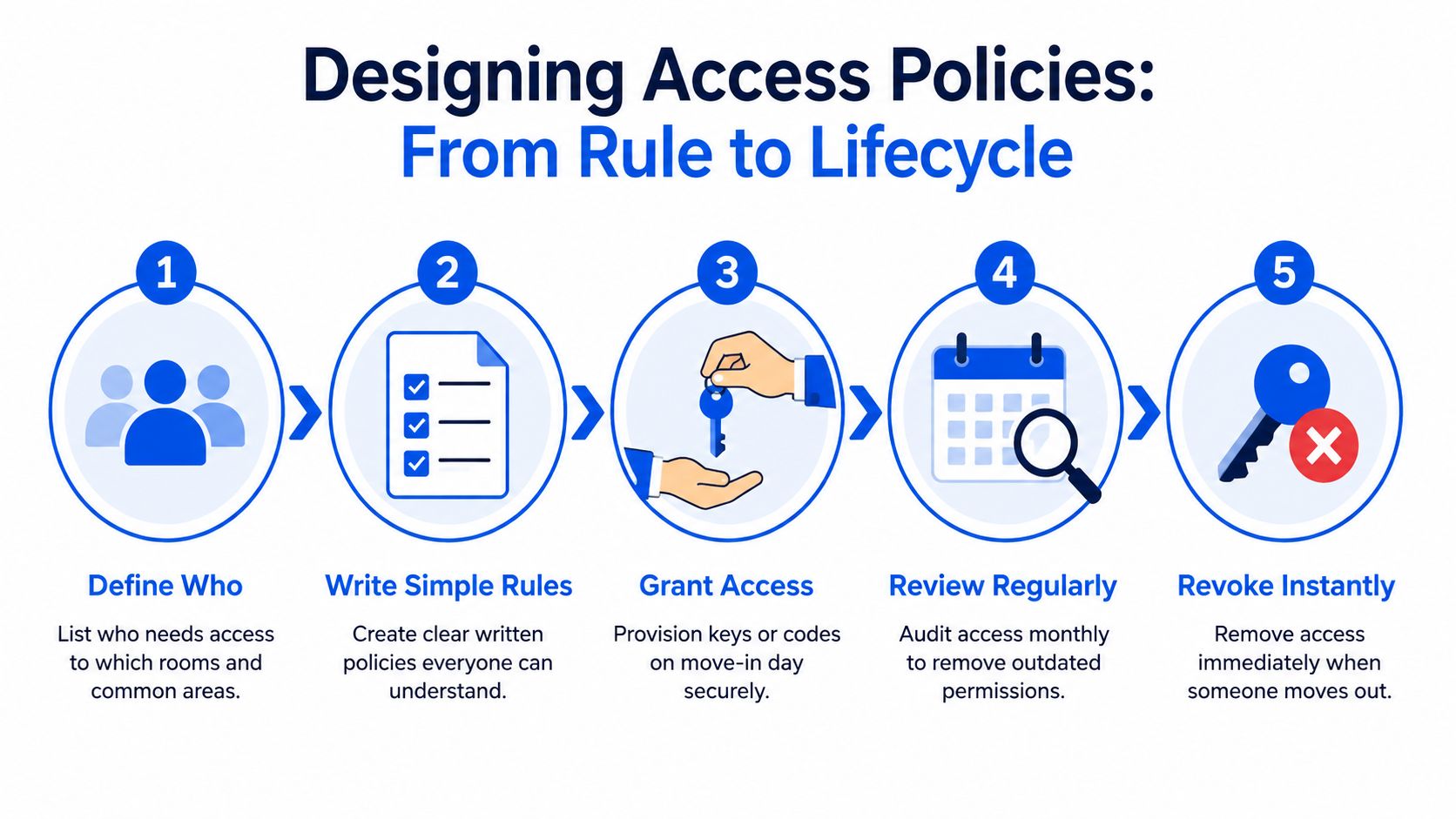
Start with a room map. List every private room, common area, exterior entrance, utility space, office, and storage area. Then assign access by person, purpose, and duration.
Write rules people can follow
A useful access policy should answer:
- Who gets access: Residents, hosts, cleaners, maintenance workers, emergency contacts, and approved guests.
- Where they can enter: Specific bedrooms, shared areas, exterior doors, or operational spaces.
- When access works: At all approved times, during a scheduled visit, or only during an active stay.
- What happens during exceptions: Lost credentials, room transfers, urgent repairs, and emergency entry.
- Who approves changes: Name the responsible host or manager, not an undefined “team.”
Avoid rules such as “staff can access the property as needed.” Replace them with a clear instruction, such as “the assigned maintenance worker may enter the utility room for the approved repair, and the host removes access after the visit.”
Treat access as a lifecycle
NIST SP 800-171 guidance requires organizations to create, modify, disable, and remove accounts according to policy, monitor account use, and disable accounts when they expire, go inactive, or no longer map to a valid user. In housing, that means access management starts before move-in and ends after deactivation, not when someone receives a code.
Use a repeatable checklist:
- Prepare: Confirm the resident, room assignment, approved spaces, and start date.
- Provision: Issue a unique credential rather than sharing a house-wide code.
- Modify: Update access when a resident changes rooms, a contractor's task expands, or common-area rules change.
- Review: Compare active permissions with current occupancy and service schedules.
- Revoke: Disable access immediately when a resident leaves or a temporary task ends.
- Record: Note who approved the change, what changed, and when it took effect.
Control exceptions instead of ignoring them
Short-term access deserves stricter boundaries because it's easy to forget. Give a contractor access for the smallest useful window, restrict the doors to the task, and assign someone to confirm removal. For an urgent entry, record the reason afterward and review whether the person still needs access.
A monthly review can catch old permissions, but it shouldn't replace event-driven changes. Move-out, room transfer, lost credential, and contract completion should all trigger an immediate update.
Smart Locks and Connected Systems That Simplify Access
Technology should make your policy easier to run, not compensate for a missing policy. The right setup depends on the doors you manage, the speed of your turnovers, the reliability of connectivity, and whether residents prefer phone-based entry or a code.
Compare the main options
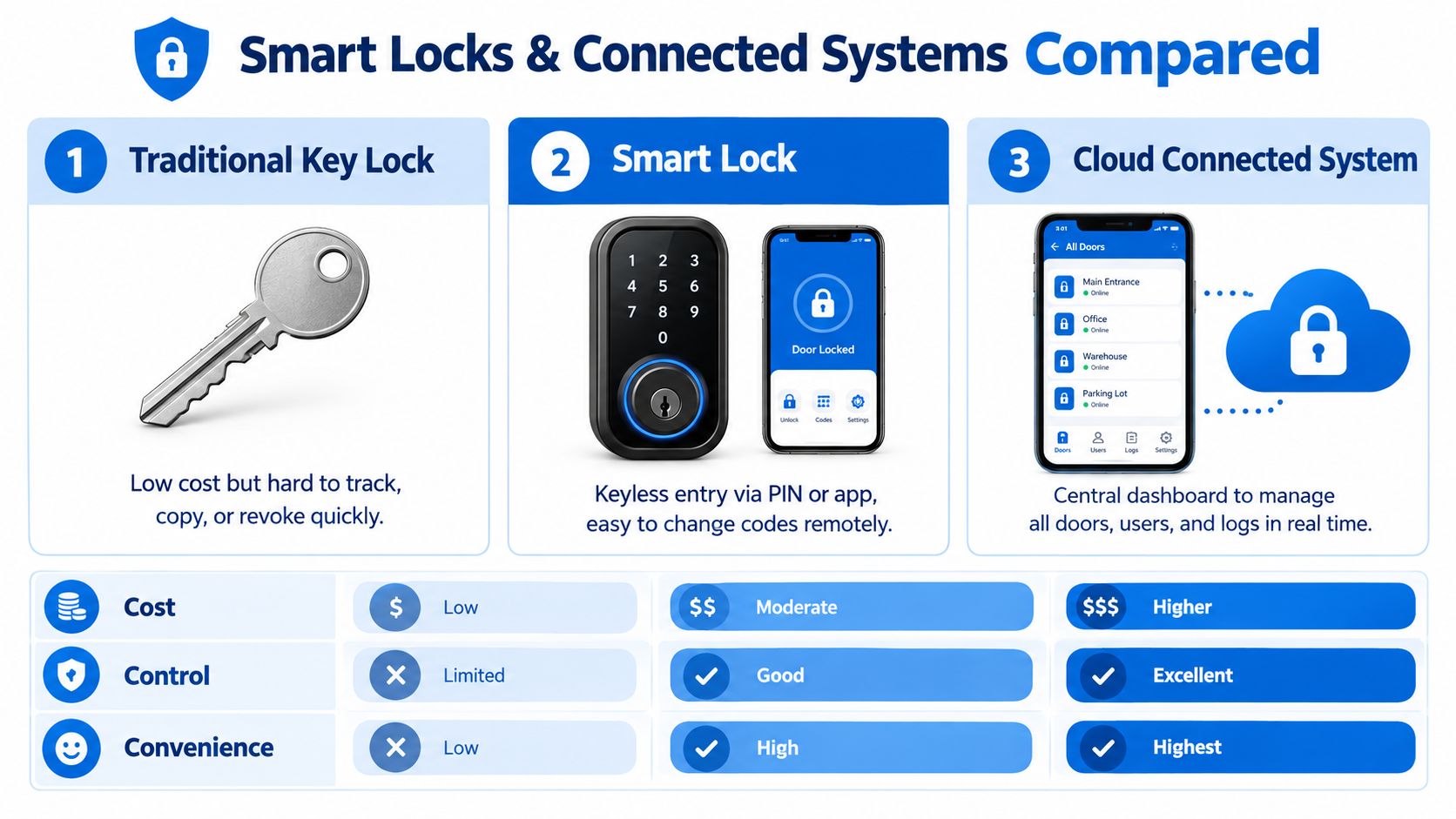
| Option | Strength | Limitation | Useful fit |
|---|---|---|---|
| Traditional key lock | Familiar and independent of batteries or apps | Difficult to track, copy, and revoke quickly | Low-complexity doors with stable occupancy |
| Smart lock with PIN | Residents can enter without physical keys, and codes can be changed remotely | Requires battery management and a reliable operating process | Private rooms and main entrances |
| Mobile credential | Convenient for residents who carry a phone, with identity tied to a digital account | A dead phone, lost device, or app problem can cause friction | Residents and staff comfortable with mobile access |
| Cloud-connected system | Central dashboard for doors, users, permissions, and logs | More dependent on vendor setup and connectivity | Operators managing multiple rooms or properties |
Traditional locks can still serve a purpose, especially for low-turnover storage spaces. They become harder to manage when residents share entrances and room assignments change frequently.
PIN-based locks are often practical for room-by-room operations because a host can create a code for a particular resident and remove it without collecting a key. Mobile credentials can provide a smoother experience, but every operator should maintain a clear fallback for phone loss, dead batteries, and account trouble.
Cloud controllers bring multiple doors into one operating view. Industry reporting describes the expansion of access control into cloud services, mobile credentials, edge-like controllers, biometric systems, IP and PoE devices, and unified management platforms. One 2025 controller report found 72% of security professionals considered controllers critical, 44% were adopting edge computing, and 21% said their current controllers lacked critical protections, according to Acre Security's access control trends report. Those figures reinforce a practical point: connected hardware still needs secure configuration, updates, fallback procedures, and regular review.
For feature-level guidance, see this explanation of smart-lock features.
A good room-turn workflow might issue a resident's room credential before arrival, activate shared-area access at the approved start time, and deactivate both when the stay ends. That reduces handoffs and gives the next resident a clean start without relying on a previous occupant to return a key.
Auditing Access and Keeping Records You Can Trust
Access control isn't working just because the lock opened for the right person once. You need records that help you confirm permissions, investigate unusual activity, and prove that changes followed your policy.
NIST audit guidance says access attempts or accesses should be logged with the date, time, and individual or user ID associated with the event. Those details turn a vague complaint, such as “someone entered the room,” into a reviewable question about a specific credential and door. NIST guidance on audit trails provides the foundation for this approach.
Review the records that matter
A practical access record should show:
- Identity: The resident, host, contractor, or system account associated with the credential.
- Door and action: Which entrance was attempted and whether access was granted or denied.
- Date and time: The exact event time, including the relevant property time zone.
- Credential status: Whether the credential was active, expired, disabled, or outside its allowed schedule.
- Change history: Who created, edited, or removed the permission.
- Exception details: The reason for emergency access, a lockout override, or a temporary credential.
You don't need to read every event manually. Look for patterns that deserve attention, such as repeated denied attempts, access to a room outside an approved schedule, active credentials belonging to former residents, or a contractor credential used after the job ended.
Create a manageable review rhythm
Review active users against your occupancy and vendor lists. Then compare permissions with actual needs. If a resident moved rooms, a cleaner changed schedules, or a contractor finished work, update the record and remove the old permission rather than leaving it “just in case.”
NIST SP 800-171 requires audit logs and records to support monitoring, analysis, investigation, and reporting of unlawful or unauthorized system activity, as described in this audit and accountability control reference. A cloud-based system can make this easier by keeping door events and user changes in one place. This overview of cloud-based access control can help you evaluate that operating model.
Keep the audit trail useful. A long list of events with no user identity, door name, or reason for a change won't help you resolve a dispute.
Write down the result of each review, even when nothing unusual appears. That small habit gives your team a shared record and makes the next review faster.
Real World Examples for Better Tenant Experience and Emergency Readiness
The best access system protects residents without making them feel watched or burdened. A new resident should receive clear instructions, a working credential, and only the permissions needed for daily life. A departing resident should lose access cleanly, without an awkward request to return a key that may already be missing.
A smoother move-in
A host sends the resident their room number, entry instructions, house rules, and credential support steps before arrival. The resident's code opens the main entrance and assigned room, but not other private rooms. A short message explains what to do if the code fails and identifies the approved support contact.
The operational lesson is simple: access instructions are part of the welcome experience. Don't make residents search through old messages or guess whether a door is supposed to open.
A cleaner's scheduled visit
A cleaner needs the shared kitchen and bathrooms, not resident bedrooms. The host grants access for the service window, shares the areas included in the visit, and removes the credential after the job. If the cleaner needs to report damage, the process should provide a channel that doesn't require broader building access.
This arrangement supports privacy while giving the cleaner enough access to complete the work. It also makes an unexpected entry easier to investigate because the credential is associated with a defined purpose.
A lost phone or code
A resident reports a lost phone or exposed PIN. The host disables the affected credential, issues a replacement, and checks recent access events for unusual activity. The host shouldn't text a universal code to the resident, because that solves the immediate inconvenience by weakening the property's access model.
An urgent repair
A pipe begins leaking near a locked room. The host grants the maintenance worker temporary access to the affected area, confirms the worker's identity, and records the reason. Once the repair ends, the host revokes the permission and checks that no broader access was added during the emergency.
For emergency readiness, keep a printed or offline contact list, a clear lockout procedure, and a documented method for authorized overrides. First responders may have their own procedures, so hosts shouldn't improvise credentials or block emergency access. The property plan should tell residents whom to contact and tell staff how to act without turning an urgent situation into permanent access.
Putting Best Practices Into Action for Your Properties
Access control becomes manageable when you treat it as a property routine rather than a one-time technology purchase. Start with the doors, people, and events that create the most friction. Then add automation where it removes repeated manual work.
This week
- Map the property: List private rooms, shared spaces, exterior doors, utility areas, offices, and storage.
- Review active access: Remove credentials for former residents, finished contractors, and unused test accounts.
- Create roles: Separate resident, cleaner, maintenance, host, and guest permissions.
- Write the emergency path: Document lockouts, lost credentials, urgent repairs, and authorized overrides.
- Name an owner: Assign one person to approve changes and confirm that revocations happen.
This month
- Standardize move-in: Prepare a repeatable checklist for room assignment, credential delivery, instructions, and support.
- Standardize move-out: Make access removal part of the departure workflow, not an optional follow-up.
- Review logs: Check denied attempts, unusual schedules, old credentials, and recent permission changes.
- Test exceptions: Walk through a lost-code scenario, a contractor visit, and an emergency access request.
- Evaluate hardware: Decide whether traditional keys, PIN locks, mobile credentials, or a cloud-connected setup best fits each door.
Ongoing
Treat every access grant as temporary unless you can explain why it should remain active. Review permissions after room transfers, staff changes, vendor changes, and unusual events. For dynamic environments, use context such as room assignment, active membership, time, and device status instead of relying only on a broad role.
Access control also extends beyond human residents. AI agents, smart-home systems, and machine-to-machine workflows should have distinct identities and narrow permissions rather than sharing a human account. Recent survey coverage found only 33% of organizations provision AI agents with least-privilege access, even though 94% reported confidence in their controls, and only 34% evaluated authorization when an agent attempted a specific action, according to SecurityBrief's survey coverage. The housing lesson is clear: confidence isn't a substitute for checking whether a permission is still justified at the moment it's used.
A 2023 access-control report found that 93% of organizations considered access control essential to their broader risk management or security plan, while more than 70% of organizations implementing access control systems reported no more than five serious incidents in a year, as documented in the ASIS access control research report. The durable practice is to keep access tied to role, need, time, and lifecycle status, then improve the process as your properties grow.
Your next step is practical. Map every door today, remove stale permissions, and write the move-in and move-out checklists your team will use.
PadPulse is being built to help co-living operators centralize pricing, resident communications, reporting, and smart-home access workflows in one toolkit. Visit PadPulse to join the interest list for launch updates, limited beta access, and practical tools for managing room-by-room rentals.