Smart Automation for Windows: Co-Living Solutions 2026
May 24, 2026
Late afternoon is where weak window control shows up first. West-facing rooms heat up fast, shades stay open in vacant units, and one resident cracks a window while the AC is running. By the time your team spots the pattern, you are already paying for it through higher utility bills, more comfort complaints, and extra staff time spent correcting room-by-room issues.
For co-living operators, the impact of small, repeated decisions is significant. Shade positions, window openings, and solar exposure change throughout the day across dozens of rooms and multiple properties. If those adjustments depend on residents or staff remembering every time, the work never really stops.
In this article, automation for windows means physical window automation for rental housing. That includes motorized shades, blinds, vents, and window controls that respond to conditions inside the unit and outside the building. The point is operational control, not gadget appeal.
Used well, these systems reduce HVAC waste, lower manual touches, and make comfort more consistent across bedrooms and shared spaces. They can also protect the asset by limiting heat buildup, glare, and weather exposure in rooms that do not get regular staff attention.
There are trade-offs. Hardware adds upfront cost. Retrofit work can get messy in older buildings. Battery devices reduce wiring work but add maintenance. Connected window controls also need clear rules for resident overrides, staff access, and security. Still, for operators managing repeatable problems across many units, window automation can improve NOI in ways a thermostat alone usually cannot.
Your Introduction to Smart Window Automation
A resident leaves for work, the bedroom shade stays open, afternoon sun hits the glass for hours, and your cooling system spends the rest of the day fighting heat you could have blocked earlier. In another unit, a window is left cracked during a storm and no one notices until your team is dealing with moisture, complaints, and an extra maintenance visit. Across one property, those are small misses. Across a co-living portfolio, they become operating costs.
That is where smart window automation earns its place. For rental housing, this means physical control of shades, blinds, vents, and operable windows so your building responds to heat, light, weather, and occupancy with less staff involvement. The goal is not smart-home novelty. The goal is lower waste, fewer manual corrections, and better control over comfort at scale.
What smart window automation actually means
For your properties, smart window automation usually combines four parts:
- Motorized shades or blinds that move on schedules or respond to sunlight and indoor conditions
- Automated window openers or vents that manage airflow based on rules you set
- Sensors that track light, temperature, occupancy, rain, or window position
- A control layer that applies schedules, logic, overrides, and staff permissions
The primary value comes from how those parts work together. A motorized shade on its own is a convenience feature. A shade tied to sun exposure, room status, and HVAC strategy becomes an operating control.
Practical rule: If it does not cut labor, reduce HVAC waste, or prevent avoidable issues, it is not useful automation for a rental portfolio.
Why co-living operators should care
Co-living creates uneven room conditions and repeated small failures. Corner bedrooms overheat. Shared lounges get glare at the same hour every day. Residents use windows and shades differently, and your staff ends up correcting the same issues unit by unit.
Window automation gives you a repeatable way to manage those patterns across many rooms. That can mean keeping vacant rooms shaded during peak sun, limiting open-window cooling loss, protecting interiors during rain, and reducing the number of comfort issues that turn into staff tickets.
It also fits a broader operating shift in rental housing. Operators are standardizing repetitive tasks wherever possible, from access control to turnovers to short-term rental automation systems that reduce manual property operations. Window controls belong in that same conversation because they affect labor, utilities, resident experience, and ultimately NOI.
Where operators usually go wrong
The first mistake is treating this like consumer smart-home shopping. One device goes into one problem room, then another brand gets added in a second building, and soon your team is supporting a patchwork of apps, batteries, permissions, and resident workarounds.
The second mistake is over-automating without an operating policy. Residents still need sensible overrides. Site teams need clear access rules. Older buildings may need power work, trim modifications, or window-by-window exceptions that affect rollout cost.
A better approach is to start with the rooms that create the most heat gain, complaints, or staff intervention, then apply simple rules that can scale across the portfolio. That is when window automation starts acting like an operations tool instead of another hardware project.
Exploring the Types of Window Automation Solutions
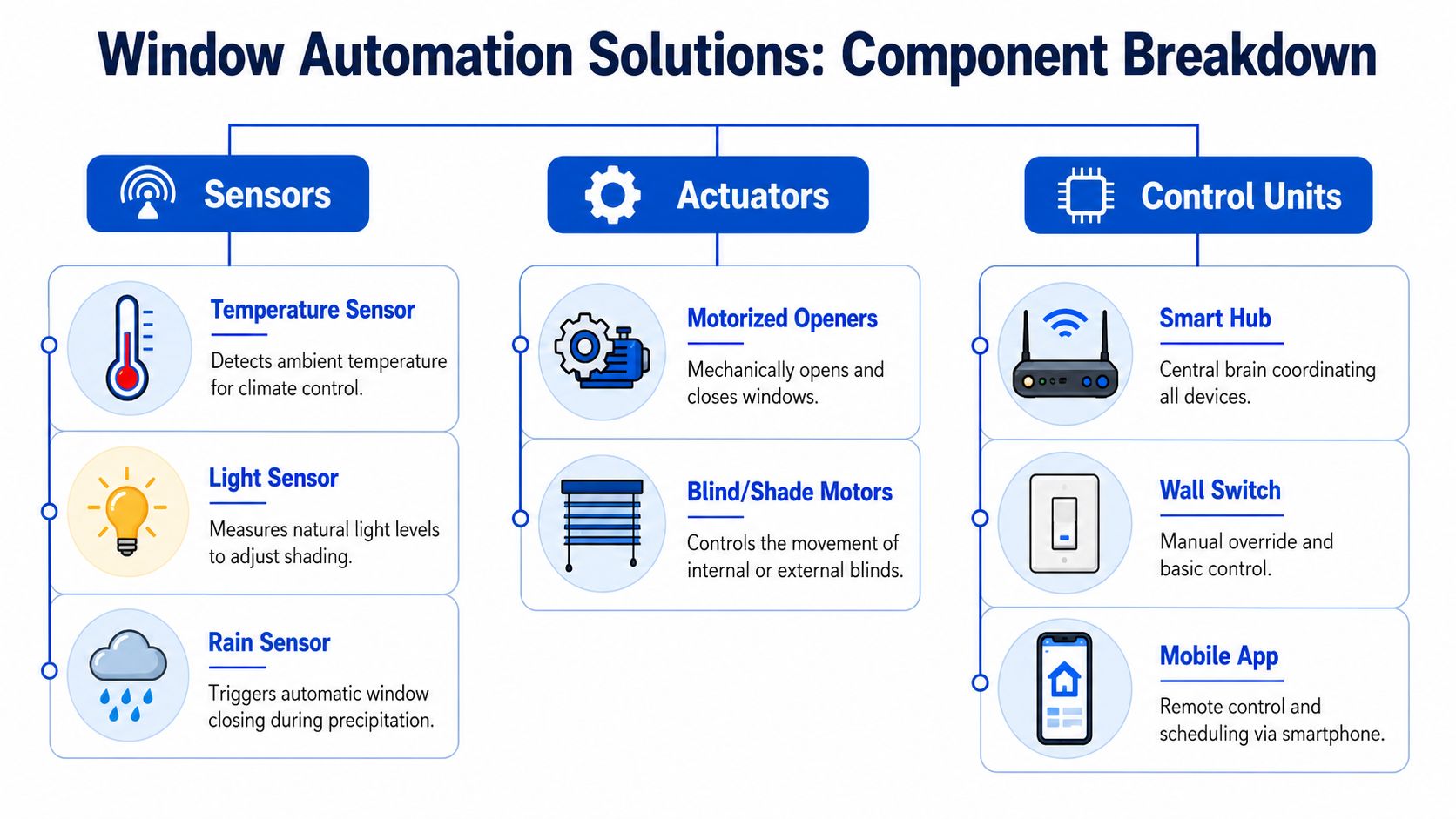
The hardware is simpler than it sounds once you break it into parts. Most systems have three jobs: sense conditions, move something physical, and decide when that movement should happen.
Motorized shades and blinds
For most co-living operators, motorized shades are the first place to start. They're usually less invasive than automated operable windows, and they directly address glare, privacy, and heat gain.
You'll typically see a few categories:
- Roller shades for a clean, simple install and easier standardization across many rooms
- Venetian or slatted blinds when you want more granular daylight control
- Blackout shades in bedrooms where sleep quality and privacy matter
- Exterior shades in some properties where blocking heat before it reaches the glass makes operational sense
Motorized shades are especially useful in rooms with recurring afternoon heat. If your team already knows which bedrooms get the most complaints, you probably know where automation will earn its keep first.
Automated window openers and vents
These devices physically open and close windows, transoms, or vents. Their value depends heavily on the building.
In the right property, they help with:
- Night flushing when cooler outdoor air can reduce indoor heat buildup
- Common-area ventilation without staff needing to visit the property
- Moisture management in kitchens, bathrooms, or laundry-adjacent spaces
- Rain response when the system closes openings automatically
In the wrong property, they become a headache. If your building sits on a noisy street, has security concerns at ground level, or has old frames with inconsistent hardware, automated opening may create more exceptions than benefits.
Sensors that do the real work
Sensors are where the system becomes useful. Without them, most automation is just scheduling.
Common sensor types include:
| Component | What it does in practice | Best use in co-living |
|---|---|---|
| Light sensor | Detects bright sun and changing daylight levels | West-facing bedrooms, sunny common rooms |
| Temperature sensor | Tracks heat buildup near windows or inside rooms | Rooms with uneven comfort |
| Rain sensor | Detects precipitation and triggers closing | Openable windows, skylights, vents |
| Occupancy sensor | Identifies whether a room is in use | Vacancy mode versus occupied mode |
| Contact sensor | Detects whether a window is open or closed | HVAC coordination and alerts |
The best sensor setups are boring. They should automatically feed rules that run every day without staff intervention.
Good automation doesn't depend on someone remembering the schedule. It responds to conditions that actually change.
Control options and advanced systems
The control layer can be a hub, a wall switch, a property app, or a larger automation platform. In small deployments, this may be a simple smart-home controller. In larger portfolios, it should support centralized oversight, permission settings, and auditability.
Some owners also ask about smart glass that tints electronically. It's real, and in the right premium project it can be compelling. But for most room-by-room rental operators, motorized shades usually provide a more practical path because they're easier to retrofit, simpler to replace, and easier for staff to understand.
If you're already thinking about broader property workflows, it helps to see how operators approach related systems in short-term rental automation. The core lesson carries over. Centralized rules beat isolated gadgets.
How Window Automation Integrates with Building Systems
Standalone window devices don't create much value. Integration does. The payoff comes when sensors, shades, vents, thermostats, and schedules act as one system instead of five separate apps.
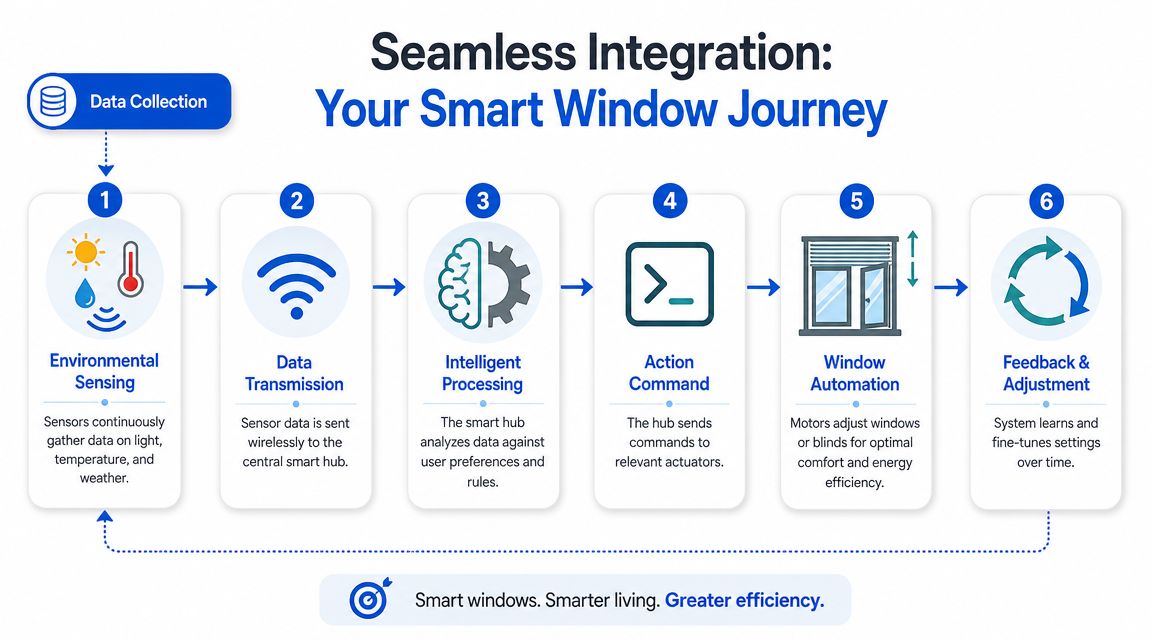
The trigger action result model
The simplest way to think about integration is this:
| Trigger | Action | Result |
|---|---|---|
| Bright afternoon sun in a west-facing room | Shade lowers automatically | Less solar heat enters the room |
| Rain starts while a top-floor window is open | Window closes | Lower risk of water intrusion |
| Bedroom becomes vacant for the day | Shade shifts to energy-saving position | Reduced heat load and less manual oversight |
| Window opens while HVAC is active | Thermostat rule adjusts or alerts staff | Less wasted heating or cooling |
That structure matters because event-driven automation is generally more dependable than random manual control. Microsoft's guidance around Windows desktop automation emphasizes the reliability of trigger-based flows and reusable action sequences over ad hoc execution (Power Automate and Windows 11 overview). The same operating principle applies in buildings. Stable triggers usually outperform constant human intervention.
How it works with HVAC
The strongest use case is coordination with heating and cooling.
If sunlight is driving up room temperature, lowering a shade early can reduce the HVAC burden later. If a resident opens a window, your system can flag that condition so cooling or heating doesn't keep fighting outdoor air. If cooler evening air is useful in a secure upper-floor common area, automated ventilation can support a lower mechanical load.
Many landlords miss the point. The window system doesn't replace HVAC. It preconditions the room so HVAC doesn't have to work as hard.
Connectivity choices that affect reliability
Most systems rely on one or more of these:
- Wi-Fi for direct device connectivity and simpler consumer deployments
- Z-Wave or Zigbee for lower-power device networks and broader smart-home compatibility
- Hardwired controls in higher-end retrofits or new construction
- Central hubs or BAS links for property-wide rules and administration
Each option has trade-offs. Wi-Fi is familiar, but crowded networks can become noisy in dense shared housing. Battery devices are easier to retrofit, but they add maintenance. Hardwired systems are cleaner long term, but installation gets more expensive.
What to avoid
The weakest setups depend on too many brittle conditions. In software automation, Microsoft and related guidance often distinguish between more structured automation and fragile interface-driven workarounds. That same lesson shows up in buildings too. If your logic depends on odd one-off routines, overlapping apps, or unclear ownership, the system won't stay reliable.
Choose the smallest stable rule first. One room, one trigger, one action, one measurable result.
For example, “Lower shades in the west-facing lounge when afternoon light crosses a threshold” is stable. “Let every resident create custom automation scenes that may conflict with thermostat logic” is not.
The Operational and Energy Benefits for Your Properties
Most operators don't buy window automation because it looks modern. They buy it when they realize the same comfort and energy issues keep repeating.
Lower labor on routine tasks
Your staff shouldn't spend time doing preventable room-by-room adjustments. That includes opening and closing shades before tours, correcting windows left open, or dealing with the same hot-room complaints every sunny afternoon.
Automation reduces those touches by standardizing what happens in recurring situations. That doesn't eliminate on-site work, but it moves your team away from low-value corrections and toward maintenance, leasing, and resident support.
Better control over avoidable HVAC waste
Windows shape heat gain, glare, and ventilation long before the thermostat can solve the symptom. That's why automation in customer-facing and revenue-linked workflows often gets adopted early. Oracle reports that marketing automation returns $5.44 for every $1 spent over the first three years, with a payback period of under six months in that context, and also cites gains in lead quantity, conversions, and reduced overhead (Oracle marketing automation statistics). Property operations are different, but the operating logic is familiar. Teams automate where small repeated improvements compound.
For co-living, that usually means:
- Reducing heat buildup in sun-exposed rooms before residents complain
- Supporting occupancy-based settings so vacant rooms don't consume attention
- Preventing HVAC conflicts when windows are open
- Using natural ventilation selectively where security and layout allow it
If you're already optimizing climate control, this pairs naturally with the broader considerations in choosing the best smart thermostat for rental property use. Thermostats manage temperature. Window automation helps control the conditions creating that temperature.
A better resident experience without more management overhead
Residents may not ask for “automated shades.” They do notice when a room overheats every afternoon, glare makes a desk unusable, or rain blows in through a forgotten window.
The benefit here is consistency. Comfortable rooms create fewer complaints, smoother renewals, and less tension between house rules and daily behavior. In shared housing, consistency often matters more than luxury.
Protection against preventable property issues
There's also a risk-management angle:
- Rain-triggered closing can reduce exposure to water intrusion
- Scheduled shade movement can protect interiors from harsh sun
- Manual override with central visibility helps staff intervene without guessing
- Window-state awareness gives you better incident context when problems happen
Operators often treat windows as resident-controlled details. In practice, they're part of building performance.
Analyzing the Cost and Return on Investment
At this stage, most purchases either move forward or stall. Window automation has real upside, but only if you evaluate it like an operating investment instead of a gadget purchase.
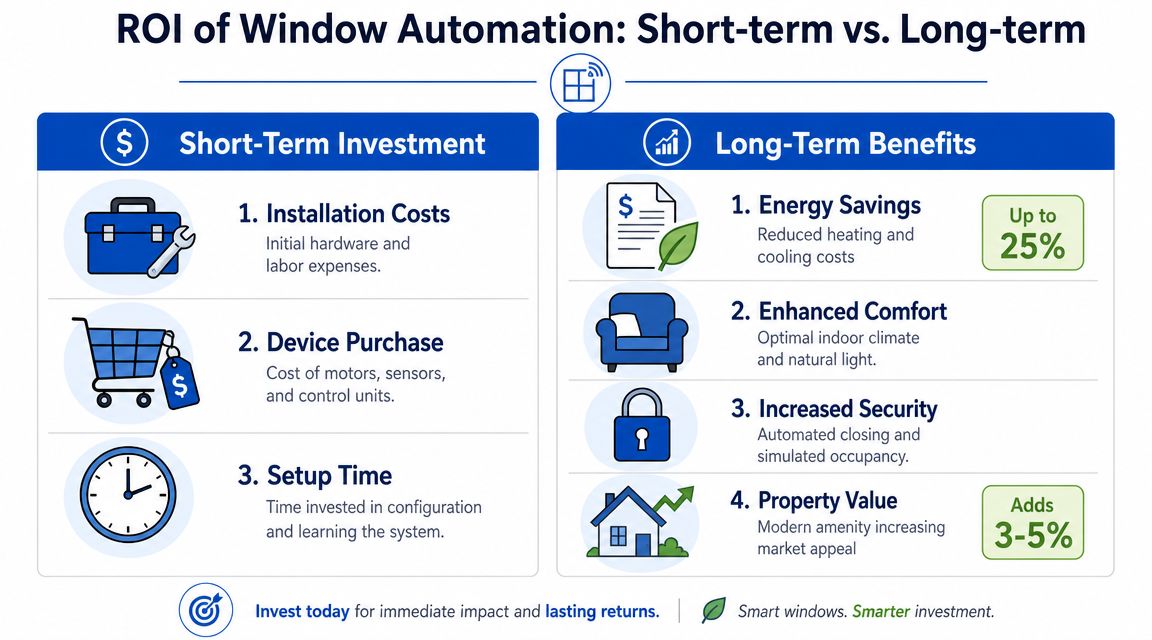
What you're actually paying for
Your costs usually fall into four buckets:
- Hardware such as shade motors, tracks, sensors, hubs, or window actuators
- Installation labor especially if wiring, trim work, or custom fitting is involved
- Configuration time for schedules, trigger rules, and permissions
- Ongoing upkeep including batteries, device replacement, and occasional troubleshooting
The range can vary widely by property. A retrofit with battery-powered shades in a few problem rooms is a different budget from a hardwired system across an entire building.
A simple ROI framework
You don't need perfect forecasting. You need a practical operating model.
Use a before-and-after worksheet with these inputs:
| ROI input | What to measure |
|---|---|
| Energy baseline | Utility costs for the rooms or property before automation |
| Labor baseline | Staff time spent on repeated comfort and window-related tasks |
| Problem frequency | Hot-room complaints, rain exposure events, manual adjustments |
| Installation cost | Equipment, labor, setup, and any replacement parts |
| Post-install results | Utility trend, labor trend, complaint trend, override frequency |
Then ask three direct questions:
- Did utility use improve in the targeted rooms or common areas?
- Did staff spend less time handling predictable comfort issues?
- Did resident complaints or avoidable incidents decrease?
If the answer is yes to two out of three, you probably have a case to expand.
How to think about return without forcing fake precision
You shouldn't trust any vendor who promises a universal payback period for every property. Room orientation, local climate, resident behavior, and window condition all matter.
Still, automation economics in other operating environments offer a useful benchmark. Kixie cites HubSpot statistics showing that marketing and sales automation can generate an average return of $5.44 for every dollar spent (Kixie sales automation statistics). You can't directly map that number onto window hardware, but the mindset is valid. Repetitive tasks and repeated inefficiencies often create more savings opportunity than operators expect.
Don't build your case on generic “smart home” value. Build it on one property, one pain point, and one measurable operating change.
A practical property example
Take a co-living house with a west-facing common room and two bedrooms that regularly overheat. Instead of automating every opening in the building, start with:
- motorized shades in those three spaces
- light and temperature sensors
- a simple schedule plus one sunlight-based trigger
- staff override for tours and maintenance
That pilot gives you real operating evidence. If bills smooth out, complaints drop, and your team stops making the same manual corrections, your expansion decision gets easier.
A Practical Guide to Installation and Implementation
The best implementation plans are conservative. They aim for reliable operation, clean ownership, and easy support. They don't try to automate every room on day one.
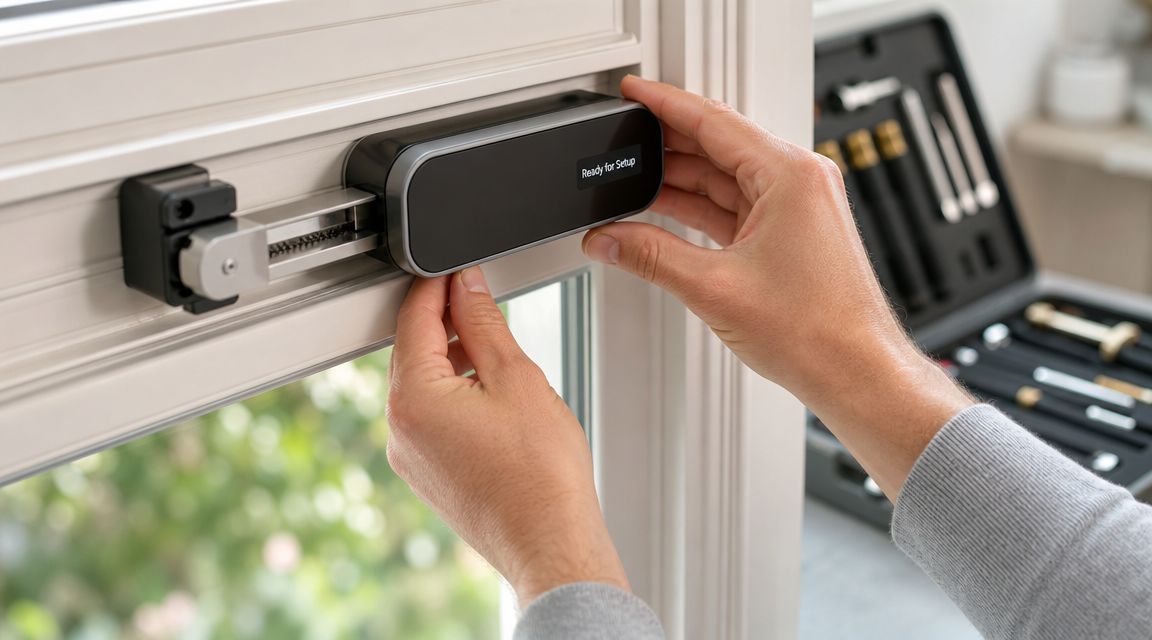
DIY versus professional installation
For a small pilot using battery-powered shades and basic sensors, some operators can handle installation themselves. That works best when:
- Window types are consistent across rooms
- You already manage smart locks, thermostats, or hubs
- Staff can handle setup and basic troubleshooting
- The system doesn't require electrical work
Professional installation is usually the better choice when the project includes wired power, custom shades, automated openers, or multi-property standardization. You're paying for fit, safety, and fewer callbacks.
A simple rule helps here. If failure would create water risk, security risk, or resident disruption, don't treat it as a casual DIY project.
Retrofit realities in older properties
Most co-living inventory isn't new construction. It's a mix of older homes, varying window dimensions, patched trim, and inconsistent power access. That affects what's feasible.
Retrofits usually work best when you prioritize:
- Battery-powered or low-intrusion devices in occupied homes
- Standardized hardware for easier replacement across properties
- Rooms with the clearest payoff such as sunny bedrooms and common areas
- Manual overrides so staff aren't locked out of simple control
Older frames can also create fit problems for automated openers. Before you commit, verify frame condition, clearance, and whether the window type is even suitable for motorization.
The technical questions to ask before you buy
Ask vendors and installers these questions early:
- Power source. Is it battery, plug-in, or hardwired?
- Connectivity. Does it use Wi-Fi, Zigbee, Z-Wave, or a proprietary bridge?
- Fallback behavior. What happens if the network fails?
- Access control. Who can override settings. Staff, residents, both?
- Maintenance. How are batteries replaced and alerts managed?
- Security. How are user accounts, remote access, and device permissions handled?
- Compatibility. Will it work with your current thermostat, lock, or property management stack?
A short demo is useful, but installation details tell you more than the app interface does. This video gives a helpful view of what physical setup can look like in practice:
Buy for serviceability, not just features. In shared housing, the easier system to maintain usually wins over the more impressive one.
Your Strategy for Procurement and Pilot Testing
Start small. That's the strongest advice I give operators on automation for windows.
Pick one or two spaces where the problem is obvious. A west-facing bedroom that overheats. A common room with heavy afternoon glare. A top-floor area where ventilation matters. Those are pilot candidates because the result is easier to observe.
Track a short list of metrics during the test:
- Energy trend in the targeted area before and after
- Manual staff interventions related to shades, windows, and comfort
- Resident feedback on glare, heat, privacy, and ease of use
- Override frequency so you can see whether your rules are working
- Exception events such as missed triggers or device failures
When you talk to vendors, ask how they handle scaling, battery replacement, admin permissions, and failed devices. Also ask what happens when a resident wants local control but you need a property-wide energy rule.
For operators thinking beyond a single device category, it helps to review how broader customized automation solutions are usually phased in. The same lesson applies here. Pilot first, standardize second, expand last.
If you're building a more efficient co-living operation, PadPulse is worth watching. It's being developed as an all-in-one platform for room-by-room rental operators, with planned tools for automation, portfolio visibility, pricing, messaging, and smart-home integrations. Join the interest list if you want updates and early access as the platform moves toward launch.