Automated Payment Reminders for Property Operators
August 16, 2026
A rent reminder rarely arrives in a simple situation. One resident forgot the due date, another paid only part of the room charge, and a third has stopped responding because the balance may be unaffordable. Meanwhile, you're checking bank activity, updating a spreadsheet, and trying to remember who needs a message today.
Automated payment reminders can remove much of that repetitive work, but they work best when treated as a resident-experience system rather than a collections blast. The right workflow gives each resident a clear balance, a direct way to pay, and an appropriate next step. It also knows when to stop, when to change tone, and when a human should take over.
Why Payment Reminders Matter in Co-Living
A room-by-room operator often manages several payment situations at once. A resident may overlook a due date. Another may believe a partial transfer cleared the account. Someone else may be waiting for a corrected utility charge, or may be dealing with a genuine cash-flow problem.
Those situations need different responses. A generic “pay now” message treats forgetfulness, confusion, disputed charges, and hardship as if they're the same problem. They aren't.
Evidence from an Australian tax-debt field experiment shows why timely communication still matters. A simple reminder letter increased the probability of payment by about 25 percentage points compared with a control group, and delaying the reminder within a three-week window produced no benefit. The study also estimated an increase of about 24 percentage points in the likelihood of payment by the end of the trial period. These findings are reported in the Australian tax-debt reminder experiment.
For a co-living host, the lesson isn't that a rent reminder guarantees payment. It's that a consistent prompt can bring an existing obligation back to the resident's attention and accelerate recovery without changing the underlying amount owed.
What automation handles well
A dependable workflow can:
- Improve attention: Put the balance, due date, and payment path in front of the resident at a sensible time.
- Create consistency: Give every resident the same basic service standard, while still allowing segment-specific rules.
- Reduce repetitive administration: Stop you from manually checking every account and rewriting the same message.
- Clarify the next action: Tell a resident whether to pay, confirm a payment method, review a charge, or contact support.
Compare two operating styles. In the manual version, you notice overdue balances at different times, search for the right payment link, and send messages that vary in detail and tone. In the structured version, the resident receives a balance confirmation before the due date, a direct payment action on the due date, and a measured follow-up after any agreed grace period.
That second approach is more useful, but it still needs judgment. Reminders can't make an unaffordable room affordable, correct an inaccurate lease record, settle a disputed charge, or resolve a structural income problem. Use resident engagement practices for shared housing to support the broader relationship, not just the payment event.
Practical rule: Automate attention and consistency. Keep affordability decisions, disputes, and sensitive conversations human.
Designing an Effective Reminder Workflow
Start with the payment event, not the message. Rent, deposits, utilities, move-in fees, and payment-plan instalments each have different timing, documentation, and resident expectations.
A useful workflow has four stages:
- Pre-due confirmation: State the exact amount, due date, account or room reference, and available payment method. This is a service message, not a warning.
- Due-day action: Provide one clear payment link or instruction. Avoid burying the action beneath a long explanation.
- Post-grace follow-up: Acknowledge that the balance remains open and show the next step after the agreed grace period.
- Measured escalation: Explain the account status, invite the resident to raise a dispute or request help, and route the matter to a person when the situation calls for judgment.
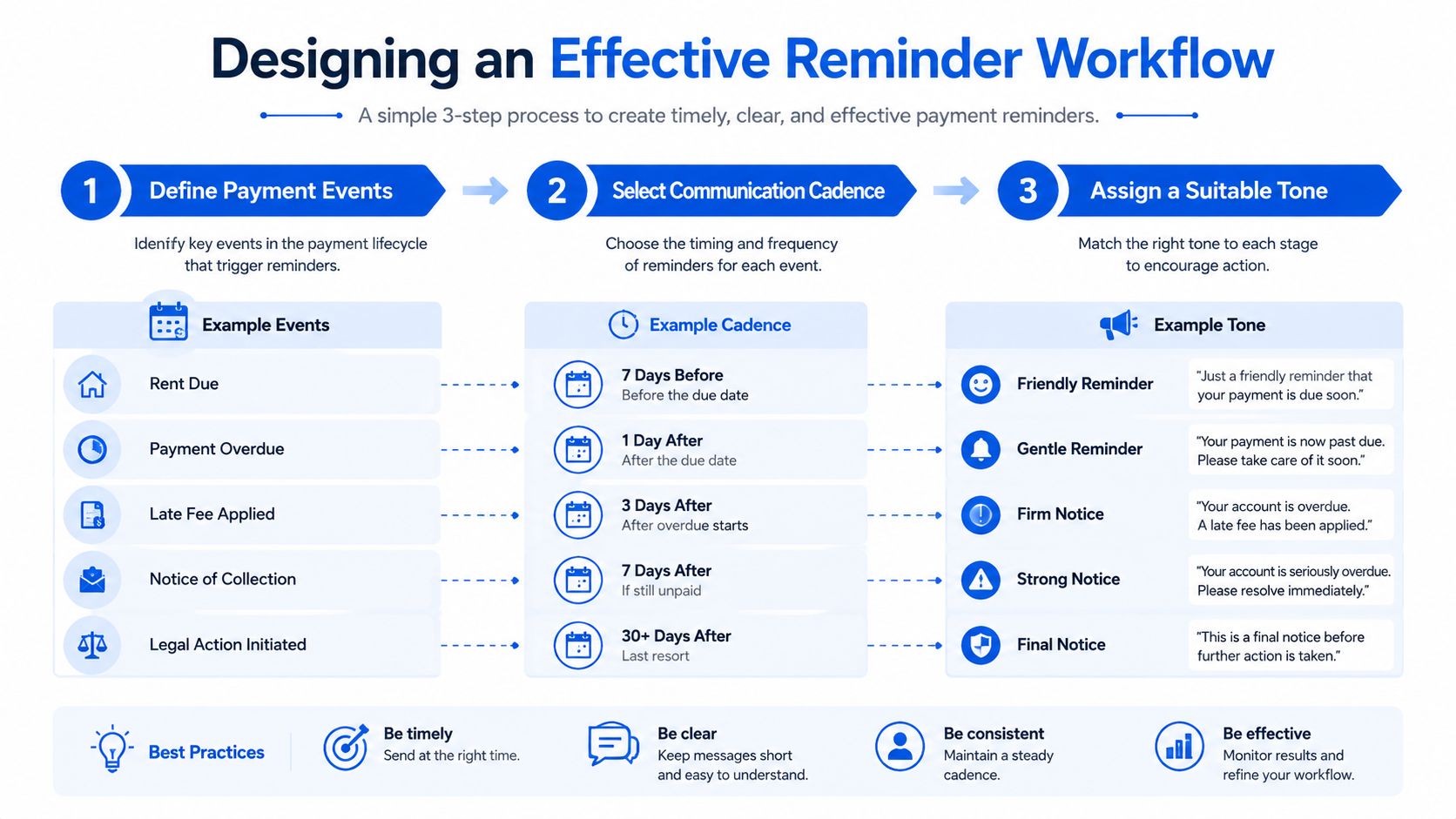
Match timing to the resident's likely action
A pre-due note should help someone prepare. A due-day note should make payment easy. A post-grace message should resolve uncertainty, not create panic.
Set rules around:
- Due-date distance: Decide when residents need information and when they need a direct prompt.
- Grace periods: Use the lease or approved policy as the source of truth. Don't let an automation tool invent a deadline.
- Quiet hours: Avoid sending messages when residents are unlikely to welcome them, especially late at night.
- Weekends and holidays: Check whether your payment support team will be available when a resident replies.
- Time zones: Send according to the resident's relevant local time, not just the property's default setting.
- Payment status: Stop or change the sequence as soon as a confirmed payment, partial payment, failure, or dispute changes the account.
A weekly text may sound reasonable, but reminder frequency has a behavioural limit. In one randomized field study, one text reminder per week increased compliance, while two texts per week reduced effectiveness. The field study on reminder frequency.pdf) supports throttling rather than adding more touches.
Use the same framework across charges, but adapt the language. A utility balance may need a line-item explanation. A move-in fee may need a document link. A payment-plan instalment should reference the approved arrangement. For practical follow-up design, see this guide to follow-up automation.
Writing Reminder Messages That Lead to Action
A reminder should answer five questions quickly: Who is contacting me, what do I owe, when is it due, how can I pay, and what should I do if the amount is wrong or payment isn't possible?
The message should pull live information from the account record. That includes the resident's name, exact balance, due date, payment method, secure payment link, and a useful support route. Never rely on a copied balance or an old link.
Use each channel for its strongest job
SMS works well for short, visible prompts. Email gives you room for line items, payment records, and explanations. In-app messaging keeps the payment action beside the resident's account, which can reduce the effort required to verify the balance.
| Channel | Best Use | Core Message Elements |
|---|---|---|
| SMS | Short pre-due, due-day, or post-due prompts | Name, amount, due date, payment link, support instruction |
| Detailed records, charge explanations, and formal notices | Subject, balance breakdown, due date, payment method, receipt or dispute route | |
| In-app message | Account-linked payment actions and status updates | Current balance, status, payment button, plan or support option |
Here are adaptable examples. Replace every bracketed field with verified account data.
Upcoming payment, SMS
Hi [Name], your room payment of [Balance] is due on [Due Date]. Pay securely here: [Payment Link]. Questions about the amount? Reply or contact [Support Route].
Due today, in-app
Your [Property or Room] payment of [Balance] is due today. Select “Pay now” to complete it. If you've already paid, allow time for confirmation or send your receipt to [Support Route].
Overdue balance, email
Subject: Payment status for [Due Date]
Hi [Name], our records show an outstanding balance of [Balance] for [Room or Charge]. Please pay through [Payment Link], or contact [Support Route] if you've made a payment, need to dispute the charge, or need to discuss support options.
Partial payment, SMS
Hi [Name], we've recorded your payment of [Amount Received]. The remaining balance is [Remaining Balance], due under your current arrangement on [Due Date]. Pay here: [Payment Link], or contact [Support Route] if this doesn't match your records.
Failed payment, email
We couldn't confirm your payment for [Charge]. Please check your payment method and try again through [Payment Link]. If your bank shows a completed transaction, send the confirmation to [Support Route] so we can review it.
Approved payment plan, in-app
Your payment arrangement is active. The next instalment of [Instalment Amount] is due on [Due Date]. View the arrangement and payment option here: [Payment Link]. Contact [Support Route] before the due date if your circumstances change.
Change urgency by changing the status and next action, not by adding shame or unsupported consequences. A good message is clear, accurate, personalized, and easy to act on. It also gives the resident a way to explain a problem before the sequence becomes more serious.
Setting Automation Rules Without Losing Control
Automation needs stop conditions as much as send conditions. Without both, a resident who paid may continue receiving overdue notices, while a resident who made a partial payment may incorrectly receive a “balance cleared” confirmation.
Build the logic around account events:
- Invoice created: Store the charge description, amount, due date, and applicable grace period.
- Due date approaching: Send the approved pre-due message at the resident's local time.
- Due date reached: Confirm the payment action and current amount.
- Payment failed: Explain that payment wasn't confirmed and provide a fresh, secure route to retry.
- Partial payment received: Record the amount received, calculate the remaining balance, and acknowledge the payment without closing the account.
- Payment confirmed: Stop payment reminders and issue a receipt or status confirmation.
- Grace period expired: Send the approved post-grace notice, unless a payment plan, dispute, or support case changes the route.
- Lease status changed: Pause or revise messages when a move-out, transfer, or lease amendment changes the obligation.
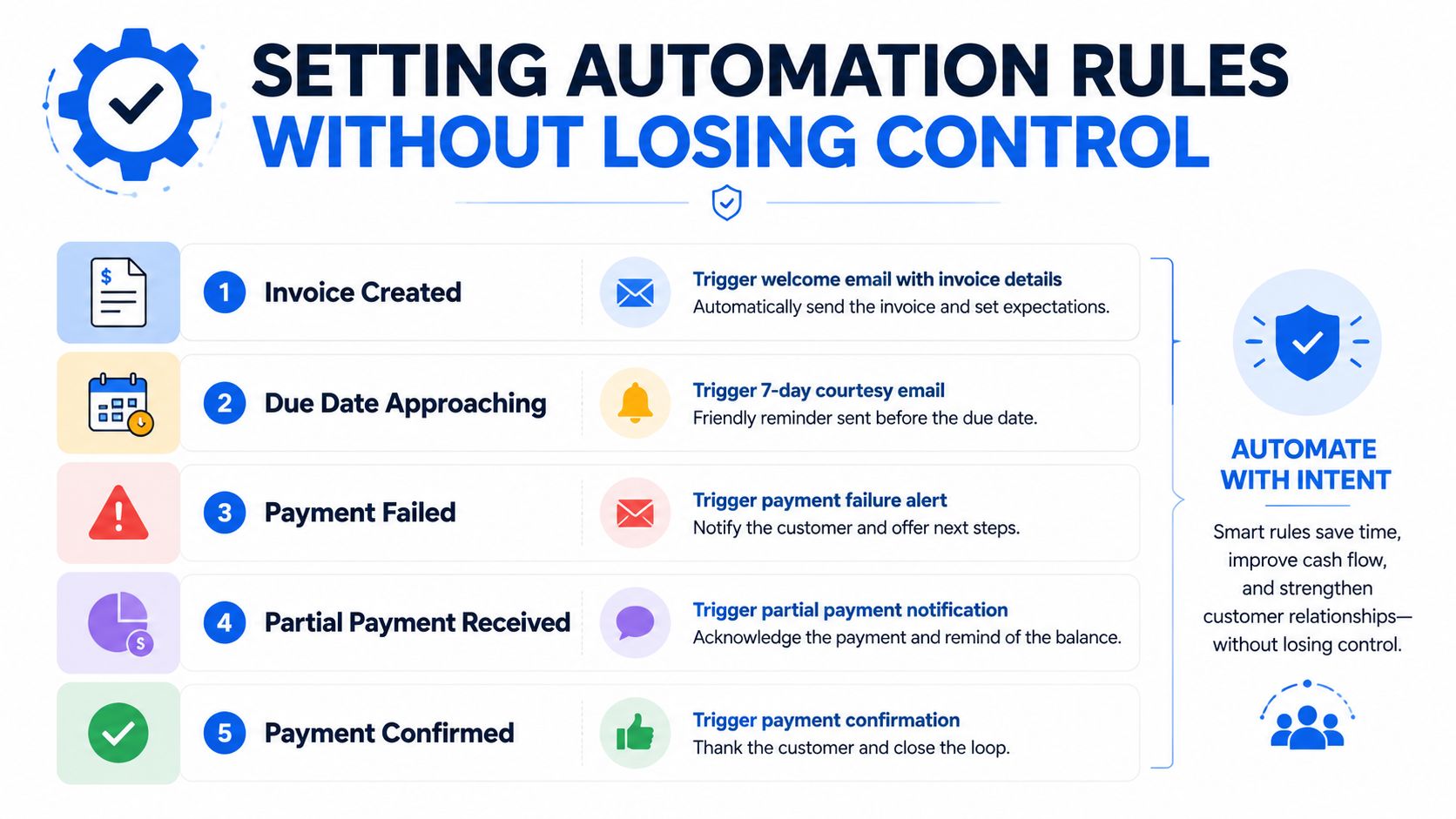
Treat partial payments as a separate state
A partial payment is not a failed payment, and it isn't a cleared balance. The workflow should thank the resident, show what remains, and restart only when the remaining amount reaches the next defined threshold.
Residents may also have different lease-specific rules. One person may have an approved grace period, another may be on a payment plan, and a third may owe a one-time move-in charge. Store those exceptions in the account record instead of asking staff to remember them.
Define the human handoff
Automation can gather information and offer a payment route. It shouldn't decide whether a disputed charge is valid, whether a hardship request deserves flexibility, or whether repeated failed payments require a different arrangement.
Send the account to human review when:
- The resident disputes the charge: Pause escalation until someone checks the source record.
- The resident reports hardship: Offer the appropriate support or payment-plan process.
- Payments repeatedly fail: Confirm whether the issue is a payment method, bank hold, incorrect link, or account error.
- The balance appears wrong: Stop messages until the amount is reconciled.
- The resident requests contact: Create a task with the full message and payment history.
Test for duplicate sends, timezone mistakes, bounced email, opted-out numbers, stale payment links, and delayed processor confirmations before launch. A simple audit trail should show the trigger, message, delivery status, account balance, and stop condition.
Protecting Compliance and Resident Trust
Aggressive wording doesn't compensate for inaccurate records. If an automated message names the wrong amount, ignores an approved grace period, or reaches a former resident, the workflow has created a trust problem instead of solving a payment problem.
Keep the underlying records current. Each charge should connect to the relevant lease term, room, utility line, fee policy, payment agreement, and source transaction. Staff should be able to see who changed the balance, which message was sent, and whether the resident has challenged the charge.
Make fairness part of the workflow
A practical communication policy should require:
- Verified contact details: Confirm the current email address and phone number before sending.
- Channel consent and preferences: Respect opt-outs and don't switch channels casually when a resident hasn't agreed to receive messages there.
- Plain status language: Say “our records show a remaining balance” rather than implying misconduct.
- A dispute route: Give residents a clear way to challenge an amount or submit proof of payment.
- A support route: Make it easy to request help when payment isn't possible.
- Controlled access: Limit balance and lease information to staff who need it.
- Audit records: Preserve the message, timestamp, delivery result, and account state.
The content of the message matters, but so does the decision behind it. Sending the same escalation to every resident can produce unequal outcomes when some residents have reliable cash flow and others face constraints. Research on credit counseling reminders found that a structured reminder stream sent for one year reduced the likelihood of 60-plus-day delinquency by 21% and 30-plus-day delinquency by 12% among treated consumers, as described in this randomized reminder study. The same evidence also indicates that reminder effects can vary by credit profile, which is a strong reason to segment rather than broadcast.
Late-fee references require particular care. A 2024 CFPB credit-card penalty-fee rule set an $8 safe-harbor cap for most large issuers, compared with older Regulation Z safe-harbor levels of $32 for a first late fee and up to $43 for subsequent fees within six months, according to the CFPB final rule. That rule concerns credit-card issuers, not residential rent, so operators shouldn't apply it directly to lease charges. Use the actual lease, local requirements, and qualified legal guidance for rental fees.
Connecting Reminders to Your Property Systems
A reminder should reflect one reliable account state. Your property-management system needs the resident identity, lease status, room, charge description, amount due, due date, grace period, payment status, receipt confirmation, and communication history. The payment processor should return confirmed payments, failures, partial amounts, and transaction references.
Three approaches are common:
| Approach | Setup Effort | Data Accuracy | Channel Control | Reporting Depth |
|---|---|---|---|---|
| Manual reconciliation | Low at first, high as volume grows | Depends on staff updates | Flexible but inconsistent | Basic spreadsheets or notes |
| Processor-only reminders | Usually straightforward | Strong for payment events, weaker for lease context | Often limited to processor channels | Payment-focused |
| PMS-connected workflow | Requires careful mapping | Strongest when records stay synchronized | Better control across resident channels | Account, property, and portfolio views |
A processor can confirm a successful transaction without knowing that a resident changed rooms, has an approved payment arrangement, or disputes a utility charge. The property-management system holds that lease context, but it still needs a dependable processor event before closing the reminder sequence. Test partial payments and room transfers, not only successful full payments.
Keep access controls separate from collections logic
Smart-home systems may support operations, but access control needs its own policy. A smart lock should not restrict a resident because a reminder was sent. The balance may be wrong, a transfer may still be pending, or the resident may have an active dispute or support arrangement. Keep payment reminders, lock commands, and human review as separate steps.
PadPulse is an in-development platform targeting a Winter 2026 launch, with expected features including AI-powered messaging workflows, smart-home integrations, P&L tracking, portfolio-level analytics, and market intelligence, as described on the PadPulse platform website. Planned smart-home connections may include keyless smart locks and smart thermostats. Treat those capabilities as future plans, not available automation.
For operators comparing tools, rent collection software should connect payment events with lease context, resident communication, reconciliation, and reporting. Evaluate whether it pauses reminders after partial payment, respects grace periods, and routes exceptions to staff instead of sending another automated notice.
Implementing, Measuring, and Improving Results
Introduce automated payment reminders as a controlled operating change, not a switch you flip across every room. Begin with clean records and a small pilot so you can find incorrect balances, duplicate messages, and confusing payment paths before residents experience them at scale.
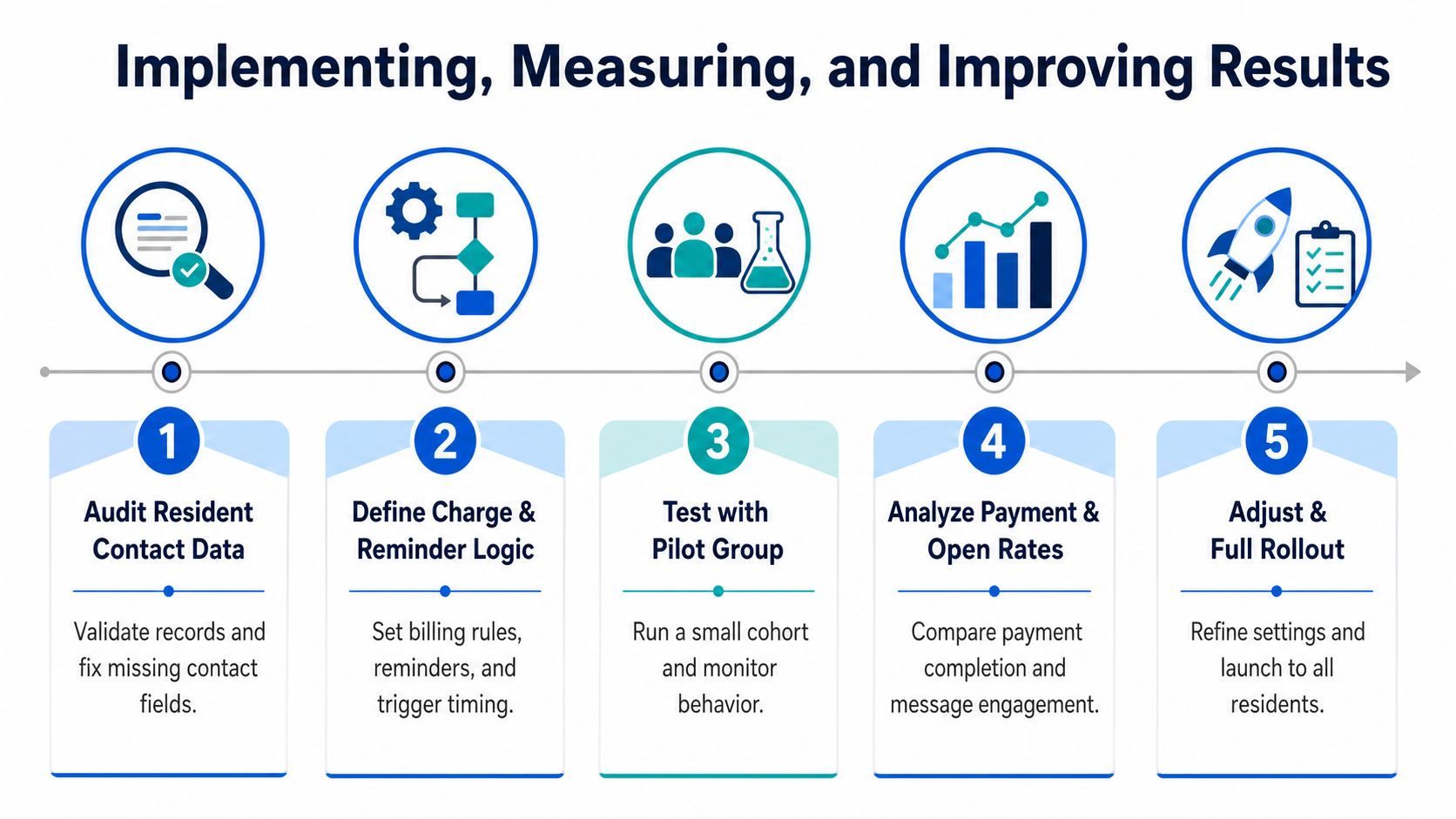
Use a beta-ready checklist
Audit resident contact data. Confirm names, room assignments, lease status, email addresses, phone numbers, consent records, and preferred channels. Remove former residents and stale payment links before enabling sends.
Define charge and reminder logic. Document rent, deposits, utilities, move-in fees, grace periods, payment plans, and approved exceptions. Decide what happens after a payment, partial payment, failure, dispute, or balance correction.
Write the templates. Create separate versions for pre-due, due-day, post-grace, failed payment, partial payment, approved plan, and human-support routing. Every template needs the exact balance, due date, payment path, and contact option.
Test every channel. Send test messages to internal accounts. Confirm that links open correctly, balances display properly, quiet-hour rules work, opt-outs are respected, and a confirmed payment stops the sequence.
Run a limited pilot. Choose a manageable group with varied payment situations, including at least one account with a partial payment or approved arrangement. Review delivery, replies, payment status, and staff workload before expanding.
Measure the whole payment journey
Track days sales outstanding, meaning how long receivables remain open, using one consistent definition across your properties. Also track collection rate, on-time payment rate, partial-payment completion, failed-payment recovery, reminder opt-out rate, and resident turnover or churn.
Churn needs an operator-defined meaning. You might define it as a resident leaving after a specified period, but there's no universal baseline you should borrow without documenting the period and the reason for departure. Separate payment-related move-outs from ordinary lease-end turnover where possible.
The strongest evidence treats reminders as more than a one-time nudge. In a credit-card repayment experiment, reminders made borrowers about 4% less likely to be late, with a 59% control-group baseline late rate, and the effect remained economically meaningful 14 weeks after the messages were sent, according to the credit-card repayment research. A separate trial found full arrears repayment at 64.3% for treated users versus 61.9% for the control group, with a 2.7 percentage-point effect among the 84.4% who logged in and saw the reminder, as reported in this digital reminder trial.
Troubleshoot by failure pattern
- Low delivery: Check contact details, consent, bounced addresses, carrier rules, and quiet-hour settings.
- Low payment-link use: Shorten the message, make the action prominent, verify the link, and test whether the resident can complete payment without extra steps.
- Messages continue after payment: Inspect processor confirmation timing and the stop condition.
- Inaccurate balances: Reconcile the source charge, partial payments, credits, and lease amendments.
- One segment performs poorly: Test another channel, cadence, or support route instead of increasing message volume.
- Residents reply with hardship or disputes: Pause automated escalation and assign a human owner.
A behavioural reminder study found that monthly emails were more useful when they included the due date, financial-assistance resources, a link to set up automatic payments, and additional encouragement, rather than offering only a generic prompt. The CFPB reminder intervention summary supports a practical principle for housing operators: give residents a concrete way forward.
A good automation program measures not only who paid, but also who was confused, unreachable, over-contacted, or asking for help.
Use the results to adjust one variable at a time. Change the message, channel, timing, or segment rule, then compare the outcome against your own earlier period. Don't treat a higher payment rate as success if complaints, disputes, or avoidable turnover rise alongside it.
PadPulse is being built for co-living operators who need rent-by-the-room communications, financial visibility, portfolio analytics, and connected property operations in one environment. Visit PadPulse to review the planned Winter 2026 launch, join the interest list, and request updates about limited beta access.