Workflow Automation Platform for Rental Operators
August 8, 2026
You know the drill. A new inquiry hits at midnight, a room just turned over, the old rate is still live, the smart lock code needs to go out, and your spreadsheet says one thing while your messaging app says another. If you run room-by-room rentals, that chaos isn't occasional, it's the job.
A workflow automation platform is what turns that mess into a system. It connects pricing, messaging, access, and reporting so you're not dragging work across five tools and three people every time a guest moves in or a room opens up. For co-living operators, that matters more than generic office automation because the work lives in both the digital and physical world, which means software has to coordinate people, rooms, locks, thermostats, and timing without constant babysitting.
Why Room-by-Room Operators Need Workflow Automation
A PadSplit host with a 12-room property doesn't need more dashboards. They need fewer things to remember at 11:47 p.m. A vacancy opens, the room should reprice, the inquiry inbox should stay warm, the move-in message should go out, and the lock code should be ready when the new member arrives.

That's why a workflow automation platform matters. It becomes the operational backbone that keeps pricing, access, and communication moving in sync instead of forcing you to chase every handoff yourself. If you're already trying to tighten your operating rhythm, the workflow optimization guide is worth reading alongside this.
The real bottleneck is coordination
Most hosts don't lose money because they lack effort. They lose it because the next task depends on someone noticing the previous one. A room sits at the wrong rate. A message reply slips. A lock code gets created late. The actual work is simple, but the coordination is brutal.
Practical rule: If a task happens every time a room turns over, every time a lead comes in, or every time occupancy changes, it should not live in someone's memory.
That's why co-living operators need automation built around the bottleneck, not around a generic feature list. The workflow automation market has grown into a major enterprise category, with Mordor Intelligence estimating USD 26.01 billion in 2026 and projecting USD 40.77 billion by 2031 at a 9.41% CAGR workflow automation market estimate. You don't need the market size to run a house, but the scale tells you something important. This category is no longer experimental, and operators who keep doing everything manually are choosing friction on purpose.
Why shared housing is different
Office workflows usually stay inside software. Shared housing doesn't. A move-in can depend on a booking status, a rent change, a smart lock, a thermostat setting, and a member-facing message that all need to happen in the right order.
That mix is exactly why co-living operators feel the pain more sharply than standard landlords. When a workflow fails, the cost shows up in real life, not just in a missed checkbox. Someone arrives early. A room is too warm. A vacancy stays underpriced. One bad handoff can touch the member experience, the maintenance team, and the revenue line at once.
How a Workflow Automation Platform Actually Works
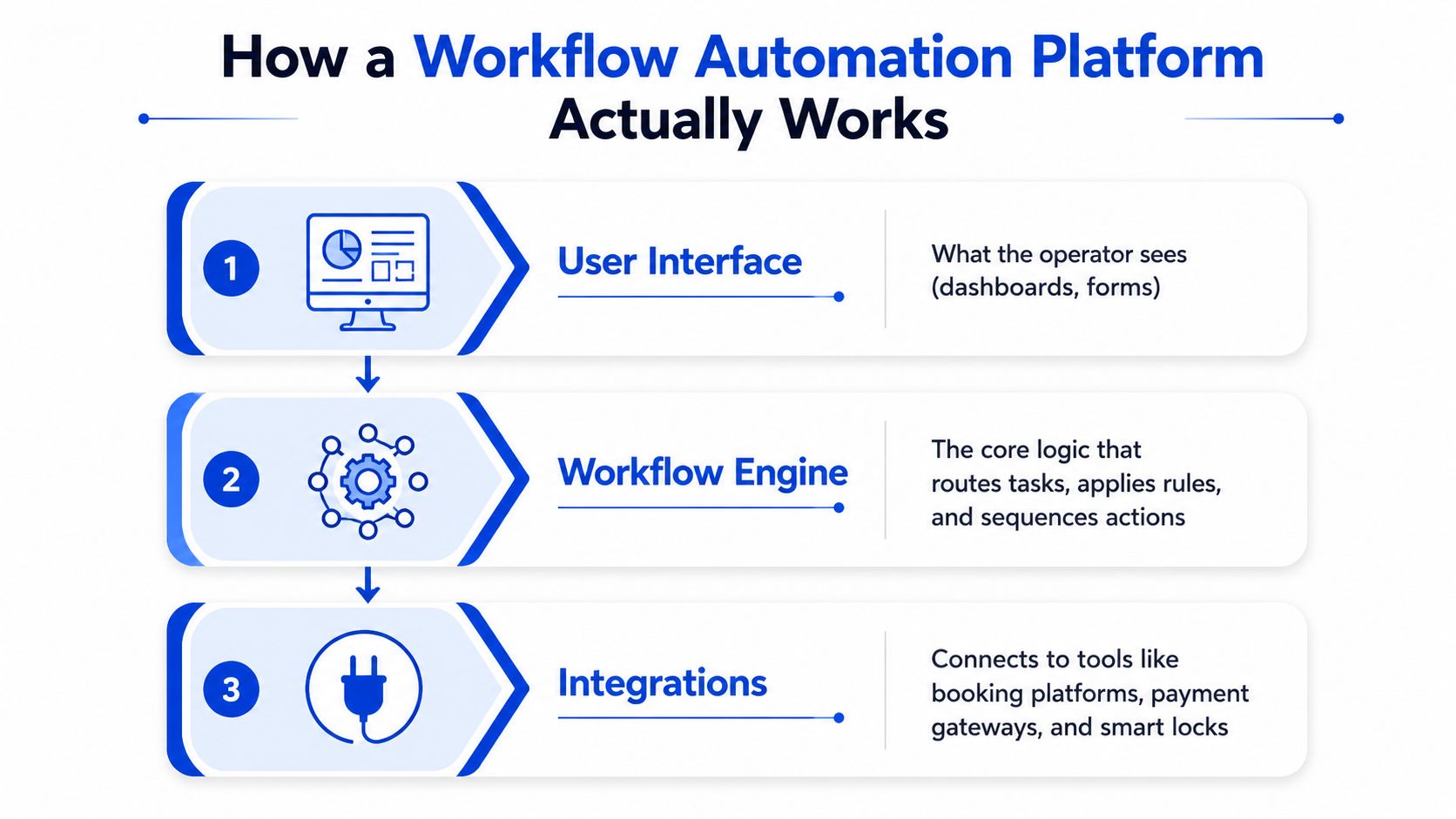
A good workflow automation platform isn't one giant app that tries to do everything. It is a building with separate floors. One floor is for the interface your team sees, one is for the orchestration engine, one handles integrations, another stores data, and the last one covers security and monitoring. That separation matters because it lets you change one part without breaking the whole operation.
The layers work separately, but they act together
The UI is what your team touches, dashboards, forms, status screens. The orchestration engine is the brain that decides what happens next. Integrations are the connectors to booking tools, payment systems, smart locks, and messaging services. Data persistence keeps the history, and observability plus security keep the system auditable and safe.
That layered setup is the reason a platform can handle workflow changes without forcing a full rebuild. If you update one connector, you shouldn't have to rewrite your whole process. If you add a new rule for move-ins, you shouldn't risk your pricing logic. The architecture separates the jobs so your operation stays flexible.
The orchestration engine is the control point
In practice, the orchestration layer is usually where state changes, retries, branching logic, and transaction handling live. That's the part you care about when a rent collection sequence needs to finish cleanly or a lock code needs to go out only after the right conditions are met. If that engine is weak, the rest of the platform is just a prettier to-do list.
A workflow platform is only as reliable as its control layer.
That's also why event-driven architecture matters. Instead of constantly checking systems for changes, the platform reacts when something happens, such as a new booking, an occupancy change, or a thermostat alert. For high-throughput automation, this event-driven pattern is the standard because it keeps producers and consumers decoupled through an event bus or message backbone event-driven workflow architecture. In plain language, that means the platform can respond in real time without wasting effort polling every system all day.
What good execution looks like
A well-built platform doesn't just automate tasks. It makes them observable. If a step fails, the platform should let you retry it without starting from scratch. If a branch changes, the team should see why. If a workflow is working, you should be able to prove it.
That design is what production-grade automation looks like. It's not flashy. It's stable, traceable, and built for repeatable operations. For co-living, that stability is the difference between a house that runs on habit and a portfolio that runs on process.
Core Features That Drive Co-Living Operations
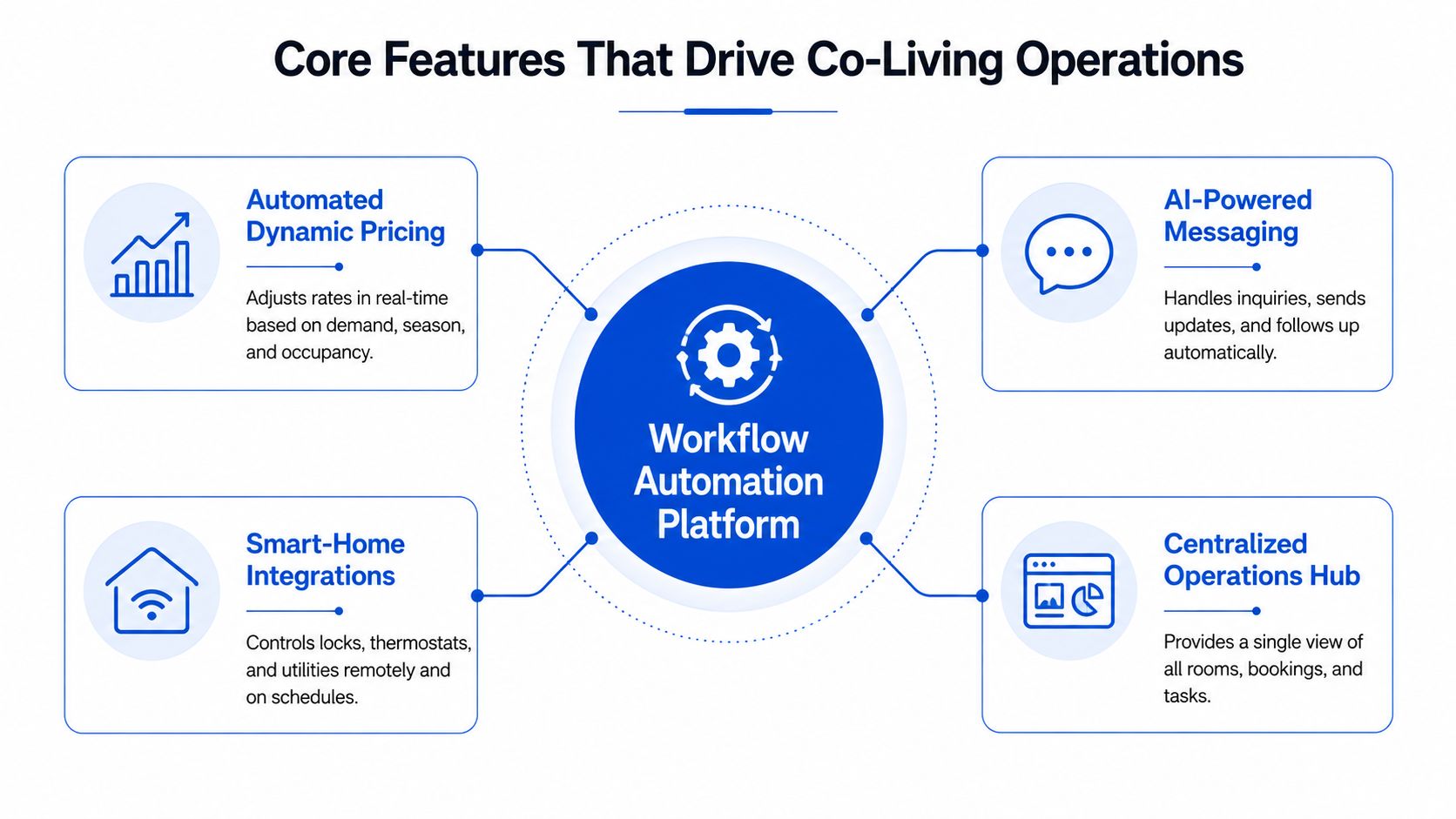
A lot of platforms look impressive in demos and disappointing in real life. For room-by-room rentals, only four feature areas usually matter: pricing, messaging, smart-home control, and reporting. If a platform does all four well, you'll feel it fast. If it misses even one, your team keeps doing manual cleanup.
Pricing that reacts to occupancy, not memory
Automated dynamic pricing should adjust room rates when a vacancy opens, demand changes, or comparable rents shift. The point isn't to chase every tiny market movement. The point is to stop leaving money on the table because no one got around to updating a listing.
In shared housing, that matters because every room is its own revenue unit. A platform that understands per-room pricing can help you balance occupancy and yield without forcing a host to review every vacancy by hand. If you're comparing tools, the property management software features guide is a useful benchmark for what should be present versus what's just nice to have.
Messaging that keeps members from waiting
A strong messaging workflow does more than send canned replies. It should handle inquiry responses, move-in coordination, reminders, and status updates without making the host retype the same thing all day. That's the difference between a lead getting a timely answer and a lead going cold.
For co-living, messaging is not a support side task. It's part of the conversion engine and part of the member experience. A clear message at the right moment prevents confusion, reduces back-and-forth, and cuts down on missed steps during move-in.
Smart-home integrations that match the real world
Co-living diverges most from generic SaaS automation. You're not just moving data between apps. You're coordinating physical access, room temperature, and occupancy-sensitive operations. A good platform should handle smart lock provisioning, thermostat adjustments, and other device actions tied to workflow events.
That's important because a software-only workflow breaks the moment the physical environment doesn't match the booking status. When a member checks in, the code should work. When a room turns over, access should change. When occupancy changes, the environment should reflect it. That's operational hygiene, not a luxury feature.
Reporting that tells you what's actually happening
Reporting should show more than a few vanity charts. You need portfolio-level visibility, room-level performance, and a clean view of the financial picture. That includes P&L tracking, market intelligence, and analytics that help you understand where your returns are coming from.
If the platform can't show you which rooms are lagging, where pricing is stale, or how your portfolio is performing overall, you're still operating blind. Good reporting gives you a way to manage by exception instead of by guesswork.
Real-World Use Cases for PadSplit Hosts
The fastest way to judge a platform is to look at the work it removes. For room-by-room operators, the big wins usually show up in vacancy repricing, move-ins, and inquiry handling. Those are the moments when manual work either leaks revenue or burns time.
Vacancy repricing that happens the day a room opens
A room becomes vacant, but the old rent stays live for two days because nobody updated the listing yet. That's the old way. The better way is a workflow that triggers as soon as the vacancy is logged, checks the pricing rule, and updates the room rate automatically.
That change matters because the room starts earning at the right price immediately instead of sitting in limbo. Even without putting a number on the gain, the logic is obvious, every day at the wrong rate is a missed opportunity. If you're trying to tighten follow-through on those handoffs, the follow-up automation guide is a practical companion read.
Move-in coordination without the scramble
Manual move-ins are where teams waste the most attention. Someone generates the lock code, someone else sends the welcome note, and somebody else remembers to set the thermostat. If one step gets missed, the member feels it right away.
With automation, the sequence starts from the lease or booking event. The platform can route the right steps in order, then confirm completion before the move-in window opens. That doesn't just save time. It lowers the chance of a bad first impression.
Operational rule: If a move-in requires three people to remember one sequence, your process is already too fragile.
Inquiry management that responds before the lead cools off
Prospective members don't wait patiently while you finish another task. They move on. Automated messaging workflows solve that by replying quickly, sharing the basics, and routing qualified leads into the next step without a manual handoff every time.
That is where a platform earns its keep. You get faster response times, less inbox drag, and fewer dropped leads. For hosts juggling multiple rooms, that kind of consistency is what keeps the pipeline from leaking at the top.
Why PadSplit hosts feel the difference first
PadSplit-style operations are exposed to the same bottlenecks over and over, pricing, access, and conversation. A platform that connects those three areas removes repetitive work from the same people who are currently stuck cleaning it up. That's the point of automation in this space. It doesn't replace the operator, it stops the operator from acting as the human bridge between disconnected systems.
Implementation Roadmap and Change Management Checklist
The worst way to roll out automation is to try to automate everything at once. Start with the workflow that causes the most friction, then prove it works, then expand. That keeps the transition manageable for small teams that don't have an IT department waiting in the wings.
Phase 1 Audit and plan
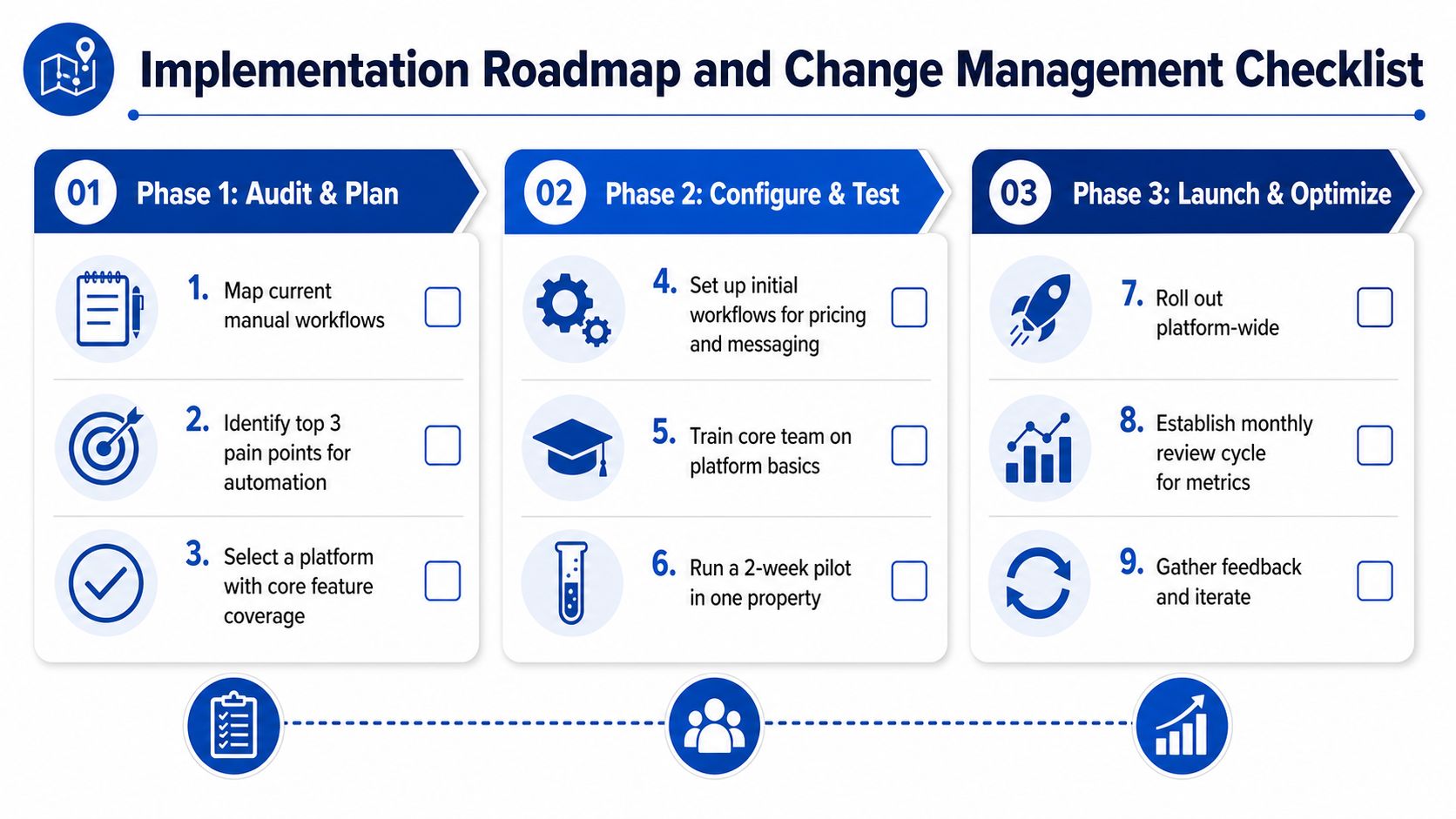
Map the manual steps first. Pricing updates, inquiry replies, lock code creation, and turnover tasks are the obvious places to look because those are the places where delay hurts. Once you see the actual sequence, pick the top three pain points and ignore the rest for now.
- Map current workflows: Write down who does what, when, and in which tool.
- Rank the bottlenecks: Focus on the tasks that slow revenue, access, or member communication.
- Choose the first automation target: Pick one workflow with obvious value and low ambiguity.
Phase 2 Configure and test
Set up the first workflow before you touch the second one. If you start with pricing and messaging, keep the scope tight enough that your team can test it without confusion. A small pilot in one property is better than a half-built rollout across the whole portfolio.
- Build the first workflow: Connect pricing or messaging to the relevant trigger.
- Test the handoffs: Check that each action fires in the right order.
- Train the core users: Make sure the people who touch the workflow daily know how to read status and handle exceptions.
Phase 3 Launch and optimize
Once the pilot is stable, expand it property by property. Don't treat launch as the finish line. Treat it as the point where real feedback starts, because that's when small gaps show up.
Keep a monthly review on the calendar. Automation only improves when someone checks the exceptions.
Your checklist should include data migration, integration testing, staff training, go-live monitoring, and a simple escalation path for broken steps. The good news is that most small operators don't need a giant implementation project. They need discipline, clear ownership, and the willingness to automate one painful workflow at a time.
How to Evaluate and Select the Right Platform
Stop shopping for a workflow automation platform by comparing shiny feature lists. Start by naming the bottleneck you need to solve. If your pain is integration sprawl, you need a different platform than if your main issue is room-level pricing, member messaging, or smart-lock coordination.
Use the bottleneck first, not the brochure
A generic automation platform can look flexible and still fit badly. It may connect tools well enough, but it often needs heavy configuration to understand shared housing, per-room pricing, or occupancy-driven access changes. A purpose-built platform is more useful when the workflows already match the realities of room-by-room operations.
| Evaluation Dimension | What to Look For | Red Flags |
|---|---|---|
| Integration depth | Native connections to booking, payment, and device tools | Lots of manual work or custom glue code |
| Smart-home compatibility | Support for locks, thermostats, and occupancy events | Device actions handled outside the main workflow |
| Pricing automation | Rules that update room rates without manual intervention | Static pricing that needs frequent human edits |
| Messaging customization | Triggers for inquiries, move-ins, and member updates | One-size-fits-all templates with no workflow logic |
| Reporting granularity | Room-level and portfolio-level visibility | Surface-level dashboards with little operational detail |
Ask vendors the questions that expose fit
What happens when a room turns over. Can the platform update pricing, notify the right people, and kick off the access workflow from one event. Can it handle the world handoffs between software and physical operations, or does it stop at app-to-app sync.
Those questions separate serious operators from curious buyers. They also reveal total cost of ownership better than a pricing page does. A platform that takes weeks of maintenance to keep alive is expensive, even if the sticker price looks low.
Why a crowded market makes fit more important
The workflow automation category is growing fast, and that means there are plenty of tools that are close enough to sound right but wrong enough to cause pain later. Market growth doesn't help you if the platform can't handle your operating model. The right choice is the one that reduces manual cleanup in your exact workflow, not the one with the loudest feature list.
Choosing a Beta or Early-Adopter Partner
If you're serious about fixing operational bottlenecks, early adoption can be smart. A well-run beta program should give you limited access without billing pressure, a direct line to the product team, regular updates, and a chance to shape the roadmap around real operator pain. That setup matters more than polished marketing because it tells you how the team behaves before the product is fully mature.
A beta is worth considering if the vendor is transparent about security, migration support, and product direction. You want to know where your data sits, how onboarding works, and what happens if the roadmap shifts. If they can't answer those questions clearly, don't assume the software will be safer after launch than it is now.
The upside is real for operators who know their bottlenecks. Early access can help you influence features like dynamic pricing, messaging automation, and smart-home coordination before the product hardens around someone else's use case. For co-living, that matters because generic automation rarely fits the way rooms, locks, and members interact.
If you're evaluating PadPulse, use the same standard you'd apply to any serious beta partner. Ask how it handles room-level pricing, member messaging, access control, and reporting in one system. If that aligns with your operation, the next step is simple.
PadPulse is built for operators who want pricing, messaging, access, and reporting in one place instead of stitched together across separate tools. If you're ready to see how a workflow automation platform can support room-by-room operations, visit PadPulse and join the interest list for early access.