Property Management Software: The Operator's Guide
August 11, 2026
Property management software is a digital platform that centralizes rent collection, tenant communication, maintenance tracking, and financial reporting for rental property operators. For room-by-room and co-living hosts, the question isn't whether software exists, it's whether the right system can handle the messy, daily work of shared housing without forcing you back into spreadsheets.
A new host usually feels the gap first thing in the morning. One app has rent messages, another has maintenance photos, a spreadsheet has room pricing, and a smart-lock app sits somewhere else entirely. By lunch, the work isn't about managing rooms anymore, it's about managing tools.
What Every Room-by-Room Operator Should Know About Property Management Software
A co-living host's day rarely starts with one clean task. You open your phone and see a rent question from one resident, a maintenance request from another, a pricing update for an open room, and a lock code problem from a new move-in. If you're juggling all of that across spreadsheets, text threads, and separate apps, the work gets fragmented fast.

That's why property management software matters. It gives you one place to handle the recurring jobs that keep shared housing running, rent, messages, maintenance, and reporting, without forcing you to rebuild the same process every day.
The real problem is not effort, it's fragmentation
Room-by-room operators don't just manage units. They manage people, rooms, turnover timing, and access. A late payment in one room can't interrupt move-in prep for another, and a maintenance delay in a shared bathroom can affect multiple residents at once.
That kind of overlap is where manual systems break down. A spreadsheet can track a payment, but it can't automatically connect that payment to messaging, lease terms, and accounting in the way a real system can.
Practical rule: if a task needs to be copied from one tool to another, it's a candidate for automation.
The value here is operational, not decorative. When the software centralizes routine work, you spend less time hunting for information and more time protecting occupancy, reducing friction, and keeping residents happy enough to stay.
Understanding Property Management Software and How It Works
For beginners, property management software is the operating system for rental workflows. It centralizes resident records, payments, maintenance, and communication so the host doesn't have to stitch everything together by hand.
The reason this matters for co-living is that every extra manual step creates delay. When a payment, a message, or a maintenance note lives in a different place, someone has to remember to connect the dots. Software removes that memory burden.
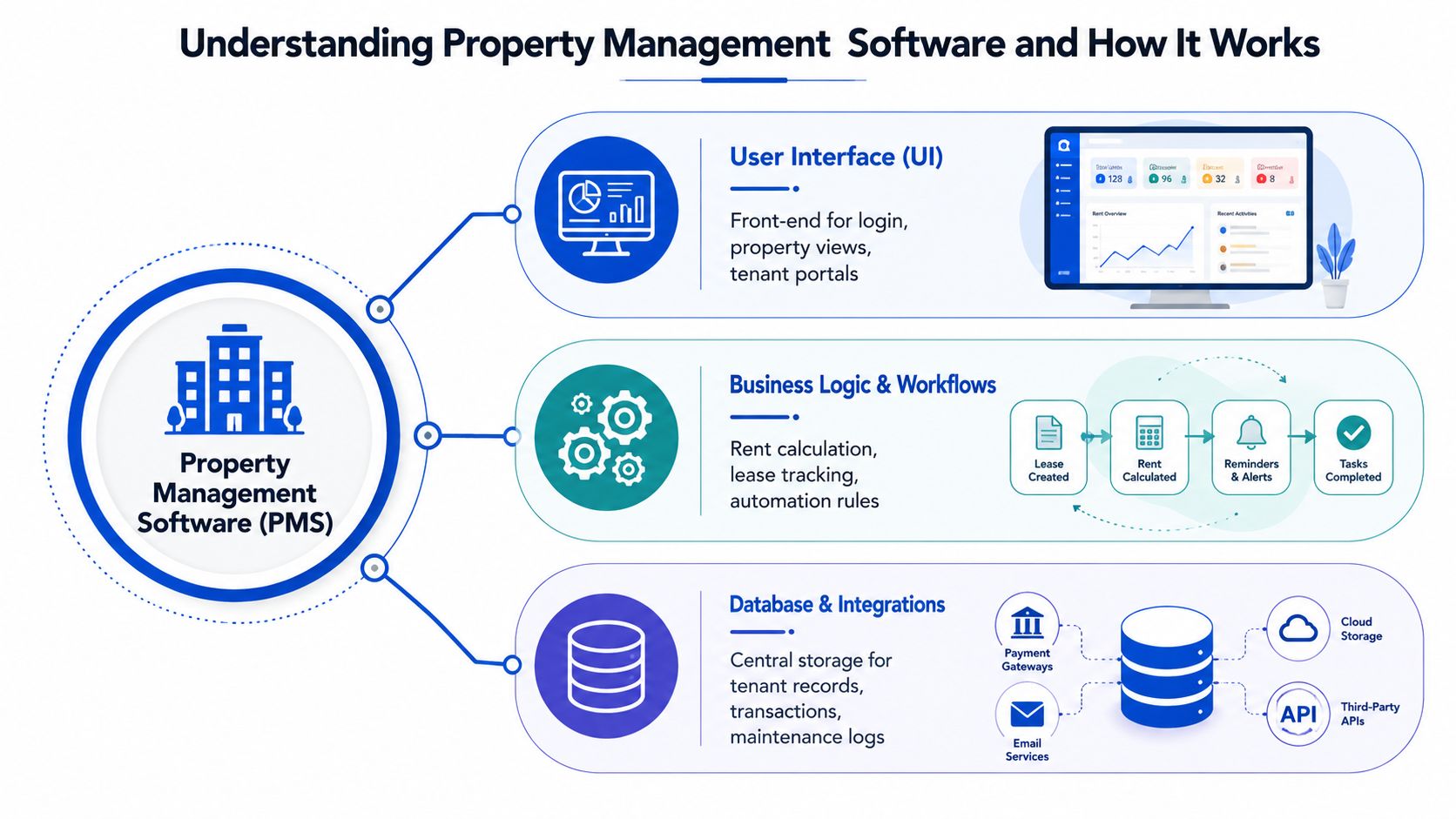
Think of it like a restaurant kitchen
The simplest way to understand the architecture is to picture a restaurant. The user interface is the dining room, it's what the guest sees and uses. The application layer is the kitchen, where the actual work happens, and the database layer is storage, where the ingredients and records stay organized.
That three-tier structure is common in modern property management software. The application layer handles workflows such as balance calculations, accruals, permissions, reports, bills, payments, and API exchanges with outside systems, while the database keeps persistent records separate from the action layer. A clear separation like that reduces complexity and makes integrations less disruptive to the core system.
For a room-by-room operator, that separation is useful because your business changes constantly. You may add a payment processor, a smart lock system, or analytics tools later, and you don't want every integration to destabilize the daily workflow.
Why the architecture matters in daily operations
A good platform can connect to outside tools without making your team learn a new process for every task. That means your resident portal, payment flow, and reporting can stay connected even when the tech stack expands.
The best systems also leave room for growth. As a portfolio gets more complex, the software should help you adapt instead of trapping you in a rigid setup that only works for one property shape or one style of leasing.
Core Features and Niche Capabilities for Room-by-Room Operations
The basics still matter. In Capterra's 2026 guide, users rate rent tracking at 90%, online payments at 86%, and tenant portals at 85% as critical or highly important, which lines up with what operators feel every day. If those three parts don't work well, the rest of the system won't save you. Capterra's property management software guide makes that hierarchy clear.
For co-living, though, the core features are only the starting point. You need software that can handle room-level complexity, not just generic rental administration.
What generic features do well
- Rent tracking: Useful when each room has its own due date, payment history, and status.
- Online payments: Helpful when residents need a simple way to pay without mailing checks or sending transfers manually.
- Tenant portals: Important when residents want to see balances, maintenance updates, and messages in one place.
Those are table stakes. They reduce chaos, but they don't solve the hardest parts of room-by-room housing.
What specialized features add
Dynamic pricing is one of the most valuable niche capabilities because room-by-room inventory changes fast. If a room sits empty, that vacancy affects NOI immediately, so pricing needs to respond to demand, seasonality, and local competition. A static price sheet makes it too easy to underprice a room or leave it empty too long.
AI-powered messaging is another practical upgrade. In shared housing, inquiry volume can spike quickly, and residents often ask about move-in timing, house rules, access, or billing. Automation helps answer routine questions without making the host type the same response all day.
Smart lock integration matters for keyless access, especially when you're managing multiple move-ins or turnovers. HVAC monitoring also matters in shared spaces, because comfort complaints can affect several residents at once and create unnecessary service calls if no one is watching the system.
This feature breakdown for co-living operators is worth keeping open while you evaluate options.
A strong platform should make the room easier to rent, easier to access, and easier to keep occupied.
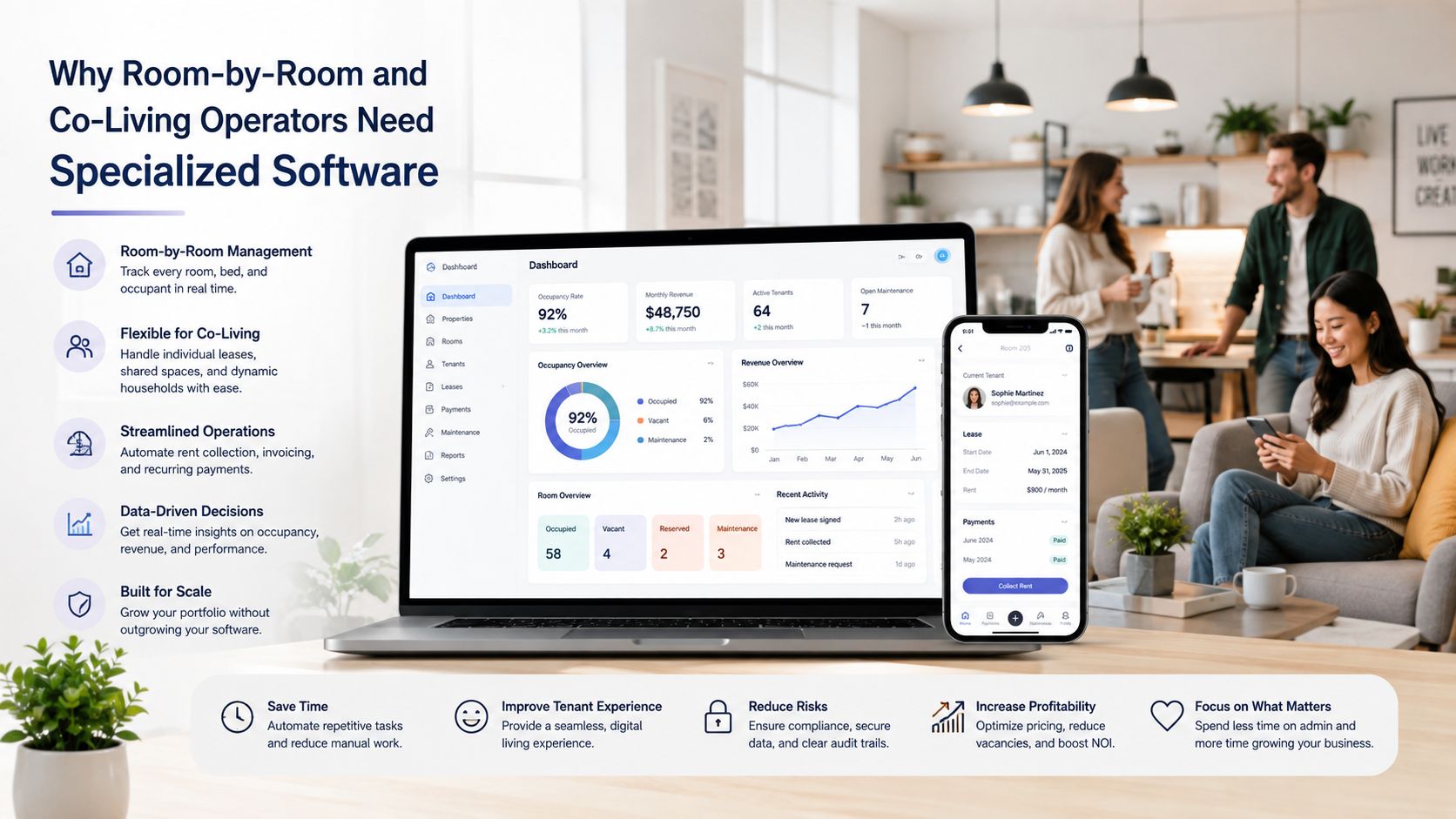
Why Room-by-Room and Co-Living Operators Need Specialized Software
Generic property management software often assumes a simpler world. It expects one lease, one unit, one payment, and one maintenance stream, which is fine for some rentals, but it breaks down in co-living where one property can contain many moving parts at once.
The technical direction of the market shows why specialized tooling keeps growing. Cloud-based systems dominate the category at 62.6% of the market in 2024, and AI integration plus IoT connectivity are becoming standard features in newer platforms. A broader market view also shows sustained expansion, with one estimate placing the global market at USD 3.6 billion in 2025 and projecting USD 5.9 billion by 2033 at a 6.4% CAGR from 2026 to 2033, while other independent estimates point in the same growth direction. Grand View Research frames this as a category still evolving, not settling down.
Where generic software falls short
Split rent is the obvious issue. If one resident pays late, or one room changes occupants mid-cycle, the accounting needs to stay clean without creating confusion for the rest of the house. Generic systems often treat the whole unit as the accounting object, which forces the host to patch around the software.
Shared amenity management is another gap. In co-living, a kitchen, laundry room, hallway, or lounge affects every resident, so one issue can become a house-wide problem. Traditional PMS tools usually don't model those shared dynamics very well.
Resident communication also becomes a scale problem. A single property with multiple rooms can generate far more touchpoints than a conventional rental, especially during onboarding, renewals, and maintenance events.
The real decision
The question isn't which platform has the longest checklist. It's whether the software understands your workflow shape.
If your operation depends on room-level pricing, access control, shared-space oversight, and high-volume messaging, a generic platform can create more admin than it removes. A specialized system is worth it when it reduces the number of exceptions you have to handle manually.
How to Evaluate Property Management Software for Your Operations
Start with the workflow, not the marketing page. A platform can look impressive and still fail your business if it doesn't map to how your house runs.
For room-by-room operators, the first test is whether the system supports rent-by-the-room logic cleanly. If that part feels awkward in the demo, the software will probably feel awkward every month after launch.
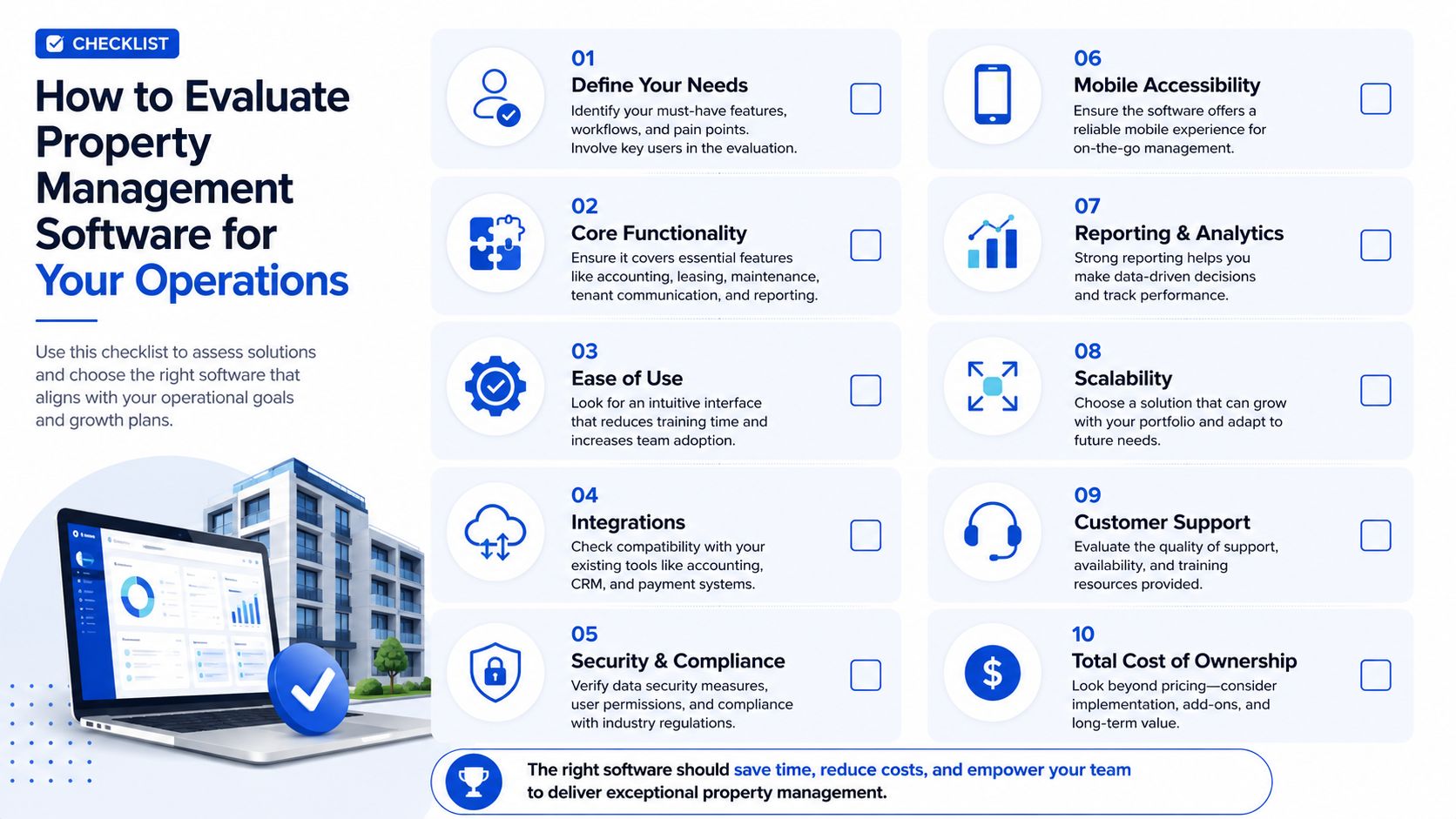
Ask these questions in every demo
- Can it handle room-level billing? If your property uses split pricing or partial occupancy, the math needs to be native, not improvised.
- Does it connect cleanly to other tools? API-first design matters because you don't want your payments, access tools, and reporting trapped in silos.
- Can it automate resident communication? Look for workflows that reduce repetitive messaging instead of just storing templates.
- Does it support smart-home systems? Keyless access and HVAC monitoring should fit into daily operations, not live as separate side projects.
- Can it show portfolio-level analytics? If you can't see performance across houses or rooms, you'll struggle to manage NOI at scale.
Test real scenarios, not sample screens
Bring actual cases into the demo. Ask the vendor to show how the system handles a move-in, a late payment, a maintenance ticket in a shared space, and a room reprice after a vacancy opens up.
That's more useful than feature-counting. A platform with fewer tools can still beat a crowded one if it handles your core workflows better.
Before you commit, read this evaluation guide for choosing software and compare it against your own operating model.
Migration and Implementation Considerations for Property Management Software
Buying software is the easy part. Getting a team to use it properly is where the work starts.
Independent commentary on property management software adoption says teams often underuse purchased tools because of weak implementation, insufficient training, and continued reliance on manual workflows. That gap matters because the ROI doesn't come from owning software, it comes from changing how the work gets done. Property Management Consulting makes that adoption problem hard to ignore.
Common mistakes that slow adoption
One of the biggest mistakes is trying to flip everything over at once. If your team is already busy with move-ins, resident questions, and maintenance, a sudden all-at-once migration can create confusion and resistance.
Another mistake is assuming the software will teach itself. Hosts and staff need clear rules for how a request enters the system, who owns it, and when a resident gets updated.
A practical rollout plan
- Phase the launch: Start with one property or one workflow before moving the whole portfolio.
- Clean the data first: Old room records, duplicate resident names, and inconsistent pricing histories will cause problems later.
- Train by role: A host, a maintenance coordinator, and a finance person don't need the same training.
- Define the workflow: Decide what happens when a resident pays, submits a request, or moves out.
- Keep manual backup options: During the first weeks, have a fallback plan so a missed step doesn't disrupt service.
Implementation rule: the software should match the way your team works, but your team also has to stop working around the software.
That last point matters most in shared housing. If staff keep using texts or side spreadsheets after go-live, the system will never become the source of truth. A good implementation is less about technology and more about discipline.
Measuring ROI and Next Steps for Property Management Software
ROI in co-living shows up in boring places first. Fewer missed messages, faster rent collection, cleaner reporting, smoother move-ins, and less time spent reconciling room data all add up to better NOI over time.
The best way to think about the return is to compare the hours you currently lose against the work the software can absorb. If your team spends less time on manual coordination, you free up attention for vacancy reduction, resident retention, and pricing decisions that affect revenue directly. For a simple framework, see this ROI calculator guide.
What scalable architecture buys you
For growing portfolios, API-first and microservices-based designs matter because each part of the stack can scale independently. Payments, maintenance, communication, property data, and financial reporting don't all need to move at the same speed, so a spike in one area shouldn't slow the others.
That matters for room-by-room operators because growth rarely happens evenly. One house can stabilize while another turns over, and the software has to keep both workflows moving without forcing the whole portfolio into one bottleneck.
What to do next
- Audit your current process: List every place where staff still copy information by hand.
- Identify the weakest workflow: Pick the area that costs the most time or causes the most resident friction.
- Run one real demo: Test the exact scenario that breaks your current setup.
- Measure before and after: Track time saved, fewer missed tasks, and cleaner rent handling after rollout.
PadPulse is building for that exact operating model, with room-by-room pricing, messaging, access, and reporting designed around co-living rather than generic rentals. If you're ready to see how a purpose-built platform can fit shared housing, visit PadPulse and join the interest list for early updates.