Market Intelligence Platform: A 2026 Guide for Operators
August 30, 2026
You're running six rooms across two houses, checking rates in a shared spreadsheet, and setting prices from what worked last month. Then a nearby operator cuts rates, but you don't notice until one of your rooms has sat vacant for weeks. At a larger scale, the problem gets harder. A 200-room co-living business must manage lease cliffs, mid-stay turnover, multiple submarkets, and a steady stream of leads without treating every bedroom as if it behaves like a conventional apartment.
A market intelligence platform gives operators a clearer operating picture. It combines property data with external market signals, then turns that information into pricing, marketing, access, and reporting decisions. For room-by-room rentals, that connection matters because a bedroom isn't just a small apartment. It has its own demand curve, competitor set, lease timing, and renewal potential.
Why Room-by-Room Operators Need a New Kind of Intelligence
A whole-unit rental can hide important differences. One bedroom in a shared house may have a private bath, another may face the street, and a third may be next to the kitchen. Tenants can compare those rooms separately, and nearby operators may price them separately too. A single property-level average won't tell you whether the smaller room is overpriced, whether the premium room is underpriced, or whether a particular floor is losing demand.
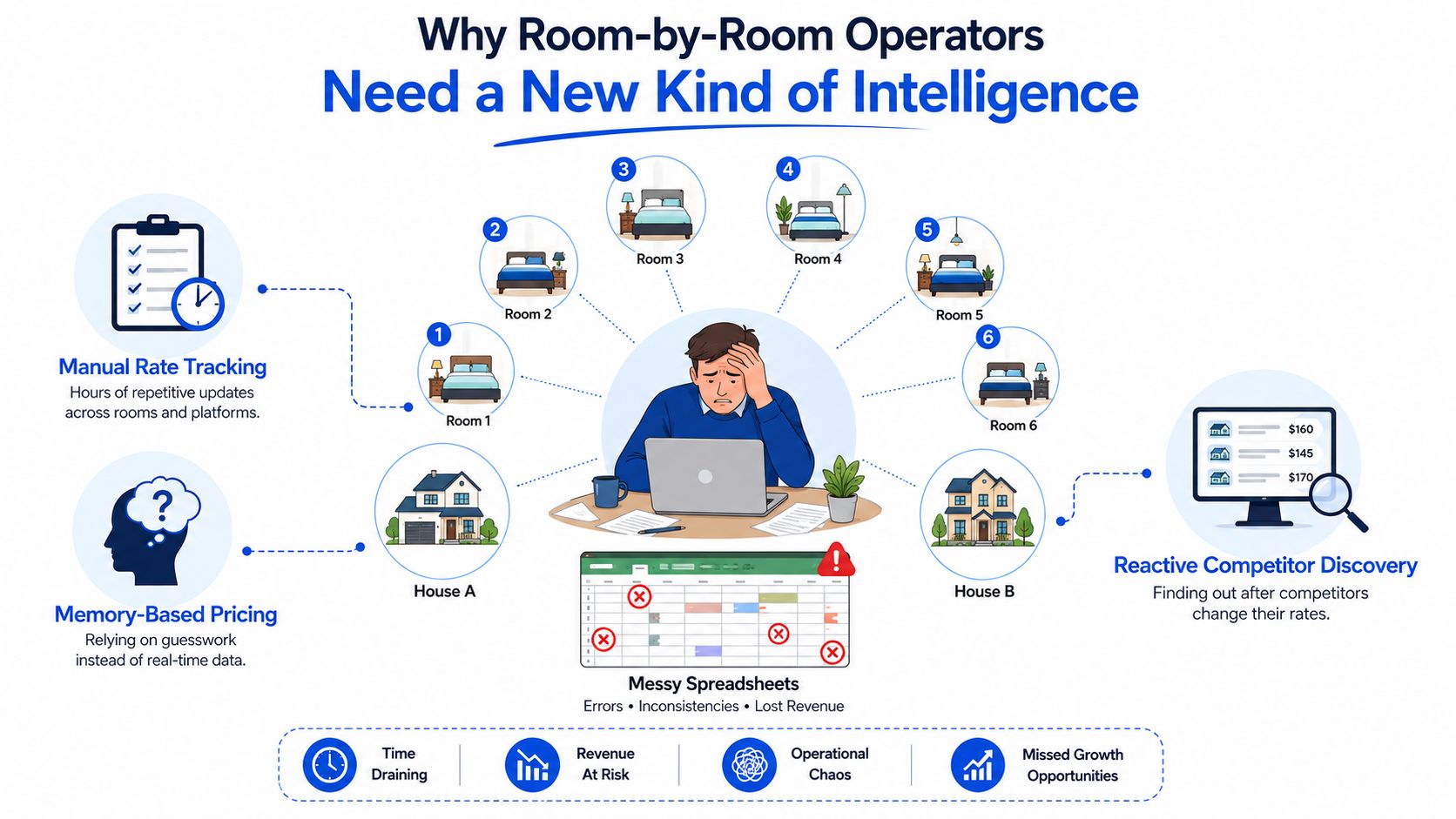
The spreadsheet problem grows with the portfolio
A small host may remember which rooms filled quickly last season. That memory becomes unreliable when move-in dates overlap, tenants extend stays, and competitors change their offers. A larger operator faces the same problem with more consequences. Lease expirations cluster, new inventory opens across submarkets, and a slow response can turn a manageable vacancy into a prolonged revenue gap.
Room-by-room economics also differ from short-term rental reporting. Traditional dashboards often emphasize whole-property occupancy, average daily rate, or booking activity. Those measures can be useful, but they won't explain why one room attracts inquiries while another receives views without applications.
The operator needs signals at the level where the decision happens:
- Room-level pricing: Compare a bedroom with similar rooms, amenities, furnishing, and lease terms.
- Micro-market visibility: Watch demand and competing supply near the relevant ZIP code, not only across a broad city.
- Lead behavior: See where prospects search, which listings they open, and where they stop responding.
- Operational timing: Connect expected demand with tours, cleaning, access, and turnover schedules.
A useful local market intelligence approach starts with the room and works outward. It helps a host decide whether to change rent, improve the listing, add tour availability, or wait for a known demand window.
Operator rule: If your reports describe the property but your decisions concern individual rooms, your data is too aggregated.
What a Market Intelligence Platform Actually Does
Think of the platform as a weather radar for your rental market. A weather service gathers readings from many locations, maps conditions, and turns those observations into a forecast. It doesn't just show clouds. It helps you decide whether to carry an umbrella, delay a trip, or change your route.
A market intelligence platform follows the same pattern. It gathers internal data from your property management system, pricing records, listings, leads, occupancy history, and lease activity. It combines that information with external signals such as competitor rates, short-term rental comparisons, search behavior, lease comparables, seasonality, local events, and operating-cost trends.
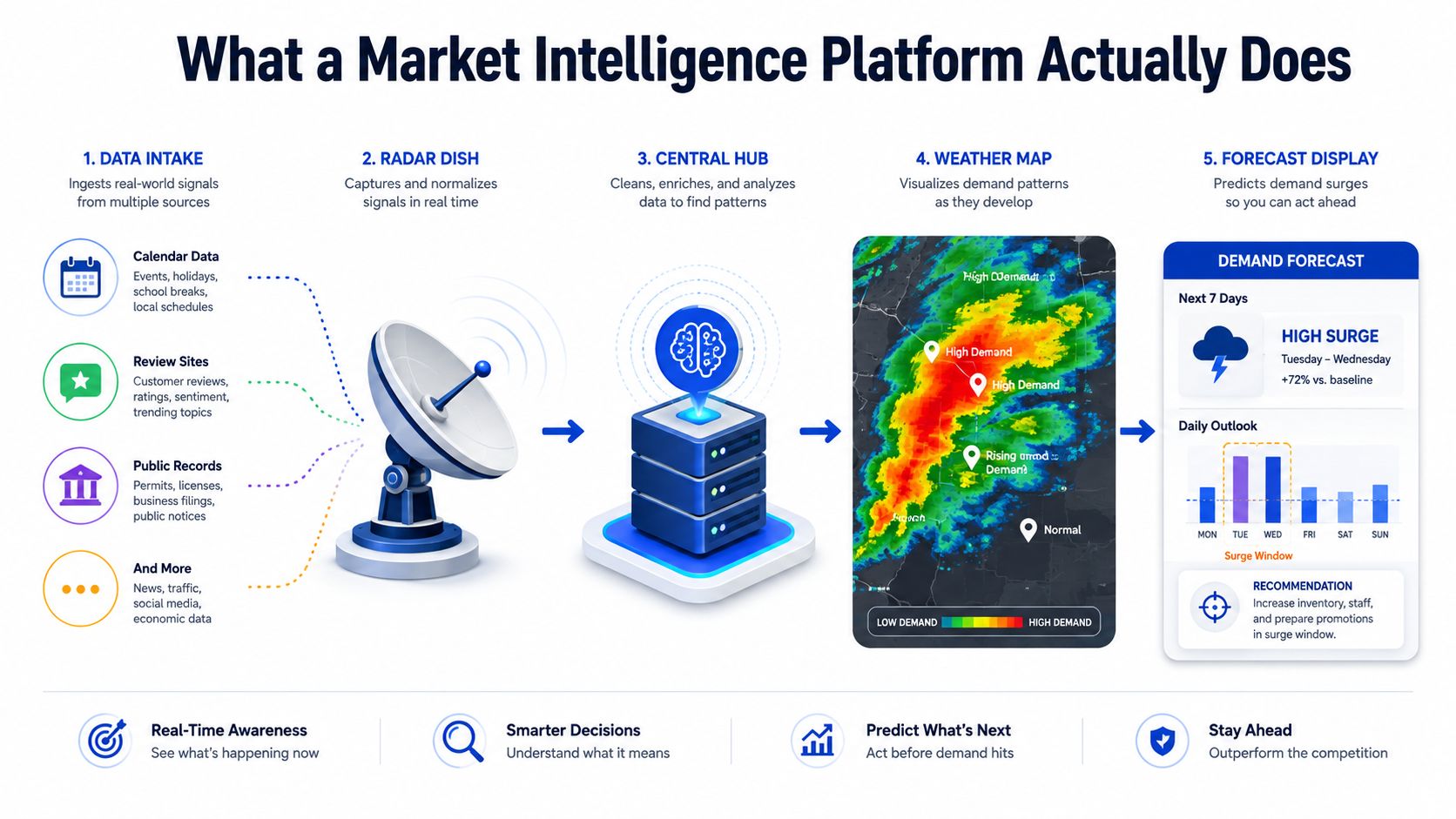
From raw observations to useful decisions
The platform's value comes from the transformation between collection and action.
- Ingest the data. It gathers rates, availability, leads, inquiries, occupancy, lease terms, and relevant outside signals.
- Normalize the records. It matches different names, room types, dates, and property descriptions so the comparison is usable.
- Create benchmarks. It shows where your rooms sit against comparable offerings and historical performance.
- Detect changes. It flags shifts in inquiries, competitor pricing, listing visibility, or expected demand.
- Recommend an action. It can support a pricing change, a listing update, a campaign adjustment, or a staffing decision.
For example, a room with steady listing views but weak applications may not need a lower rent. The issue could be unclear utility terms, poor photography, limited tour times, or an application process that creates friction. A platform helps separate those possibilities instead of forcing the operator to guess.
Outputs can appear in a dashboard, a weekly operating brief, an alert, or an API feed into pricing and property workflows. The best setup doesn't leave intelligence trapped in charts. It puts the signal in front of the person who must act on it.
For readers building a repeatable measurement system, these competitive intelligence frameworks and KPIs provide useful context for turning observations into decisions.
Core Features Every Co-Living Operator Should Expect
A co-living operator shouldn't choose a platform because it has the longest feature list. The practical test is whether it can connect room-level signals to the decisions your team makes each week.
Dynamic pricing that respects each room
A useful pricing engine combines rules with predictive models. It should account for length of stay, lease length, seasonal demand, floor position, amenities, and comparable rooms. A blanket increase across every bedroom may push a price-sensitive room above its market while leaving a premium room below its potential.
The operator should be able to set boundaries too. Floor rents, minimum lease periods, utility policies, and discount rules protect the business from an automated recommendation that improves occupancy while weakening the economics of the stay.
Comp intelligence that compares like with like
A comp view should answer more than “What are nearby rooms charging?” It should help you compare furnishing, private or shared bathrooms, utilities, parking, deposit terms, lease flexibility, and included services. If a competitor's advertised rent excludes utilities while yours includes them, the headline prices aren't equivalent.
Demand signals that explain what comes next
Lead volume, source, search interest, inquiry quality, and lead-to-book conversion show where demand is forming. A new employer office, campus term, transit improvement, or local event can change the audience searching for rooms. When a technology employer announces a nearby office lease, an operator may want to watch professional demand, tour requests, and longer-stay inquiries before changing every rate.
Forecasting that supports choices
Forecasting should show expected occupancy and revenue under different conditions. Scenario controls can help an operator test a rate change, a new competing property, additional inventory, or possible churn. The forecast isn't a guarantee. It's a structured way to compare choices before committing inventory.
| Feature Pillar | What It Does | Co-Living Example | Operator Question Answered |
|---|---|---|---|
| Dynamic pricing | Adjusts room rates using demand, terms, and comparable data | Prices a private-bath room differently from a shared-bath room | Is this room priced for its actual market? |
| Comp intelligence | Tracks comparable rooms and offer details | Separates all-in rent from rent plus utilities | Am I comparing like with like? |
| Demand signals | Connects searches, leads, and conversion behavior | Identifies rising demand from relocating workers | Where may the next qualified tenants come from? |
| Forecasting | Models occupancy and revenue scenarios | Tests the effect of a new opening or renewal risk | What happens if we change the rate or offer? |
How Established Platforms Compare to Co-Living Tools
Established real estate platforms are often strong at broad market coverage, institutional reporting, and multifamily analysis. Their limitation for a room-by-room operator is usually the unit of analysis. A platform built around properties, buildings, and investment assets may treat individual bedrooms as secondary details.
RealPage Market Analytics says it provides daily updates on rents, concessions, floor plans, and occupancy. Its aggregated and anonymized lease data supports market, submarket, and niche analysis, including NOI, trade-out rates, retention, lease terms, and vacant days. That can be valuable for understanding conventional rental conditions, but a co-living operator still needs to verify whether the comp set reflects shared housing and room-level offers.
CoStar's Market Data and Analytics supports analysis of rent trajectories, vacancy projections, property performance, demographics, and peer comparisons across 3,000+ markets and submarkets. The product also states that it includes over 6 million property records and 11 million lease and sale comps. Broad coverage doesn't automatically mean the data captures how tenants compare individual rooms.
Match the tool to the operating decision
Yardi is widely associated with property operations and accounting. That makes it useful for financial and management workflows, while an operator may need another layer for external demand and competitor signals. AirDNA and Mashvisor can help with short-term rental demand, but they don't naturally represent the realities of medium-term and longer room leases.
CENSAI offers a different example. Its affordability index measures rent-to-income ratios and provides scores updated quarterly for ZIP codes, counties, and CBSAs, as described in its affordability capabilities. That geographic detail can help an operator understand affordability pressure, but it isn't the same as a room-level pricing and leasing workflow.
| Platform | Primary Strength | Room-Level Data | Co-Living Comps | Refresh Cadence | Best Fit |
|---|---|---|---|---|---|
| RealPage | Multifamily market and lease analytics | Verify room-level suitability | Verify coverage | Daily updates are stated for selected data | Multifamily operators and market analysts |
| CoStar | Broad property, rent, vacancy, and comp analysis | Property-focused | Verify coverage | Product-specific | CRE research and investment analysis |
| Yardi | Property operations and accounting | Depends on configuration | Not its core emphasis | Operational system cadence | Accounting and property management |
| CENSAI | Affordability and geographic income context | Geographic, not room-specific | Not its core emphasis | Quarterly updates are stated | Affordability analysis |
| Co-living-focused tool | Room-level pricing and leasing decisions | Designed for individual rooms | Built around relevant local supply | Should be checked during evaluation | Room-by-room operators |
The right choice depends on granularity, refresh cadence, and workflow fit, not brand recognition alone.
The KPIs and Workflows That Move Occupancy and NOI
Raw market data only becomes useful when it changes a weekly decision. Room-by-room operators can keep the scorecard focused on five measures that connect demand, pricing, and leasing economics.
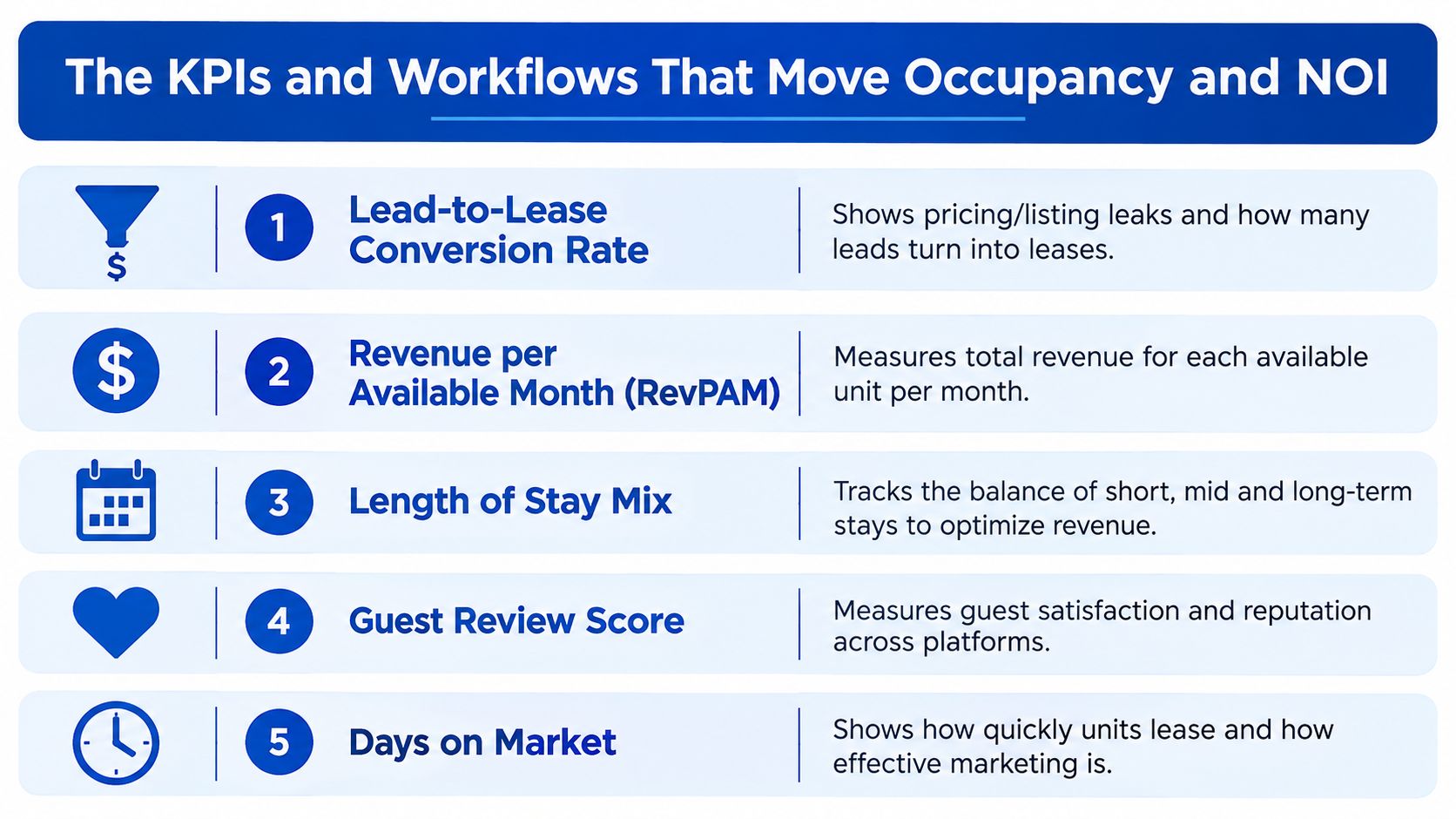
Start with conversion and yield
Lead-to-lease conversion rate shows whether interest becomes signed occupancy. If leads are healthy but applications are weak, inspect price, photos, response speed, qualification rules, and tour availability before cutting rent.
Revenue per available mattress, or RevPAM, gives a room-by-room yield view. It considers the earning capacity of available sleeping spaces rather than looking only at occupied rooms. Compare it with nearby room offers and your own room types to identify where revenue is leaking.
Median days-to-lease exposes slow inventory. Median is useful because one unusually long vacancy won't distort the picture as much as an average can. Watch the metric by room type and property, not only across the portfolio.
Add channel and move-in economics
Channel attribution tells you whether qualified leads come from organic search, paid campaigns, listing marketplaces, referrals, or other sources. A channel that produces many inquiries but few leases may need a message or audience adjustment.
Net move-in spread tracks the difference between asking rent and the effective economics after concessions. It keeps a full room from looking successful if the discount required to fill it erodes NOI.
Run the metrics through a simple operating rhythm:
- Monday, review comps: Check comparable room rates, inclusions, availability, and lease terms.
- Tuesday, adjust pricing: Change rates or offers where the evidence supports an action.
- Wednesday, audit listings: Improve photos, descriptions, amenities, and response paths for rooms with weak conversion.
- Thursday, review channels: Compare inquiry quality and signed leases by source. A live chat for property inquiries can help capture questions that might otherwise arrive outside office hours, but measure whether those conversations become qualified leads.
- Friday, reconcile move-in economics: Review concessions, effective rent, and vacancy exposure before setting the following week's priorities.
For a deeper operating model, use this demand forecasting guide for room-by-room rentals alongside the KPI review.
Turning Insights Into Pricing, Messaging, and Access Decisions
A market intelligence platform earns its place in an operator's stack when the data reaches daily workflows. Pricing, messaging, and access shouldn't operate as separate departments if each decision depends on the same demand picture.
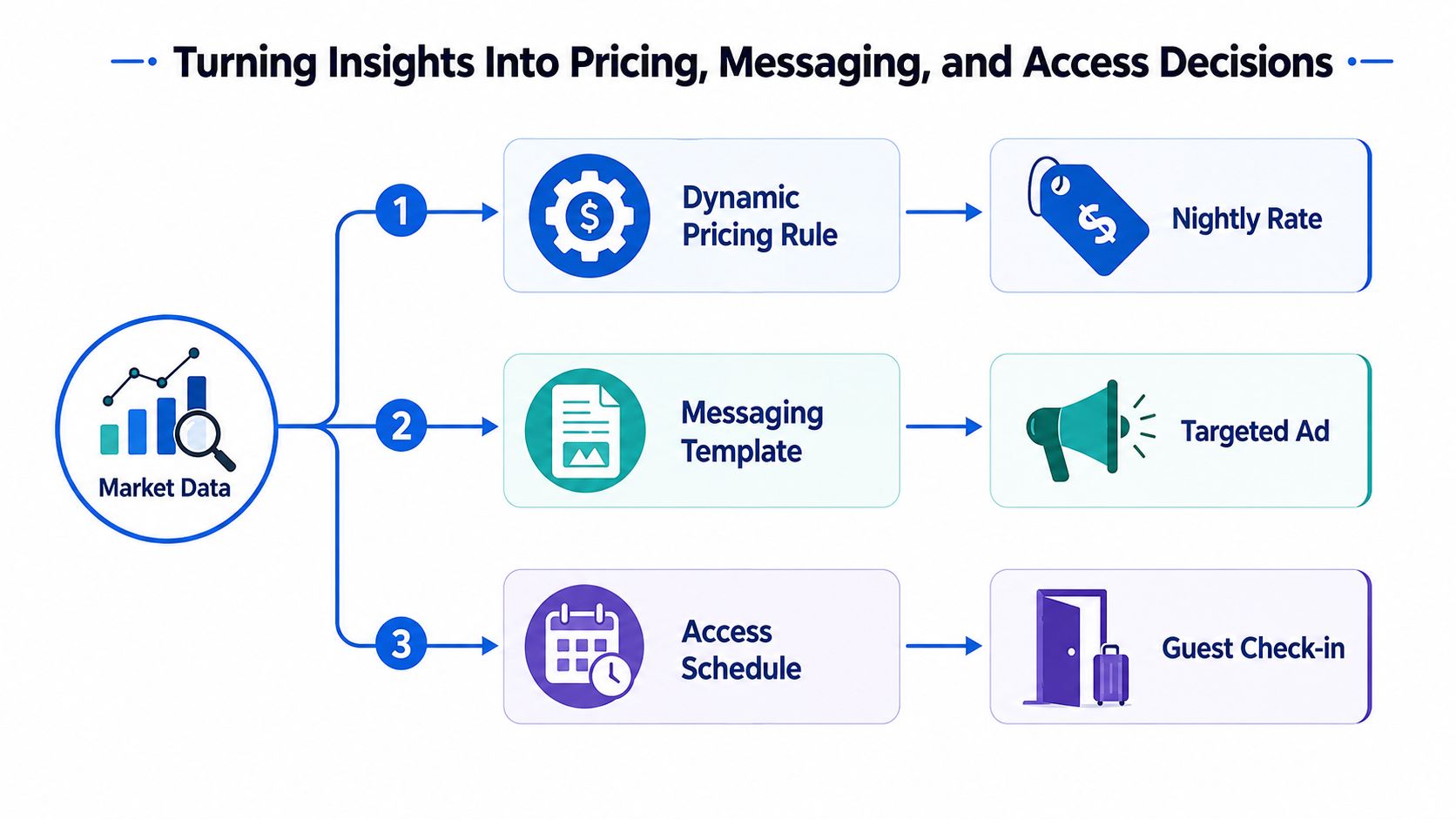
One signal, several actions
Suppose the platform flags weaker lead activity for Studio B. The operator shouldn't immediately slash rent. First, compare the room with similar inventory, check whether the listing appears in relevant searches, and inspect the questions prospects ask.
A coordinated response might include:
- Pricing: Introduce a bundled-utilities offer while keeping the effective rent above the operator's floor.
- Messaging: Rewrite the headline around the audience most likely to value the room's location, furnishing, or flexibility.
- Access: Add tour windows and adjust smart-lock scheduling so prospects can view the room without creating unnecessary staff trips.
The same logic applies when demand strengthens. A stronger forecast may justify a higher nightly or monthly rate, fewer concessions, or tighter holdover windows between move-out and showing. Access data can also help maintenance teams plan room turns without blocking promising tour times.
Practical rule: Change the offer only after checking whether the problem is price, presentation, availability, or access.
The operator's Tuesday routine might look like this. A room receives fewer qualified inquiries than comparable rooms. The team checks the comp set, updates the hero image, highlights included utilities, opens more tour slots, and records the decision. The following review should examine lead quality and conversion, not just page views.
That kind of connected workflow is the focus of pricing intelligence for rental operators. The point isn't to automate every judgment. It's to make sure the team acts on the same evidence across revenue, leasing, and property operations.
A 90-Day Rollout Plan for Small and Enterprise Operators
A market intelligence platform should enter the business in stages. The first goal isn't maximum automation. It's clean data, consistent definitions, and a team that trusts the recommendations enough to test them.
Days 1 through 30 establish the baseline
Connect the property management system, listing channels, and access-control data where available. Define each room type, lease term, inclusion, availability status, and lead source. Build a baseline KPI dashboard, then benchmark every room against nearby comparable offerings.
During this phase, avoid changing every rate at once. Review mismatches manually and correct room attributes that could distort comparisons. A private room with included utilities shouldn't sit in the same benchmark group as a room with shared facilities and separate charges.
Days 31 through 60 test the operating loop
Turn on dynamic pricing for a limited pilot floor of 10 rooms. Hold a weekly pricing standup with the people responsible for leasing and operations. Review recommendations, record overrides, and standardize lead-source tracking so the team can connect demand signals with signed leases.
The pilot should answer practical questions. Did staff understand why the system suggested a change? Could they explain the offer to prospects? Did the workflow preserve lease flexibility and the operator's rent floor?
Days 61 through 90 scale what works
Extend pricing and renewal workflows across the property when the pilot produces a repeatable process. Add forecasts for the next two quarters, assign an owner to each KPI, and create an exception path for unusual rooms, urgent vacancies, or major local changes.
Enterprise operators managing 500+ keys can run a parallel integration track. They may automate group-wide comp pulls, multi-city demand dashboards, and API connections with accounting and access systems from the beginning. The governance requirement remains the same: someone must own the definitions, review exceptions, and act on the output.
Building a Daily Habit Around Market Intelligence
Many operators treat a dashboard as a quarterly reporting destination. That approach misses the value of fresh signals. A room can become less competitive after a new listing appears, a lease term changes, or a prospect pattern shifts, even when the property's monthly report still looks acceptable.
A better habit is small and repeatable. Each morning, spend a few minutes checking the local demand pulse, rate recommendation alerts, and overnight lead-to-book activity. Don't change pricing automatically. Use the scan to identify which room deserves attention and why.
Make Friday the learning loop
Set aside a weekly review for actual occupancy, NOI, length-of-stay mix, conversion, and effective move-in economics. Compare what happened with the decision made earlier in the week. If a promotion produced inquiries but no applications, the next test may concern qualification, photos, or response speed rather than rent.
Log one pricing or leasing decision each week and record the reason. Over time, the team builds a property-specific playbook based on its own rooms, tenants, and submarkets. That knowledge becomes more useful than a generic rule copied from another asset.
A market intelligence platform works best like a chef tasting food while cooking. The operator checks, adjusts, and tastes again. It isn't a one-time dashboard installation. It's a daily operating habit that helps small hosts and large teams respond before small vacancies become expensive problems.
PadPulse is being built to connect room-level pricing, inquiry workflows, smart access, financial reporting, and market signals in one toolkit for co-living operators. Visit PadPulse to join the interest list for launch updates and potential beta access.