Financial Reporting for Co-Living Operators
September 23, 2026
Tuesday morning in an eight-room co-living house rarely starts with a clean ledger. A Wi-Fi bill is sitting in the owner's personal inbox, two residents paid through different apps, and the bank balance looks healthy enough to postpone the uncomfortable question: did the property make money last month?
That question is the practical purpose of financial reporting. It turns scattered rent payments, utility bills, cleaning invoices, deposits, repairs, and financing costs into information you can use to price rooms, control expenses, protect cash, and explain performance to a lender or investor. For room-by-room rentals, the strongest reporting system is usually not the most complex one. It's the one that captures complete, consistent data before the numbers reach the spreadsheet.
What Financial Reporting Means for a Co-Living Host
Financial reporting is the structured process of capturing, classifying, checking, and summarizing the money moving through your rental operation. The output includes statements and operating reports that answer practical questions, not just accounting questions.
For a co-living host, the monthly test is straightforward:
- What came in? Room rent, member fees, cleaning charges, utility recoveries, and other operating revenue.
- What went out? Utilities, maintenance, supplies, management costs, vendor payments, interest, and approved operating expenses.
- What is still owed? Uncollected rent, vendor bills, security deposits, loans, and other liabilities.
The three core statements provide different views of the same house. The income statement, often called the P&L, shows revenue and expenses over a period. The balance sheet shows assets, liabilities, and equity at a point in time. The cash flow statement shows how cash moved through operating, investing, and financing activities. This three-statement structure is consistent with the beginner-level explanation from SCORE's financial statement guide.
Reporting starts before accounting
A weak NOI figure often begins with an operational mistake. Someone enters a resident under the wrong room, pays a utility from a personal card, records a deposit as rent, or assigns a furniture purchase to the wrong property. The accounting software can process those entries perfectly and still produce a misleading report.
That's why a host needs standard property IDs, room IDs, resident ledgers, vendor categories, and payment rules before adding automation. Your reporting process should make it difficult to answer a question with an estimate when the underlying transaction should be traceable.
Accrual reporting is required for general-purpose statements under both U.S. GAAP and IFRS. Under that approach, revenue is recognized when earned and expenses when incurred, rather than only when cash changes hands, as explained in OpenStax's cash versus accrual accounting overview. That distinction matters in co-living because a bank balance can look strong while a month's rent, unpaid bills, or deposit obligations belong to a different reporting period.
Operator rule: If you can't trace a number from the statement to a property, room, resident, vendor, or bank transaction, treat it as an exception that needs review.
The Three Core Statements Explained Simply
A room-by-room operator doesn't need to become a financial analyst to use the three statements. You need to know what each one measures, which line items belong there, and what decision the report should support.
The P&L shows whether the period worked
The profit and loss statement covers a period such as a month, quarter, or year. It typically starts with rental revenue, then subtracts operating expenses to arrive at operating profit or NOI. The basic income-statement structure includes revenue, cost categories, operating expenses, and net income, while the Investopedia financial statements guide explains how the cash flow statement separates operating, investing, and financing movements.
For a co-living house, useful P&L lines include:
- Room rent earned
- Member or move-in fees
- Utility reimbursements
- Cleaning and turnover costs
- Repairs and maintenance
- Internet and shared services
- Property management fees
- Mortgage interest
- Operating reserves
A replacement refrigerator may need different treatment from a routine repair, depending on your accounting policy and tax advice. The key operational requirement is consistency, so the same type of cost doesn't appear as maintenance at one property and capital expenditure at another.
The balance sheet shows what exists now
The balance sheet is a snapshot at a fixed date. It shows what the business owns, what it owes, and the residual equity. The SEC's investor guide distinguishes this point-in-time view from income and cash flow statements, which cover a period.
A small operator's balance sheet should make several items visible:
- Bank and reserve accounts
- Accounts receivable for unpaid rent
- Furniture, appliances, and other property assets
- Security deposits held for residents
- Unpaid vendor bills
- Loan principal
- Owner contributions and draws
Security deposits belong in a liability account until the operator applies them lawfully to damage, unpaid charges, or another permitted use. They aren't earned revenue just because the money reached the bank.
Cash flow explains the bank balance
The cash flow statement reconciles actual cash movement. Operating cash includes resident collections and ordinary bills. Investing cash includes property improvements or equipment purchases. Financing cash includes loan proceeds, principal payments, and owner contributions or withdrawals.
Consider a December resident whose rent is earned for December but collected in January. Accrual reporting places the revenue in December and records receivable until collection. A cash report places the receipt in January. Both views describe a real event, but only the accrual view matches the revenue with the period in which the resident occupied the room.
| Line Item | Accrual View, December | Cash View, January |
|---|---|---|
| December room rent | Revenue recognized when earned | No December receipt shown |
| Unpaid December rent | Accounts receivable | No receivable unless tracked separately |
| January collection | Reduces receivable | Cash inflow recorded |
| Security deposit | Liability when received | Bank inflow, but not income |
| Vendor bill incurred in December | Expense and payable | Cash outflow when paid |
The bank feed is useful, but it isn't a complete performance report. A monthly operating review should reconcile cash to the accrual P&L, then use the balance sheet to explain receivables, deposits, payables, reserves, and debt. That connection is what turns three separate statements into an operating control system.
KPIs That Actually Matter for Room-by-Room Rentals
A co-living dashboard should help you spot trouble before the monthly P&L confirms it. Use a small set of measures that connect room availability, resident collections, and property economics.
The core dashboard
- NOI: Total property revenue minus operating expenses, before debt service and taxes. It shows whether the property's operations are producing income before financing and tax decisions.
- RevPAR: Revenue per available room per night. Divide room revenue by the total available room-nights for the period. It combines price and availability into one view.
- Occupancy: Filled room-nights divided by available room-nights. It reveals vacant capacity, but it won't tell you whether occupied rooms are priced correctly.
- ARPU: Average revenue per resident, or per occupied room. Divide the relevant rental revenue by the resident or occupied-room count for the selected period.
- Collection rate: Rent collected within the agreed terms divided by rent billed for the same period. A target such as 90% collection paired with 85% physical occupancy can protect NOI better than occupancy alone, because full rooms don't help if residents pay late or not at all.
The formulas matter less than the definitions staying fixed. If one property includes utility reimbursements in revenue and another excludes them, portfolio comparisons become unreliable.
Match each KPI to its rhythm
Run occupancy, move-ins, move-outs, and collection rate weekly. These are pulse measures. They tell you whether a vacant room, a weak price, or a receivable problem needs attention now.
Review NOI, expense ratios, reserves, and debt-related items monthly with the financial statements. A strong occupancy week can still produce weak NOI if utility costs rise, turnover takes longer, or maintenance invoices arrive late.
Use the warning signs deliberately:
- Falling occupancy points to pricing, marketing, condition, or resident-experience problems.
- Stable occupancy with declining RevPAR suggests discounting or poor room mix.
- Stable RevPAR with a weaker collection rate points to payment enforcement or resident screening.
- Healthy revenue with declining NOI suggests expense leakage or incomplete cost capture.
- Rising ARPU with higher turnover may indicate pricing that residents don't sustain.
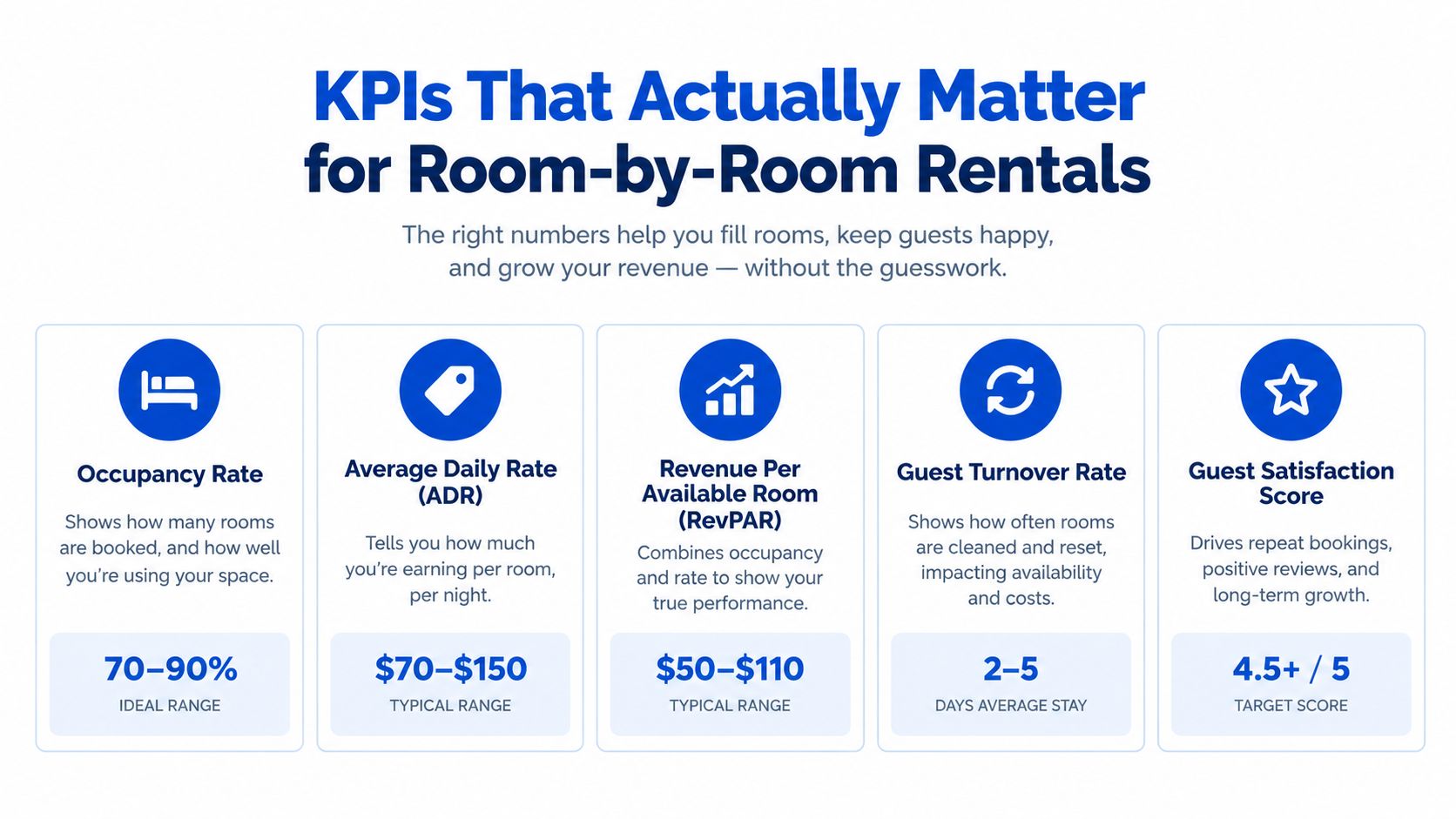
Don't use a benchmark as a substitute for context. A property with unusual utility exposure, furnished rooms, or seasonal demand needs a management range that reflects its operating model. The dashboard's job is to prompt a question early, then send you to the ledger and statements for the answer.
A Month-End Close Walked Through an 8-Room House
At month-end, the eight-room house has sixteen residents, several payment methods, shared utilities, and a handful of vendor bills. A clean close starts with the property management system, not the bank statement.
On the final day, the operator exports the resident ledger and checks every room against the occupancy roster. Settled payments are matched to residents, unpaid charges become accounts receivable, and any rent earned but not yet collected is accrued. Security deposits are posted to a deposit-liability account, not rental income. Utility bills, cleaning invoices, and maintenance costs are entered against the correct property and period.
The operator then calculates a 5% management reserve according to the property's policy and records the reserve movement separately. That step prevents a reserve transfer from disappearing inside a vague expense line. The bank feed is reconciled after the ledger is complete, so unmatched transactions become visible instead of silently changing NOI.
A practical close sequence
| Day | Close Task | Owner | Output / System Record |
|---|---|---|---|
| Final day | Confirm room and resident roster | Property manager | Occupancy and resident ledger |
| First close day | Match payments and accrue earned rent | Bookkeeper | Receivables and rental revenue |
| Second close day | Post utilities and vendor bills | Bookkeeper | Property-level expense detail |
| Third close day | Record deposits and reserve movements | Owner or bookkeeper | Liability and reserve schedules |
| Fourth close day | Reconcile bank feed and transfers | Bookkeeper | Reconciled cash ledger |
| Fifth close day | Review statements and exceptions | Owner | P&L, balance sheet, cash flow, KPI pack |
The trial balance rolls into the P&L, balance sheet, and cash flow statement. The P&L answers whether the house generated operating income. The balance sheet shows unpaid rent, deposits, payables, assets, and debt. The cash flow statement explains why net income differs from the actual bank movement.
For a lender or investor, the review often goes beyond the headline NOI. They'll look at aged receivables, reserve activity, transfers between properties, and whether furniture or appliance replacements were incorrectly treated as ordinary expenses. A report that looks polished but can't explain those items won't build confidence.
Use a consistent general ledger structure for rental properties so every transaction retains its property, room, category, and reporting-period identity. The close then becomes a repeatable control rather than a monthly reconstruction project.
Common Pitfalls That Distort Operator Reporting
Fancy software can't repair inconsistent operating habits. In property portfolios, the largest reporting errors often enter through payment handling, vendor workflows, and unclear allocation rules.
Five errors to remove first
Personal and rental transactions share one account. The bank balance mixes groceries, owner contributions, rent, and repairs. Reported expenses become overstated or understated, and true profitability disappears. Use a dedicated property account and record owner transfers explicitly.
Security deposits appear as income. Revenue looks higher than it is, while liabilities are understated. Post the receipt to a deposit-liability account and maintain a resident-level deposit schedule.
Move-in fees are netted against expenses. A cleaning charge collected from a resident gets offset against the cleaning invoice, making both revenue and expense look smaller. Record the fee and expense gross unless your accountant has documented another treatment.
Rent is recognized only when cash arrives. A late payment makes one month look weak and another look unusually strong. Record earned rent in the correct period, then track the receivable until collection.
Furniture and appliance costs are spread vaguely across properties. One house carries too much cost while another appears artificially profitable. Attach the invoice to the property that received the asset, and document any shared allocation method before posting it.
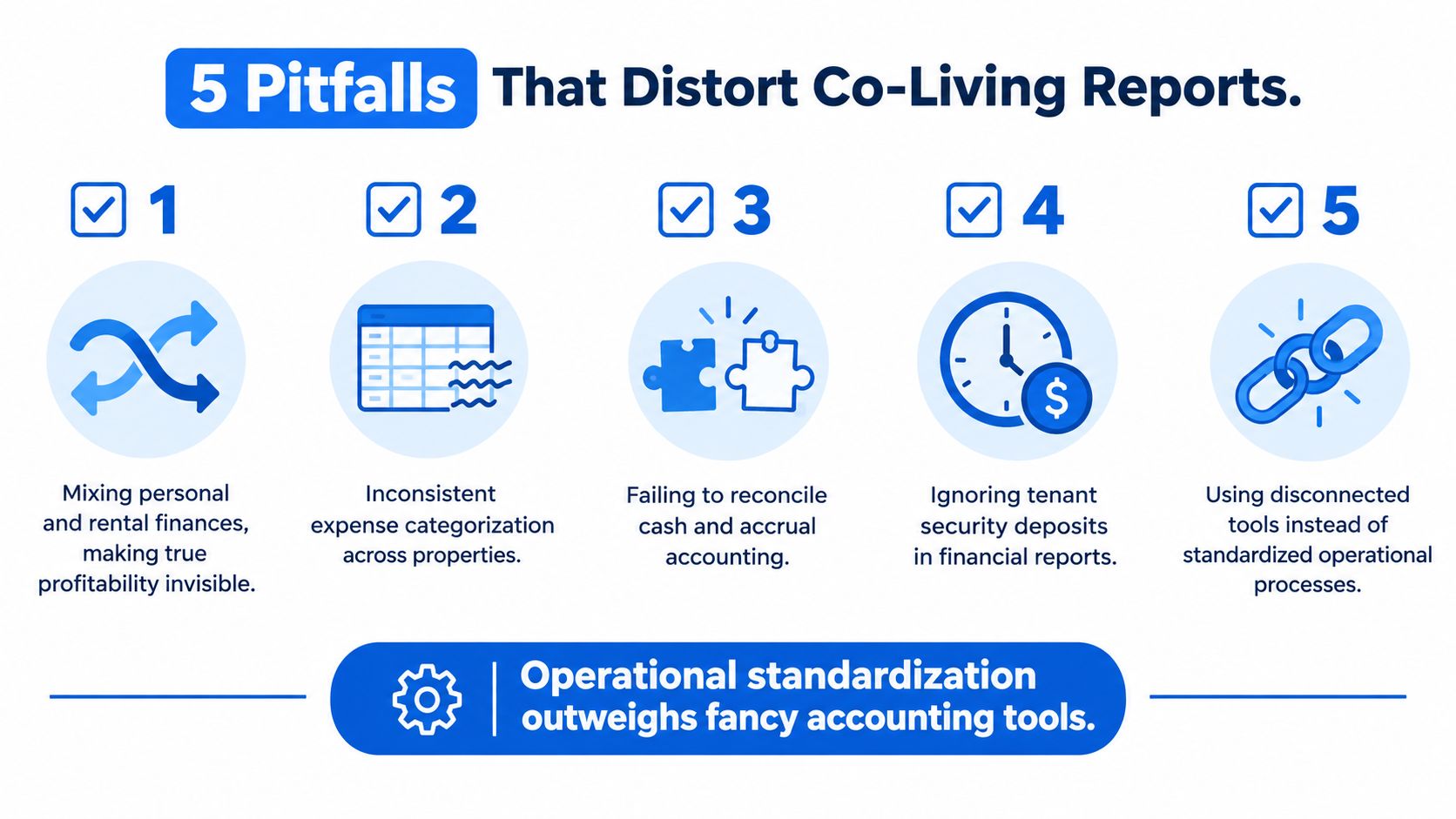
The fix for each mistake is procedural. Separate accounts, standardize categories, require property and room IDs, reconcile accruals, and review exceptions at close. Those controls usually create more value than adding another disconnected tool.
The most expensive reporting system is the one that produces confident numbers you can't defend.
Structured reporting adds another control layer. SEC commentary has highlighted material errors in XBRL-tagged filings, including fields such as revenue, net income, assets, scaling, and period-end dates, and recommends validation warnings and standard tags to reduce mistakes in machine-readable data. The same principle applies at property level: validate the structure before trusting the summary.
Reporting Cadence, Formats, and Tax Basics
A reporting routine should match the speed of the decision. Daily reports help you collect money. Weekly reports help you manage rooms. Monthly statements help you understand performance. Quarterly and annual reviews support tax, financing, and ownership decisions.
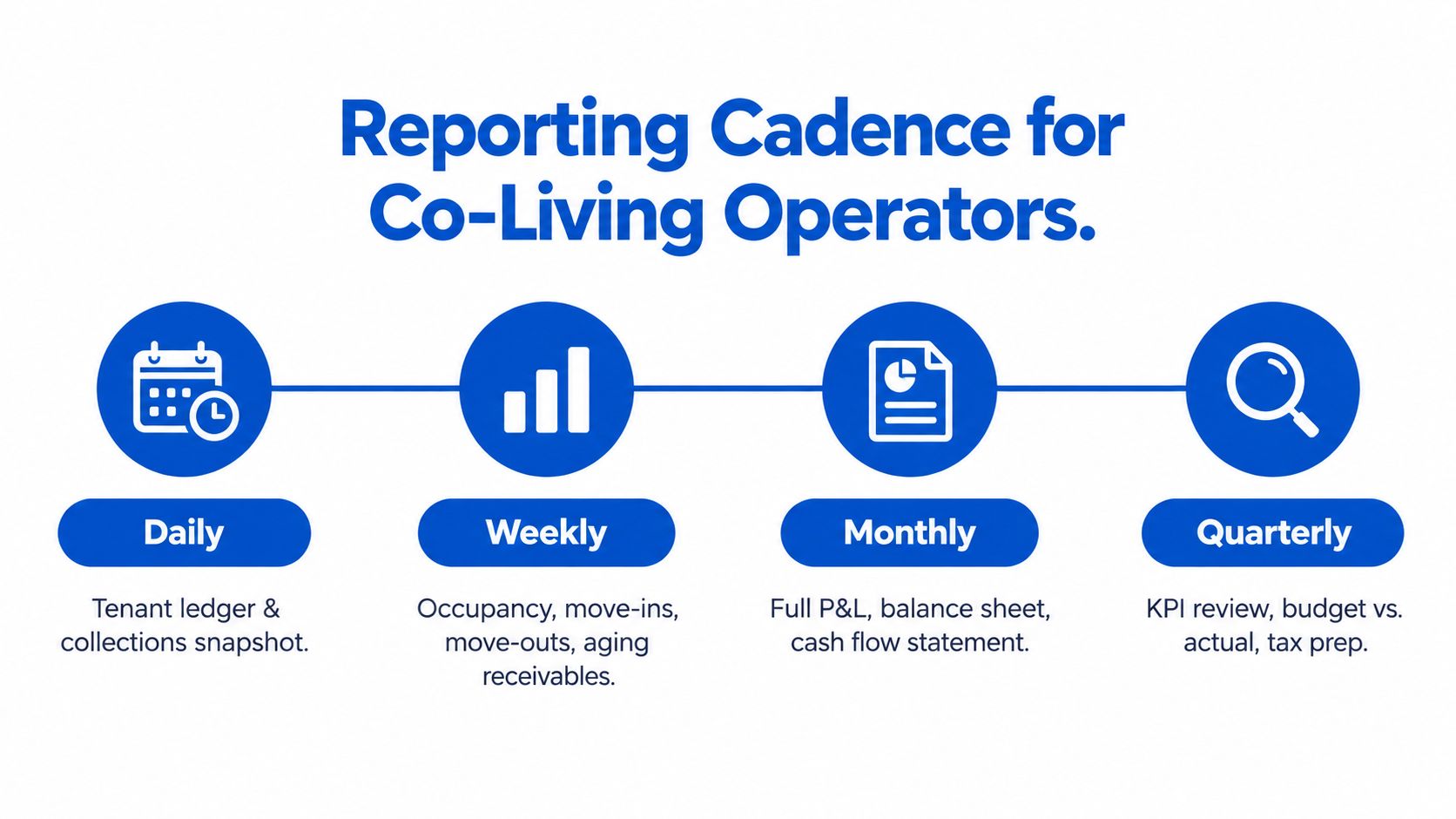
A workable cadence looks like this:
- Daily: Review the tenant ledger, payment exceptions, new balances, and collections snapshot.
- Weekly: Check occupancy, move-ins, move-outs, open maintenance costs, and aging receivables.
- Monthly: Deliver the P&L, balance sheet, cash flow statement, KPI dashboard, bank reconciliation, and a one-page owner summary.
- Quarterly: Review tax estimates, budget versus actual results, reserve movements, and contractor records.
- Annually: Complete the entity-level tax return, fixed-asset review, lender or investor reporting pack, and chart-of-accounts cleanup.
The IRS threshold for reviewing Form 1099-NEC contractor reporting is $600 or more paid to a contractor during the year, subject to the applicable rules and exceptions. Confirm the current filing requirements with a tax professional because payment type, entity classification, and recipient status can change the result.
Compliance checkpoint: Unearned rent is a liability until the operator earns it. Deposits, bundled utility charges, local occupancy taxes, and excise taxes may also need separate treatment depending on jurisdiction.
Payroll deserves its own review if the owner employs staff or treats workers as employees. Bookkeeping done under the IRS definition of a trade or business doesn't automatically answer when payroll registration, withholding, or payroll software is required. Ask a qualified tax adviser before classifying recurring labor as contractor work.
Use a budget versus actual reporting process to explain variances rather than merely displaying them. A monthly report should state what changed, why it changed, whether it will repeat, and what action the operator will take.
Financial reporting is also becoming more structured and machine-readable. The SEC's Financial Statement Data Sets contain numeric face-financial information from all financial statements from January 2009 through June 2026, illustrating how users increasingly analyze standardized reporting at scale, as described by the U.S. Census Bureau's Quarterly Financial Report background. For a small operator, that points to a simple lesson: consistent fields and clean source data matter long before a report reaches a discerning reader.
Building or Automating Your Reporting Workflow
Automation works after the operating model is clear. Start by designing a chart of accounts that reflects how co-living properties earn and spend money, rather than copying a generic small-business template.
Build the accounting spine
Create separate accounts for rental income, member fees, utility pass-throughs, cleaning turnover, repairs, supplies, management fees, capex reserves, loan service, deposits, and owner transactions. Add required tracking fields for property, room, resident, vendor, and reporting period.
Then map the source systems:
- Payment processor exports should identify resident, room, property, amount, and date.
- Utility bills should identify the service period and allocation method.
- Vendor invoices should include property and expense category.
- Bank feeds should match, not replace, the underlying ledger.
- Reserve accounts should show transfers separately from operating expenses.
A spreadsheet stack can work for a small, stable operation when one person owns the process, transaction volume remains manageable, and every reconciliation has a documented reviewer. It becomes fragile when multiple people edit files, properties use different categories, payment sources don't match the ledger, or owners need timely portfolio comparisons.
Choose the right automation layer
Build with accounting software such as QuickBooks when you need familiar bookkeeping controls and can maintain custom templates, imports, and property tracking. Buy an integrated property-management workflow when the value comes from connecting resident payments, utility allocation, room operations, and property-level reporting in one system.
The dashboard should have three layers:
- Weekly KPI tiles: Occupancy, RevPAR, ARPU, collection rate, and open receivables.
- Monthly P&L view: Revenue, controllable expenses, NOI, reserve movements, and variance notes.
- Quarterly cash forecast: Expected collections, vendor obligations, debt payments, reserves, and planned capital work.
Choose the system that preserves transaction detail while reducing duplicate entry. Automation that hides the source data makes review harder. Automation that keeps an audit trail and flags exceptions gives the operator more control.
For repeatable layouts and schedules, start with financial reporting templates for property operations. Templates should standardize the work, not encourage you to paste new numbers into an old unexplained formula.
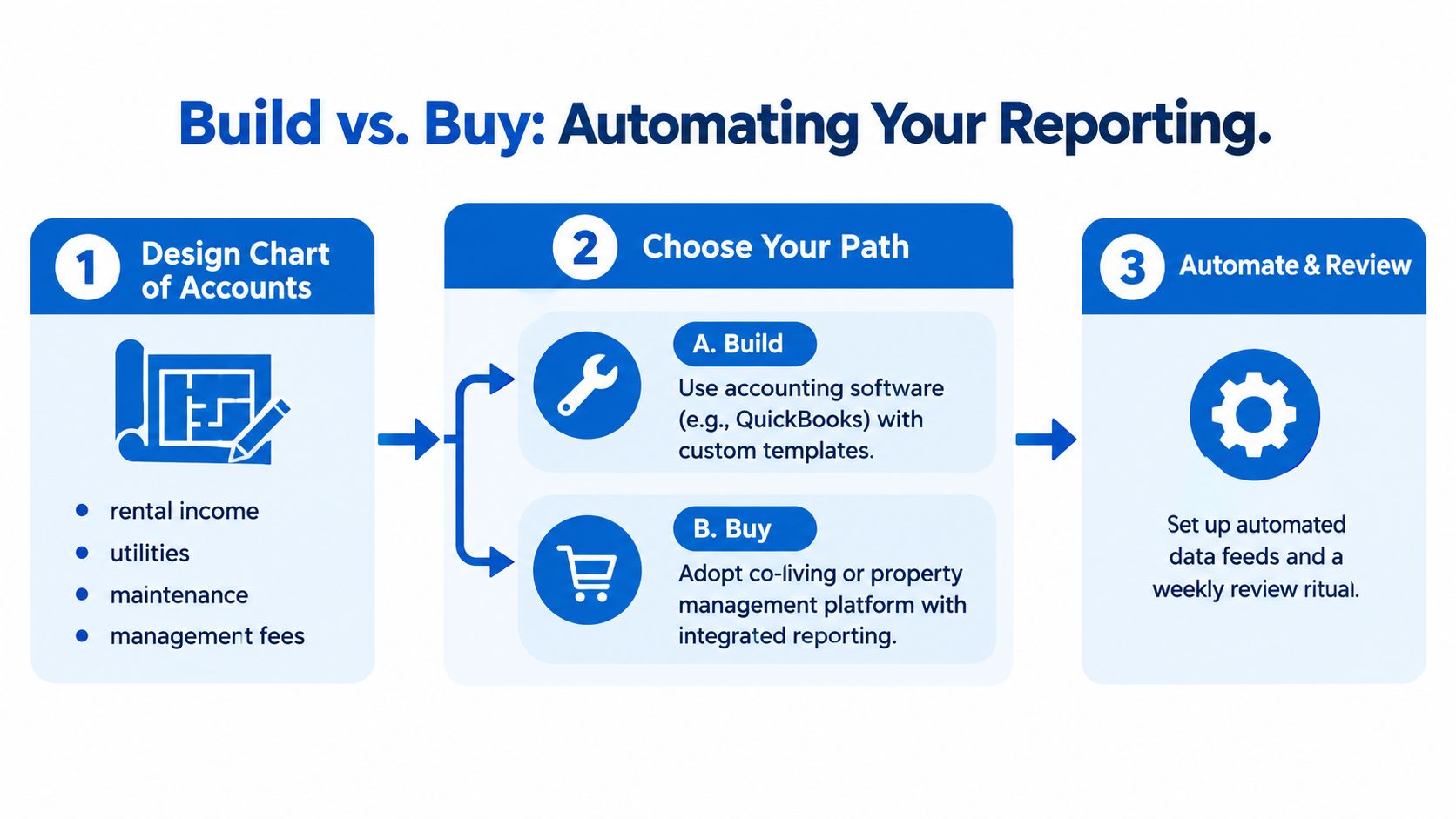
The practical test is simple. If your close depends on remembering which spreadsheet contains the latest utility allocation, you're ready to improve the workflow. If your source data is inconsistent, fix the naming and categorization first, then automate the repeatable parts.
Your First 30 Days of Cleaner Reporting
Use the first month to establish control, not to build a perfect finance department.
Week one focuses on data hygiene. Standardize property and room IDs, reconcile the resident roster, assign every payment to a resident, and clean the last 90 days of bank transactions. End the week with a list of unmatched entries and missing invoices.
Week two builds the ledger. Create the chart of accounts, define deposit and reserve treatment, and choose one source of truth. End the week by testing a sample transaction from payment through statement output.
Week three runs the close. Complete the first real month-end process with a P&L, cash flow statement, balance sheet, and KPI dashboard delivered by the fifth business day. Record every exception instead of correcting it invisibly.
Week four reviews the system. Fix reconciliation gaps, document allocation rules, confirm owner-transfer treatment, and lock the daily, weekly, monthly, and quarterly cadence. End with a short owner summary that states what changed and what action follows.
The habit sticks when each close leaves behind cleaner source data than the previous one. Start Monday with the roster and bank feed, not a new dashboard.
PadPulse is being built to connect rent collection, room operations, property-level NOI tracking, portfolio analytics, and owner reporting for co-living operators. Join the early-access interest list through PadPulse to follow the Winter 2026 launch and explore limited beta access without billing before launch.