Unified Communication System: The Co-Living Operator's Guide
June 17, 2026
By 9:15 a.m., you may already have five separate conversations going about one property. A prospect asks about room availability on a listing site. A current resident texts about a clogged shower drain. Someone emails a proof-of-income document. A smart lock app sends an access alert. Your cleaner messages that one room still isn't move-in ready.
None of that work is unusual in co-living. The problem is that it lives in too many places.
For rent-by-the-room operators, communication isn't a side task. It's the operating system. If messages get missed, tours don't get booked, repairs get delayed, residents get frustrated, and vacant rooms sit longer than they should. A unified communication system fixes that by pulling calls, texts, messages, updates, and alerts into one working environment so you can run the house without constantly switching apps.
Your Day Is Chaos Is There a Better Way
A typical co-living day rarely breaks in a clean line.
You start by answering a lead who wants to move in this weekend. Before you finish, a resident sends a photo of a leak under the kitchen sink. Then another resident can't get the front door code to work. While you're checking that, your handyman calls to ask which unit needs the repair first. Ten minutes later, you're back in your inbox trying to find the application that came in overnight.
The stress isn't just the message volume. It's the fragmentation.
When your leasing messages are in one app, maintenance in another, lock access in another, and team coordination in plain text, you spend real time stitching together basic context. You have to remember who said what, whether anyone followed up, and which issue is urgent versus just noisy.
Most communication problems in co-living aren't caused by a lack of effort. They're caused by scattered tools.
That matters more in shared housing than in a standard apartment portfolio. In co-living, there are more people per address, more turnover, more house rules to explain, and more daily coordination between residents, cleaners, vendors, and on-call staff. Small delays multiply fast.
What the mess looks like in practice
A few patterns show up again and again:
- Lead follow-up falls behind: A prospect asks one question, then disappears because nobody replied quickly or consistently.
- Maintenance gets handled informally: A resident sends a text, but the repair never becomes a tracked task.
- Move-ins feel improvised: Access instructions, first-day details, and house expectations go out manually, often at the last minute.
- Team visibility breaks down: Your VA, cleaner, and field tech each know part of the story, but nobody sees the full thread.
A unified communication system gives you one place to manage those flows. Not as abstract tech. As a working command center for your portfolio.
What better looks like
Instead of checking six tools, you open one dashboard. You can see the new prospect, the open maintenance issue, the move-in task list, and whether your staff member is available right now. Calls, messages, alerts, and updates stop competing for attention because they live in a shared structure.
That doesn't eliminate the work. It removes the waste around the work.
What Is a Unified Communication System
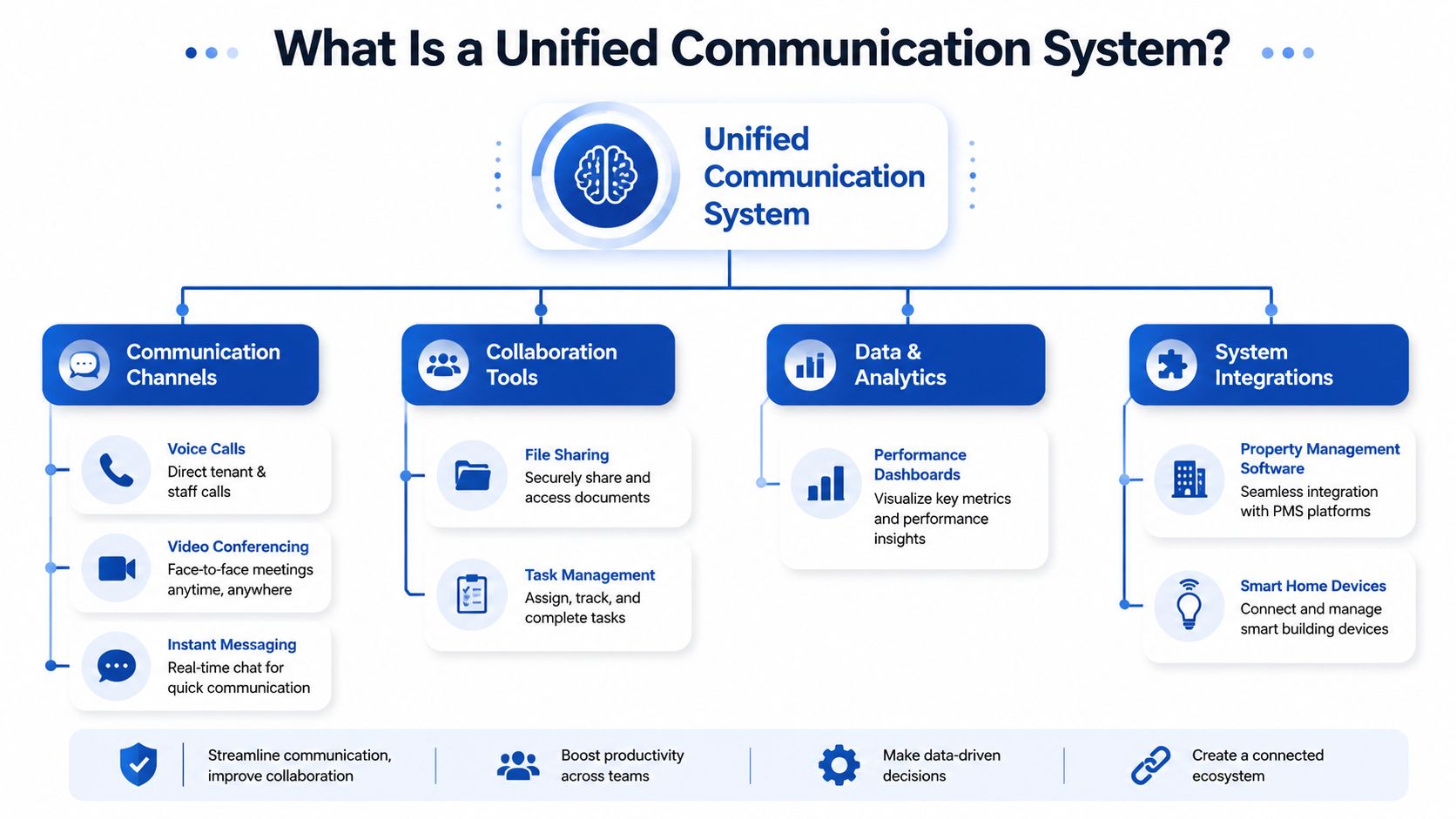
A unified communication system is best understood as the digital nervous system for your properties. Every important signal comes into one hub, and the right person gets the right information without you manually relaying it.
Historically, the idea grew out of the shift away from traditional PBX phone systems toward integrated IP-based communications. Cisco describes that transition as replacing separate telephony systems with a single enterprise communications architecture that combines call processing, IP phones, voice messaging, video devices, gateways, switches, and application services over one network, which became part of the foundation for today's cloud communications platforms in Cisco's unified communications overview.
The simple version
If you've ever thought, "Why can't my calls, tenant messages, team chat, and property alerts all live together?" that's the idea.
Modern unified systems usually bring together:
- Voice calling: Tenant calls, vendor calls, leasing calls, and voicemail in the same environment.
- Messaging: Text-style conversations with residents, prospects, and staff.
- Video: Virtual tours, resident interviews, or staff check-ins without separate meeting software.
- Presence: A live signal that shows whether a team member is available, busy, or offline.
- Shared files and notes: Lease instructions, move-in checklists, repair photos, and internal comments attached to the conversation.
- Integrations: Connections to the other tools you already use.
If you're already using resident messaging tools, a system like this builds on that idea. For example, centralized resident and prospect messaging workflows show how communication becomes more manageable when conversations stop living in disconnected inboxes.
What each part means in property operations
A lot of UC language sounds corporate until you translate it into landlord work.
| Component | What it means for co-living |
|---|---|
| Calls | A prospect can call from a listing, and you can route that call without using your personal number |
| Chat | Residents can ask questions about house rules, rent reminders, or access issues in one thread |
| Video | You can run remote room tours or applicant screening conversations |
| Presence | You can see whether your maintenance lead or leasing assistant is actually reachable |
| Unified history | Anyone on your team can pick up the conversation without asking the resident to repeat everything |
Practical rule: If your communication tool can't show history, route work, and connect to other systems, it's probably just another inbox.
Why the term matters now
Today's version isn't just business phones moved online. It's a broader operating layer that combines voice, messaging, meetings, collaboration, and connected apps into a consistent experience across devices. That's why unified communication systems matter so much in co-living. The work doesn't happen at a desk. It happens across houses, phones, contractors, prospects, and residents all day long.
Why UC Matters for Co-Living and PadSplit Hosts
At 8:15 a.m., one resident is texting about a broken dryer, a prospect is calling about tonight's room tour, your cleaner wants the new access code, and a house message about trash pickup still hasn't gone out. In rent-by-the-room housing, communication is not a side task. It is daily operations.
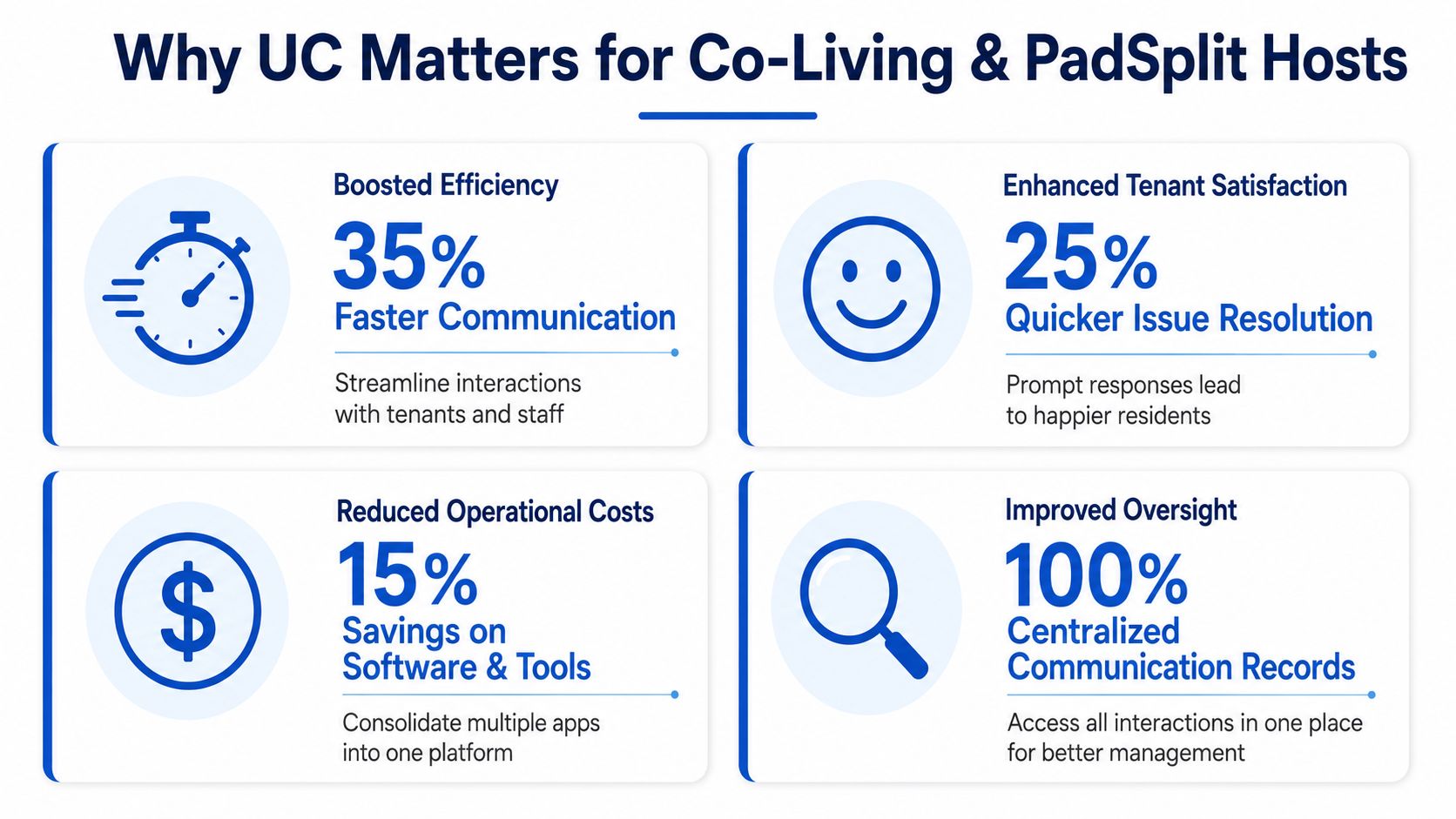
For co-living and PadSplit hosts, speed and coordination affect revenue fast. A missed prospect follow-up can leave a room empty for another week. A slow reply to a maintenance issue can turn into a bad review, a resident move-out, or extra staff time spent calming people down later.
Analysts at Coherent Market Insights project that the global unified communications market will grow from USD 128.63 billion in 2026 to USD 348.45 billion by 2033, a 15.3% CAGR, according to their unified communications market projection. The point for operators is simple. Communication software is becoming core infrastructure, not office furniture for large companies.
Where hosts notice the payoff first
The first wins usually show up in routine work.
- Leasing gets tighter: Prospect calls, texts, follow-ups, and tour scheduling stay connected, so leads do not disappear between your phone, your VA, and your inbox.
- Resident issues get resolved with less backtracking: A repair request can be routed, assigned, and updated in one place instead of getting buried in personal texts.
- Team handoffs improve: Your maintenance lead, cleaner, leasing assistant, and house manager can all see the same thread and the same status.
- Your business stops living on your personal number: That reduces missed context, after-hours spillover, and the usual confusion when someone else needs to step in.
Tangible benefits for NOI
In co-living, small communication failures show up in the P&L.
If a furnished room sits vacant because nobody returned a call while the lead was still warm, that is lost rent. If house rules, parking instructions, or move-in details have to be typed out again and again, that is labor cost. If residents do not know where to report problems, issues linger longer and trust drops.
A well-set system helps you protect NOI in practical ways:
- Fewer dropped leads: New inquiries land in a shared queue with ownership and follow-up rules.
- Better occupancy discipline: Every prospect can be pushed toward the next step instead of sitting in someone's text history.
- Lower admin time: Common replies, reminders, and updates can be standardized.
- Stronger retention: Residents get faster answers and clearer expectations, especially in shared homes where one unresolved issue affects multiple people.
I see this in the field often. Operators assume they have a staffing problem, but the underlying problem is that nobody can see the full conversation or act on it quickly.
Co-living has communication problems standard multifamily does not
A conventional apartment building may deal with one primary leaseholder per unit. Co-living is messier. You have separate bedrooms, different move-in dates, shared kitchens and bathrooms, more frequent questions, and a higher volume of operational messages.
That changes what a useful UC setup needs to do.
- Send one-to-many house updates: inspection notices, cleaner schedules, internet outages, or quiet-hours reminders
- Support mobile field work: staff and vendors need to reply, update status, and receive assignments from a phone
- Keep context across channels: a resident may text about an access issue, then call, then send a photo
- Route urgency correctly: lockouts, water leaks, and payment problems should not sit in the same pile as routine questions
This is also why generic office-phone thinking falls short for shared housing. Co-living operators need communication tools that connect conversations to units, rooms, tasks, and resident records. Property communication integrations for co-living teams matter because they tie the message to the actual work, not just the device that received it.
Integrating Your Comms with Your Properties
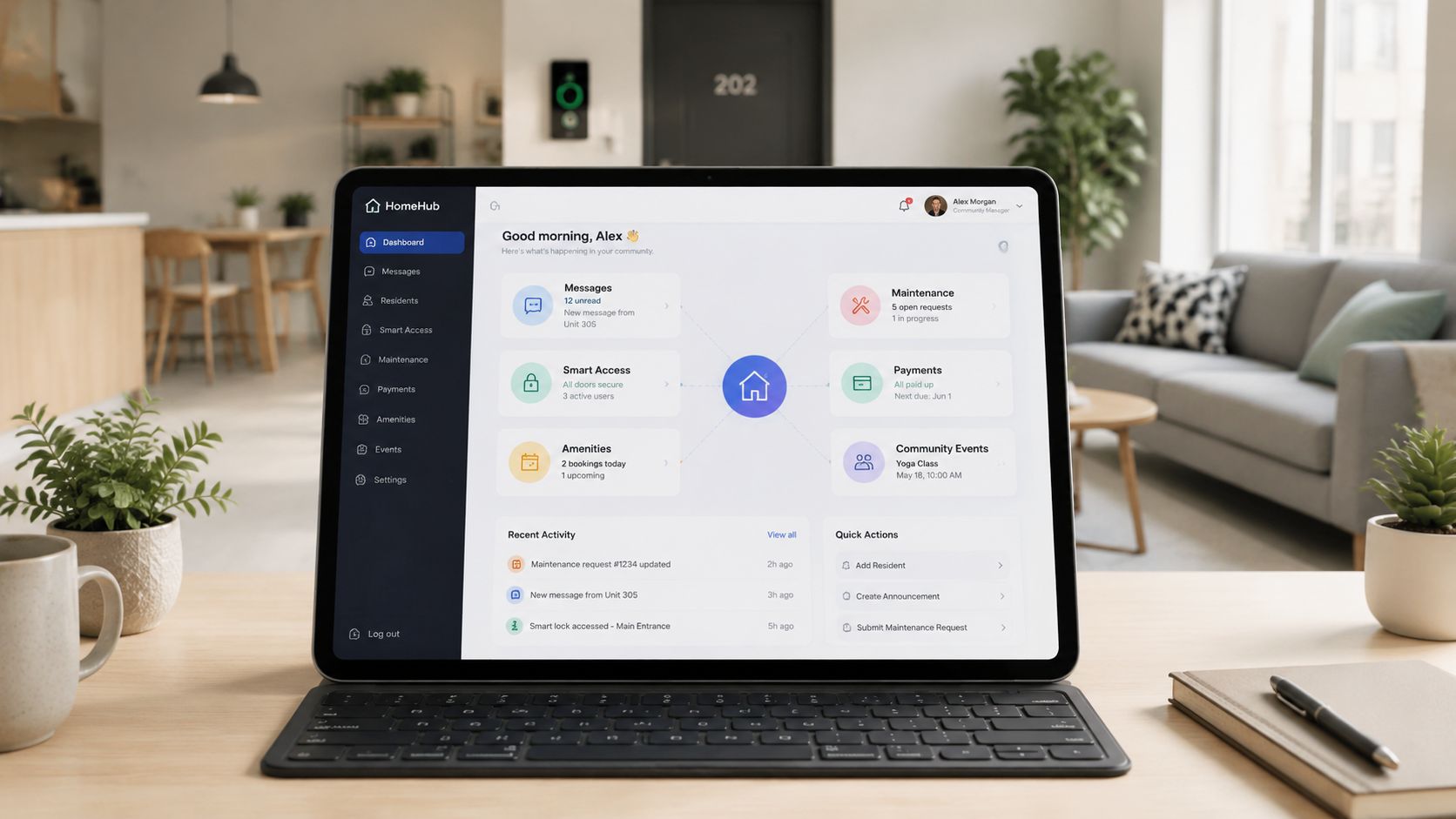
A unified communication system becomes powerful when it stops being a standalone tool and starts acting like connective tissue between the systems you already rely on.
That matters because strong UC architecture is layered. Endpoints, applications, call control, and infrastructure stay separate enough that each part can connect through defined protocols rather than requiring a full rebuild every time you add a tool. Paessler's explanation of layered unified communications architecture is useful here because it shows why integrations with things like CRMs or smart locks are practical in the first place.
What you should connect first
For co-living, the highest-value integrations are usually the boring ones. They remove repeated manual steps.
A good starting checklist looks like this:
- Property management software: Resident records, room status, lease timing, and payment context should be visible where communication happens.
- CRM or lead pipeline: Prospect messages should connect to the stage of the leasing journey.
- Smart locks: Access events and code changes should align with move-ins, move-outs, and support requests.
- Maintenance workflow: Messages about repairs should create trackable work, not just generate chatter.
- Team coordination tools: Cleaners, VAs, leasing staff, and technicians need a shared channel with role-based visibility.
You can think of this less as software consolidation and more as workflow compression.
A simple integration example
A prospect books a room. The system updates the record. The move-in team gets notified. The resident receives arrival instructions. Smart access gets prepared. If something fails, the right person sees it immediately.
Without integration, each of those steps lives in a different app and depends on someone remembering the next action.
With integration, the communication layer keeps the process moving.
For operators exploring connected systems, examples like property management integrations and workflow connections are useful because they show how communications, devices, and operations can feed one another rather than sit in separate silos.
Where people get this wrong
The common mistake is adding tools without deciding what event should trigger what action.
Before you connect anything, identify:
| Trigger | Action | Owner |
|---|---|---|
| New inquiry arrives | Send initial reply and assign follow-up | Leasing |
| Resident reports issue | Create task and alert on-call staff | Maintenance |
| Lease is signed | Send move-in instructions and access prep | Operations |
| Resident moves out | Remove access and notify turnover team | Turn team |
Integration works best when you map the workflow first and shop for software second.
That's especially true in co-living, where one resident action often affects several people at once.
Choosing and Implementing Your First UC System
The biggest mistake I see is choosing based on feature volume. For smaller operators, that usually leads to complexity nobody uses.
A better approach is to choose for operational fit. That's the core risk area. A system can look impressive in a demo and still fail in practice if it doesn't match your workflows, your staff habits, or the tools already embedded in your business. That point comes through clearly in this implementation-readiness discussion focused on operational fit.
What to look for first
If you're managing shared housing, these criteria matter more than enterprise flash:
- Mobile usability: Your staff won't always be at a laptop. If the phone experience is clunky, adoption will be weak.
- Clear integrations: The system should connect to your existing stack without custom work you can't support.
- Simple routing: Leads, maintenance issues, and resident updates should be easy to assign and escalate.
- Conversation history: Anyone on the team should be able to open a thread and know what's happening.
- Flexible permissions: Your VA shouldn't see everything your maintenance lead sees, and vice versa.
If you need a broader view of software categories used in room-by-room operations, this overview of co-living software tools and workflows is a good companion read.
A practical rollout plan
Don't launch across your whole portfolio on day one. Start smaller than you think.
Audit your current chaos
List every place communication happens now. Include your phone, email, text, lock apps, listing platforms, WhatsApp, Slack, and anything staff use informally.Pick your top three workflows
Don't try to unify everything first. Start with the areas where missed communication hurts most. Usually that's leasing follow-up, maintenance triage, or move-in coordination.Pilot one property
One house is enough to reveal friction. You'll quickly learn whether residents use it, whether staff ignore it, and where manual steps still sneak in.Write short playbooks
Keep training simple. One page for leads. One page for maintenance. One page for move-ins. Staff need clarity, not a software manual.
What works and what doesn't
Here's the short version.
| Works | Doesn't work |
|---|---|
| Starting with one painful workflow | Trying to replace every tool at once |
| Training around real scenarios | Training around menus and settings |
| Assigning one internal owner | Assuming everyone will self-organize |
| Testing resident-facing messages | Rolling out templates nobody reviewed |
A smaller system that your team actually uses will outperform a bigger one that everyone avoids.
The hidden implementation issue
Many operators focus on software selection and ignore readiness. But UC success often depends on basic groundwork like device compatibility, network reliability, team habits, and clear ownership. If those are weak, the platform won't save you.
The right question isn't "Which platform has the most features?" It's "Which system fits the way this portfolio runs?"
Sample Workflows for Modern Co-Living Operators
It is 8:15 a.m. A prospect wants to tour the last open room. A current resident is texting about a leaking sink. Someone new is outside asking for the door code. Then the internet drops in one house and six residents message at once.
That is a normal morning in rent-by-the-room operations.
The value of a unified communication system shows up in moments like these. Co-living operators are not managing one lease, one household, and one decision-maker. They are coordinating leads, residents, cleaners, maintenance techs, and house-level updates across shared homes where small delays turn into vacancy loss, extra labor, and resident complaints.
The inquiry to tour workflow
A lead sends a message from a room listing during a lunch break.
Instead of landing in one staff member's personal inbox, the inquiry enters a shared leasing thread tied to the right property and room. The system sends an immediate reply with the next step, captures the conversation, and gives the leasing coordinator context before anyone picks up the phone.
If that same prospect calls later, staff can see the earlier messages in the same record. The team does not waste time asking which house they meant or whether the room is still available. In co-living, that matters because speed wins deals. A room can sit empty for days when leads cool off between handoffs.
The maintenance workflow
A resident messages that the upstairs bathroom sink is leaking, with a photo and a note that two other housemates use that sink before work.
That message should create action, not sit in a text thread. It gets routed to maintenance, tagged to the correct property, and tracked from first report to completion. The technician sees the photo, the resident gets confirmation, and the operator can tell whether the issue is waiting on approval, parts, or a site visit.
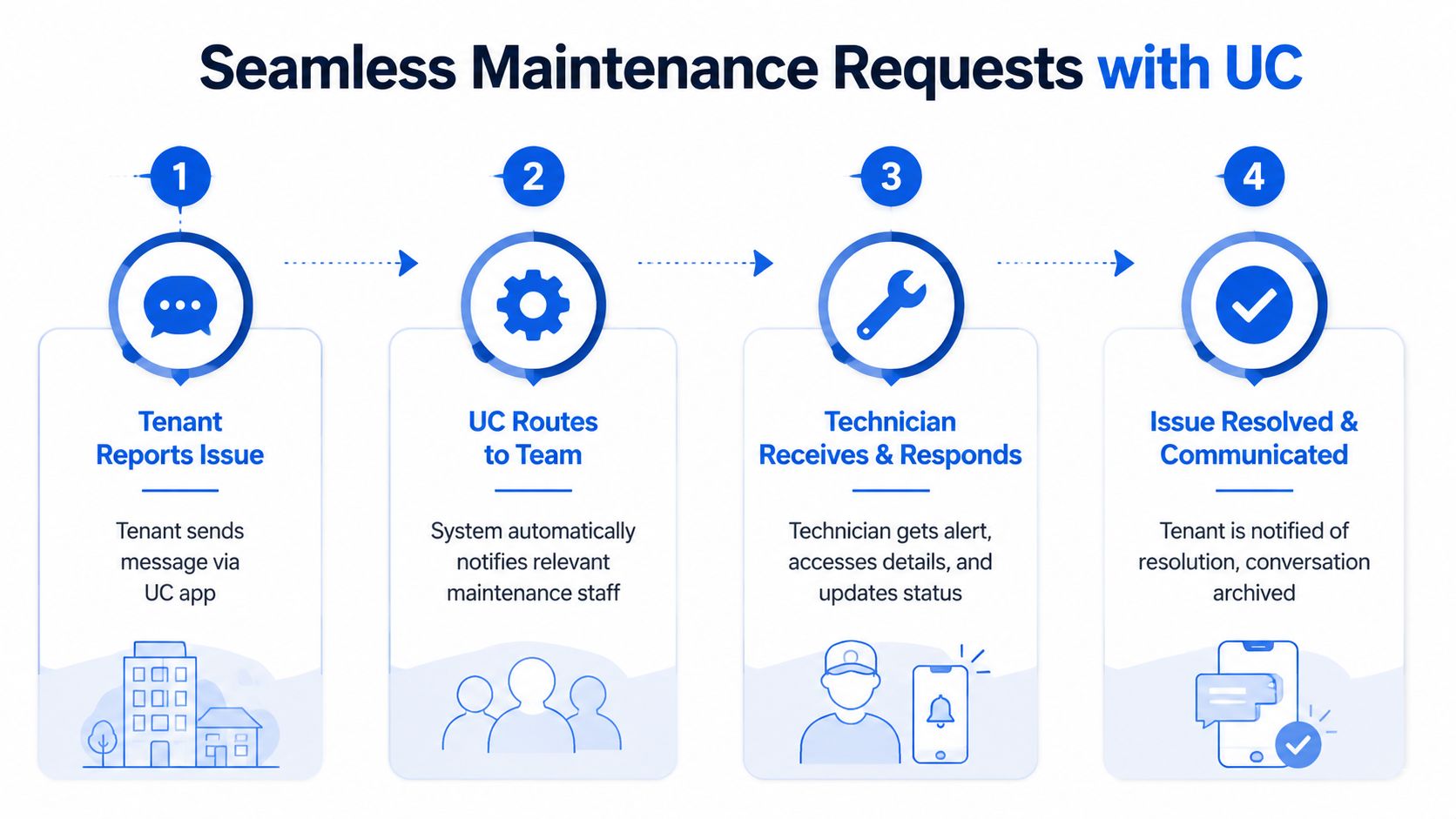
This is especially useful in shared housing because one repair often affects several residents at once. Clear status updates reduce repeat messages and help prevent the familiar problem where three people report the same issue in three different apps. The National Apartment Association has written about how centralized maintenance communication supports faster coordination and a better resident experience in multifamily settings, and the same logic applies even more strongly in co-living, where communication volume is higher and households are denser.
The move-in day workflow
Move-in problems usually come from scattered information, not from the move itself.
With a unified setup, the new resident gets one message thread for arrival time, ID check, house rules, utility details, Wi-Fi, and access instructions. If they cannot get in, staff can see what was sent, when it was sent, and who needs to step in. Nobody has to search email, text, and WhatsApp to piece together what happened.
That saves time, but it also protects the first impression. In rent-by-the-room housing, move-in day sets the tone for retention and referrals.
The house-wide notice workflow
Shared homes create one communication problem that traditional single-family rentals deal with less often. One event can affect everyone in the house, but each resident may have a different follow-up question.
A water shutoff, pest treatment, driveway repair, internet outage, or house inspection should go out from one central thread tied to that property. Residents receive the same core notice, replies stay organized, and staff can split off one-off questions without losing the original announcement.
That keeps house-wide updates from turning into a reply storm across text messages, email inboxes, and staff phones.
Good workflows reduce missed handoffs, shorten response time, and make ownership of the next step obvious.
FAQs and Your Next Steps
Is a unified communication system too much for a small portfolio
Not if you focus on the workflows causing the most friction now. Even a smaller operator benefits from centralizing leasing, maintenance, and move-in communication. You don't need a huge deployment. You need a cleaner operating rhythm.
Do I need technical skills to run one
Not deep technical skills. You do need process discipline. Most implementation problems come from unclear workflows, poor setup choices, and weak training, not from the concept itself. If you can document how leads, residents, and staff currently communicate, you can make good decisions.
Will residents actually use it
They will if it makes life simpler. Residents don't care about the category name. They care that they can report an issue, get a response, and find important info without chasing you across apps. Adoption improves when the system becomes the easiest path.
What's the best first step
Audit your current communication stack and identify where delays cost you money or create resident frustration. Then test one workflow at one property. That's enough to tell you whether a unified communication system will remove real operational drag.
A lot of co-living operators wait until communication becomes unmanageable across the portfolio. That's usually later than ideal. The better time to organize the system is while your processes are still small enough to fix cleanly.
If you're exploring better ways to centralize pricing, communications, access control, and portfolio visibility for room-by-room rentals, join the early adopter interest list at PadPulse. You'll get updates on the platform's development, limited beta access opportunities, and a chance to learn alongside other co-living operators without any billing commitment before launch.